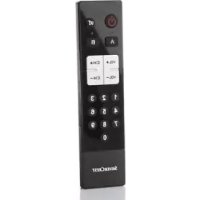
SFS 18 A1 - Remote control SILVERCREST - Free user manual and instructions
Find the device manual for free SFS 18 A1 SILVERCREST in PDF.



| Product type | Universal remote control for seniors |
| Brand | SilverCrest |
| Model | SFS 18 A1 |
| Dimensions (h x w x d) | 90 x 47 x 20 mm |
| Weight (without batteries) | 75 g |
| Power supply | 2 Micro AAA batteries, LRO3, 1.5 V |
| Number of programmable devices | 2 (A and B) |
| Programming methods | Manufacturer code, automatic search, manual search, learning |
| Main keys | Power/Standby, Mute, Volume +/-, Channel +/-, 0-9, A/B Selection |
| Special functions | All On/All Off, code extraction |
| Operating temperature | +5°C to +35°C |
| Operating humidity | 85% RH max |
| Storage temperature | 0°C to +50°C |
| Maintenance | Clean with a clean, dry cloth; do not open the casing |
| Safety | Do not expose to water, heat sources, use only recommended batteries |
| Warranty | 3 years |
| Technical service | Tel.: 01-71230283 (FR), email: service.FR@targa-online; IAN: 88818 |
| Package contents | Remote control, 2 AAA batteries, instruction manual |
Frequently Asked Questions - SFS 18 A1 SILVERCREST
User questions about SFS 18 A1 SILVERCREST
0 question about this device. Answer the ones you know or ask your own.
Ask a new question about this device
Download the instructions for your Remote control in PDF format for free! Find your manual SFS 18 A1 - SILVERCREST and take your electronic device back in hand. On this page are published all the documents necessary for the use of your device. SFS 18 A1 by SILVERCREST.
USER MANUAL SFS 18 A1 SILVERCREST
User manual and service information
TARGAGMBH
Coesterweg 45
59494 SOEST DETEGULAND GERMANY
DEUTSCHLAND/GERMANY
Last Information Update:
04/2013-Ident.No.:SF518A1042013-1
IAN 88818
IAN 88818
DE AT
CH NL
Deutsch 2
Français 17
Italiano 32
Nederlands 47
English 62
Safety instructions 66
Operating environment 67
Batteries 67
Children 67
Copyright 68
Prior to use 69
Inserting the batteries 69
First use 70
Programming via manufacturer's code 70
Programming via automatic scan 70
Programming via manual scan 71
Programming via the learning function 71
Reading the programmed code 72
All on/All off function. 72
Factory settings 72
Troubleshooting. 73
Device does not respond to commands from the remote control 73
Cleaning / maintenance 73
Environmental and disposal information 74
Conformity information 74
Warranty and servicing advice. 75
Information about trademarks/ trademark rights. 76
Introduction
Thank you for purchasing a SilverCrest product.
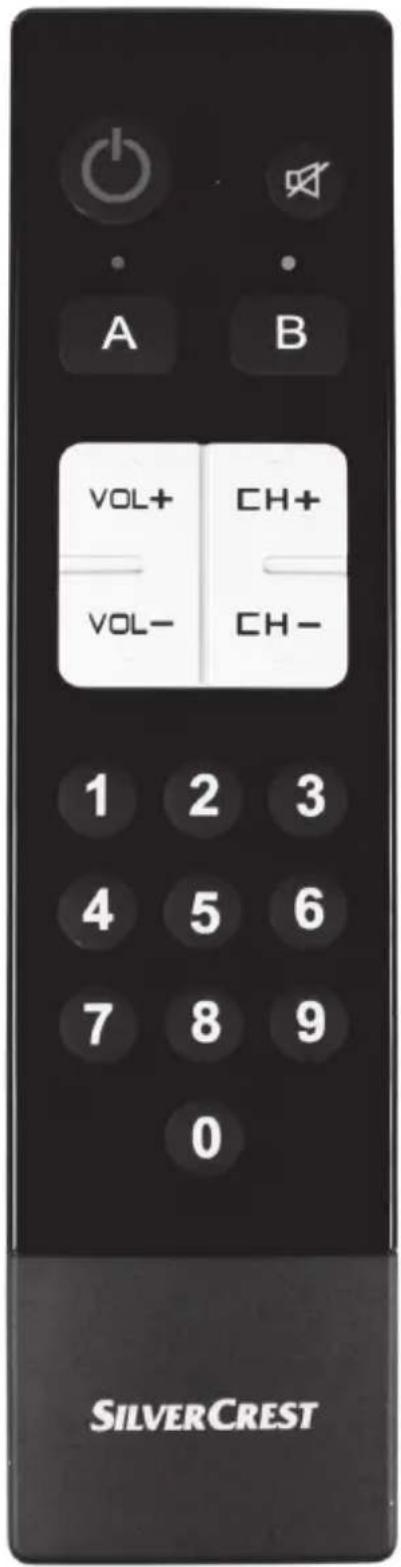
The SilverCrest remote control for seniors SFS 18 A1, hereinafter referred to as remote control, is easy to use and is impressive with its modern design. It is adaptive and thus suitable for almost all standard TVs and set-top boxes. With its large buttons, the remote control allows you to easily use the main functions of 2 different devices.
Intended use
This remote control is a consumer electronics device. It is only designed for private use and not for industrial or commercial purposes. Furthermore, the remote control may not be used outdoors or in tropical climates. This remote control meets all relevant standards in relation to CE conformity. The manufacturer does not accept any liability for any resulting damage or faults in the event of unauthorised modifications to the remote control. Only use accessories specified by the manufacturer. Please observe the regulations and laws in the country of use.
Supplied items
- SilverCrest SFS 18 A1 remote control for seniors
- 2 batteries of type AAA, LRO3, 1.5V
- These operating instructions (symbolic representation)
1
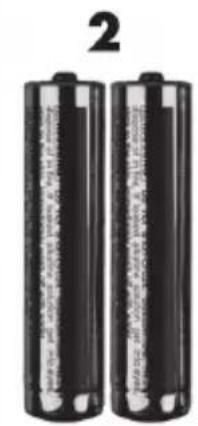
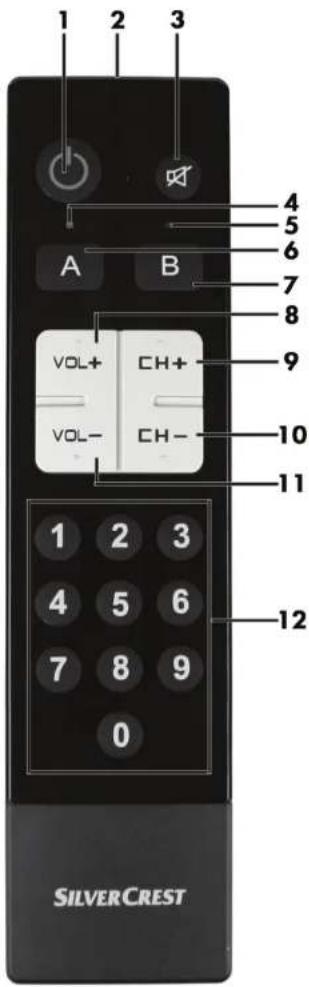
These operating instructions have a fold-out cover. The SilverCrest remote control for seniors SFS 18 A1 is illustrated with numbers on the inside cover. The numbers indicate the following:
1 On/Standby button
2 IR LED
3 Mute button
4 Confirmation LED for device A
5 Confirmation LED for device B
6 Device button A
7 Device button B
8 Increase volume (VOL+)
9 Channel up (CH + )
10 Channel down (CH-)
11 Lower volume (VOL-)
12 Number buttons 0-9
Technical data
| Model: SilverCrest SFS 18 A1 | |
| Programming functions: code | list, learning function |
| Number of simultaneously programmable devices | 2 |
| Power supply: 2 batteries | of type AAA, LR03, 1.5V |
| Dimensions (H x W x D): 190 x 47 x 20mm | |
| Weight: 75g (without batteries) | |
| Operating temperature: +5°C to +35°C | |
| Operating air humidity: 85% rel. air humidity | |
| Storage temperature: 0°C to +50°C | |
The technical data and design may be changed without notification.
Safety instructions
Before using the remote control for the first time, please read the following instructions carefully and take note of the safety warnings, even if you are familiar with the use of electronic devices. Store these operating instructions in a safe place for future reference. If you sell the remote control or pass it on, always include these instructions.

This symbol indicates important information for safe operation of the device and the safety of the user.

This symbol indicates other important information on the topic.

This remote control can be used by children aged 8 and older and by persons with reduced physical, sensory or mental abilities or lack of experience and knowledge if they are supervised or have been instructed on the safe use of the remote control and understand the resulting risks. Children must not play with the remote control. Cleaning and user maintenance must not be carried out by children without supervision. Always keep plastic packaging away from children as it poses a suffocation risk.

If smoke is produced, or there are any unusual sounds or smells, remove the battery immediately from the remote control. In such cases, the remote control should not be used until it has been inspected by authorised service personnel. Never inhale smoke from a potential device fire. If you have inhaled smoke, however, consult a doctor. The inhalation of smoke can be harmful.

The remote control and its accessories must not become damaged in order to prevent hazards.

Ensure that no fire sources (e.g. burning candles) are placed on or near the remote control. It poses a fire hazard!

The remote control must never be exposed to any direct heat sources (for example, heaters) or direct sunlight or artificial light. Also avoid
contact with dripping water and splashes and corrosive liquids. Do not use the remote control near water. In particular, the remote control should never be submerged in liquid (do not place any items filled with liquid, e.g. vases or drinks near the remote control). Also ensure that the remote control is never subjected to excessive shocks and vibrations. Furthermore, no foreign objects may penetrate the device. Otherwise, the remote control could be damaged.
Operating environment

The device is not designed for use in environments with a high temperature or humidity (e.g. bathrooms) or in extremely dusty conditions. Operating temperatures and operating air humidity: 5^ to 35^ , max. 85% rel. air humidity.
Batteries

Always ensure correct polarity of the batteries. Please note the markings on the batteries and in the battery compartment. Never try to recharge batteries and never throw them into an open fire. Never mix batteries (old and new, alkaline and carbon, etc.) at the same time. Rechargeable and disposable batteries may not be used together. Remove the batteries if you will not be using the remote control for an extended period of time in order to avoid damage due to leakage. In the event of improper use, there is a risk of explosion and leakage.
Children

Electrical devices do not belong in children's hands! Never allow children to use electrical devices unsupervised. Children may not recognise potential risks. Small parts can be fatal if swallowed. If a battery is swallowed, seek medical help immediately. Always keep plastic packaging away from children as it poses a suffocation risk.
Copyright
All information contained in these instructions is subject to copyright and is provided for information purposes only. It is only permitted to copy or duplicate data and information with the express and written consent of the author. This also includes commercial use of the content and data. The text and illustrations are based on the state of the art at the time of printing. Subject to change without notice.
Prior to use
The remote control is powered by 2 batteries of type AAA, LRO3, 1.5V. These are supplied.
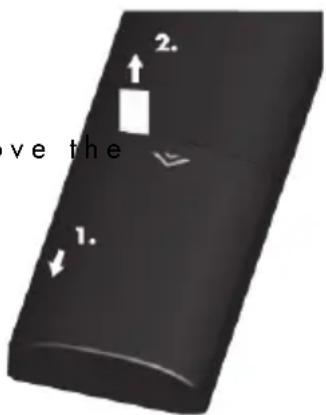
In its original state, the batteries are already inserted in the battery compartment. To use the device for the first time, you only have to replastic strip which is inserted between the battery and the battery contacts. Proceed as follows:
- Open the battery compartment
- Remove the plastic strip
Inserting the batteries
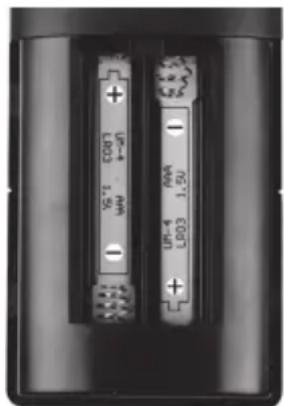
Open the battery compartment on the rear of the remote control by removing its cover in the direction of the arrow. Insert the batteries with the correct polarity as shown in the adjoining illustration. The correct polarity is illustrated in the battery compartment and on the batteries. Close the battery compartment. When the performance of the remote control decreases, replace the batteries with new batteries of the same type. The device does not indicate when the battery capacity is exhausted.
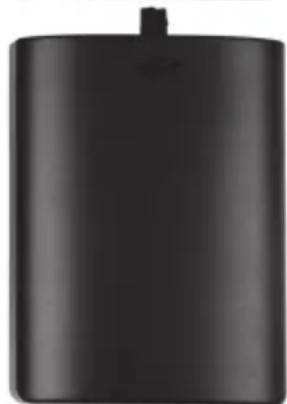

Programmed codes are stored permanently and are not lost when the batteries are changed.
First use
To be able to use the remote control, you must first perform one of the following steps.
Programming via manufacturer's code
- On the remote control, select the device (A or B) which you want to programme.
- In the code list attached to these operating instructions, find the appropriate 4-digit code for your device (e.g. TARGA 1268) from the relevant device group (e.g. TV).
- Press and hold the selected device button, for example, "A" (6), for approx. 3 seconds. Once the blue LED (4) lights up continuously, release the button. The remote control is now in programming mode for approx. 10 seconds. If no entries are made within 10 seconds, the programming mode is cancelled automatically.
- Now, enter the 4-digit device code using the number buttons (12). If the remote control accepts the code which was entered, the blue LED (4) goes out. The code is invalid if the LED (4) flashes twice. In this case, the remote control remains in programming mode. Enter a correct code within 10 seconds.
- After entering the code, check whether the buttons on your remote control work correctly. If the remote control does not work correctly, try another 4-digit device code of the same manufacturer (e.g. TARGA 1276). Repeat steps 3 to 5 until the remote control works correctly.
Programming via automatic scan
- The device that you want to use must be switched on.
- Point the remote control at the device. Press and hold the selected device button, for example, "A" (6), for approx. 5 seconds. Once the blue LED (4) flashes, the remote control is in automatic search mode.
- The "VOL+" signal is now continuously sent to your device (code scanning function). Once the volume of your device changes, press the device button "A" (6) immediately to stop the automatic search mode.
- If your device is a CD player, a tuner or a cassette player, rather than a TV, a POWER signal is continuously sent to the device. Once your device is
switched off, press the device button "A" (6) immediately to stop the automatic search mode. Then switch the device on again.
- Now, check whether the buttons of the remote control work correctly. If this is not the case, start scanning again to find a suitable code.
Programming via manual scan
- The device that you want to use must be switched on.
- Point the remote control at the device. Press and hold the selected device button, for example, "A" (6), for approx. 3 seconds. Once the blue LED (4) lights up continuously, the remote control is in manual search mode.
- Press the "VOL+" button (8) approximately every 1.5 seconds. Once the volume of your device changes or the device is switched off, check whether the other buttons on the remote control work correctly.
- If the other buttons do not work, continue the manual search by pressing the "VOL+" button (8) every 1.5 seconds.
- If the other buttons work, save the code by pressing the device button "A" (6).
- The manual search is cancelled automatically if no entry is made within 30 seconds.
Programming via the learning function
This function provides the option of transferring the code of each button individually from your original remote control.
- Press and hold the selected device button, for example, "A" (6), until the corresponding LED lights up continuously. Enter 9999 using the number buttons (12). The remote control is now in learning mode.
- Place the original remote control so that its IR LED and the IR LED (2) of the remote control for seniors are against each other with only a distance of approximately 3cm at most between them.
- First, press the button which you want to set on the remote control for seniors. The LED then flashes approximately 3 times per second. On the original remote control, press the relevant button whose code you want to copy. The successful transfer of the button
code is confirmed by the LED flashing rapidly 3 times. The LED then lights up continuously again.
- Repeat the procedure described in section 3 to set other buttons on your remote control for seniors.
- To save your entries and exit the learning mode, press the device button, for example, "A" (6), again. The learning mode is exited automatically if no entry is made for 14 seconds.
Reading the programmed code
It is possible to read the code which is currently programmed for device "A" or "B". To do so, you must press a device button and, with a short delay, one of the number buttons 1-4. Then hold down both buttons for approximately 2 or 3 seconds. Count how often the corresponding LED flashes in each case.
Example for device "A" (6)
Sample code: 1268
- For the thousands digit, press "A" (6) and "1" > LED (4) flashes once
- For the hundreds digit, press "A" (6) and "2"> LED (4) flashes twice
- For the tens digit, press "A" (6) and "3">LED (4) flashes 6 times
- For the single digit, press "A" (6) and "4"> LED (4) flashes 8 times
All on/All off function
If you have programmed your remote control to operate 2 devices (A and B), this function allows the simultaneous switching on or off of both devices with just the touch of a button. To do so, hold down the On/Standby button (1) for approximately 3 seconds. Both programmed devices are now switched on or off.
Factory settings
You can reset the remote control to its factory settings. To do so, press the buttons "A" and "O" simultaneously and hold them down for more than 3 seconds.
Please note that all codes that were programmed and set will be lost.
Troubleshooting
Device does not respond to commands from the remote control
-
Check whether the correct device (A or B) was selected on the remote control.
-
Check whether the remote control was programmed with the correct code appropriate to your device.
-
Your device may not be compatible for programming via the code list. In this case, programme the remote control via the learning function (see page 71).
-
The batteries are low or empty. Please replace the batteries with new batteries of the same type. Please pay particular attention to the chapter "Inserting the batteries" on page 69.
Cleaning / maintenance
It is necessary to repair the remote control if it has been damaged in any way, for example, if the housing is damaged, if liquid or objects have penetrated the remote control or if it has been exposed to rain or moisture. Repairs are also required if it is not working properly or has been dropped. If smoke is produced, or there are any unusual sounds or smells, remove the batteries immediately. In such cases, the remote control should not be used until it has been inspected by authorised service personnel. Only have the device repaired by qualified personnel. Never open the housing of the remote control. Only use a clean, dry cloth for cleaning the remote control and never use any corrosive liquids. Never try to open the housing of the remote control as this would void your warranty.
Environmental and disposal information
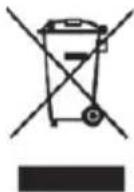
When this symbol appears on a product, this indicates that the product is subject to the European Directive 2002/96/EC. All electrical and electronic devices must be disposed of separately from household waste at designated disposal points.
The correct disposal of old devices in this manner will prevent environmental pollution and human health hazards. For further information about proper disposal, contact your local authorities, waste disposal office or the shop where you bought the device.
Remember to protect the environment. Used batteries should not be disposed of in domestic waste. They must be taken to a collection point for old batteries. Please note that only discharged batteries may be deposited in collection bins for portable batteries. Care must be taken to ensure that batteries that are not fully discharged do not short circuit.
Dispose of the packaging in an environmentally compatible manner. Cardboard can be put out for municipal paper collections or brought to public collection points for recycling. Films and plastic used for packaging the device are collected by your local disposal services and disposed of in an environmentally compatible manner.
Conformity information

This device meets the basic requirements and other relevant regulations of the EMC Directive 2004/108/EC as well as the RoHS Directive 2011/65/EU. The Declaration of Conformity can be found at the end of these operating instructions.
Warranty and servicing advice
Warranty of TARGA GmbH
This device is sold with three years warranty from the date of purchase. Please keep the original receipt in a safe place as proof of purchase. Before using your product for the first time, please read the enclosed documentation or online help. Should any problems arise which cannot be solved in this way, please call our hotline. Please have the article number and, if available, the serial number to hand for all enquiries. If it is not possible to solve the problem on the phone, our hotline support staff will initiate further servicing procedures depending on the fault. Within the warranty period the product will be repaired or replaced free of charge as we deem appropriate. No new warranty period commences if the product is repaired or replaced. Consumables such as batteries, rechargeable batteries and lamps are not covered by the warranty.
Your statutory rights towards the seller are not affected or restricted by this warranty.

Service
Phone: 0207-3650744
E-Mail: service.GB@targa-online.com
Phone: 01-2421583
E-Mail: service.IE@targa-online.com

Phone: 800-62175
E-Mail: service.MT@targa-online.com

Phone: 800-92496
E-Mail: service.CY@targa-online.com

Manufacturer
TARGA GmbH
Coesterweg 45
59494 SOEST
GERMANY
Information about trademarks/trademark rights
All brand and product names as well as trademarks listed in these instructions and in the device code list are the property of the respective manufacturer and are used solely for the product description and for unique identification.
Gerätecodes / Codes d'appareils / Codici degli apparecchi / Apparaatcodes / Device codes
| TV | ||
| A.R. SYSTEMS 0039 0059 0049 0056 005 | 7 | |
| ACCENT 0049 0051 005 | 7 | |
| ACCUPHASE 005 | 7 | |
| ACEC 0000 0006 0016 0018 0025 0026 | ||
| 0046 0071 0073 0076 0078 0094 | ||
| 0097 0099 0057 0056 0105 0110 | ||
| ACER | 1172 | |
| ACME | 0508 | |
| ACTION 0051 | ||
| ADA | 0512 | |
| ADC | 0505 | 0506 |
| ADMIRAL 0000 0051 0035 0501 0502 0503 | ||
| 0529 | ||
| ADYSON 0051 0006 | ||
| AEG 0057 0083 0056 | ||
| AGASHI 0051 0049 0016 0056 | ||
| AGAZI | 0503 | |
| AGB 0040 0013 0037 0012 0010 0011 | ||
| 0001 0002 0056 0031 0003 0000 | ||
| 0568 0063 | ||
| AGEF 0041 0057 0040 0051 0000 0048 | ||
| AIKO 0041 0051 0006 0056 0504 050 | 7 | |
| AIM 0057 0050 0039 0056 | ||
| AIOSTAY 0019 | ||
| AIWA | 0056 0643 | |
| AKAI 0006 0015 0016 0041 0045 0050 | ||
| 0051 0052 0035 0061 0083 0057 | ||
| 0056 0101 0038 0106 0504 0505 | ||
| 0507 0508 0532 0538 0539 0544 | ||
| 0586 0178 | ||
| AKIBA | 0057 0056 0041 0508 | |
| AKIRA | 0021 0056 | |
| AKITO | 0005 0041 0049 0051 0059 0063 | |
| 0056 0021 0057 | ||
| AKTRON | 0056 0033 0034 0045 0063 0083 | |
| AKURA | 0051 0049 0056 0057 0503 0507 | |
| 0508 0540 0586 | ||
| ALBA 0041 0038 0056 0051 0507 0508 | ||
| 0517 0518 0529 0538 0542 0586 | ||
| 0616 | ||
TV
| ALBIRAL | 0039 | 0056 | 0041 | 0049 | 0017 | 0038 |
| ALHORI | 0006 | |||||
| ALKOS | 0056 | 0033 | 0034 | 0045 | 0063 | 0083 |
| 0584 | ||||||
| ALL TEL | 0056 | 0023 | 0078 | |||
| ALLORGAN | 0006 | 0582 | ||||
| ALLSTAR | 0532 | |||||
| ALTUS | 0063 | |||||
| AMPLIVISION | 0006 | 0039 | ||||
| AMSTRAD | 0035 | 0041 | 0049 | 0051 | 0056 | 0083 |
| 0057 | 0111 | 0503 | 0507 | 0508 | ||
| 0538 | 0539 | 0540 | 0568 | |||
| ANAM | 0057 | 0056 | 0507 | 0557 | ||
| ANEX | 0056 | |||||
| ANGLO | 0049 | 0051 | 0507 | |||
| ANIS | 0049 | |||||
| ANITECH | 0016 | 0056 | 0051 | 0049 | 0057 | 0503 |
| 0507 | 0526 | 0557 | ||||
| ANSONIC | 0049 | 0102 | 0051 | 0021 | 0056 | 0507 |
| 0233 | ||||||
| ANTECNO | 0041 | |||||
| AQP | 0014 | 0015 | 0026 | 0044 | 0061 | 0086 |
| 0091 | 0100 | 0101 | 0109 | |||
| ARC EN CIEL | 0001 | 0003 | 0002 | 0010 | 0011 | 0012 |
| 0013 | 0014 | 0019 | 0028 | 0031 | ||
| 0038 | 0040 | 0061 | 0067 | 0085 | ||
| 0113 | 0527 | 0570 | 0574 | |||
| ARCAM | 0006 | |||||
| ARCELIK | 0021 | 0038 | 0063 | |||
| ARDEM | 0021 | 0056 | 0063 | |||
| ARGENTINA | 0111 | |||||
| ARISTONA | 0000 | 0006 | 0016 | 0018 | 0025 | |
| 0046 | 0071 | 0073 | 0076 | 0078 | ||
| 0097 | 0099 | 0057 | 0056 | 0105 | ||
| 0532 | 0586 | |||||
| ARPONE | 0038 | 0051 | 0056 | |||
| ARTHUR MARTIN | 0007 | 0008 | 0009 | 0020 | 0057 | |
| 0056 | 0038 | 0035 | ||||
| ART-TECH | 0051 | 0056 | ||||
| ASA | 0019 | 0035 | 0056 | 0501 | 0510 | |
| 0512 | 0558 |
TV
ASBERG 0046 0056 0532 0526
ASORA 0049
ASTHON 0019 0102 0103 0038 0017 0056
0000 0016 0060 0006 0071
ASTRA 0045 0046 0051 0006 0050 0507
ASTRO SOUND 0039 0038
ASUKA 0006 0049 0041 0038 0503 0508
ATLANTIC 0006 0009 0016 0019 0057 0036
0038 0049 0050 0051 0058 0056
0532 0582 0586
ATORI 0051 0507
AUDIOSONIC 0051 0021 0041 0017 0024 0016
0006 0038 0049 0050 0057 0056
0063 0102 0507 0508 0532 0546
0574 0582 0586 1092
AUDIOTON 0051 0006 0017
AURORA 0000 0006 0050
AUSIND 0019 0526
AUTOVOX 0083 0006 0019 0056 0016 0501
0503 0526 0582
AUVISAT 0056
AWA 0024 0051 0006 0050 0057 0056
AXXENT 0056
BAIRD 0052 0559 0574 0616
BANG & 0000 0501
OLUFSEN
BARCO 000000100560
BASIC LINE 0041 0083 0056 0050 0063 0038
005100210507050805320616
BASTIDE 0006
BAUER 006400560042
BAUMATIC 0049
BAUR 0016 0009 0015 0018 0026 0030
0057 0051 0056 0101 0586
BAZIN 0006
BEAUMARK 0060
BEKNTEKNIK 00340102
BEKO 0021 0034 0036 0038 0057 0056
0085 0063 0506 0542 1094
BENNETT 0057 0056
BENSTEN 0023 0091
TV
BEON 0057 0056 0532 0586
BEST 0561
BESTAR 0102 0051 0057 0056 0532 0616
BIAZET 0056 0002
BIFONIC 0006 0051
BIGSTON 0050 0051 0049
BINATONE 0006
BLACK DIAMOND 0056 0057
BLACK PANTHER0616
LINE
BLACKSTAR 0041
BLACKTRON 0041
BLACKWAY 0041
BLAUPUNKT 0014 0015 0024 0026 0057 0059
0503
BLAUSONIC 0006
BLOOM 0057 0056 0079
BLUE SKY 0063 0083 0001 0056 0057 0061
0005 0021 0041 0508
BLUE STAR 0038 0566
BOCA 0035 0041 0049 0051 0056 0083
0057 0111
BONDSTEC 0017
BOOTS 0006
BOSTON 0006
BOSUN/FORESEE 0150
BPL 0057 0056 0566
BRANDT 0085 0001 0527 0528 0570 0571
0574
EU Declaration of Conformity
Address:
Targa GmbH
Coesterweg 45
59494 Soest, Germany
Product:
RemoteControl
Model:
SilverCrest SFS 18 A1
Identification number:
JAN 88818
The product complies with the requirements of the following European directives:
2004/108/EC
Electromagnetic Compatibility
2011/65/EU
Restriction of the use of certain hazardous
substances in electrical and electronic equipment
Compliance was proved by the application of the following standards:
EMC:
EN 55013:2001+A1:2003+A2:2006
EN 55020:2007+A11:2011
Rohs:
EN 50581:2012
Year of CE marking:
2013
Soest, 22st of July, 2013
Matthias Klauke, Managing Director

- Introduction
- Intended use
- Supplied items
- Technical data
- Safety instructions
- Operating environment
- Batteries
- Children
- Copyright
- Prior to use
- Inserting the batteries
- First use
- Programming via manufacturer's code
- Programming via automatic scan
- Programming via manual scan
- Programming via the learning function
- Reading the programmed code
- All on/All off function
- Factory settings
- Troubleshooting
- Device does not respond to commands from the remote control
- Cleaning / maintenance
- Environmental and disposal information
- Conformity information
- Warranty and servicing advice
- Warranty of TARGA GmbH
- Service
- Manufacturer
- Information about trademarks/trademark rights
- TV
- EU Declaration of Conformity
Brand : SILVERCREST
Model : SFS 18 A1
Category : Remote control