ION Technology - Electric bike Batavus - Free user manual and instructions
Find the device manual for free ION Technology Batavus in PDF.



| Product type | Electric bicycle |
| Brand | Batavus |
| Model | ION Technology |
| Category | Electric pedal-assisted bicycle (EPAC) |
| Battery weight | Approximately 4 kg |
| Maximum motor power | 250 W |
| System voltage | 24 V |
| Charging time | 2 to 3 hours |
| Fuse | 30 A (T) |
| Charger - input voltage | 230 V AC |
| Charger - max input power | 145 W |
| Charger - max input current | 1 A |
| Display types | Square display or compact display |
| Assistance levels | ECO, NORMAL, POWER (and OFF) |
| Display functions | Speed, battery level, distance, range, temperature, heart rate (optional) |
| Lighting | Powered by battery or dynamo (if battery empty) |
| Boost function | Additional assistance while pedaling via throttle |
| Assisted parking | Forward and backward up to 3 km/h |
| Calibration | Via lighting button (square display) or M button (compact display) |
| Electrical components warranty | 2 years |
| Charging temperature | -10 °C to +45 °C |
| Operating temperature | -15 °C to +55 °C |
| Storage temperature (80% charge) | -10 °C to +35 °C |
Frequently Asked Questions - ION Technology Batavus
User questions about ION Technology Batavus
0 question about this device. Answer the ones you know or ask your own.
Ask a new question about this device
Download the instructions for your Electric bike in PDF format for free! Find your manual ION Technology - Batavus and take your electronic device back in hand. On this page are published all the documents necessary for the use of your device. ION Technology by Batavus.
USER MANUAL ION Technology Batavus
- Diagnose melding (I)
1 Directions for use 44
1.1 Parts 44
1.2 Charge the battery pack 47
1.3 Instructions for the battery pack under the luggage carrier 50
2 Square display 53
2.1 Removing and fixing 53
2.2 Adjust 53
2.3 Buttons and indications 54
2.4 Switching on the display 54
2.5 Set the support 55
2.6 Charge level 55
2.7 Menu overview 56
2.8 Menu setting explanation 57
2.9 View options 60
2.10 Use of other displays 64
3 Compact display 65
3.1 Mount and dismount 65
3.2 Buttons and indications 65
3.3 Settings 66
3.4 Calibrate the bicycle 69
3.5 Immobiliser 70
4 Range indication table 71
5Throttle (optional) 73
5.1 Throttle 73
5.2 Boost function (use during cycling) 73
5.3 Parking assistance (forwards and backwards) 74
6 Technical data 75
6.1 Weight and performance 75
6.2 Battery cell temperature ranges 75
6.3 Battery charger technical data 75
7 Diagnostic messages 76
8 Guarantee conditions and legal requirements 78
1 Directions for use
1.1 Parts
1.1.1 Square or compact display
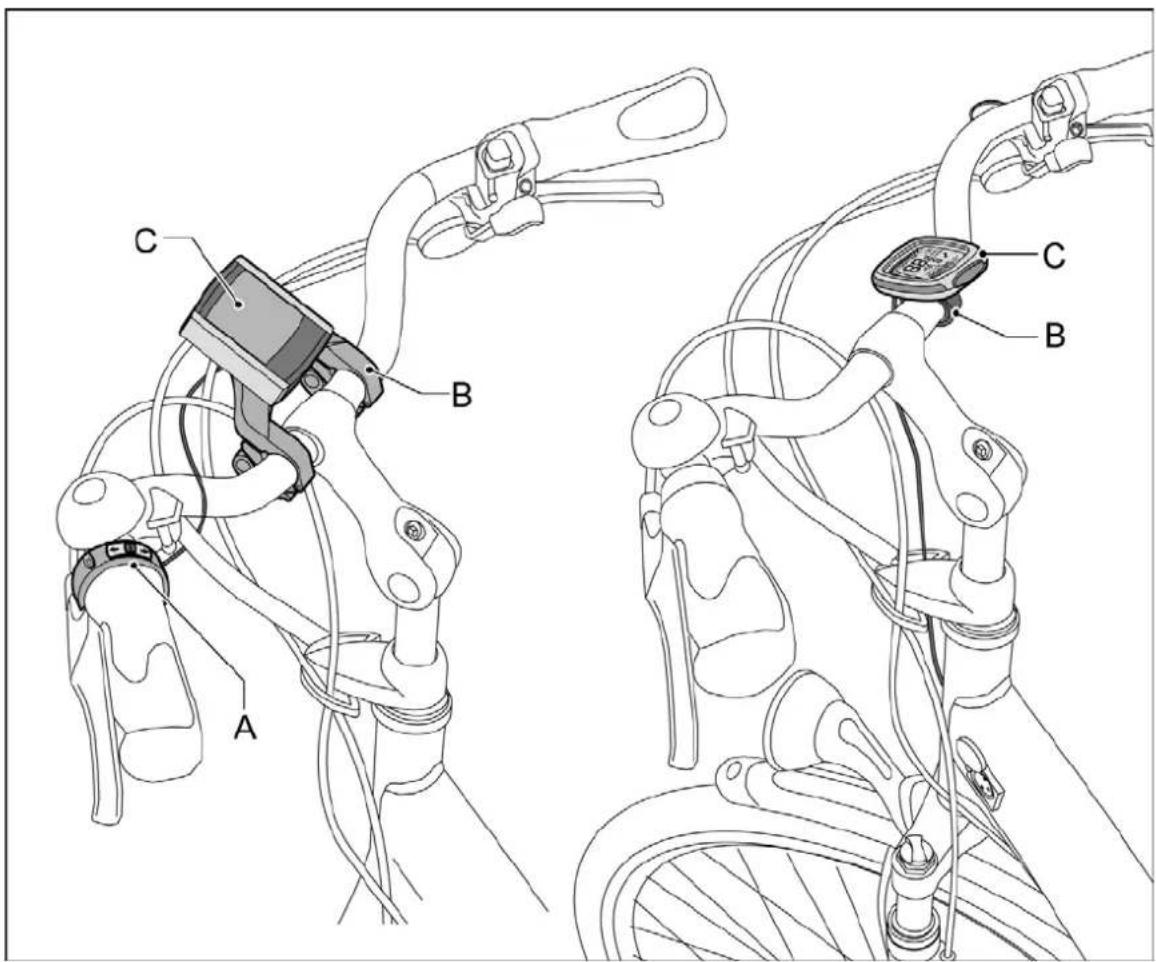
A Control unit
B Display holder
C Display
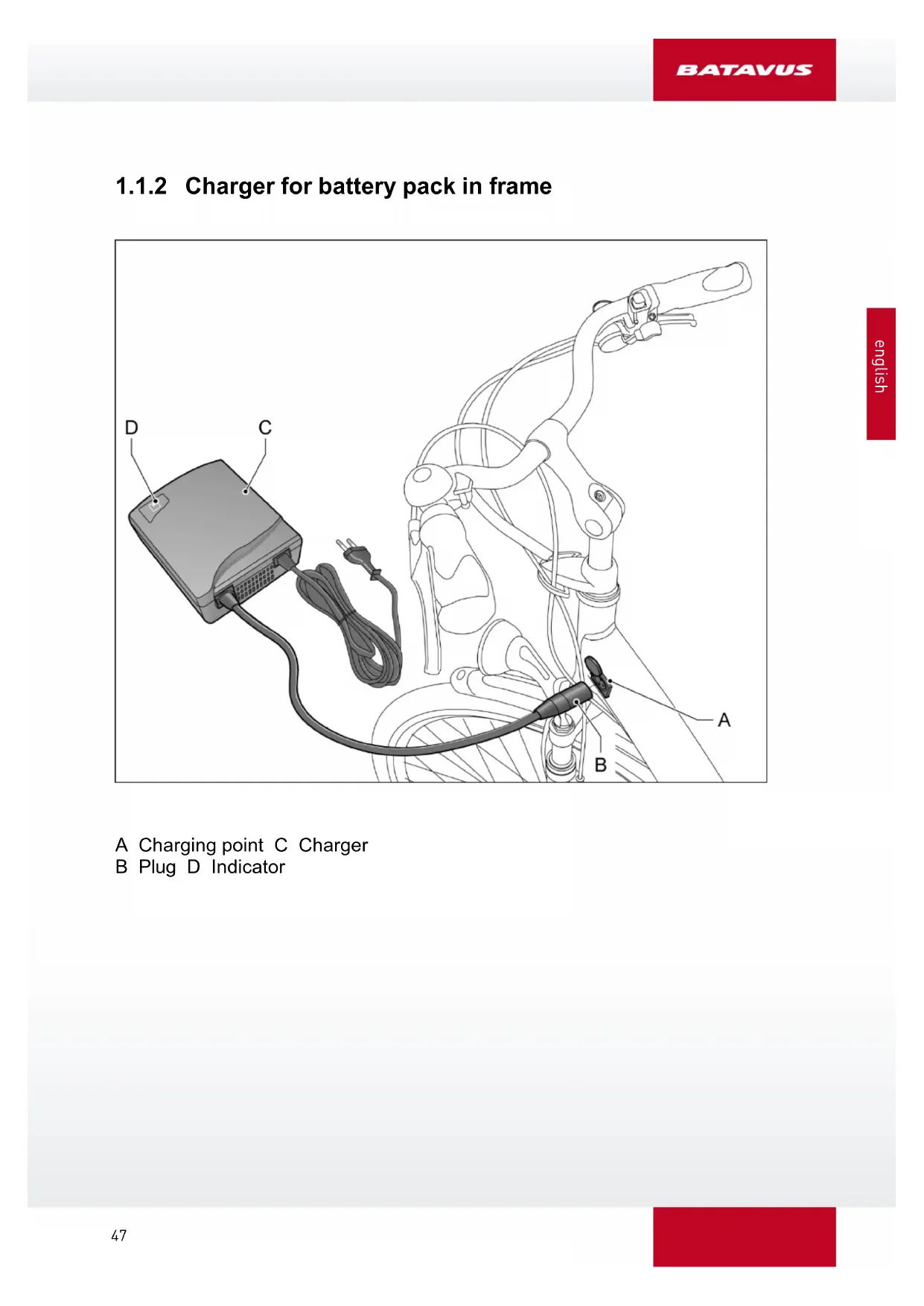
1.1.2 Charger for battery pack in frame
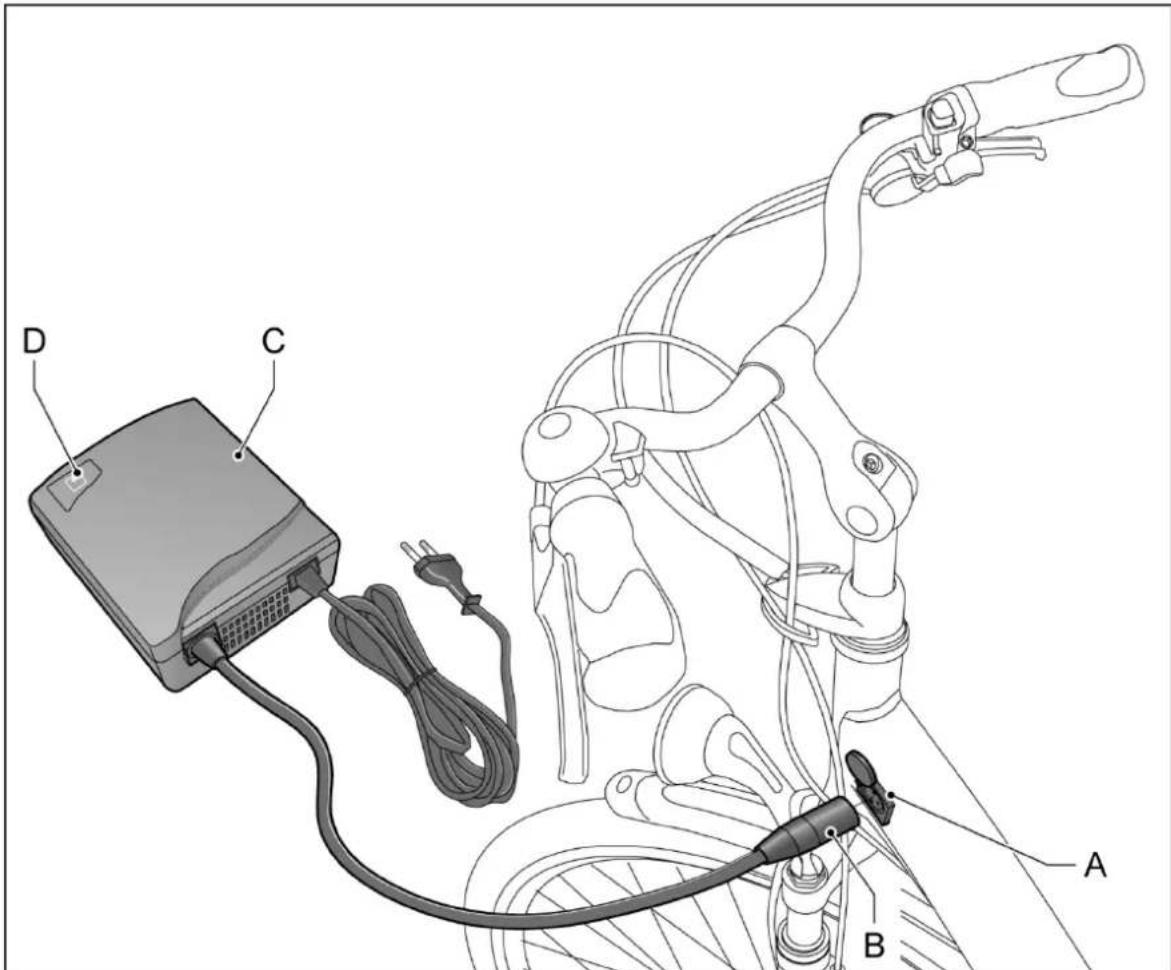
A Charging point C Charger
B Plug D Indicator
1.1.3 Battery pack under the carrier and charger
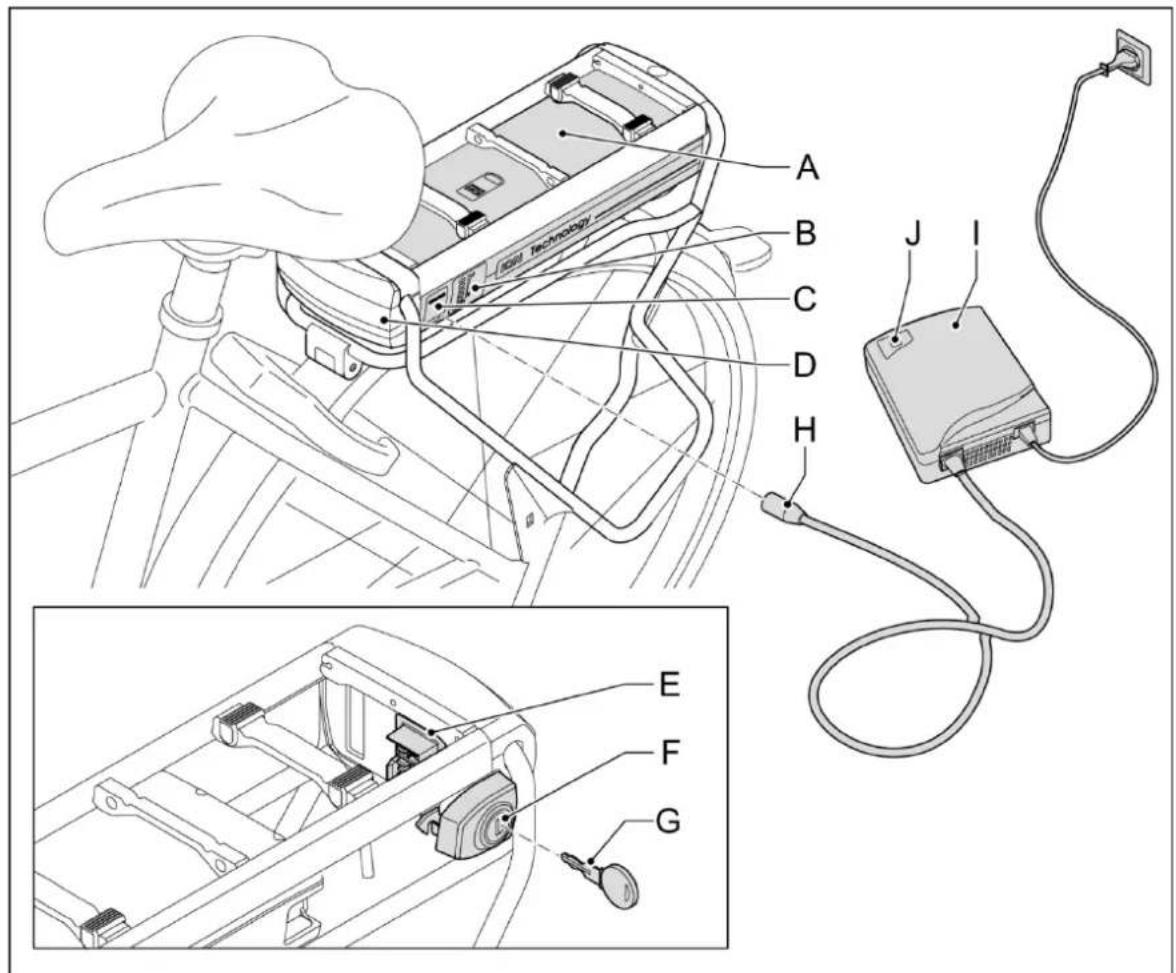
A Battery pack F Lock
B State of charge display G Key
C Charging point H Plug
D Docking station I Charger
E Docking station contact point J Indicator
1.2 Charge the battery pack
All batteries start emptying over time. This process is called 'self discharge'. If the battery is discharged too much, deep discharge will occur. A deep discharge can cause permanent damage to the battery pack. In order to prevent this situation, follow the charge instructions carefully.

The guarantee will be null and void when deep discharge is established.
1.2.1 Charge
Connect the charger to the battery pack when the latter is not in use. The system will then automatically recharge the pack whenever necessary.
If you cannot leave the battery pack connected to the charger, you can disconnect it once the pack is fully recharged. In this case, do make sure to connect the battery pack to the charger at least once every two months and recharge it to avoid a deep a discharge.

Connect the charger to the bicycle when it is not being used. This will lengthen the life of the battery pack.
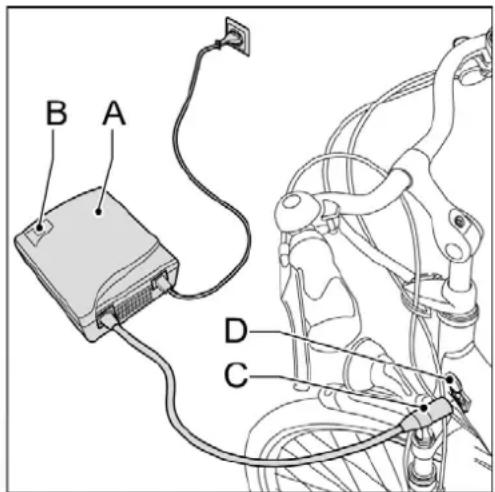
1.2.2 Charging in the frame
- Check that the power cable is properly connected to the charger (A).
- Connect the plug (C) of the charger to the contact point (D).
- Remove the charger before you start cycling.
1.2.3 Charging under the luggage carrier
- Check that the power cable is properly connected to the charger (A).
- Connect the charger (A) to the mains voltage. The green indicator (B) will light up.
- Connect the plug (C) of the charger to the contact point (D).
- Remove the charger before you start cycling.
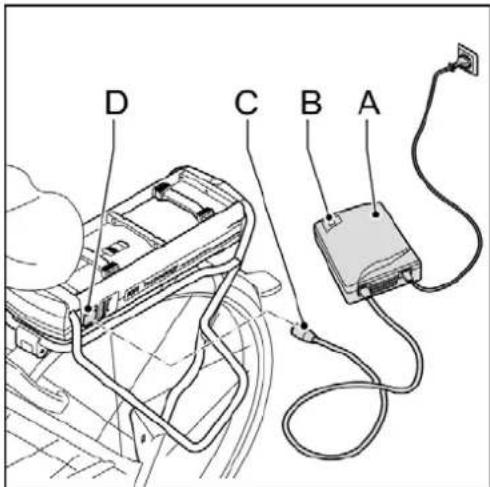
- The battery pack can be charged both in the bicycle and outside the bicycle.
- Press the button (C) to check the charge level (F) of the battery pack if this has not been activated.
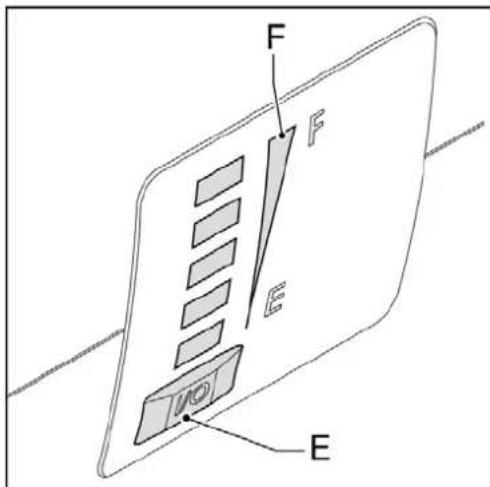
1.2.4 Irregular use or long-term storage
If the E-bike is not used for over two months and the battery cannot be charged in the meantime, the battery pack must be fully charged. Once the battery is full, you can remove the fuse. If the fuse is removed, the battery pack can be stored for a maximum period of 6 months without having to recharge the battery. We recommend that you contact a certified E-bike dealer before removing the fuse.

The battery pack will be fully charged in 2 to 3 hours.
- The charging cost is a maximum of € 12 on the basis of 2500 km/year (48 km/week) including a maximum of € 6 for the standby time (bicycle is always connected to the charger).
- The cost for charging the battery once is € 0.09 on the basis of a 10 Ah battery.

Carefully read the warnings given below. Your manufacturer is not responsible for accidents or faults caused by improper use of (parts of) the E-bike.
- Always charge the battery pack using the charger delivered with the bicycle. Do not use any other charger.
- A battery pack that is flat and is not charged can be deep discharged within two weeks and become faulty. The guarantee will be null and void in this case.
- No not connect the charger to the mains voltage when it is not used.
- Disconnect the charger from the battery before you start cycling.
Make sure that the charger does not get wet. - Do not damage the charger.
- Do not charge the battery pack in direct sunlight.
- Do not drop the battery pack. This may damage the battery.
- Make sure that the battery pack remains within the temperature ranges given below. This will lengthen the life and improve the performance of the battery pack. The charger or the peddling assistance will, moreover, not work outside this temperature range.
| Status | Minimum [°C] | Maximum [°C] |
| While charging | -10 | +45 |
| During use | -15 | +55 |
| Storage (at least 80% charge level) | -10 | +35 |
1.3 Instructions for the battery pack under the luggage carrier
1.3.1 Positioning the battery pack
- Remove the key from the lock.
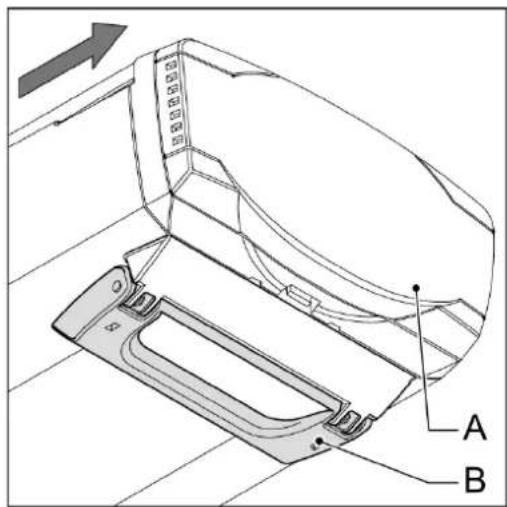
- Carefully push the battery pack (A) under the luggage carrier alongside the guide until the lock clicks (B).
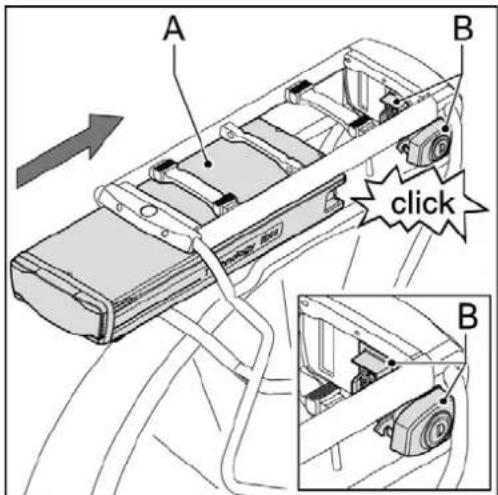
- Check whether the battery pack (A) has been positioned correctly. A correctly positioned battery pack cannot be removed any more without the key.
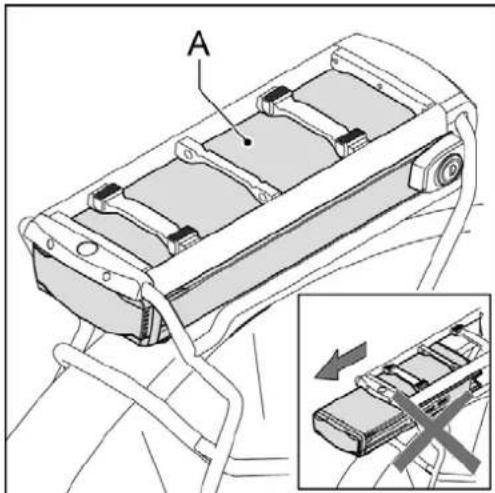
1.3.2 Take out the battery pack
- Insert the key (A) in the lock (B) (this key is the same as the key for the bicycle lock).
- Make sure that the cover (C) of the charging plug is closed.
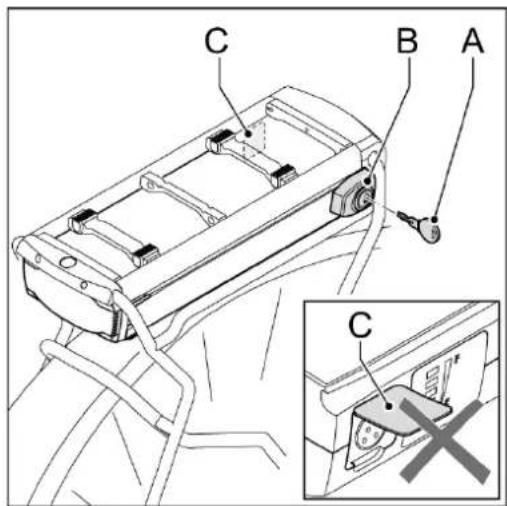
- Remove the battery pack (A) from the luggage carrier using the handle (B) on the bottom side of the battery pack.

Always remove the battery pack with two hands to prevent the battery pack from falling.
Take the battery pack out of the luggage carrier when transporting the bicycle by car.
1.3.3 Safety
The battery pack can only be used on the bicycle on which it has been installed. A code in the software makes sure that it cannot be used on another bicycle, that is to say, there will be no peddling assistance (protection against theft). A second battery pack can in many cases be purchased for your E-bike. Contact your dealer for more information.
1.3.4 Peddling assistance
You can switch on the system by pressing the up arrow on the lights button. When the E-bike is not being used, the peddling assistance and lights will be switched off automatically after five minutes. The display will be put in the sleep mode automatically after another five minutes and the display will no longer be shown.
Press the up arrow on the lights button to cancel the sleep mode. The sleep mode of the display will also be cancelled when the bicycle is again in motion.
1.3.5 Diagnosis report
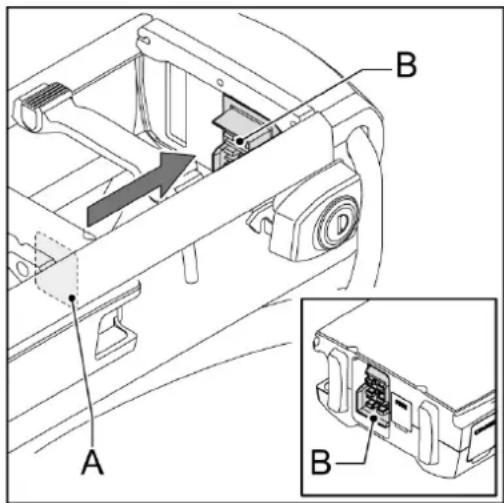
If all LEDs flash, first check whether the battery pack (A) has been correctly connected to the docking station (B).
If the LEDs continue to flash, contact your dealer.
1.3.6 Lighting
The lights (both at the front and rear) are supplied with electricity by the battery pack and will, therefore, only work when the battery pack has been installed in the E-bike. The motor will work as a dynamo when the battery pack is flat. The rear light is fixed to the battery pack.
If the rear light needs to be replaced, we recommend contacting your certified E-bike dealer.
2 Square display
2.1 Removing and fixing
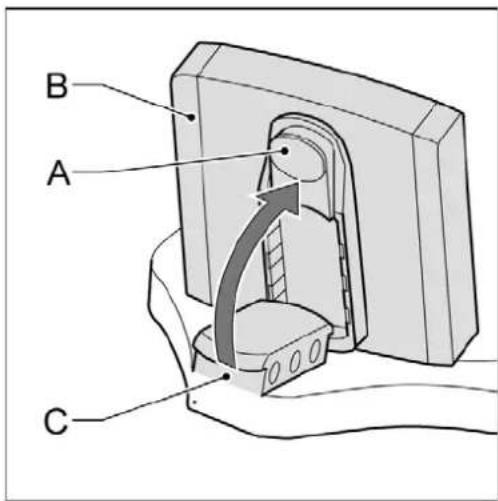
Removing: Press the button (A) on the bottom side and remove the display (B) from the display holder (C).
Fixing in place: Position the display (B) obliquely on the display holder (C) and click it in place in the lock.
2.2 Adjust
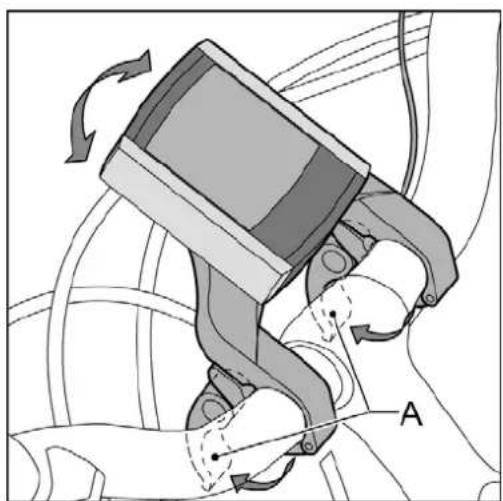
Loosen the handles (A) and twist the display holder.

Remove the display when storing and transporting the bicycle.
2.3 Buttons and indications
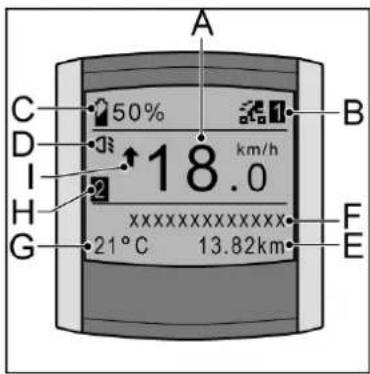
2.3.1 Display
A Present speed
B Peddling assistance level
C Battery pack charge level
D Lighting indicator
E Variable indicator
F Variable indictor description
G Temperature/Time
H View Trip 1/Trip 2
Average speed indicator
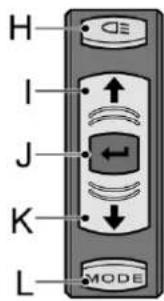
2.3.2 Control unit
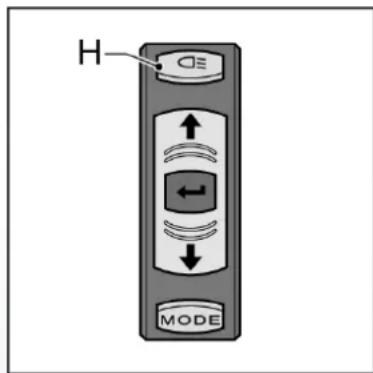
H Lighting button
Up button - variable application
J Set - variable application
K Down button - variable application
L Mode button - variable application
2.4 Switching on the display
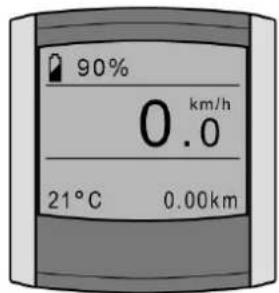
If the up arrow on the lighting button is pressed, the reading will be displayed.
2.5 Set the support
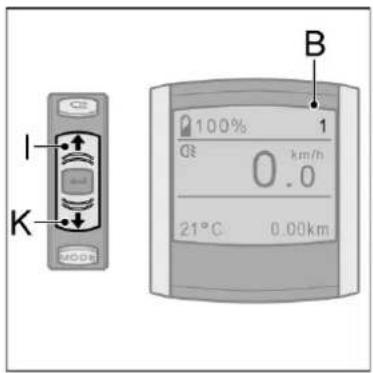
Press the up (I) or down (K) button to set the support (B). You can select from three positions:
1 ECO
2 NORMAL
3 POWER
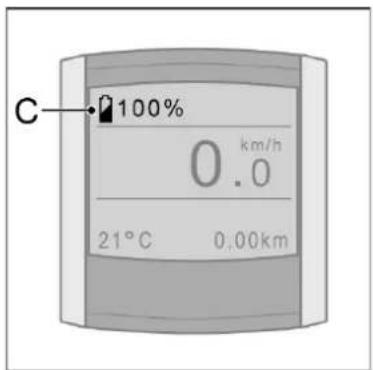
2.6 Charge level
The charge level (C) indicates the charge of the battery pack in terms of a percentage. This is displayed at every view setting.
2.7 Menu overview
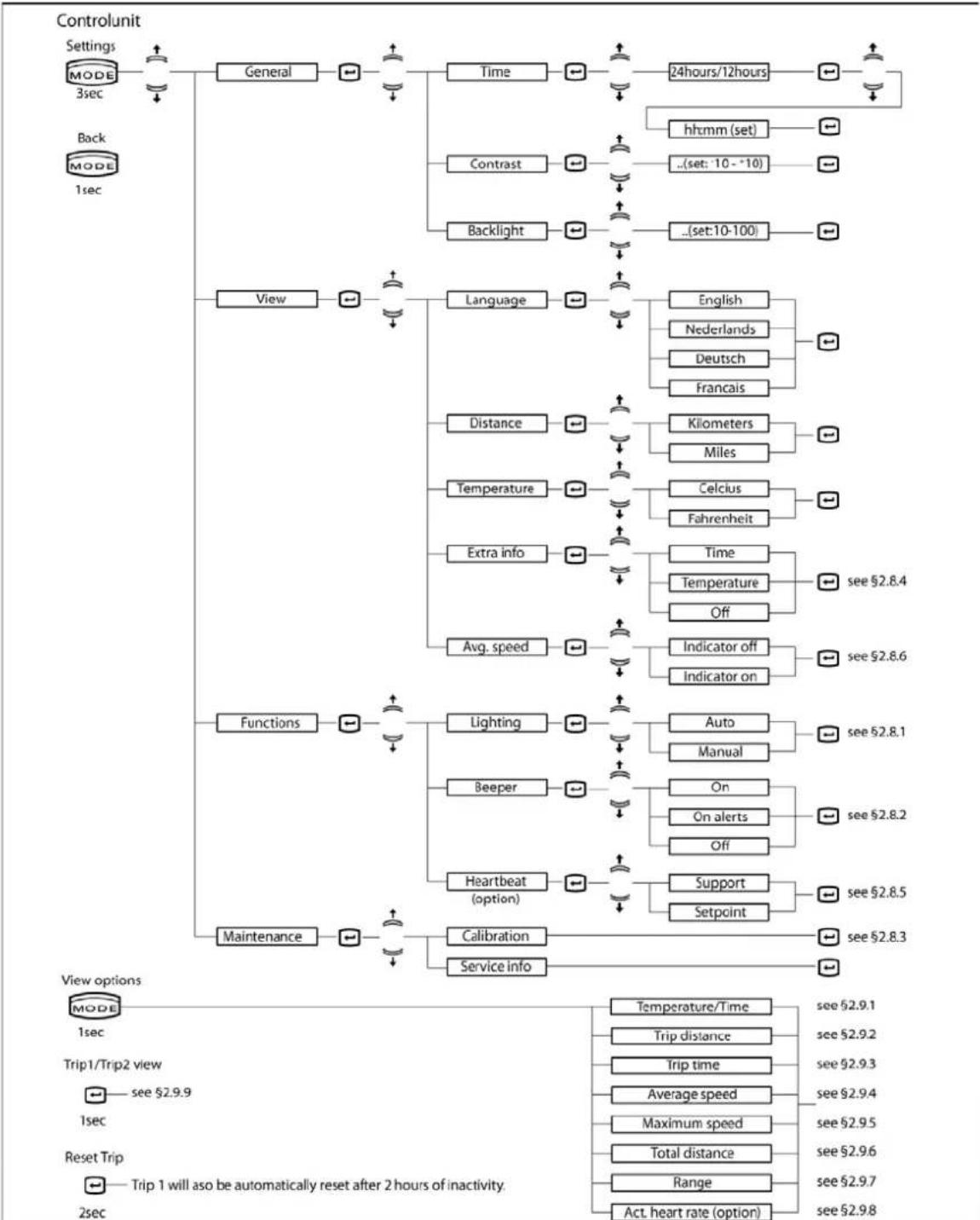
2.8 Menu setting explanation
2.8.1 Lighting
You can set whether you wish the lights to be switched on automatically or whether you wish to do this manually under Lighting.
If you select Auto, the bicycle lighting will be switched on and off automatically. A light sensor will continuously measure the quantity of light and will switch the lights on and off based on this.
If you select Manual, the bicycle lighting will only be switched on or off when you use the lights button on the control unit.
2.8.2 Beep Signals
You can set whether and when you wish to hear beep signals under Beepers.
If you select On, the display will emit five long beeps when there is a message on the display. In addition, you will also hear a short beep signal when you press the control unit buttons.
If you select On alerts, the display will emit five long beep signals when there is a message. Your display will not emit beep signals with this setting when the control unit buttons are pressed.
If you select Off, the display will not issue beep signals when operating the control unit nor when there are alerts.
2.8.3 Calibration
If the peddling assistance is reduced in due course, the electronics may have to be calibrated.
- Stand next to the bicycle.
Do not exert force on the pedals. - Switch off the lights (H).
- Keep the lights button pressed for at least two seconds until the message is issued that the calibration has been completed.
2.8.4 Extra information
With this option you can indicate whether you want to see extra information in the display. The chosen option is shown as a standard at the bottom left of the display.
If you select Time, the time will be displayed on the left at the bottom of the display as standard.
Temperature is then shown under display options (see § 2.9)
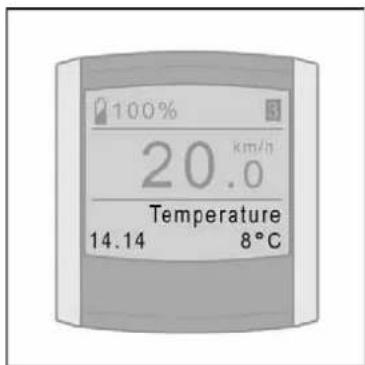
If you select Temperature, the temperature will be displayed on the left at the bottom of the display as standard. Time is then shown under display options (see § 2.9).
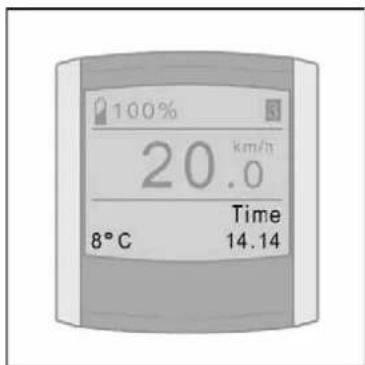
When you select Off, the room at the bottom left of the display remains empty. Both Time and Temperature will then be shown under display options (zie § 2.9)
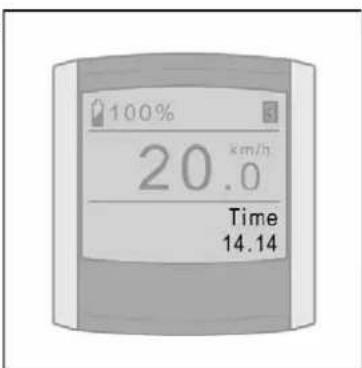
2.8.5 Heartbeat (optional)
You can change the heartbeat settings with this option when you use the Heartbeat support. Contact your dealer for the conditions. You can switch on and off the support based on your heartbeat with the Support option.
You can set your required heartbeat by using the arrow keys with the Target value option. The peddling assistance system will subsequently ensure that you continuously work towards the target value by providing more or less support.
2.8.6 Indicator Average speed
The indicator for average speed indicates, when cycling, whether the current speed is above or below the average speed of the ride.
Arrow upwards means: current speed is above the average speed of the ride.
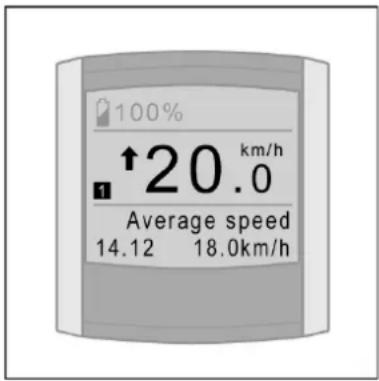
Arrow downwards means: current speed is below the average speed of the ride.
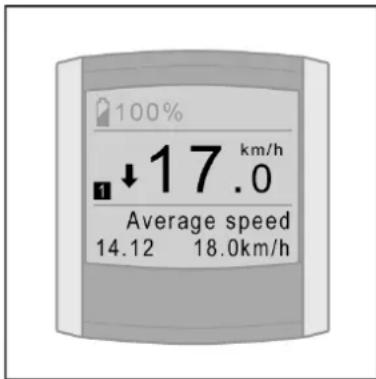
Block means: current speed is almost the same as the average speed of the ride.
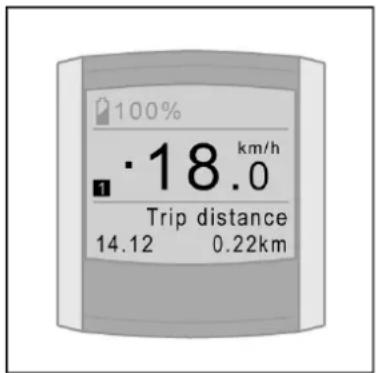
With the option Average Speed you indicate whether you want to show the indicator in the display or not.
2.9 View options
By briefly pressing the MODE button, you decide what you want to show at the bottom right of the display. All possible display options are briefly explained below.
2.9.1 Time/Temperature
With menu settings you can select whether want to see Time, Temperature or nothing as a standard at the bottom left of the display (see § 2.8.4). The non-selected option(s) will then be placed automatically under display options.
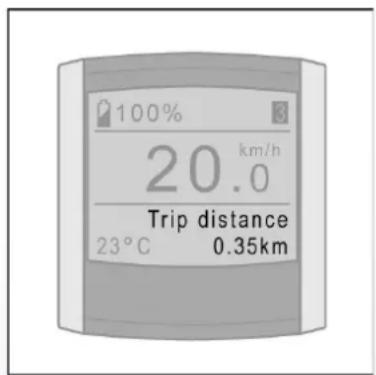
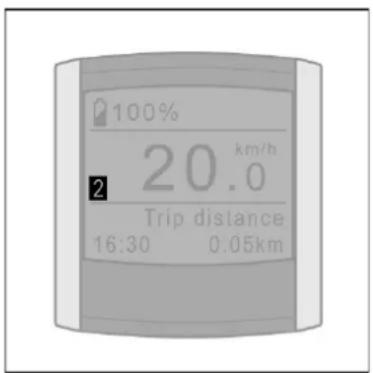
2.9.2 Trip distance
The trip distance measured from the moment that you start cycling.
For resetting the "Trip distance" see § 2.9.9.
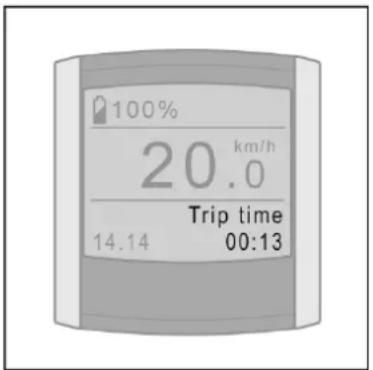
2.9.3 Trip time
The trip time measured from the moment that you start cycling.
For resetting the "Trip time" see § 2.9.9.
2.9.4 Average speed
Average speed measured over the cycled distance.
For resetting the "Average speed" in § 2.9.9.

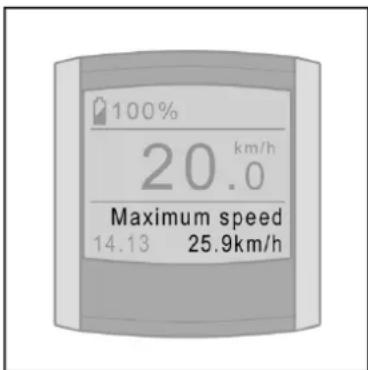
2.9.5 Maximum speed
Maximum speed measured over the cycled distance.
For resetting the "Maximum speed" see in § 2.9.9.
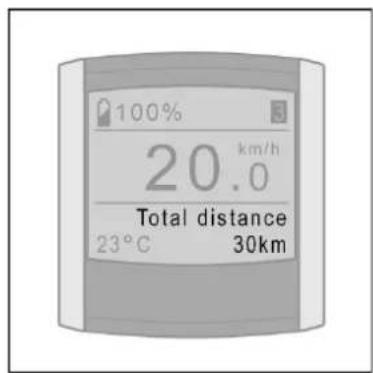
2.9.6 Total distance
Total distance measured from the moment that you start cycling.
It is not possible to reset the total distance.
2.9.7 Range
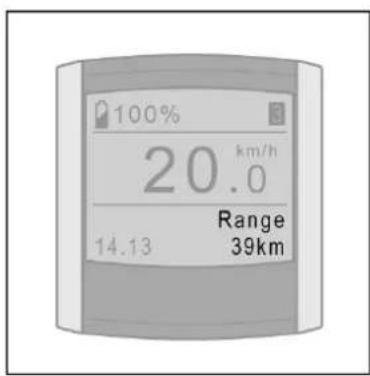
The range shows how many kilometres you can still cycle using peddling assistance.
The range is calculated on the basis of actual and historic consumption in combination with the charging level of the battery pack.
2.9.8 Current heartbeat (optional)
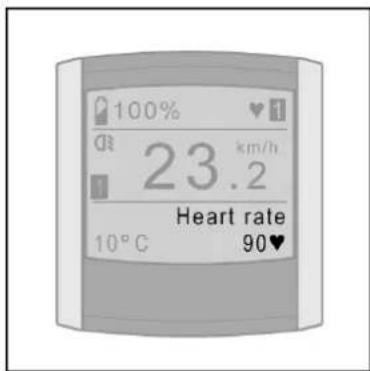
This option specifies your current heartbeat if you use Heartbeat support. Contact your dealer for the conditions.
2.9.9 Trip 1 and Trip 2
The Trip distance, Trip time, Average speed and Maximum speed are linked to each other and are kept track of twice, that is, in Trip 1 and Trip 2.
You can select between the view of Trip 1 and Trip 2 on the display by pressing the red button briefly.
Resetting Trip 1 will be automatic when the bicycl is not used for more than 2 hours. Trip 1 can also be reset manually by keeping the red button pressed for a long time.
You can only reset Trip 2 manually by keeping the red button pressed for a long time.
2.10 Use of other displays

Your display acts as an immobiliser, which makes it impossible to install any display on your E-bike and make full use of it.
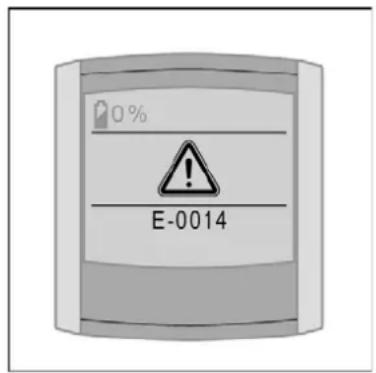
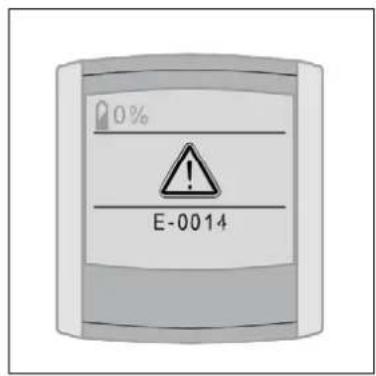
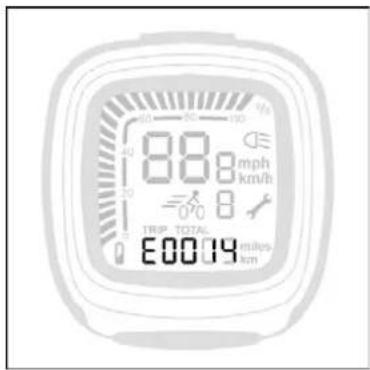
Your display has a unique code that corresponds with the respective E-bike. If you want to switch on the support or the lights, it is checked whether the display and the bicycle belong together. If not, the message E0014 appears and the support and the lights cannot be switched on.
If you have two E-bikes with the same type of display, it is possible to register both displays for both bicycles.
Your certified E-bike dealer can do this for you. Then you can use both displays on both bicycles.

Do not remove the rear wheel. This may affect the performance of the bicycle.
3 Compact display
3.1 Mount and dismount
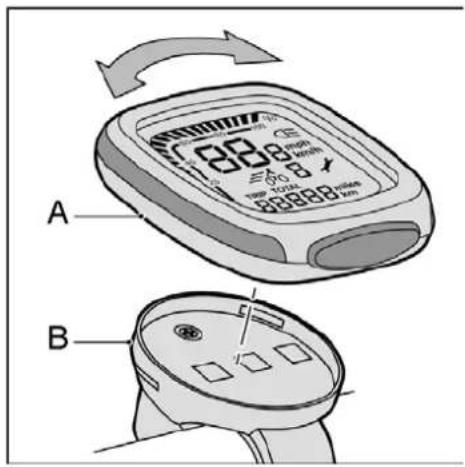
- Place the display (A) on to the holder (B). Turn the display a quarter turn clockwise to lock the control display into place.
- Turn the display a quarter turn anticlockwise to release it.

Remove the display when storing and transporting the bicycle.
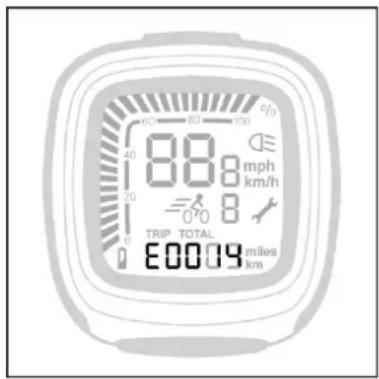
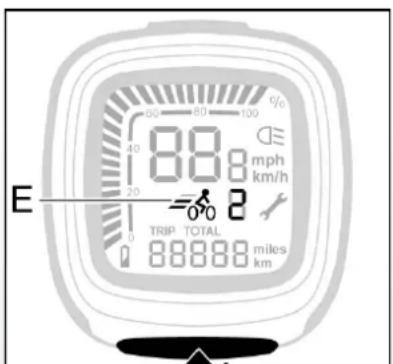
3.2 Buttons and indications
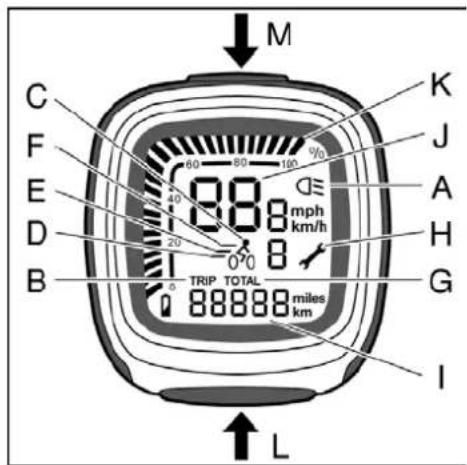
Every selected function is indicated by a bar.
A Lighting
B Trip recorder
C Peddling assistance OFF
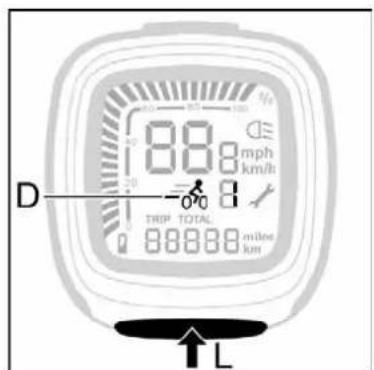
D Peddling assistance ECO
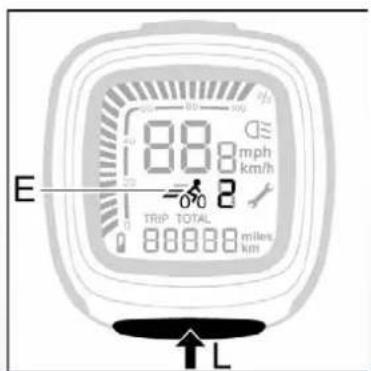
E Peddling assistance NORMAL
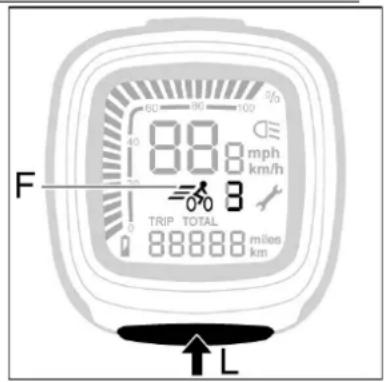
F Peddling assistance POWER
G Total covered distance
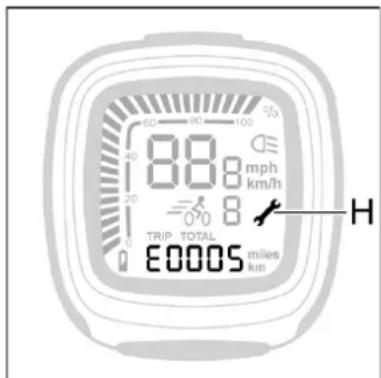
H Maintenance indicator
Variable indicator
J Speed
K Battery pack charge level
L Set button
M Light button
3.3 Settings
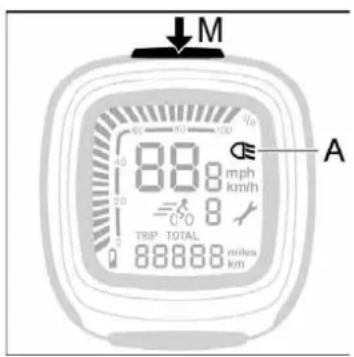
Turn the lights on and off (A and M)
- Press the light button (M) to switch the lights on or off. When the lights are on, the bar (A) and the background lighting of the display will light up.

The battery pack supplies power to the lights. The lights will remain on when the bicycle is standing still. The motor will work as a dynamo when the battery pack is flat.
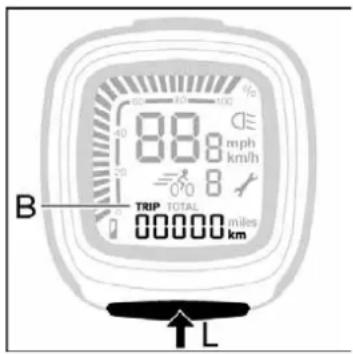
Trip recorder (B)
- Usually, the trip recorder is visible. Reset the trip recorder by pressing the set button (L) for five seconds.
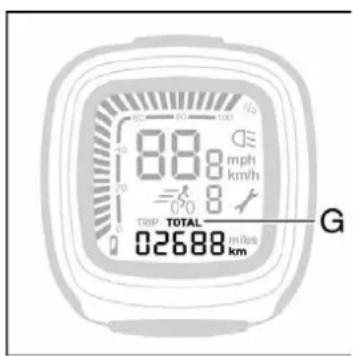
Total covered distance indicator (G)
- The display shows the total covered distance when switching on the peddling assistance or the lights. The trip recorder will automatically replace the total covered distance after 15 seconds.
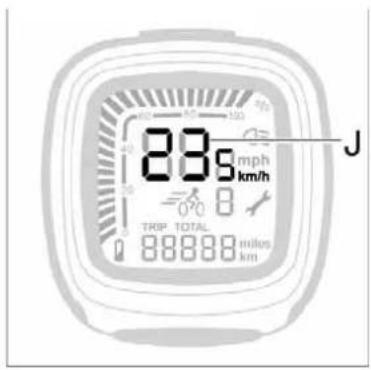
Speed (J)
The speed is constantly displayed in km/hour.
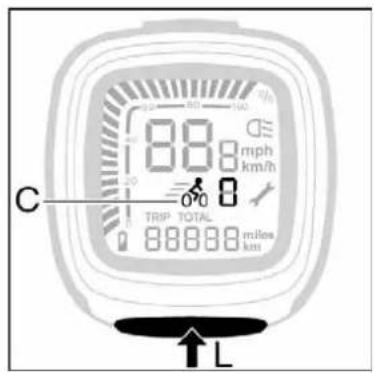
Peddling assistance (C, D, E and F)
- Press the set button (L) to set the peddling assistance.
.
OFF0(C)
The peddling assistance is off.
ECO 1 (D)
The peddling assistance is in the lowest position. This gives the maximum range.
NORMAL 2 (E)
The peddling assistance is in the normal position.
POWER 3 (F)
The peddling assistance is in the highest position. This gives the smallest range.
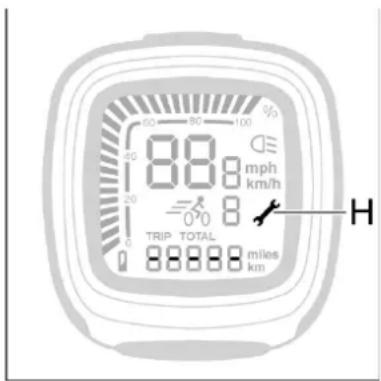
- Maintenance indicator (H)
The display shows a spanner (H) together with the letter E followed by a code number. The spanner indicates that this diagnosis must be remedied at the bicycle repair shop.
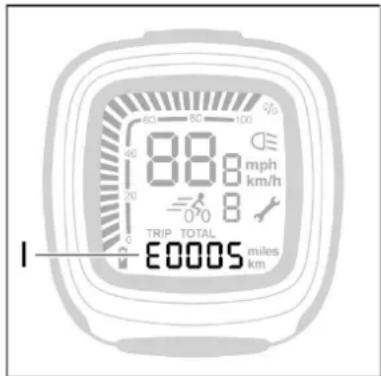
- Diagnosis message (I)
The display shows an E followed by a code number. The messages chapter contains the diagnosis and how you can remedy the problem yourself.
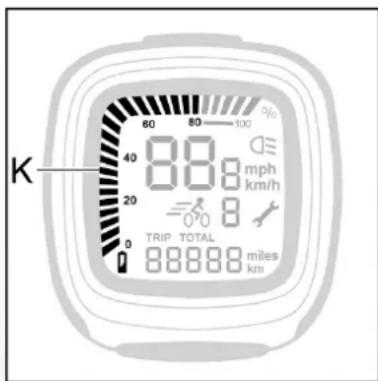
- Battery pack charge level (K)
The charge level is given in increments of 4% .
Service indicator
The display shows a spanner (H) with five dashes when it is time for service. Contact your bicycle repair shop.
3.4 Calibrate the bicycle
It may be necessary to calibrate the electronics if the power decreases over time.
- Stand next to the bicycle.
- Switch off the lights.
- Set the peddling assistance to OFF.
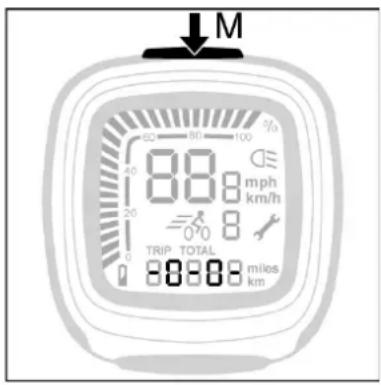
- Press the M button 5 seconds. -0-0- will, next, be displayed on the display. Now the bicycle has been calibrated.

Do not remove the rear wheel. This may affect the performance of the bicycle.
3.5 Immobiliser

Your display acts as an immobiliser, which makes it impossible to install any display on your E-bike and make full use of it.
Your display has a unique code that corresponds with the respective E-bike. If you want to switch on the support or the lights, it is checked whether the display and the bicycle belong together. If not, the message E0014 appears and the support and the lights cannot be switched on.
If you have two E-bikes with the same type of display, it is possible to register both displays for both bicycles.
Your certified E-bike dealer can do this for you. Then you can use both displays on both bicycles.
4 Range indication table
| Optimum riding program | ||||||
| Battery pack | Pedal assistance level | |||||
| ECO (km) | NORMAL (km) | POWER (km) | ||||
| Min. | Max. | Min. | Max. | Min. | Max. | |
| 168 Wh* | 29 | 53 | 23 | 41 | 17 | 30 |
| 216 Wh* | 38 | 68 | 30 | 53 | 22 | 39 |
| 240 Wh* | 42 | 75 | 33 | 59 | 24 | 43 |
| 264 Wh* | 46 | 83 | 36 | 65 | 26 | 47 |
| Tour riding program | ||||||
| Battery pack | Pedal assistance level | |||||
| ECO (km) | NORMAL (km) | POWER (km) | ||||
| Min. | Max. | Min. | Max. | Min. | Max. | |
| 168 Wh* | 29 | 53 | 27 | 48 | 22 | 39 |
| 216 Wh* | 38 | 68 | 34 | 61 | 28 | 50 |
| 240 Wh* | 42 | 75 | 38 | 68 | 31 | 55 |
| 264 Wh* | 46 | 83 | 42 | 75 | 34 | 60 |
| Plus riding program | ||||||
| Battery pack | Pedal assistance level | |||||
| ECO (km) | NORMAL (km) | POWER (km) | ||||
| 168 Wh* | 29 | 53 | 23 | 41 | 13 | 25 |
| 216 Wh* | 38 | 68 | 30 | 53 | 17 | 32 |
| 240 Wh* | 42 | 75 | 33 | 59 | 19 | 35 |
| 264 Wh* | 46 | 83 | 36 | 65 | 21 | 38 |
- The number of Wh reflects the amount of power that the battery pack can deliver. It is calculated as follows: capacity (Ah) x voltage (V).
The range depends on various factors and is strongly influenced by the following:
- Capacity (Ah) and voltage (V) of the battery pack;
- Pedal assistance level (Eco/Normal/Power);
- Pedal assistance mode or riding program (Optimum/Plus/Tour), ask your dealer about the possibilities;
- Ambient temperature
Wind force;
Tyre pressure (at least 4 bar);
Cycling speed; - Weight of the cyclist and the load (standard 80kg );
Cycling behaviour;
Road conditions;
Use of gears.
The range will perceptibly decrease as the battery pack gets older.
Shift gears

If the bicycle has been equipped with gears, timely shift the gears in order to increase the range.
5 Throttle (optional)
5.1 Throttle
The throttle (B) can be used when the peddling assistance has been switched on. You 'throttle up' by turning the throttle towards you.
When using the throttle for the first time, carefully try it out to familiarise yourself with the power the throttle delivers.
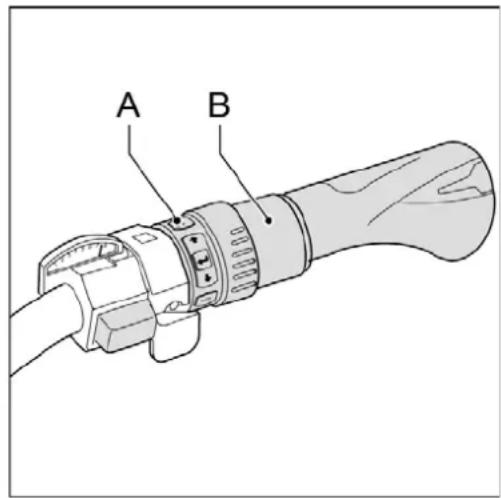
A Control unit
B Throttle
5.2 Boost function (use during cycling)
The boost function can be used during cycling, therefore, when one of the three peddling assistance levels (ECO/NORMAL/POWER) has been set.
The throttle will provide an additional push during cycling. Handy when you wish to accelerate temporarily, for example, to overtake. The boost function is connected to the peddling assistance levels. The effect of the throttle can be felt the most in the ECO mode while it is felt the least in the POWER mode.
Note: the boost function will only work when you pedal too.
5.3 Parking assistance (forwards and backwards)
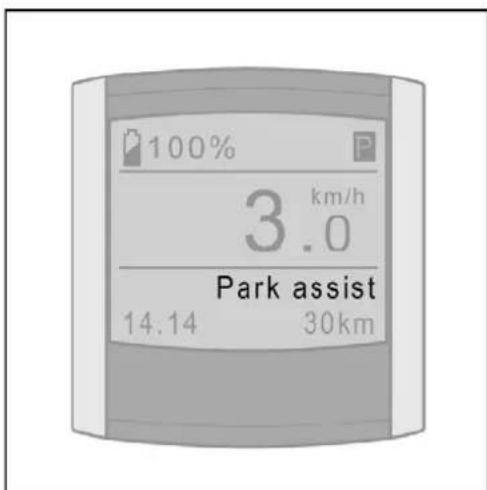
The throttle offers support up to approximately 3 km/hour when you are walking alongside your bicycle. Handy when the E-bike needs to be fetched from the shed or basement. Parking assistance works both backwards and forwards.
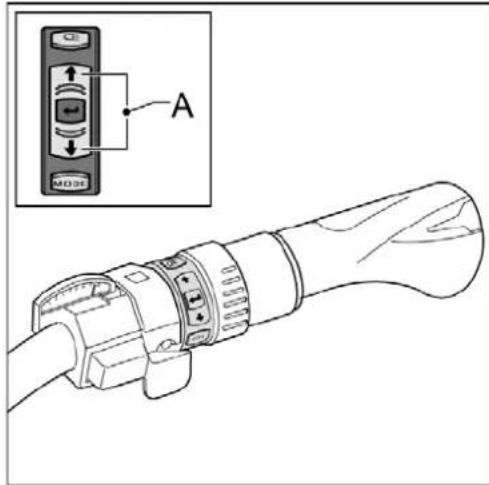
Use the arrow keys on the control unit (A) to set the parking assistance.
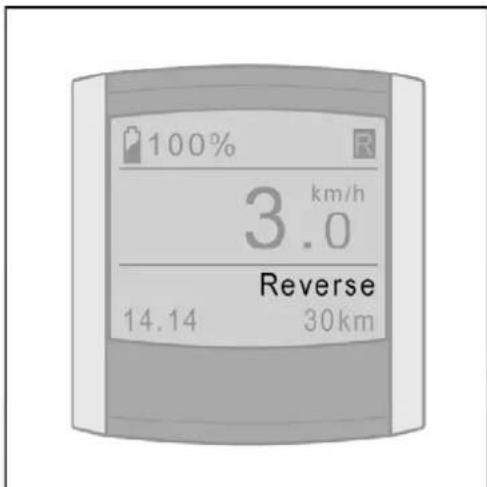
Select Parking assistance (P) when you wish to move forward.
Select Reverse (R) when you wish to move backwards.
Once you have set the parking assistance, you can use the throttle by turning it towards you.
Note: When using the throttle for the first time, carefully try it out to familiarise yourself with the power the throttle delivers.
6 Technical data
6.1 Weight and performance
Weight of battery pack Approx. 4 kg
Maximum power 250 W
Charging time 2 to 3 hours
Voltage 24 V
Fuse 30 A(T)
6.2 Battery cell temperature ranges
| Status | Minimum [°C] | Maximum [°C] |
| While charging | -10 | +45 |
| During use | -15 | +55 |
6.3 Battery charger technical data
| Input voltage | 230 V AC |
| Input power | Max. 145 W |
| Input current | Max. 1 A |

7 Diagnostic messages
Contact the bicycle repair shop if the message is not listed in the manual.
| Message Diagnosis Solution | ||
| E01 | Battery pack flat | Charge the battery pack. |
| E02 The battery pack has become too hot or cold while charging | Wait until the battery pack is within the temperature range (see § 1.2.4 and § 5.1). The charging will then automatically continue. | |
| E04 Bicycle connected to the battery charger | Disconnect the battery charger from the bicycle. | |
| E07 Motor outside temperature range | Wait until the motor has reached the proper temperature. | |
| E13 Display does not respond correctly | This message may occur while positioning/removing the display. Take your bicycle to the bicycle repair shop. | |
| E14 Display is not recognised | The display needs resetting. Take your bicycle to the bicycle repair shop. | |
| E15 Deviation in the charging management | Connect the bicycle to the battery charger and wait until | |
| the bicycle is fully charged. | ||
| E16 Constant | activity of the power sensor | Calibrate by holding the light button pressed for 5 seconds (see § 3.4). |
| E17 Maximum | motor current reached because of extreme load | This message will automatically disappear when the load is taken off the bicycle. |
| E18 Difference | in voltage measured between the cells of the battery pack | Connect the bicycle to the battery charger and wait until the bicycle is fully charged. |
| E19 Battery pack | pack outside the temperature range | Wait until the battery pack is within the temperature range (see § 1.2.4 and § 5.1). The charging will then automatically continue. |
| E21 | Motor current regulator | Load the bicycle less heavily. The message will disappear. |
| E22 | Problems while charging | Turn the lights on/off and wait for 10 seconds. Reconnect the battery charger. Go to the bicycle repair shop if the message is reappears. |
8 Guarantee conditions and legal requirements
Guarantee conditions
The following guarantee conditions supplement the applicable legal rights.
When does the guarantee apply?
The supplier of the battery pack will give a guarantee for any material or construction faults concerning the battery pack if the following condition is met:
- You only have a right to the guarantee if you can provide a certificate of guarantee or a receipt. The guarantee period commences on the day of purchase.
- The guarantee will be null and void when deep discharge is established.
Guarantee period of the E-bike
A 2-year factory guarantee is given with regard to the electrical parts of your E-bike (display, drive system and battery pack). For the guarantee period for the other parts refer to the guarantee provisions as specified in the instruction booklet of the manufacturer.

Do not clean the bicycle with a high-pressure spraying pistol. A too powerful jet of water may damage the motor's electronics. This will make the guarantee null and void.
Additional guarantee

You can purchase an additional guarantee period to extend your guarantee for three more years within the first 2 years of purchasing your new E-bike. Contact your dealer for the conditions.
Legal requirements
The described conveyance is a bicycle according to European legislation, because the bicycle complies with the following rules:
- The support is only active when the user peddlies too.
- The support is active for up to 25 km/hour.
The supplied power is maximum 250 W.

The E-bike is an EPAC (Electrically Power Assisted Cycle) in accordance with EN15194.
Compliance
The manufacturer of your e-bike declares that the product meets all requirements and other relevant provisions of directives 2004/108/EC and 2002/24/EC.
The declaration of compliance can be requested from the manufacturer.
Environment

We recommend that you return a faulty bicycle battery pack to your dealer in accordance with the environmental regulations for collecting and processing batteries drawn up by the Ministry of Housing, Spatial Planning and the Environment. The dealer is required to accept the battery and must ensure that it is processed further by the manufacturer.
Periodical maintenance

Your E-bike needs regular service. Your dealer can advise and inform you on how to make optimum use of your bicycle. You can also contact your dealer for software updates or for an analysis of the diagnosis form containing the exact details of how you use your bicycle.
Version 09/2011
Batavus B.V.
Industriebeg 4, Postbus 515, NL-8440 AM Heerenveen

Pedalstyringen stared normally.
POWER (F)