Garda Ego - Electric bike Batavus - Free user manual and instructions
Find the device manual for free Garda Ego Batavus in PDF.



| Product type | Electric bike with pedal assistance |
| Brand | Batavus |
| Model | Garda Ego |
| Battery type | Lithium-ion PowerPack 300 / 400 (36 V) |
| Battery capacity | 300 Wh or 400 Wh |
| Estimated range | Up to 150 km in ECO mode (varies with conditions) |
| Motor power | 250 W |
| Maximum torque | 50 Nm |
| Maximum assisted speed | 25 km/h |
| Assistance levels | OFF, ECO, TOUR, SPORT, TURBO |
| Total weight (estimated) | Approximately 23 kg |
| Weight of drive unit | 4 kg |
| Battery weight | 2.5 kg |
| Weight of control computer | 0.15 kg |
| Protection rating (motor, battery, control) | IP54 (dust-tight and water spray proof) |
| Operating temperature (motor) | -5 °C to +40 °C |
| Operating temperature (battery) | -10 °C to +40 °C |
| Storage temperature (battery) | -10 °C to +60 °C |
| Charger - Input voltage | 207 – 264 V~, 47 – 63 Hz |
| Charger - Output voltage / Current | 42 V / 4 A |
| Charger - Charging time | 2.5 h (PowerPack 300) / 3.5 h (PowerPack 400) |
| Lighting (via battery) | Front light 2.7 W, rear light 0.3 W |
| USB connection | Yes, 5 V / 500 mA |
| Speed sensor - Air gap distance | 5 – 17 mm |
| Maintenance and cleaning | Clean with a soft damp cloth. Do not immerse or use a pressure washer. |
Frequently Asked Questions - Garda Ego Batavus
User questions about Garda Ego Batavus
0 question about this device. Answer the ones you know or ask your own.
Ask a new question about this device
Download the instructions for your Electric bike in PDF format for free! Find your manual Garda Ego - Batavus and take your electronic device back in hand. On this page are published all the documents necessary for the use of your device. Garda Ego by Batavus.
USER MANUAL Garda Ego Batavus
Drive Unit Cruise | Intuvia | PowerPack 300 | PowerPack 400 | Charger
0 275 007 006 | 0 275 007 007 | 1 270 020 903 | 0 275 007 500 | 0 275 007 501 |
0 275 007 502 | 0 275 007 503 | 0 275 007 504 | 0 275 007 505 | 0 275 007 905

BOSCH
Read all safety warnings and all instructions. Failure to follow the warnings and instructions may result in electric shock, fire and/or serious injury.
Save all safety warnings and instructions for future reference.
The term “battery pack” used in these operating instructions refers both to standard battery packs (battery packs with holder on the bike frame) and to rack-type battery packs (battery packs with holder in the rear rack/carrier).
Do not open the drive unit yourself. The drive unit is maintenance-free and may be repaired only through a qualified repair person and only using original spare parts. This will ensure that the safety of the drive unit is maintained. Unauthorised opening of the drive unit will void any and all warranty claims.
All components mounted to the drive unit and all other components of the eBike drive (e.g., the chainwheel, chainwheel seat, pedals) may be replaced only against identical components or components specifically approved for your eBike by the bicycle manufacturer. This protects the drive unit against overload and damage.
▶ Remove the battery pack from the eBike before working on the eBike (e.g., assembling, maintenance, etc.), transporting it via car or plane, or storing it. Danger of injury when accidentally actuating the On/Off switch.
The push-assistance function may only be used when pushing the eBike. Danger of injury when the wheels of the eBike do not have ground contact while using the push-assistance function.
▶ Use only original Bosch battery packs approved for your eBike by the manufacturer. Using other battery packs can lead to injuries and pose a fire hazard. When using other battery packs, Bosch shall not assume any liability and warranty.
▶ Please observe all national regulations on registering and using eBikes.
▶ Please read and observe the safety warnings and instructions enclosed in the operating instructions of the battery pack as well as in the operating instructions of your eBike.
Product Description and Specifications
Intended Use
The drive unit is intended exclusively for your eBike and may not be used for other purposes.
The eBike is intended for use on paved paths. It is not permitted for use in competition.
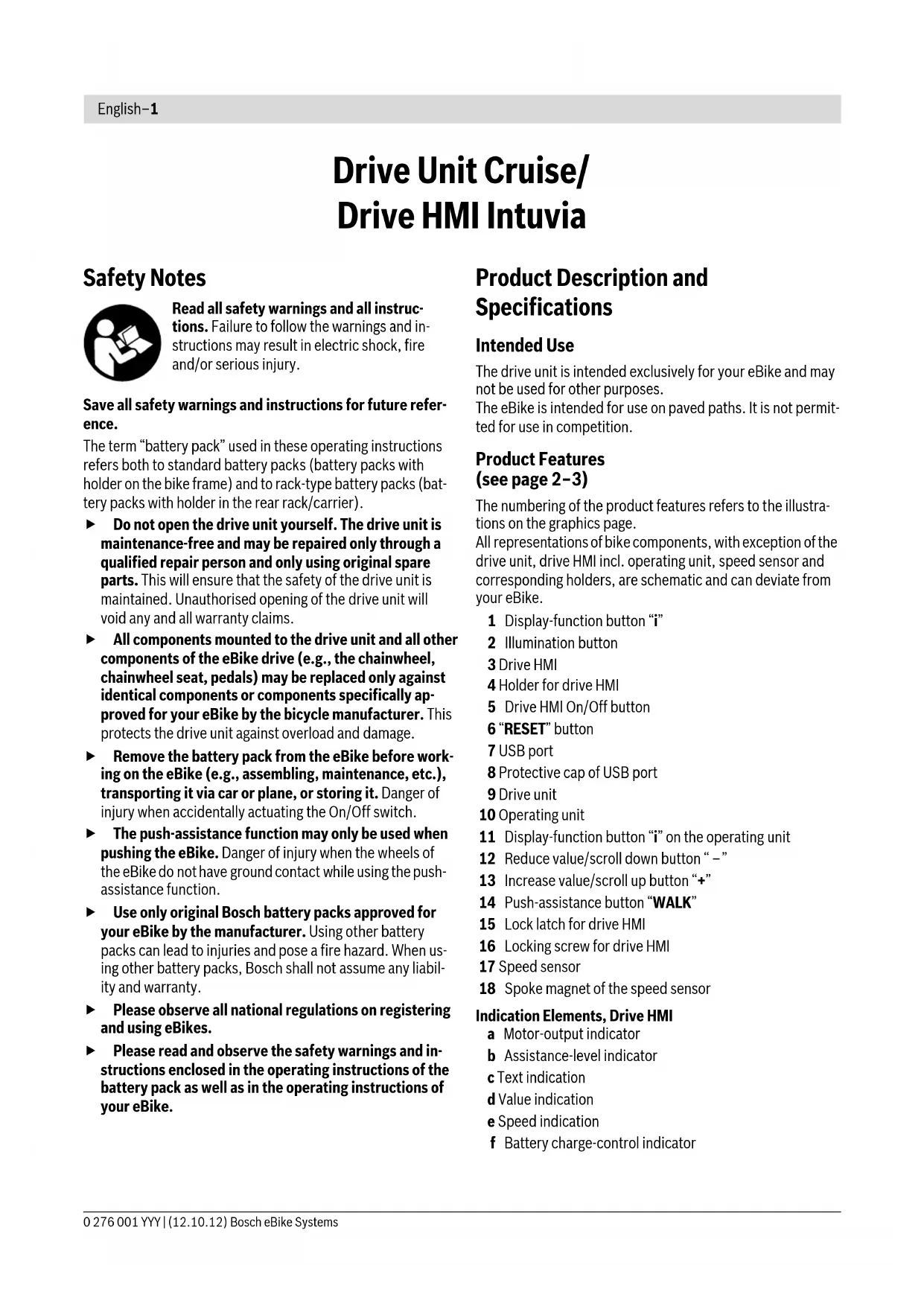
Product Features (see page 2-3)
The numbering of the product features refers to the illustrations on the graphics page.
All representations of bike components, with exception of the drive unit, drive HMI incl. operating unit, speed sensor and corresponding holders, are schematic and can deviate from your eBike.
1 Display-function button "i"
2 Illumination button
3 Drive HMI
4 Holder for drive HMI
5 Drive HMI On/Off button
6 "RESET" button
7 USB port
8 Protective cap of USB port
9 Drive unit
10 Operating unit
11 Display-function button "i" on the operating unit
12 Reduce value/scroll down button “ – ”
13 Increase value/scroll up button “+”
14 Push-assistance button "WALK"
15 Lock latch for drive HMI
16 Locking screw for drive HMI
17 Speed sensor
18 Spoke magnet of the speed sensor
Indication Elements, Drive HMI
a Motor-output indicator
b Assistance-level indicator
c Text indication
d Value indication
e Speed indication
f Battery charge-control indicator
Technical Data
| Drive Unit Drive Unit Cruise | ||
| Article number | 0 275 007 006/0 275 007 007 | |
| Power output | W 250 | |
| Output torque, max. | Nm 50 | |
| Rated voltage | V36 | |
| Operating temperature | °C-5...+40 | |
| Storage temperature | °C-10...+50 | |
| Degree of protection | IP 54 (dust and splash water protected) | |
| Weight, approx. | kg | 4 |
| Drive HMI Intuvia | ||
| Article number | 1 270 020 903 | |
| Max. charging current, USB connection. | mA 500 | |
| Charging voltage, USB connection | V5 | |
| Operating temperature | °C-5...+40 | |
| Storage temperature | °C-10...+50 | |
| Degree of protection | IP 54 (dust and splash water protected) | |
| Weight, approx. | kg 0.15 | |
| Lighting* | ||
| Rated voltage | V--- | 6 |
| Power output | ||
| – Front light | W | 2.7 |
| – Rear light | W | 0.3 |
| * Not possible via the eBike battery pack in all country-specific versions, depending on the statutory regulations | ||
Assembly
Inserting and Removing the Battery Pack
For inserting and removing the battery pack in/from the eBike, please read and observe the battery pack operating instructions.
Inserting and Removing the Drive HMI (see figure A)
To insert the drive HMI 3, slide it from the front into the holder 4.
To remove the drive HMI 3, press the lock latch 15 and slide the drive HMI toward the front out of the holder 4.
▶ Remove the drive HMI when parking the eBike, so that the drive cannot be used by unauthorised persons.
Without the drive HMI, the eBike system cannot be switched on.
The drive HMI can also be secured in the holder against removing. For this, remove the holder 4 from the handlebar. Insert the drive HMI into the holder. Screw the locking screw 16 from below into the corresponding thread in the holder. Mount the holder onto the handlebar again.
Checking the Speed Sensor (see figure B)
The speed sensor 17 and its spoke magnet 18 must be mounted in such a manner that the spoke magnet, after a turn of the wheel, moves past the speed sensor with a clearance of at least 5 mm, yet no more than 17 mm.
Note: If the clearance between speed sensor 17 and spoke magnet 18 is too small or too large, or if the speed sensor 17 is not properly connected, the speed indication e will fail, and the eBike drive will operate in emergency mode.
In this case, loosen the screw of the spoke magnet 18 and fasten the spoke magnet to the spoke in such a manner that it runs past the mark of the speed sensor at the correct clearance. When the speed is still not being indicated in the speed indication e after this, please refer to an authorised bicycle dealer.
Operation
Initial Operation
Requirements
The eBike system can only be activated when the following requirements are met:
- A sufficiently charged battery pack is inserted (see operating instructions of the battery pack).
- The drive HMI is properly inserted in the holder (see "Inserting and Removing the Drive HMI", page English - 2).
- The drive HMI is properly connected (see "Checking the Speed Sensor", page English–2).
Switching the eBike System On/Off
Options for switching on the eBike system:
- If the drive HMI is already switched on when inserting it in the holder, the eBike system is automatically switched on.
- When the drive HMI and the battery pack are inserted, briefly press the On/Off button 5 of the drive HMI once.
- When the drive HMI is inserted, press the On/Off button of the battery pack (see battery pack operating instructions).
Note: When switching on the eBike system, the pedals of the eBike must not be subject to load, as otherwise the motor output capacity will be limited. The error message "Release pedal" is displayed in text indication c.
If the eBike system was inadvertently switched on with load applied to the pedals, then switch it off and then on again without load.
The drive is activated as soon as you step into the pedals (except when in push-assistance mode, see "Switching the Push-assistance mode On/Off", page English - 4). The motor output depends on the settings of the drive HMI.
As soon as you stop pedaling when in normal operation, or as soon as you have reached a speed of 25 km/h, the assistance from the eBike drive is switched off. The drive is automatically re-activated as soon you start pedaling again and the speed is below 25 km/h.
Options for switching off the eBike system:
- Press the On/Off button 5 of the drive HMI.
- Switch the battery pack off by its On/Off button (see battery pack operating instructions.)
- Remove the drive HMI out of its holder.
When no power output of the drive is requested for approx. 10 minutes (e.g., because the eBike is parked) and no button of the drive HMI or operating unit is pressed, the battery pack automatically switches off to save energy.
Indications and Settings of the Drive HMI
Power Supply of the Drive HMI
When the drive HMI is inserted in holder 4, a sufficiently charged battery pack is inserted in the eBike and the eBike system is switched on, power is supplied to the drive HMI via the eBike's battery pack.
When the drive HMI is removed from holder 4, it is supplied with power via an internal battery pack. If the internal battery pack is low when switching on the drive HMI, "Attach to bike" is displayed for 3 s in text indication c. Afterwards, the drive HMI switches off again.
To recharge the internal battery pack, insert the drive HMI into the holder 4 (a battery pack must be inserted in the eBike). Switch the eBike battery pack off by its On/Off button (see battery pack operating instructions).
The drive HMI can also be charged via USB connection. Open protective cap 8 for this. Using a matching USB cable, connect the USB port 7 of the drive HMI to a commercially available USB charger or to the USB port of a computer; (5 V charging voltage; max. 500 mA charging current). "USB connected" is displayed in text indication c of the drive HMI.
Switching the drive HMI On/Off
To switch on the drive HMI, briefly press the On/Off button 5. When the internal battery pack is sufficiently charged, the drive HMI can also be switched on when not inserted in the holder.
To switch off the drive HMI, press the On/Off button 5.
When the drive HMI is not inserted in the holder and no button is pressed, it automatically switches off after 1 min to save energy.
Battery Charge-control Indicator
The battery-pack charge-control indicator f indicates the charge condition of the eBike's battery pack, and not the charge condition of the drive HMI's internal battery pack. The charge condition of the eBike's battery pack can also be read from the battery pack's LEDs.
On indicator f, each bar of the battery pack symbol is equivalent to a capacity of approx. 20 %:

100 % to 80 % capacity

20 % to 5 % capacity; the battery pack should be recharged.

Less than 5 % capacity; drive assistance is no longer possible. The LEDs of the charge-control indicator on the battery pack go out.
When the eBike lighting is powered via the battery pack (country-specific), the capacity upon first indication of the empty battery pack symbol will be sufficient for approx.
2 hours of lighting. When the symbol begins to flash, the lighting will continue to operate only for a short period.
When the drive HMI is removed from holder 4, the last indicated battery pack charge condition is stored.
Setting the Assistance Level
The level of assistance of the eBike drive when pedaling can be adjusted via the drive HMI. The assistance level can be changed anytime, even during riding.
Note: For individual versions, it is possible that the assistance level is pre-set and cannot be changed. It is also possible that less assistance levels are available for selection than listed here.
The following assistance levels (max.) are available:
- “OFF”: The drive is switched off, the eBike can be operated as a normal bicycle through pedaling.
- “ECO”: Effective assistance at maximum efficiency for maximum cruising range
- “TOUR”: Uniform assistance, for touring with long cruising range
- "SPORT": Powerful assistance for sportive riding off road as well as for urban traffic
- “TURBO”: Maximum assistance, supporting highest cadence for sportive riding
To increase the assistance level, press the “+” button 13 on the operating unit until the desired assistance level is displayed in indicator b; to decrease the assistance level, press the “-” button 12.
The requested motor output is displayed in indicator a. The maximum motor output depends on the selected assistance level.
| Assistance Level Motor Output* | |
| Derailleur Gear Hub | |
| “ECO” | 30 % 30 % |
| “TOUR” | 100 % 90 % |
| “SPORT” | 170 % 150 % |
| “TURBO” | 250 % 200 % |
| * The motor output can vary for individual versions. | |
When the drive HMI is removed from holder 4, the last indicated assistance level is stored; the motor-output indicator a remains empty.
Switching the Push-assistance mode On/Off
The push-assistance feature makes it easier to push the eBike. The speed in this function depends on the set gear and cannot exceed 6 km/h (max.). The lower the set gear, the lower the speed in the push-assistance function (at full output).
The push-assistance function may only be used when pushing the eBike. Danger of injury when the wheels of the eBike do not have ground contact while using the push-assistance function.
To activate the push-assistance function, press and hold the "WALK" button 14 on the operating unit. The eBike's drive is activated.
The push-assistance function is switched off as soon as any of the following incidents occur:
- You release the "WALK" button 14,
- You pedal in forward or quickly in backward direction,
- The wheels of the eBike are blocked (e. g., through braking or running against an obstruction),
- Your speed exceeds 6 km/h.
Switching the Lighting On/Off
Depending on country-specific regulations, two lighting versions are possible:
- The front light, rear light and display backlight can be switched on and off at the same time via the drive HMI. In this version, "Lights on" is displayed for approx. 1 s in text indication c when switching on, and "Lights off" when switching off.
- Only the display backlight can be switched on and off; the front and rear light of the eBike are independent of the drive HMI.
For both versions, the lighting is switched on and off by pressing button 2.
Speed and Distance Indication
The speed indication e always displays the current speed.
The following functions are available in the function indication (combination of text indication c and value indication d):
- “Range”: Estimated range of the available battery-pack charge (for constant conditions such as assistance level, route profile, etc.)
- “Distance”: Distance covered since the last reset
- “Trip time”: Trip time since the last reset
- "Avg. Speed": Average speed achieved since the last reset
- "Max. Speed": Maximum speed achieved since the last reset
- "Clock": Current time
To switch between the indication functions, press the “i” button 1 on the drive HMI or the “i” button 11 on the operating unit until the desired function is displayed.
To reset "Distance", "Trip time" and "Avg. Speed", switch to any of the three functions and then press and hold the "RESET" button 6 until the indication is set to zero. This also resets the values of the other two functions.
To reset the "Max. Speed", switch to this function and then press and hold the "RESET" button 6 until the indication is set to zero.
When the drive HMI is removed from the holder 4, all function values remain stored and can be viewed.
Displaying/Adapting Basic Settings
The basic settings can be displayed and changed no matter if the drive HMI is in the holder 4 or not.
To access the basic settings menu, press and hold the "RESET" button 6 and the "i" button 1 until "Configuration" is displayed in text indication c.
To switch between the basic settings, press the "i" button 1 on the drive HMI until the desired basic setting is displayed. When the drive HMI is inserted in holder 4, you can also press the "i" button 11 on the operating unit.
To change the basic settings, press the On/Off button 5 next to the “-” indication to decrease the value or scroll down, or the illumination button 2 next to the “+” indication to increase the value or scroll up.
When the drive HMI is inserted in holder 4, you can also change the values with the “-” button 12 or the “+” button 13 on the operating unit.
To exit the function and store a changed setting, press the "RESET" button 6 for 3 s.
The following basic settings are available:
- “unit km/mi”: The speed and distance can be displayed either in kilometres or miles.
- “time format”: The time can be displayed either in the 12 hour or 24 hour format.
- “clock”: The current time can be set here. Pressing and holding the setting buttons fast-forwards the setting speed.
- “English”: The language for text indication can be changed. The available languages are German, English, French, Spanish, Italian and Dutch.
- “odometer”: Indicates the total distance travelled with the eBike (not changeable).
- “power-on hours”: Indicates the total travel duration with the eBike (not changeable).
Error Code Indication
The components of the eBike system are continuously and automatically monitored. When an error is detected, the respective error code is indicated in text indication c.
To return to the standard indication, press any button on the drive HMI 3 or on the operating unit 10.
Depending on the type of error, the drive is automatically shut off if required. Continued travel without assistance from the drive is possible at any time. However, have the eBike checked before attempting new trips.
▶ Have all inspections and repairs carried out only by an authorised bicycle dealer. When an error is still displayed despite corrective measures, please also refer to an authorised bicycle dealer.
| Code Cause Corrective Measure | ||
| 100 | Internal error of the drive unit | Have the drive unit checked |
| 101 | Connection problem of the drive unit | Have connections and contacts checked |
| 102 | Error of the speed sensor | Have the speed sensor checked |
| 103* | Connection problem of the lighting system | Have connections and contacts checked |
| 104 | Connection problem of the drive HMI | Have connections and contacts checked |
| 105 | Temperature of the drive unit too high (above 40 °C) | Allow the drive unit to cool down. Continued travel without assistance from the eBike drive is possible and speeds up the cooling of the drive unit. |
| 200 | Internal electronic error of battery pack | Have battery pack checked |
| 201 | Temperature of the battery pack too high (above 40 °C) | Allow the battery pack to cool down. Continued travel without eBike drive is possible and speeds up the cooling of the battery pack. |
| 202 | Temperature of the battery pack too low (below -10 °C) | Allow the battery pack to warm up slowly in a warm location. |
| 203 | Connection problem of battery pack | Have connections and contacts checked |
| 204 | Incorrect polarity of battery pack | Charge the battery pack with the original Bosch charger as described in the operating instructions. |
| 410 | One or more buttons of the drive HMI are blocked. | Check if any buttons are blocked, e.g. from dirt or debris. Clean the buttons, if required. |
| 414 | Connection problem of the operating unit | Have connections and contacts checked |
| 418 | One or more buttons of the operating unit are blocked. | Check if any buttons are blocked, e.g. from dirt or debris. Clean the buttons, if required. |
| 422 | Connection problem of the drive unit | Have connections and contacts checked |
| 423 | Connection problem of battery pack | Have connections and contacts checked |
| 424 | Communication error among the components | Have connections and contacts checked |
| 430 | Internal battery pack of drive HMI empty | Charge drive HMI (in holder or via USB port) |
| 490* only for eBike lighting via battery pack (country-specific) | Internal error of the drive HMI | Have the drive HMI checked |
Power Supply of External Devices via USB Connection
With the USB connection, it is possible to operate and charge most devices whose power supply is possible via USB (e.g., various mobile phones).
Prerequisite for the charging is that the drive HMI and a sufficiently charged battery pack are inserted in the eBike.
Open the protective cap 8 of the USB port on the drive HMI. Using a matching USB cable, connect the USB port of the external device to the USB port 7 of the drive HMI.
Notes on Riding with the eBike System
When does the eBike Drive Operate?
The eBike drive supports you when riding, as long as you step into the pedals. Without pedaling, there is no assistance. The
motor output always depends on the amount of your pedaling power.
When applying less pedaling power, the assistance or support will be lower than when applying a lot of pedaling power. This applies independent of the assistance Level.
The eBike drive automatically switches off at speeds in excess of 25 km/h. When the speed falls below 25 km/h, the drive is automatically available again.
An exception applies for the push-assistance function, in which the eBike can be pushed at low speed without pedaling. The eBike can also be ridden as a normal bicycle without assistance at any time, by either switching off the eBike system or setting the assistance level to "OFF". The same applies when the battery pack is empty.
Interaction of the eBike System with the Bicycle Gears
The bicycle gears should be used as with a normal bicycle, even with eBike drive (please observe the operating instructions of your eBike).
Independent of the type of gearing, it is recommended to briefly interrupt the pedaling while changing gears. This makes changing gears easier and reduces the wear of the drive train.
By selecting the right gear, you can increase the speed and range with the same pedaling effort.
Gathering First Experience
It is recommended to gather first experience with the eBike away from roads with heavy traffic.
Try out the different assistance levels. As soon as you feel safe, you can participate in traffic with the eBike as with any other bicycle.
Test the operating range of your eBike under different conditions before planning longer and more challenging rides.
Influences on the Operating Range
The operating range depends on many factors, such as:
- Assistance level,
- Gear-switching behaviour,
– Bicycle tyres and tyre pressure,
– Age and condition of the battery pack, - Route profile (inclines) and road or path conditions (road or path surface),
- Head wind and ambient temperature,
- Weight of the eBike, rider and equipment/luggage
For these reasons, it is not possible to predict an accurate operating range before starting your ride. General rules:
- For the same motor output of the eBike drive: The less power or force that you have to bring about to reach a certain speed (e.g. through optimal use of the gears), the less energy the eBike drive will consume, and the greater the range for a battery-pack charge.
- The higher the assistance level under otherwise same conditions, the lower the range.
Careful Handling of the eBike
Please observe the operating and storage temperatures of the eBike components. Protect the drive unit, drive HMI and battery pack against extreme temperatures (e.g. from intense sunlight without adequate ventilation). The components (especially the battery pack) can become damaged through extreme temperatures.
Maintenance and Service
Maintenance and Cleaning
Keep all components of your eBike clean, especially the battery-pack contacts and corresponding holder contacts. Clean them carefully with a soft, damp cloth.
All components including the drive unit may not be immersed in water or cleaned with a high-pressure cleaner.
For service or repairs on the eBike, please refer to an authorised bicycle dealer.
After-sales Service and Customer Assistance
In case of questions concerning the eBike system and its components, please refer to an authorised bicycle dealer.
For contact data of authorised bicycle dealers, please refer to www.bosch-ebike.com
Transport
The battery packs are subject to the Dangerous Goods Legislation requirements. Private users can transport battery packs by road without further requirements.
When being transported by commercial users or third parties (e.g. via air transport or forwarding agency), special requirements on packaging and labelling must be observed (e.g. ADR Regulations). For preparation of the item being shipped, an expert for hazardous material can be consulted as required.
Dispatch battery packs only when the housing is undamaged. Tape or mask off open contacts and pack up the battery pack in such a manner that it cannot move around in the packaging. Please also observe possibly more detailed national regulations.
In case of questions concerning transport of the battery packs, please refer to an authorised bicycle dealer. Bicycle dealers can also provide suitable transport packaging.
Disposal

The drive unit, drive HMI (incl. operating unit), battery pack, speed sensor, accessories and packaging should be sorted for environmental-friendly recycling.
Do not dispose of eBikes and their components into household waste!
Only for EC countries:
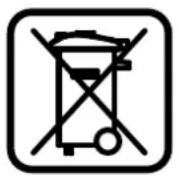
According to the European Guideline 2002/96/EC, electrical devices/tools that are no longer usable, and according to the European Guideline 2006/66/EC, defective or used battery packs/batteries, must be collected separately and disposed of in an environmentally correct manner.
The integrated battery pack in the drive HMI may only be removed for disposal. Opening the housing shell can damage or destroy the drive HMI.
Please return battery packs that are no longer usable to an authorised bicycle dealer.
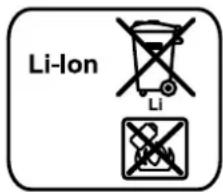
Li-ion:
Please observe the instructions in section "Transport", page English-6.
Subject to change without notice.
Lithium ion battery pack PowerPack
Safety Notes


Read all safety warnings and all instructions. Failure to follow the warnings and instructions may result in electric shock, fire and/or serious injury.
Save all safety warnings and instructions for future reference.
The term “battery pack” used in these operating instructions refers both to standard battery packs (battery packs with holder on the bike frame) and to rack-type battery packs (battery packs with holder in the rear rack/carrier), except when explicitly referring to the design type.
▶ Remove the battery pack from the eBike before working on the eBike (e.g., assembling, maintenance, etc.), transporting it via car or plane, or storing it. Danger of injury when accidentally actuating the On/Off switch.
▶ Do not open the battery pack. Danger of short-circuiting. Opening the battery pack voids any and all warranty claims.

Protect the battery pack against heat (e. g., also against continuous intense sunlight), fire and immersing into water. Danger of explosion.
▶ Keep the battery pack not being used away from paper clips, coins, keys, nails, screws or other small metal objects, that can make a connection from one terminal to another. Shorting the battery-pack terminals together may cause burns or a fire. For short-circuiting damage caused in this manner, any and all warranty claims through Bosch shall be invalid.
▶ Under abusive conditions, liquid may be ejected from the battery pack. Avoid contact. If contact accidentally occurs, flush with water. If liquid contacts eyes, additionally seek medical help. Liquid ejected from the battery pack may cause skin irritations or burns.
▶ Vapours can escape in case of damage and improper use of the battery pack. Provide for fresh air and seek medical attention in case of complaints. The vapours can irritate the respiratory system.
▶ Charge the battery pack only with original Bosch battery chargers. When using non-original Bosch chargers, the danger of fire cannot be excluded.
▶ Use the battery pack only together with eBikes that have an original Bosch eBike drive system. This is the only way to protect the battery pack against dangerous overload.
▶ Use only original Bosch battery packs approved for your eBike by the manufacturer. Using other battery packs can lead to injuries and pose a fire hazard. When using other battery packs, Bosch shall not assume any liability and warranty.
▶ Please read and observe the safety warnings and instructions enclosed in the operating instructions of the charger and drive unit/drive HMI (Human Machine Interface), as well as in the operating instructions of your eBike.
Product Description and Specifications
Product Features (see page 4-5)
The numbering of the product features refers to the illustrations on the graphics pages.
All representations of bike components, with exception of the battery packs and their holders, are schematic and can deviate from your eBike.
19 Holder of the rack-type battery pack
20 Rack-type battery pack
21 Operation and charge-control indicator
22 On/Off button
23 Key of the battery pack lock
24 Battery-pack lock
25 Upper holder of the standard battery pack
26 Standard battery pack
27 Bottom holder of the standard battery pack
28 Carrying strap
29 Battery charger
Technical Data
| Lithium ion battery pack PowerPack 300 PowerPack 400 | ||
| Article number | ||
| - Standard battery pack, black | 0 275 007 500 | 0 275 007 503 |
| - Standard battery pack, white | 0 275 007 501 | 0 275 007 504 |
| - Rack-type battery pack | 0 275 007 502 | 0 275 007 505 |
| Rated voltage | V= 36 36 | |
| Rated capacity | Ah8.2 11 | |
| Energy | Wh300 400 | |
| Operating temperature | °C-10...+40 -10...+40 | |
| Storage temperature | °C-10...+60 -10...+60 | |
| Allowable charging temperature range | °C0...+40 0...+40 | |
| Weight, approx. | kg 2.5 2.5 | |
| Degree of protection | IP 54 (dust and splash water protected) | IP 54 (dust and splash water protected) |
Assembly
▶ Place down the battery pack only on clean surfaces. In particular, avoid soiling the charge socket and the contacts, e. g. by means of sand or ground.
Checking the Battery Pack Before Using for the First Time
Check the battery pack before charging it or using it with your eBike for the first time.
For this, press the On/Off button 22 to switch on the battery pack. When no LED of the charge-control indicator 21 lights up, the battery pack may be damaged.
When at least one, but not all LEDs of the charge-control indicator 21 is lit, then fully charge the battery pack before using for the first time.
▶ Do not charge a damaged battery pack and do not use it. Please refer to an authorised bicycle dealer.
Charging the Battery Pack
▶ Use only the charger provided with your eBike or an identical original Bosch charger. Only this charger is matched to the lithium-ion battery pack used in your eBike.
Note: The battery pack is supplied partially charged. To ensure full battery pack capacity, completely charge the battery pack in the charger before using for the first time.
The battery pack must be removed from the eBike for charging.
For charging the battery pack, read and observe the operating instructions of the charger.
The battery pack can be charged any time without reducing the service life. Interrupting the charging procedure does not cause damage to the battery pack.
The battery pack is equipped with a temperature control indicator, which enables charging only within a temperature range between 0 °C and 40 °C.
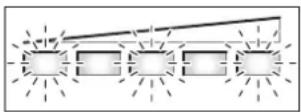
When the battery pack is not within the charging-temperature range, three LEDs of the charge-control indicator 21
flash. Disconnect the battery pack from the charger until its temperature has adjusted.
Do not connect the battery pack to the charger until it has reach the allowable charging temperature.
Charge-control Indicator
When the battery pack is switched on, the five green LEDs of the charge-control indicator 21 indicate the charge condition of the battery pack.
In this, each LED indicates approx. 20 % capacity. When the battery pack is completely charged, all five LEDs light up.
Additionally, the charge condition of the switched on battery pack is indicated on the drive HMI. Read and observe the operating instructions of the drive unit and the drive HMI.
When the capacity of the battery pack is below 5 %, all LEDs of charge-control indicator 21 on the battery pack go out; however, the drive HMI does provide an additional indication function.
Inserting and Removing the Battery Pack (see figures C-D)
▶ Always switch the battery pack off when inserting or removing it from the holder.
In order for the battery pack to be inserted, the key 23 must be inserted into the lock 24 and the lock must be unlocked.
To insert the standard battery pack 26, place it via the contacts onto the bottom holder 27 on the eBike. Pivot the battery pack to the stop into the upper holder 25.
To insert the rack-type battery pack 20, slide it with the contacts facing ahead until it engages in the holder 19 of the rear rack/carrier.
Check if the battery pack is tightly seated. Always lock the battery pack with lock 24, as otherwise the lock can open and the battery pack could fall out of the holder.
After locking, always remove the key 23 from the lock 24. This prevents the key from falling out and the battery pack from being removed from unauthorised persons when the eBike is parked.
To remove the standard battery pack 26, switch it off and unlock the lock with the key 23. Pivot the battery pack out of the upper holder 25 and pull it by the carrying strap 28 out of the bottom holder 27.
To remove the rack-type battery pack 20, switch it off and unlock the lock with the key 23. Pull the battery pack out of the holder 19.
Operation
Initial Operation
▶ Use only original Bosch battery packs approved for your eBike by the manufacturer. Using other battery packs can lead to injuries and pose a fire hazard. When using other battery packs, Bosch shall not assume any liability and warranty.
Switching On and Off
Switching the battery pack on is one of the possibilities to start the eBike system. Read and observe the operating instructions of the drive unit and the drive HMI.
Before switching on the battery pack or the eBike system, check that the lock 24 is locked.
Note: When switching on the eBike system, the pedals of the eBike may not be subject to load, as otherwise the output capacity of the drive will be limited.
To switch on the battery pack, press the On/Off button 22. The LEDs of indicator 21 light up and at the same time indicate the charge condition.
Note: When the battery-pack capacity is below 5 %, none of the LEDs of charge-control indicator 21 will light up. Only the drive HMI will indicate if the eBike system is switched on.
To switch off the battery pack, press the On/Off button 22 again. The LEDs of indicator 21 go out. This also switches off the eBike system.
When no power output of the eBike drive is requested for approx. 10 minutes (e.g., because the eBike is parked) and no button of the drive HMI or operating unit is pressed, the eBike system and thus the battery pack automatically switch off to save energy.
The battery pack is protected against deep discharging, overcharging, overheating and short-circuiting through the “Electronic Cell Protection (ECP)”. In case of hazardous situations, a protective circuit automatically switches off the battery pack.
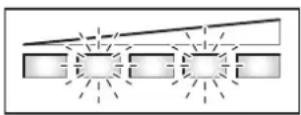
When a defect of the battery pack is detected, two LEDs of the charge-control indicator 21 flash. In this case, please refer
to an authorised bicycle dealer.
Notes for Optimum Handling of the Battery Pack
The battery-pack life can be prolonged when being properly maintained and especially when being operated and stored at the right temperatures.
With increasing age, however, the battery-pack capacity will diminish, even when properly maintained.
A significantly reduced operating period after charging indicates that the battery pack is worn out and must be replaced. You can replace the battery pack yourself.
In case the carrying strap 28 of the standard battery pack should be defective, please have it replaced by a bicycle dealer.
Recharging the Battery Pack prior to and during Storage
When not using the battery pack for a longer period, charge it to approx. 60% (3 to 4 LEDs lit on the charge-control indicator 21).
Check the charge condition after 6 months. When only one LED of the charge-control indicator 21 lights up, recharge the battery pack again approx. 60 %.
Note: When the battery pack is stored discharged (empty) for longer periods, it can become damaged despite the low self-discharging and the battery-pack capacity may be strongly reduced.
It is not recommended to have the battery pack connected permanently to the charger.
Storage Conditions
Store the battery pack in a dry, well-ventilated location. Protect the battery pack against moisture and water. Under unfavourable weather conditions, it is recommended e.g. to remove the battery pack from the eBike and store it in an enclosed location until being used again.
The battery pack can be stored at temperatures between -10°C and +60°C . For a long battery-pack life, however, storing the battery pack at a room temperature of approx. 20°C is of advantage.
Take care that the maximal storage temperature is not exceeded. As an example, do not leave the battery pack in a vehicle in summer and store it out of direct sunlight.
Maintenance and Service
Maintenance and Cleaning
Keep the battery pack clean. Clean the battery pack carefully with a soft, damp cloth. The battery pack may not be immersed in water or cleaned with a water jet.
When the battery pack is no longer operative, please refer to an authorised bicycle dealer.
After-sales Service and Customer Assistance
In case of questions concerning the battery packs, please refer to an authorised bicycle dealer.
▶ Note down the manufacturer and the number of the key 23. In case of loss of the keys, please refer to an authorised bicycle dealer. Please provide the name of the manufacturer and the number of the key.
For contact data of authorised bicycle dealers, please refer to www.bosch-ebike.com
Transport
The battery packs are subject to the Dangerous Goods Legislation requirements. Private users can transport battery packs by road without further requirements.
When being transported by commercial users or third parties (e.g. via air transport or forwarding agency), special requirements on packaging and labelling must be observed (e.g. ADR Regulations). For preparation of the item being shipped, an expert for hazardous material can be consulted as required.
Dispatch battery packs only when the housing is undamaged. Tape or mask off open contacts and pack up the battery pack in such a manner that it cannot move around in the packaging. Please also observe possibly more detailed national regulations.
In case of questions concerning transport of the battery packs, please refer to an authorised bicycle dealer. Bicycle dealers can also provide suitable transport packaging.
Disposal

Battery packs, accessories and packaging should be sorted for environmental-friendly recycling.
Do not dispose of the battery packs into household waste!
Only for EC countries:
According to the European Guideline 2002/96/EC, electrical devices/tools that are no longer usable, and according to the European Guideline 2006/66/EC, defective or used battery packs/batteries, must be collected separately and disposed of in
an environmentally correct manner.
Please return battery packs that are no longer usable to an authorised bicycle dealer.
Li-ion:
Please observe the instructions in section "Transport", page English-11.
Subject to change without notice.
Charger
Safety Notes


Read all safety warnings and all instructions. Failure to follow the warnings and instructions may result in electric shock, fire and/or serious injury.
Save all safety warnings and instructions for future reference.
The term “battery pack” used in these operating instructions refers both to standard battery packs (battery packs with holder on the bike frame) and to rack-type battery packs (battery packs with holder in the rear rack/carrier).

Keep the charger away from rain or moisture. The penetration of water into a battery charger increases the risk of an electric shock.
▶ Only charge eBike-approved Bosch lithium-ion battery packs. The battery-pack voltage must match the battery-pack charging voltage of the charger. Otherwise there is danger of fire and explosion.
- Keep the battery charger clean. Contamination can lead to danger of an electric shock.
Before each use, check the battery charger, cable and plug. If damage is detected, do not use the battery charger. Never open the battery charger yourself. Have repairs performed only by a qualified technician and only using original spare parts. Damaged battery chargers, cables and plugs increase the risk of an electric shock.
▶ Do not operate the battery charger on easily inflammable surfaces (e.g., paper, textiles, etc.) or surroundings. The heating of the battery charger during the charging process can pose a fire hazard.
▶ Vapours can escape in case of damage and improper use of the battery pack. Provide for fresh air and seek medical attention in case of complaints. The vapours can irritate the respiratory system.
▶ Supervise children. This will ensure that children do not play with the charger.
Children or persons that owing to their physical, sensory or mental limitations or to their lack of experience or knowledge, are not capable of securely operating the charger, may only use this charger under supervision or after having been instructed by a responsible person. Otherwise, there is danger of operating errors and injuries.
▶ Please read and observe the safety warnings and instructions enclosed in the operating instructions of the battery pack and drive unit/drive HMI, as well as in the operating instructions of your eBike.
▶ A short version of important safety warnings in English, French and Spanish with the following content can be found on the bottom side of the charger (marked with number 33 in the representation on the graphics page):
- For safe operation see manual. Risk of electric shock.
– Dry location use only.
- Charge only batteries of the Bosc h eBike Systems. Other batteries may burst causing personal damage.
- Do not replace the plug assembly as risk of fire or electric shock may result.
Product Description and Specifications
Product Features (see page 6-7)
The numbering of the product features refers to the illustration of the battery charger on the graphics page.
20 Rack-type battery pack
21 Battery charge-control indicator
26 Standard battery pack
29 Battery charger
30 Charger socket
31 Plug-in connector
32 Ventilation openings
33 Safety warnings, charger
34 Charge connector
35 Socket for charge connector
Technical Data
| Battery Charger Charger | |
| Article number | 0 275 007 905 |
| Rated voltage | V~ 207 -264 |
| Frequency | Hz 47 -63 |
| Output voltage | V42 |
| Charging current | A 4 |
| Allowable charging temperature range | °C0...+40 |
| The values given are valid for a nominal voltage [U] of 230 V. For different voltages and models for specific countries, these values can vary. | |
Battery Charger Charger
| Charging time | ||
| - PowerPack 300 | h | 2.5 |
| - PowerPack 400 | h | 3.5 |
| Number of battery cells | 10 -80 | |
| Operating temperature | °C-10...+75 | |
| Storage temperature | °C-20...+70 | |
| Weight according to EPTA-Procedure 01/2003 | kg 0.8 | |
Degree of protection IP 40
The values given are valid for a nominal voltage [U] of 230 V. For different voltages and models for specific countries, these values can vary.
Operation
▶ Place down the battery pack only on clean surfaces. In particular, avoid soiling the charge socket and the contacts, e.g. by means of sand or ground.
Initial Operation
Connecting the Charger (see figures E-F)
▶ Observe the mains voltage! The voltage of the power supply must correspond with the data given on the name-plate of the battery charger. Battery chargers marked with 230 V can also be operated with 220 V.
Plug the charger plug 31 of the power cord into the charger socket 30 of the charger.
Connect the mains cable (country-specific) to the mains supply.
Switch the battery pack off and remove it from the holder of the eBike. For this, read and observe the operating instructions of the battery pack.
Insert the charger plug 34 of the battery charger into the socket 35 on the battery pack.
Charging Procedure
The charging procedure begins as soon as the charger is connected with the battery pack and the mains supply.
Note: The charging procedure is only possible when the temperature of the battery pack is within the allowable charging-temperature range.
During the charging procedure, the LEDs of charge-control indicator 21 on the battery pack light up. Each continuously lit LED is equivalent to a charge capacity of approx. 20%. The flashing LED indicates the charging of the next 20%.
▶ Use caution when touching the charger during the charging procedure. Wear protective gloves. Especially in high ambient temperatures, the charger can heat up considerably.
Note: Pay attention that the charger is well ventilated during the charging procedure and that the ventilation openings 32 on both sides are not clogged or contaminated.
The battery pack is completely charged when all five LEDs of indicator 21 light up continuously. The charge procedure is automatically ended.
Disconnect the charger from the mains supply and the battery pack from the charger.
When disconnecting the battery pack from the charger, the battery pack is automatically switched off.
The battery pack can now be inserted into the eBike.
Troubleshooting – Causes and Corrective Measures
Cause Corrective Measure
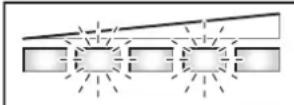 | Two LEDs of the battery pack flashing |
| Battery pack defective | Refer to an authorised bicycle dealer |
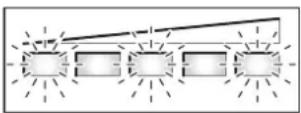 | Three LEDs of the battery pack flashing |
| Battery pack too warm or too cold | Disconnect the battery pack from the charger and allow to adjust to the ambient temperature until the charging-temperature range is reached.Do not connect the battery pack to the charger until it has reach the allowable charging temperature. |
No charging procedure possible (no indication on battery pack)
| Plug not inserted correctly | Check all plug connections |
| Contacts of battery pack soiled | Carefully clean the contacts of the battery pack |
| Ventilation openings 32 of the charger clogged or contaminated | Clean ventilation openings 32 and set up charger well ventilated |
| Socket outlet, cable or charger defective | Check mains voltage, have charger checked through bicycle dealer |
| Battery pack defective | Refer to an authorised bicycle dealer |
Maintenance and Service
Maintenance and Cleaning
If the charger should fail, please refer to an authorised bicycle dealer.
After-sales Service and Customer Assistance
In case of questions concerning the charger, please refer to an authorised bicycle dealer.
For contact data of authorised bicycle dealers, please refer to www.bosch-ebike.com
Disposal
Battery chargers, accessories and packaging should be sorted for environmental-friendly recycling.
Do not dispose of battery chargers into household waste!
Only for EC countries:
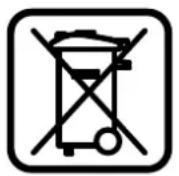
According to the European Guideline 2002/96/EC for Waste Electrical and Electronic Equipment and its implementation into national right, battery chargers that are no longer usable must be collected separately and disposed of in an environmental correct manner.
Subject to change without notice.
Ladeaggregat Charger
- DRIVE UNIT CRUISE | INTUVIA | POWERPACK 300 | POWERPACK 400 | CHARGER
- BOSCH
- PRODUCT DESCRIPTION AND SPECIFICATIONS
- INTENDED USE
- PRODUCT FEATURES (SEE PAGE 2-3)
- INDICATION ELEMENTS, DRIVE HMI
- ASSEMBLY
- INSERTING AND REMOVING THE BATTERY PACK
- INSERTING AND REMOVING THE DRIVE HMI (SEE FIGURE A)
- CHECKING THE SPEED SENSOR (SEE FIGURE B)
- OPERATION
- INITIAL OPERATION
- REQUIREMENTS
- SWITCHING THE EBIKE SYSTEM ON/OFF
- OPTIONS FOR SWITCHING OFF THE EBIKE SYSTEM
- INDICATIONS AND SETTINGS OF THE DRIVE HMI
- POWER SUPPLY OF THE DRIVE HMI
- SWITCHING THE DRIVE HMI ON/OFF
- BATTERY CHARGE-CONTROL INDICATOR
- SETTING THE ASSISTANCE LEVEL
- SWITCHING THE PUSH-ASSISTANCE MODE ON/OFF
- SWITCHING THE LIGHTING ON/OFF
- SPEED AND DISTANCE INDICATION
- DISPLAYING/ADAPTING BASIC SETTINGS
- ERROR CODE INDICATION
- POWER SUPPLY OF EXTERNAL DEVICES VIA USB CONNECTION
- NOTES ON RIDING WITH THE EBIKE SYSTEM
- WHEN DOES THE EBIKE DRIVE OPERATE
- INTERACTION OF THE EBIKE SYSTEM WITH THE BICYCLE GEARS
- GATHERING FIRST EXPERIENCE
- INFLUENCES ON THE OPERATING RANGE
- CAREFUL HANDLING OF THE EBIKE
- MAINTENANCE AND SERVICE
- MAINTENANCE AND CLEANING
- AFTER-SALES SERVICE AND CUSTOMER ASSISTANCE
- TRANSPORT
- DISPOSAL
- ONLY FOR EC COUNTRIES
- LI-ION
- LITHIUM ION BATTERY PACK POWERPACK
- SAFETY NOTES
- PRODUCT FEATURES (SEE PAGE 4-5)
- CHECKING THE BATTERY PACK BEFORE USING FOR THE FIRST TIME
- CHARGING THE BATTERY PACK
- CHARGE-CONTROL INDICATOR
- INSERTING AND REMOVING THE BATTERY PACK (SEE FIGURES C-D)
- SWITCHING ON AND OFF
- NOTES FOR OPTIMUM HANDLING OF THE BATTERY PACK
- RECHARGING THE BATTERY PACK PRIOR TO AND DURING STORAGE
- STORAGE CONDITIONS
- CHARGER
- PRODUCT FEATURES (SEE PAGE 6-7)
- CONNECTING THE CHARGER (SEE FIGURES E-F)
- CHARGING PROCEDURE
- TROUBLESHOOTING – CAUSES AND CORRECTIVE MEASURES
- LADEAGGREGAT CHARGER
Brand : Batavus
Model : Garda Ego
Category : Electric bike