Pro+ - Headphones TRITTON - Free user manual and instructions
Find the device manual for free Pro+ TRITTON in PDF.


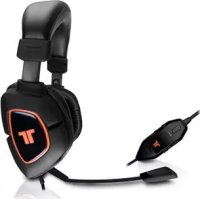
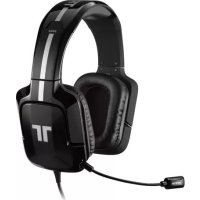
| Product Type | Surround audio headset |
| Brand | Tritton |
| Model | Pro+ |
| Audio technology | True 5.1 Surround |
| Microphone | Flexible and removable |
| Wired controller | Main volume, mute, acoustic field buttons (4 channels), SVM (Selectable Voice Monitoring), microphone mute |
| PC/Mac connectivity | USB + 4 3.5mm connectors (pink, orange, black, green) |
| Included adapter | PC 5.1 Analogue Audio Adapter |
| Console compatibility | Xbox 360 and PS3 (via optional Pro+ decoder not included) |
| Power supply | Via USB (PC or console port) |
| Warranty period | 2-year limited |
| Earpad material | Plush padded |
| Adjustable headband | Yes |
| SVM function | Allows you to hear your own voice in the headset |
| Individual channel adjustment | Yes, via acoustic field buttons (Green, Blue, White, Cyan, Red) |
| Care and cleaning | Clean with a dry, soft cloth. Do not expose to moisture or water. |
| Safety precautions | Avoid prolonged exposure to high volumes to prevent hearing loss. Do not use near water. Do not disassemble the device. |
| Repairability | Any repair must be carried out by qualified personnel. Contact Mad Catz support. |
| Package contents | Headset, wired controller, microphone, PC 5.1 adapter |
| General information | Made in China. Specifications may change without notice. Keep the manual for future reference. |
Frequently Asked Questions - Pro+ TRITTON
User questions about Pro+ TRITTON
0 question about this device. Answer the ones you know or ask your own.
Ask a new question about this device
Download the instructions for your Headphones in PDF format for free! Find your manual Pro+ - TRITTON and take your electronic device back in hand. On this page are published all the documents necessary for the use of your device. Pro+ by TRITTON.
USER MANUAL Pro+ TRITTON
Connecting the Microphone 3
In-line Controls 4
Connect To
PC/Mac 6
Pro+ Decoder Box (not included). 8
Warranty 10
Technical Support 11
Package Contents
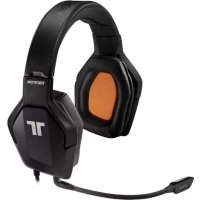
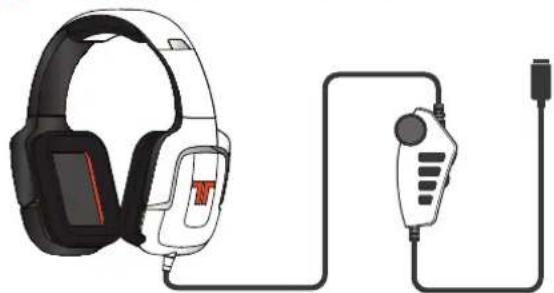
A 5.1 Surround Sound Headset / In-line Audio Controller
Detachable, Flexible Microphone
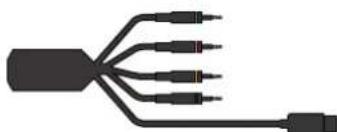
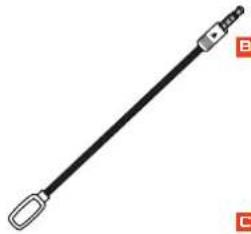
PC 5.1 Analog Audio Adapter
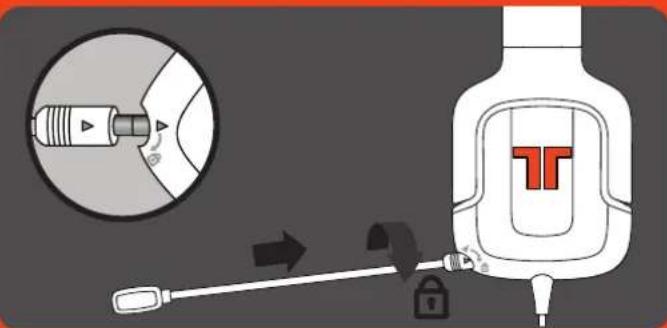
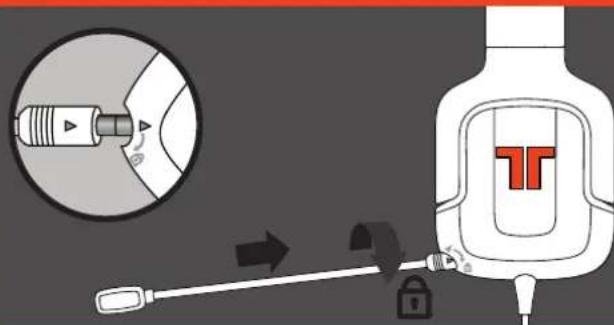
Connecting the Microphone
Insert the microphone into the headset by lining up the small dot on the microphone with the small dot on the headset.
Firmly press the microphone into place.
Rotate the microphone in a clockwise direction until it stops.
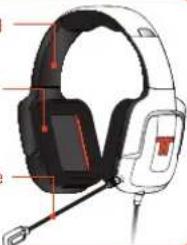
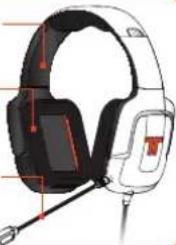
Adjustable Headrail
Plush Headrail and Earcup Padding
Removable, Flexible Microphone
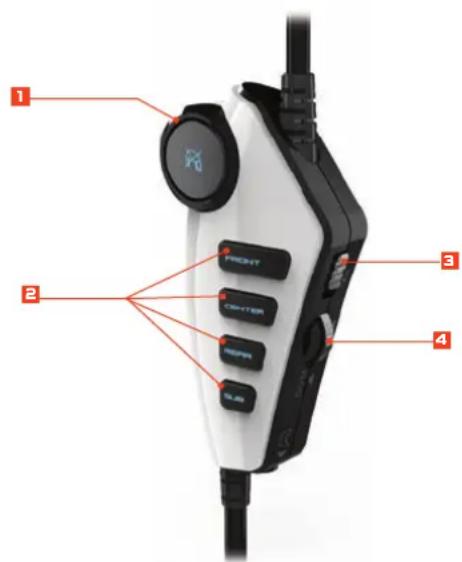
In-line Controller
In-line Controller
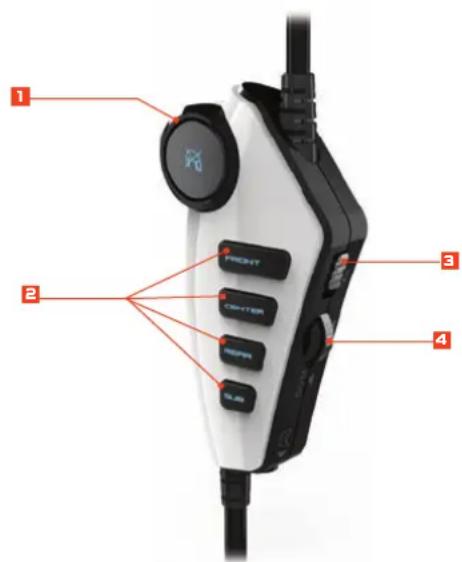
1 Master Volume: Use to adjust the master volume of game audio. Press in to mute the volume of the game audio.
Sound Field Buttons: To adjust the volume of each channel individually, first press one of the "Individual Sound Field Switches" and then adjust the Master Volume. The color will change based upon the volume level (Green > Blue > White > Cyan > Red). Repeat this for all sound fields you wish to adjust. To adjust Master Volume after this, you must wait 3 seconds for all the channels to illuminate.
To reset the volume of all channels to the same level, simply adjust the Master Volume level all the way to the lowest level, then turn it back up again.
3 Mic Mute: Slide the mic mute switch down to mute the microphone so others cannot hear you.
Voice Communication Volume and SVM Control: Use to adjust the volume of the voices of other players when connected to the Pro+ Decoder Box (not included) as a secondary headset. SVM = Selectable Voice Monitoring. SVM allows the user to hear his or her own voice through the headset. Push in to turn SVM ON/OFF.
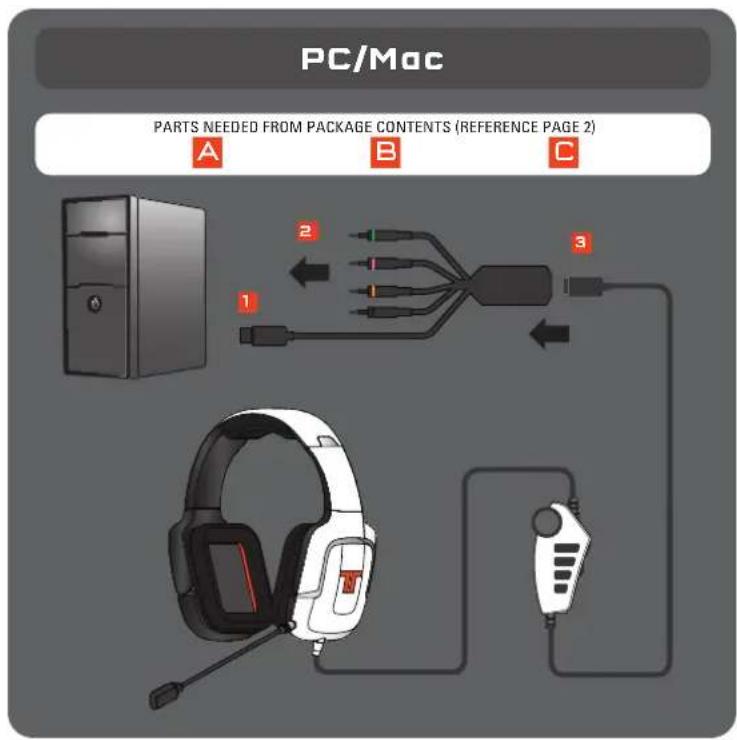
PC/Mac
Plug the USB connector into an available USB port.
Connect the Pink, Orange, Black, and Green 3.5mm connectors to the PC/Mac soundcard.
3 Connect PC Adapter to end of headset cable.
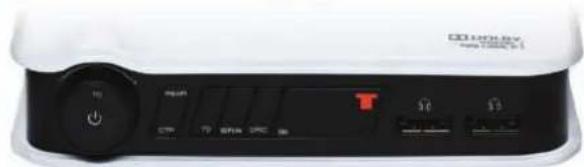
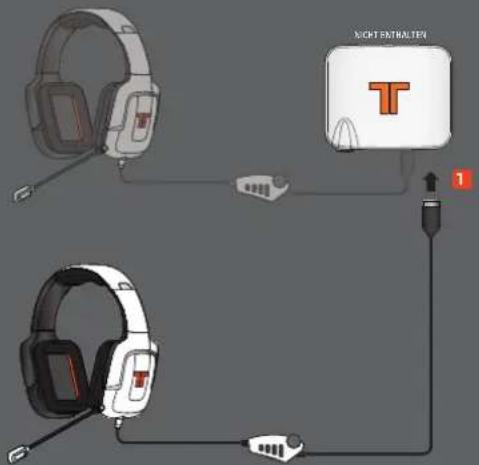
P r o^+ Decoder Box
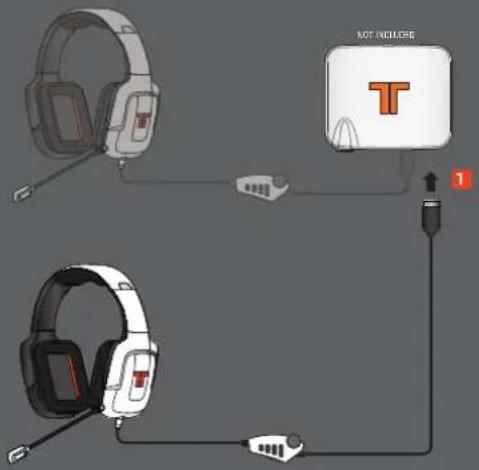
The Pro PC Headset can be connected as a secondary headset to the Pro Decoder Box (not included) for use with the Xbox 360 and PS3.
[8][9]
Pro+ Decoder Box
PARTS NEEDED FROM PACKAGE CONTENTS (REFERENCE PAGE 2)
A
WARRANTY
2-YEAR LIMITED WARRANTY
Mad Catz warrants this product to be free from defects in materials and workmanship for the warranty period. This non-transferable, two-(2) year limited warranty is only to you, the first end-user purchaser. If a defect covered by this warranty occurs AND you provide proof of purchase, Mad Catz, at its option, will repair or replace the product at no charge.
The Mad Catz two- (2) year limited warranty is available to North American and European customers. Your sole and exclusive remedy is repair or replacement of your Mad Catz product. In no event shall Mad Catz liability exceed the original purchase price of the product. This warranty does not apply to: (a) normal wear and tear or abusive use; (b) industrial, professional or commercial use; (c) if the product has been tampered with or modified.
NORTH AMERICA AND EUROPE
To receive warranty service, you must:
Obtain a Return Authorization Number from Mad Catz Technical Support via ONE of the following methods:
a. Submit a Ticket at http://support.madcatz.com
b. Call the Mad Catz Tech Support Center nearest you:
North America: 1-800-659-2287 (USA) or 1-619-683-2815 (outside USA)
United Kingdom: 08450 508418
Europe (outside UK): +44(0) 1633 883110
France:0182880180
Germany:089-21094818
Spain: 93 181 63 94
Once you have your unique Return Authorization Number, do the following:
- Ship the product to Mad Catz at your expense for service.
- Enclose a copy of the original sales receipt showing a purchase date.
- Enclose a full return address with daytime and evening phone numbers.
TECHNICAL SUPPORT
Online Support: http://support.madcatz.com
North American telephone, available Monday through Friday (excluding holidays): 1-800-659-2287 (USA only) or 1-619-683-2815 (outside USA).
United Kingdom telephone, available Monday through Friday
(excluding bank holidays): 08450 508418.
European telephone (outside UK), available Monday through Friday
(excluding bank holidays): +44(0) 1633 883110.
CAUTIONS
- Long-term exposure to loud music or other sounds in headphones may cause hearing damage. It is best to avoid extreme volume levels when using headphones, especially for extended periods.
Use this unit only as intended.
To prevent fire or shock hazard, do not expose this unit to rain or moisture. Do not use within 30^ of any water such as swimming pools, bathtubs, or sinks.
To avoid electrical shock, do not disassemble. Refer servicing to qualified personnel only. - Never insert objects of any kind, other than authorized items, into the product as they may touch
dangerous voltage points or short out parts that could result in tire or electrical shock. - Stop using this unit immediately if you begin to feel tired or if you experience discomfort or pain in your hands and/or arms while operating the unit. If the condition persists, consult a doctor.
- Avoid prolonged use of this unit. Take breaks every 30 minutes.
- Route all cords so that they are not likely to be walked on or tripped over. Make sure that cords are not placed in a position or areas where they may become pinched or damaged.
- Do not wrap cords around any part of anyone's body.
- Do not allow children to play with cords.
- This product contains small parts that may cause choking if swallowed. Not intended for use by children under 3 years of age.
FCC & IC WARNING
This device complies with part 15 of the FCC Rules and Industry Canada license-exempt RSS standards. Operation is subject to the following two conditions: (I) This device may not cause harmful interference, and (2) this device must accept any interference received, including interference that may cause undesired operation.
Any changes or modifications not expressly approved by the party responsible for compliance could void the user's authority to operate the equipment.
FCC Radiation Exposure Statement:
This equipment complies with FCC radiation exposure limits set forth for an uncontrolled environment. This transmitter must not be co-located or operating in conjunction with any other antenna or transmitter.
CAUTIONS
IC RF Exposure Statement:
The device meets the exemption from the routine evaluation limits in section 2.5 of RSS 102 and compliance with RSS-102 RF exposure, users can obtain Canadian information on RF exposure and compliance.
Under Industry Canada regulations, this radio transmitter may only operate using an antenna of a type and maximum {or lesser} gain approved for the transmitter by Industry Canada. To reduce potential radio interference to other users, the antenna type and its gain should be so chosen that, the equivalent isotropically radiated power {o.i.r.p.} is not more than that necessary for successful communication.
EU DECLARATION OF CONFORMITY:
As required, certain of these products have been tested and conform to the requirements of the European Union Directives 2002/95/EC, 2002/96/EC, and 2004/108/EC. Authorized signatory of the manufacturer is Mad Catz, Inc., 7480 Mission Valley Road, Suite 101, San Diego, CA 92108.
05/13

WWW.TRITTONAUDIO.COM
©2013 Mad Catz, Inc. 7480 Mission Valley Road, Suite 101, San Diego, CA 92108 U.S.A. Mad Catz, TRITTON, and the Mad Catz and TRITTON logos are trademarks or registered trademarks of Mad Catz Interactive, Inc., its subsidiaries and affiliates. The shape and design of this product are a trade dress of Mad Catz Interactive, Inc., its subsidiaries and affiliates. All other product names and images are trademarks or registered trademarks of their respective owners. Made in China. All rights reserved. Product features, appearance and specifications may be subject to change without notice. Please retain this information for future reference.
Assistance Technique 11
Microphone Amovable flexible
Contrôleur filaire
Contrôleur filaire
©2013 Mad Catz, Inc. 7480 Mission Valley Road, Suite 101, San Diego, CA 92108 U.S.A. Mad Catz, TRITTON, and the Mad Catz and TRITTON logos are trademarks or registered trademarks of Mad Catz Interactive, Inc., its subsidiaries and affiliates. The shape and design of this product are a trade dress of Mad Catz Interactive, Inc., its subsidiaries and affiliates. All other product names and images are trademarks or registered trademarks of their respective owners. Made in China. All rights reserved. Product features, appearance and specifications may be subject to change without notice. Please retain this information for future reference.
Digital Headphone Decoder
Digital Headphone Decoder
BENOTIGTE TEILE AUS DEM PACKUNGsinHALT (REFERENZSEITE 2)
A
GEWÄHRLEISTUNG
©2013 Mad Calz, Inc.; 1480 Mission Valley Road, Suite 101, San Diego, CA 92108 U.S.A. Mad Calz, TRITON, and the Mad Calz and TRITON logos are trademarks or registered trademarks of Mad Calz Interactive, Inc., its subsidiaries and affiliates. The shape and design of this product are a trade dress of Mad Calz Interactive, Inc., its subsidiaries and affiliates. All other product names and images are trademarks or registered trademarks of their respective owners. Made in China. All rights reserved. Product features, appearance and specifications may be subject to change without notice. Please retain this information for future reference.
Mad Catz is a publicly traded company on the TSX/NYSE MKT, symbol MCZ.
©2013 Mad Calz, Inc. 7480 Mission Valley Road, Sails 101, San Diego, CA 92108 U.S.A. Mad Calz, TRITON, and the Mad Calz and TRITON logos are trademarks or registered trademarks of Mad Calz Interactive, Inc., its subsidiaries and affiliates. The shape and design of this product are a trade dress of Mad Calz Interactive, Inc., its subsidiaries and affiliates. All other product names and images are trademarks or registered trademarks of their respective owners. Made in China. All rights reserved. Product features, appearances and specifications may be subject to change without notice. Please retain this information for future reference.
Mad Catz is a publicly traded company on the TSX/NYSE MKT, symbol MCZ.
©2013 Mad Calz, Inc.; 7480 Mission Valley Road, Sails 101, San Diego, CA 92108 U.S.A. Mad Calz, TRITTON, and the Mad Calz and TRITTON logos are trademarks or registered trademarks of Mad Calz Interactive, Inc., its subsidiaries and affiliates. The shape and design of this product are a trade dress of Mad Calz Interactive, Inc., its subsidiaries and affiliates. All other product names and images are trademarks or registered trademarks of their respective owners. Made in China. All rights reserved. Product features, appearance and specifications may be subject to change without notice. Please retain this information for future reference.
Mad Catz is a publicly traded company on the TSX/NYSE MKT, symbol MCZ.
©2013 Mad Calz, Inc.; 7480 Mission Valley Road, Sails 101, San Diego, CA 92108 U.S.A. Mad Calz, TRITTON, and the Mad Calz and TRITTON logos are trademarks or registered trademarks of Mad Calz Interactive, Inc., its subsidiaries and affiliates. The shape and design of this product are a trade dress of Mad Calz Interactive, Inc., its subsidiaries and affiliates. All other product names and images are trademarks or registered trademarks of their respective owners. Made in China. All rights reserved. Product features, appearance and specifications may be subject to change without notice. Please retain this information for future reference.
Mad Catz is a publicly traded company on the TSX/NYSE MKT, symbol MCZ.
Online Support: http://support.madcatz.com
Telefon i Storbritannien, aben mandag til fredag (eksklusive helligdage): 08450 508418.
Telefon i Europa (uden for Storbritannien), aben mandag til fredag (eksklusive helligdage): +44(0) 1633 883110.
FORHOLDSREGLER
©2013 Mad Catz, Inc.; 7480 Mission Valley Road, Suite 101, San Diego, CA 92108 U.S.A. Mad Catz, TRITTON, and the Mad Catz and TRITTON logos are trademarks or registered trademarks of Mad Catz Interactive, Inc., its subsidiaries and affiliates. The shape and design of this product are a trade dress of Mad Catz Interactive, Inc., its subsidiaries and affiliates. All other product names and images are trademarks or registered trademarks of their respective owners. Made in China. All rights reserved. Product features, appearance and specifications may be subject to change without notice. Please retain this information for future reference.
Mad Catz is a publicly traded company on the TSX/NYSE MKT, symbol MCZ.
©2013 Mad Calz, Inc. 7480 Mission Valley Road, Suite 101, San Diego, CA 92108 U.S.A. Mad Calz, TRITTON, and the Mad Calz and TRITTON logos are trademarks or registered trademarks of Mad Calz Interactive, Inc., its subsidiaries and affiliates. The shape and design of this product are a trade dress of Mad Calz Interactive, Inc., its subsidiaries and affiliates. All other product names and images are trademarks or registered trademarks of their respective owners. Made in China. All rights reserved. Product features, appearance and specifications may be subject to change without notice. Please retain this information for future reference.
Mad Catz is a publicly traded company on the TSX/NYSE MKT, symbol MCZ.