TCP120KN - Alarm Clock TOKAI - Free user manual and instructions
Find the device manual for free TCP120KN TOKAI in PDF.



| Product type | Radio alarm clock |
| Brand | Tokaï |
| Model | TCP120KN |
| Power supply | 3 AAA 1.5 V batteries (LR03) or DC 5V 400 mA mains adapter (not included) |
| Radio frequency range | FM 87.5-108 MHz |
| Speaker power | 0.5 W |
| Power consumption in operation | 1.28 W |
| Main functions | Clock, alarm (buzzer/radio), projector, FM radio, snooze, volume control |
| Display | LCD, 12h/24h format |
| Care and cleaning | Wipe with a soft cloth and a non-abrasive detergent solution |
| Safety | Do not open, do not expose to water, do not use near water |
| Spare parts and repairability | No user-serviceable parts, contact an authorized service center |
| Conditions of use | Avoid direct sunlight, extreme temperatures, humidity, vibrations, dust |
| Disposal | Do not dispose with household waste, follow the WEEE directive (2002/96/EC) |
| Importer | LEMA S.A.S., 28 Boulevard Zéphirin Camélinat, 92230 GENNEVILLIERS, France |
Frequently Asked Questions - TCP120KN TOKAI
User questions about TCP120KN TOKAI
0 question about this device. Answer the ones you know or ask your own.
Ask a new question about this device
Download the instructions for your Alarm Clock in PDF format for free! Find your manual TCP120KN - TOKAI and take your electronic device back in hand. On this page are published all the documents necessary for the use of your device. TCP120KN by TOKAI.
USER MANUAL TCP120KN TOKAI
English - English (C-109)
English - English
TCP-12OK-N
AVERTISSEMENT
Puisance :3 piles x LR-03 (AAA) 1,5 Volt (non incluses)
veille :0,075W Poids net :147g
SPECIFICATIONS ET FONCTIONS SOUMISES A CHANGEMENT SANS PREAVIS. CECI EST LIE A L'AMELIORATION CONSTANTE DE L'APPAREIL.
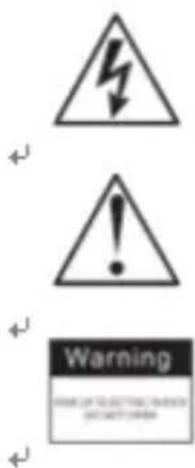
The lightning flash is intended to alert the user to the presence of dangerous voltage within the product's enclosure, and touching the inner parts may result in a risk of electric shock to persons.
The exclamatory mark is intended to alert the user to the presence of important operating instructions.
To reduce the risk of electric shock or fire, do not open the cover. Refer servicing to qualified service personnel.
NOTES:
We reserve the right to make technical changes without notice in the interest of improvement.
SAFETY INSTRUCTIONS
- Do not use this product near water, in wet areas to avoid fire or injury of electric current. Always turn off the product when you don't use it or before a revision. There aren't any parts in this appliance which are reparable by consumer. Always appeal to a qualified authorized service. The product is under a dangerous tension.
- The product shall not be exposed to dripping or splashing and that no objects filled with liquids, such as vases, shall be placed on / near the product.
- The normal ventilation of the product shall not be impeded for intended use. Never attempt to insert wires, pins or such objects into the vents or openings of the unit.
- The unit should not be exposed to direct sunlight, very high or low temperature, moisture, vibrations or placed in a dusty environment.
- Do not use abrasive, benzene, thinner or other solvents to clean the surface of the unit. To clean, wipe it with mild non-abrasive detergent solution and clean soft cloth.
SERVICING - The user should not attempt to service the unit beyond that described in the user operating instructions. All other servicing should be referred to qualified service personnel.
THE NORMAL FUNCTION OF THE PRODUCT MAY BE DISTURBED BY STRONG ELECTRO MAGNETIC INTERFERENCE. IF SO, SIMPLY RESET THE PRODUCT TO RESUME NORMAL OPERATION BY FOLLOWING THE INSTRUCTION MANUAL. IN CASE THE FUNCTION COULD NOT RESUME, PLEASE USE THE PRODUCT IN OTHER LOCATION.
EN
FUNCTION KEYS
- MIN/TURN+ KEY
- HOUR/TURN-KEY
- TIME/VOL+ KEY
- ALARM/VOL-KEY
- SNOOZE/LIGHT KEY
- RADIO SWITCH
- ALARM SWITCH
8.PROJECTOR
9.DC5VINPUT
1.POWER SUPPLY BATTERY POWER SUPPLY

Insert Batteries
a. Take off the batteries compartment cover
b. Insert 3 × AAA (1.5V) batteries (batteries not included)
and make sure the polarity is correct
c. Replace the battery cover
REMARK:
In case of abnormal display, please take the batteries out and put them in back 1 min later
If you find that the digits on the screen become thin or unclear, you shall need to replace
the batteries with new ones. Do not mix new batteries with old ones.
EN
CAUTION: Danger of explosion if battery is incorrectly replaced. Replace only with the same or equivalent type.
IMPORTANT NOTE ON BATTERIES :
Please help to protect the environment.
It is recommended to dispose of old batteries in collection centers specially designed
Batteries shall not be exposed to excessive heat such as sunshine, fire or the like.
IMPORTANT!
It is recommended not to leave a mobile phone near the unit in order to avoid electromagnetic interference in the speakers.
DC POWER SUPPLY
DC 5V 400MA external adaptor (not supplied) could be used for this model also. Plug the adaptor to the DC 5V hole (9), then the unit will be workable.
2.CLOCK OPERATION
1) Time can be set during OFF mode. Press TIME(3) for 2 seconds – the LCD digits are flashing; Then into time setting, press HOUR(2) and/or MINUTE (1) keys to set hour and minute, then press TIME key once settings are finished. Or after 10 seconds, it will exit setup automatically
2) Under time display situation, short press TIME key, will switch the displayed hour format between 12-hour system & 24-hour system.
3.ALARM OPERATION
4) Snooze function
1) Under time display situation, press ALARM key, LCD will display Alarm icon, it means that the Alarm function is ON.
2) Alarm Setting: When the LCD displays the Alarm icon, press ALARM (4) for 2 seconds to enter into alarm setting. Press HOUR (2) or MINUTE (1) to set hour and minute, then press ALARM key to finish setting. Or after 10 seconds, it will exit setup automatically
3) Alarm sound choice(see picture of the ALARM SWITCH - 7)
- when you put the switch on BUZ. Then the alarm sound as buzzer.
- when you put the switch on RADIO, then the alarm sounds as radio. In this case, if you want to turn off the radio, you can put the switch on OFF. The projection and the LCD display backlight will be on no matter you choose Radio or Buzzer for alarm sound.
If the ALARM SWITCH is on Buzzer, when the alarm rings, the LCD display and projector will light ON and the alarm symbol will be flashing on the LCD, then press SNOOZE (5) to suspend the alarm. When the alarm symbol is still flashing, 9 minutes later the alarm will ring again. Press SNOOZE key again, alarm will be suspended again, another 9 minutes later will ring again, and so on until the next alarm rings.
If you want to disable the SNOOZE function, short press ALARM key.
During the SNOOZE function, even though the alarm is suspended, the projector and the LCD display will remain ON.
When you press SNOOZE/LIGHT button (5), the projector will light ON about 30 seconds, then automatically OFF if you don't press it
a. Put the RADIO switch to "ON" to turn on the radio, and short press VOL- to decrease the volume, long press, it will decrease the volume automatically (0-15), Short press VOL+ to increase the volume, and long press; it will increase the volume automatically (0-15).
b. Short press TURN- key to search for the "PRE" stations, long press, it will search for "PRE" stations automatically. Short press TURN +key to search for the "NEXT" stations, long press, it will search for "NEXT" stations automatically.
c. To turn OFF the radio, set the RADIO SWITCH to "OFF".
In areas where the FM reception is weak, it is advisable to fully extend the FM wire Antenna and relocate for best reception.
Specifications:
Power:3 x AAA (1.5 Volt) batteries (batteries are not supplied)
Frequency Range:FM 87.5-108MHz
Display size: LCD
Speaker Power: 0.5 W
Consumption in working mode: 1.28W
Consumption in standby mode: 0.075W
Net weight: 147g
SPECIFICATIONS AND FUNCTIONS ARE SUBJECT TO CHANGE WITHOUT NOTICE. IT IS CONNECTED WITH CONTINUAL IMPROVEMENT OF THE DEVICE.
EN

End of Life Disposal
Warning! This logo set on the product means that the recycling of this apparatus comes within the framework of the Directive 2002/96/CE of January 27, 2003 concerning the Waste of Electrical and Electronic Equipment (WEEE).
This symbol means that used electrical and electronic products should not be mixed with general household waste. There is a separate collection system for these products.
If you want to dispose of this equipment, please do not use the ordinary dust bin!
- The presence of dangerous substances in the electrical and electronic equipments can have potential consequences on the environment and human health in the cycle of reprocessing this product.
- Therefore, at the end of its lifetime, this product shall not be disposed with other non-recycled waste. Used electrical and electronic equipment must be treated separately and in accordance with legislation that requires proper treatment, recovery and recycling of used electrical and electronic equipment.
- Local authorities and resellers have set special procedures for the purpose of collecting and recycling this product (please contact your local authority for further details). You have the obligation to use the selective waste collection systems put in place by your local authority.
- If your used electrical or electronic equipment has batteries or accumulators, please dispose of these separately beforehand according to local requirements.
- By disposing of this product correctly you will help ensure that the waste undergoes the necessary treatment, recovery and recycling and thus prevent potential negative effects on the environment and human health which could otherwise arise due to inappropriate waste handling.

This unit complies with European Council Directive 2006 / 95 CE (Electromagnetic Compatibility & Low Voltage Directives)
ES

ADVERTENCIA
This product was imported by the Company : LEMA S.A.S.
For any questions concerning the conformity of the product, thank you to send your request to :
LEMA S.A.S.
Brand : TOKAI
Model : TCP120KN
Category : Alarm Clock