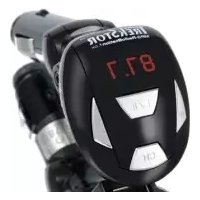
MP3RadioStation f.ox - Radio TrekStor - Free user manual and instructions
Find the device manual for free MP3RadioStation f.ox TrekStor in PDF.


Frequently Asked Questions - MP3RadioStation f.ox TrekStor
User questions about MP3RadioStation f.ox TrekStor
0 question about this device. Answer the ones you know or ask your own.
Ask a new question about this device
Download the instructions for your Radio in PDF format for free! Find your manual MP3RadioStation f.ox - TrekStor and take your electronic device back in hand. On this page are published all the documents necessary for the use of your device. MP3RadioStation f.ox by TrekStor.
USER MANUAL MP3RadioStation f.ox TrekStor
Important note: With regard to the commissioning and use of this product in the various modes (standard mode/power mode) please note the information contained in 6) "CHANGING THE TRANSMISSION POWER OF THE TRICKS FOR MP3-RADIOSTANION FOG".
This FM audio transmitter may be used in the countries of the European Union and in Iceland, Norway, Switzerland and Liechtenstein. In these countries, the device may only be used in the "Standard Mode". The use of this product in the countries of the European Union and in Iceland, Norway, Switzerland and Liechtenstein is consistent with the EU standard 99/5/EC for Class II radio equipment. The use in other countries may be prohibited. Please inquire in advance as to permissibility according to the locally applicable laws and regulations.
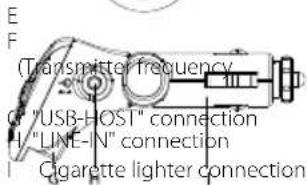
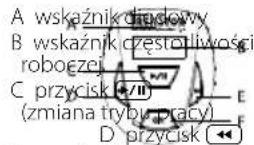
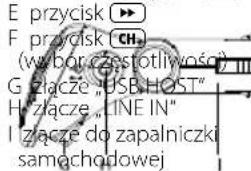
1) Operating elements of the TrekStor MP3 -RadioStation f.ox
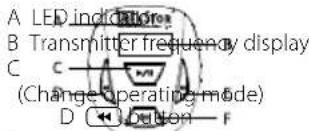
// button
按钮CH button
selection button)
2) Connecting the TrekStor MP3-RadioStation f.ox with a USB stick or an audio device
Note: To prevent damage to the MP3-RadioStation f.ox or to other connected devices, first connect your USB stick or audio device (e.g. MP3-Player, CD-Player) to the MP3-RadioStation f.ox, before connecting it to the 12-volt connection in your car.
Please note: You can connect the MP3-RadioStation f.ox either to a USB stick or an audio device, but not to both at the same time.
Procedure for using a USB stick
Please note: Given the very wide variety of different USB sticks, TrekStor cannot guarantee compatibility with devices from every manufacturer. Therefore, a distinction must be made between USB sticks with Flash memory and with integrated hard disk. The MP3-RadioStation f.ox supports only USB sticks with integrated Flash memory. As a result, all USB sticks with integrated Flash memory should generally function without any problems.
Connect your USB stick to the "USB-HOST" connection of your MP3 -RadioStation f.ox
Procedure for using an audio device (e.g. MP3-Player)
Connect the headphone jack of your audio device to the "LINE-IN" connection of your MP3-RadioStation f.ox using the provided line-in cable.
3) Connecting the TrekStor MP3 -RadioStation f.ox to the 12-Volt connection (cigarette lighter) of your car and setting the transmitter frequency
Note: Using voltage that is either too high or too low may damage the MP3 -RadioStation f.ox.
a) After you have connected the MP3-RadioStation f.ox to your USB stick or audio device, connect the cigarette lighter connection of the MP3-RadioStation f.ox to the 12-volt connection of your car.
Please note: If connected correctly, the LED indicator and the transmitter frequency of the MP3-RadioStation fox will be displayed.
b) Select the transmitter frequency from one of the 14 pre-set transmitter frequencies by briefly pressing the CH button. The currently selected transmitter frequency appears on the transmitter frequency display of the MP3-RadioStation f.ox. To achieve a high level of signal quality, please use a transmitter frequency that is available at your location, i.e. one that is not used by a radio station.
The MP3-RadioStation f.ox can transmit at the following frequencies:
| Lower frequency range (in MHz) | 87.7 | 87.9 | 88.1 | 88.3 | 88.5 | 88.7 | 88.9 | ||
| Upper frequency range (in MHz) | 106.7 | 106.9 | 107.1 | 107.3 | 107.5 | 107.7 | 107.9 |
c) Next, set your car radio to the same frequency which is displayed on your MP3 -RadioStation f.ox.
d) When using the MP3-RadioStation f.ox with an audio device, please skip the following section and go directly to Section 5) "PATING THE TRICKSTON MP3-RADIO STATION FOX WHEN USING AN AUDIO DEVICE".
4) Operating the TrekStor MP3-RadioStation f.ox when using a USB stick
-Playback
Briefly press the button to start playback of an MP3 file. The LED indicator flashes during playback and the transmitter frequency is displayed continually.
Please note: If the music playback is interrupted due to other noise, please repeat items b) and c) in Section 3) "C CONNECTING THE TREXSTOR MP3-R ADIOSTATION F.O.K TO THE 12-VOLT CONNECTION (CIGARETTE LIGHTER) OF YOUR CAR AND SETTING THE TRANSMITTER FREQUENCY".
- Pause
Briefly press the button to pause the playback of an audio file. The LED indicator flashes continually. Due to legal reasons, the transmitter frequency is cleared again after 30 seconds by the
MP3-RadioStation.fox-the display goes out. Press the + / + button again to resume playback.
Note: To prevent damage to the MP3-RadioStation f.ox or to the other devices being used, pause the playback of your MP3 file before removing your USB stick from the MP3-RadioStation f.ox.
- Changing songs
Briefly press the button to select the next song.
Press the
回 button to select the previous song.
- Changing the playback mode
Hold down the button for 2 seconds to select one of the 2 playback modes.
In the playback mode "R EPEAT ALL" the LED indicator flashes slowly. All of the songs are then played in sequence and after the last song, playback begins again starting with the first song.
In playback mode "R ANDOM PLAYBACK" the LED indicator flashes rapidly. All songs are then played back in a random sequence.
5) Operating the TrekStor MP3-RadioStation f.ox when using an audio device
Please note: When using the "LINE-IN" jack of the MP3-RadioStation.fox only the CH button of the MP3-RadioStation.fox can be operated.
Turn your audio device on and start playback of the desired audio files.
Please note: If you pause or stop the music playback of your audio device, your MP3 -RadioStation f.ox automatically detects this. It switches off after about 30 seconds. If you continue to play back the music of your audio device, the MP3-RadioStation f.ox will automatically turn back on.
Please note: If the music playback is interrupted due to other noise, please repeat items b) und c) in Section 3) "CONNECTING THE TREXSTOR MP3-RADIO STATION FOC TO THE 12-VOLT CONNECTION (CIGARETTE LIGHTER) IN YOUR CAR AND SETTING THE TRANSMITTER IROUND".
6) Changing the transmitting power of the TrekStor MP3 -RadioStation f.ox
Please note: The MP3-RadioStation.fox has a so-called "POWER MODE", in which the maximum transmitting power prescribed for the EU is exceeded. Thus, this "POWER MODE" may not be used within the EU! Customers outside of the EU have the option of increasing the transmitting power of the MP3-RadioStation.fox in order to avoid noises that interrupt the playback of music, for example.
The FM transmitter MP3-RadioStation fox is a wireless radio communication system. The European Directive 1999/5/EC (RTTE) dated 3/9/1999, which has been transposed into national law in the Federal Republic of Germany by means of the law on radio communications and telecommunications (FTEG) dated 1/31/2001, applies for these radio communication
systems. Putting FM transmitters into circulation and commissioning them in the Federal Republic of Germany first became feasible by means of a decree by the Bundesnetzagentur (federal network agency) of 2/08/2006. Among other things, this decree provides for compliance with a maximum transmitting power of 50nW (ERP), in order to assure appropriate protection against radio communication-related interference with other devices.
The factory setting (standard mode) of the MP3-RadioStation f.ox meets this requirement, which is also prescribed in many other member states of the European Union.
In some other countries outside of the European Union, it is also permissible to use FM transmitters with a higher transmitting power. In these countries, it is therefore possible to operate the MP3-RadioStation f.ox with an increased transmitting power of 75 nW (Power mode). Any possible outside noise can therefore be virtually ruled out. This lessens the protection against
radio communication-related interference from other devices, however. If you wish to operate the MP3-RadioStation f.ox in power mode outside of the Federal Republic of Germany, please inquire in advance as to permissibility according to the locally applicable regulations.
Please do not start up the MP3-RadioStation f.ox when on board an airplane under any circumstances!
Warning: Please observe the country-specific laws before increasing the transmitting power of the MP3-RadioStation f.ox!
The MP3-RadioStation.fox has 2 different modes, which differ from each other in the transmitting power being used. When you connect the MP3-RadioStation.fox, it will always be in the transmitting mode last used. Proceed as follows to change the transmitting power:
a) Activate the MP3-RadioStation.fox as described in the previous sections.
b) During music playback, hold down the CH button for 10 seconds to change the transmitting mode.
When using the normal transmitting power, the LED indicator of the MP3-RadioStation f.ox is illuminated in green. When using the "POWER MODE" with higher transmitting power, the LED indicator of the MP3-RadioStation f.ox is illuminated in red.
7) Troubleshooting
The LED indicator or transmitting frequency display do not illuminate after I connect the MP3-RadioStation f.ox to the 12-volt connection in my car.
Unplug the MP3-RadioStation f.ox from your 12-volt car connection and then plug it in again. If this does not correct the problem, change the safety fuse in the MP3-RadioStation f.ox as described below:
a) Remove the MP3-RadioStation f.ox from the 12-volt connection in your car.
b) Unscrew the MP3-RadioStation f.ox at the point as shown in the picture and remove the defective safety fuse.
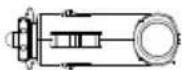
c) Replace it with a working safety fuse and close the MP3 -Radio-Station f.ox again.
Please note: Only use the MP3-RadioStation f.ox fitted with a fuse type "F 0,5 AL 250 V".
Please note: If the problem is still not corrected, check the safety fuses in your automobile power supply and replace them, if required.
I have connected an audio device to the MP3-RadioStation f.ox using the line-in cable. But no music is being played back and the MP3-RadioStation f.oxshuts itself off automatically after about 30 seconds.
a) Check to see if the line-in cable is connected correctly or if it shows possible damage.
b) Increase the volume of your audio device, if necessary.
No audio files are being played back from my USB stick.
a) Copy the audio files (MP3) to your USB stick again.
b) Then, reconnect your USB stick to the MP3 -RadioStation f.ox
The LED indicator is illuminated, but the buttons of the MP3 -RadioStation f.ox are not working.
Disconnect your MP3-RadioStation f.ox from your automobile and then reconnect it.
The LED indicator is illuminated, but I don't hear any music.
a) Check to see if the USB stick is connected correctly and / or whether the line-in cable is connected correctly and that the audio files are being played on your audio device.
b) Increase the volume of the connected audio device or the car radio.
c) Check to see whether the format of the audio files on the USB stick of your MP3-RadioStation.fox are supported.
I have interference on the selected channel.
Please change the transmitting frequency as described for items b) and c) in Section 3) "CONNECTING THE TREKSTOR MP3-RADIO STATION F.OX TO THE 12-VOLT CONNECTION (CIGARETTE LIGHTER) OF YOUR CAR AND SETTING THE TRANSMITING FREQUENCY.
If using the device outside of the EU: If the problems cannot be corrected using these methods, follow the instructions in Section 6) "CHANCING THE TRANSMITTING POWER OF THE TREKSTOR MP3-RADIOSTATION F.OX", provided you do not violate the country-specific laws.
The manufacturer reserves the right to continually further develop the product. These changes may be made without being directly described in these operating instructions. Information in these operating instructions may therefore not reflect the state of the art.
The manufacturer only guarantees suitability for the product's intended purpose. In addition, the manufacturer is not responsible for damage or loss of data and subsequent consequences.
Copyright © 2009 TrekStor GmbH & Co. KG. All rights reserved. Other cited product or company names may be trademarks or brand names of the respective owner.
MODED'EMPLOI
This FM audio transmitter may be used in the countries of the European Union and in Iceland, Norway, Switzerland and Liechtenstein. In these countries, the device may only be used in the "Standard Mode". The use of this product in the countries of the European Union and in Iceland, Norway, Switzerland and Liechtenstein is consistent with the EU standard 99/5/EC for Class II radio equipment. The use in other countries may be prohibited. Please inquire in advance as to permissibility according to the locally applicable laws and regulations.
This FM audio transmitter may be used in the countries of the European Union and in Iceland, Norway, Switzerland and Liechtenstein. In these countries, the device may only be used in the "Standard Mode". The use of this product in the countries of the European Union and in Iceland, Norway, Switzerland and Liechtenstein is consistent with the EU standard 99/5/EC for Class II radio equipment. The use in other countries may be prohibited. Please inquire in advance as to permissibility according to the locally applicable laws and regulations.
-56-
1) Elementos de commando da MP3-RadioStation f.ox da TrekStor
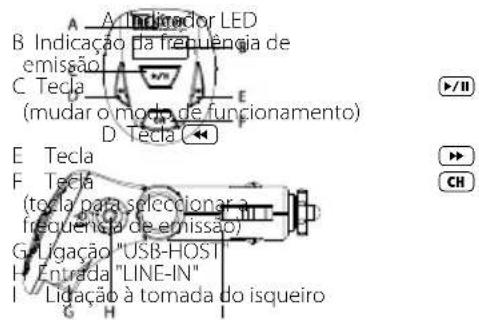
PT
This FM audio transmitter may be used in the countries of the European Union and in Iceland, Norway, Switzerland and Liechtenstein. In these countries, the device may only be used in the "Standard Mode". The use of this product in the countries of the European Union and in Iceland, Norway, Switzerland and Liechtenstein is consistent with the EU standard 99/5/EC for Class II radio equipment. The use in other countries may be prohibited. Please inquire in advance as to permissibility according to the locally applicable laws and regulations.
1) Bedieningselementen van de TrekStor MP3 -RadioStation f.ox
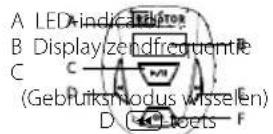
toets
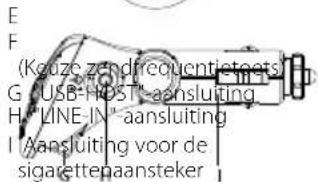
toets CH-toets
Satt in USB-minnet i"USB-HOST"-uttaget pa MP3-RadioStation f.ox.
This FM audio transmitter may be used in the countries of the European Union and in Iceland, Norway, Switzerland and Liechtenstein. In these countries, the device may only be used in the "Standard Mode". The use of this product in the countries of the European Union and in Iceland, Norway, Switzerland and Liechtenstein is consistent with the EU standard 99/5/EC for Class II radio equipment. The use in other countries may be prohibited. Please inquire in advance as to permissibility according to the locally applicable laws and regulations.
1) TrekStor MP3 -RadioStation f.ox'un kullanim Dügmeleri
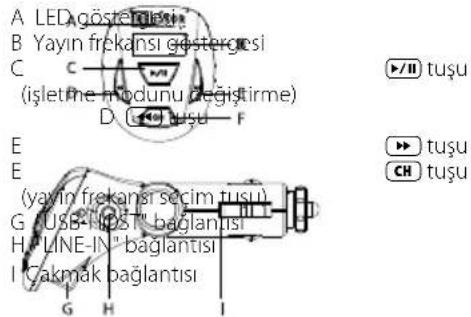
This FM audio transmitter may be used in the countries of the European Union and in Iceland, Norway, Switzerland and Liechtenstein. In these countries, the device may only be used in the "Standard Mode". The use of this product in the countries of the European Union and in Iceland, Norway, Switzerland and Liechtenstein is consistent with the EU standard 99/5/EC for Class II radio equipment. The use in other countries may be prohibited. Please inquire in advance as to permissibility according to the locally applicable laws and regulations.
1) Elementy obslugi TrekStor MP3 -RadioStation f.ox
This FM audio transmitter may be used in the countries of the European Union and in Iceland, Norway, Switzerland and Liechtenstein. In these countries, the device may only be used in the "Standard Mode". The use of this product in the countries of the European Union and in Iceland, Norway, Switzerland and Liechtenstein is consistent with the EU standard 99/5/EC for Class II radio equipment. The use in other countries may be prohibited. Please inquire in advance as to permissibility according to the locally applicable laws and regulations.
This FM audio transmitter may be used in the countries of the European Union and in Iceland, Norway, Switzerland and Liechtenstein. In these countries, the device may only be used in the "Standard Mode". The use of this product in the countries of the European Union and in Iceland, Norway, Switzerland and Liechtenstein is consistent with the EU standard 99/5/EC for Class II radio equipment. The use in other countries may be prohibited. Please inquire in advance as to permissibility according to the locally applicable laws and regulations.
| The CE symbol confirms that this product conforms with the above mentioned norms and regulations. |
| The manufacturer also declares the conformity of the product according to the following directives: |
| 2001/95/EC General Product Safety |
| 2002/95/EC RoHS: Hazardous substances in electrical and electronic equipment |
| Support | Hotline E-Mail Language |
| AT | +49 431 -24 89 45 70** support.at/trekstor.de German |
| BE | +49 431 -24 89 45 80** support.elen@trekstor.de English |
| CH | +49 431 -24 89 45 73** support.ch@trekstor.de German |
| DE | 01805 - TREKSTOR* |
| 01805 - 87 35 78 67** support.de@trekstor.de German | |
| ES | +49 431 -24 89 45 76** support.es@trekstor.de Spanish |
| FR | +49 431 -24 89 45 74** support.fr@trekstor.de French |
| HU | +49 431 -24 89 45 79** support.elen@trekstor.de English |
| IT | +49 431 -24 89 45 75** support.it@trekstor.de Italian |
| LU | +49 431 -24 89 45 72** support.lu@trekstor.de German, French |
| NL | +49 431 -24 89 45 81** support.elen@trekstor.de English |
| PL | +49 431 -24 89 45 77** support.pl@trekstor.de Polish |
| PT | +49 431 -24 89 45 78** support.elen@trekstor.de English |
| UK | +49 431 -24 89 45 71** support.uk@trekstor.de English |
| GR | +49 431 -24 89 45 82** support.elen@trekstor.de English |
| TR | +49 431 -24 89 45 83** support.elen@trekstor.de English |
| SE | +49 431 -24 89 45 92** support.elen@trekstor.de English |
| SI | +49 431 -24 89 45 94** support.elen@trekstor.de English |
| Other Countries | +49 431 -24 89 45 99** support.elen@trekstor.de English |