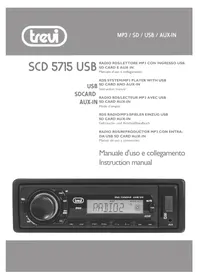
SDC 5715 USB - Car radio Trevi - Free user manual and instructions
Find the device manual for free SDC 5715 USB Trevi in PDF.


| Product type | Car radio |
| Brand | Trevi |
| Model | SDC 5715 USB |
| Power supply | 12V DC, max. current 7A |
| Output power | 7.5W x 4 channels |
| Speaker impedance | 4 ohms per channel |
| FM band | 87.5 MHz - 108 MHz |
| MW band | 522 kHz - 1620 kHz |
| FM sensitivity | 3 µV |
| MW sensitivity | 40 dB |
| Inputs | USB (front), SD/MMC (front), AUX (front, 3.5 mm jack) |
| Outputs | Line-out (1000 mV max) |
| Radio functions | RDS (AF, TA, PTY), synthesizer, automatic memory |
| MP3/WMA playback | USB, SD, supports MP3 and WMA |
| Advanced functions | Intro (10s), repeat (track/folder), random |
| Equalizer | Presets: Flat, Classic, Rock, Pop, User Set |
| Display | Digital (frequency, tracks, clock, RDS) |
| Clock | Adjustable 12/24h display, on/off |
| Detachable faceplate | Yes, with REL button, storage case included |
| Contact cleaning | Cotton swab soaked with alcohol, do not bend contacts |
| Safety | Do not expose faceplate to heat, do not disassemble |
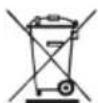
| Recycling instructions | Mandatory separate collection (crossed-out wheelie bin symbol) |
Frequently Asked Questions - SDC 5715 USB Trevi
User questions about SDC 5715 USB Trevi
0 question about this device. Answer the ones you know or ask your own.
Ask a new question about this device
Download the instructions for your Car radio in PDF format for free! Find your manual SDC 5715 USB - Trevi and take your electronic device back in hand. On this page are published all the documents necessary for the use of your device. SDC 5715 USB by Trevi.
USER MANUAL SDC 5715 USB Trevi
-
- Rear right
-
- Rear right
-
- Front right
-
- Front right
-
- Front left
-
- Front left
- ^+ Rear left
-
- Rear left
Front Cabinet after removing Front Control Panel
- RELEASE button
11.3/RPT button
-
VOL knob
-
4/RDM button
-
POWER & MUTE button
-
5/-10/HANG UP button
-
LCD
-
6/+10/TEL button
5&6. |<< and >> | buttons
-
AUX IN jack
-
BAND button
-
USB socket
-
MODE/PTY button
17.Card slot
9.1/TOP/> button
-
SEL button
-
2/INT button
-
RESET button
Common operation:
- To turn the unit on/off.
When the unit is power Off, it may be switched On by pressing any button except RELEASE button.
When the unit is switched On, press and hold POWER button for more than 0.5 seconds, to switch the power off.
- To select function mode
Press MODE button to change function mode as follows:
-->TUNER -->USB(after inserting USB stick)-->CARD(after inserting SD card)
-->AUX--->
When there is no media (USB/CARD), that mode will be skipped.
- To adjust the volume level
Rotate VOL knob to adjust volume level during playback.
- To mute or resume sound
Press MUTE button to eliminate or resume sound immediately during playback.
To resume the sound immediately, you can also rotate VOL knob to resume the sound.
- To set sound mode and menu
1).To set sound mode:
Press SEL button shortly and repeatedly to select mode of VOL(volume), BASS (without preset DSP), TRE(treble)(without preset DSP), BAL Balance) and FAD (fader) in the sequence and circulation. In each mode, the waiting time is about 5 seconds, and when the waiting time is over, it will return to the last display mode.
After selecting a sound mode, use volume control to set level of the selected sound mode.
2).To set menu:
Press SEL button and hold for more than 2 seconds to turn on TA ON/OFF mode, then press SEL button shortly and repeatedly to select AF ON/OFF,TA SEEK/TA ALARM PI SOUND/PI MUTE, RETUNE L/RETUNE S, MASK DPI/MASK ALL, BEEP ON/BEEP OFF, USER SET(FLAT/CLASSIC/ROCK/POP),
VOL LAST/VOL DEFA, EUROPE/AMERICA3, STEREO/MONO(in FM mode), LOUD OFF/LOUD ON, DX/LOCAL (in FM mode), CLK ON/CLK OFF, CLK 12/24 mode.
After selecting the desired mode, rotate the VOL- or VOL+ button to select one setup item of the desired mode.
(1) TA SEEK/TA ALM:
TA SEEK mode: when newly tuned station does not receive TP information for 5 seconds, the radio retunes to next station which has not the same station(PI) as the last station, but has the TP information.
When TP information gets lost at the current station for retune time which is set by RETUNE SHORT(60 seconds) or RETUNE LONG(90 seconds), the radio start to retune to next same PI station. When same PI station is not received in 1 cyclic search, the radio retunes to next station with TP information.
TA ALARM mode: when this mode is selected, any automatic retune mode is not activated. Only double beep sound(ALARM) is out-put.
When newly tuned station does not have TP information for 5 seconds, beeps are sounded.
When TP information gets lost at the current station for retune time which is set by RETUNE SHORT(60 seconds) or RETUNE LONG(90 seconds), the radio start to retune to next same PI station. When same PI station is not received in 1 cyclic search, the radio retunes to next station with TP information.
TA ALARM mode: when this mode is selected, any automatic retune mode is not activated. Only double beep sound(ALARM) is out-put.
When newly tuned station does not have TP information for 5 seconds, beeps are sounded.
When TP information gets lost at the current station for retune time, the beep sound is out-putted.
When newly tuned station has no RDS signal, PI SEEK may be suppressed.
(2) PI SOUND/PI MUTE:
PI SOUND mode: If a car is cruising between buildings, an oscillation phenomenon may occur, due to different PI codes being received from the same AF.
PI MUTE mode: In above situation, the sound will be muted for less than 1 second.
(3) RETUNE L / RETUNE S:
The initial time of automatic TA search or PI SEARCH mode is selected.
When PI information is not received during retune time, the radio start to retune to next same PI station.
When same PI station is not received during 1 cyclic search, the radio goes to last station and waits for 4-5 minutes until PI code is received.
RETUNE L mode: selected as 90 seconds.
RETUNE S mode: selected as 60 seconds.
(4) MASK DPI/MASK ALL:
MASK DPI mode: masked only the AF which has different PI.
MASK ALL mode: masked the AF which has different PI and NO RDS signal with high field strength.
BEEP ON mode: The beep is generated when any key is pressed.
BEEP OFF mode: The beep sound is disabled.
(6) VOL LAST/VOL DEFA
VOL LAST: The volume level when switching off will be restored with power On.
VOL DEFA: The volume level of the main unit after power on is a constant value. when selecting VOL DEFA item, press SEL button to display AVOL , then you can pre-set the constant volume level after power on with VOL control.
(7) CLK ON/OFF
CLK ON: Clock will always show on the display when power is off.
CLK OFF: Clock will disappear from the display when power is off.
- To display and adjust clock
Press CLK button briefly to display time for 5 seconds on the display, and then returns to its previous display unless the button is pressed again.
Press CLK button and hold for more than 1 second until the real time flashes on LCD. Then you can adjust HOUR or MINUTE with volume control.
- To remove front control panel
Press RELEASE button to release front control panel from unit chassis, then you can remove it from unit chassis.
When front control panel is removed, the LED indicator on front cabinet flashes.
- To reset unit
Before operating the unit for the first time, or after replacing the car battery or changing the connections. You must reset the unit.
To reset the unit, remove the front control panel, then press RESET button with a cuspidal object.
This operation will erase clock setting and some stored contents.
RADIO OPERATION:
- To select radio band
Press BAND button briefly and repeatedly to select a desired radio band in sequence and circulation as follows:
$$ - - > F M 1 - - > F M 2 - - > F M 3 - - > A M 1 (M W 1) - - > A M 2 (M W 2) - > $$
- To search for radio station manually or automatically
Press and hold >>| or | button for 1 seconds to automatically tune up/down for a radio station of strong signal.
Press >>| or | button briefly to manually tune up/down for your desired radio stations step by step.
- To store current station or turn on a preset one
1) Press one of the 6 number buttons and hold for more than 1 second to store the current station in the preset memory bank of the number button for the current band. In this way the unit can store 30 preset stations.
2) Press one of the 6 number buttons briefly to turn on the preset station stored in the preset memory bank of the number button for the current band.
- To scan for each preset station or auto search for the strongest stations
1) When pressing and holding BND button for more than 1 second, the radio searches from the current frequency and checks the signal strength level until the 6 strongest stations are found. And then the 6 strongest stations are preset to the corresponding preset memory numbered bank. The auto-storage operation is implemented in the each selected band. When the auto-storage operation is finished, the radio executes Preset scan.
- To search for stations with a PTY (PROGRAM TYPE) program
Press and hold PTY button to select one of PTY programs such as: POP M- - NEWS -- off. While selecting POP M or NEWS, pressing one of 6 preset buttons briefly and repeatedly can select your desired PTY program as described in preset buttons. The 6 number buttons are shared as follows:
PTY music group PTY speech group
-
POP M, ROCK M
-
NEWS, AFFAIRS, INFO
-
EASY M, LIGHT M
2.SPORT, EDUCATE, DRAMA
-
CLASSICS, OTHER M
-
CULTURE, SCIENCE, VARIORED
-
JAZZ, COUNTRY
-
WEATHER, FINANCE, CHILDREN
-
NATION M, OLDIES
-
SOCIAL, RELIGION, PHONE IN
-
FOLK M
-
TRAVEL, LEISURE, DOCUMENT
When turning on a PTY program, the PTY program and PTY word is flashed on LCD. After selecting a desired PTY program and no operation for 2 seconds, it will search for the station of the PTY program. During 1 loop, if the desired station of the PTY program is not found, PTY NONE is displayed, then returns to previous normal radio and PTY icon disappears.
- AF [ALTERNATIVE FREQUENCIES] BUTTON
When AF switching mode is selected and the state of AF switching mode is displayed by AF segment in display.
Segment off: AF switching mode off.
Segment on: AF switching mode on, and has RDS information.
Segment flashing: AF switching mode on, but RDS information is not received yet.
When AF switching mode is selected, the radio checks the signal strength of AF all the time. The interval of checking time of each AFs depends on the signal strength of the current station, from a few minutes for strong station to a few seconds for weak station. Every time that new AF is stronger than current station, it switches over to that frequency for a very short time, and the NEW FREQUENCY is displayed for 1-2 seconds.
Because the mute time of AF switching or checking time is very short, it is almost inaudible in case of normal program.
During FM mode, when AF is on, SEEK, (SCAN), AUTO-MEMORY function can only receive and save RDS program.
- TA [TRAFFIC ANNouncement] BUTTON.
When TA mode is on(TA is displayed on LCD), it will begin to seek TA station and TA SEEK will be displayed on LCD for a while.
When traffic announcement is transmitted:
1). If the unit is in SD, USB mode, it will switch to radio mode temporarily.
2). If volume level is below 20, volume level is raised to 20, and returns to its previous mode and volume level when the traffic announcement is over.
If volume is adjusted during traffic announcement, only the traffic announcement volume is valid
- TA interruption function:
The current traffic announcement is cancelled by pressing this key. But the TA mode will not be off.
- When TA is on, SEEK, (SCAN), AUTO MEMORY function can be received or saved only when traffic program identification code has been received.
USB/Card OPERATION:
- To insert or pull out SD card or USB stick
When needing to playback SD or USB music, insert an SD card or USB stick into the card slot or USB socket. Then the playing mode will be changed into SD or USB mode and display Card or USB on LCD (When SD card and USB stick are both inserted into the slot or socket, the playing mode will be changed into the mode of the latter one), and then play the first track of SD or USB.
- To select next or previous track to play
Press >>| or | button to select next or previous track to play.
- To play fast forward or backward
Press and hold >>| or << button to play fast forward or backward.
- To play previous or next 10th track/previous or next folder
Press 5/-10 or 6 / + 10 button to play previous or next 10th track;
Press and hold 5/-10 or 6 / + 10 button to play previous or next folder.
- How to use 1 / > || TOP button
During playback, press 1/>||/TOP button to pause playback. When in pause mode, press 1/>||/TOP button to play again.
Press and hold 1/>||TOP button to select the first track for playback.
- To scan tracks
During playback, press INT button briefly to play the first 10 seconds of each track, press INT button again to cancel INT function and retain playing the track currently selected.
- To repeat track(s)
During playback, press RPT button briefly to play the current track repeatedly, and the LCD will display RPT ONE.
Press RPT button twice to play the tracks in the Album repeatedly, and the LCD will display RPT ABM.
Press RPT button thrice to cancel RPT function, and the LCD will display RPT OFF.
- To play tracks in random
During playback, press RDM button briefly to play all tracks in random. Press it again to cancel RDM function.
9. Tracks search
Press BND button, it will activate TRACK SEARCH mode. The LCD will display TRK 0/00/000 (deside on the total number of tracks in the SD card or USB stick) and flash the 0 on the biggest digit position. Then rotate VOL knob to select a number on the flashing digit position from 0 9 . Then press SEL button to confirm the number and flash the 0 on next smaller digit position. With the same means, select the number on the flashing digit position with VOL knob. After finishing selecting the numbers on all digits position, press 1/> button to play the track of the selected serial number.
INSTALLATION METHOD
This is an anti-theft installation method.
The main unit wears a METAL MOUNTING SLEEVE.
Please connect the wiring, eg, the Power Supply, the Speakers and the Antenna according to the requirements of this Instruction Manual, then install the metal mounting sleeve into the car as per the diagram illustrated below.
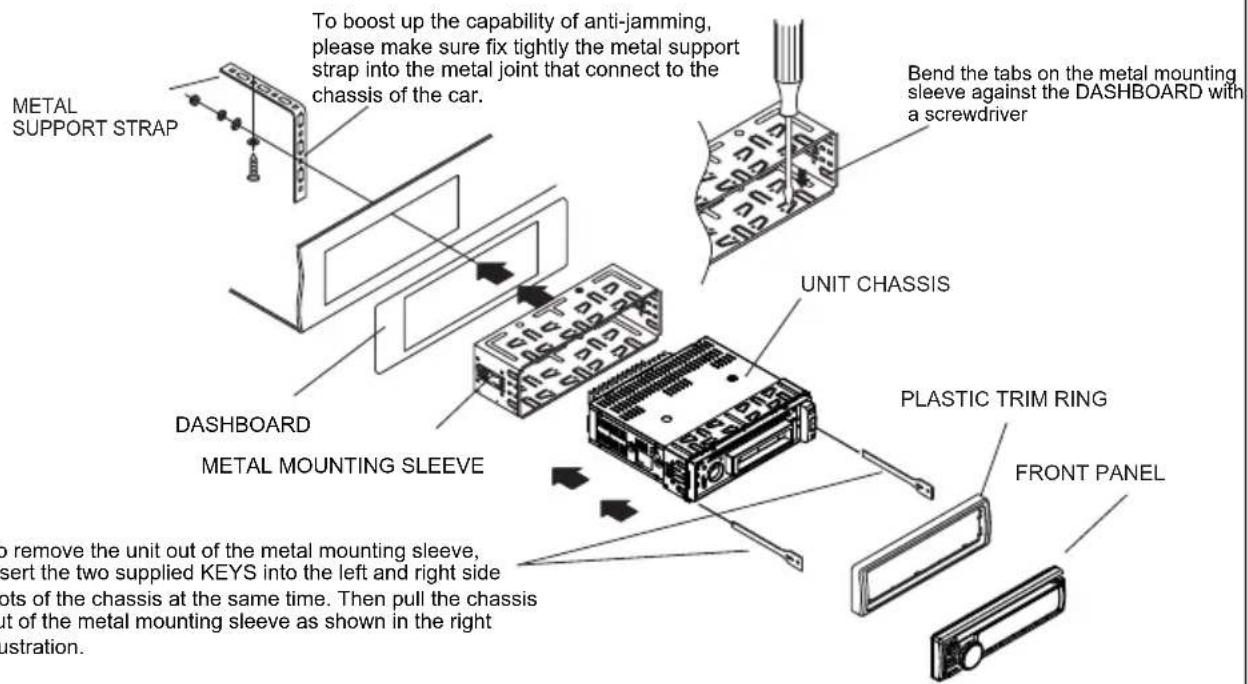
To remove the unit out of the metal mounting sleeve, insert the two supplied KEYS into the left and right side slots of the chassis at the same time. Then pull the chassis out of the metal mounting sleeve as shown in the right illustration.
WIRES CONNECTION
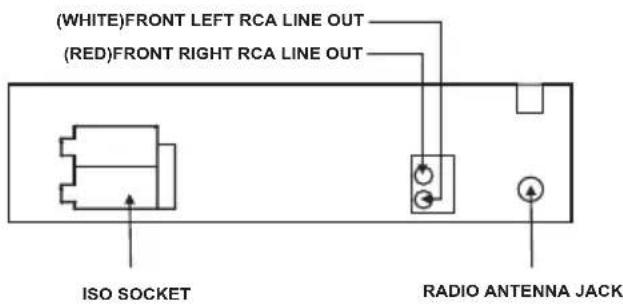
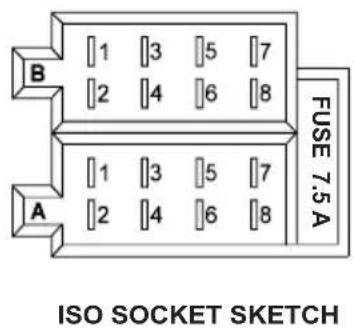
CONNECTOR A
- Memory +12V
- Auto Antenna Output
- 12V (To Ignition Key)
- GROUND
CONNECTOR B
- Rear Right Speaker (+)
- Rear Right Speaker (-)
- Front Right Speaker (+)
- Front Right Speaker (-)
- Front Left Speaker (+)
- Front Left Speaker (-)
- Rear Left Speaker (+)
- Rear Left Speaker (-)
SPECIFICATION
GENERAL
Supply Voltage
Current Consumption
Power Output
Number of channels
Unit Dimensions
FM SECTION
Frequency range
Effective sensitivity
I.F Frequency
AM SECTION
Frequency range
Effective sensitivity
I.F Frequency
RCA LINE OUT
Output
SD or USB PLAYBACK
System
Frequency characteristics
Signal to noise (SD & USB)
DC 12V. Negative Ground
Max.7A
4 × 7W
2STEREO channels.
178[W] X 108[D] X 50[H] mm.
87.5MHz -108MHz
3uV.
10.7MHz.
522KHz - 1620KHz
40dB.
450KHz
1000mV @ MAX.
MP3 audio system.
20Hz -100Hz 6B5
10KHz-20KHz
50dB [1KHz].
EMPLOI DE LA FACADE AMOVIBLE
Rapport S/R CD: 50dB [1KHz]
REMARQUE
PRECAUTIONS FOR CORRECT DISPOSAL OF THE PRODUCT
The symbol shown on the equipment indicates that waste must be disposed of in "separate collection" and so the product must not be disposed of together with urban waste.
The user must take the product to special "separate waste collection centres" provided by local government, or deliver it to the retailer against the purchase of a new product.
Separate collection of waste and subsequent treatment, recycling and disposal operations promotes the production of equipment with recycled materials and limits negative effects on the environment and on health caused by improper handling of waste.
Illegal disposal of the product leads to the enforcement of administrative penalties.
RECOMMANDATIONS POUR L'ELIMINATION CORRECTE DU PRODUIT


- Front Cabinet after removing Front Control Panel
- RADIO OPERATION:
- USB/Card OPERATION:
- Tracks search
- INSTALLATION METHOD
- WIRES CONNECTION
- CONNECTOR A
- CONNECTOR B
- SPECIFICATION
- EMPLOI DE LA FACADE AMOVIBLE
- REMARQUE
- PRECAUTIONS FOR CORRECT DISPOSAL OF THE PRODUCT
- RECOMMANDATIONS POUR L'ELIMINATION CORRECTE DU PRODUIT
Brand : Trevi
Model : SDC 5715 USB
Category : Car radio