
CDXG1200U - Car stereo SONY - Free user manual and instructions
Find the device manual for free CDXG1200U SONY in PDF.



| Brand | Sony |
| Model | CDXG1200U |
| Product type | Car stereo with CD player, FM/MW/LW tuner, USB port, AUX input |
| Dimensions (W × H × D) | Approx. 178 × 50 × 177 mm |
| Weight | Approx. 1.2 kg |
| Power supply | Vehicle battery 12 V DC (negative ground), nominal current consumption 10 A |
| Maximum output power | 55 W × 4 (at 4 Ω) |
| Speaker impedance | 4 Ω – 8 Ω |
| FM tuning range | 87.5 – 108.0 MHz (Europe) / FM1/FM2: 87.5 – 108.0 MHz, FM3: 65 – 74 MHz (Russia) |
| MW/LW tuning range | MW: 531 – 1602 kHz, LW: 153 – 279 kHz |
| Compatible audio formats (USB) | MP3, WMA, FLAC (depending on specifications) |
| Compatible audio formats (CD) | CD-DA, MP3, WMA |
| Main functions | RDS radio, CD player, USB (AOA 2.0/MSC/MTP), AUX input, 10-band equalizer, Extra Bass, Quick-BrowZer, steering wheel remote control |
| Maintenance and cleaning | Clean the faceplate connectors with a cotton swab; clean discs from the center outward |
| Safety | Detachable front panel with anti-theft alarm; AUTO OFF function to prevent battery drain |
| Spare parts and repairability | Replaceable fuse (amp rating indicated on the old fuse); removable chassis sleeve and trim ring |
| General information | Made in Thailand; EU declaration of conformity available at www.compliance.sony.de |
Frequently Asked Questions - CDXG1200U SONY
User questions about CDXG1200U SONY
0 question about this device. Answer the ones you know or ask your own.
Ask a new question about this device
Download the instructions for your Car stereo in PDF format for free! Find your manual CDXG1200U - SONY and take your electronic device back in hand. On this page are published all the documents necessary for the use of your device. CDXG1200U by SONY.
USER MANUAL CDXG1200U SONY
FM/MW/LW Compact Disc Player
CD-пponгьВаTeЛь CBCTpoEHHbIM FM/MW/LW-THHePOM
FM/MW/LW nporpaBaay KOMnakT DnCKiB
To cancel the demonstration (DEMO) display, see page 10.
For the connection/installation, see page 20.
Operating Instructions GB
For safety, be sure to install this unit in the dashboard of the car as the rear side of the unit becomes hot during use. For details, see "Connection/Installation" (page 20).
Made in Thailand
Laser Diode Properties
- Emission Duration: Continuous
- Laser Output: Less than 53.3 W
(This output is the value measurement at a distance of 200mm from the objective lens surface on the Optical Pick-up Block with 7 mm aperture.)
The nameplate indicating operating voltage, etc., is located on the bottom of the chassis.
CE
Hereby, Sony Corporation declares that this equipment is in compliance with Directive 2014/53/EU.
The full text of the EU declaration of conformity is available at the following internet address:
http://www.compliance.sony.de/
This equipment is intended to be used with the approved version(s) of software that are indicated in the EU Declaration of Conformity.
The software loaded on this equipment is verified to comply with the essential requirements of the Directive 2014/53/EU. Software version: 1_
The software version can be checked in the firmware setup item of the general setup menu.
Notice for customers: the following information is only applicable to equipment sold in countries applying EU Directives
Manufacturer: Sony Corporation, 1-7-1 Konan Minato-ku Tokyo, 108-0075 Japan For EU product compliance: Sony Belgium, bijkantoor van Sony Europe Limited, Da Vincilaan 7-D1, 1935 Zaventem, Belgium
Disposal of waste batteries and electrical and electronic equipment (applicable in the European Union and other European countries
with separate collection systems)
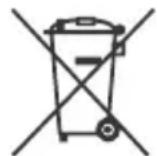
This symbol on the product, the battery or on the packaging indicates that the product and the battery shall not be treated as household waste. On certain batteries this symbol might be used in combination with a chemical symbol. The chemical symbols for mercury (Hg) or lead (Pb) are added if the battery contains more than 0.0005% mercury or 0.004% lead.
By ensuring these products and batteries are disposed of correctly, you will help prevent potentially negative consequences for the environment and human health which could otherwise be caused by inappropriate waste handling. The recycling of the materials will help to conserve natural resources.
In case of products that for safety, performance or data integrity reasons require a permanent connection with an incorporated battery, this battery should be replaced by qualified service staff only.
To ensure that the battery and the electrical and electronic equipment will be treated properly, hand over these products at end-of-life to the applicable collection point for the recycling of electrical and electronic equipment.
For all other batteries, please view the section on how to remove the battery from the product safely. Hand the battery over to the applicable collection point for the recycling of waste batteries.
For more detailed information about recycling of this product or battery, please contact your local Civic Office, your household waste disposal service or the shop where you purchased the product or battery.
Warning if your car's ignition has no ACC position
Be sure to set the AUTO OFF function (page 10). The unit will shut off completely and automatically in the set time after the unit is turned off, which prevents battery drain. If you do not set the AUTO OFF function, press and hold OFF until the display disappears each time you turn the ignition off.
Disclaimer regarding services offered by third parties
Services offered by third parties may be changed, suspended, or terminated without prior notice. Sony does not bear any responsibility in these sorts of situations.
Table of Contents
Guide to Parts and Controls 4
Getting Started
Detaching the Front Panel. 5
Resetting the Unit 5
Setting the Clock 6
Connecting a USB Device 6
Connecting Other Portable Audio Device 6
Listening to the Radio
Listening to the Radio 7
Using Radio Data System (RDS) 7
Playback
Playing a Disc 8
Playing a USB Device 8
- Searching and Playing Tracks 9
Settings
Canceling the DEMO Mode 10
Basic Setting Operation. 10
General Setup (GENERAL) 10
Sound Setup (SOUND) 11
Display Setup (DISPLAY) 12
Additional Information
Updating the Firmware 13
Precautions. 13
Maintenance. 14
Specifications 14
Troubleshooting 16
Messages 18
Connection/Installation
Cautions 20
Parts List for Installation 20
Connection 21
Installation 23
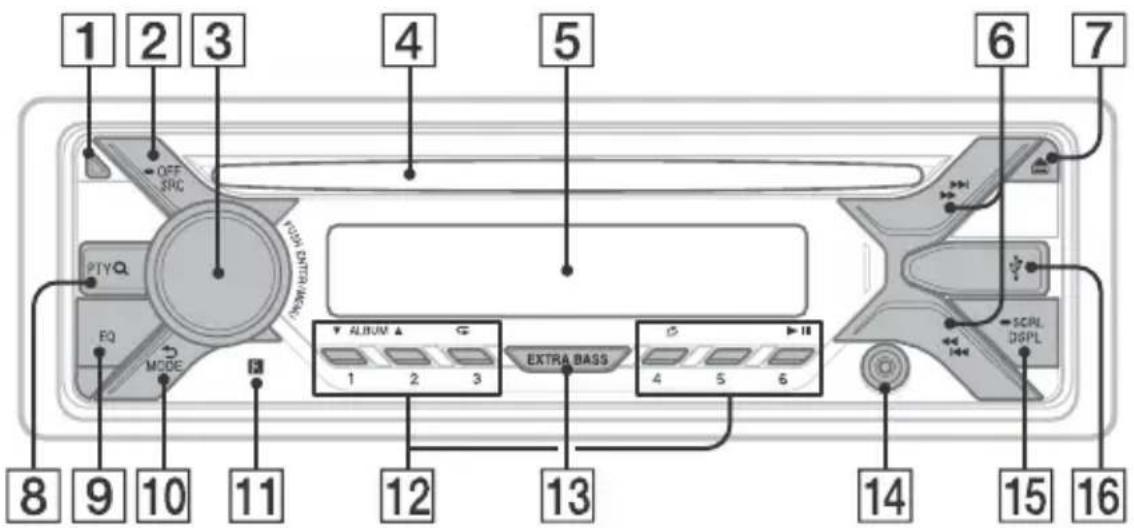
Guide to Parts and Controls
Main unit
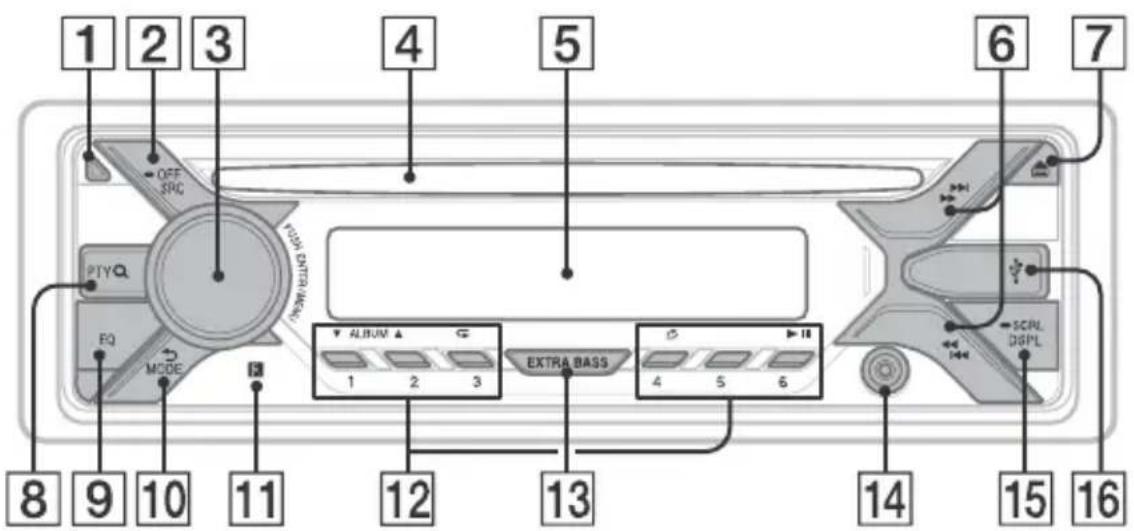
1 Front panel release button
2 SRC (source)
Turn on the power.
Change the source.
OFF
Press and hold for 1 second to turn the source off and display the clock.
Press and hold for more than 2 seconds to turn off the power and the display.
3 Control dial
Rotate to adjust the volume.
PUSH ENTER
Enter the selected item.
MENU
Open the setup menu.
4 Disc slot
5 Display window
6 S E E K - / + )
Tune in radio stations automatically.
Press and hold to tune manually.
I/prev/next)
(fast-reverse/fast-forward)
7 (disc eject)
8 PTY (program type)
Select PTY in RDS.
Q (browse) (page 9)
Enter the browse mode during playback.
Not available when a USB device in
AndroidTM mode is connected.)
EQ (equalizer)
Select an equalizer curve.
10 (back)
Return to the previous display.
MODE (page 7)
11 Receptor for the remote commander
12 Number buttons (1 to 6)
Receive stored radio stations. Press and hold to store stations.
ALBUM /
Skip an album for audio device. Press and hold to skip albums continuously.
(Not available when a USB device in
Android mode is connected.)
(repeat)
(Not available when a USB device in
Android mode is connected.)
(shuffle)
(Not available when a USB device in
Android mode is connected.)
II (play/pause)
13 EXTRA BASS
Reinforces bass sound in synchronization with the volume level. Press to change the EXTRA BASS setting: [1], [2], [OFF].
14 AUX input jack
15 DSPL(display)
Change display items.
SCRL (scroll)
Press and hold to scroll a display item.
16 USB port
Getting Started
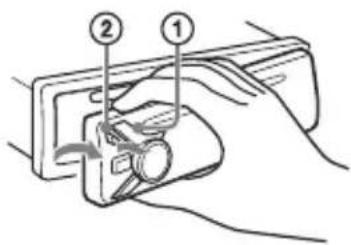
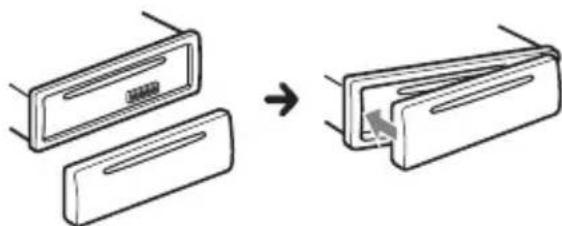
Detaching the Front Panel
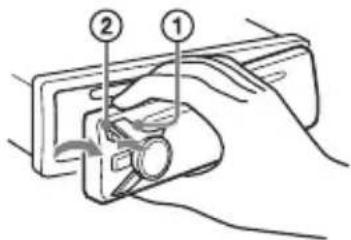
You can detach the front panel of this unit to prevent theft.
1 Press and hold OFF ① until the unit turns off, press the front panel release button ②, then pull the panel towards you to remove.
Caution alarm
If you turn the ignition switch to the OFF position without detaching the front panel, the caution alarm will sound for a few seconds. The alarm will only sound if the built-in amplifier is used.
Attaching the front panel
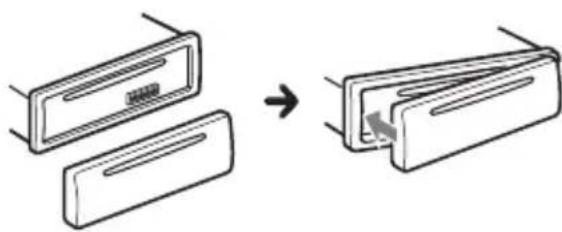
Resetting the Unit
Before operating the unit for the first time, or after replacing the car battery or changing connections, you must reset the unit.
1 Press DSPL and (back)/MODE for more than 2 seconds.
Note
Resetting the unit will erase the clock setting and some stored contents.
Setting the area/region
After resetting the unit, the area/region setting display appears.
1 Press ENTER while [SET AREA] is displayed.
The area/region currently set appears.
2 Rotate the control dial to select [EUROPE] or [RUSSIA], then press it.
3 Rotate the control dial to select [YES] or [NO], then press it. If the setting area/region is changed, the unit is reset, then the clock is displayed.
This setting can be configured in the general setup menu (page 10).
Setting the Clock
1 Press MENU, rotate the control dial to select [GENERAL], then press it.
2 Rotate the control dial to select [SET CLOCK-ADJ], then press it. The hour indication flashes.
3 Rotate the control dial to set the hour and minute. To move the digital indication, press SEEK + / -
4 After setting the minute, press MENU. The setup is complete and the clock starts.
To display the clock Press DSPL.
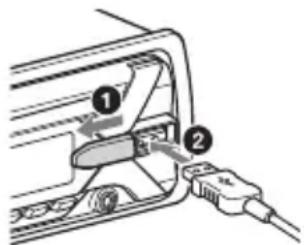
Connecting a USB Device
1 Turn down the volume on the unit.
2 Connect the USB device to the unit.
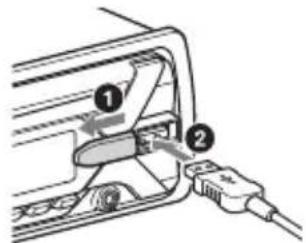
Connecting Other Portable Audio Device
1 Turn off the portable audio device.
2 Turn down the volume on the unit.
3 Connect the portable audio device to the AUX input jack (stereo mini jack) on the unit with a connecting cord (not supplied)*.
- Be sure to use a straight type plug.
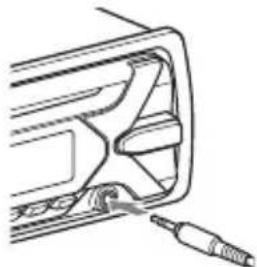
4 Press SRC to select [AUX].
To match the volume level of the connected device to other sources
Start playback of the portable audio device at a moderate volume, and set your usual listening volume on the unit. Press MENU, then select [SOUND] SET AUX VOL.
Listening to the Radio
Listening to the Radio
To listen to the radio, press SRC to select [TUNER].
Storing automatically (BTM)
1 Press MODE to change the band (FM1, FM2, FM3, MW or LW).
2 Press MENU, rotate the control dial to select [GENERAL], then press it.
3 Rotate the control dial to select [SET BTM], then press it.
The unit stores stations in order of frequency on the number buttons.
Tuning
1 Press MODE to change the band (FM1, FM2, FM3, MW or LW).
2 Perform tuning.
To tune manually
Press and hold SEEK + / - to locate the approximate frequency, then press SEEK + / - repeatedly to fine adjust to the desired frequency.
To tune automatically
Press SEEK + / -
Scanning stops when the unit receives a station.
Storing manually
1 While receiving the station that you want to store, press and hold a number button (1 to 6) until [MEM] appears.
Receiving the stored stations
1 Select the band, then press a number button (1 to 6).
Using Radio Data System (RDS)
Setting alternative frequencies (AF) and traffic announcement (TA)
AF continuously retunes the station to the strongest signal in a network, and TA provides current traffic information or traffic programs (TP) if received.
1 Press MENU, rotate the control dial to select [GENERAL], then press it.
2 Rotate the control dial to select [SET AF/TA], then press it.
3 Rotate the control dial to select [SET AF-ON], [SET TA-ON], [SET AF/TA-ON] or [SET AF/TA-OFF], then press it.
To store RDS stations with the AF and TA setting
You can preset RDS stations along with an AF/TA setting. Set AF/TA, then store the station with BTM or manually. If you preset manually, you can also preset non-RDS stations.
To receive emergency announcements
With AF or TA on, emergency announcements will automatically interrupt the currently selected source.
To adjust the volume level during a traffic announcement
Level will be stored into memory for subsequent traffic announcements, independently from the regular volume level.
To stay with one regional program (REGIONAL)
When the AF and REGIONAL functions are on, you will not be switched to another regional station with a stronger frequency. If you leave this regional program's reception area, set [SET REG-OFF] in [GENERAL] during FM reception (page 11).
This function does not work in the UK and some other areas.
Local Link function (UK only)
This function enables you to select other local stations in the area, even if they are not stored on your number buttons. During FM reception, press a number button (1 to 6) on which a local station is stored. Within 5 seconds, press again a number button of the local station. Repeat this procedure until the local station is received.
Selecting program types (PTY)
1 Press PTY during FM reception.
2 Rotate the control dial until the desired program type appears, then press it. The unit starts to search for a station broadcasting the selected program type.
Type of programs
NEWS (News), AFFAIRS (Current Affairs), INFO (Information), SPORT (Sports), EDUCATE (Education), DRAMA (Drama), CULTURE (Culture), SCIENCE (Science), VARIORED (Varied), POP M (Pop Music), ROCK M (Rock Music), EASY M (M.O.R. Music), LIGHT M (Light classical), CLASSICS (Serious classical), OTHER M (Other Music), WEATHER (Weather), FINANCE (Finance), CHILDREN (Children's program), SOCIAL A (Social Affairs), RELIGION (Religion), PHONE IN (Phone In), TRAVEL (Travel), LEISURE (Leisure), JAZZ (Jazz Music), COUNTRY (Country Music), NATION M (National Music), OLDIES (Oldies Music), FOLK M (Folk Music), DOCUMENT (Documentary)
Setting clock time (CT)
The CT data from the RDS transmission sets the clock.
1 Set [SET CT-ON] in [GENERAL] (page 11).
Playback
Playing a Disc
1 Insert the disc (label side up).
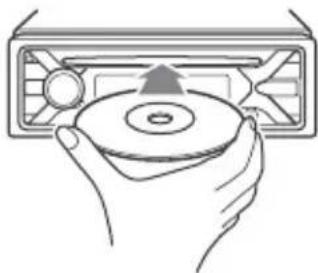
Playback starts automatically.
Playing a USB Device
AOA (Android Open Accessory) 2.0, MSC (Mass Storage Class) and MTP (Media Transfer Protocol) type USB devices* compliant with the USB standard can be used. Depending on the USB device, the Android mode or MSC/MTP mode can be selected on the unit. Some digital media players or Android smartphones may require setting to MTP mode.
- e.g., a USB flash drive, digital media player, Android smartphone
Notes
- For details on the compatibility of your USB device, visit the support site on the back cover.
- Smartphones with Android OS 4.1 or higher installed support Android Open Accessory 2.0 (AOA 2.0). However, some smartphones may not fully support AOA 2.0 even if Android OS 4.1 or higher is installed. For details on the compatibility of your Android smartphone, visit the support site on the back cover.
- Playback of the following files is not supported. MP3/WMA/FLAC:
copyright-protected files - DRM (Digital Rights Management) files
- Multi-channel audio files MP3/WMA:
- lossless compression files
Before making a connection, select the USB mode (Android mode or MSC/MTP mode) depending on the USB device (page 11).
1 Connect a USB device to the USB port (page 6).
Playback starts.
If a device is already connected, to start playback, press SRC to select [USB].
2 Adjust the volume on this unit.
To stop playback
Press and hold OFF for 1 second.
To remove the device
Stop playback, then remove the device.
Searching and Playing Tracks
Repeat play and shuffle play
Not available when a USB device in Android mode is connected.
1 During playback, press (repeat) or (shuffle) repeatedly to select the desired play mode.
Playback in the selected play mode may take time to start.
Available play modes differ depending on the selected sound source.
Searching a track by name (QuickBrowZerTM)
Not available when a USB device in Android mode is connected.
1 During CD or USB playback, press (browse)* to display the list of search categories.
When the track list appears, press (back) repeatedly to display the desired search category.
- During USB playback, press (browse) for more than 2 seconds to directly return to the beginning of the category list.
2 Rotate the control dial to select the desired search category, then press it to confirm.
3 Repeat step 2 to search the desired track.
Playback starts.
To exit the Quick-BrowZer mode
Press (browse).
Searching by skipping items (Jump mode)
Not available when a USB device in Android mode is connected.
1Press Q (browse).
2 Press SEEK+.
3 Rotate the control dial to select the item.
The list is jumped in steps of 10% of the total number of items.
4 Press ENTER to return to the QuickBrowZer mode.
The selected item appears.
5 Rotate the control dial to select the desired item, then press it.
Playback starts.
Settings
Canceling the DEMO Mode
You can cancel the demonstration display which appears when the source is off and the clock is displayed.
1 Press MENU, rotate the control dial to select [GENERAL], then press it.
2 Rotate the control dial to select [SET DEMO], then press it.
3 Rotate the control dial to select [SET DEMO-OFF], then press it. The setting is complete.
4 Press (back) twice.
The display returns to normal reception/ play mode.
Basic Setting Operation
You can set items in the following setup categories:
General setup (GENERAL), Sound setup (SOUND), Display setup (DISPLAY)
1 Press MENU.
2 Rotate the control dial to select the setup category, then press it. The items that can be set differ depending on the source and settings.
3 Rotate the control dial to select the options, then press it.
To return to the previous display
Press (back).
General Setup (GENERAL)
AREA
Specifies the area/region to use this unit: [EUROPE], [RUSSIA].
If the area/region currently set is changed, this unit is reset, then the clock is displayed.
(Available only while the source is off and the clock is displayed.)
DEMO (demonstration)
Activates the demonstration: [ON], [OFF].
CLOCK-ADJ (clock adjust) (page 6)
CAUT ALM (caution alarm)
Activates the caution alarm: [ON], [OFF] (page 5).
(Available only while the source is off and the clock is displayed.)
BEEP
Activates the beep sound: [ON], [OFF].
AUTO OFF
Shuts off automatically after a desired time when the unit is turned off: [ON] (30 minutes), [OFF].
STEERING
Registers/resets the setting of the steering wheel remote control.
(Available when connected with the connection cable (not supplied).)
(Available only while the source is off and the clock is displayed.)
STR CONTROL (steering control)
Selects the input mode of the connected remote control. To prevent a malfunction, be sure to match the input mode with the connected remote control before use.
CUSTOM
Input mode for the steering wheel remote control
PRESET
Input mode for the wired remote control excluding the steering wheel remote control (automatically selected when [RESET CUSTOM] is performed.)
EDIT CUSTOM
Registers the functions (SOURCE, ATT, VOL + / - ,SEEK + / - ) to the steering wheel remote control:
1 Rotate the control dial to select the function you want to assign to the steering wheel remote control, then press it.
2 While [REGISTER] is blinking, press and hold the button on the steering wheel remote control you want to assign the function to. When registration is complete, [REGISTERED] is displayed.
3 To register other functions, repeat steps 1 and 2.
(Available only when [STR CONTROL] is set to [CUSTOM].)
RESET CUSTOM
Resets the setting of the steering wheel remote control: [YES], [NO].
(Available only when [STR CONTROL] is set to [CUSTOM].)
Notes
- While making settings, only button operation on the unit is available. For safety, park your car before making this setting.
If an error occurs while registering, all the previously-registered information remains. Restart registration from the function where the error occurred. - This function may not be available on some vehicles. For details on the compatibility of your vehicle, visit the support site on the back cover.
USB MODE
Changes the USB mode: [ANDROID], [MSC/MTP].
(Available only when the USB source is selected.)
CT (clock time)
Activates the CT function: [ON], [OFF].
AF/TA (alternative frequencies/traffic announcement)
Selects the alternative frequencies (AF) and traffic announcement (TA) setting: [AF-ON], [TA-ON], [AF/TA-ON], [AF/TA-OFF].
REGIONAL
Restricts reception to a specific region: [ON], [OFF].
(Available only when FM is received.)
BTM (best tuning memory) (page 7)
(Available only when the tuner is selected.)
FIRMWARE
(Available only while the source is off and the clock is displayed.)
Checks/updates the firmware version. For details, visit the support site on the back cover.
FW VERSION (firmware version)
Displays current firmware version.
FW UPDATE (firmware update)
Enters firmware update process: [YES], [NO].
Updating the firmware takes a few minutes to complete. During the update, do not turn the ignition to the OFF position, nor remove the USB device.
Sound Setup (SOUND)
EQ10 PRESET
Selects an equalizer curve from 10 equalizer curves or off:
[OFF], [R&B], [ROCK], [POP], [HIP-HOP], [ELECTRONICA], [JAZZ], [SOUL],
[COUNTRY], [KARAOKE]*, [CUSTOM].
The equalizer curve setting can be memorized for each source.
- [KARAOKE] reduces the vocal sound but cannot be fully removed during playback. Also, using a microphone is not supported.
EQ10 CUSTOM
Sets [CUSTOM] of EQ10.
Setting the equalizer curve: [BAND1] 32 Hz, [BAND2] 63 Hz, [BAND3] 125 Hz,
[BAND4] 250 Hz, [BAND5] 500 Hz,
[BAND6] 1 kHz, [BAND7] 2 kHz, [BAND8] 4
kHz, [BAND9] 8 kHz, [BAND10] 16 kHz.
The volume level is adjustable in 1 dB
steps, from -6 dB to +6 dB.
BALANCE
Adjusts the sound balance: [RIGHT-15] - [CENTER] - [LEFT-15].
FADER
Adjusts the relative level: [FRONT-15] - [CENTER] - [REAR-15].
([ATT] is displayed at the lowest setting.)
Selects the subwoofer phase: [NORM], [REV].
LPF FREQ (low pass filter frequency)
Selects the subwoofer cut-off frequency:
[80Hz], [100Hz], [120Hz].
HPF FREQ (high pass filter frequency)
Selects the front/rear speaker cut-off
frequency: [OFF], [80Hz], [100Hz], [120Hz].
AUX VOL (AUX volume level)
Adjusts the volume level for each
connected auxiliary device: [+18dB]
[0 dB] - [-8 dB].
This setting negates the need to adjust
the volume level between sources.
(Available only when the AUX is selected.)
Display Setup (DISPLAY)
DIMMER
Changes the display brightness: [ON], [OFF], [CLK].
To set this function to be active only during a fixed period, select [CLK], then set the start and end times.
- To set the brightness when the dimmer function is activated:
Set [DIMMER] to [ON], then adjust [BRIGHTNESS].
- To set the brightness when the dimmer function is deactivated:
Set [DIMMER] to [OFF], then adjust [BRIGHTNESS].
The brightness setting is stored and applied when the dimmer function is activated or deactivated.
BRIGHTNESS
Adjusts the display brightness. The brightness level is adjustable: [1] - [10].
SND SYNC (sound synchronization)
Activates the synchronization of the illumination with the sound: [ON], [OFF].
AUTO SCR (auto scroll)
Scrolls long items automatically: [ON], [OFF].
Not available when the AUX or tuner is selected.)
Additional Information
Updating the Firmware
To update the firmware, visit the support site on the back cover, then follow the online instructions.
Notes
- Using a USB device (not supplied) is required for updating the firmware. Store the updater in the USB device, and connect the device to the USB port, then perform the update operation.
- Updating the firmware takes a few minutes to complete. During the update, do not turn the ignition to the OFF position, nor remove the USB device.
Precautions
Cool off the unit beforehand if your car has been parked in direct sunlight.
- Do not leave the front panel or audio devices brought in inside the car, or it may cause malfunction due to high temperature in direct sunlight.
- Power antenna (aerial) extends automatically.
Moisture condensation
Should moisture condensation occur inside the unit, remove the disc and wait for about an hour for it to dry out; otherwise the unit will not operate properly.
To maintain high sound quality
Do not splash liquid onto the unit or discs.
Notes on discs
- Do not expose discs to direct sunlight or heat sources such as hot air ducts, nor leave it in a car parked in direct sunlight.
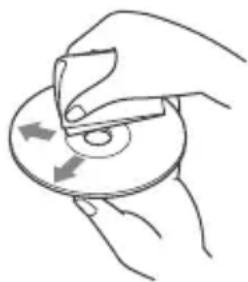
- Before playing, wipe the discs with a cleaning cloth from the center out. Do not use solvents such as benzine, thinner, commercially available cleaners.
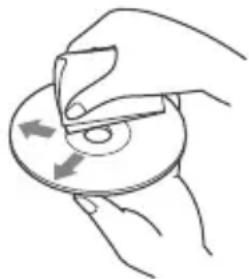
- This unit is designed to play discs that conform to the Compact Disc (CD) standard. DualDiscs and some of the music discs encoded with copyright protection technologies do not conform to the Compact Disc (CD) standard, therefore, these discs may not be playable by this unit.
- Discs that this unit CANNOT play
- Discs with labels, stickers, or sticky tape or paper attached. Doing so may cause a malfunction, or may ruin the disc.
- Discs with non-standard shapes (e.g., heart, square, star). Attempting to do so may damage the unit.
- 8 cm (1/4 in) discs.
Notes on CD-R/CD-RW discs
- If the multi-session disc begins with a CD-DA session, it is recognized as a CD-DA disc, and other sessions are not played.
- Discs that this unit CANNOT play
- CD-R/CD-RW of poor recording quality.
- CD-R/CD-RW recorded with an incompatible recording device.
- CD-R/CD-RW which is finalized incorrectly.
- CD-R/CD-RW other than those recorded in music CD format or MP3 format conforming to ISO9660 Level 1/Level 2, Joliet/Romeo or multi-session.
Playback order of audio files
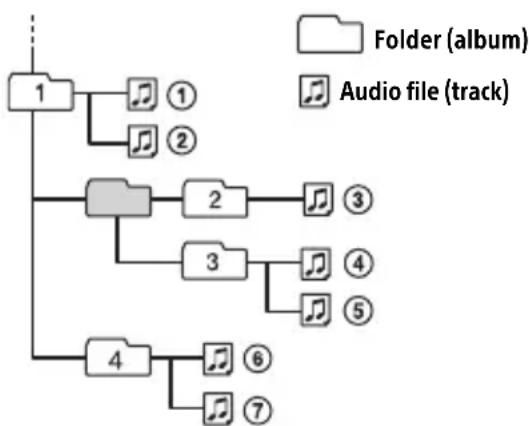
If you have any questions or problems concerning your unit that are not covered in this manual, consult your nearest Sony dealer.
Maintenance
Cleaning the connectors
The unit may not function properly if the connectors between the unit and the front panel are not clean. In order to prevent this, detach the front panel (page 5) and clean the connectors with a cotton swab. Do not apply too much force. Otherwise, the connectors may be damaged.
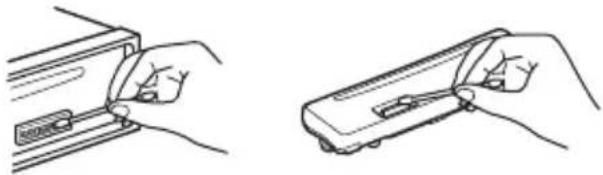
Notes
- For safety, turn off the ignition before cleaning the connectors, and remove the key from the ignition switch.
- Never touch the connectors directly with your fingers or with any metal device.
Specifications
Tuner section
FM
Tuning range: When [AREA] is set to [EUROPE]: 87.5 MHz - 108.0 MHz When [AREA] is set to [RUSSIA]: FM1/FM2: 87.5 MHz - 108.0 MHz (at 50 kHz step) FM3: 65 MHz - 74 MHz (at 30 kHz step) Antenna (aerial) terminal: External antenna (aerial) connector Intermediate frequency: When [AREA] is set to [EUROPE]: FM CCIR: -1,956.5 kHz to -487.3 kHz an +500.0 kHz to +2,095.4 kHz When [AREA] is set to [RUSSIA]: FM CCIR: -1,956.5 kHz to -487.3 kHz an +500.0 kHz to +2,095.4 kHz FM OIRT: -1,815.6 kHz to -943.7 kHz and +996.6 kHz to +1,776.6 kHz Usable sensitivity: 7 dBf Selectivity: 75 dB at 400 kHz Signal-to-noise ratio: 73 dB Separation: 50 dB at 1 kHz Frequency response: 20 Hz - 15,000 Hz MW/LW Tuning range: MW: 531 kHz - 1,602 kHz LW: 153 kHz - 279 kHz Antenna (aerial) terminal: External antenna (aerial) connector Sensitivity: MW: 26 V, LW: 50 V
CD Player section
Signal-to-noise ratio: 95 dB
Frequency response: 10Hz - 20,000Hz
Wow and flutter: Below measurable limit
The maximum number of: (CD-R/CD-RW only)
- folders (albums): 150 (including root folder)
- files (tracks) and folders: 300 (may less than 300 if folder/file names contain many characters)
displayable characters for a folder/file name: 32 (Joliet)/64 (Romeo)
Corresponding codec: MP3 (.mp3) and WMA (.wma)
USB Player section
Interface: USB (Full-speed)
Maximum current: 500mA
The maximum number of recognizable tracks:
- folders (albums): 256
- files (tracks) per folder: 256
Compatible Android Open Accessory protocol (AOA): 2.0
Corresponding codec: MP3 (.mp3)
Bit rate: 8 kbps - 320 kbps (Supports VBR (Variable Bit Rate))
Sampling rate: 16kHz - 48kHz
WMA (.wma)
Bit rate: 32 kbps - 192 kbps (Supports VBR (Variable Bit Rate))
Sampling rate: 32 kHz, 44.1 kHz, 48 kHz
FLAC (.flac)
Bit depth: 16 bit, 24 bit
Sampling rate: 44.1 kHz, 48 kHz
Power amplifier section
Output: Speaker outputs
Speaker impedance: 4 -8
Maximum power output: 55W× 4 (at 4
General
Outputs:
Audio outputs terminal (REAR, SUB)
Power antenna (aerial)/Power amplifier control terminal (REM OUT)
Inputs:
Remote controller input terminal
Antenna (aerial) input terminal
Power requirements: 12 V DC car battery (negative ground (earth))
Rated current consumption: 10 A
Dimensions:
Approx. 178mm× 50mm× 177mm
(7 1/8 in × 2 in × 7 in) (w/h/d)
Mounting dimensions:
Approx. 182mm× 53mm× 160mm
(7 1/4 in × 2 1/8 in × 6 5/16 in) (w/h/d)
Mass: Approx. 1.2 kg (2 lb 11 oz)
Package contents:
Main unit (1)
Parts for installation and connections (1 set)
Your dealer may not handle some of the above listed accessories. Please ask the dealer for detailed information.
Design and specifications are subject to change without notice.
Copyrights
Windows Media is either a registered trademark or trademark of Microsoft Corporation in the United States and/or other countries.
This product is protected by certain intellectual property rights of Microsoft Corporation. Use or distribution of such technology outside of this product is prohibited without a license from Microsoft or an authorized Microsoft subsidiary.
MPEG Layer-3 audio coding technology and patents licensed from Fraunhofer IIS and Thomson.
Android is a trademark of Google Inc.
libFLAC
Copyright (C) 2000-2009 Josh Coalson
Copyright (C) 2011-2013 Xiph.Org Foundation
Redistribution and use in source and binary forms, with or without modification, are permitted provided that the following conditions are met:
- Redistributions of source code must retain the above copyright notice, this list of conditions and the following disclaimer.
- Redistributions in binary form must reproduce the above copyright notice, this list of conditions and the following disclaimer in the documentation and/or other materials provided with the distribution.
- Neither the name of the Xiph.org Foundation nor the names of its contributors may be used to endorse or promote products derived from this software without specific prior written permission.
THIS SOFTWARE IS PROVIDED BY THE
COPYRIGHT HOLDERS AND COLNTRIBUTORS "AS IS" AND ANY EXPRESS OR IMplied
WARRANTIES, INCLUDING, BUT NOT LIMITED TO, THE IMPLIED WARRANTY OF
MERCHANTABILITY AND FITNESS FOR A
PARTICULAR PURPOSE ARE DISCLAIMED. IN NO EVENT SHALL THE FOUNDATION OR
CONTRIBUTORS BE LIABLE FOR ANY DIRECT,
INDIRECT, INCIDENTAL, SPECIAL,
EXEMPLARY, OR CONSEQUENTIAL DAMAGES (INCLUDING, BUT NOT LIMITED TO,
PROCUREMENT OF SUBSTITUTE GOODS OR SERVICES; LOSS OF USE, DATA, OR PROFITS; OR BUSINESS INTERRUPTION) HOWEVER CAUSED AND ON ANY THEORY OF LIABILITY,
WHETHER IN CONTRACT, STRICT LIABILITY,
OR TORT (INCLUDING NEGLIGENCE OR OTHERWISE) ASISING IN ANY WAY OUT OF THE USE OF THIS SOFTWARE, EVEN IF ADVISED OF THE POSSIBILITY OF SUCH DAMAGE.
Troubleshooting
The following checklist will help you remedy problems you may encounter with your unit. Before going through the checklist below, check the connection and operating procedures.
For details on using the fuse and removing the unit from the dashboard, see "Connection/Installation" (page 20). If the problem is not solved, visit the support site on the back cover.
General
No sound or the sound is very low.
The position of the fader control [FADER] is not set for a 2-speaker system.
The volume of the unit and/or connected device is very low.
- Increase the volume of the unit and connected device.
No beep sound.
An optional power amplifier is connected and you are not using the built-in amplifier.
The contents of the memory have been erased.
The power supply lead or battery has been disconnected or not connected properly.
Stored stations and correct time are erased.
The fuse has blown.
Makes a noise when the position of the ignition is switched.
The leads are not matched correctly with the car's accessory power connector.
During playback or reception, the demonstration mode starts.
If no operation is performed for 5 minutes with [DEMO-ON] set, the demonstration mode starts.
- Set [DEMO-OFF] (page10).
The display disappears from/does not appear in the display window.
The dimmer is set to [DIM-ON] (page 12).
The display disappears if you press and hold OFF.
- Press OFF on the unit until the display appears.
The connectors are dirty (page 14).
The display/illumination flashes.
The power supply is not sufficient.
- Check that the car battery supplies enough power to the unit. (The power requirement is 12VDC .)
The operation buttons do not function. The disc will not eject.
Press DSPL and (back)/MODE for more than 2 seconds to reset the unit.
The contents stored in memory are erased.
For your safety, do not reset the unit while you are driving.
Radio reception
Stations cannot be received. The sound is hampered by noises.
The connection is not correct.
- Check the connection of the car antenna (aerial).
- If the auto antenna (aerial) will not extend, check the connection of the power antenna (aerial) control lead.
Preset tuning is not possible.
The broadcast signal is too weak.
65 MHz to 74 MHz in FM3 cannot be tuned in.
[AREA] is set to [EUROPE].
- Set [AREA] to [RUSSIA] (page 10).
RDS
RDS services cannot be received (when [AREA] is set to [RUSSIA]).
FM3 is selected.
- Select FM1 or FM2.
RDS services are unavailable in the current region.
The SEEK starts after a few seconds of listening.
The station is non-TP or has weak signal.
- Deactivate TA (page 7).
No traffic announcements.
Activate TA (page 7).
The station does not broadcast any traffic announcements despite being TP.
- Tune in another station.
PTY displays [- - - - - - - - ]
The current station is not an RDS station.
RDS data has not been received.
The station does not specify the program type.
Program service name flashes.
There is no alternative frequency for the current station.
- Press SEEK +/- while the program service name is flashing. [PI SEEK] appears and the unit starts searching for another frequency with the same PI (program identification) data.
CD playback
The disc does not play.
Defective or dirty disc.
The CD-R/CD-RW is not for audio use (page 13).
MP3/WMA files cannot be played.
The disc is incompatible with the MP3/WMA format and version. For details on playable discs and formats, visit the support site on the back cover.
MP3/WMA files take longer to play than others.
The following discs take a longer time to start playback.
- A disc recorded with a complicated tree structure.
- A disc recorded in Multi Session.
-A disc to which data can be added.
The sound skips.
Defective or dirty disc.
USB device playback
You cannot play items via a USB hub.
This unit cannot recognize USB devices via a USB hub.
A USB device takes longer to play.
The USB device contains files with a complicated tree structure.
The sound is intermittent.
The sound may be intermittent at a high-bit-rate.
DRM (Digital Rights Management) files may not be playable in some cases.
Audio file cannot be played.
USB device formatted with file systems other than FAT16 or FAT32 are unsupported.*
* This unit supports FAT16 and FAT32, but some USB device may not support all of these FAT. For details, refer to the operating instruction of each USB device or contact the manufacturer.
Operations for skipping an album, skipping items (Jump mode), and searching a track by name (QuickBrowZer) cannot be performed.
These operations cannot be performed when a USB device in Android mode is connected.
- Set [USB MODE] to [MSC/MTP] (page 11).
The USB mode of the device is not set to the appropriate mode.
- Make sure that the USB mode of the device is set to MSC/MTP mode.
The sound cannot be output during playback in Android mode.
While the unit is in Android mode, the sound outputs only from the Android smartphone.
- Check the status of the audio playback application on the Android smartphone.
- Playback may not perform properly depending on the Android smartphone.
Messages
The following messages may appear or flash during operation.
CD ERROR: The disc cannot be played. The disc will be ejected automatically.
Clean or insert the disc correctly, or make sure the disc is not blank or defective.
CD NO MUSIC: There is no playable file. The disc will be ejected automatically.
Insert a disc containing playable files (page 15).
CD PUSH EJT: The disc could not be ejected properly.
Press (eject).
HUB NO SUPRT: USB hubs are not supported.
INVALID
The selected operation could be invalid.
NO AF: No alternative frequencies.
Press SEEK + / - while the program service name is flashing. The unit starts searching for another frequency with the same PI (program identification) data ([PI SEEK] appears).
NO TP: No traffic programs.
The unit will continue searching for available TP stations.
NOT SUPPORT -Android MODE
A USB device not supporting AOA (Android Open Accessory) 2.0 is connected to the unit while [USB MODE] is set to [ANDROID].
- Set [USB MODE] to [MSC/MTP] (page 11).
OVERLOAD: The USB device is overloaded.
Disconnect the USB device, then press SRC to select another source.
The USB device has a fault, or an unsupported device is connected.
READ: Now reading information.
Wait until reading is complete and playback starts automatically. This may take some time depending on the file organization.
USB ERROR: The USB device cannot be played.
Connect the USB device again.
USB NO DEV: A USB device is not connected or recognized.
Make sure the USB device or USB cable is securely connected.
USB NO MUSIC: There is no playable file.
Connect a USB device containing playable files (page 15).
USB NO SUPRT: The USB device is not supported.
For details on the compatibility of your USB device, visit the support site on the back cover.
L L L or :T h e beginning or the end of the disc has been reached.
(underscore): The character cannot be displayed.
For steering wheel remote control operation:
ERROR: An error occurred during the function registration.
Register again from the function where the error occurred (page 11).
TIMEOUT: The function registration failed due to a timeout.
Try completing the registration while [REGISTER] is blinking (about 6 seconds) (page 11).
If these solutions do not help improve the situation, consult your nearest Sony dealer. If you take the unit to be repaired because of CD playback trouble, bring the disc that was used at the time the problem began.
Connection/Installation
Cautions
- Run all ground (earth) leads to a common ground (earth) point.
- Do not get the leads trapped under a screw, or caught in moving parts (e.g., seat railing).
- Before making connections, turn the car ignition off to avoid short circuits.
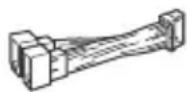
- Connect the power supply lead ⑥ to the unit and speakers before connecting it to the auxiliary power connector.
- Be sure to insulate any loose unconnected leads with electrical tape for safety.
Precautions
- Choose the installation location carefully so that the unit will not interfere with normal driving operations.
- Avoid installing the unit in areas subject to dust, dirt, excessive vibration, or high temperature, such as in direct sunlight or near heater ducts.
- Use only the supplied mounting hardware for a safe and secure installation.
Note on the power supply lead (yellow)
When connecting this unit in combination with other stereo components, the amperage rating of the car circuit to which the unit is connected must be higher than the sum of each component's fuse amperage rating.
Mounting angle adjustment
Adjust the mounting angle to less than 45^ .
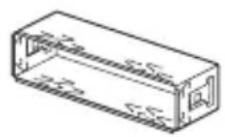
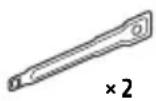
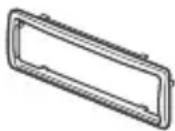
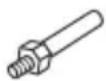
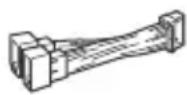
Parts List for Installation
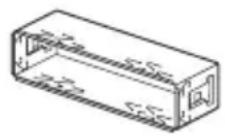
①
2
(3)
(4)

(5)
6
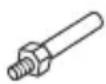
- This parts list does not include all the package contents.
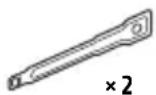
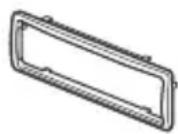
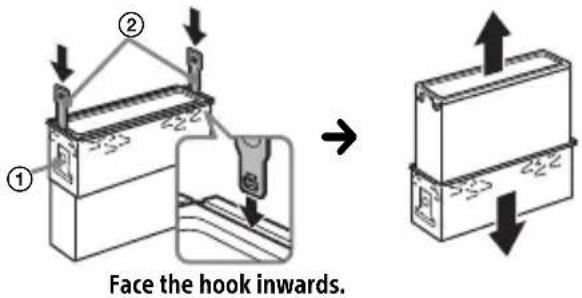
- The bracket ① and the protection collar ③ are attached to the unit before shipping. Before mounting the unit, use the release keys ② to remove the bracket ① from the unit. For details, see "Removing the protection collar and the bracket" (page 23).
- Keep the release keys ② for future use as they are also necessary if you remove the unit from your car.
Connection
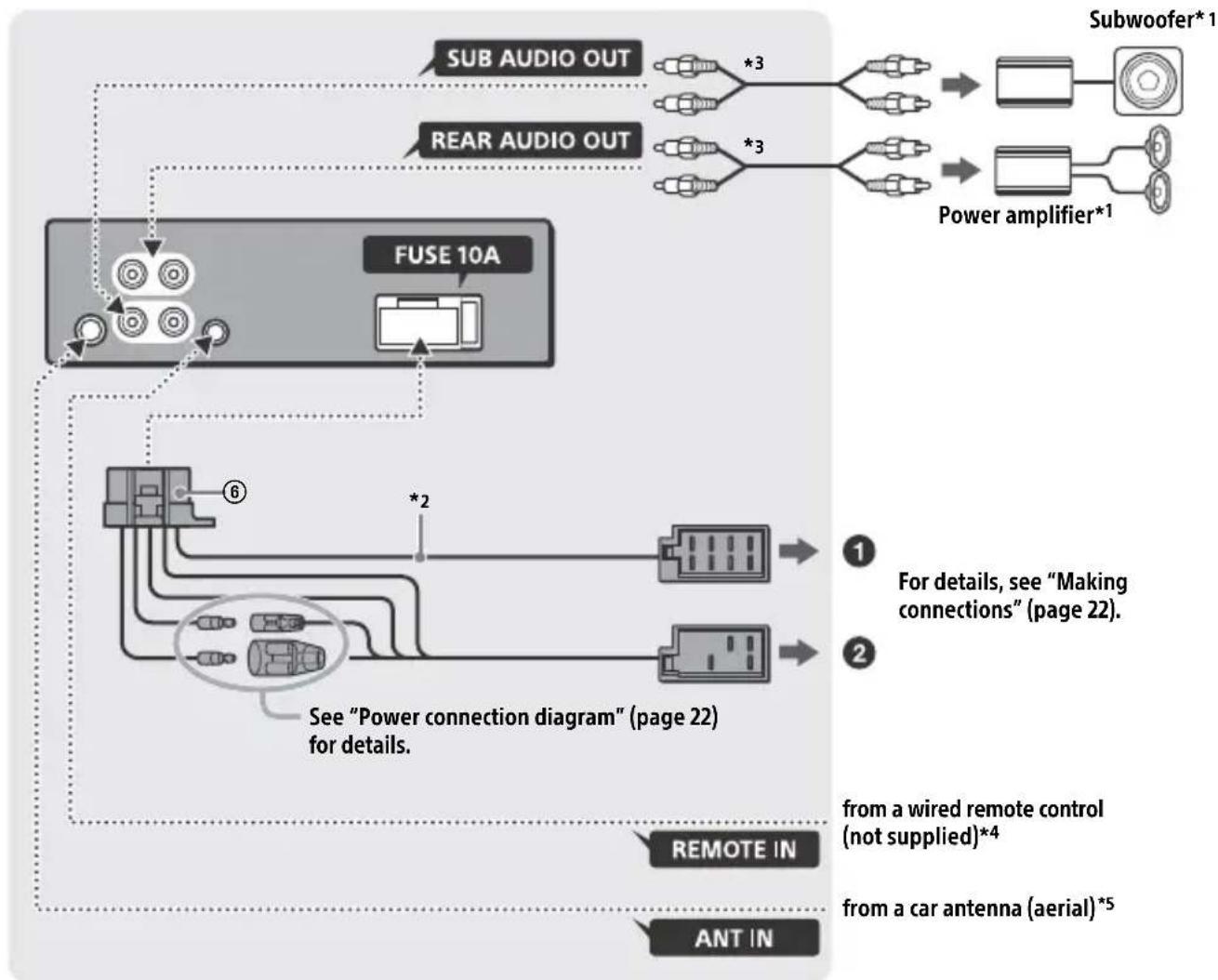
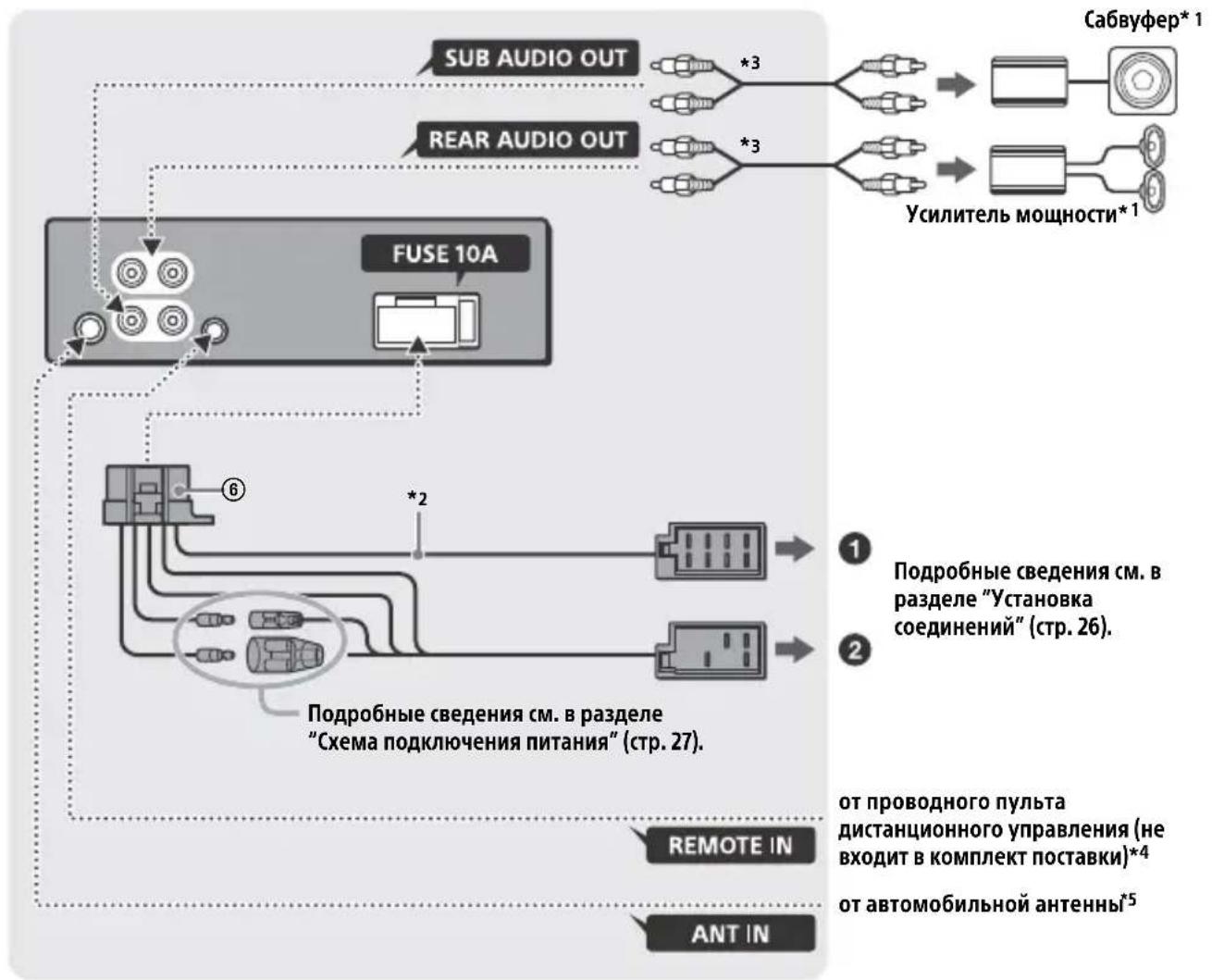
1 Not supplied
2 Speaker impedance: 4 - 8 × 4
3 RCA pin cord (not supplied)
4 Depending on the type of car, use an adaptor for a wired remote control (not supplied). For details on using the wired remote control, see "Using the wired remote control" (page 23).
*5 Depending on the type of car, use an adaptor (not supplied) if the antenna connector does not fit.
Making connections
If you have a power antenna (aerial) without a relay box, connecting this unit with the supplied power supply lead ⑥ may damage the antenna (aerial).
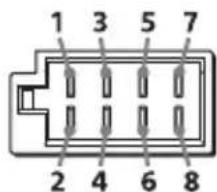
To the car's speaker connector
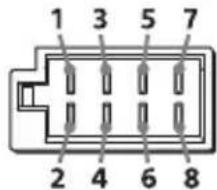
| 1 | Rear speaker (right) | ⊕ | Purple |
| 2 | Purple/black striped | ||
| 3 | Front speaker (right) | ⊕ | Gray |
| 4 | Gray/black striped | ||
| 5 | Front speaker (left) | ⊕ | White |
| 6 | White/black striped | ||
| 7 | Rear speaker (left) | ⊕ | Green |
| 8 | Green/black striped |
To the car's power connector
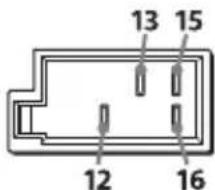
| 12 | continuous power supply | Yellow |
| 13 | power antenna (aerial) /power amplifier control (REM OUT) | Blue/white striped |
| 15 | switched power supply | Red |
| 16 | ground (earth) Black |
Subwoofer Easy Connection
You can use a subwoofer without a power amplifier when it is connected to a rear speaker cord.
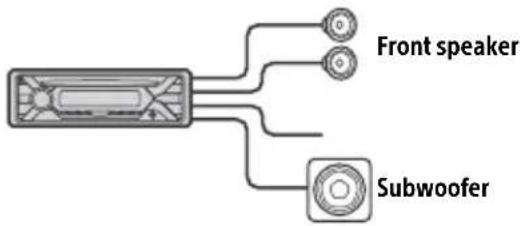
Notes
- Preparation of the rear speaker cords is required.
- Use a subwoofer with an impedance of 4 to 8 , and with adequate power handling capacities to avoid damage.
Memory hold connection
When the yellow power supply lead is connected, power will always be supplied to the memory circuit even when the ignition switch is turned off.
Speaker connection
Before connecting the speakers, turn the unit off.
- Use speakers with an impedance of 4 to 8 , and with adequate power handling capacities to avoid damage.
Power connection diagram
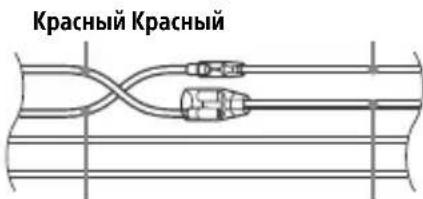
Make sure your car's auxiliary power connector, and match the connections of cords correctly depending on the car.
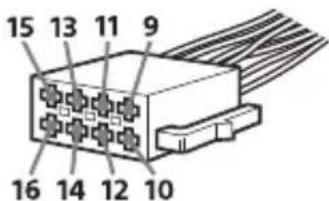
Auxiliary power connector
Common connection
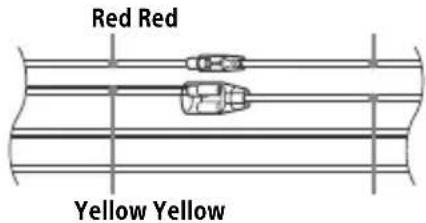
| 12 | continuous power supply | Yellow |
| 15 | switched power supply Red |
When the positions of the red and yellow leads are inverted
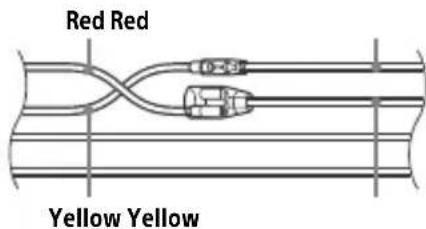
| 12 | switched power supply | Yellow |
| 15 | continuous power supply | Red |
When the car without ACC position
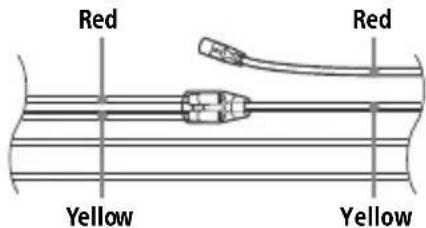
After matching the connections and switching power supply leads correctly, connect the unit to the car's power supply. If you have any questions and problems connecting your unit that are not covered in this manual, consult the car dealer.
Using the wired remote control
1 To enable the wired remote control, set [STR CONTROL] in [SET STEERING] to [PRESET] (page 10).
Installation
Removing the protection collar and the bracket
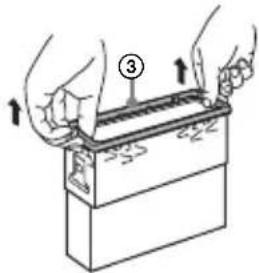
Before installing the unit, remove the protection collar ③ and the bracket ① from the unit.
1 Pinch both edges of the protection collar ③ then pull it out.
2 Insert both release keys ② until they click, and pull down the bracket ①, then pull up the unit to separate.
Mounting the unit in the dashboard
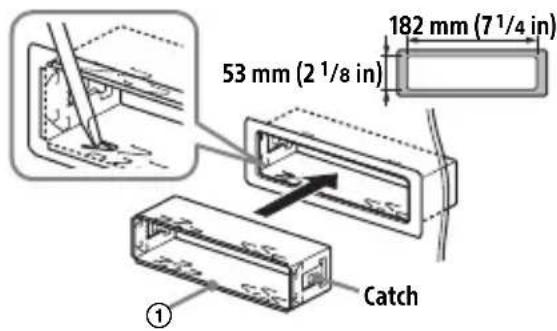
Before installing, make sure the catches on both sides of the bracket ① are bent inwards 2mm (3/32 in).
1 Position the bracket ① inside the dashboard, then bend the claws outward for a tight fit.
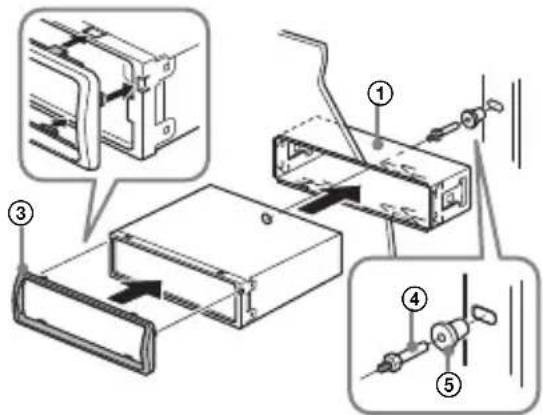
2 Mount the unit onto the bracket ①, then attach the protection collar ③.
Notes
- If the catches are straight or bent outwards, the unit will not be installed securely and may spring out.
Make sure the 4 catches on the protection collar are properly engaged in the slots of the unit.
Detaching and attaching the front panel
For details, see "Detaching the Front Panel" (page 5).
Resetting the unit
For details, see "Resetting the Unit" (page 5).
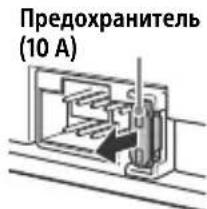
Fuse replacement
When replacing the fuse, be sure to use one
matching the amperagerating stated on the
original fuse. If the fbl blows, check the pot
connection and replace the
fuse. If the fuse blows again after
replacement, there may be an internal malfunction. In such a case, consult your nearest Sony dealer.
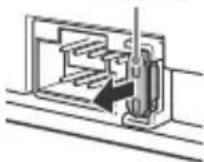
Fuse (10 A)
FW VERSION (Firmwareversion)
[BAND6] 1 kHz, [BAND7] 2 kHz, [BAND8]
4 kHz, [BAND9] 8 kHz, [BAND10] 16 kHz.
87,5 MHz - 108,0 MHz
Abtastrate: 16 kHz - 48 kHz
WMA (.wma)
Bitrate: 32 Kbps - 192 Kbps
Abtastrate: 32 kHz, 44,1 kHz, 48 kHz
FLAC (.flac)
Raccordement/Installation
Attention. 24
La lecture commence.
La lecture commence.
DEMO (demonstration)
Permet d'activer la démonstration : [ON], [OFF].
Protocole AOA (Android Open Accessory) compatible : 2.0
Codec correspondent : MP3 (.mp3)
Débit binaire : 8 kbits/s - 320 kbits/s (prise en charge de VBR (Variable Bit Rate))
Appareil principal (1)
Raccordement/Installation
Attention
250 Hz, [BAND5] 500 Hz, [BAND6] 1 kHz, [BAND7] 2 kHz, [BAND8] 4 kHz, [BAND9] 8 kHz, [BAND10] 16 kHz.
Interfaccia: USB (Full speed)
cartelle (album): 256
-file(brani)percartella:256
Protocollo compatible Android Open Accessory (AOA): 2.0
Codec correspondenti: MP3 (.mp3)
Geproduced in Thailand
Eigenschappen laserdiode
Producent: Sony Corporation, 1-7-1 Konan
Minato-ku Tokyo, 108-0075 Japan
Selecteer PTY in RDS.
Q (bladeren) (pagina 10)
250 Hz, [BAND5] 500 Hz, [BAND6] 1 kHz,
[BAND7] 2 kHz, [BAND8] 4 kHz, [BAND9]
8 kHz, [BAND10] 16 kHz.
Interface: USB (Full-speed)
Maximale stroom: 500mA
- mappings (albums): 256
bestanden tracks) per map: 256
Geschikt Android Open Accessory Protocol (AOA): 2.0
Bijbehorende codec: MP3 (.mp3)
Bitfrequentie: 8 kbps - 320 kbps (Ondersteunt VBR (Variable Bit Rate))
Sampling-frequentie: 16kHz - 48kHz
WMA (.wma)
Bitfrequentie: 32 kbps - 192 kbps
(Ondersteunt VBR (Variable Bit Rate))
Sampling-frequentie: 32kHz 44,1 kHz, 48 kHz
FLAC (.flac)
Bitdiepte: 16 bit, 24 bit
Sampling-frequentie: 44,1 kHz - 48 kHz
Eindversterker
Pon3Bovntelb: CoHn KopnpoeuH, 1-7-1
KoHaH MnHaTo-Ky TokNo, 108-0075 JnoHna
B ueJx 6e30nacHocTn o6aTeIbHo yCTaHaBnBaIte 3TO yCTpoIcTBo Ha np6OpHO nAHeJI n ABToMObNJI, TAK KaK erO 3aDnY aCt b HArpeBaETcB O BpEm pa60Tbl.
PnoPpO6Hee cm. "YcTaHOBka/ PnOdkNIOUChEne" (CTp. 24).
CboiCTBa Ia3epHoro nnOda
- IpoJIoJIxIeJIbHOcTb n3JIyueHnIa: HenpepbIBHoe
- BbIXoJHa MOnHocTb Ja3epa: MeHbIe 53,3 MKBT
(3начени полунуении Марпастояни 200mm OT NOВЕРХОCTN ЛИНЗblобъктува 6лOKA ONTNUECKOTOСЧТБИBAHAнcaеprTypo7mm.)
Tabnukc cyka3aHneM pa6oeryo HapjKeHnI npyInx xapaKTePncTnK HaxOHTcHa HnXHei naHei Kopnyca.
Даразиотовлия указаHA Ha TOBape, a TaKxe Ha ynapokBcIeDyUOuem φopMaTe:
MM.YYYY, rnde MM - mecau n YYYYY - roi n3rotobleny.
HOpMaunIyNokynateneB YkpanHe

YnoHOMOeHHbI npedCTaBntlb YKpaHHe NO BONpocam COOTBeTCTBn Tpe6oBaHm TexHnuecknx peIJaMeHTOB: OOO "CoHn YKpaHa", yI. NJIbHcKa, 8, r. KneB, 04070, YKpaHa.
ObopydOBaHne OTBeuaeT Tpe6OBAHnM TexHnueckoro perIamEnTa orpaHnueHn IcNoJIb3OBAHn HeKOTOpbIX ONaChbIX BeueCTB 3JIeKTPnueCKOM n 3JIeKTpOHHOM obopydOBaHn (noCTaHOBLeHne KMY ot 03.12.2008 N° 1057).
YcIOBxpaHeHn
TobapbcoxpaHOT ByyNAKOBAHHOM BnDe B TeMHbIX, cyNX, YnCTbIX, XopoO BoHTUNIPyeMbIX NOMEuEHNrX, N3OJInpoBaHHbIX OT MeCt XpaHeHnKNCJOT nIeIoueY.
TemnepaTypa xpaHEny: ot -20 do +60 ^ C OTHOCuTeNbHa BlaXHoCTb XpaHEny: 80%. Pa6oay TempePaTypa: ot 0 do 40°C. Pa6oay OTHOCuTeNbHa BlaXHoCTb: 40-60%.
YTNIN3aunna NCNOJb3OBaHHbIX 3JeMeHTOB NITAHnI OTCnyKbWeRo 3JeKtpnueckoroN
3JIeKTPoHOrO 6OpUdoBaHnA (DInpeKTHBa npImMeHReTcB CtpaHax Ebpocoi03a n Dpynx EBponeNCKNX CtpaHax, rIe JeICTByOT CNCTembl pa3dJIbHOrO c6opa OTXODOB)
IpeDynpexKdHne dIaClyuaeB, KOrda B 3aMKe 3aXnraHna Het noLoXkeHna ACC
Y6eHNTecb, yTO HaCTpoEHa fYHKcIa AUTO OFF (ctp. 12). NocIe BbIKIOueHnA YCTPOIcTBa erO nITaHne 6yIeT aBTOMATUeCKN OTKIOUeHO uepe3 YCTaHOBJIeHHOE BPEM, yTO npEOITBpaUaet pa3PRAky aKKymJlraTopa. EcnI fYHKcIa AUTO OFF He 3aJaHa, To npK KaXdOM BbIKIOueHn 3axnRaHn HaxmMaTe n yDepxNBaIte KhoNkOFF Do Tex nop, nOK dncJIeH He noracHeT.
OTka3 OT OTBETCTBEHHOCTN B OTHoWeHn ycIyr, npeDoCTaBJaEmbIX CTOpOHHMn NOCTaBzIKamN
Cnyk6bl, npedocTabIeMbIe CTOpOHHIMNIOCTaBUNKaMn,MOyT 6bITb N3MeHeHbI, pnoctaHOBJIeHbI NN OTMeHeHbI 6e3 npedBaPntbHoro yBeOMJeHn. KompanaHn Sony He Hecet OTBeTCTBeHHOCTn 3a CNTyaun Noo6HOro poJa.
Copepkanhe
CnpaBoUHnK nO deTajm N opraHaM npabJIeHn 4
Haualo pa60tbl
ChTne npeDne nnHei 5
Ipee3arpy3ka yctpoiCTBa 6
YCTaHOBka YacOB 6
PoiKJIHueHne yCTpoiCTBa USB 6
IopKluoyeHne npyroro nepehocchoro ayuOuyctpoNCTBa . 7
PpocnyuBauHne paHno
PpocnyuBHaHne paIIO 7
CnCTemblpaIIOaHHbIX(RDS) 8
Bocnpon3BeDeHne
Bocnpoun3BeJeHne nncka 9
Bocnpon3BeJeHne yctpoiCTBa USB. 9
ПОИСК И ВОСПОНЗВЕДЕНЕ KOMПОЗИЦИ 10
NapaMeTpbl
OTmeHa pexnma DEMO 11
OchOBhble opeaunn HacTpoKn napametpoB 11
HactpoKa 6uxn napametpoB (GENERAL) 12
Hactpoika 3Byka (SOUND) 13
Hactpoika niscnnej (DISPLAY) 14
Дононтульнаифорmaцnia
O6HOBJIeHHe MnKpOpnporpaMMbl 15
MepbI npeOocTopoXHocTn 15
YxOa yCTpoIcTBOM 16
TexnuecknxapaKTepeNCTnKn 17
Ponck uyctpaHHe HeucnpaBHOCTe 19
CoobueHn. 22
YCTaHOBKa/NoDKJIIOUeHne
BHHMaHne! 24
IpeueHb detae nIy cTaHOBKn 24
PoiKJIIOUeHne 25
YCTaHOBka. 27
CnpaBoUHnK no DeTaJAm n opraHaM ynpaBJeHna
OCHOBHOE yCTPOIcTBO
1 Khonka chytna nepedne nahein
2 SRC(nctouhuk)
BkIoueHne nTaHn.
CmeHa nCTouHnka cnHana.
OFF
HaxmTe u yepXnBaIte B TeueHne 1 ceKyHdbI dIe BBkIIOUeHn ICTOuHNKa n OTo6paKeHn YacOB.
HaxmTe u ydepXnBaIte 6oJee 2 ceKyHd IJIy BbIKIOUeHn NITaHn I dncnJe.
3 DnCKOBbI peYJrTOp
Q (o63op) (ctp. 10, 11)
IepexoBpeKmO63opa npu BocnpOn3BeJeHn.
(Heioctynho,ecnnnoKJIOUeHo yCTpoiCtBO USB bpeKmE AndroidTM.)
EQ (3Kbanaa3ep)
Bb6op KpB0N 3KbAaJ3epa.
10 (Ha3aI)
Bo3BpaT K npeIbIyUcEmy ekpaHy. MODE (ctp. 7)
11 PpneMnK CnHAnOB C nylbTa DnCTaHcNoHHoro ynpabHeHn
12 HomepHbIe KhONKn (1-6)
PpneM coxpaHeHHbIX B naMaTn paNocTaHcN. HaxMnte uYepKNaBte Ira coXpaHeHra CtaHcN.
ALBUM ▼/▲
PpOnyck aIb6OMa IJIa ayDnOyCtpoiCTBa.HaxMnte uYdepxNBAiTte dIra HENpepbIBHOro npOnycka aIb6OMOB.
(Heioctynho,ecnnoKluoyeno yctpoicTBO USB b pekme Android.)
(nobtop)
(Heioctynho,ecnnoKluoyeHo yctpoicTBO USB b pexime Android.)
(cnyaHna nocJeDoBaTeIbHOCTb)
(Heioctynho,ecn noKluyeHo yctpoicTBO USB b pekme Android.)
II (Bocnpon3BepeHne/nay3a)
13 EXTRA BASS
YcunJeHne 3ByuHaHn6aCoBOro 3Byka BCnHXPOHN3aUIn C yPoBHeM rPOMKocTn. HaxMMTe, YTObI N3MeHHTb HaCTpoNky EXTRA BASS: [1], [2], [OFF].
14 BxoHoe rHe3do AUX
15 DSPL (dncnnei)
I3MeHeHne HndnKauzn.
SCRL (npokpyTKa)
HaKMTe n ydepXnBaIte dIra npOKpyTKn INdNkauuN.
16 NopT USB
Hauano pa60tbi
Сятыпешени панели
Bo n36exaHne kpaKn yCTpoiCTBa MOxHo CHTb C Hero nepeDHOI NaHeJIb.
1 HaKMnte u ydepxnBaIte KhoNky OFF ① do tex nop, noka ycTpoNCTBO He OTKJIIOUHTcR. HaKMnte KHOINKY CHaTna nepedHne naHeN ②, a 3aTeM NOTAHnTE naHeNb Ha Ce6y n CHIMITE ee.
PpeynpeinteHbI 3ByKOBOc nHaJ
Ecnn do nobopoTa BbIKIouateJra 3aXnraHnB nOIOxHe Nc OFF cyCTpoNCTBa He 6bla Chrta nepeHnaHb,TO B TeueHne HeckoJIbKnx CekyHd 6ydt CblIeH npDeynpeDntbHbIM 3ByKOBoCnHaI. 3ByKOBo CNHaI 6ydt CblIeH, TOnbKO ecnn nCNoJIb3yETcBCTPOEHbYcNJNTeHb.
YctaHOBka nepeDnei paHeJI
Ipe3arpy3ka yctpoiCTBa
IpepeI nePBbIM nCNoJIb3OBAHHeM yCTpoiCTBa, nocJe 3aMeHbI aBtOMo6nIbHOrO aKKyMylTopa IIN NOBtOPHOro nOcOeDInHeHna Ka6eIe HEO6xOdmo nepe3aRpy3ntb yCTpoiCTBO.
1 HaxmTe n ydepKnBaIe KHOKN DSPL n (ha3aI)/MODE 6oJee 2 cekyHd.
PpimMeuHne
Ipe3arpy3ka yctpoiCtBa npnBeJeT K ydaJIeHIO NaCTpoE K YACOB N HeKOToPbIX COxpaHeHHbIX 3JIeMeHTOB COdepXIMOTO.
YctaHOBka CtpaHbI/perNoHa
Iocne nepe3arpy3kn yctpoiCTBa OTKpoeTcMeHIO HAcTPOiKN CTpaHbI/perNoHa.
1Пи оTo6paKeHn [SET AREA] HaxmTe KhoNky ENTER.
OTo6pa3ntcTeKyuzaCtpaHa nnpeHnH.
2 NobopaunBaJ DNCKOBbI peYJIaTOp, BbI6epnte [EUROPE] nII [RUSSIA] a 3aTeM HaKMITE DNCKOBbl peYJIaTOp.
3Поворачвая дисковый ретуларot, bblберпг [YES] nln [NO], a 3aTe m haxmnte disckobbyi perylartop.
Ipn n3MeHn npnoHa nn cTpaHbI yCTpoNCTBO nepe3aRpy3ntcra, noCne yeRo Ha dncnnee oTo6pa3rTa qacbl.
3ToT npaMeTp MoXHo HAcTpOuTb B MeHIO6xNn npaMeTpOB (cTp.12).
YctahOBka yacob
1 HaKMnte KhoNky MENU, nobepHnTe DnCKOBbl peRyJrTOp dIaBb6opa [GENERAL], 3aTeM HaKmTe DnCKOBbl peRyJrTOp.
2 NobopaunBaJ dNCKOBbI peYJrTOp, BbI6epnte [SET CLOCK-ADJ], 3aTeM HaxMMte dNCKOBbI peYJrTOp. Haynet MmraTb INHdkauZna Yaca.
3 Поворачваite ДИСКOBып peгунларTop ДЯ уCTaHOBKN 3HaueHnЯЧаСВИ MнHyT.
ДлЯ n3MeHHeNn INnKauNn HaxMnte KhoNky SEEK +/-.
4 NocJe yCTaHOBKn MmHyT HaXMMTe KhoNky MENU.
YctahOBka 3aBepseHa, nocJe yero yacBi NaHyT OTCyET BpeMeHn.
ДяоюбрахенячавOB
HaKMnTe KhONKy DSPL.
Подключени устpoиства USB
1YMeHbIte rpoMkoCTb Ha annapaTe.
2 PoiKJIIOUHTe yCTPOIcTBO USB K annapaTy.
YcTaHOBka YacOB (CT)
Дя OCTaHOBKn BOCnpon3BeJeHnA
HaxmTe u ydepKuBaIte KhoNky OFF B TeueHne 1 ceKyHdbI.
OCTaHOBnTe BOCnPOn3BeDeHne, 3aTeM ydaJIte yCTpO'ntBO.
Bocnpoun3BeJeHne B BbI6paHHom pexnme MoKeT HaaTbcr He cpa3y.
IocTyHbIepeKIMblBocpOn3BeJeHnO TInuHaOTcB 3aBNCMOCTN OT Bbl6paHHOrIO NCTOCHNka 3ByKa.
ПОИСК KOMПОЗИЦИ NO Ha3BaHиЮ (Quick-BrowZer™)
Heioctynho,ecnnoKIOUeHO yCTPOIcTBO USBBpeXmmeAndroid.
1BpeKnme BocnpOn3BeDeHnca CD nIu USB haxmTe (063Op)*, yTo6bl oTo6pa3ntb cncok kaTeropn noncka.
Korda noBtca cnCOK KOMno3nui, Haxmaite KHonky Ta3ad), noka He OTo6pa3ntc HyxHaj kateropnia noncka.
*Bo BpemBaocpnoun3BeJeHnC yCTpoiCTBa USB HaxMnte n ydepxnBaIte KhoNky Q (o630p) 6Oone 2 cekyH, uTo6bl BepHyTbcra HeNocepEaCTBeHHo K Haayany CnNcKa KaTeOpu.
2 NobopaunBaJ DNCKOBbI peYJIaTOp, BbIbePte Tpe6yEmyIO KaTeropnIO noncKa, 3aTeM HaXMMTe DNCKOBbI peYJIaTOp dJa NOdTBePxKdEHNIA.
3 NOBTOPHe 1ar 2 dIy nonka Tpe6yeMoKOMNo3uIN.
Haunetc Bocnpoun3BeJeHne.
CLOCK-ADJ (yCTaHOBka yacOB) (CTp. 6)
CAUT ALM (npedynpeiTeIbHbI 3ByKOBoCnHaI)
BkIIOueHne npEynpeiTeJIbHOro 3BykoBOrO cunHaJa: [ON], [OFF] (cTp.5).
(ДocунTOЛькОпи ВblKIOUeHHOM nCTOuHnke, KOrda OTo6paKaIOTcYacbl.)
BEEP
AKTUNBn3aun 3ByKOBOrO cnHa: [ON], [OFF].
AUTO OFF
A B T O M A T N U E C K O E O T K J I O U E H N E U c e p 3 O npe d e l e h H o e B p e m, e c n y c t p o i c T B O B b k j I O U e H o: [O N] (30 M n H y T), [O F F].
STEERING
Perectpaun/umMeHneHaCTpOKn nyIbTa DnCTaHcNHOHoro ynpabHeHna Hpyne.
(DocTyHNO npn noDKNoyeHn coeHNHTelbHOro Ka6eJn (He BXoIIT B KOMNKeT NoCTaBKn).) (OcTyHNO ToJIbKO npn BBKIOUeHHOM NCTOCHNe, KOrDa oTo6paKaIoTcYacbl.)
STR CONTROL (nylt dntctaHcnoHHoуnpabIeHna pyne)
Bb6op peKIma BBOda noKluoyehHoro nylta dNCTaHcNoHHoro ynpabLeHnra.Bo n36eXaHne HeNCpabHocTei nepei NCNoJIb3OBAHNem NOd6epnte
COOTBeTCTBIOUHINpeKIM BBOJa DnIPOdkNIOUeHHOFO NylTa
DnCTaHcUHOHHoro ynpabJeHn.
CUSTOM
Pexm BbOda dIyIbTa InCTaHcNoHHOro ynpabJeHna Ha pyne.
PRESET
Pexim BBOda IJnI npOBdHOro NylbTa
INCTaHcNoHOrO ynpabLeHnra 3a
NCKJIoueHnem NylbTa
INCTaHcNoHOrO ynpabLeHnHa pyJe (BbIbpaTeC aBTOMaTneckn npn
BblOnHeHn [RESET CUSTOM]).
EDIT CUSTOM
Pernctpaunya yHKn (SOURCE, ATT, VOL + / - ,SEEK + / - )IyNbTa InCTaHOnHO ynpabHeHa pyne
1 NOBOPaUNBaI DnCKOBbI peRyJIaTOp, Bbl6epnte yHKUIO, KOtOpYIO HxKHO Ha3HaunTB dIpyNbTa DnCTaHcUOnHO rO ynpaBJeHna Ha pyJe, a 3aTeM HaXKMITE nCKOBbI peRyJIaTOp.
2ПиMuraIoUeMcoO6UeHnN [REGISTER]HaXMMTeuYdePxNBaITe KHOKNyHaNylbTeDnCTaHcUNOHNOY npaBHeHnHa pyJe, KOtOpoI Tpe6yeTcHa3HaunThbФyHKcIIO.10 3aBepWeHnPeRnCTpaCnOTo6pa3ntcR [REGISTERED].
3ДЯpernctpaunnpyrgnxФyHKuIN NOBTOPNTeDeiCTBna 1N2.
(Doctynho, Tolsko ecn 3haueHne napametpa [STR CONTROL] yctaHOBJeHo Ha [CUSTOM].)
RESET CUSTOM
I3MeHeHne HacTpoE KnybTa InCTaHcNoHHoro ynpabNeHna pyJe: [YES], [NO].
(DoctytnHO, TOLbKO ecn 3HaueHne napameTpa [STR CONTROL] yctaHOBJIeHo Ha [CUSTOM].)
Ppimechnna
- Bo Bpemr n3MeHnra HacTpoek DoCTyHToTbKO KHOIOuHoe ynpaBneHne Ha daHHOMycTpoiCTBe. B cIeJx 6e3oNaCHOCTN octAHOBtTe aBTOMObNb IpeE, n3MeHeHEm 3TNX HAcTpoEK.
- Ecnn BO Bpemr pernctpaun npoun3oienot Own6ka, Bcra paHee 3apeinctpnpobAHna HnΦopMauncoxpanTc. BbInonHntepoueDpy peRnCTpaun 3aHOBO,HaunHacTohФyHKUnn, rpe npoun3oJna Own6ka.
-3TaΦyHKUmaMOKet6bITbHeIOCTynHAB HeKOToPbIX TpaHCnOpTHbIX CpeIcTBax.ДЯ NOJUYeHIN NOpDpO6hIX CBeJeHIn O COBMeCTNMOCTIN BaWero TpaHCnOpTHoro CpeIcTBA NocETnTe Be6-caNTNoIDepKKn, YKa3aHHbI Ha 3aDHe CTopoHe 0bLOXKn.
USB MODE
Измение рекиma USB: [ANDROID], [MSC/MTP].
OTo6paKeHne TeKyuEeBepcnn MnKpOpPOrpaMMbl.
FW UPDATE (O6HOBJIeHne MINKpONpOrpaMMbl)
3aynck o6HOBJIeHnMnKpOnporpaAMMb[YES], [NO].
O6HOBJIeHne MKNpOpPOrpaMMbI 3aHmMaET HeCKoJbKO MNHyT.Bo BpeMg O6HOBJIeHnHe NOBopauNBAiTte BbIKJIouaTeJIb 3aXnraHnB NIOLOXKeHne OFF n He oTcoEduHnTe uCNoJb3yEmoe yCTpoiCTBO USB.
HactpoNka 3Byka (SOUND)
EQ10 PRESET
Bb6op KpUBoi 3KBaIaI3epa n3 10 KpNBbIX 3KBaIaI3epa nII N BbIKIOueHne 3KBaIaI3epa:
[OFF], [R&B], [ROCK], [POP], [HIP-HOP], [ELECTRONICA], [JAZZ], [SOUL], [COUNTRY], [KARAOKE]*, [CUSTOM].
Bb6paHHyIO JIJI KAKDOrO NCTOCHNka KpNByIO 3KBAJn3epa MOXHO 3aHeCTN B PAMrTb.
*PnBbIbOpe[KARAOKE]3ByK rOlOca BO BpEm BOCnpoun3BeDeHn npRJyUaEcTc, Ho He yCTpaHReTcNoJIHOCTbIO. IcNoJIb3OBaHne MUKkofoHa He NoIepeXNBaETc.
EQ10 CUSTOM
Bb6op BapnHaTa[CUSTOM]ДЯ EQ10. HacTpoIka KpIbOu 3KbAlaI3epa: [BAND1]32ΓU, [BAND2]63ΓU, [BAND3] 125ΓU, [BAND4]250ΓU, [BAND5]500ΓU, [BAND6]1KΓU, [BAND7]2KΓU, [BAND8] 4KΓU, [BAND9]8KΓU, [BAND10]16KΓU. YpoBeHb rPOMKOCTn HacTpauBaetcB DnaIa3OHe oT-6DDo+6DcSwaROM 1d6.
BALANCE
PeruInpoBka 3BykoBOro 6aJaHca: [RIGHT-15] - [CENTER] - [LEFT-15].
FADER
PerylnpoBka OTHOCHTeHbHO rypOBHr: [FRONT-15] - [CENTER] - [REAR-15].
S.WOOFER (ca6ByΦep)
SW LEVEL (ypoBcHb ca6Byepa)
PerynpoBka ypOBHra pOMKocTn ca6Byeepa: [+6dB] -[0 dB]-[-6 dB].
([ATT] oTo6paKaaeTcra, ecn yCTaHOBneHo MNHmajbHoe 3HaueHne.)
SW PHASE (a3a ca6Byepepa)
Bb6op fo3b1 ca6Byepea: [NORM], [REV].
LPF FREQ (uactota hNJIbTpHa Hn3Knx uactot)
Bb6op rpaHnUHOuacTObi ca6Byepa:
[80Hz], [100Hz], [120Hz].
HPF FREQ (caCTOta fNbTpTa BblcOKNX caCTOT)
Bb6op 3NaueHnraPauHnHoJ yactOTbl nepeDnHex/3aDnHex rPOMKOrOBOpnteJeN:[OFF], [80Hz], [100Hz], [120Hz].
AUX VOL (ypoBeHb rpoMkoCTn AUX)
HactpoJa ypoBnI rpoMkOCTn KaJdoRo NOcOeDHeHHoro IOnOpHnTeJIbHOro ycTpoiCTBa: [+18dB] -[0 dB]-[-8 dB].
3Ta HAcTpoiKa NCKJIIOUaET Heo6xoIIMOcTB peRyIINPOBKN rPOMKOCTN dJa pa3HbIX NCTOCHIKOB.
AUTO SCR (aBtOMaTnuecka npokpyTkα)
AByToMaTnuecka npokpyTKaДЛиHHbIX 3JIeMeHToB: [ON], [OFF].
(HeioctynHO,ecn BBbpaH nCTouHnK AUXnn TIOhep.)
MepbI npeOcTOPOXHOCTH
- ECIN ABTOMO6nJIb 6bl npnnapKOBaH B COJHeuHOM MeCTe, He BKIIOuaTe yCTpoiCTBO Do Tex nop, NOKa OHO He OXJaNTcra.
He octabIaTe nepeHIO npHaJIb nIINpepeHOChIe ayDnOyCTPoNCTBa BHyTpnaBtOMo6nla, NocKOJIbky BblcOKaTEmpepaTypa B pe3yIbTaTe BO3DeiCTBnI npMbx COJHeuHbIX JUyei MoKeT npNBecTI K IN NOBpeKdEHIIO. - Пи рабоTe yCTpoIcTba aBTOMaTnueCKN ВыДВИraeTCЯ aHTeHHa C эЛeКТрчeCKIM ПривODOM.
KoHdEHCaunBlaun
Ipn KOHdEHCaun Bnarn BHytpn yCTpoiCTBa n3BnKeKTe dNcK n NpOdoXdnte np6n3ntelbHo Yac, noka Bnara He nCnapTc. B npOTNBHom cnyae BO3MOxHbI C60n npn pa6oTe yCTpoiCTBa.
Для подерханя ВьICOKORO KaYeCTBa 3Byka
He npoIuBaIte XnIDKOCTn Ha yCTPOIcTBO nII INCKN.
Приимechи OTHOCHTeIbHoДИСКOB
-He noDbepraTe DNCKN BO3deJCTBNU O npMbx COJIHeuHbIX JUyei N IUCTOCHNKOB TePna, TaKnx KaK BO3dyXoBOdBi C rOpAUM BO3dyxOM. He OCTaBnIe DNCKN B MaunHe, npnnapKObaHHoB B COJIHeuHOM MecTe.
-NepeBOCPON3BeJeHEmIpoTnpaTe DnCKNuCTaSei TKaHbIO NoHaNpaBLeHIOOTcHTpa K KpaM.HeNoJIb3yITecbpactBOpNTeJAM,TakIMKaK 6eH3uH,pa36abTeb, a TaKKnpoJaKe YnCTaUIMN
-3To yCTpoIcTBO npEHa3HaueHo IJRA BOCnPOIN3BeDeHnA DnCKOB,OTBeuaIOuNX Tpe6oBaHnAM cTaNdApTa Compact Disc (CD).DbYxCtOpOHnHe DnCKn (DualDisc) n HeKOTOpBle My3bIKaJIbHbIE DnCKn, 3aKOINPOBaHnBHe C NOMOUsbTO TexHOJOrn 3aUHTbI aBTOPCKNX npaB, He COOTBeTCTByIOT cTaNdApTy Compact Disc (CD) n PO3Tomy MoYr He BOCnPOIN3BOIDITbc4 TTM yCTpoIcTBOM.
-ДИСКИ, KOТОВЕ 3TO yCTPОИCTBO HE MOXET BOCIPON3BOДNTb:
-ДИСКИСЯрлбИКAMN,HaKJIeIKNaMn,a TaKKe C npNKpeIeHNoI KJIeKOJ IeHTo IIN6bymaro.IpIMeHHeT eTakxДИСКOBMOKeT BbI3BaTb c6OuB pa6Ote IIN NOBpeKdEHneДИSCa.
-ДИСКИ HeCTaHdApTHOиФОмbl (Ha npIMep,BΦOpMe cepIua,KBaIpaTa, 3Be3Ib).BnpOTnBHom cIyae 3TO MOKET pINBeCTN K NOBpeJdeHIO yCTpOuCTBa.
-Диски Диаметюм 8см.
Pa3pIaHocb:166nt,246nt
YacToTa nnckpeTn3aunn: 44,1 KtU, 48KtU
YcHJIteJIb MOUHOCTN
BbIXoJ: BbIXoJbI rPOMKOrOBOpnteJIe
PonHoe co npOTnbIeHne
rpoMkoROBOpnteJe:4OM-8OM
MaKcImaJIbHaBbIXOHaMOnHocTb:55BT
x4 (npn conpoTnbJeHnn 4OM)
067aHΦopMaun
BbIXOdbI:
TepmHaJ ayDIOBbIXoO8 (REAR, SUB)
CnloBa aHTeHHa/TepmHnHa
ynpablenyucnntelem(REMOUT)
Bxodbl:
BxoHOn TepMnHaI nYbTa
ДиctaHcNoHHOrO ynpabLeHnA
BxoHNo pa3bem aHTeHHbI
BxoJHoe rHe3do AUX (MHN
CTepeopaa3bem)
NopT USB
Tpe6obAHnK nCTouHnky nHTAHN:
aBtOMo6nIbHbI aKKymyIaTOp 12 B
IOCTOARHHOTo TOKa (COTpuIaTeJIbHbIM
3a3eMnEHHmE)
HOMHaJIbHbI ToK:10A
Pa3Mepbl:
MOHTaXHbIe pa3Mepbl:
HaJIuHn HeKOTOpbIX n3 npHaJdJIeXJHoCTeN,
peueucneneHbIX Bblwe. ObaTnteck
Microsoft Corporation. ИсторICAL History of Microsoft Corporation.
pacnpoctpaHeHneNoDobHoTexHonoI
Kpome KaB DaHHOM npOdyKe, 6e3
He CJIbIweH 3ByKOBoN cInrHaJI.
→ ΠоДКЛЮЧЕн ДОПОЛНИТЕNBи YСИЛNTeNB MoIshOCTN, a BCTpoEHbI He IcNoJIb3yETcR.
YdaIeHbI daHHbIe n3 naMrtn.
OToeHNnncnHnHe npaBnIbHo nOdkJIOueH npoBO nHTaHn, IIN60 n3BLeueHa 6aTapeiKa.
I3 namrtn ydaJIeHbI 3anporpaMMnpoBaHHbI paNIOCTaHcII N UCTaHOBka BpeMeHN.
Ipeperope npedoxpaHntelb. CbIweH ym npn pekeKIOUeHN nOLOKeHNA KIOUa 3aXnraHna.
→Пювова He npaBnIbHNo NOdCoeINHeHbI K pa3bemy 3JIeKtpoPntaHnB BCNOMORAteIbHOrO O6OpyIDOBaHnA aBTOMO6nIy.
BoBpemBaCnpOn3BeDeHnI nn npneMa NaunHaetcA demOHCTpaZna.
EcIn npn BkIIOueHHOM
dEmOHCTpaUHOHHoM peKmme [DEMO-ON]
B TeueHne 5 MInHyT He BbINOnHraOTcR
HnKaKHe ONEpaUHN, HauHnaeTcR
dEmOHCTpaUHa.
-YctaHOBe 3HaueHne [DEMO-OFF] (cTp.12).
Ipona/He OTo6paXaeTcNHdNkaCnB OKoWKe Dncnne.
→ДЯДИММеруCTaHOBJIeHO 3HaueHHe [DIM-ON] (cTp.14).
→Дисплел OTKЛIOUHTcЯ,ecnHaXkaTb n ydepxNBaTB KHONky OFF.
- HaXmTe KhONky OFF ha yCTpoiCTBe n ydepxnBaIte ee HaxaToN, Noka DnCnJIeH He BKJIOUHTc.
KOHTaKTbI 3arpa3HeHbI (CTp.16).
Ducnnei/NoCDBeTka Mnaet.
HeoctaToHnaNoDaHaNTaHn.
- Y6eIITecb, yTO Ha yCTpoIcTBO NOaETcAIOCTaTOUHO NHTAHN O T aBTOMO6NJbHOrO aKKyMylrTopa. (Tpe6oBaHne K nCTouHnky nHTAHN: 12 B NoCToRHHOrO ToKa.)
He pa6oTaOT KHOtKN ynpaBJIeHn. NcK He n3BJIeKaETc.
Haxmte u yepknaTe KhoNk DSPL n (Ha3aI)/MODE 6oJee 2 cekyH, YTO6bI nepe3arpy3ntb yctpoiCTBO. Coepxmoe naTn 6ydt ydaJeHO. B ceJax 6e30nacHOCTn He BblnoHnTe nepe3arpy3ky BO BpeMBAKDeHnA.
PpneM padnoctaun
He ydaetc npinraTb paNocTaHcnn. 3ByK cOnpOBoXdaetc nomexamn.
HenpaBnIbHoe coeINHeHne.
-Поберп Te NOДСоЕДИнHeHne aBTOMOБиЛьHoI aHTeHHbI.
- EcIn He BbIDBnraeTcA bTOMaTnuecka aHTeHHa, nPoBepbTe CoeINHeHne npoBOda ynpaBJeHna aHTeHHoN C 3JIeKTPuYeCKM npuBOJOM.
He ydaetcBbInolHnTb npedBaPnteIbHyo HacTroKy.
→ PpepaBaemb paAnocnHaI cNtKOM cna6.
B dnaana3oHe FM3 He ydaCTcHacTpoNTb
yactotbl 65 MΓu - 74 MΓu.
→Дя [AREA] Вьбрано [EUROPE]. -Установпг Дя [AREA] Знayене [RUSSIA] (стр.12).
RDS
He ydaetc npnHryb ycnyr RDS (korda dansnapaMeTp a [AREA] 3aDaHO 3HaueHne [RUSSIA]).
→ Bbipan nnana30n FM3. -Bb6epnte FM1 nnn FM2.
YcIyRn RDS HeIOCTyINbIB daHHOM perNoHe.
Iocne HeckoJbKnx cekyHd npocnyuBHaHn BkJIIOuaeTcra yHKnra SEEK.
→ CtaHnIa He npepaet daHHbIe TP nnI nepepaet cIIuKOM cIa6bl cnHaJ. -OTKnUHTe TA (cTp.8).
DopoxKhble coo6ueHn He nepeaOTc.
BKJIIOUHTeTA(cTp.8).
→ CtaHnIa He TpaHcInpyeT DOpOxHbIX coo6uHn, XOTn OTHocntcK Tnny TP. -HaCtpoItecb Ha dpyrTu cTaHcuio.
Pn BkIIOueHnn FyHKcnn PTY oTo6paXkaeTcN HdNkaun [---].
→Пинимаема санця He nepeJaet daHHbIe RDS.
→ДаHHbIe RDS He npHmAlOTcra.
→ CtaHnIa He yka3bIbae TIN npoPpAMMbI.
Ha3BaHne nporpamMHOyCnym MnraeT.
→Дя ВьбраHHОВ ДаHHbIM MOMENT CTaHcUN He NcNoJIb3yETcAЛБТeРHaTINBHaЯЧАТа.
- Haxmte KhoNky SEEK +/-, noka muraet Ha3BaHne npoRpaMMHO yClyr. IoBntcnaIa [PI SEEK], u YCTPOiCTBO NaHET NOnCK dpyroJ qactotbI c TaKIMn Je daHHbIMn PI (npoRpaMMHa nDeHTnΦkauny).
Bocnpon3BeJeHne AnckOB CD
KomnakT-ndcK He BocnpOn3BODNTc.
→ДиCK3aRpa3HeHnIIN NOBpeXKeH.
→ДиСКИ CD-R/CD-RW He npeДнa3нaуeны ДЯ BOCnрОu3BedeHnЯ 3Byka (cTp.16).
HeBO3MOxHNO BOCpOu3BecTu φaJbI MP3/WMA.
→ДИСК He COBMeCTUM C φOpMaTOM IN BepCnei MP3/WMA. YTo6bI NOJyUHTb NOДрОБнtie CBeDEHnA O BOCpON3BOIDMbIX DnCKax N φOpMaTAX, NocETnTe Be6-caIT, aJpec KOTOPOrO yKa3aH Ha 3aDHeN O6IoXKe.
He ydaetc Bocnpoun3Bectn aydnofoaun.
YcTpoiCTBa USB,OTfOpMaTnpOBaHbIe c NOMOuBIO faiIOBbIX CNCTEm,OTJINuHbIX ot FAT16 nIIN FAT32,He NOIDepKnBAIoTcra.*
* DaHHOe yCTpoiCTBO NOJdEpxKnBaET oOpMaTbI
faiIOBOI CNTEmbl FAT16 n FAT32, OHaKO
HeKOToPbIe yCTpoiCTBa USB moYr He
NoJIePkNtBc BCE 3TN fOpMaTbI faiIOBOI
CNTEmbl FAT. IJI NaIpyeHnra NpOboHoi
INΦOpMaun CM. INHCTpyKUIno IO 3KcNlyaTaun
KOHKeTHOrO yCTpoiCTBa USB nnn CBxNTEcb C
IpOn3BOIDnteJeM.
He ydaetcBbINOJHHTb onepaunn nponycka aIb60Ma, nponycka 3JeMeHTOB (pexim nepexoJa) n noncka komno3uqnn no Ha3BaHnIO (QuickBrowZer).
→ 3TN Opepaunn HeIOCTyHbI, eCIn NOdkloueHo yCTpoiCTBO USB B peKIme Android.
-Для napametpa [USB MODE] yctaHOBnTe 3HaueHne [MSC/MTP] (cTp.13).
→ Ha yctpoiCTBe 3aHaH HeBepHbI peXIM USB.
- Y6eIITecb, yTO B KaueCTBe peKIma USB Ha yCTpoiCTBe 3aHaH peKIm MSC/MTP.
B pexime Android 3Byk c annapata He BocnpOn3BOdntc.
Korda annapaT haoDntcB peXime Android, 3ByK BocnpOn3BODNTcToIbko co cMapTfoHa c OC Android.
-Поверпс союнne npилхеня Дд Вocпpon3BeДeHЯунnoHa cmapTфОе c OC Android.
-B 3aBnCmOCTn OT cMapTfoHa c OC Android Bo3MoXHbI npo6JIembl C BocnpOn3BeDeHHeM.
Co06eHn
Bo BpempaObIyCTpoiCTBaMoryT OTo6paXaTbcNIMMraTcNeDyUoNe coo6uHn.
CD ERROR: HeB03MOxHOBocnpOn3BecTN DnCK. DnCK 6yJeT n3Bneueh ABTOMaTuYeCKN.
→ПоунстпгЕИИпраиьнбВСТаБтЕДИСК,ЛИбОУБeДИТeСь,ЧТОДИСК He YBЛЯETС ПYCTbIM ИИ NIOВPEЖDEHHbIM.
CD NO MUSIC: OTCYTCTBYeT Φaɪn Для BOCnpoɪЗВeDEHŋ. ДɪСК БуДeТ N3BLeueH ABTOMaTIчecN.
BCTaBbTe DnCK C BOCnpon3BOIDMbIMN aJ lamn (cTp.17).
CD PUSH EJT: He ydaIocb npaBnIbHO n3BJIeY bNCK.
→ Haxmnte KhoNky (n3Bneyb).
HUB NO SUPRT: He noДeрЖиВaIOTcKoHцentpaTOpbl USB.
INVALID
→ BbI6paHna onepaunma MoKeT He noDpeKnBaTbcra.
NO AF: OTCYCTBYOT aJIbTepeHaTINBHBie yaCTOTbl.
→HaxmTe KhoNky SEEK + / - ,noKa Muraet Ha3BaHHe nporpaMMHO yCnyr. YcTpoiCTBO HauHaet NOsCK dpyroJ qACTOTbIC TeMn Je DaHHbIMn PI (nporpaMMHa nJeHTnΦnKaun) (NoBJIeTcNnDnKaun [PI SEEK]).
NO TP: Het coo6eHn o TekyeJ cnTyauuHa doporax.
YcTpoiCTBO npoOJXHT nonCK cTaHcN, nepedaIOuNX nporpaMMy TP.
NOT SUPPORT -Android MODE
→ Kaannapaty nodkloueHO yctpoiCTBO USB, He noDepkNBAIOUee npotoKoI AOA (Android Open Accessory) 2.0, kOrda nI npametpa [USB MODE] zadaHO 3naueHne [ANDROID].
-ДяnapaMeTpa[USB MODE] yctaHOBnTe 3HaueHne [MSC/MTP] (cTp.13).
OVERLOAD: yctpoiCtBO USB nepenOJIHeNo.
→ OTKIIOHTe yCTpOoiCTBO USB, a 3aTeM HaxMMTE KHOKNy SRCДЯ BbIbOpa DpyrTO NCTOuHnKa.
YcTpoiCTBO USB noBpeJdeHo, nIIN IOdcoeDnHeH HeNoIepKnBaemoe YcTpoiCTBO.
READ: nIeT cHTbIbAHne.
Дождntecb3aBepseHnCHTbIBaHn. Bocnpon3BeDHeNHe NaHcTcra aBTOMaTnueckn.3To MoKet 3aHrTb HeKOTOpoe BpeMBAABCIMOCTN OT ctpyKtypblФaJla.
USB ERROR: HeB03MOXHO BOCPON3BeCTN yCTpoiCTBO USB.
CHOBA NOdkJHouHTe yCTpOoiCTBO USB.
USB NO DEV: yctpoiCTBO USB He NOdkJIOUeHOJIH He paCNo3HaHO.
Y6eIntecb, yTo yCTpoiCTBO USB nnn Ka6eIb USB HaJeXHo NODKnIOUeHbl.
USB NO MUSIC: oTCyTCTByeT faJI dJaBOCnpon3BeDeHn.
→ ΠоДcoeДиНTe yCTpoIcTBo USB c BOCnpon3BOdIMbIMn φaɪlaMn (CTp. 17).
USB NO SUPRT: yctpoiCTBO USB He IopdepKnBaetc.
→Дяпolyченя порбньх сөдөний о coBmecTиMoCTи yctpoiCTBa USВ nocetITE Be6-caT NOdEpXKN, yKa3aHHbI Ha 3aДнeI CTopoH e OБлoxKn.
LLL nnn 1Ha aNo nn KOHeu, DNCKa DOCTnHyTbI.
(3нak почеркваня): He ydaetcra OTO6pa3ntb cIMBOJ.
MepbI npedoctopoXHOCTN
TuaTeJIbHO BbIbnpaIte MeTo dJa yCTaHOBKn aPnapaTa, YTObI OH He MeJauynpaBHeNIO aBTOMO6NJem.
- He yctaHaBnBaIe Taannapat TaM, rde OH 6ydet nOdBepXeH BO3DeiCTBIO nbIN, rpa3N, Ype3MePHO Bn6paCUN NIN BbICOKNX TempeATyp, HApPIMep B MeCTax, Kya IOnaDAOT npAble COJIHeuHbIe JyuN, INN B6JIn3N BeHTINLAUONHHbIX peWetOK o6OrpeBaTeJeN.
B ueJx o6ecneueHnHaedXHoN 6e3ONaCHOYCTaHOBKn NcNoJIb3yIte IINb BXODaUHe B KOMPJIeKT MOHTaXHbIe DeTaII.
PnmeaHne OTHocnteJbHo npoBoda nTaHna (KeJtbi)
Pn noKIOueHn DaHHoro yCTpOcTbBA BMeCTe C DpyrMM nTepeOKOMNOHeHTaM HOMHaJIbHOE 3NaueHne CNbl TOKa B KOHType NtTaHn ABTOMOUIA DoJXHO pReBbIaTb CymMapHOE 3NaueHne CNbl TOKa, YKa3aHHoe Ha npdeOxpaHnteJx BCex KOMNoHETOB.
Peynilpobka yrna yctaHOBKn
OtperynpyTe yroJ yctaHOBKn TaK, UTo6bI OH coCTaBJI MeHee 45^
Ipeuehb deTaJe dJa yCTaHOBKn
①
②
(3)
(4)
⑤

(6)
B 3TOT cINcOK BXOJNT He BCE coJIepXUMoe KOMNJIeKTA NOCTaBKN.
-KpoHwTeH ① 3aUHTHaMaHKeTa ③ npKpeIeHbIKyCTpOuCTByIO NOCTaBKn. IpeE yCTaHOBkoYCTPOINCTBa BOCnOJIb3yITecb KJIIOUaMn DJIa DEMOHTaKa ② ,TO6bl OTcoeHNHTb KPOHwTeH ① OT yCTpOuCTBa.IoDPo6hble CBeDeHnA cm.B pa3dJe "OTcoeDInHeHne 3aUHTHO mAHKeTb IN KPOHwTeHHa" (cTp.27).
-CoxpaHnte KJIouN IJRA DeMOHTaJa ② JIINCPONb3OBAHnB 6yDyuIeM, NOCKoJIbky OHI TaKKe NOTpe6yIOTc npI DeMOHTaKe aannapata n3 aBTOMo6nJI.
Поклоченье
1 He BXOДNT B KOMПЛЕКТ NOCTaВК.
2 Полhoe copotnbIeHne rpoMkorOBopnteJen: 4OM-8OM×4
3 Ka6eNb c pa3bemAmu RCA (He BXoIIT B KOMNJIeK T NOCTaBkU).
*4B3aBnCmOCTnOTTuna ABTomO6nla, BO3MOxHNO,NOTpe6yEtcNcNoIb3OBaTb aAnTePdI npoBOJHO rYnbTa INCTaHcUOnHOrO ynpabJeHnR (He BXoIIT B KOMJIeK T NOCTABKn).IpOp6HbIe CBeHnR o6 INcNoJIb3OBaHN pOBoJHO rYnbTa INCTaHcUOnHOrO ynpabJeHnR CM.B pa3DeJe "IncNoJIb3OBaHne npoBOJHO rYnbTa INCTaHcUOnHOrO ynpabJeHnR" (CTp.27).
5 B 3aBncmocTn OT Tuna aBTOMO6nla
NcNoJIb3yIte aIaNTep (He BXoJNT B KOMnJIeKT
NocTaBKn), ecnn pa3beM aHTeHHbl He NOxOJNT.
YcTaHOBka CoeHHeHn
Ecnncnojb3yETc aHTeHnac 3NeKtpoPnPBODOM6e3peJeHOrO6Ioka, nOcOeHNHeHne 3TOrO yCTpoiCTBa C nOMoubIO npNlaRaEMO rPOBOda NITaHnA ⑥ MOKeT pNBecTN K NOBpeXdEHnO aHTeHHbl.
Kpa3bemy rpOMKOROBOpTeJra abTOMO6nla
EcnKpaChbI N XeJIbI npoBoda nepeCTaBHeHbI MeCTaMn
XeNTbI XeNTbI
Ioppo6HbIe CBeJeHnCm.Bpa3dJe "IpeepaRpy3ka yctpOInCTBa" (cTp.6).
3ameHa npedoxpauHnteIa
Ipn 3aMeHe npedoxpaHnteJe o63aTeJIbHO nCNoJIb3yUTe TOJIbKO Te, KOTOpbie COOTBeTCTBYOT CnJIe TOKa, yKa3aHHoHa
opunhaJIbHOM
npedoxpaHnteJe. Ecn npereOpel
npedoxpaHnteJb, npOBepbTe noDKIIOUeHne
nITaHnI 3aMeHNTe npedoxpaHnteJb.
Ecn nocJe 3aMeHb npedeoxpaHnteJb cHOBa
peperopeJ, 3TO MOKeT O3NaUtB
HeuCnpabHocTb yCTpOiCTBa. B 3Tom Cnyae
6bpaTtEcK 6blxkaIWeMy dInepy Sony.
3 MeTOIO 6e3NeKu OOB'3KOBO BCTaHOBIb uei npIcTpiy naHeIb npUlaID ABTOMO6JIa, oCKIbKu 3aHnA CTOPoHa npICTpOIO iIq Yac BUKOpNCtAHNHa HarpBaETbcJ. DOKJaADHIwe dINB. «PiIkJIooHeHH/ BCTaHOBJIeHHra》 (CTop.23).
Bnactnbocti iOHO rna3epa
Tpmbalictb BnnpomHOBaHH: NOCTiHe
BuxiHa notyXHicTb Ia3epa: MeHwe, HIX 53,3 MKBT
(3HaueHnBuxiHoi NOTyXHocTI BmipraHo Ha BiCTaHI 200 MM BiN NOBepxHi IIN3n 6'KtNbHa HOnTnUHOMy 6Iooi aanTepa 3 diameTpom anepTypn 7 MM.)
Tabnucka 3 iHopmaicno npo po6oyu Hanpyry toso po3miueHa Ha HxNHi qactnHi Kopnycy.
ДаТа BИROTOВЛECHЯ Bka3aHa Ha BИpo6i Ta Ha Ино упakOBci Y国有资产у Формati: MM.YYYY, De MM -micraTa YYYY - pik BИROTOBJIeHHЯ.

BurotoBneHO TaJnHaNdi
Bnpo6nK: CoHi KopnopeuH, 1-7-1 KOnaH MiHaTo-Ky Tokio, 108-0075 JnoHia
YnoBHOBaKeHn npedCTaBnK B YkpaHi 3
NHTaNb BiIDNoBIDHOCTI BMOMaTExHicHyX
perlaMeHTiB:
TOB «CoHi YkpaHa》,ByI.JIJIIncBka,8,M.
KnIB,04070,YkpaHa.
O6laHaHHa BiNobiJaE BmOram
TexHicHoRo perIaMeHTy 06MeXeHHa
BnKOpNCaHHa DeAKNx He63NeuHnx
peoBnB eJleKtpuHOMy Ta eJleKTpOHHomy
O6laHaHHi (noCTaHOba KMy BiD 03.12.2008 N^号 1057).
YMOBn 36epirahnn
PpOdyKciIO 36epiraIOTb ByynaKOBaHOMy BnDiB TemHnx, cyxnx, uNCTnx, I06peBeHTnIbObaHnx npMIMiueHHJx, i3OJIbOBAHnxBiMiCzB 36epirAHnKncIOT i LyrIB.
TemnepaTypa 36epirahn: BiD-20do +60^ BiHocHa BOIorictb 36epirAHn: 80%
Pobocha TemnepaTypa: BiD 0 do 40^ Pobocha BiHocHa BOnorictb: 40-60%.
Ipepeo6Ka BnKOpncTaHnx eIemEnTIB KINBJIeHHa, CTaporo eIeKtpuHoro Ta eIeKTPoHHoro 06laHaHHa (3actOCOByETbCraB
€Bponeckbkomy coo3i Ta iHux €Bponeckbkx kpaIHax i3 cnCTeMaMu po3dIbHorO 36npaHHra cmTTA)
3aTepeXeHHaBnApKIB, KOJI 3aNaIIOBaHHaBTOMo6iHa He Mae noLoXeHHA CC
O6OB'3KOB0 BCTaHOBIb FyHKciIO AUTO OFF(cTOp.12).IpnCTpiBvIMKaTmMeTbcra NobHicTIO aBTOMaTnUHOY BCTaHOBJIeHN Yac NiCJI BVMKHeHH NpIcTPOIO, 3o 3anobiratme pO3PjaKHIO akymylATopa. JkIo OyHKciIO AUTO OFF He aKTNoBOBaHO, 3Opa3yPiJ.Yac BVIMKHeHH 3anaJIIOBAHH HaTnCKaTe yTpIMyTe KhoNkyOFF,doKn dncnneH He 3rache.
BidmoBa BiD BiINOBiJaIbHocTi 0oDo nocnyr, 3aPpONHOBaHnx TpeTimn CTOpOHAMN
Iocnyr, 3anponoHObahi TpeTimn CTOpOHaMn, MoKytb 3MiHOBaTncs, npn3ynnHraTncs a60 npnHHaTn po60Ty 6e3 nonepedNbOro nobiOomJIeHn. Sony He Hece JODHO BIDNOBiaJbHOCTI B TaKnx CHTyaCiX.
3mict
IobiHnK i3 qactnH i opraHIB kepyBaHHa 4
Pouatok po6otn
Bi'εινηνηνη περεινηνηνηνηνηνηνηνηνηνηνηνηνηνηνηνηνηνηνηνηνηνηνηνηνηνηνηνηνηνηνηνηνηνηνηνηνηνηνηνηνηνηνηνηνηνηνηνηνηνην
Ipee3aBaHTaxKeHH npncTpoIO 6
YcTaHOBHeHHraOuHHnKa 6
PiikIoueHH npncTroo USB 6
PiKJIoueHnIINo nOpTaTHBHO aYdionpncTpoIO 7
PpoclyxOByBaHHpaio
PpocnyxOByBaHHpaio 7
Bukopustahnna cncTeMa paioaHnx (RDS) 8
BiodbopeHn
BiTbOpEnHa DnCKa 9
BiTbOpHnI npncTroIO USB. 9
Iouyk i BiTbOpEHNa KOMno3nui. 10
Hanaштуваимя
CkacyBaHHpeKmMy DEMO 11
Ochobhi onepauii HanauTyBaHHra 11
3araIbHI HanaTByBaHnra (GENERAL) 12
HaataTyBaHHa 3Byky (SOUND) 13
HaiaWtYBaHHaDcNpei (DISPLAY) 14
Доаткови BiIDOMOCTI
OHOBLeHHB6yDoBaHOro I3 15
3acTepeKHi 3axoNi 15
Texhne o6cJyroByBaHHra 16
TexhiyixapakTepeuCTnKU 17
Nozyk i ycyenne HecnpaBHOCTe 19
PobidomJIeHHra 21
3MiHeHHIiHnKauiHa nCnJIe.
SCRL (npokpyTKa)
HaTnCHiB i IyTpmyIte, 0o6 npokpyTuH nDnkaucio Ha dncnnei.
16 NopT USB
Ponatokpo60tn
Bid'εdHaHnpeepHboi naHeI
IpeHIO nAHeB UBoO npNCTPOIO MOXHa BiD'EDHaTn, 0o6 3anobirKpaiaXci.
1HaTnCHiTb i yTpmyTe KhONky OFF ①,doKN npncptpi He BmKHeTbcra. HaTnCHiTb KhONky po36lokyBaHH naheHboi naHeJI ②, a notim 3HiIMt b naHeIb,notarHyBwn ii do ce6e.
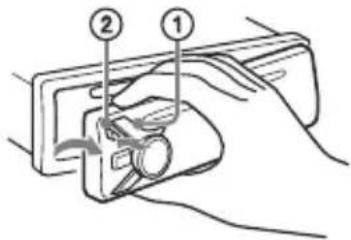
PonepeJxkyBaIbHn cnrHaI
KIO 3AMOK 3aNAJIIOBAHNNIpeBecTIN B INOJXeHHN OFF, He BiD'cHnABu NpePdHIO NaHeIb, IpOTrOM KINbKOx cekyHd 6yde LyHaTI NOpEeJxByAalbHn CnHaI. CnHaI 6yJe LyHaTI TiIbKn 3a yMOBu BVKOpNCtAHN B6yDoBaHO rIDcNlIOBaUa.
PnncdHaHna nepedhboi naheI
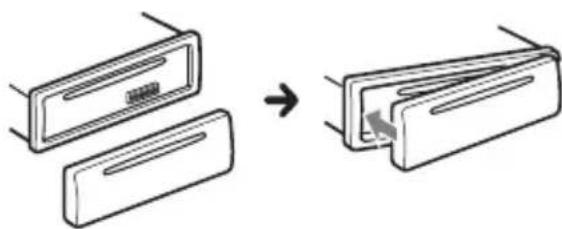
Ipee3aBaHTaxKeHn npncTpoU
IpeepnBm BkOpncTahHm npntpo, nicna3amH elemEnTa KNBleHHa6o nepeo6laHaHnH 3'EdHaNb npntpiinotpiHo nepe3aBaHTaxNTn.
1HaTnchItb i yTpmyTe KhoNk DSPLi (Ha3aD)/MODE doBwe 2 cekyHd.
PnmiTka
Ipe3aBaHTaKeHH npunctpoIO npn3BeDe Do CTnpaHH NaCTpOioK rOuHHNka, a TaKoX NeBHO 36epexeHOro BMicty.
HanaatyBaHHKpaIHn/perioHy
Iicna nepe3aBaHTaxKeHH npntpoB iDkPnEbCra ekpaH HaJaTuBaHH KpaIHn/ perioHy.
1 Koln BiO6paXaTImeTbc8 [SET AREA], HATncHtB KhoNky ENTER. BiO6pa3ntbC npToUHa KpaIHa a6o perioH.
2 NobeptaOuN dNcK KepyBaHHn, Bn6epiTb [EUROPE] a6o [RUSSIA], a NOTIM HaTnCHiTb dNcK KepyBaHHn.
3 NobeptaOnuN dNcK kepyBaHHn, Bn6epitb [YES] a6o [NO], a notim HATnCHiB dNcK kepyBaHHn. Y pa3i 3mHeHH KpaIHn a6o perioHy npnstpi nepe3aBaHTaXtbcra, nicra QTO BIObOpaKaTImeTBc rOINHHNK.
LeynapaMeTpMOxHaHaIaTuBaTINB MeHIO 3aRaJIbHNx HaIaNtYBaHb (CTop.12).
YCTaHOBJIeHHra roINHHnKa
1HaTnCHiTb KhoNky MENU, NOBepTaOuN dNcK KepyBaHHa, Bn6epiTb [GENERAL], a notim HaTnCHiTb dNcK KepyBaHHa.
2 NobeptaOuN dNcK kepyBaHHa, Bn6epitb [SET CLOCK-ADJ], a notim HaTncHiB dNcK kepyBaHHa. 3NaueHnY yacy noUHe 6JIImaTn.
3 NobeptaIte dNcK KepyBaHHa, 06 yCTaHOBHTI rOuHn Ta XBNiHn. 1o6 nepemictNTn uΦpoBy iHnkaio, HATnCKaTe KNONky SEEK +/-
4 Nicra BCTaHOBJIeHHXBVJINH HATnCHiTB KhoNkY MENU. HactpoOBaHH6yJe 3aBepSeHo, i roDInHHK NOUHe npaIobAtn.
Iio6 BiO6pa3nTn rOuHHNK, HATNCiTB KhoNky DSPL.
1HaTnchItb KhoNky MODE, 06 3miHtNi diaNa3oH (FM1, FM2, FM3, MW a6o LW).
2 HactpoTe yactoty.
HanaHTyBaHHaJIbTepeHaTnBnHex YactOT (AF)i NobiOmJeHb npo cHTyaCiIO Ha doporax (TA)
Функця AF noctiHNo haIaNawTOBvETbCЯHaCTaHcIIO 3 HaicNJIbHIiM CnIHaJOM yMepeXi, aФунKczIy TA hAdae HauHOBIwY iHOpMaIIO npo cHTyaIIO Ha doporax abOdoPoxkHi nporpaMn (TP), kIoo BOHN npinMaIOTbcra.
1HaTnchItb KhoNky MENU, NOBepTaOuN DnCK KepyBaHHa, Bn6epiTb [GENERAL], a notim HaTnchItb DnCK KepyBaHHa.
2 NobeptaOuN dNcK KepyBaHH, Bu6epiTb [SET AF/TA], notim HaTnCHiTb dNcK KepyBaHH.
3 NOBePtaOuN dIscK KepyBaHHa, Bn6epiTb [SET AF-ON], [SET TA-ON], [SET AF/TA-ON] a6o [SET AF/TA-OFF], a NOTIM HaTnCHiTb dIscK KepyBaHHa.
36epexeHHaTauRDSi3
BnKOpNCTAHHMaHaTaYBaHb AFiTA
Moxha 3anporpamyBatn cTauRDSpa3om
i3 HalaHTyBaHmN AF/TA.YcTahOBiTb AF/
TA,a notim 36epeXitb cTau3a
DonomoroTO BTM a6o BpyHy. Kaio
nporpaMyBaHHa cTau3diinCHIOETbcra
BpyHy,MOxHa TaKoX 3anporpamyBatn
ctau36RDS.
IpnMaHnE ekCTpeHx OOrIoWeHb
JkUo BBiIMKHeHO AF i TA, ekCTpeHi
OroLoWeHHa ABTomaTuHNo
IpepeNBaTmMyTb NToOuHe Bn6paHe
dxKepeNo.
PerylIOBaHnryrUHoCTi nID yac oroIooHenn npO cnTyauciIO Ha doporax
Pibehruyhocti 6yde 36epexeHOBnam'rti DnHaCTynHx OOrOoWeHb npo CNTyaucio Ha doporax, i BIn He 6yde 3aJexKaTu BiD 3Bnuahoro pIBHrauyhocti.
Прийом odни epiohaьhoi nporpaMu (REGIONAL)
KuOyHKui AF i REGIONAL yBIMKHyTo, npictriH He nepemukatmEtbcra Ha iHwU perioHaJIbHy cTahciO 3 notxHiWM cnHaIOM. KaO Bn 3aIIuwaTe 3OHy npiMy ciEi perioHaJIbHoI nepeaui, ycTaHOBIb [SET REG-OFF] y MeHIO HanaStyBaHb [GENERAL] niD qac npiMy FM-paioctaHcii (CTop.13). LyaFyHKsI He npaioe y BeNko6pTuHii Ta deAKNx IHnx KpaIHax.
Функця мicцeвoro paioomoblenna (tibkn y Benuko6pntahii)
LyaYHKiJaO3BOJAE Bn6upaTn iHwi MicueBi CTanii B neBHi MicueBOcTi, HABiTb kUo BOH He 3akpInJIeHI 3a UΦpoBUMN KHOKNAM.
PiJ uac npinomy B diaNa30Hi FM haTNCIb UΦpoBy KHONKy (Bid 1do 6), Ha kKi36epexeHo MICeBy cTAHciIO. He Ni3HlWe HIX uepe3 5cekynd 3HOBy hATNCITb UΦpoBy KHNKy MICeBOoi cTAHci. NobTopoiTe IIO npOeDpy, DOKn He 3HaNdTe Notpi6Hy MICeBy cTAHciIO.
Bn6ip Tnib nporpaM (PTY)
1 Hatnchitb PTY niD yac npniomy FMpaioctaHci.
2 NobeptaTe DnCK KepyBaHHa, DokHa DnCnJIeI He BiO6pa3ntbCnOTpi6Hn TnnporpaMn,NotIM HaTnCHiTb DnCK KepyBaHHa. PnictpiN noUHe NOuYK CTanCi, Jka TpaHCIOE Bn6paHn Tn nporpaMn.
Tun nporpam
NEWS (HOBINH), AFFAIRS (AKTyaIbHi noii), INFO (BiIomocTi), SPORT (Cnopt), EDUCATE (Ocbita), DRAMA (PaIOBucTaBn), CULTURE (KylbTypa), SCIENCE (Hayka), VARIORED (Pi3He), POP M (POnyIaRHa My3Nka), ROCK M (PoK), EASY M (Lerka My3Nka), LIGHT M (Lerka KlaacuHa My3Nka), CLASSICS (KlacsuHa My3Nka), OTHER M (My3Nka iInx JKaHpiB), WEATHER (IorOda), FINANCE (PhiHcns), CHILDREN (DITayi nporpamn), SOCIAL A (CycinbHe xHTT), RELIGION (Peirir), PHONE IN (ДзВИнкуnpamn ephiip), TRAVEL (Подороki), LEISURE (ДоЗВлл), JAZZ (Джа3), COUNTRY (KaHTpi), NATION M (HaioHaJIbHa My3Nka), OLDIES (Стapiшяrepn), FOLK M (ФолК), DOCUMENT (ДokumentaIbHi nporpamn)
YctaHOBJIeHHra roHHHnka (CT)
1 Y MeHIO HaJaTaYBaHb [GENERAL] yCTaHOBiTb [SET CT-ON] (ctop. 13).
BiodtbopeHH
BiodtbopeHnI ncka
1 BCTaBTe DnCK (niDnncaHOIO CTOpOHIO DoROpN).
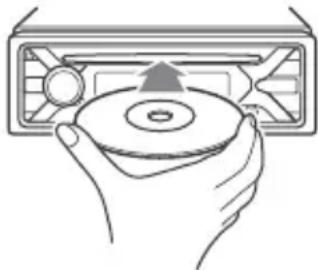
BiTbOpEHn po3NoHcBcA BtOMaTuHo.
BiiTbOpEHNaHabeEHNx HnXue faaiiB He NiIDTPMMyETbcra.
MP3/WMA/FLAC:
-ФaДИN,3axnueHiaBTOPCbKmMnpaBaMn;
-ФaJIn3DRM(KepyBaHHnUΦpOBmnpaBamn);
-6araTOKaHaJIbHi ayiofoaainn.
MP3/WMA:
-ФаниЗКOMпессio6e3ВТрИДaнIX.
Ipeed CTBOpEHHaM NiKJIoueHn Bn6epiTb pexm USB (pexim Android a6o MSC/MTP) 3aJexHo BiD TUny npncTroIO USB (ctop.13).
1ПiДКЛЮчITь npистри USBdo nopTy USB (ctop.6).
Po3noUHTbcB BiTbOpenhna.
Kku npucpii USB Bxe niKluoyeHo, InnaocKy BiTbOpEnHaTnckaTe KhoNkSy RC, DOKn He BiO6pa3ntbcr iHdkauia [USB].
2 BiDperyIIOTe rUHicTb Ha cboMy anapati.
Pp3ynnHeHHBiDtBopeHH
HaTnCHiTb i yTpmyTe KhONky OFF npotrrom 1 cekyn.
BvdaJIeHnI npncTpoI
PpnnHItb BiITBOpEHnTa BnDaJIb npncpti.
FW UPDATE (OHOBJIeHHB6yIOBaHOro 13)
3aynck OHOBneHnBbYIOBaHOro I3: [YES], [NO].
OHOBHeHH B6yDObaHOro I3 TpNBac KJIbKa XBnInH. PId Yac OHOBHeHH He nepeBODbTe 3aMOK 3aJaIeHH B PNOJKeHH OFF i He BiD'EDHyIte npucTpi USB.
HajauTyuBaHHa 3Byky (SOUND)
EQ10 PRESET
Bn6ip kpiBoi ekBaIaJ3epa 3 10 KpNBx ekBaIaJ3epa a6o BmKHeHHeKBaIaJ3epa:
[OFF], [R&B], [ROCK], [POP], [HIP-HOP], [ELECTRONICA], [JAZZ], [SOUL],
[COUNTRY], [KARAOKE]*, [CUSTOM].
Hactpoikn Kpnboi ekBaIaI3epa MoXHa 36epertn IyKoXHoro DKepeJa.
*Kuio Bn6paoH [KARAOKE], 3Byk roIocy niU qac BiTbOpEH npurnyuYcBcA, aJe He yCyBaETBCIOBHiCTIO. BnkOpncTaHH MikpoOHa He niITpMycBc.
EQ10 CUSTOM
YcTaHOBJIeHHn[CUSTOM]3EQ10.
HaIaIHTyBaHnKpNBoI eKBaIaN3epa: [BAND1] 32 T, [BAND2] 63 T, [BAND3] 125 T, [BAND4] 250 T, [BAND5] 500 T [BAND6] 1 KT, [BAND7] 2 KT, [BAND8] 4 KT, [BAND9] 8 KT, [BAND10] 16 KT. PBeHb ryHocTi peRyIHOeTBcR B dIana3o BiD-6 DDo +6 DIs kPOKOM B 1 D.
BALANCE
PeryIIOBaHn3ByKOBOrO 6aHaNcY: [RIGHT-15] - [CENTER] - [LEFT-15].
FADER
PeruIIOBaHnB iIDHOCHOro pIBn: [FRONT-15] - [CENTER] - [REAR-15].
S.WOOFER (ca6byΦep)
SW LEVEL (piBHeH ca6ByΦepa)
Perynobannpibnryuhocti ca6Byepa: [+6dB] -[0 dB]-[-6 dB].
([ATT] Biö6paKaεTbC8 3a HaɪHnXyOrO 3HaueHHra.)
SW PHASE (a3a ca6Byepepa)
Bn6ip a3n ca6Byepa: [NORM], [REV].
LPF FREQ (aactota dna iNbTpa Hn3bKnx aactot)
Bn6ip rpaHnUHOJ yacToTn ca6Byepea: [80Hz], [100Hz], [120Hz].
Texhivhe o6cIyroByBaHHa
Чишина Контактib
Pnucpi MoKe npaObaTn HeHaJIeKHM
HNOM y BnPaIky 3a6pydHHeHHa KOHTaKTIB,
Uo 3^ dHyOtB npucpi i nepeHIO naHeJIb.
Uo6 3anobirTu cboMy, BiD'edHaIte
nepeHIO nAHeJb (CTop.5)i npocntbTe
KOHTaTKn BaTHm TaMnoHom.He
IDoknaaTe HaamipHnx 3ycnlb.B IHsOMy
pa3i MOxHa NOxKOJNTN KOHTaKTN.
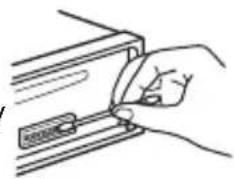
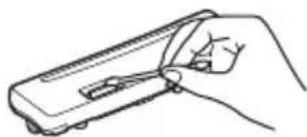
Ppumitkn
3MipkyBaHb 6e3neKn BumkaTe 3anaIIOBaHH Ta BmMaTe KIOU 3aMKa 3anaIOBaHH nepeD YnueHHM KOHTaTtB.
Hikon He TopkaTecKoHTaKtIB 6e3nocepHbO nIbUAMn a6o 6yNb-RAKM MeTaJIeBMn PpeMeTom.
TexhiHi xapaKTepuCTnKn
Tóhep
FM
ДиаэоннстpoIBaHHЯ:
ДляnapaMeTpapArea]BCTaHOBJeHo 3naueHnE [EUROPE]:
87,5 MΓι - 108,0 MΓι
ДляnapaMeTpapArea]BCTaHOBJIeHo 3HaueHHra [RUSSIA]:
FM1/FM2:87,5 MΓι - 108,0 MΓι (3 iHTepBaJIoM 50 κΓι)
BnKOpncToByBaHa yTlnBiCTb:7 EbΦ
Bn6ipkoBicb:75nb npu 400Kr
BidnoHenncHnA/73d6
PozdineHHa:50 nHa 1Kr
YacToTHa xapaKTepeNCTnka: 20 T-15000 T
MW/LW
ДиаэоннстpoюBaHHa:
MW: 531 kT - 1602 kT
LW:153KΓu-279KΓu
THi3do aHTeHn:
3'εДнУВач ДЯЗOBишьоi aHTeHn
YyTnBicTB: MW: 26 MKB, LW: 50 MKB
PporpaBau CD
BiDHOWeHHcHnHaI/Whm:95d6
YacToTHa xapaKTepeNtka: 10 Tz - 20000 Tz
KoephiHT deToHaui: no3a BmipOBAHUMM MEkamn
MaKcImaJIbHa KIJIbKICtB (JInWe CD-R/ CD-RW):
- nanopok (aIb6omib): 150 (y TOMy uNcJI KopeheBa nanka);
-ФaHJIb(KOMno3nci)i nanok:300
(MOJINBO, MeHwe 300, kIIO imHa nAnOK a6o faiB cKlaJaTObCra 3 BeJIkoI KInbKOci CMBOLiB);
- BiöópaKaYBaHnX CmMbOJIb IЯ Ha3Bn
nankn a6o foay: 32 (Joliet)/64 (Romeo).
KoIeK: MP3 (.mp3) i WMA (.wma)
PporppaBau USB
Intepfeic:USB(noBHOuBnKicHn)
MaKcImaJIbHa cUla cTpymy: 500 mA
MaKcImaJIbHa KJIbKICTb KOMNo3nci, Ipo3Pi3HaIOTbc:
-
napoK (aIb6omib): 256
-
faaiB (komnou:): 256
Cymicha Bepcia npotoKoly Android Open Accessory (AOA): 2.0
Koidek:
MP3 (.mp3)
WBndkictb nepeaui daHnx:
8K6iT/c-320K6iT/c
(πiTpmyetbyc VBR (nepeminHa
YacToTa nnckpeTn3aui: 16 KfU 48KfU
WMA (.wma)
WBndkictb nepedaqui daHnx:
YacToTa nckpeTn3aui: 32 KfU,
44,1 KΓu, 48 KΓu
FLAC(.flac)
PozpndHicb:16 6it,24 6it
YacToTa nCKpeTn3aui: 44,1 KfU,
48 K
PipcnIIOBaU notyXHocTi
Buxi: BuxOuN dHaMiKIB
Повни onip диHamikib: 4 Om -8 Om
MaKcImMaJIbHa BnIXiHa NOTyXHiCTb:
55BTx43a4OM
3araJIbHI BiIDOMOCTI
Buxo:
TepmiHaayioBxOiB (REAR, SUB)
AHTeHa 3 eJekTpnuHm npuBOdom/ TepmiHaI KepyBaHHnPiDCnIIOBaem noTyXhOCTi (REM OUT)
Bxo:
BxidHn TepmHaI pylbTa
ДиСТанцИнHorOКерУВаHHЯ
BxIDHe rHizdo aHTeHN
BxiIHe rHi3Do AUX (ctepeo mHi-rHi3do)
NopT USB
BmOrn do XNBJIeHHa: aBTOMo6JIbHn
akymyIaTOP noCTiHoro CTpyMy
Hanpyro10 12 B (i3 3a3emJIeHHaM
HeratNBHORO KOHTaKTy)
HomHaJIbHe cNoXnBaHnA Ctpymy: 10 A
Po3mipn:
YactHHn DJIa BCTaHOBJeHH Ta
BiDcyTHi3ByKOBn CnRHaI.
→ΠДКЛЮЧЕН ДОДАТКOBИ NIDCSINIOBAHNotyxKHOCTI, a B6yIDOBAHN NIDCSINIOBAH He BUKOPUCTOByETbCra.
Bmict nam'atri ctepto.
LHyp XnBLeHHa6o eJeMeHT XnBLeHHa BIDKIOUeHO a6o He NiKIOUeHO HJIeXHM YINOM.
36epekehiBnam'ayi paioctanii Ta noka3HnK npaBnIbHorO yacy cTepti. Nperopib 3ano6ixHnK.
Y npncptpoi BnHnkae wum niq yac 3miHn noloxKeHHra 3aMka 3anaIIOBaHHra.
→ LHypn HnnpaBnIbHo NiKJIuOeHi Do IdoTaKOBOro rHi3da XnVBHeHHaBTOMo6iJa.
→ IOnaETbca HeIOCTaTHbO XNIBJeHHA.
-ПepekoHaITeCЯ,иоHa npncTpii NOdaεTbcraДocTaTHbOЖИВлeHHЯ BiD abTomo6ilbHOroakymyJrTopa.(BmoradoЖИВлeHHa:12BnoctiHoro cTpyMy.)
KhoNk onepaui He yHKioHyOTb. DnCK He BmMaetbcra.
→ HatachItb i ytpmmyTe KhoNKn DSPL i
(Ha3aJ)/MODE IOBwe 2 cekyH, uo6 nepe3aBaHTaXHTn npncTpii. Bmict, 36epeXeHn y nam'ATi, bye cTeptO.
3 mipkybaHB 6e3neKn He BnKohynte onepaio nepe3aBaHTaxeHHn iD yac KepybaHH aBTOMo6iJem.
Papionpniom
He npnMaIOb8c cnHann paioctaHci. 3ByK cynpoBODxcyTbc8 wymamn.
HenpaBnIbHe nIckNoueHHa.
- IpepeBipTe πiДКЛIOUeHHЯ aBTOMO6IJIbHOI aHTeHn.
-Якшо aBTOMaTnHa aHTeHa 3 eJekTpUHm npuBOdom He BnCyBaETbcra, npeBipTe NidkIIOueHHn pOBoDy KepyBaHHa aHTeHOIO 3 eJekTpOpnpuBOdom.
He BdaεTbc8 3HaHTn 3a nporpaMoBaHi cTaHci.
TpaHcIbOBaHn cnHaJ HaTo cJa6Kn.
Y diaana3oHi FM3 HEMOXJINBO HAcTpoITn 74 Mf.
→ ItoTuHa cTaHcIa He e RDS-CTaHcIeIO.
He oTpmaHo daHux RDS.
→ CtaHciHa He Bka3yE Tn np nepaui.
Ha3Ba nporpamHoi iocIyru 6IImae.
→ДяцiCi CTaHcii HeMae aJIbTepeHaTnBHOI qACTOTN.
- HaTnCHiTb SEEK + / - ,KoJIn 6JIIMa€ Ha3Ba npoRpaMHOI NocLyrN. 3'ABuTbcra NOBIOMLeHnA [PI SEEK], i npucTiPi NOUHe WyKaTu iHsu YacToTy 3 TaKUMc CAMMn DaHmPi (npoRpaHa iDeHTnΦikaiz).
BiodbopeHnC
He BiIDTBOPIOETbCnCK.
→ДиСКпОшКоДжЕнйа603a6pydHeHn.
→ДиСКИ CD-R/CD-RW He npn3HaueHi IЯ BiIbTBopeHnHa 3Byky (CTop.16).
Hemoklnbo BiTbOpTu ΦaJn MP3/WMA.
→ДиСК HeCyMiCn i3 ФОмaTOM i BepciEIO MP3/WMA.ДoklaDiHi BiDOMocTi npo BiIDTBOPIOBaHI DiNCKI Ta ФОмaTn HabeDeHi Ha caiTi NiIDTpIMKn, 3a3HaueHOMy Ha OCTaHHi CTOpIHcI O6KlaDINHKn.
Фаилmp3/WMA notpe6yIb 6Ibwe acyДЯ NOATKBy BIDTBOpEHnH, HIX IHwi.
→ HabeHeni HnXue DNCKN nOTpe6yIOTB 6Ibwe yacy dny noaTKy BiTbOpeHH:
-ДИСК,ЗАПИСАНМ 3i CКlaДНОCTPyKТуpoI O DepeBa ФаЛIB;
-ДиСК,Злпсану ржимi Multi Session;
-ДИСК,наяк imm MOxHa IODaBaTn ФaилданHnx.
3Byk nepeepBaetbca.
→Диck noWkoJxehn a6o 3a6pydHeHn.
BiTbOpHn3 npncTroo USB
He BiTbOpIOITbcra eIemEnTu Chepe3 KOHcHTpaTop USB.
→Ппстpoю He ВдаeТься рОзni3HaTи npстpii USB chepe3 концentpaTop USB.
Для поатку BiДТВОРЕнг i3 npистpoю USBnotpi6no 6iNbwe yacy.
→ Ctpyktypa depeBa faaiB y npncptpoi USB CKlaHa.
IpepepuBvactictb 3Byky.
3ByK MoXe 6yTn nepepuBvactm Upe3 BnCOy WbNdkictb nepepaui daHx.
→ YdeKnx BnnaKax BiTbOpEH naJIiB i3 DRM (kepyBaHnHa nΦpoBmnpaBaMn) HEmoXJInBO.
He BiTbOpIOeTbcya ydiOphiJ.
→Пистри USB, BiДфОрмАвани 3a ДОпOMою ФайлOBиxCИСТЕМ, BiДMiHнХ BiД FAT16 a60 FAT32, He NiДтprIMy€Tбя.*
*Ue anapat niItpmmycncTeMn FAT16 i FAT32, npote deaKi npicTroo USB moxyb 6ytn HecymichnMn 3 ycima cImn CnCTeMaMn. DoknaHiy InphiopMaio DnB. BInctpyKci3 ekcnnyataui npicTroo USB a6o 3B'jXiTbcra 3 Bnpo6HnKom.
HeBdaeTbcBnKoHaTu onepaui nponycky aIb6omy, nponycKy eJeMeHTIB (peXm m Wbndkoro nepexOdy) i nowky KOMno3uii 3a Ha3BOIO (Quick-BrowZer).
Liopeaui HeoctynHia, KIO nnKluoyeno npucpti USB y pexmi Android.
- YctaHOBIbIb [USB MODE] 3haueHnra [MSC/MTP] (cTOp.13).
→ Ha npicntpoi BcTaHOBJIeHO HenpaBnIbHn peKm USB.
-ПepekoHaITeCЯ,иоДЯUSBн npicTpoi BCTaHOBJIeHo peKIM MSC/ MTP.
Y pejkmi Android 3Byk 3 anapaTa He BiTbOpIOeTbcra.
Koli anapat 3haxoDntbC B pexnmi Android, 3Byk BiTbOpIOeTbC TijbkN 3i cMapTfoHy 3 OC Android.
- IpepeBipTe cTah nporpaMn BiIDTBOpEHnayio Ha cMaprfoHi 3 OC Android.
- 3aJIeXHo BiI cMapTfoHy 3 OC Android MOxKyTb BnHnKHyTu npo6JeMn 3 BiITBOpEHHaM.
Повимленья
IiD yac pO6OT npncTpoIO MOKytb 3'ABnTnca Taki NOBIOMJeHHa.
CD ERROR: He BiДТВОПЮЕТБСАДСК. ДИСК 6удe ВилучEHи aBTOMaTNUHO.
Почисте диck abo BCTaBTe NOrO npabnIbHo.пepekoHaITeCЯ, loДиck He npoJxHi I He nOwKoJxKeHn.
CD NO MUSIC: BiDCyTHiB iD TBOPIOBaHn foai. DnCK 6yde BnIyuEHN aBTOMaTNoHO.
BCTaBTe DnCK 3 BiTbOpIOBaHIMN
paIamn (CTop.17).
CD PUSH EJT: INCK HEMOXJIINBO BNIHHTN.
→ HaTnchItb (BnMmHaHn).
HUB NO SUPRT: uei npicpii He niIDtpmUe KOHcHTpaTOpn USB.
INVALID
→Bn6paHa onepaizj MoKe He NiIDTPMMyBaTncr.
NO AF: BiIDcyTHi aIbTePHaTnBHi acTOnN.
→ HaTnCHiB SEEK + / - , KOJIu 6JIUMaE Ha3Ba nporpaHoi nocnyr. PnpCTpiN noUHe wyKaTu iHsu yacToTy 3 TaKIMn CaMMn DaHmPi (iJeHTnΦikaizr nporpaMn) (3'ABtbcra nobIDomIeHHra [PI SEEK]).
NO TP: BiDcyTHi npoRpaMn npo cnTyauciu Ha doporax.
→ПистрийnpoДOBЖуВATIME noшукdoctynHx TP-CTaHciI.
NOT SUPPORT -Android MODE
Do anapata πικλιουηο npinctpii USB, ἀκην ἡπιθριμγε προτόκολ AOA (Android Open Accessory) 2.0, κολι ἀπη napaMeTpa [USB MODE] BCtahOBJIeHo 3haueHŋ [ANDROID].
-YctaHObitbI [USB MODE]3HaueHnraMSC/MTP.
OVERLOAD: npncptpi USB nepenOBHeHn.
BiD'εdHaTe npncptpi USB, a notim 3MiHITb DKepeNo, HATNCHyBwN KHOKNy SRC.
→ПистpiUSB HeCnpaBn,abo nikluoyeHO npctpi,kNHe nIDTPmMyETbcra.
READ: TpNbAe 3uHTyBaHH iHopMauii.
DooekaTec3aBepWeHH3HTyBaHHBIBTBOpEHnPO3NoHETbcABTomAtuHo.3aJeXHO BIDCTpykTypnphiIy cei npocc MoKe TpNBaTN DeKniac.
USB ERROR: He BiIDTBOpIOEbCra npucTpi USB.
3HOBy nIDKnHouItb npucpti USB.
USB NO DEV: npncptpi USB He n iεdHaHo a6o He po3ni3HaHo.
→ NpekeKaHaItecra, 0o npncpi a6o Ka6eB USB haDiHnO nDHaHo.
USB NO MUSIC: BiDCyTHiB BiTbOpIOBaHnI Φaɪn.
→ПiД'ЕДнайTe npиСтпй USB 3 BiIDTBOPIOBAHIMN ФаИламn (cTOp.17).
USB NO SUPRT: npucptpi USB He NiIDTpUMyETbcra.
→ДяОТриманняДOKладнх BiIDOMOCTe npo cymicHicTB npictpoU USB nB. Be6caT NiIaTPmKn, 3a3HaueHn Ha OCTaHHi CTopIHci O6KlaDnHKn.
LLL a6o THTyTo NOaTKy a6o KINuCKa.
-(3HaKπIckpeCJIeHHa):HEmOxJIINBO BiO6pa3NTN CIMBOJ.
Iooo p060n npylta dNCTaHcHOrO KepyBaHHa Ha kepMObOMy Koneci:
ERROR: nID yac peectpauii fynkuii ctaJnacn NOMUka.
→ Bukohai Te npoceDpy peecTpaui 3HOBy, nouHaoun 3 Tiie fynKci, De ctaJacra nOMnIka (CTop.12).
TIMEOUT: npoceynpy peectpauii fyHKuii He BnKoHaHO y 3B'ra3ky 3 nepeBnueHHm Liimity uacy.
→ Cnpo6yIe 3aBepuNTn npOceDpy peecTpaui, nok 6mMaE [REGISTER] (6n3bKO 6 ckyHd) (CTOp.12).
JaKuO HaBeHei nopAaH He DonomaraIOTb BnpiUnTI npo6IeMy, npokOHcyJbTyItec3 NaB6JInxKUIM dIJIepOM Sony.
Kkuo npncpti 3daeTbcB peMOHT uepe3 npo6lemy 3 BiITbOpEHnM dNcKa CD, 3axoniTb i3 cOboIO DnCK, NiD yac BiITbOpEHnRAKORO BUNHKna npo6Iema.
Cnncok yactinДЯ BCTaHOBJIeHЯ
①
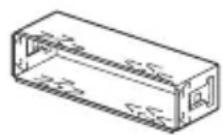
②
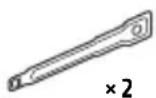
(3)
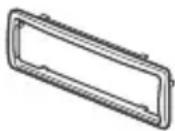
(4)
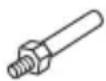
⑤

(6)
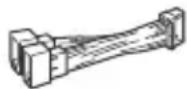
-Lei CnncOK qactH He OXONJIIOBHN KOMNJIeKT NOCTaHaHH.
KpoHHTeH 1 i 3axncha MaHKeTa ③ npNKpINIOHObCdo npNCPOI nepei KOMNJIeKTAciIc. NpeJ yCTaHOBJIeHNrmpNCPOI CKOpNCaTaeTEcA DEMOHTaXHMKnIOUAM ②, 0o6 BiD'EDHaTN KPOHHTeH ① BiN pNCPOI. DOKNaHIIwa iHΦopMaIaI -y po3diI «BiD'EDHaHHa 3axnCHOI MaHXeTIa KPOHHTeHa» (CTOP.26).
-36epexiHa MaibyTHcI DeMOHTaXHi KIOUci ② OCKIN BOHn NOTpi6Hi dna 3HIMAHNpNCPTPO3 aBTOMo6iJia.
Підклоченя
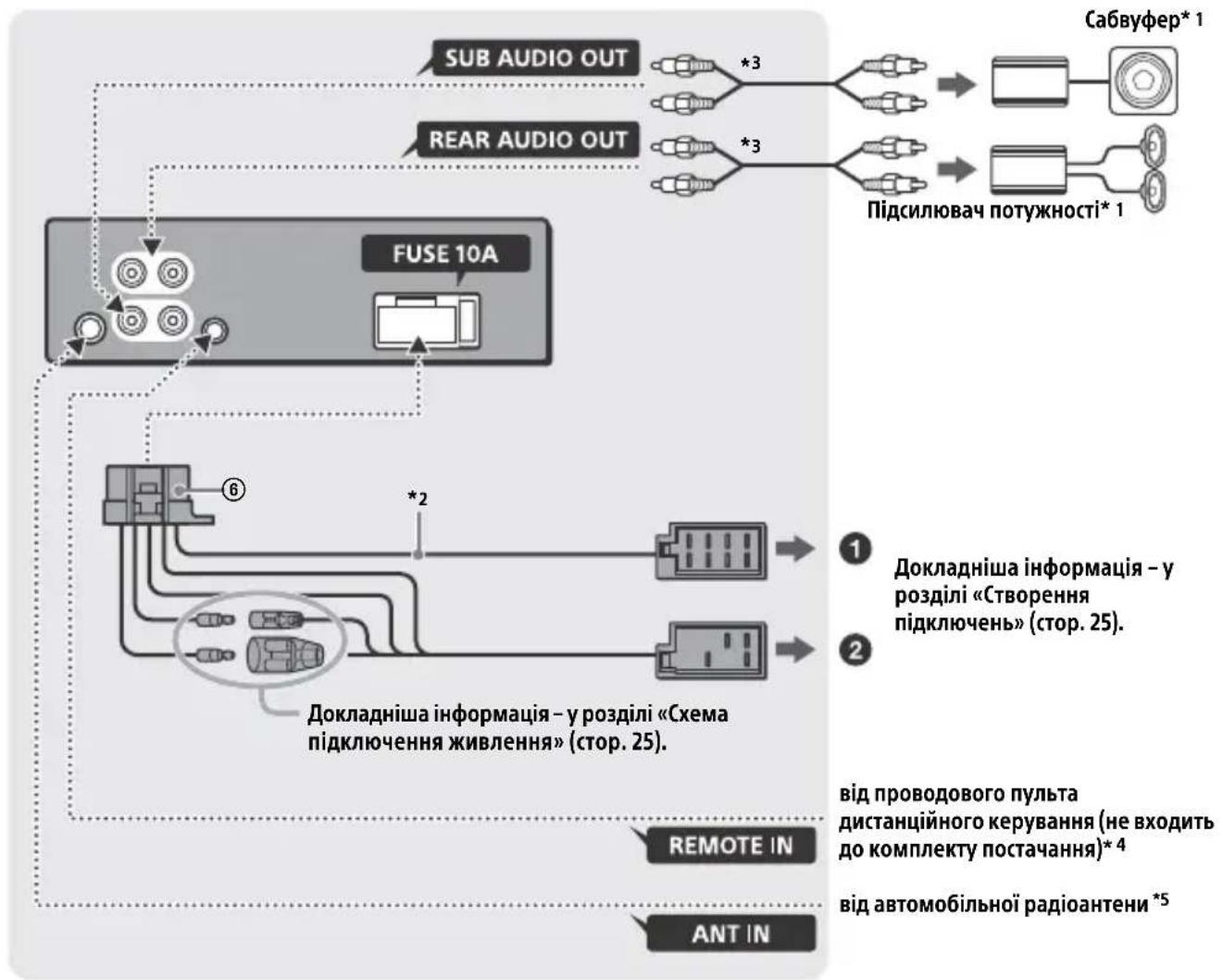
1 He BxOuNTb Do KOMnJIeKTy NoCTaHaHH.
2 Повни onip диhamikib: 4 OM - 8 OM × 4.
3 Lhyp RCA 3 KOHTaKTHMm UTNpKaMn (He BXOINb DO KOMNKeTMy NOCTaHaHHa).
4 3aIexHo BiTnTy aBtOMo6iJI, MoxJInBO, 3HaIObntbcBnKOpNCTaTn aadantep dny npOBODOBO rnybTa nCTaHuiHoro KepyBaHHr (He BxoDHT do KOMPNeKty noCTaAH). DoklaDiHiuy iHΦopMauiu npOBOpNCTaHH npOBODOBO rnybTa nCTaHuiHoro KepyBaHHr DnB. B p03diIi «BnKOpNCTaHH npOBODOBO rnybTa nCTaHuiHoro KepyBaHH» (CTop. 26).
*5 3aIeXHo BiD TnIy aBtOMoBiJI, MoKJIuBO, 3HaIO6bTcB aNkOpNCtAtn aAnTep (He BXOJNTb Do KOMNJIeKTy NoCTaUHHa), RaKIO He NiIXoJNTb 3'EDHyBa DnI 3OBHIshBoi aHTehN.
CTBOpENHnPiKlOueHb
JaKuo aHTeHa 3 eJekTpO npBODom He MaepelneHoi CTiIKN, NiKJIuOyeHHa ZbOrOpnpCTPOIO 3a DOnOMoTO Ka6eIJOXNBLeHHa 3 KOMPJIeKTy ⑥ MoKe NOsKOJNTn aHTeHy.
1 Do po3'Emy dHAmika ABTomo6iJra
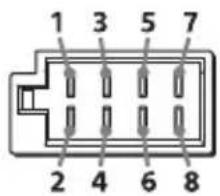
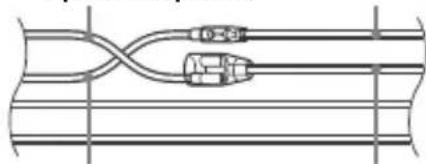
UeRboHn UeRboHn
KOBTHI KOBTHI
Hereby, Sony Corporation declares that this equipment is in compliance with Directive 2014/53/EU. The full text of the EU declaration of conformity is available at the following internet address: http://www.compliance.sony.de/
Eesti Keel
If you have any questions or for the latest support information on this product, please visit the web site below: