
HW70B1426S - Washing machine HAIER - Free user manual and instructions
Find the device manual for free HW70B1426S HAIER in PDF.



| Product type | Washing machine |
| Brand | Haier |
| Model | HW70B1426S |
| Rated capacity | 7 kg |
| Maximum spin speed | 1400 rpm |
| Energy efficiency class | A+++ |
| Weighted annual energy consumption | 140 kWh/year |
| Weighted annual water consumption | 9240 L/year |
| Spin efficiency class | B |
| Number of programs | 16 |
| Main programs | Hygiene, Jeans, Sport, Lingerie, Wool, Mixed, Synthetic, Cotton, Daily, Ultra white, Express 15', Baby cotton, Delicate, Hand wash, Spin/Drain, Drum clean |
| Dimensions (H × W × D) | 845 × 595 × 600 mm |
| Net weight | 67 kg |
| Power supply | 220-240 V ~ 50 Hz |
| Maximum current | 10 A |
| Maximum power | 2000 W |
| Water pressure | 0.03 – 1 MPa |
| Noise level (wash/spin) | 54 / 70 dB(A) |
| Special functions | Delayed start, Child lock, Memory (M1/M2/M3), Aqua Stop |
| Installation type | Freestanding |
| Safety | Door lock, Overflow protection, Anti-foam |
| Maintenance | Detergent drawer cleaning, Pump filter, Water inlet filter, Drum clean |
Frequently Asked Questions - HW70B1426S HAIER
User questions about HW70B1426S HAIER
0 question about this device. Answer the ones you know or ask your own.
Ask a new question about this device
Download the instructions for your Washing machine in PDF format for free! Find your manual HW70B1426S - HAIER and take your electronic device back in hand. On this page are published all the documents necessary for the use of your device. HW70B1426S by HAIER.
USER MANUAL HW70B1426S HAIER
Thank you for purchasing a Haier product
Please read these instructions carefully before using this appliance. It contains important information which will help you get the best out of your appliance and ensure safe and proper installation, use, care and cleaning.
Keep this manual in a convenient place so you can always refer to it for safe and proper use.
If you sell the appliance, give it away, or leave it behind when you move, make sure you also pass on this manual so that the new owner can become familiar with all features and safety warnings.
Legend
√ Yes No i General information and tips Warning! Important safety Environmental information
Disposal
The presence of this symbol on the product, accessories or materials that goes with this information indicates that at the end of its useful life the product or its electronic accessories (e.g. cable, Aqua Stop hose) should not be disposed with other household waste. To prevent possible damage to the environment or human health from uncontrolled waste disposal, please separate these items from other types of waste and recycle them. This will promote the sustainable reuse of material resources. Household users should contact either the retailer where they purchased the product or relevant local authorities to find out how they can take this item for environmentally safe recycling and safety. Business users should contact their supplier and check the conditions of the purchase. This product and its electronic accessories should not be mixed with other commercial waste.
3 Index
Safety. 4-5 Product description.. 6 Control panel. 7-10 Programmes 11 Consumption. 12 Daily use. 13-16 Care and cleaning. 17-19 Troubleshooting 20-22 Installation. 23-25 Technical data 26 After sales service 27
Safety
4
Before switching on the appliance for the first time...

...make sure all transport bolts are removed. ...make sure the power cord is not caught under or in the appliance and there is no damage or risk for damaging ...make sure the power circuit fuse is rated for 15A. ...use a separate earthed socket for the power supply. ...make sure the plug is always accessible. ...hold the plug and not the electric cable when unplugging the power supply. ...check that hose joints and connections are firm and by opening tap check for any waterleakage. ...do not switch on the appliance until everything is properly installed!
Do not ...

...allow children or infirm persons to play with the appliance or packing materials. ...install the appliance outdoors in a damp place, or in an area which may be prone to water leaks such as under or near a sink unit. In the event of a water leak, cut power supply and allow the machine to dry naturally. ...expose the machine to any frost, heat, or direct sunlight. ...touch or use the appliance when barefoot or with wet or damp hands or feet. ...use flammable detergent or dry cleaning agent. ...use any flammable sprays in close vicinity to the appliance. ...remove or insert the plug in the presence of flammable gas. ...place the appliance directly on a carpet, or close to a wall or furniture.
5
Safety
During daily use of the appliance...
...supervise children.

Ensure that they don't play with the appliance and its packaging.
Ensure that the appliance is not used by people with reduced physical, sensory, or mental capabilities, lack of experience and knowledge. ...pull up zips, fix loose threads, and take care of small items to prevent laundry from being entangled. If necessary, use an appropriate bag or net. ...switch off at the wall socket after each wash programme to save electricity and for safety. ...keep the lower part of the porthole clean and open the door and detergent drawer if the appliance is not in use to prevent odours. ...a damaged power cord is only to be replaced by the manufacturer, his service agent, or other specifically qualified people.
Do not ...
...touch the door during the washing process, it gets hot. ...place heavy objects or sources of heat or damp on top of the appliance. ...hot wash foam rubber or sponge-like materials. ...open the detergent drawer during any wash cycle. ...force the door to open, it is fitted with a self-lock device and will open shortly after the wash cycle ends. ...open the door if the water level is visibly over the porthole. ...cover or encase the appliance during operation or afterwards to allow any moisture or dampness to evaporate.


Product description
6
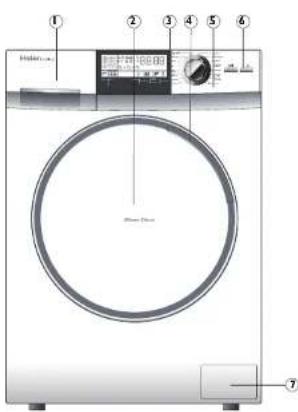
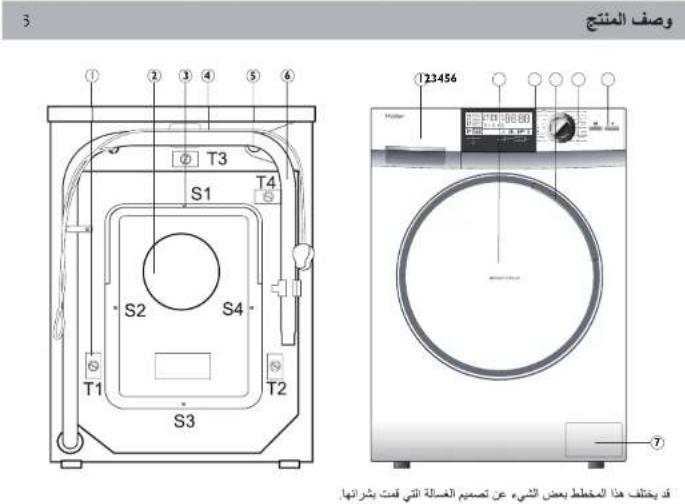
This drawing may be slightly different from the layout of the washing machine you have just purchased.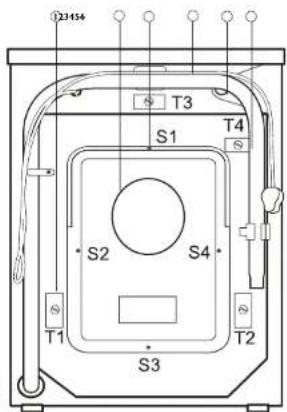
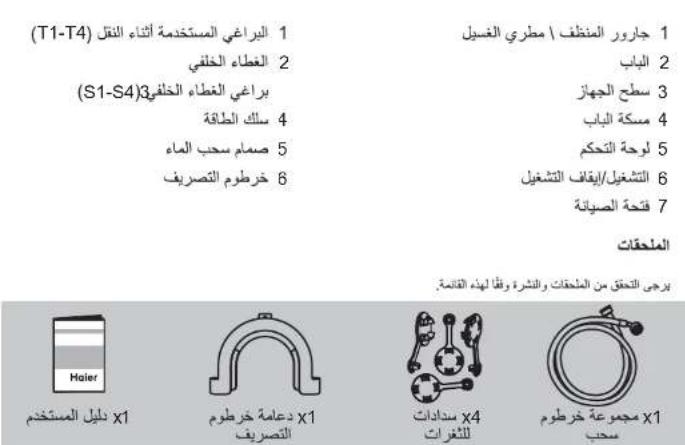
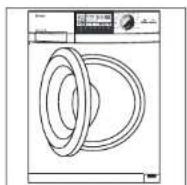
1 Detergent/Softener drawer, Transportation bolts (T1-T4) 2 Door, Back cover 3 Worktop, Back cover screws (S1-S4) 4 Door handle, Power cord 5 Control panel, Water inlet valve 6 On/Off, Drain hose 7 Service flap
Accessories
Check
riesanciteratine in acudance with this list.
1x Inlet hose assembly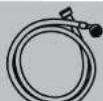
4x Blanking plugs
1x Drain hose bracket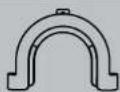
1x User manual
7
Control panel
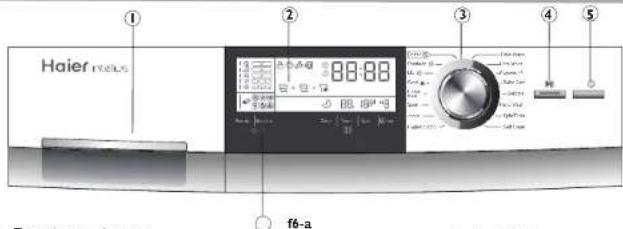
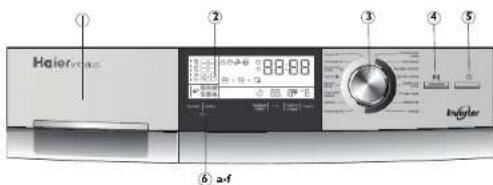
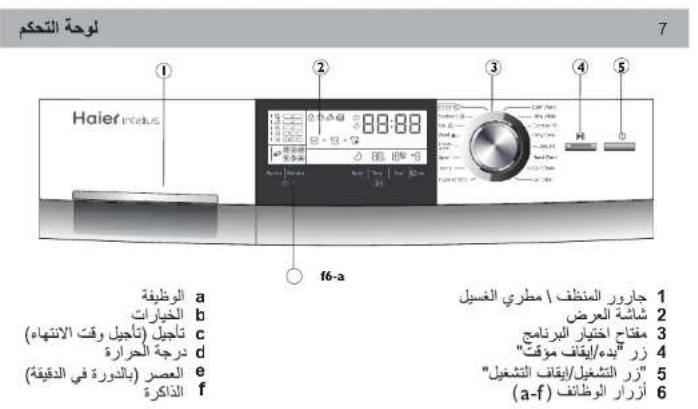
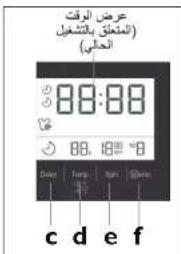
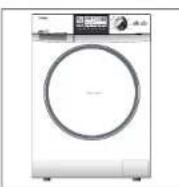
1 Detergent drawer 2 Display 3 Programme selector 4 "Start/Pause" button 5 "On/Off" button 6 Function buttons (a-f)
a Function b Selection c Delay (End time delay) d Temp e Spin (rpm) f Mero
Detergent drawer
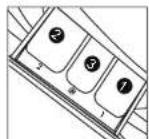
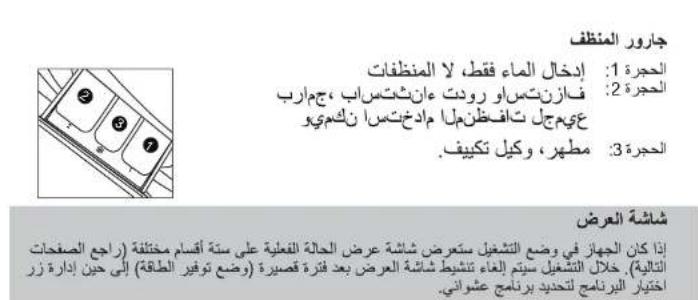
Compartment 1: Water inlet only, no detergent.
Compartment 2: Detergent for programs except spin/drain.
Compartment 3: Softener, conditioning agent, perfume.
The recommendation on the type of detergents is suitable for the various washing temperatures; please refer to the manual of detergent.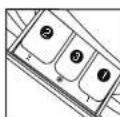
Display
If the appliance is on display, it will light up the actual status on six different sections (see next pages). During operation, the display will be reactivated after a while (Energy saving mode) until programme selection is turned at random.
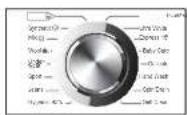
Programme selector
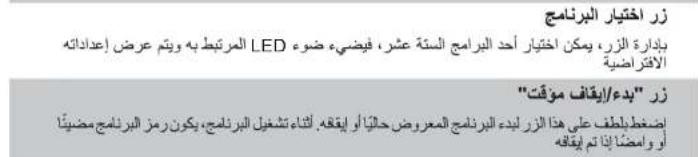
By turning the knob, one of 16 programmes can be selected. The related LED will light up and its default settings will be displayed.
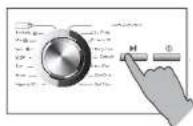
"Start/Pause" button
Press this button gently to start or interrupt the currently displayed programme. During operation its symbol is shining, or if interrupting, blinking.
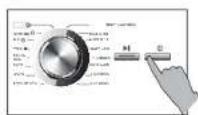
"On/Off" button
Press this button gently to switch on the display is shining. Press again for about 2 seconds to switch off. If no panel element or program is activated after a while, the machine will shut down automatically.
Control panel - function buttons
8
To get best results in each programme, Haier has well defined specific default settings. If there is no special requirement, default settings are recommended. Accordingly to these factory settings, many programme parameters and additional functions could be individually changed (see "programmes" and "function" buttons).
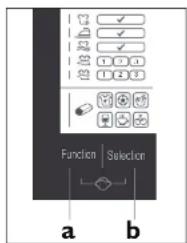
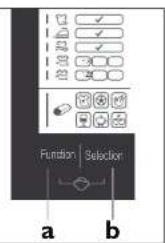
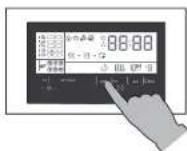
"Function" (button a)
Touch it to select sequentially required functions and settings. The related symbol will shine.
"Selection" (button b)
Touch it to confirm the current chosen "Function", its symbol is blinking. Additionally a "checkmark", a "1"/"2"/"3" symbol, or one of the stain symbols will light up. Function will be activated after 3 seconds or if button a ("Function") is touched.
"Child lock"-control panel lock function (button a + b)
This option blocks all panel elements against activation. After starting, press simultaneously "Function" + "Selection" for about 3 seconds. Panel lock symbol is now displayed. Next repetition deblocks any function.
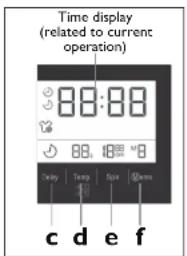
"Delay" - End time delay (button c)
Touch it to light up related symbol and display present programme end time. Accordingly to all programme settings start of wash cycle will be delayed. End time delay could be increased by turning programme selector in steps of 30 minutes from 0,5-24h. For example, display of "6:30" means end of programme cycle will be in 6 hours and 30 minutes. It is not applicable to programme "Spin/Drain". Note: End time must always be longer than programme cycle time. Otherwise operation will start immediately, although chosen end time could not be reached.
9
function buttons -
"Temp." (button d)
Touch it to adapt maximum of water temperature. Note: Display of "--" stands for "no operational heating".
"Spin" (button e)
Touch it to adapt speed of centrifugation.
"Memo" (button f)
Memory function is available in programme "Cotton" (M1), "Synthetic" (M2), "Mix" (M3). After selecting individual options and related values touch "Memo" button until display shows related "M1"/"M2"/"M3". Start programme, memory is now activated for chosen programme. When that programme will be chosen next, press "Memo" button to activate memorized setting and be at once ready to start.

General information and tips:
To cancel any actual setting change programme or press "On/Off" about 3 seconds. To cancel a running programme touch "Start/Pause" and then "On/Off" for about 3 seconds.
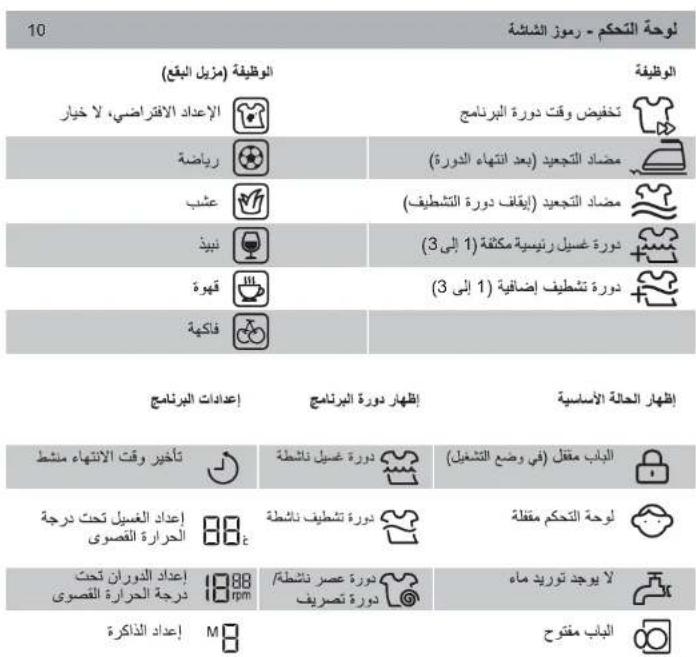
| Control panel - display symbols | ||
| Function | Function (Stains remover) | |
| Reduced programme cycle time | Default setting, no option | |
| Anti wrinkling (after cycle end) | Sport | |
| Anti wrinkling (rinse cycle stop) | Grass | |
| Intensified main wash cycle (1 to 3) | Wine | |
| Additional rinse cycle (1 to 3) | Coffee | |
| Fruit | ||
| Basic status indication | Programme cycle indication | Programme settings |
| Door is locked (in operation) | Running wash cycle | Endtime delay activated |
| Control panel locked Running cycle | Maximum wash- temperatur setting | |
| No water supply | Running spin/ | Maximum speed of rotation setting |
| Door is open | M | Memo setting |
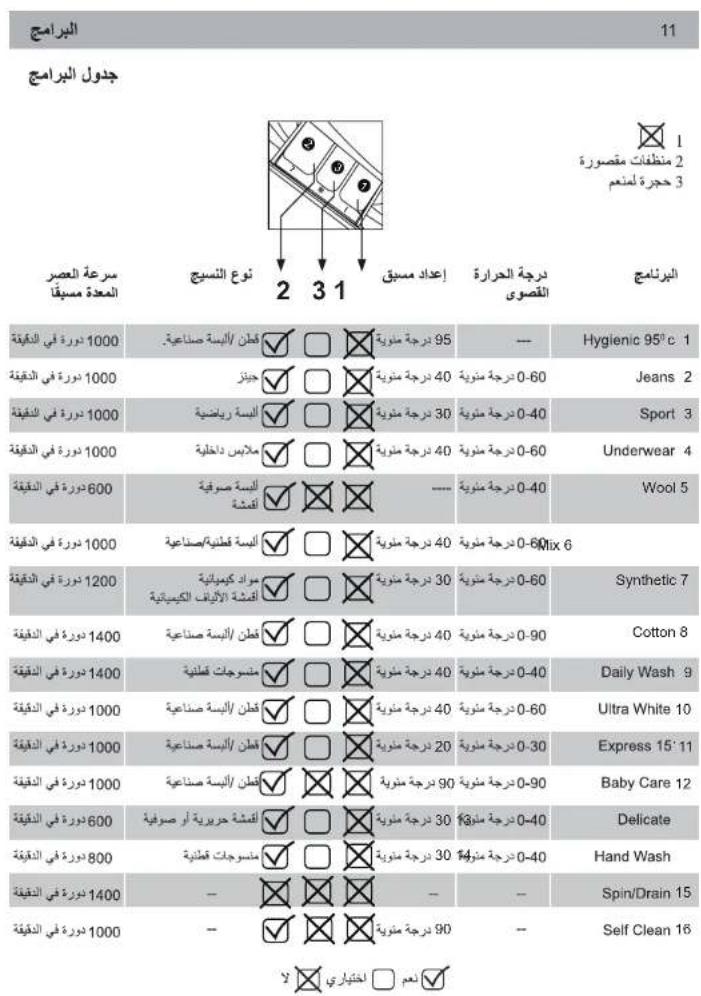
| Programme | Temp. max. | Preset | 2 3 1 | Fibre type | Preset Spin speed |
| 1 Hygienic 95°C | -- 95°C Cotton /Svn. | 100 rpm | |||
| 2 Jeans 0-60°C | 40°C Jeans 1000 rpm | ☐ ☑ ☑ | |||
| 3 Sport 0-40°C | 30°C Sports Wear 1000 rpm ☐ ☑ ☐ | ||||
| 4 Underwear 0-60°C | 40°C Underwear 1000 rpm ☐ ☑ ☐ | ||||
| 5 Wool | 0-40°C | -- ☐ ☑ ☐ Woolen fabrics | 600 rpm | ||
| 6 Mix | 0-60°C | 40°C Cotton /Svn. | 100 rpm | ||
| 7 Synthetic | 0-60°C | 30°C Chemicals | ☐ ☐ ☐ rpm fibre fabrics | ||
| 8 Cotton | 0-90°C | 40°C Cotton /Svn | 100 rpm | ||
| 9 DailyWash | 0-40°C | 40°C | ☐ ☐ ☐ | Cotton fabrics | 1400 rpm |
| 10 Ultra White | 0-60°C | 40°C | ☐ ☐ ☐ | Cotton /Synth | 1000 rpm |
| 11 Express 15' | 0-30°C | 20°C Cotton /Svn | 1000 rpm | ||
| 12 Baby Care | 0-90°C | 90°C Cotton /Svn | 1000 rpm | ||
| 13 Delicate | 0-40°C | 30°C Silk or wool | ☐ ☐ ☐ rpm | ||
| 14 Hand Wash | 0-40°C | 30°C | ☐ ☐ ☐ | Cotton fabrics | 800 rpm |
| 15 Spin/Drain | -- | -- | ☐ ☐ ☐ | --- | 1400 rpm |
| 16 Self Clean | -- | 90°C | ☐ ☐ ☐ | --- | 1000 rpm |
Consumption
12
The indicated consumption values may differ in addition of local conditions.
| Programme | Max. load kg | Energy kWh | Water L | Temp. °C | Washing time h:min | Spin drying performance % |
| Hygienic 95°C | 2 2,00 | 36,0 | 95 Auto | --- | ||
| Jeans 4 | 0,56 | 40,0 | 40 Auto | --- | ||
| Sport | 2 | 0,26 | 35,0 | 30 | 0:25 | --- |
| Underwear | 4 | 0,50 | 40,0 | 40 | 1:19 | --- |
| Wool | 1 | 0,10 | 50,0 | -- | 0:42 | --- |
| Mix | 4 | 0,56 | 34,0 | 40 | Auto | --- |
| Synthetic | 4 | 0,25 | 46,0 | 30 | Auto | --- |
| Cotton 40°C * | 3.5 | 0,47 | 36,0 | 40 Auto | <53 | |
| Cotton 60°C * | 3.5 | 0,68 | 37,0 | 60 Auto | <53 | |
| Cotton 60°C * | 7 | 0,62 | 44,0 | 60 Auto | <53 | |
| Daily Wash | 4 | 0,58 | 46,0 | 40 | 1:20 | --- |
| Ultra White | 2 | 0,60 | 45,0 | 40 | 1:14 | --- |
| Express 15' | 1 | 0,20 | 20,0 | 20 | 0:15 | --- |
| Baby Care | 4 | 2,00 | 67,5 | 90 | 2:05 | --- |
| Delicate | 1 | 0,25 | 50,0 | 30 | 0:56 | --- |
| Hand Wash | 2 | 0,25 | 36,0 | 30 | 0:57 | --- |
| Spin/Drain | 7 | 0,10 | --- | -- | 0:13 | --- |
| Self Clean | --- | 1,80 | 15,0 | 90 | 1:05 | --- |
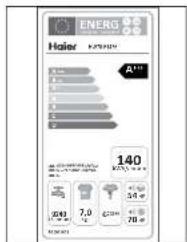
*General Information and tips:

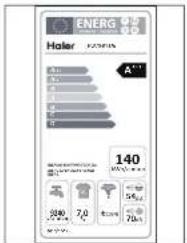
Standard programme for the Energy Labelling according to 2010/30EU:
Cotton 60°C / 40°C with max. spin speed setting and activated Intensive function (level 3) (others are default setting).
The standard 60°C and 40°C cotton programmes are suitable to clean normally soiled cotton laundry. They are the most efficient programmes in terms of combined energy and water consumption for cotton laundry. Used water temperature may differ from declared cycle temperature.
13
Daily use
This appliance is only for domestic use inside the house. If it is used for commercial, industrial or not intended purposes any Haier guarantee will not be valid anymore. Consider anytime instructions of each garment label and wash only machine-washable laundry.
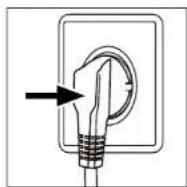
Power supply
Connect the washing machine to the power supply (220V to 240V~50Hz).
Water connection
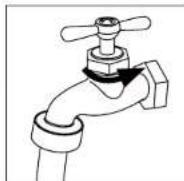
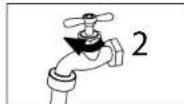
Turn on the tap. The water must be clean and clear.
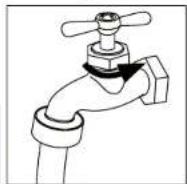
Warning!

Before use, turn tap on and check for any leakage.
Preparing laundry
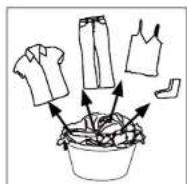
Sort out clothes according to fabric (cotton, synthetics, wool or silk) and to how dirty they are.
Separate white clothes from coloured ones. Wash coloured textiles first by hand to check if they fade or run.
Garments without hems, delicates and finely woven textiles such as fine curtains are to be put into a wash bag to care for this delicate laundry (hand or dry cleaning would be better). Close zippers and hooks, make sure the buttons are sewn on tightly and place small items such as socks, belts, bras, etc. in a wash bag.
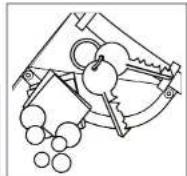
Unfold large pieces of fabric such as bed sheets, bedspreads etc. Turn clothes inside out. Empty pockets (keys, coins, etc.) and remove harder decorative objects (e.g. brooches).
Warning!

Non-textile, loose, or sharp-edge items may cause malfunctions and damage to clothes and appliance.
Daily use
14
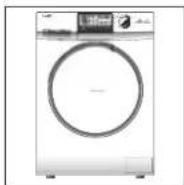
Loading the appliance
Open the door and put in the laundry piece by piece. Don't overload. Check if you can put a hand upright on top of load. Close the door carefully.
General information and tips:

After each installation or longer down time run at first programme "Self Clean" with no load and added detergent in washing agent compartment (2) to remove possibly corruptive residues.
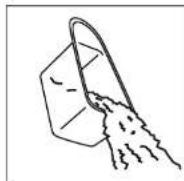
Selecting detergent
Washing efficiency and performance is determined by used detergent quality. Use only machine wash approved detergent and if needed specific detergents, e.g. for synthetic and woolen fabric. Mind always detergent manufacturer recommendations.
General information and tips:

Remove detergent residues before next wash cycle. Please follow the detergent dosage recommendation from the detergent package.
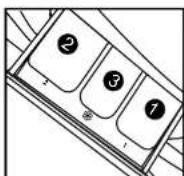
Adding detergent
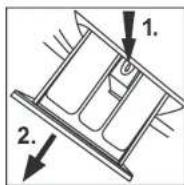
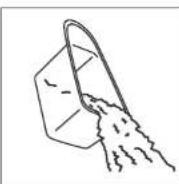
Slide out the detergent drawer and put the required detergent and softening agent into the corresponding compartments. Push back the drawer gently (Refer to the instructions on the drawer). Important information: For prewashing program, detergent should be added to both compartment 1 and 2.
For other programs, do not add detergent to compartment 1. Add liquid detergent to the main drawer, and dilute it first if it is concentrated. Do not overuse detergent; otherwise, it will damage the artificial fibers. So, please follow the instruction on the detergent package. Do not use liquid detergent if the pre-wash mode or "delay" is selected.
Do not overuse softener; otherwise, it will damage the artificial fibers.
15
Daily use
Select a programme
To get the best washing results, select a programme which fits the degree of soiling and sort of laundry type. Please turn the programme knob to select the right programme.
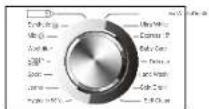
Select options
Select required options (refer to "Control Panel").
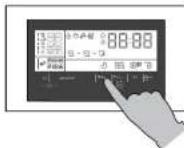
Start wash programme
Touch "Start/Pause" button to start. Appliance operates according to present settings. Changes are only possible by cancelling wash programme. At programme cycle end "End" is displayed, afterwards machine will shut off automatically.
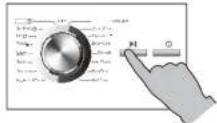
Interrupt - cancel wash programme
To interrupt a running programme, press gently the "Start/Pause" button. Press it again to resume operation. To cancel a running programme and all its individual settings, activate "Start/Pause" and then press "On/Off" for about 3 seconds.
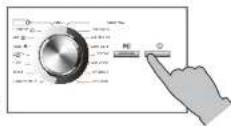
General information and tips:

Choose programme settings carefully, referring to the icons on each laundry label and the "Care chart". Removing laundry promptly at cycle end will be gentle and minimize wrinkling.
After washing
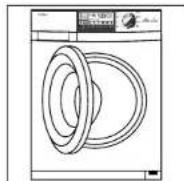
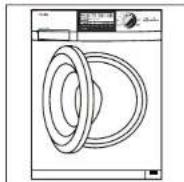
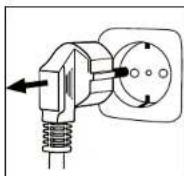
Turn off the water supply and unplug the power cord. Open the door to prevent formation of moisture and odours. Let it open while not used.
Daily use
16
Care chart
| Washing Process | |||
| 95 | Maximum washing temperature 95°C - normal process | 60 | Maxim um washing temperature 60°C - normal process |
| 40 | Maximum washing temperature 40°C - normal process | 40 | Maxim um washing temperature 40°C - mild process |
| 30 | Maximum washing temperature 30°C - normal process | 30 | Maxim um washing temperature 30°C - mild process |
| Wash by hand max. temp. 40°C | Do not wash | ||
| Bleaching Process | |||
| Any bleaching agent allowed bleach allowed | Only oxygen / non-chlorine | ||
| Tumble Drying Process | |||
| Tumbled drying possible normal temperature line drying | Tumble drying possible lower temp erature Flat drying | ||
| Iron at a maxim um sole-plate temperature of 200°C Do not iron | Iron at a maxim um sole-plate temperature of 150°C | ||
| Professional Textile Care Process | |||
| Professional dry cleaning in tetrachloroethene Professional wet clean | F Fc fessional dry cleaning in hydrocarbons D c not professional wet clean | ||
1/
Care and cleaning
Cleaning the detergent drawer
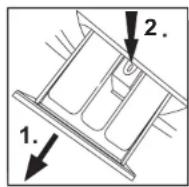
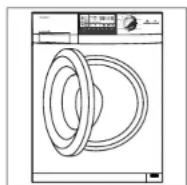
Clean the drawer from detergent residues regularly. Pull out the drawer until it stops (1) and press the release button (2) to remove the drawer. Then flush the drawer with water until it is clean and insert the drawer back in the appliance.
Cleaning the machine
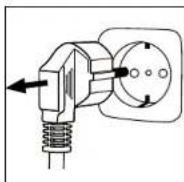
Unplug the machine during cleaning and maintenance. Use a soft cloth with soap liquid to clean the machine case and rubber components. Do not use organic chemicals or corrosive solvents.
General information and tips: After each installation or longer downtime, run at first programme "Self Clean" with no load and added detergent in washing agent compartment (2) to remove possibly corrosive residues.
Environmental information
To achieve the best use of energy, water, detergent, and time, you should use the recommended maximum load size. Do not exceed indicated chemical dosages. Always choose the lowest washing temperature. Modern detergents are cleaning efficiently below 60°C. Only due to heavy soil, raise accordingly from default settings. Using a domestic dryer afterwards, a maximum spinning speed is recommended.

Care and cleaning
18
Pump filter
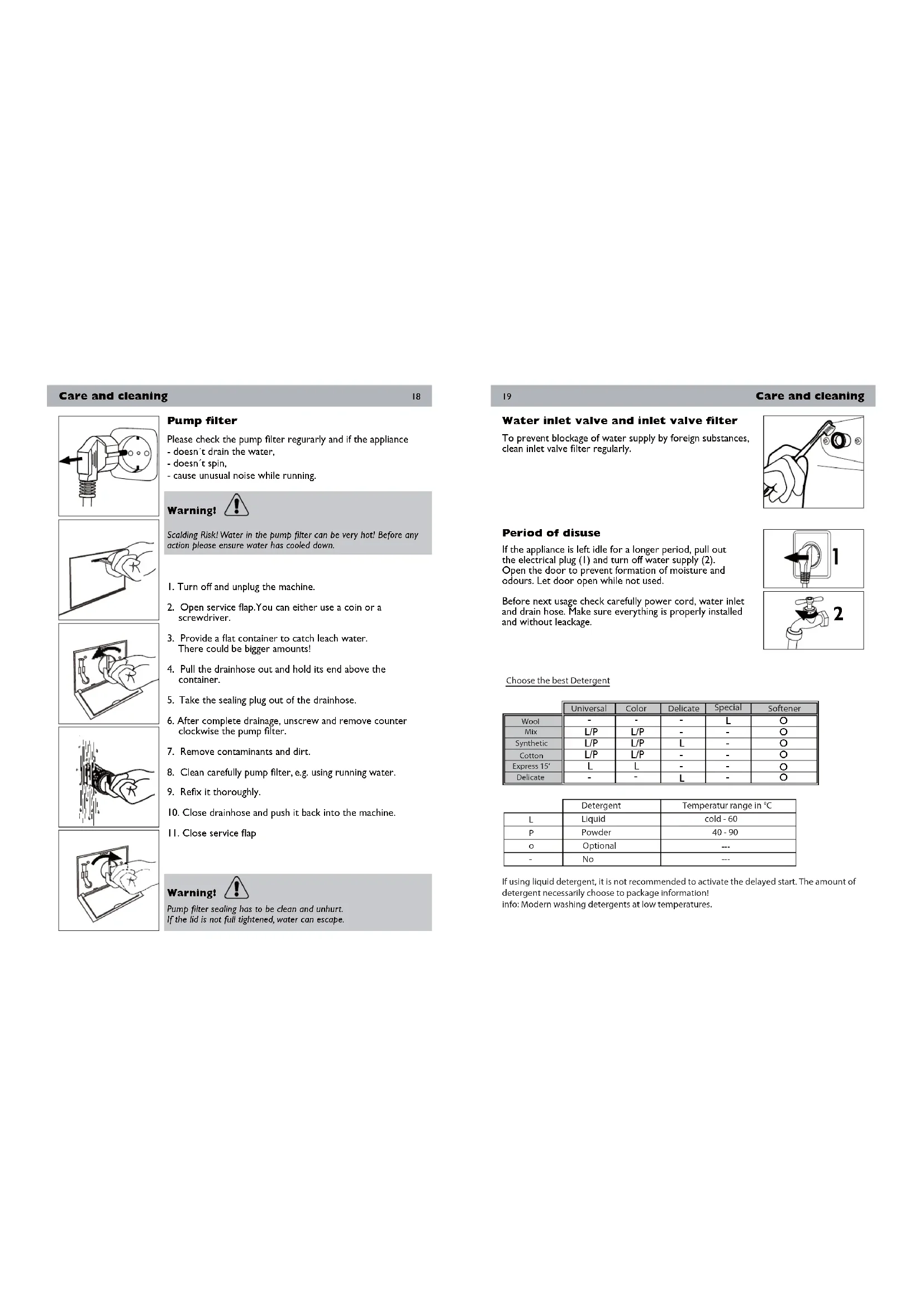
Please check the pump filter regularly and if the appliance
- doesn't drain the water, doesn't spin,
- or causes unusual noise while running.
Warning!

Scalding Risk! Water in the pump filter can be very hot! Before any action, please ensure water has cooled down.
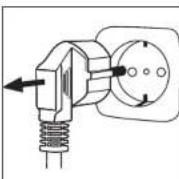
- Turn off and unplug the machine.
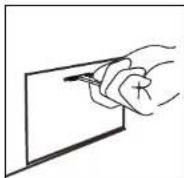
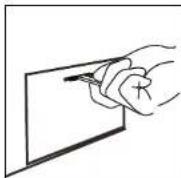
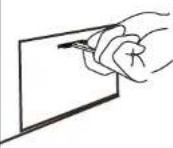
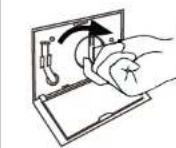
- Open the service flap. You can either use a coin or a screwdriver.
- Provide a flat container to catch leach water. There could be bigger amounts!
- Pull the drain hose out and hold its end above the container.
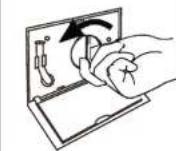
- Take the sealing plug out of the drain hose.
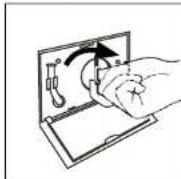
- After complete drainage, unscrew and remove the pump filter counterclockwise.
- Remove contaminants and dirt.
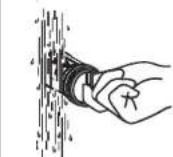
- Clean the pump filter carefully, e.g., using running water.
- Refit it thoroughly.
- Close the drain hose and push it back into the machine.
- Close the service flap.
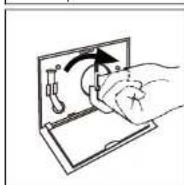
Warning!

The pump filter sealing has to be clean and unhurt.
If the lid is not fully tightened, water can escape.
19
Care and cleaning
Water inlet valve and inlet valve filter
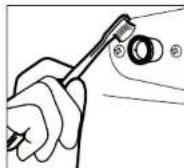
To prevent blockage of water supply by foreign substances, clean the inlet valve filter regularly.
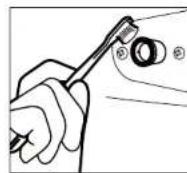
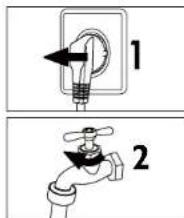
Period of disuse
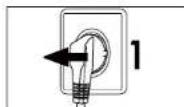
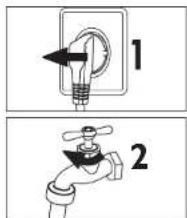
If the appliance is left idle for a longer period, pull out the electrical plug (1) and turn off the water supply (2). Open the door to prevent formation of moisture and odours. Let the door open while not used.
Before next usage, carefully check the power cord, water inlet, and drain hose. Make sure everything is properly installed and without leakage.
Choose the best detergent.
| Universal | Color | Delicate | Special | Softener | |
| Wool | - | - | - | L | O |
| Mix | L/P | L/P | - | - | O |
| Synthetic | L/P | L/P | L | - | O |
| Cotton | L/P | L/P | - | - | O |
| Express 15' | L | L | - | - | O |
| Delicate | - | - | L | - | O |
| Detergent | Temperatur range in °C | |
| L | Liquid | cold - 60 |
| P | Powder | 40 - 90 |
| o | Optional | --- |
| - | No | --- |
If using liquid detergent, it is not recommended to activate the delayed start. The amount of detergent must be chosen according to the package information! Info: Modern washing detergents work at low temperatures.
Troubleshooting
20
Display code
Troubleshooting
| Code | Cause | Solution |
| Auto | Automatic load detection. | Laundry weight detection in progress, please wait until program cycle time is displayed. |
| Lo /HALF /FULL /HI | Weighing the laundry load in the drum. | Please wait until program cycle time is displayed: Lo = small load; HALF = half load; FULL = optimized weight load; HI = full load. |
| 1:25 | Remaining wash cycle time. | Refer to additional symbol. |
| 19:30 | Remaining wash cycle time. | End is likely delayed - refer to symbol. |
| Lock | Door cannot be opened due to water level or hot water in the drum. | Wait to the end of program or cancel the program and select the drain program. In case of hot water is in the drum, to avoid scalding, select a handwash program and wash several minutes and then select a draining program before open the door. |
| End End of cycle. | ||
| EI | Drainage error, water not emptied. | Clean pump filter. Check drain hose for blockage and proper installation. |
| E2 | Lock - error. | Shut the door properly. |
| E4 | Water level not reached after 8 minutes. | Check if water supply and water pressure is normal. Drain hose is self-syphoning. |
| E8 | Water protective level - error. | Auto release. Otherwise contact the After sales service. |
| F3 | Temperature sensor - error. | Contact the After sales service. |
| F4 | Heating error (Appears at the end of a cycle). | Contact the After sales service. |
| F7 | Motor - error. | Contact the After sales service. |
| Fb | Water overflow. | Close tap immediately. Contact the After sales service. |
| FA | Water level sensor error. | Contact theAfter sales service. |
| FC | Electronic control - error. | Contact the After sales service. |
| Unb | Unbalanced load and not able to spin. | Check and balance the laundry load in the drum. Also reduce the load if too heavy. Restart with a spin program. |
Warning!

Code Fb: Water-overflow protection is placed on the deepest part of the appliance. In case of leakage, all functions will be shut down automatically except the drain pump, which will be activated for safety reasons.
21
In case of power failure
The current programme and its settings will be saved only for a short time. Probably a new programme cycle start is needed.
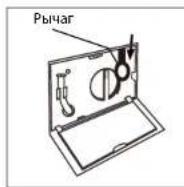
If a power failure cuts an operating wash programme, the door opening is mechanically blocked. To get out any laundry, the water level should not be seen in the glassy porthole of the door - danger of burns!
Water level has to be lowered as described in "Pump filter". Not till then pull the lever beneath the service flap until the door is unlocked by a gentle click. Afterwards refill all parts.
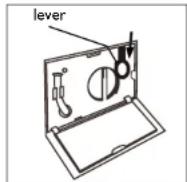
Troubleshooting without display code
| Problem | Cause | Solution |
| Washing machine Programme is not yet started. Press "Start/Pause" button. fails to operate. Door is not properly closed. Close the door properly. Machine has not been switched on. Switch the machine on. Power failure. Check power supply. | ||
| Washing machine No chosen programme. Set programme and start it. will not be filled No water. Check water tap. with water. | Inlet hose is knicked. | Check inlet hose. |
| Inlet hose filter is blocked. | Unblock inlet hose filter. | |
| Water pressure is less than 0,03 MPa. | Check water pressure. | |
| Water supply failure. | Ensure the water supply. | |
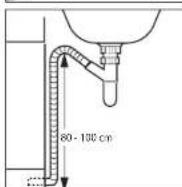
| Machine is draining while being filled | Height of drain hose is below 80 cm. | Make sure that drain hose is properly installed. |
| Drain hose end could reach into water. | ||
Troubleshooting
22
Problem
Cause
Solution
Drainage failure. Pump filter is blocked. Clean pump filter. Drain hose end is higher than 100 cm above floor level. Make sure that drain hose is properly installed. Drain hose is blocked. Unblock drain hose.
Strong vibration while spinning. Machine load is not correct. Adapt amount of laundry. Washing machine is located on an uneven surface or is not levelled. Make sure that washing machine is on an even surface and levelled. Not all transportation bolts have been removed. Remove all transportation bolts.
Operation stops before completing wash cycle.
Water or electric failure. Check power
and water supply.
Operation stops for a period of time. No
displayed "error code"?
Programme performs
Activate display - see "display".
Touch "Start/Pause" to resume.
Excessive foam: Detergent is not appropriate. Foam overflows from the drum and/or detergent drawer: Excessive use of detergent.
Cancel operation.
Automatic adjustment of washing time.
Washing programme duration will be adjusted.
This is normal and doesn't affect functionality.
Spinning fails.
Unbalance of laundry.
Check machine load and laundry and run a spinning programme again.
General information and tips:

If too much foam is detected during spin cycle, motor stops and drain pump will be activated for 90 seconds. If elimination of foam fails up to 3 times, programme ends without spinning.
23
Installation
Preparation
Remove all packaging material including polystyrene base. While opening the package, water drops may be seen on plastic bag and porthole. This normal phenomenon results from water tests in the factory.
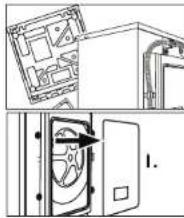
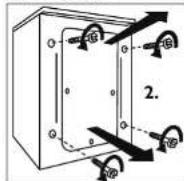
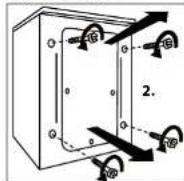
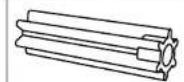
Dismantle the transportation bolts
The transportation bolts are designed for clamping antivibration components inside the appliance during transportation.
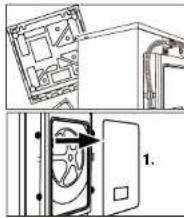
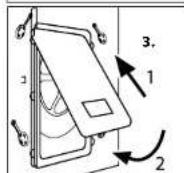
- Remove the back cover.
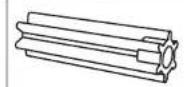
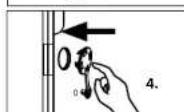
- Remove bolts on the rear side and take out plastic spacers from inner side of the machine.
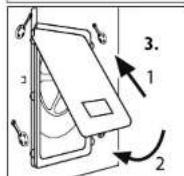
General information and tips:

Keep the transportation bolts in a safe place for later use. If the machine is to be moved to another location, replace transportation bolts contrariwise to prevent damage.
- Replace back cover by inserting it in the two gaps its convexity is facing outside
- Fill left holes with blanking plugs.
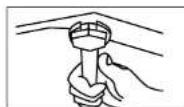
Adjusting the feet
Adjust all feet to achieve a complete level position. This will minimize vibrations and thus noise during use. It will also reduce wear and tear. We recommend to use a spirit level for adjustment. Floor should be as stable and flat as possible.
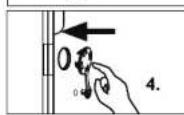
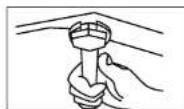
Installation
24
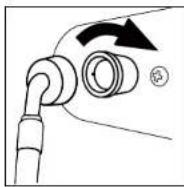
Inlet hose - Aqua control System
The Aqua Stop inlet hose is an important element for safety and over all control. Its valves are controlling water supply and will interrupt it if the hose is leaking
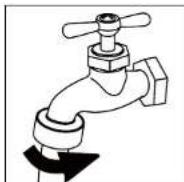
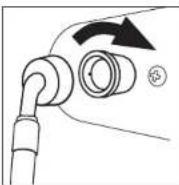
- Connect the nut on the inlet hose to the connector on the water valve.
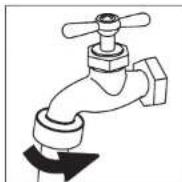
- Apply inlet hose to a water tap.
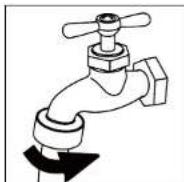
Warning!

Appliance is only qualified for cold water supply!
Use the hose-set supplied with the appliance. Old hose-sets should not be reused.
Drain hose
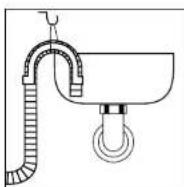
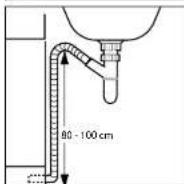
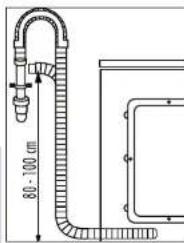
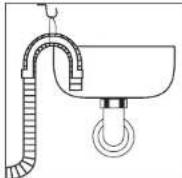
Drainage could be installed in different ways. Nevertheless, level of drain hose has to reach at one point 80 - 100cm If possible keep always drain hose fixed to the clip at the appliance back.
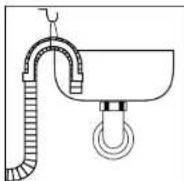
1. Drain hose to sink
Use the drain hose bracket to keep drain hose end retained and out of any water level. Fix the bracket sufficiently to avoid dropping down due to operational movements.
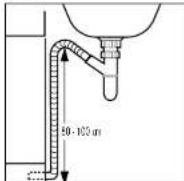
2. Drain hose to sink siphon
Connection has to be securely sealed and fixed to correspond adapter above the siphoning part!
25
Installation
3. Drain hose to sewage pipe
Use the drain hose bracket to keep drain hose end retained. Fix the bracket sufficiently to avoid dropping down due to operational movements.
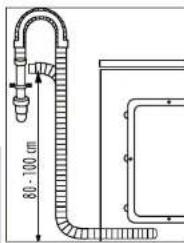
Warning!

The drain hose should not be submerged in water and should be securely fixed and leak-free. If the drain hose is placed on the ground or if the pipe is at a height of less than 80cm, the washing machine will continuously drain while being filled (self-siphoning). Drain hose is not to be extended. If necessary contact after sales service.
Power supply connection
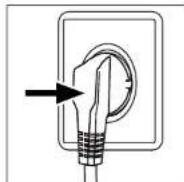
Before each connection check if: - socket is adequate for the maximum power of the appliance (safety power circuit fuse should be rated not less than 15A). - voltage should meet the requirement. - power outlet should be appropriate to appliance plug. - used power socket has to be earthed.
Note - only UK: The fuse in a UK 13A plug must comply to BS1362 standard.
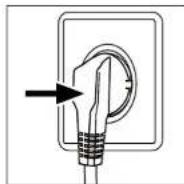
Technical data
26
Basic technical information regarding the appliance
HW70-B1426
HW70-B1426S
| zH05/~V042-022ecruosrewoP | |
| Max. working current (A) | 10 |
| Water pressure (MPa) | 0.03≤P≤1 |
| Nominal load (kg) | 7 |
| Spinning speed (rpm) | 1400 |
| Washing programmes | 16 |
| Max. power (W) | 2000 |
| Dimensions (HxDxW mm) | 845 x 600 x 595 |
| Net. weight (kg) | 67 |
| Power consumption of the off-mode (W) | 0,2 |
| Power consumption of the left-on mode (W) | 0,2 |
27
After sales service
In case of trouble, please check the trouble-shooting section of this manual. If required please check your warranty card for after sales service information.
For other countries please refer to: www.haier.com service and support area.
You can find FAQs and can activate service claim.
| Product Fiche (according EU 1061/2010) | |
| Trade mark | Haier |
| Model No. | HW70-B1426/HW70-B1426S |
| Rated capacity(kg) | 7 |
| Energy efficiency class | A+++ |
| Energy consumption per year (kWh)11 | 140 |
| Energy consumption of cotton 60°C, full load | 0.62 |
| Energy consumption of cotton 60°C, partial load | 0.68 |
| Energy consumption of cotton 40°C, partial load | 0.47 |
| Weighted power consumption of the off-mode | 0.2 |
| Weighted power consumption of the left-on mode | 0.2 |
| Water consumption per year (L)21 | 9240 |
| Spin efficiency class31 | B |
| Max spun speed (rpm)31 | 1400 |
| Remaining moisture content (%)41 | 53 |
| standard 60°C cotton program5 | Cotton 60°C with max. spin speed setting and activated intensive function (level 3) |
| standard 40°C cotton program5 | Cotton 40°C with max. spin speed setting and activated intensive function (level 3) |
| Program time of cotton 60°C, full load (min) | 178 |
| Program time of cotton 60°C, partial load(min) | 178 |
| Program time of cotton 40°C, partial load (min) | 172 |
| Duration of the left-on mode (min)6 | - |
| Airborne acoustical noise (washing/spinning)(dB(A))7 | 54/70 |
| Type | front loader freestanding |
| 1) Based on 220 standard washing cycles for cotton programmes at 60°C and 40°C at full and partial load, and the consumption of the low-power modes. Actual energy consumption will depend on how the appliance is used. | |
| 2) Based on 220 standard washing cycles for cotton programmes at 60°C and 40°C at full and partial load. Actual water consumption will depend on how the appliance is used. | |
| 3) Class G is the least efficient and Class A is the most efficient. | |
| 4) Based on the standard 60°C cotton program at full load and the standard 40°C cotton program at partial load | |
| 5) "standard 60°C cotton program" and "standard 40°C cotton program" are the standard washing programmes to which the information in the label and fiche relates. These programmes are suitable to clean normally soiled cotton laundry and they are the most efficient programmes in terms of combined energy and water consumption. | |
| 6) In case there is a power management system | |
| 7) Based on the standard 60°C cotton program at full load | |
Haier
Washing machine
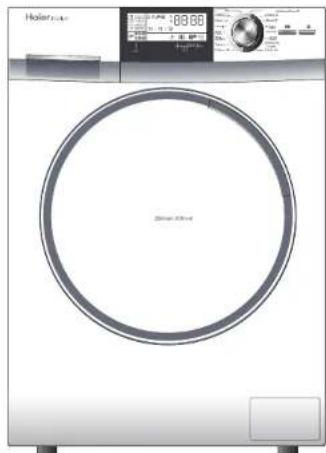
HW70-B1426
HW70-B1426S
"Time delay" - End time delay (button c)
"Spin" (button e)

Wash temperature 30°C - normal process

Maximum
Wash temperature 30°C - mild process

Maximum
Wash temperature 30°C - extra mild process

Hand wash max. temp. 40°C

Do not wash
Bleaching

Bleach
allowed

If using liquid detergent, it is not recommended to activate the delayed start. The amount of detergent must be chosen according to the package information! Info: Modern washing detergents are effective at low temperatures.
Troubleshooting
20
Troubleshooting
After a power failure
B-1070 Anderlecht Belgium
Tel.: +32.2.528.05.50
Fax: +32.2.528.05.55
Mail: benelux@haiereurope.com
Haier
Press to do anything in the program.
4x 3aynywnk1x kpoHuren
CNBHORO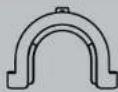
1xpykoBOc1BO 1016308aTe18
7
PahenbynpaBneHn
1KoHTeHepIraMoIOUeroCpeNCTBa
2 Dmnnne 3CenekTop nporpaMM 4 Khonka "Ctapr/Na3a" 5KhoKa"BKn/BnKn 6 KhoNKn FyHKn (a-f)
aФункшura Bb6op 3aepkkacapta (OKOHuaHHCTnPKN) dTc eCKopocTb OTKmMa (o6/MnH.) f narnTb
KontneHep dnia mooero cpeCTBa
OTcek 1:3aNNBbTbTbKO BDOy He HcNOnb3OBaTb MoOuue CpeDCTBA. OTcE2K:ДЛЯМОИСРССТДСТСВСНБОП (6bTcP8) STNPK, KPOME pnpPMAOt OXmK/CnB OTcck 3: npdaaHaeHno pceCTb no yxoany 3a 6beBem (KpaxmaaHX CMRAOUX apomatnHpyuNX H.
PekomeHaauu No Tnny Moouero cpeCTBa,coOTBeTcByouero onpeHENHIO TEMNEPAType CTMPK,CMOTPITE B yPKOBODCTBE NO IINNoBObAHNO MOOJcero cpeCTBA.
Ducnnei
PnBkHHeHHMaHNNbHdNcHneBbBDOHTmHINOpMauO nTeKUYmCOTOHHN, PA3deneHHa HaeCTb6nAtee (cm. Hnke). B npoueece pabtoI dncnnpe Heepes Kekotopoe Bpemn rachet (nepeoxoITB peKHMIOKHOOMHOH3eepn) no IIOBO NOBOPOTA ceneKTopo nporpAMm.
CenekTop nporpamM
BbOpO 16 nPpOgMaM PnOaOaDNTy CmETN NopOBoTpyKuPi; PnBbOpE npORpAMMbI aOpTaCt Co0BeTcBtuOoiy Ie CEBTOION, H Na DInChNE NoABINOTC hAToPOHnO mNoYMOHAnH
Knob "Start/Stop"
Press the knob to start or stop the program. The program is displayed on the display. During program execution, the symbol remains constant if the program is running, or the symbol flashes.
Knob "On/Off"
Press the knob to turn on the machine. When turning on, the display lights up. To turn off, press and hold the knob for 2 seconds. If after some time after turning on no program or panel element is activated, the machine turns off automatically.
Control panel - knobs
8
The command was developed for all programs with default settings, allowing to obtain the best results. If there are no specific requirements, it is recommended to use the default settings. Many additional parameters of the programs can be changed individually (see section "Programs" description of functions).
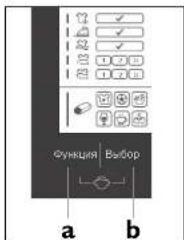
"Function" (knob a)
The knob selects the function and settings by sequential rotation. The corresponding symbols are displayed.
"Selection" (knob b)
The knob is used to switch to the currently selected function, the corresponding symbols light up. Simultaneously, the symbol "program number 1/2/3" or one of the symbols for the display lights up. The selected function is activated after 3 seconds of pressing the "Function" knob.
"Child lock - blocking the panel and controls (knob a + b)"
The function is intended for blocking all elements of the control panel to prevent accidental use. After activation, simultaneously press and hold the knobs "Function" and "Selection" for 3 seconds. The blocking symbol appears. To remove the blocking, repeat this action again.
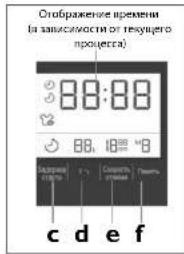
"Delay start" - delay of the end of the cycle (knob c)
After pressing the knob, the delay is displayed with the corresponding symbols. The delay time is set for the selected program. The start is delayed by the set time, and the program starts after the delay. The end time of the cycle is displayed at each turn of the program selector for 30 minutes (0.5-24 hours). For example, the indication "6:30" means that the cycle will end after 6 hours and 30 minutes.
INIOHJ3OBATB 3OT PEKKIM DYNI PONPAMMb'OTKHM/CJIINBEHOEMMOHDK.
PIMMEAHHE: BPEMOKOHAHNCTMPKNCBcERDaDOLKHO6bBT60NBUE BPEMHN BbMOHNEHN PnporpAMMb. B npoTHOBmCnYyae npOeCC 3aNYCAETCRpaZY, HecMOTpHaTO, TTOoEcecNtBpeSyemoe BPEM OKOHAHNA Heo3MOKHO.
9
KHOHKnFyHKn- NaHEnbynpabHeHn
"T°c"(Khonka d)
KCHOTIECTAOTOHKOHNJINHACTPOKNIMAKCMNAJIHOI TEMPEPATyB ROYU.
PIMeHaeHHe:MHdKaaIe"--03Haayet NoorpeB BoM He npnBbOuTcK."
"CKopoctb OTKIMMA"(KHONKA e)
KoCHNTecb 3TOI KHOKN DnHACTPOHN CKOPOCTN OTKIMA.
"NamrTb" (KhONkaf)
MnHnHnHnHnHnHnHnHnHnHnHnHnHnHnHnHnHnHnHnHnHnHnHnHnHnHnHnHnHnHnHnHnHnHnHnHnHnHnHnHnHnHnHnHnHnHnHnHnHnHn HmHO 10000000000000000000000000000000000000000000000000000000000000000000000000000000000000000

06aaHfopmaaHcoBtbl:
IraOTMeHbIy6oBcTahOBnEHHOHAcTpOeKINpeKIOWHTe nporpAMMy HmYyEepKBaIte KHOKNy BKn/BkN. BTeYHeH3 cKeYHy. IraOCTAHOBKBMONHnEMo nporpAMMbHAKMITE KHOKNy"Ctapt/ Na3ya, a3AETeYpeKBeAte KHOKNy BKn/BkN. bTeYHeH3 cKeYHy.
| Функциа YckopoeHHoe bblonHene nporpamMbI | Функциа (ydalanenhe zarpazheni) |
| Аntисмг themselves (no okonчани цнka) | Пу'monчанio, 6e3 oniiin |
| ANTICSMYTHe (octahOBkaцнka nolockanry) | СпорТ Траа |
| Повьшения ИстенCBHOCb OCHOBHOrOцнka (ot 1 do 3) | Вио |
| Даллнichtелынцлп пОLOCKAHNY (ot 1 do 3) | Кofoe |
| Фукуlt. |
| 11 | |||||
| Table 1: Tâbânça nprpamm | |||||
| 2:门槛 moioux x copéctb ochOBHOB (búctpoj) CTNPK, KPOMe nprpammm OTKIMM/CnIB. | |||||
| 3: npedhaanheho门槛 cpeéctb no yxody 3a 6bělem(KpaxmaJIauxix, CMJg qauouix, apomATIN3puyuOxH N.D.) | |||||
| Iprpamma | Mánc. Temnep. | Ucx. yctahovka | Tin Bonokha | Icx.yct. ckopoc'tb OTKIMM | |
| 1 Kπηγενηne 95°C | -- | 95°C | √ √ √ √ √ √ √ √ √ √ √ √ √ √ √ √ √ √ √ √ √ √ √ √ √ √ √ √ √ √ √ √ √ √ √ √ √ √ √ √ √ √ √ √ √ √ √ √ √ √ √ ∇ | OKnONX CnHTETKIA | 1000 o6/MIH |
| 2 DKKHcB | 0-60°C | 40°C | √ √ √ √ √ √ √ √ √ √ √ √ √ √ √ √ √ √ √ √ √ √ √ √ √ √ √ √ √ √ √ √ √ √ √ √ √ √ √ √ √ √ √ √ √ √ √ √ √ | ||
| 3 Cnoptnabaj OeDkda | 0-40°C | 30°C | √ √ √ √ √ √ √ √ √ √ √ √ √ √ √ √ √ √ √ √ √ √ √ √ √ √ √ √ √ √ √ √ √ √ √ √ √ √ √ √ √ √ √ √ √ √ √ √ ∇ | HARBOPTN00 06/MIH | |
| 4 HIXKHee 6BéB | 0-60°C | 40°C | √ √ √ √ √ √ √ √ √ √ √ √ √ √ √ √ √ √ √ √ √ √ √ √ √ √ √ √ √ √ √ √ √ √ √ √ √ √ √ √ √ √ √ √ | ||
| 5 UepCTb | 0-40°C | -- | √ √ √ √ √ √ √ √ √ √ √ √ √ √ √ √ √ √ √ √ √ √ √ √ √ √ √ √ √ √ √ √ √ √ √ √ √ √ √ √ √ √ √ √ √ √ √ √ √ ∇ | IIepCTaHbte TKH | 600 o6/MIH |
| 6 CmeuHnA CTNPK | 0-60°C | 40°C | √ √ √ √ √ √ √ √ √ √ √ √ √ √ √ √ √ √ √ √ √ √ √ √ √ √ √ √ √ √ √ √ √ √ √ √ √ √ √ √ √ √ √ √ ∇ | IORX CnHTETKIA | 1000 o6/MIH |
| 7 CnHTETKIA | 0-60°C | 30°C | √ √ √ √ √ √ √ √ √ √ √ √ √ √ √ √ √ √ √ √ √ √ √ √ √ √ √ √ √ √ √ √ √ √ √ √ √ √ √ √ √ √ √ √ √ √ ∙ | TKaHb VexMM BONOKH | 1200 o6/MIH |
| 8 Xlonok M | 0-90°C | 40°C | √ √ √ √ √ √ √ √ √ √ √ √ √ √ √ √ √ √ √ √ √ √ √ √ √ √ √ √ √ √ √ √ √ √ √ √ √ √ √ √ √ √ √ √ √ √ ∇ | IORX CnHTETKIA. | 1400 o6/MIH |
| 9 ПовсднБа CTNPK | 0-40°C | 40°C | √ √ √ √ √ √ √ √ √ √ √ √ √ √ √ √ √ √ √ √ √ √ √ √ √ √ √ √ √ √ √ √ √ √ √ √ √ √ √ √ √ √ √ √ √ √ ∙ | TKaHIb 3xIONK | 1400 o6/MIH |
| 10 Bénoe 6bè | 0-60°C | 40°C | √ √ √ √ √ √ √ √ √ √ √ √ √ √ √ √ √ √ √ √ √ √ √ √ √ √ √ √ √ √ √ √ √ √ √ √ √ √ √ √ √ √ √ √ ∙ | IORX CnHTETKIA | 1000 o6/MIH |
| 11 BéICTpaH CTNPK15' | 0-30°C | 20°C | √ √ √ √ √ √ √ √ √ √ √ √ √ √ √ √ √ √ √ √ √ √ √ √ √ √ √ √ √ √ √ √ √ √ √ √ √ √ √ √ √ √ √ √ √ √ √ √ ∗ | IORX CnHTETKIA | 1000 o6/MIH |
| 12 DetCKa OeXda | 0-90°C | 90°C | √ √ √ √ √ √ √ √ √ √ √ √ √ √ √ √ √ √ √ √ √ √ √ √ √ √ √ √ √ √ √ √ √ √ √ √ √ √ √ √ √ √ √ √ √ √ √ √ ∙ | IORX CnHTETKIA. | 1000 o6/MIH |
| 13 DeNKaTHa CTNPK | 0-40°C | 30°C | √ √ √ √ √ √ √ √ √ √ √ √ √ √ √ √ √ √ √ √ √ √ √ √ √ √ √ √ √ √ √ √ √ √ √ √ √ √ √ √ √ √ √ √ ∇ | IeNK mII IePCT | 600 o6/MIH |
| 14PyuHb CTNPK | 0-40°C | 30°C | √ √ √ √ √ √ √ √ √ √ √ √ √ √ √ √ √ √ √ √ √ √ √ √ √ √ √ √ √ √ √ √ √ √ √ √ √ √ √ √ √ √ √ ∇ | TKaHIb 3xIONK | 800 o6/MIH |
| 15 OTKIM/CnIB | -- | -- | √ √ √ √ √ √ √ √ √ √ √ √ √ √ √ √ √ √ √ √ √ √ √ √ √ √ √ √ √ √ √ √ √ √ √ √ √ √ √ √ √ √ √ √ √ √ √ √ ∇ | -- | 1400 o6/MIH |
| 16 OChCTKa | -- | 90°C | √ √ √ √ √ √ √ √ √ √ √ √ √ √ √ √ √ √ √ √ √ √ √ √ √ √ √ √ √ √ √ √ √ √ √ √ √ √ √ √ √ √ √ √ √ √ √ ∇ | -- | 1000 o6/MIH |
TapaMeTpbl paXoJa
12
The flow rate values may vary depending on local conditions.
| Погамma | Муж. загука КГ | Зелковая КВТ-н | Вoga n | Temn. °C | Вразma STИРК ЧЕМС | 3фбгмьrostь OTЖмь % |
| Кличесни 95℃ | 2 | 2,00 | 36,0 | 95 | Auto | --- |
| Джинсь | 4 | 0,56 | 40,0 | 40 | Auto | --- |
| Спoptимья | 2 | 0,26 | 35,0 | 30 | 0:25 | --- |
| Ножд骞 велья | 4 | 0,50 | 40,0 | 40 | 1:19 | --- |
| Шерст | 1 | 0,10 | 50,0 | -- | 0:42 | --- |
| Смешаший CTИРКa | 4 | 0,56 | 34,0 | 40 | Auto | --- |
| СиHTETИКa | 4 | 0,25 | 46,0 | 30 | Auto | --- |
| ХлONOK 40℃* | 3.5 | 0,47 | 36,0 | 40 | Auto | <53 |
| XлONOK 60℃* | 3.5 | 0,68 | 37,0 | 60 | Auto | <53 |
| XлONOK 60℃* | 7 | 0,62 | 44,0 | 60 | Auto | <53 |
| Повседnevни CTИРКa | 4 | 0,58 | 46,0 | 40 | 1:20 | --- |
| Бение相关内容 | 2 | 0,60 | 45,0 | 40 | 1:14 | --- |
| БыICTра CTИРКа 15 | 1 | 0,20 | 20,0 | 20 | 0:15 | --- |
| ДetSCКАОдEGДa | 4 | 2,00 | 67,5 | 90 | 2:05 | --- |
| ДелIMKAТWA CTИРКa | 1 | 0,25 | 50,0 | 30 | 0:56 | --- |
| РУЧАСТИРКa | 2 | 0,25 | 36,0 | 30 | 0:57 | --- |
| OTЖМ/СпМВ | 7 | 0,10 | --- | -- | 0:13 | --- |
| ОчECTКa | --- | 1,80 | 15,0 | 90 | 1:05 | --- |
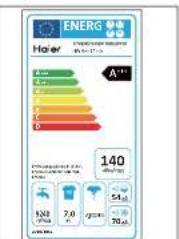

*General information:
Consumption according to standard
Washing at 60°C / 40°C with maximum load using active detergent (powder) (only water, no other cleaning agents).
13
Household use
The machine is intended solely for household use indoors. In case of commercial, industrial, or other non-household use, Haier's warranty obligations are void. Always follow the instructions in the manual for each machine.
Power supply
Connect the machine to the electrical supply (220-240V AC, 50Hz).
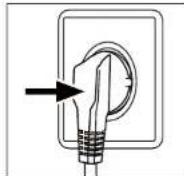
Water connection
Open the tap. The water should be cold and clear.
Attention!

Do not dry clean

Rinse cycle

For heavily soiled laundry
17
Care and cleaning
Cleaning the detergent container
Regularly clean the detergent container of detergent residues. Pull the container out until the stop (1), remove the siphon cap (2). After rinsing the container under running water, remove all residues and put it back into the machine.
Cleaning the machine
Before cleaning, unplug the power cable and close the water tap. To clean the external parts and rubber parts, use a soft cloth and a mild detergent. Do not use organic solvents, aggressive or abrasive solutions.
General information and advice

To avoid the build-up of residues and odors, it is recommended to run the "Cleaning" program regularly without loading detergent. Ensure that the detergent drawer (2) is free of any possible blockages.

Environmental safety
After using the detergent, the packaging should be disposed of in accordance with local regulations.
Recommended load.
Do not exceed the specified doses of chemicals.
Choose the lowest possible washing temperature. Modern detergents ensure effective washing at temperatures below 60°C.
Use high values only for heavily soiled laundry.
At night, it is recommended to use the pump at maximum speed.
Maintenance and cleaning
18
Drain pump
Regularly check the pump filter; if the machine does not drain water, the drum may be blocked, and unusual noise may occur during operation.
The drain hose connection in the pump housing must be properly tightened to prevent leaks.
1. Turn off the machine and disconnect it from the power supply. 2. Open the service panel using a coin or a screwdriver. 3. Place a shallow container under the drain hose to catch any remaining water. There may be a lot! 4. Pull out the drain hose and place its end over the container. 5. Remove the plug from the drain hose. 6. After the water has completely drained, unscrew and remove the pump filter by turning it counterclockwise. 7. Remove any foreign objects and dirt. 8. Clean the pump filter thoroughly, for example under running water. 9. Reinstall the filter in reverse order. 10. Close the drain hose and secure it back to the machine. 11. Close the service panel.
Attention!

The pump filter must be clean and undamaged.
If it is not properly tightened, water may leak.
19
Maintenance and cleaning
Water inlet valve and water inlet filter
The water inlet valve and filter should be checked regularly and cleaned if necessary.
Period of inactivity
The main time is not used, insert the plug (1) into the socket (2).
Open the lid of the water tank. Press the release button and keep the lid open.
Before using the appliance again, carefully check the power cord and plug. Make sure they are not damaged and do not have any leaks.
Troubleshooting
20
End of cycle
Start
Solution
Auto: automatic load detection
Load, please, until the end of the cycle, the door is locked during program execution.
For drying of the drum, the door is locked.
Please, wait until the display shows: Lo = small load;
/FUL
HALF = medium load;
FULL = optimal load; H = full load.
1:25 Octa Weec BpeMa KnaCTnPKn.
CM.DONONHHTeBHeC HMBOJIb.
19:30 Octa Weec BpeMa KnaCTnPK.
Ckopee bcerO, akTHBbPOBaHa 3aepKxKa CTAPa — C. COBTBCTBTOUYIcIM CMBNO
Lock DBePua He MOKER 6bIb OTKbTBA N3-3BbKOKO YPOBBA HbBbKOJI TewinepatyB BObuB 8bOpaHe
JIOKIDTE BOKOHAHN INPORPAMMBH, HIN OTMENHEI eBbBNOHNHEH NANCTYNE INPORPAMMY CINBA BOJI. ECNI BODA BHUTPI BAKa ROPAAU, TO, BO IV36ekAHHE OOKOB, ZANCTYHe HA HECKOBK MHHYTIPORPAMMY PYHNA CTPKA, 3ATEM PONPAMMY CINBA BOJI..
End Okohyane nporpammb.
E1 Ow6Ka cnBa, B0a He ydanenHa.
OCHITTEH cHbTbHacocA. POBeRbeTc HcOTOTy nPABnBbHOCTb MOHTACA CNBHORO sHaHra.
E2 Omm6ka 6nokpobKn
Tuatahenbno 3akpoTe dpeuy.
E4 Boga He HapaeTcBteHHe 8 MmHT.
Pnepbpehnae nanaa Habne Hbo. Boda CmBaTcTa Hpe3 CmBHO nnHr BCnECTBme CcoHNOO 06KtA.
E8 OuMbKa 3aunmbTb no ypOLevelBbI.
Abyu Bytnyi, a, b npOnnoBom Chyau.ObpaTneTcS. BOTJNocIePnOdKaHOro Ocb7OyKbMaHIna.
F3 Temperature sensor error
Contact the after-sales service department.
F4 Heating error (ignition coil)
Contact the after-sales service department.
F7 Fan error.
Contact the after-sales service department.
Fb Water level overflow.
Close the tap immediately. Contact the after-sales service department.
FA Water level sensor error.
Contact the after-sales service department.
FC Electronic control unit error.
Contact the after-sales service department.
If the laundry is unbalanced, the drum may not spin.
Distribute the laundry more evenly, or remove some items if the load is too large, then restart the program.
Attention!

The device is designed for continuous operation and is the most reliable. In case of a power outage, the pump automatically turns off to prevent dry running.
21
Troubleshooting
In case of no power
The current program and settings are saved, but after a short time it may be necessary to select the program and settings again.
When the door is opened during program operation, the door is mechanically locked. The door can only be opened when the water level is not too high - to prevent splashing!
The water level can be lowered using the method described in the pump section. After that, the door can be opened with the handle.
Then all components must be installed in place.
Troubleshooting when there is no water supply
The water inlet filter is clogged.
The washing machine does not work.
The program has not started.
The door is not properly closed.
The machine is not turned on.
There is no water supply.
Haxmte KhoNky"Ctapt/Na?a",
TnHOaKpOteBepuy.
Bknoute MaunHy.
PpOepeTeHaHnue nHTaHn.
CtupnlaHbMauiHaMe HAnnoHJTeRTOyO.
He b6paHa nporpamMa.
3aKpbTnnoDnayBOBbl.
Ipekkatwnahn noaay Bods.
3acopenern pnilbtp nnaHra tonaun BOdb.
Koehc mshHoro wHaHa Ha BbCote MeHee 80 cm. KOehc mshHoro wHaHa MoXET DOCTaH J0 BObl
YSeBjTeTc, YTO CINHIOI shAHIY CTaONAHORN PABINHO.
Nonck n yctpanenne Hncnpabnoctei
22
PpO6nMa PpuuHa PeewHne
He pa6oTaet cnB.
3acop φmnbtpa Hacoc.
Kouei CInHBOO WHaHa HaxoJIN3C 60nee cem Ha 100 cm Blle nona 3abIOKIOKOBAPOBAN CInHBOWnAHI.
OHTTE OINbTp HAcoca.
YcDyTcB,TO CINHNOI HnH CMHTNPOBAHnpAIBHO. YCTpaHnTE 6IOKIMPOBky CINHBOI nHaHFA.
CinbIbIe BnBpaHnn pRnBpaJIenH.
HedonyCTMnARy3KaMaMHNbI. CTHpAihhA MaHHaYcTahOBHeHa HApEOHOHOBEPXHOCTmHHe otperynpoBAHo eoNOKeHHe He hBnepeHbTpaHCnOpHTbe 60bnI.
3MeHHTeKONHueCTBO6enB
COOTETCTBYUIMMOBpAsOM. YCTAHOBITE CTnpanbHyMOaMHINH HaPBOBHNonNtOpyrnnpnyTe ee NOJOKHE. IVBNEKITE BCE tpAHCNOPTNPBOOHNBE 60NTb.
Pnpocc octahabnBaTcRdo 3aBepHueHHuKna CTNPK
Het noaun Bodbu nn
3/NeKTPoPnTaNH.
Поветerveюву boDyI anektoponanien.
Ipoecc OCTAHABNBAeTCH Ha HEKOTOPOE BPEM.
HaJnCnne oTo6paKaTe cKoI OuH6Kn? 3To npOncxOHTB pAMKaX uKNa 3aMaYBaHN? PipeBaHne npOrpAMMb.
AknBpyrteJnneH Cm.paedn Dnncn. KOHNCTCBKONKnCnTcPrrIy3a 1nn B03O6OBENHHPOecca. PnH neo6xOIMOCTH octanOBHTe paboty MaNNbH.
During washing and rinsing, a lot of foam is formed.
Unsuitable detergent. Excessive amount of detergent.
Check the recommendations for using the detergent. Reduce the amount of detergent.
AUTOMATIC CORRECTION OF THE WASHING PROGRAM
Perform a test run with automatic correction of the program.
This function is not available for all programs.
It is not performed if the load is unevenly distributed.
Perform a machine load and then start the program.
Error messages:

If the error occurs again after the above steps, the appliance will stop, and after 90 seconds the power will be turned off. If the error cannot be eliminated in this way, the program will be terminated.
23
Installation
Preparation
Remove all packaging materials, including the polystyrene base. Turn the packaging over to check for the presence of a bag on the top of the appliance. This is normal for transport safety reasons.
Unscrew the transport bolts.
3Tn TPAHCTNPTOPOBOVBH6 BoTH npEHaHAeHbI nDn KpERNEHnAHTINB6paUOMHHX CMNOHEHTOB BYHTP MaUNHbI R pOIECE TPAHCTNPOTPBOKH.
1.CHMMTE3aHIOKpbuKy. 2. BvBepHHTe 0bTbHa haaDhe CTOpOHe n HABeKETIaNCTMCCOBHe paoaeninm3MaMHNb
06aaHooepmaaHncoBtB

NOMECTHE TPAHONOPTROBOHBE 60NTB HADAEKHOE MEO To cnyu noCNEUYOERO HCNLOBZAOHN.
EIN MAAHNY Ntpo6yETe nepeBEST B DpyrOe MeTO, BO Hs36JXAHHE NOBPEXJEH NYCTAHOBHTe TPAHCTOPUPOBOHyBE 60TbI B o6pTHOM NOPAJe.
3.YCTAHOBHTA ZADHIHOK BKPbIKy ObopatHO, BCTABIN Ee 8 Da n3a BByTKNQ TCOPOH HApKY. 4.3aKpOte OTBepCTN 3arnyikamn
PerynnpOBKa HOKeK
OTpyrnpyte HOKKNOONYCHNHYC0TNOHNBOHOTNOONKEHNA3TO 030BONHTMNMMNINPBOBATBnBpaunu, N, KAK CNECTBNE, YWM TNP paBote.KpOmeTORo,3TO CHNKAETNHO.CPEMOENYEOTCBYCTABNTB NOONKEHNC NOMOIOCTPOENTBOHOPOYOBNYCTAHANNBAt BAAMHy CNEETA MAKCMMAIbHOPOHHNI INIOCKNNION.
yCTAHOBKa
24
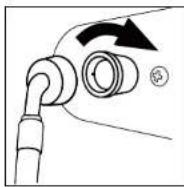
Uanr noaun BObl -CncreMa KOHTpon BObl
Ullanr Naodn Bovd Asuca St - Baekhry Iaemement 3aunntb, o6ceNnaBwaouo 6eOnaanochtb O uoshoKHTPob.
YCTAHONHEHNE H KEM LIAIJIHNI KOHTPOPIAOTK ONJAI BOJIN A NAMOTATMCKEA NEPEKHPBATOCR PNO NBNHEAPOPTOKEY
- HabeHHTe raiKy Ha IaHRe nOaHy BODHa BODHOH KnaH. 2.PnncoeHHTe WnHaHr NoadaHbKpAHy.
BHHMaHHeI

The drain hose is attached to the machine kit. Do not use other hoses.
DRAINAGE
The drain hose must be connected in such a way that the installation height of the lower end is 80-100 cm above the floor. The hose must not be kinked or pinched.
1. Drain hose connection
Secure the end of the drain hose with the clamp so that it is not immersed in water. Firmly attach the clamp to the wall or floor to prevent it from falling during operation.
2. Connecting the drain hose to the drain pipe
The connection must be sealed and secured to the appropriate pipe or siphon.
25
Installation
3. Connecting the drain hose to the drain pipe
Secure the end of the drain hose with the clamp. Firmly attach the clamp to prevent it from falling during operation.
WARNING!

The drain hose must not be immersed in water; it should be securely fastened and protected from damage. If the drain hose is placed in a sink or tub, the height must be at least 80 cm, otherwise the machine may drain incorrectly (siphon effect). The drain hose must not be kinked. If necessary, contact an authorized service center.
Power connection
Before connecting, make sure: The socket matches the required power rating. The socket corresponds to the plug. The socket has an earth connection.
Technical data
26
Main technical parameters
HW70-B1426
HW70-B1426S
, China Haier Group, Haier Industrial Park, No 1, Haier Road, Hi-tech Zone, 266101, Qingdao, P.R. China
Using Electrical Appliance Com. LTD., Ltd.
Hi-tech Zone, 266101, Qingdao, P.R. China
Hi-tech Zone, 266101, Qingdao, P.R. China
EU Norre Nn33a
Importer address: 121099, Moscow, Novinsky Blvd, 8, office 1601
LLC Torgovaya Kompaniya Haier Rus LLC Torgovaya Kompaniya Haier Rus zone, Qingdao, 266101, PRC Haier Industrial Park, Haier Road, Hi-tech Zone, Haier Group, Hong Kong, China No. 100000, Hong Kong, China 266101, Qingdao, P.R. China Haier Group, Haier Industrial Park, No 1, Haier Road
Manufacturer: Haier Electric Appliances Corp. Ltd.

a 234
yolall Duaa yu duaia 1
Aaiae aee eae 4y g y
y
K

…
aii 100
a 1
1
2
yall yll l jal yall jay...
j 1
Jusuui jusuui uuuuui uuuuui uuuuui
Jn jnnn nn nnnn nnnnnnnnnnnnnnnnnnnnnnnnnnnnnnnnnnnnnnnnnnnnnnnnnnnnnnnnnnnnnnnnnnnnnnnnnnnnnnnnnnnnnnnnnnnnnnnnnnnnnnnnn
Jia 1


(d) "Temperature"
(e j) "Spin"
S 1 = 1/2( a 1 + a 2 + a 3)
(f)
(M2) "SyntheticM1 ( ) "Cotton"

(a) "Function"
(b) "Selection"
"Child Lock"
(a+b j)
(4) x = 21
| % | Cag dang dang dang | S dang dang dang | dang dang dang | dang dang dang | dang dang dang | dang dang dang |
| --- | Auto | 95 | 36,0 | 2,00 | 2 | Hygienic 95°C |
| --- | Auto | 40 | 40,0 | 0,56 | 4 | Jeans |
| --- | 0:25 | 30 | 35,0 | 0,26 | 2 | Sport |
| --- | 1:19 | 40 | 40,0 | 0,50 | 4 | Underwear |
| --- | 0:42 | -- | 50,0 | 0,10 | 1 | Wool |
| --- | Auto | 40 | 34,0 | 0,56 | 4 | Mix |
| --- | Auto | 30 | 46,0 | 0,25 | 4 | Synthetic |
| 53> | Auto | 40 | 36,0 | 0,47 | 3.5 | Cotton 40°C* |
| 53> | Auto | 60 | 37,0 | 0,68 | 3.5 | Cotton 60°C* |
| 53> | Auto | 60 | 44,0 | 0,62 | 7 | Cotton 60°C* |
| --- | 1:20 | 40 | 46,0 | 0,58 | 4 | Daily Wash |
| --- | 1:14 | 40 | 45,0 | 0,60 | 2 | Ultra White |
| --- | 0:15 | 20 | 20,0 | 0,20 | 1 | Express 15' |
| --- | 2:05 | 90 | 67,5 | 2,00 | 4 | Baby Care |
| --- | 0:56 | 30 | 50,0 | 0,25 | 1 | Delicate |
| --- | 0:57 | 30 | 36,0 | 0,25 | 2 | Hand Wash |
| --- | 0:13 | -- | -- | 0,10 | 7 | Spin/Drain |
| --- | 1:05 | 90 | 15,0 | 1,80 | --- | Self Clean |

:
2010/30EU ydaal dabd aagaa (g yaey) 404060 (a)
15
#
#
14

"Self Clean" 1234567890123456789012345678901234567890123456789012345678901234567890123456789012345678901234567890123456789
Jia 100000000000000000000000000000000000000000000000000000000000000000000

gaijie cing
Ae 1
paalal ayaaaay aaiy aaiy aaiy aaiy aaiy aaiy aaiy aaiy aaiy aaiy aaiy aaiy aaiy aaiy aaiy aaiy aaiy aaiy aaiy aaiy aaiy aaiy aaiy aaiy aaiy aaiy aaiy aaiy aaiy aaiy aaiy aaiy aaiy aaiy

gaijia hao chuan
"Self Clean" 2 (2)

zui ci jia
cilll, cbiell, 8eell pliwl jil
y
Therefore, y = -x^2 + 1

1
1
1
1
1
.
5
7
8
9
10
11

1
1
1
(1)
21

y
y 1
Therefore, the area of triangle OBC equals the area of triangle COD plus the area of triangle BOC minus the area of triangle BOC.
- THANK YOU FOR PURCHASING A HAIER PRODUCT
- LEGEND
- DISPOSAL
- SAFETY
- BEFORE SWITCHING ON THE APPLIANCE FOR THE FIRST TIME
- DO NOT
- DURING DAILY USE OF THE APPLIANCE
- PRODUCT DESCRIPTION
- ACCESSORIES
- CONTROL PANEL
- DETERGENT DRAWER
- DISPLAY
- PROGRAMME SELECTOR
- START/PAUSE" BUTTON
- ON/OFF" BUTTON
- CONTROL PANEL - FUNCTION BUTTONS
- FUNCTION" (BUTTON A)
- SELECTION" (BUTTON B)
- CHILD LOCK"-CONTROL PANEL LOCK FUNCTION (BUTTON A + B)
- DELAY" - END TIME DELAY (BUTTON C)
- FUNCTION BUTTONS
- TEMP." (BUTTON D)
- SPIN" (BUTTON E)
- MEMO" (BUTTON F)
- CONSUMPTION
- GENERAL INFORMATION AND TIPS
- DAILY USE
- POWER SUPPLY
- WATER CONNECTION
- WARNING
- PREPARING LAUNDRY
- LOADING THE APPLIANCE
- SELECTING DETERGENT
- ADDING DETERGENT
- SELECT A PROGRAMME
- SELECT OPTIONS
- START WASH PROGRAMME
- INTERRUPT - CANCEL WASH PROGRAMME
- AFTER WASHING
- CARE CHART
- CARE AND CLEANING
- CLEANING THE DETERGENT DRAWER
- CLEANING THE MACHINE
- ENVIRONMENTAL INFORMATION
- PUMP FILTER
- WATER INLET VALVE AND INLET VALVE FILTER
- PERIOD OF DISUSE
- IN CASE OF POWER FAILURE
- TROUBLESHOOTING
- PREPARATION
- DISMANTLE THE TRANSPORTATION BOLTS
- ADJUSTING THE FEET
- INSTALLATION
- INLET HOSE - AQUA CONTROL SYSTEM
- DRAIN HOSE
- DRAIN HOSE TO SINK
- DRAIN HOSE TO SINK SIPHON
- DRAIN HOSE TO SEWAGE PIPE
- POWER SUPPLY CONNECTION
- TECHNICAL DATA
- AFTER SALES SERVICE
- HAIER
- TIME DELAY" - END TIME DELAY (BUTTON C)
- BLEACHING
- AFTER A POWER FAILURE
- PAHENBYNPABNEHN
- KONTNEHEP DNIA MOOERO CPECTBA
- DUCNNEI
- CENEKTOP NPORPAMM
- KNOB "START/STOP
- KNOB "ON/OFF
- CONTROL PANEL - KNOBS
- FUNCTION" (KNOB A)
- SELECTION" (KNOB B)
- CHILD LOCK - BLOCKING THE PANEL AND CONTROLS (KNOB A + B)
- DELAY START" - DELAY OF THE END OF THE CYCLE (KNOB C)
- KHOHKNFYHKN- NAHENBYNPABHEHN
- T°C"(KHONKA D)
- CKOPOCTB OTKIMMA"(KHONKA E)
- NAMRTB" (KHONKAF)
- AAHFOPMAAHCOBTBL
- TAPAMETPBL PAXOJA
- HOUSEHOLD USE
- ATTENTION
- CLEANING THE DETERGENT CONTAINER
- ENVIRONMENTAL SAFETY
- MAINTENANCE AND CLEANING
- DRAIN PUMP
- WATER INLET VALVE AND WATER INLET FILTER
- PERIOD OF INACTIVITY
- END OF CYCLE
- IN CASE OF NO POWER
- TROUBLESHOOTING WHEN THERE IS NO WATER SUPPLY
- NONCK N YCTPANENNE HNCNPABNOCTEI
- PPO6NMA PPUUHA PEEWHNE
- ERROR MESSAGES
- UNSCREW THE TRANSPORT BOLTS
- AAHOOEPMAAHNCOBTB
- PERYNNPOBKA HOKEK
- YCTAHOBKA
- UANR NOAUN BOBL -CNCREMA KOHTPON BOBL
- BHHMAHHEI
- DRAINAGE
- DRAIN HOSE CONNECTION
- CONNECTING THE DRAIN HOSE TO THE DRAIN PIPE
- POWER CONNECTION
- TEMPERATURE
- (E J) "SPIN
- (F)
- FUNCTION
- SELECTION
- CHILD LOCK
- (A+B J)
Brand : HAIER
Model : HW70B1426S
Category : Washing machine