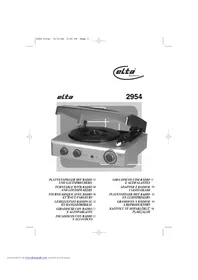
2954 - Turntable ELTA - Free user manual and instructions
Find the device manual for free 2954 ELTA in PDF.

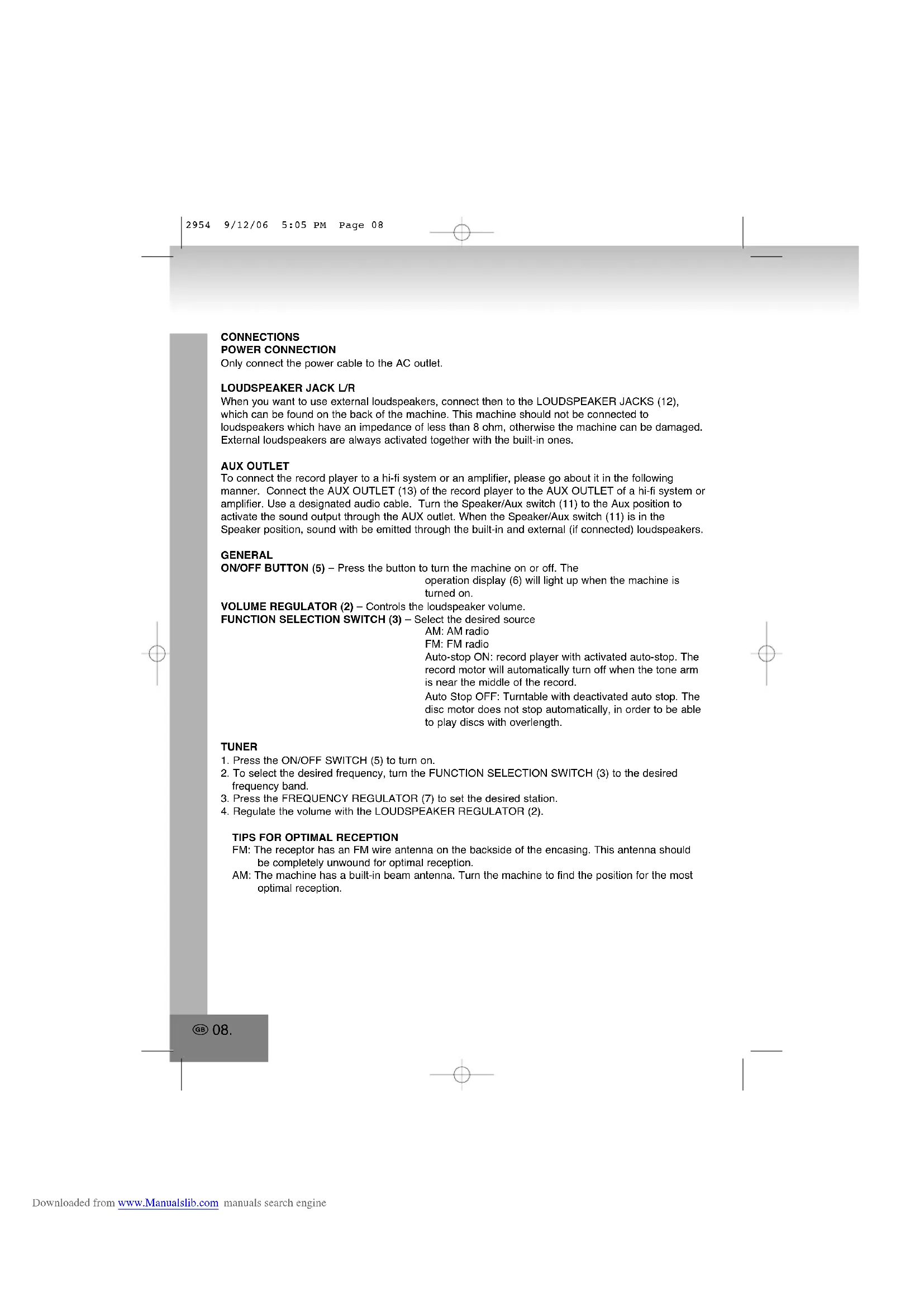


| Brand | ELTA |
| Model | 2954 |
| Product type | Vinyl turntable with AM/FM radio and built-in speakers |
| Power supply | 230 V ~ 50 Hz |
| Radio bands | AM 525-1615 kHz, FM 87.5-108 MHz |
| Playback speeds | 33, 45, 78 RPM (selectable) |
| Built-in speakers | Yes |
| Auxiliary output | 3.5 mm jack (line output) |
| Auxiliary input | No (output only) |
| External speaker jacks | 2 x RCA (for L/R speakers, impedance ≥ 8 Ω) |
| Auto stop | Yes (selectable Auto Stop ON/OFF) |
| Functions | Disc playback, AM/FM radio, playback via built-in or external speakers, aux output |
| Maintenance | Clean with a soft, damp cloth; replace the stylus if worn |
| Safety | Do not open the casing (electric shock risk), protect from water and heat |
| Spare parts | Stylus (user-replaceable) |
| Dimensions | Approximately 40 x 30 x 15 cm (estimate) |
| Weight | Approximately 3 kg (estimate) |
Frequently Asked Questions - 2954 ELTA
User questions about 2954 ELTA
0 question about this device. Answer the ones you know or ask your own.
Ask a new question about this device
Download the instructions for your Turntable in PDF format for free! Find your manual 2954 - ELTA and take your electronic device back in hand. On this page are published all the documents necessary for the use of your device. 2954 by ELTA.
USER MANUAL 2954 ELTA
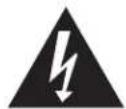
The triangular symbol with the lightning bolt warns the user to the presence of dangerous nonisolated voltage on the inside of this device which may cause an electric shock.
WARNING
DANGER OF A HAZARDOUS ELECTRIC SHOCK. DO NOT OPEN
WARNING: TO REDUCE THE RISK OF AN ELECTRIC SHOCK, DO NOT REMOVE THE FRONT OR BACK COVER. INSIDE THE UNIT, THERE ARE NO PARTS THAT CAN BE REPAIRED OR ADJUSTED BY THE USER, PLEASE REFER TO QUALIFIED TECHNICIANS.

The triangular symbol with the excamination highlights important points of which the user should refer to the manual regarding maintenance and repair.
LIST OF OPERATING ELEMENTS
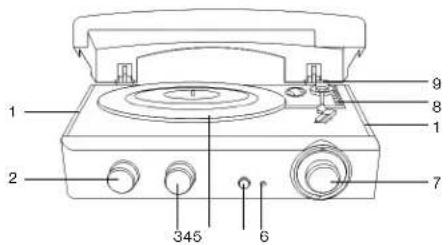
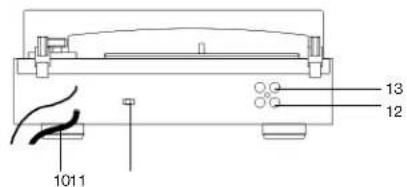
- BUILT-IN LOUDSPEAKER 8. SPEED SELECTION SWITCH
- VOLUME REGULATOR 9. TONE ARM
- FUNCTION SELECTION SWITCH 10. POWER CABLE
- TURNING PLATE 11. SPEAKER/AUX SWITCH
- ON/OFF BUTTON 12. LOUDSPEAKER JACK L/R
- OPERATION DISPLAY 13. AUX OUT JACK
- FREQUENCY REGULATOR
CONNECTIONS
POWER CONNECTION
Only connect the power cable to the AC outlet.
When you want to use external loudspeakers, connect then to the LOUDSPEAKER JACKS (12), which can be found on the back of the machine. This machine should not be connected to loudspeakers which have an impedance of less than 8 ohm, otherwise the machine can be damaged. External loudspeakers are always activated together with the built-in ones.
AUX OUTLET
To connect the record player to a hi-fi system or an amplifier, please go about it in the following manner. Connect the AUX OUTLET (13) of the record player to the AUX OUTLET of a hi-fi system or amplifier. Use a designated audio cable. Turn the Speaker/Aux switch (11) to the Aux position to activate the sound output through the AUX outlet. When the Speaker/Aux switch (11) is in the Speaker position, sound with be emitted through the built-in and external (if connected) loudspeakers.
GENERAL
ON/OFF BUTTON (5) - Press the button to turn the machine on or off. The operation display (6) will light up when the machine is turned on.
VOLUME REGULATOR (2) - Controls the loudspeaker volume. FUNCTION SELECTION SWITCH (3) - Select the desired source
AM:AM radio
FM: FM radio
Auto-stop ON: record player with activated auto-stop. The record motor will automatically turn off when the tone arm is near the middle of the record.
Auto Stop OFF: Turntable with deactivated auto stop. The disc motor does not stop automatically, in order to be able to play discs with overlength.
TUNER
- Press the ON/OFF SWITCH (5) to turn on.
- To select the desired frequency, turn the FUNCTION SELECTION SWITCH (3) to the desired frequency band.
- Press the FREQUENCY REGULATOR (7) to set the desired station.
- Regulate the volume with the LOUDSPEAKER REGULATOR (2).
TIPS FOR OPTIMAL RECEPTION
FM: The receptor has an FM wire antenna on the backside of the encasing. This antenna should be completely unwound for optimal reception.
AM: The machine has a built-in beam antenna. Turn the machine to find the position for the most optimal reception.
PHONO
Note:
Remove the protective cap of the stylus. Before operating, make sure that the tone arm is unlocked on the tone arm holder. Lock the tone arm once again after the playing process.
1. Press the ON/OFF SWITCH (5) to turn on.
2. Turn the FUNCTION SELECTION SWITCH (3) to Auto Stop ON or Auto Stop OFF.
3. Select the correct playing speed, which is dependent on the particular recording, with the speed regulator.
4. Position the record on the record plate (use an adapter if necessary).
5. Lift the tone arm (9) off of the holder and lower it slowly onto the record. The record plate begins to turn.
6. Bring the tone arm to the desired position.
7. Select the desired volume with the volume regulator (2).
8. The turning of the record plate will automatically stop when the record has finished playing, if the function selection switch is in the Auto Stop ON position. Lift the tone arm (9) from the record and set it back on its holder.
9. To stop the playing manually, lift the tone arm (9) from the record and set it on its holder.
10. Please set the function button (3) to Auto Stop OFF in order to be able to play discs with overlength.
TROUBLESHOOTING
The ON/OFF BUTTON is on but the machine has no electricity.
- Check the electric current entry of the wall outlet.
- Check the power cable connection to the outlet.
The operation display is on, but there is no sound from the loudspeakers.
- Check the function selection switch.
The Speaker/Aux switch must remain in the Speaker position. - Check the set volume.
The radio has bad FM reception.
- Completely unwind the wire antenna for optimal reception.
CARE
ON/OF BUTTON
After use, turn the machine off by pressing the ON/OFF BUTTON.
Cleaning the machine.
To maintain the outer attractiveness of the machine, simply clean it with a soft, clean cloth soaked in lukewarm water.
Safety advice:
- Do not connect the power cable to the outlet before all other connections have been made.
- Do not expose the machine to drips or sprays.
Replacing the stylus
The replacement of a used needle can simply be carried out as follows.
1. Lift up the tone arm
2. To replace the old needle, pull the pick-up diagonally down. Keep the sheath of the crown secure with your other hand.
3. Gently push the new needle into the holder (hold it firmly at the corner to avoid damaging the needle) until it engages.
SPECIFICATIONS
Power supply:
AC:230V\~50Hz
Radio frequency range:
AM:525-1615kHz
FM:87.5-108MHz
Technical data is subject to change.
MORE INFORMATION

Beware of small pieces and batteries, do not swallow them. It may be hazardous to your health and lead into suffocation. Please, Make sure to keep small devices and batteries out of the reach of children.

Important advice regarding hearing protection
Caution:
You care for your hearing, and so do we.
Therefore, use caution while using this appliance.
Our recommendation: Avoid high volumes.
Children should be supervised while using headphones; make sure that the appliance is not set to high volume.
Caution!
High volumes may cause irreparable damage to children's ears.

NEVER let allow anyone, especially children, to put objects into the holes, slots or openings on this devise. This may lead into death due to electric shock. The device must only be opened by a qualified assistant.

Only use the appliance for its intended purpose.

Please keep this instruction manual for further reference.

Professional recycling
Batteries and packaging should not be disposed of in the trash. Batteries must be handed over to a collection centre for used batteries. Separating disposable packaging materials is ecologically friendly.


Do not obstruct the ventilation of the device. Make sure, that no curtains, newspapers, furniture or any other type of object are blocking the ventilation system of the apparatus. The ventilation system must be clear of objects at all times! Overheating may lead into serious damage of the device and reduce its performance and lifespan.
Heat and warmth
Do not expose the appliance to direct sunlight. Make sure that the appliance is not subject to direct heat sources such as heaters or open fire. Make sure that the ventilation slots of the appliance are not covered.
Moisture and cleaning
This appliance is not waterproof! Do not immerse player in water. Do not allow player to come in contact with water. If water gets inside the player it may cause serious damage. Do not use cleaning agents that contain alcohol, ammoniac, benzene or abrasives as these could damage the player. For cleaning, use a soft, moistened cloth.
Instructions on environment protection
Do not dispose of this product in the usual household garbage at the end of its life cycle; hand it over at a collection point for the recycling of electrical and electronic appliances. The symbol on the product, the instructions for use or the packing will inform about the methods for disposal. The materials are recyclable as mentioned in its marking. By recycling, material recycling or other forms of re-utilization of old appliances, you are making an important contribution to protect our environment. Please inquire at the community administration for the authorized disposal location.
MODEL 2954
TOURNE-DISQUE AVEC RADIO ET HAUT-PARLEURS
Notre recommendations: Evitez les volumes forts.
Recyclage professional
DODATKOWE INFORMACJE

RISICO P EEN DEVAARLIKJE SCHOK NIET OPENEN
OPGELET:OM HET RISIOPO EEN ELEKTRICKSCHOK TE VERSILIDEN, DE VOOR OF ACHTERKANT NIET VERWUDEREN, BinnenINEN BEVINDEN ZICH GEEN DELEN DIE DOOR DE GEBUKRUEN ODRHEFOUDEN KUNNEN WORIDEN. DOE EEN BEROOP EEN OPER ERKENDOE EN BEVOEGDE TECHNISCHE DIENST

DOPLNUJICI INFORMACE

Pozor na male dily a baterie. Spolknuti techto predmetu mze vest k vaznemu zraneni, nebo uduseni. Hlavne dbeje na to, aby male dily a baterie nebly v dosahu deti.

Duleztara rada tykajici se ochrany sluchu
Upozorneni

- WARNING
- LIST OF OPERATING ELEMENTS
- CONNECTIONS
- POWER CONNECTION
- AUX OUTLET
- GENERAL
- TUNER
- TIPS FOR OPTIMAL RECEPTION
- PHONO
- NOTE
- TROUBLESHOOTING
- THE RADIO HAS BAD FM RECEPTION
- CARE
- ON/OF BUTTON
- CLEANING THE MACHINE
- SAFETY ADVICE
- REPLACING THE STYLUS
- SPECIFICATIONS
- MORE INFORMATION
- HEAT AND WARMTH
- MOISTURE AND CLEANING
- INSTRUCTIONS ON ENVIRONMENT PROTECTION
- MODEL 2954
- TOURNE-DISQUE AVEC RADIO ET HAUT-PARLEURS
- RECYCLAGE PROFESSIONAL
- DODATKOWE INFORMACJE
- DOPLNUJICI INFORMACE
- DULEZTARA RADA TYKAJICI SE OCHRANY SLUCHU
- UPOZORNENI
Brand : ELTA
Model : 2954
Category : Turntable