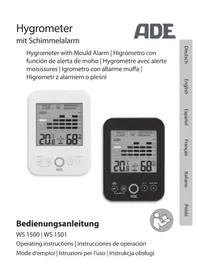
WS 1500 - Weather Station ADE - Free user manual and instructions
Find the device manual for free WS 1500 ADE in PDF.



| Product type | Weather station (hygrometer) |
| Brand | ADE |
| Model | WS 1500 (white) / WS 1501 (black) |
| Power supply | 2 LR03 (AAA) 1.5 V batteries (included) |
| Temperature measurement range | 0 °C to 50 °C (±1 °C) |
| Relative humidity measurement range | 20 % to 95 % (±5 %) |
| Dew point measurement range | 0 °C to 50 °C (±1 °C) |
| Temperature resolution | 0.1 °C |
| Humidity resolution | 1 % |
| Display | Extra large LCD screen |
| Main functions | Indoor temperature, relative humidity, dew point, MAX/MIN display, 12h graph, humidity and mold alarms, comfort indicator, °C/°F selection |
| Humidity alarm | Programmable high and low thresholds from 30 % to 95 % in 5 % steps |
| Mold alarm | Adjustable thresholds: 60 %, 65 %, 70 % or 75 % (default 65 %) |
| Well-being level indicator | Color display: too dry, dry, comfortable, humid, too humid |
| Mounting | Foldable stand and hanging eyelet for wall mounting |
| Care and cleaning | Clean with a dry cloth, do not immerse in water |
| Safety | Use by children aged 8 and over under supervision; do not play with batteries; risk of ingestion; observe battery polarity |
| Batteries | Type AAA (LR03); replace all batteries at the same time; do not mix old and new batteries |
| Warranty | 2 years from date of purchase, covers material and manufacturing defects |
| Distributor | Waagen-Schmitt GmbH, Hammer Steindamm 27–29, 22089 Hamburg, Germany |
Frequently Asked Questions - WS 1500 ADE
User questions about WS 1500 ADE
0 question about this device. Answer the ones you know or ask your own.
Ask a new question about this device
Download the instructions for your Weather Station in PDF format for free! Find your manual WS 1500 - ADE and take your electronic device back in hand. On this page are published all the documents necessary for the use of your device. WS 1500 by ADE.
USER MANUAL WS 1500 ADE
Bedienungsanleitung
WS 1500 | WS 1501
Operating instructions | Instrucciones de operación Mode d'emploi | Istruzioni per l'uso | Instrukcja obsługi

natural_image
Simple icon of a person using a laptop inside a circle (no text or symbols)22089 Hamburg, Germany
22089 Hamburg, Germany

Garantie
natural_image
Symbol of a trash bin crossed with no text or numbers, representing waste sorting or disposal (no text present)natural_image
Simple line drawing of a trash bin with two crossed lines indicating no waste or prohibition (no text or symbols)You have chosen to purchase a high-quality product from the brand ADE, which combines intelligent functions with an exceptional design. This hygrometer is an ideal measuring instrument for checking the quality of your indoor climate. The many years of experience of the brand ADE ensures a high technical standard and proven quality.
We wish you a lot of joy and a perfect indoor climate!
Your ADE Team
Scope of Delivery
- Hygrometer
- 2 batteries LR03 (AAA) / 1.5 V
- Operating Manual
Table of Contents
Scope of Delivery 24
General Information......26
Intended Use....27
Safety 27
Suggestions for location....31
Overview 32
The hygrometer offers....34
What you should know ....35
Use 38
Setting the humidity alarm ....38
Setting the mould alert....39
Selecting the temperature unit......40
Reading stored MAX/MIN values......40
Using the graphical representation of the last 12 hours....41
Fault/Remedy......42
Technical Data 42
Declaration of Conformity ....43
Guarantee 44
Disposal....44
About this manual

natural_image
Icon of a person using a laptop inside a circle (no text or symbols)This operating manual describes how to safely use and care for your products. Keep this operating manual in a safe place in case you would like to refer to it later. If you pass this item on to someone else, pass on this manual as well. Failure to observe the recommendations in this operating manual can lead to injuries or damage to your product.
Explanation of symbols

This symbol, combined with the word DANGER, warns against serious injury.

This symbol, combined with the word WARNING, warns against moderate and mild injuries.

This symbol, combined with the word NOTE, warns against material damage.

This symbol signifies additional information and general advice.
Intended Use
- This hygrometer is intended for measuring the indoor temperature and humidity and thereby serves to control the indoor climate.
- The hygrometer is not suitable for commercial use.
Safety
This item can be used by children 8 years of age and above, as well as by persons with reduced physical, sensory, or mental capacities or lacking experience and knowledge, if they are supervised or have been instructed in the safe use of the item and understand the dangers that may arise.
- Children must not play with the item.
- Cleaning and user maintenance must not be carried out by children, unless they are 8 years of age or older and are being supervised.
- Batteries, when swallowed, can be life-threatening. The device and batteries should therefore be kept out of reach of small children. If a battery is swallowed, medical assistance must be sought immediately.
DANGER for children
- Keep children away from packaging material. Risk of choking if swallowed. Also beware that children do not pull the packaging material over their heads.
RISK of fire/burning and/or explosion
- Risk of explosion if batteries are improperly exchanged. Replace the batteries only with those of the same or an equivalent type. Pay attention to the “Technical Data”.
- Batteries must not be recharged, reactivated by other means, dismantled, thrown into fire, or short-circuited. Otherwise there is an increased risk of explosion and of leakage; furthermore, gases may escape.
- Avoid contact of the battery fluid with skin, eyes, and mucosa. If you do come into contact with it, rinse the affected areas immediately and thoroughly with clean water and consult a doctor immediately.
BEWARE of material damage
- Do not submerge the item in water or other liquids.
- Protect the item against sharp jolts and vibrations.
-
Remove the batteries from the device once they have been used up or if you are not using the device for an extended period. You will thus avoid damage that may result from the leakage of battery acid.
-
When inserting and changing batteries, pay attention to the correct polarity (+/-).
- Do not subject the batteries to extreme conditions by, for example, storing them on heaters or under direct sunlight. Increased risk of leakage!
- Clean the battery and device contacts, as needed, before inserting the battery.
- Only insert batteries of the same type; do not use different types or used and new batteries with each other.
- Do not make any modifications to the item. Only allow repairs to be carried out at a specialist workshop. Repairs carried out incorrectly can considerably endanger the user.

DANGER of severe injuries
-During wall installation, there must be no electrical cables, gas or water pipes installed in the walls at the mounting site. Otherwise, when drilling holes, there is a risk of electric shock!
- The device is equipped on the rear side with a foldout foot as well as a mounting eyelet for attachment to the wall.
- Where possible, select a location in which the device is not exposed to direct sunlight.
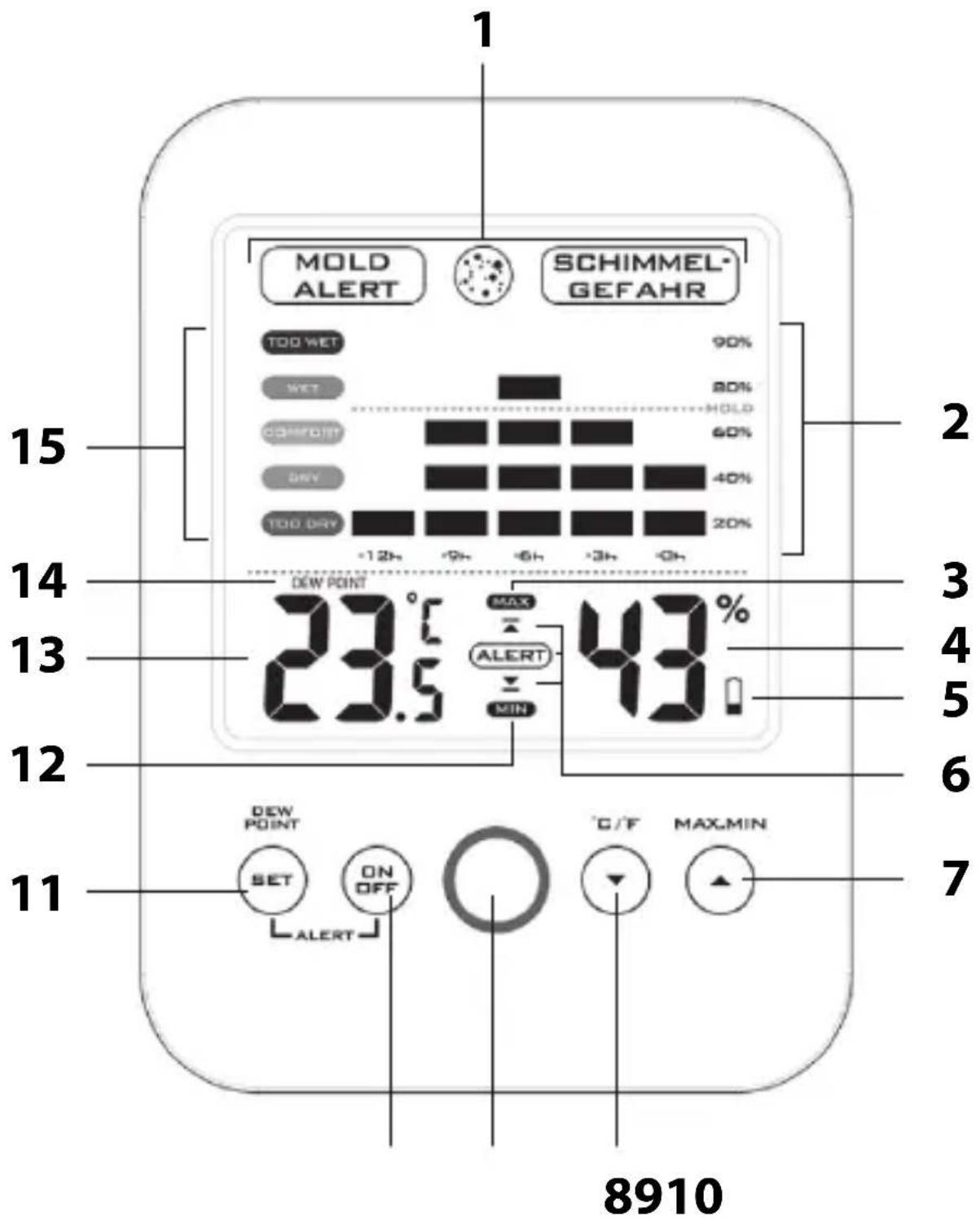
1 Mould alert
2 12-hour indicator of relative humidity
3 MAX indicator
4 Relative humidity in percentage
5 Battery change indicator
6 Alarm indicator
7 MAX.MIN sensor button
8 °C/°F toggle button
9 Red LED alarm signal
10 Alarm on/off button
11 Activate alarm / dew point sensor button
12 MIN indicator
13 Temperature in °C or °F
14 Dew point
15 Comfort level indicator
The hygrometer offers
- Extra-large LCD
- Internal room temperature indicator
- Dew point temperature indicator
- Display of relative humidity indoors
- Selectable temperature indicator, in °C or °F
- Max/min indicator of temperature and relative humidity
- Graphical display of relative humidity over the last 12 hours
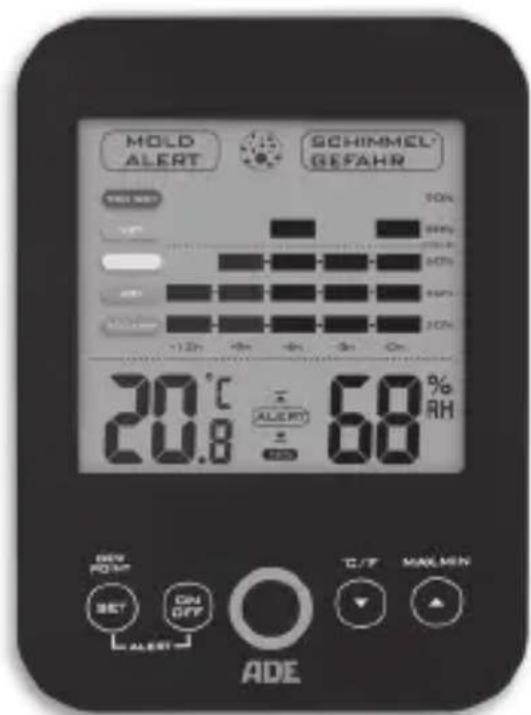
- Mould alert with warning symbol and blinking LED alarm signal, as well as selectable threshold values (60%, 65%, 70%, 75%)
- Humidity alarm with warning symbol and blinking LED alarm signal, as well as programmable threshold values for the upper/lower relative humidity (30 - 95% in 5% intervals)
- Easy-to-read, colour comfort index (comfort level)
- Operation by means of sensor buttons
- Alarm
Humidity affects your health and your home in the following ways
Excessive humidity indoors promotes the growth of undesirable organisms. The maintenance of humidity in the range between 30% and 50% indoors contributes to preventing the growth of mould, mildew, and mites.
Staying in rooms infested with mould can harm the human immune system, weakens resistance to respiratory allergies, and has been linked to infections.
Excessively dry air indoors can dry out the skin, irritates the throat and paranasal sinuses, and contributes to the easier infection of these areas. In a dry climate or in winter, when the air indoors has been made dry by heating, the relative humidity can be increased with the help of a humidifier.
Indoor air that is excessively dry can cause wood to contract and split, particularly thin wood such as that used in the making of guitars and violins. During extreme dryness over a long period of time, the splitting of solid wooden beams or plaster is also possible. Active heating and ventilating can contribute to creating a comfortable and healthy living climate.
Information on the dew point
The dew point is a measure for determining the moisture in the air and is calculated from the relationship of relative humidity to temperature. It defines the temperature at which moisture in the air condenses.
The warmer the air, the more moisture it can transport. If dew point and temperature are exactly the same, the humidity is 100% i.e. the air is saturated and the moisture condenses – e.g. indoors on walls, outdoors it leads to the formation of fog or precipitation.
Normal indoor air at 22^ C and 40% humidity, which is generally found to be comfortable, has – for example – a dew point of approx. 8^ C. This information is particularly helpful for preventing the formation of mould. As soon as the temperature of e.g. external walls reaches the dew point or falls below it, moisture will be deposited; in the long term this can lead to the formation of mould.
For use you require 2 batteries of type LR03 (AAA), 1.5 V (included).
- Open the battery compartment on the rear side.
- Insert the batteries as shown on the base of the battery compartment. Pay attention to the correct polarity (+/-).
- Close the battery compartment again.
Suggestions for changing the battery:
- A change of batteries is necessary when the battery symbol 📁 or nothing at all is shown on the display.
- Only use the type of battery that is specified in the “Technical Data”.
- Always exchange all of the batteries at the same time.
- Dispose of batteries in an environmentally appropriate way (see “Disposal”).
Setting the humidity alarm
- Press and hold the SET button until the ALERT and ▲ symbols are shown on the upper part of the display and the humidity indicator blinks.
- Using the ▲ and ▼ buttons, set the upper humidity limit (in 5% increments).
- Press the SET button again. On the lower part of the display, ALERT and ▼ are shown and the humidity indicator blinks.
- Using the ▲ and ▼ buttons, set the lower humidity limit (in 5% increments).
- Then press SET or wait approx. 10 seconds until the indicator returns to normal mode.
- Press the ON/OFF button to activate the humidity alarm. ALERT is shown on the display; the humidity alarm is active.
As soon as the humidity exceeds or falls below the values set by you, the ▲ or ▼ symbol and the red LED alarm signal (rapidly) blink. Alarm duration: 1 minute.
- To stop the blinking of the symbol and the alarm signal sooner, press any button.
- To switch off the humidity alarm, press the ON/OFF button once. ALERT and ▲or ▼will no longer be displayed.
Setting the mould alert
- Press and hold the ^ C/ ^ F button until the MOLD ALERT ⚙RISK OF MOLD symbols are shown simultaneously on the upper part of the display and the humidity indicator blinks.
- Press the ▲ or ▼ button to set the upper mould alert limit with a value of 60%, 65%, 70% or 75% (standard setting: 65%).
- Press and hold the ▼/°C/°F button again or wait approx. 10 seconds until the display returns to normal mode.
As soon as the humidity exceeds the set mould alert value, there is a risk of mould formation.
In this case, the MOLD ALERT ⚙️ RISK OF MOLD symbols are shown on the display. Additionally, the red LED alarm signal blinks every 5 seconds.
-Press any button in order to stop the red LED alarm signal.
The MOLD ALERT ⚙️ RISK OF MOLD symbols are displayed until the measured humidity once again falls below the input mould limit value.
Selecting the temperature unit
-Press the °C/°F button in order to switch between °C and °F.
Reading stored MAX/MIN values
-Press the MAX.MIN button once for each value.
MAX symbol – The maximum values are displayed.
MIN symbol – The minimum values are displayed.
Deleting stored values:
-Press and hold the MAX.MIN button to delete the respective stored MAX or MIN value. The values are then recorded anew.
Using the graphical representation of the last 12 hours
In the graphical representation you can very easily read off the record of the relative humidity and the perceived level in the room within the last 12 hours.
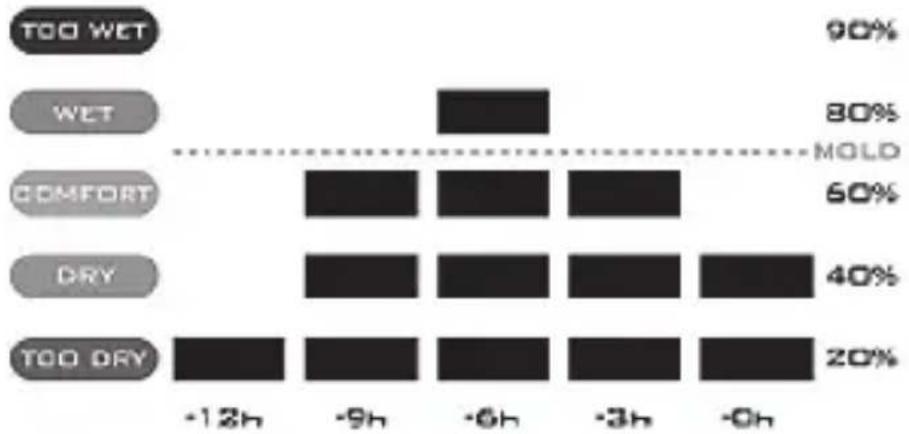
bar
| Category | Value (%) | |---|---| | TOO WET | 90 | | WET | 80 | | COMFORT | 60 | | DRY | 40 | | TOO DRY | 20 | -12h | -9h | -6h | -3h | -0h | -0h || Perceived level (comfort index) | Relative humidity |
| Too wet 81% to 90% | |
| Wet 61% to 80% | |
| Comfortable 41% to 60% | |
| Dry 31% to 40% | |
| Too dry 20% to 30% |
Fault/Remedy
| Fault Possible Cause | |
| Instead of the measured values for temperature or dew-point temperature, H.HH or LL.L is shown on the display. | The values lie above or below the measurement range. |
| The indicator is illegible, the function is unclear, or the values are obviously false. | Remove the batteries for a few moments. |
Technical Data
Model: Hygrometer
WS 1500 (white)
WS 1501 (black)
Batteries: 2x LR03 (AAA) / 1.5 V
Measuring range
- Temperature: 0 °C - 50 °C (+/- 1 °C)
- Dew point: 0 °C - 50 °C (+/- 1 °C)
- Relative humidity; 20% - 95% (+/- 5%)
Temperature resolution: 0.1 °C
Relative humidity reso- 1%
lution:
Distributor:
Waagen-Schmitt GmbH
Hammer Steindamm 27-29
22089 Hamburg, Germany
Our products are constantly being developed and refined. For this reason, design and technical modifications are possible at any time.
Declaration of Conformity
Waagen-Schmitt GmbH hereby declares that the hygrometer WS 1500/1501 complies with EU directives 2014/53/EU and 2011/65/EU.
The full text of the EU conformity declaration is available via the following Internet address: www.ade-germany.de/doc
This declaration loses its validity if modifications are made to the product without our approval.
Guarantee
Dear Valued Customer, the company Waagen-Schmitt GmbH guarantees for 2 years from the purchase date the cost-free remedying of defects due to material or fabrication errors by repair or exchange. In the event of a guarantee claim, please return the product with the proof of purchase (stipulating the reason for claim) to your dealer.
Disposal
Disposing of the packaging

Dispose of the packaging with similar materials. Put cardboard with waste paper, films with recyclable materials.
Disposing of the product
Dispose of the product in accordance with the regulations that apply in your country.
natural_image
Symbol of a trash bin crossed with two crossed lines, no text or labels presentDevices must not be disposed of in normal household waste.
At the end of its life, the product must be disposed of in an appropriate way.
In this way, valuable materials contained in the device will be recycled and the burden on the environment avoided. Hand in the old device at a collection point for electronic waste or at a recycling depot. For more information, contact your local waste disposal firm or your local administrative body.
natural_image
Simple line drawing of a trash bin with crossed x- and y-axes (no text or symbols)Recyclable and disposable batteries do not belong in household waste.
All batteries must be handed in at a collection point in your community, suburb, or at the retailer.
Such batteries can thus be disposed of in an environmentally friendly way.
natural_image
Icon of a person using a laptop inside a circle (no text or symbols)natural_image
Symbol of a trash bin crossed with two crossed lines, no text or labels presentnatural_image
Simple line drawing of a trash bin with crossed lines indicating no waste or restriction (no text or symbols)Consignes relatives au site....75
natural_image
Icon of a person using a laptop inside a circle (no text or symbols)natural_image
Symbol of a trash bin crossed with a diagonal line, no text or numbers presentnatural_image
Symbol of a trash bin crossed with no text or labelsnatural_image
Icon of a person using a laptop inside a circle (no text or symbols)natural_image
Symbol of a trash bin with crossed x-marks and a solid black rectangle below (no text or labels)natural_image
Simple line drawing of a trash bin with crossed x-bracing (no text or symbols)natural_image
Icon of a person using a laptop inside a circle (no text or symbols)bar
| Condition | Time Period | Percentage (%) | |---|---|---| | TOO WET | -12h | 90 | | TOO WET | -9h | 80 | | TOO WET | -6h | MOLD | | TOO WET | -3h | 60 | | TOO WET | -0h | MOLD | | WET | -12h | 40 | | WET | -9h | 20 | | WET | -6h | 20 | | WET | -3h | 20 | | WET | -0h | 20 | | COMFORT | -12h | 20 | | COMFORT | -9h | 20 | | COMFORT | -6h | 20 | | COMFORT | -3h | 20 | | COMFORT | -0h | 20 | The chart includes a dashed line labeled 'MOLD' connecting the bars to the center of the bars.natural_image
Symbol of a trash bin crossed with two crossed lines, no text or labels presentnatural_image
Simple line drawing of a trash bin with two crossed x-axes (no text or symbols)
- Bedienungsanleitung
- Garantie
- Scope of Delivery
- Table of Contents
- About this manual
- Explanation of symbols
- This symbol signifies additional information and general advice.
- Intended Use
- Safety
- DANGER for children
- RISK of fire/burning and/or explosion
- BEWARE of material damage
- DANGER of severe injuries
- The hygrometer offers
- Humidity affects your health and your home in the following ways
- Information on the dew point
- Setting the humidity alarm
- Setting the mould alert
- Selecting the temperature unit
- Reading stored MAX/MIN values
- Using the graphical representation of the last 12 hours
- Fault/Remedy
- Technical Data
- Declaration of Conformity
- Guarantee
- Disposal
- Disposing of the packaging
- Disposing of the product
- Devices must not be disposed of in normal household waste.
- Recyclable and disposable batteries do not belong in household waste.
Brand : ADE
Model : WS 1500
Category : Weather Station