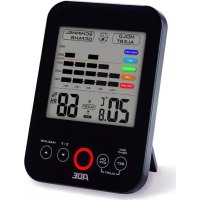
WS 1501 - Weather Station ADE - Free user manual and instructions
Find the device manual for free WS 1501 ADE in PDF.


| Product type | Indoor weather station (thermo/hygrometer with mold alert) |
| Brand | ADE |
| Model | WS 1501 |
| Temperature range | 0 °C to +50 °C |
| Temperature accuracy | ± 1 °C |
| Temperature resolution | 0.1 °C |
| Relative humidity range | 20 % to 95 % |
| Relative humidity accuracy | ± 5 % |
| Relative humidity resolution | 1 % |
| Dew point range | 0 °C to +50 °C |
| Power supply | 2 AAA 1.5 V batteries (included) |
| Display | Extra large LCD screen |
| Temperature units | °C or °F (selectable) |
| Main functions | Indoor temperature, relative humidity, dew point, max/min recording, comfort index, mold alert, high/low humidity alarm, 12h graphical display |
| Humidity alarm | Adjustable high and low thresholds from 30% to 95% in 5% steps |
| Mold alert | Adjustable thresholds: 60%, 65%, 70%, 75%; factory preset 65% |
| Comfort index | Color display: too humid, humid, comfortable, dry, too dry |
| Warranty | 3 years (material or manufacturing defects) |
| Maintenance | Clean with a dry cloth; do not use solvents |
| Recycling | Device and batteries should not be disposed of with household waste |
Frequently Asked Questions - WS 1501 ADE
User questions about WS 1501 ADE
0 question about this device. Answer the ones you know or ask your own.
Ask a new question about this device
Download the instructions for your Weather Station in PDF format for free! Find your manual WS 1501 - ADE and take your electronic device back in hand. On this page are published all the documents necessary for the use of your device. WS 1501 by ADE.
USER MANUAL WS 1501 ADE
Thermo-/Hygrometer with Mould Alert Model WS 1501
Operating Manual
- Display & Settings Page 2
- Features Page
- Technical Data Page 3
- Start-up Page
- Important Information Page 5
- Warranty Page
Thank you for deciding to purchase this high-quality product from the Waagen-Schmitt Company. You have purchased a thermometer/hygrometer of the highest technical standard and proven quality.
This thermometer/hygrometer is an ideal measuring instrument for checking the indoor climate characteristics.
Please read through this operating manual carefully before starting-up for the first time, and keep it in a safe place so that this information is available to you when you need it.
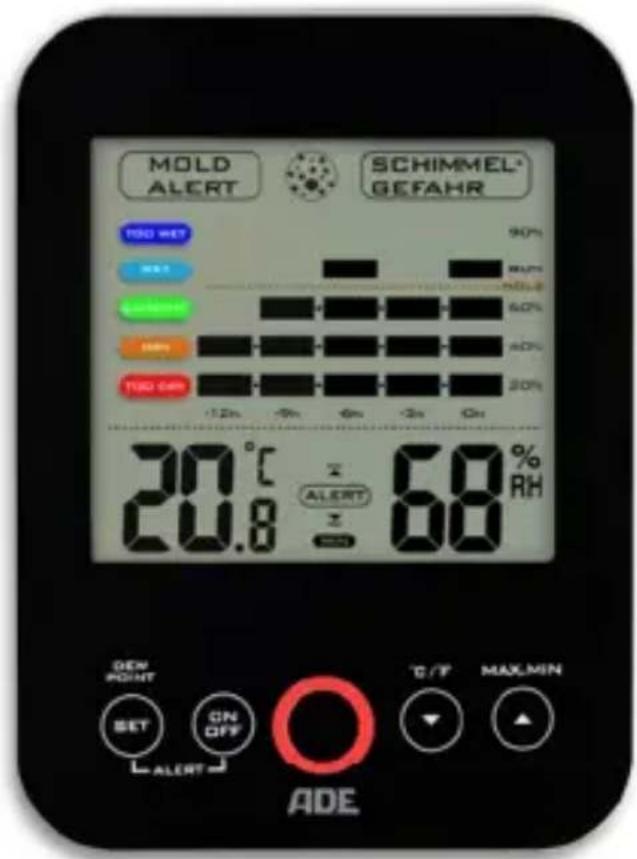
1. Indicators and Settings

2. Features
- Extra large LCD
- Internal room temperature indicator
- Dew point temperature indicator
- Display of relative humidity indoors
- Selectable temperature indicator, in °C or °F
- Max/min indicator of temperature and relative humidity
- Graphical display of relative humidity over the last 12 hours
- Mould alert with warning symbol and blinking LED alarm signal, as well as selectable threshold values (60%, 65%, 70%, 75%)
- Humidity alarm with warning symbol and blinking LED alarm signal, as well as programmable threshold values for the upper/lower relative humidity (30 - 95% in 5% intervals)
- Easy-to-read, colour comfort index (comfort level)
- Operation by means of sensor buttons
3. Technical Data
- Temperature indicator 0 °C to +50 °C
- Dew point temperature range 0 °C to +50 °C
- Tolerance +/- 1 °C
- Relative humidity range 20% to 95%
- Tolerance +/-
- Temperature resolution 0.1 °C
- Relative humidity resolution 1%
- Temperature outside the permissible range: HH.H/LL.L
- Dew point temperature outside the permissible range: HH.H/LL.L
4. Start-up
Open the battery compartment on the back of the thermometer/hygrometer, insert the supplied batteries (2 x 1.5V AAA) and then close the battery compartment again. Please be mindful of the correct polarity of the batteries (+/-). The thermometer/hygrometer is now ready.
Setting the humidity alarm
-
In order to activate the humidity alarm, press and hold the SET button until the ALERT and ▲ symbols appear simultaneously in the upper part of the display and the humidity indicator blinks. Now press the ▲ or ▼ button in order to set (in 5% intervals) the upper humidity threshold.
-
Now press the SET button once more and ALERT and ▼ will appear on the lower part of the display and the humidity indicator will blink. Now press the ▲ or ▼ button in order to set (in 5% intervals) the lower humidity threshold.
- Press the SET button once more or wait approx. 10 seconds; the indicator then returns to normal mode again.
- In order to activate the humidity alarm, press the ON.OFF button once. ALERT appears on the display
- As soon as the humidity falls below or exceeds the values that you have set, the ▼ or ▲ symbol and, at the same time, the red LED alarm signal (quickly) blink.
- In order to stop the blinking of the symbol and alarm signal, press any button.
- In order to switch off the humidity alarm, press the ON.OFF button once. ALERT and ▲ or ▼ will no longer be displayed.
Remarks: The duration of the alarm is one minute.
Setting the mould alert
- In order to activate the mould alert, press and hold the ▼ /°C/°F button until the MOLD ALERT ⊙ MOLD RISK symbols appear simultaneously in the upper part of the display and the humidity indicator blinks. Now press the ▲ or ▼ button in order to set the upper mould threshold with a value of 60%, 65%, 70%, or 75%.
- Press and hold the ▼ /°C/°F button or wait approx. 10 seconds in order to return to the normal display mode.
- As soon as the humidity exceeds the set mould alert value, there is a risk of mould formation. The symbols MOLD ALERT ⊙ MOLD RISK then appear on the display and, simultaneously, the red LED alarm signal blinks (slowly – every 5 seconds).
- Press any button in order to stop the red LED alarm signal. The MOLD ALERT ⊙ MOLD RISK symbols remain visible on the display until the measured humidity falls back under the preset mould threshold value.
The factory preset value for the mould alert is 65%.
Selecting the temperature indicator (°C or °F)
In order to toggle between °C and °F units of temperature, press the °C/°F button.
Reading and resetting the record of maximum/minimum temperature and humidity.
In order to read the maximum or minimum temperature and relative humidity since the last time you reset the system, press the respective MAX.MIN button once. When the MAX symbol is displayed you can read off the maximum values, and when the MIN symbol is displayed you can read off the minimum values.
When the maximum values are displayed by MAX, the record can be reset and a new record started by pressing and holding the MAX.MIN button.
When the minimum values are displayed by MIN, the record can be reset and a new record started by pressing and holding the MAX.MIN button.
5. Important Information
How does the humidity affect your health and your home?
Excessive humidity indoors promotes the growth of undesirable organisms. The maintenance of humidity in the range between 30% and 50% indoors contributes to preventing the growth of mould, mildew, and mites. Staying in rooms infested with mould can damage the human immune system, weakens the resistance to respiratory allergies, and has been linked with infections.
Excessively dry air indoors can dry out the skin, irritates the throat and paranasal sinuses, and contributes to the easier infection of these areas. In a dry climate or in winter, when the air indoors has been made dry by heating, the relative humidity can be increased with the help of a humidifier.
Indoor air that is excessively dry can cause wood to contract and split, particularly thin wood such as that used in the making of guitars and violins. During extreme dryness over a long period of time, the splitting of solid wooden beams or plaster is also possible.
Active heating and ventilating can contribute to creating a comfortable and healthy living climate.
Information on the dew point
The dew point is a measure for determining the moisture in the air and is calculated from the relationship of relative humidity to temperature. It defines the temperature at which moisture in the air condenses.
The warmer the air, the more moisture it can transport. If dew point and temperature are exactly the same, the humidity is 100% i.e. the air is saturated
and the moisture condenses – e.g. indoors on walls, outdoors it leads to the formation of fog or precipitation.
Normal indoor air at 22^ C and 40% humidity, which is generally found to be comfortable, has – for example – a dew point of approx. 8^ C. This information is particularly helpful for preventing the formation of mould. As soon as the temperature of e.g. external walls reaches the dew point or falls below it, moisture will be deposited; in the long term this can lead to the formation of mould.
Remarks: The dew point temperature range of the hygrometer extends from 0^ C to 50^ C. If the dew point temperature exceeds 50^ C, “HH.H” appears on the display; if it is below 0^ C, “LL.L” appears on the display.
Graphical representation of humidity within the last 12 hours.
In the graphical representation, you can easily read the record of the relative humidity and the perceived level in the room within the last 12 hours.
| Perceived level (comfort index) | Relative | humidity |
| Too wet 81% to 90% | ||
| Wet 61% to 80% | ||
| Comfortable 41% to 60% | ||
| Dry 31% to 40% | ||
| Too dry 20% to 30% |

bar
| Category | Value (%) | |---|---| | TOO WET | 90 | | WET | 80 | | MOLD | 60 | | COMFORT | 40 | | DRY | 20 | -12h -9h -6h -3h -0h -12h -9h -6h -3h -0h6. Warranty
WAAGEN-SCHMITT guarantees the free correction of defects resulting from material or manufacturing faults through repair or exchange 3 years from the purchase date. In the event of a warranty claim, please return the thermo-/hygrometer with the receipt to your dealer, specifying the reason for the claim.
Please note: Under strong electromagnetic influences, e.g. when operating a radio device in immediate proximity to the thermo-/hygrometer, interference with the indicator values may be caused. After the disturbing influence has stopped, the product may once again be used as intended, although a re-activation may be necessary.
Legal duty to inform about battery disposal:
Batteries do not belong in household waste. As a consumer you are legally obligated to return batteries. You can hand in your old batteries at the public collection point in your community or anywhere where batteries of the same kind are sold.
Please note:

These symbols can be found on batteries:
Li = Battery contains lithium
AI = Battery contains alkali
Mn = Battery contains manganese
CR (Li); AA (Al, Mn); AAA (Al, Mn)
Disposal of used electrical and electronic devices
This symbol on the product or its packaging indicates that the product is not to be treated like normal household waste, but must be handed over at a collection point for the recycling of electrical and electronic devices. Further information can be obtained in your community, at communal disposal services or the business where you bought the product.
CE
Declaration of conformity by the manufacturer
This thermo-/hygrometer has been manufactured in accordance with the harmonised European standards. It conforms to the provisions of the following EC directives:
- EMC Directive 2004/108/EC regarding electromagnetic compatibility
- RoHS Directive 2011/65/EC
in the currently valid versions.
This declaration loses its validity if modifications are made to the scale without our approval.
Hamburg, May 2015
WAAGEN-SCHMITT GmbH
Hammer Steindamm 27 – 29
D-22089 Hamburg
Operating Manual_N_WS1501_EN_150527_REV001
ADE
- Thermo-/Hygrometer with Mould Alert Model WS 1501
- Operating Manual
- Indicators and Settings
- Features
- Technical Data
- Start-up
- Setting the humidity alarm
- Setting the mould alert
- Selecting the temperature indicator (°C or °F)
- Important Information
- Information on the dew point
- Warranty
- Please note:
- Disposal of used electrical and electronic devices
- CE
- Declaration of conformity by the manufacturer
- ADE
Brand : ADE
Model : WS 1501
Category : Weather Station