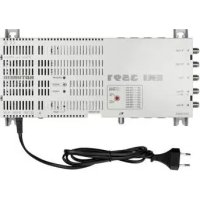
EXI 3591 - Switch KATHREIN - Free user manual and instructions
Find the device manual for free EXI 3591 KATHREIN in PDF.

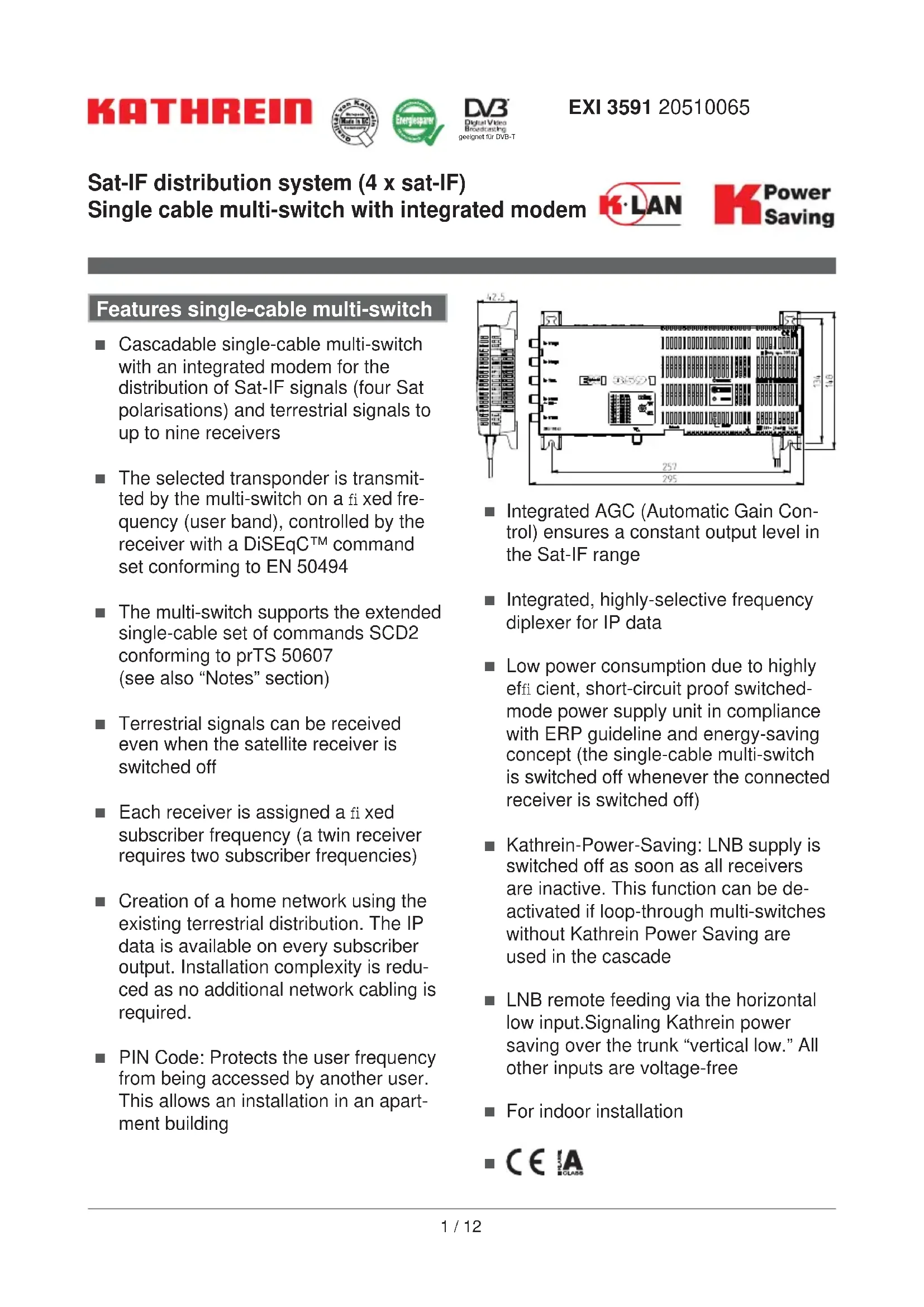


| Product type | Single-cable multiswitch with integrated modem for IF satellite and terrestrial distribution |
| Brand | Kathrein |
| Model | EXI 3591 |
| Reference | 20510065 |
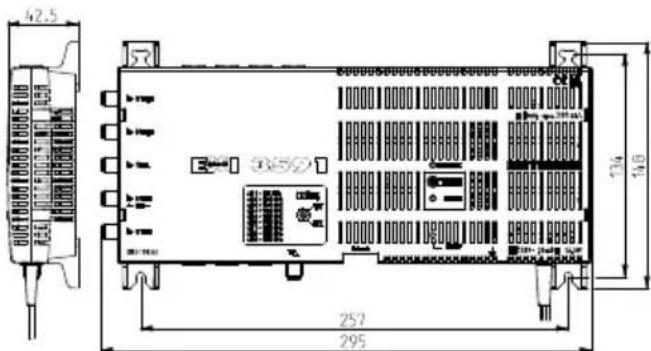
| Dimensions (W x H x D) | 295 x 148 x 42.5 mm |
| Weight | Approx. 0.7 kg |
| Mains power supply | 230 V (47-63 Hz), permissible range 207-253 V |
| Power consumption (max) | 12.2 W (with 300 mA load and modem in standby) |
| Number of inputs | 1 terrestrial, 4 IF Sat (low horizontal and others) |
| Number of subscriber outputs | 1 x 9 (up to 9 receivers) |
| Terrestrial frequency range | 87.5 – 862 MHz |
| Satellite frequency range | 950 – 2150 MHz |
| Integrated modem | K-LAN (IEEE 1901) for IP transmission over coaxial cable |
| Modem raw data rate | Greater than 500 Mbit/s |
| IP frequency range (modem) | 2 – 68 MHz (8-68 MHz used) |
| PIN code protection | Yes, for each subscriber frequency (user band) |
| Kathrein Power Saving | Yes, LNB power supply switch-off if no receiver active (switchable) |
| Permissible ambient temperature | -20 to +55 °C |
| Protection rating | IP 30 (indoor installation) |
| Sockets and connectors | F connectors 75 Ω (F series) according to EN 61169-24, RJ45 for Ethernet |
| Modem standby consumption | Approx. 1.0 W |
| Modem active consumption | Approx. 4.2 W |
| Recommended accessories | Single modem EXI 01, high-pass filter EXI 90, software EXI 700 |
Frequently Asked Questions - EXI 3591 KATHREIN
User questions about EXI 3591 KATHREIN
0 question about this device. Answer the ones you know or ask your own.
Ask a new question about this device
Download the instructions for your Switch in PDF format for free! Find your manual EXI 3591 - KATHREIN and take your electronic device back in hand. On this page are published all the documents necessary for the use of your device. EXI 3591 by KATHREIN.
USER MANUAL EXI 3591 KATHREIN
Single cable multi-switch with integrated modem

K Power Saving
Features single-cable multi-switch
Cascadable single-cable multi-switch with an integrated modem for the distribution of Sat-IF signals (four Sat polarisations) and terrestrial signals to up to nine receivers
The selected transponder is transmitted by the multi-switch on a fixed frequency (user band), controlled by the receiver with a DiSEqCTM command set conforming to EN 50494
The multi-switch supports the extended single-cable set of commands SCD2 conforming to prTS 50607 (see also "Notes" section)
Terrestrial signals can be received even when the satellite receiver is switched off
Each receiver is assigned a fixed subscriber frequency (a twin receiver requires two subscribers frequencies)
Creation of a home network using the existing terrestrial distribution. The IP data is available on every subscriber output. Installation complexity is reduced as no additional network cabling is required.
PIN Code: Protects the user frequency from being accessed by another user. This allows an installation in an apartment building
Integrated AGC (Automatic Gain Control) ensures a constant output level in the Sat-IF range
Integrated, highly-selective frequency diplexer for IP data
Low power consumption due to highly efficien, short-circuit proof switchedmode power supply unit in compliance with ERP guideline and energy-saving concept (the single-cable multi-switch is switched off whenever the connected receiver is switched off)
Kathrein-Power-Saving: LNB supply is switched off as soon as all receivers are inactive. This function can be deactivated if loop-through multi-switches without Kathrein Power Saving are used in the cascade
LNB remote feeding via the horizontal low input. Signaling Kathrein power saving over the trunk "vertical low." All other inputs are voltage-free
For indoor installation
CCL
Features built-in modem
Modem for Kathrein IP over coax system "K-LAN" (based on the standard IEEE 1901)
- Ideal for networking of receivers, TV sets and Blu-ray players. Other network-capable units such as PCs can also be easily connected using a router (e.g. FRITZ!Box)
500-Mbit data throughput (gross) allows several HD streams during simultaneous data transmission between PCs. Due to QoS * relevant services are prioritised
High screening values ensure disturbance security
128 bit AES encryption: Secure, private network connection at the press of a button - no software required
- Eco Power Mode: The modem switches automatically to "stand-by" and is "woken up" again through the network. Consumption: 1.0 watts in stand-by mode/4.2 watts in operational mode
Accessories
- Sockets of the ESR series are used despite limited frequency range for K-LAN.
Protection of the system function in receiver malfunction: power of the connected receiver, if this is not the single-cable DiSEqCTM instruction set according to EN 50494 is used (cutting off the power from the satellite terminal to input at +18 VDC to 400 ms)
End-user modem EXI 01 (Order no. 20510061): To reconvert IP data on subscriber outlets (e.g. to connect a satellite receiver with an Ethernet port) - Software EXI 700: Shows the functioning modems in a network (Downloadable from: www.kathrein.de)
High pass EXI 90 (BN 20,510,062): If additional multi-switch (not from the EXI series) cascade and the EXI 01 is operated at one of these multi-switch, the high-pass must be screwed onto the terrestrial input of the multiswitch. This subsequent multiswitches are isolated and prevented the incoming and outgoing radiation of the frequency range of IP and terrestrial antenna in the cascade. EXI 3591 in the high-pass is already integrated
Installation and Safety
- The equipment described is designed solely for the installation of satellite receiver systems.
- Any other use or failure to comply with these instructions will void the warranty or guarantee.
- The equipment may only be installed in dry areas indoors. Do not install on or against highly combustible materials.
WFS 55 units must be earthed when installed. (Cu, minimally 4mm^2 - The safety regulations set out in the current EN 60728-11 and EN 60065 standards must be complied with.
Fixings: Screws, max. 0: 4 mm. - Connectors: RF connector 75 Ω (series F) according to EN 61169-24.
- Unused RF ports must be terminated with 75 resistors (e.g. EMK 03).


An inner cable conductor diameter greater than 1.2 mm, or the presence of burrs may damage the sockets on the unit.
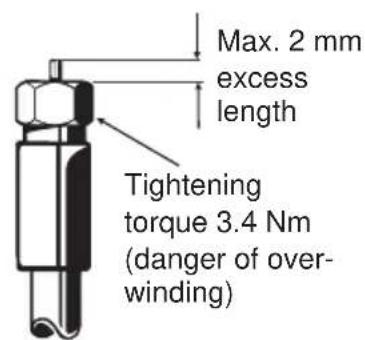
Diameter 0.6-1.2 mm free of burrs

Current-carrying device.
- Do not open the unit or tamper with it!
- When working on the system always unplug the power supply unit from the wall socket!
- The device is intended only for wall mounting! Do not install the device lying at or on its top, or operate it in this position.
- Ensure adequate clearance! Clearance all round at least 5 cm!
- Free circulation of air must be possible to discharge the heat emitted by the unit. Danger of overheating!
- Ambient temperature range: -20 to +55°C
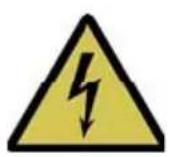
Caution:
- No liquid-filled items may be placed on top of the power supply unit.
- The power supply unit must not be exposed to dripping or splashing water.
- The mains plug must be easily accessible and operable.
- The only reliable method of disconnecting the unit from the mains is to unplug it.
Kathrein Power Saving
If an EXI 3591 is run on its own or alongside other multi-switched Kathrein-Power-Saving-logo devices, then Kathrein power saving switch can be activated with the "On" button. If a receiver is switched on in the cascade, from the end of the LNB multiswitch is powered.

Uses without Kathrein Power Saving do not give signalling to the end multi-switch. The stand-by switch must be set to "OFF" for permanent powering of the LNB.
| Type Product | type Kathrein Power | Saving Switch position | |
| VWS 2551 Amplifiers | Can be used without restriction Note: If the terrestrial frequency range is used, the VWS (amplifier) must be locally powered. | ON | |
| EBX 2520 Two-way splitter | Can be used without restriction if each trunk has been terminated with a Kathrein Power Saving-capable end multi-switch. | ON | |
| EAX 2512 Two-way tap | Not compatible with Kathrein Power Saving | OFF | |
| VWS 2500 Amplifiers | Not compatible with Kathrein Power Saving | OFF | |
PIN code protection
The multi-switch is protected by a PIN code in order to prevent the set userband from being used/disturbed by another subscriber. This should be specified in the receiver settings. A fixed PIN has been assigned to each userband.
| UB 1 UB 2 UB 3 UB 4 UB 5 UB 6 UB 7 UB 8 UB 9 | ||||||||||
| Frequency (MHz) | 974 10 | 076 1178 | 1280 13 | 82 1484 | 1586 16 | 88 1790 | ||||
| Pin 151 052 | 133 124 | 205 196 | 187 178 | 8 099 | ||||||
Notes
Only use splitters without diodes (EBC 110 or EBC 114). The required diode protection is provided by outlets from the ESU series.
By definition the system is designed so that single-cable units are supplied with 14 V DC. The power supply is briefly switched to 18 V DC if control signals similar to DiSEqCTM have to be transmitted. Continuous application of 18 V would block the system.
Sockets of the ESR series are specified in the data sheet from 47 MHz. The very small directional losses in the range 5-47 MHz used in the K-speed modems in this case, is an advantage. They can therefore be used without any problems.
It is recommended to assign the outlets with the shorter cable lengths the higher frequencies.
The multi-switch (with integrated modem) EXI 3591 is ideally used in combination with the single modem EXI 01. The subscriber of this multi-switch is specially adapted to terrestrial and offers the optimum conditions for the data rates of the modem to EXI 3591 but also between multiple EXI 01s. An integrated high pass filter for terrestrial input prevents unwanted distribution of your network data on a connected antenna.
To achieve optimum performance, make sure when your entire distribution that supports the frequency range 5-68 MHz.
The receivers that are connected must be designed for single-cable operation conforming to EN 50494. In order to use userband 9, the receiver must also support the single-cable standard SCD2 as per prTS 50607.
Startup of the modem
The integrated modem in the multi-switch EXI 3591 and the Kathrein modem EXI 01 are secured from the factory with a network key. For easy operation of these two modems must be connected to a coaxial cable to the socket . Connected to the network devices such as routers and receivers are connected using the supplied Ethernet cable to the provided RJ-45 jack. The LEDs „Power“ and „Coax / Link“ light. The data link is established. Up to 64 modems may be connected to each other.
Additional security:
"Ensure" that in a coaxial distribution system all the modems connected are Kathrein. If you want to build a private network with your own modems, proceed as follows:

- Press about 12 seconds on the button „pairing“. Both LEDs go out momentarily. The network key is deleted. The LED “power” lights “Coax/link” is missing. Perform this step on all your devices that you want to add to a private network through!
- Now click on one of your modems short (approximately 1 second) on the button "pairing". The "Power" LED starts blinking. Now press the next button shortly modem "pairing". Both modems negotiate a secret network key and connect to each other. You have about three minutes for pressing the second button. When the process is completed, both LEDs light up constantly again. Each additional modem can be added in the same manner to the private network. The pairing can be started from any modem in your private network.
Reset:
With the "Reset" button, the modem to factory setting reset. Since in this case also the original factory network key is set, the modem is generally visible again and no longer belongs to the private network.
Stand-by:
Modem switches after a few minutes without traffic automatically to stand-by mode. The "Power" LED blinks slowly (red - green).
Overview LED
| LED ... Status | Modem | |
| “Power” LED Lights | up green In operation | |
| Lights up red Stand-by | ||
| Is off No power supply | ||
| “Coax/Link” LED Lights | Lights up green Connection | on made in coax networks (optimal combination) |
| Lights up orange Connection still good | ||
| Lights up red Poor connection - data throughput decreases | ||
| Is off Damping is too high (>90 dB), interruption or no suitable network key | ||
| Ethernet socket | ||
| LED left Blinks orange LED right Lights up | ge Ethernet activity | |
| green Gigabit connection | ||
| Is off At ≤ 100 | MBit connection | |
Overview button
| Button is ... Solved the following action ... | ||
| Pairing Pressed briefy | (1-3 seconds) | Another modem is connected |
| Pressed | Modem is prepared inlet for connection to a private network. Network key is deleted | |
| (about 12 seconds) | ||
| Reset Pressed briefy | (1-3 seconds) | Resetting to factory settings. Factory network key is set |
Technical data
| Type EXI 3591 | ||||
| Multi-switch | ||||
| Order no. 20510065 | ||||
| Subscriber connections 1 x 9 | ||||
| Inputs 1 x terrestrial 4 x Sat-IF | ||||
| Frequency range MHz 87.5-862 950-2,150 | ||||
| Tap loss (terrestrial) dB 9 | ||||
| Output level Sat (AGC) | dBμV | - | 88 | |
| Decoupling horiz./vert. | dB | - | 30 | |
| Input level Sat | dBμV - | 55-80 | ||
| Participants frequency/User band | Receiver 1 | MHz | 2-68/87.5-862 | 974/1 |
| Receiver 2 | 1,076/2 | |||
| Receiver 3 | 1,178/3 | |||
| Receiver 4 | 1,280/4 | |||
| Receiver 5 | 1,382/5 | |||
| Receiver 6 | 1,484/6 | |||
| Receiver 7 | 1,586/7 | |||
| Receiver 8 | 1,688/8 | |||
| Receiver 9 | 1,790/9 | |||
| Screening factor | dB | 5-300 MHz > 85; 300-470 MHz > 80470-1,000 MHz > 75; 1,000-2,400 MHz > 55 | ||
| Permissible supply voltage at the subscriber output | V | 12-14 | ||
| Max. current drain through subscriber output | mA | 10 | ||
| Nominal input voltage | V | 230 (47-63 Hz) | ||
| Permissible input voltage range | V | 207-253 | ||
| Input power at 0-/150-/300-mA-Last 1) | W | 6.1/9.2/12.2 | ||
| Secondary voltage (input "horiz. low") | V | 18 | ||
| Max remote current (input "horiz. low") | mA | 300 | ||
| Protection class/protection type II (insulated)/IP 30 | ||||
| Permissible ambient temperature °C - 20 to + 55 | ||||
| Connections F-type connectors | ||||
| Dimensions mm 295 x 148 x 42.5 | ||||
| Packing unit/weight | pc./kg | 1 (10)/Approx. 0.7 | ||
| Integrated modem | ||
| Frequency range IP (IEEE 1901) MHz 2-68 | 2) | |
| Gross data rate Mbit 500 | ||
| Modem current drain mA Max. 200 | ||
| Power consumption at max. data rate W Approx. | 4.2 | |
| Power consumption in stand-by mode W Approx. | 1.0 | |
| Connections RJ45 | ||
| Supported standards IEEE1901 | ||
1) All nine user frequencies Frenzen/user bands in operation, with modem in stand-by
2) Currently used: 8-68 MHz

Examples of systems (symbolic representation)
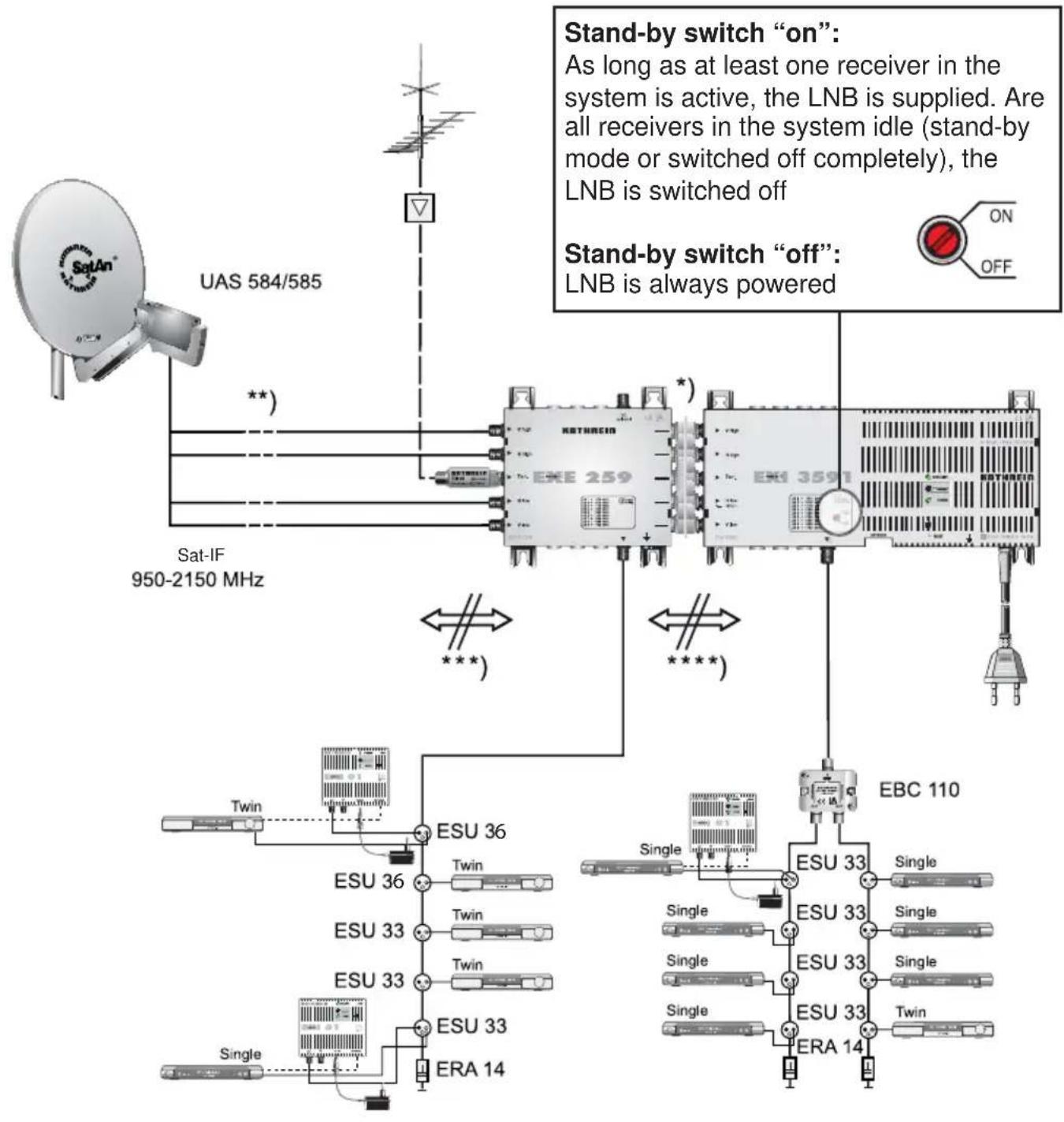
*) Connector EMU 250
**) Over-voltage protector KAZ 11/KAZ 12
*** Separation of the frequency range of IP and terrestrial antenna or other multiswitches is screwed by high-pass EXI 90
****) Separation of the frequency range of IP and done for terrestrial antenna or other multiswitches here through integrated high pass in the EXI 3591
Possible causes of problems, and their solutions
| Problem Possible cause: Solution | ||
| Permanent message:"poor or no signal" | No voltage from receiver | Short circuit at the receiver - multi-switch connection. Receiver is not in single-cable mode. Outlet blocks permanent 18 V. |
| Wrong single-cable command | Receiver is not in single-cable mode | |
| Wrong PIN Code Check PIN code number or deactivate | ||
| Wrong assignment | UB and frequency do not match. Warning: SCR no. is not the same as UB no. | |
| No voltage on the LNB | EXI 3591 power plug is disconnected. Short circuit at the receiver - LNB connection | |
| Only UB 9:"poor or no signal" | Receiver does not support SCD2 by prTS50607 | If possible, perform software update on receiver |
| Short message:"poor or no signal" or picture wobbles in regular intervals | Another subscriber has accessed the same UB | Check menu settings of all connected receivers. Check that frequencies are assigned to one receiver only. |
| Loop-through multi-switches without Kathrein Power Saving do not or only sometimes function | Stand-by switch on "ON" | Switch off stand-by function. Stand-by switch to "OFF" |
| LED "Coax/Link" does not light up | No coax connection | Pay attention to short-circuit-free connection of the coaxial cable |
| Loss between the modems is too high | Check that the components used your distribution covering the frequency range 5-68 MHz | |
| No Pairing | The modem does not have a valid network key. Run through the start up steps. | |
Electronic equipment is not domestic waste - it must be disposed of properly in accordance with directive 2002/96/EC OF THE EUROPEAN PARLIAMENT AND THE COUNCIL dated 27th January 2003 concerning used electrical and electronic appliances. At the end of its service life, take this device for disposal at a designated public collection point.
936.4553/-/VKDF/0813/GB - Technical details subject to change!
^*) QoS = Quality of Service