
UFM 341 - Audio/video converter KATHREIN - Free user manual and instructions
Find the device manual for free UFM 341 KATHREIN in PDF.


| Product Type | Audio/Video Converter |
| Brand | Kathrein |
| Model | UFM 341 |
| Dimensions (L x W x H) | 100 x 60 x 30 mm |
| Weight | 200 g |
| Power Supply | 5 V DC, 500 mA (via included power adapter) |
| Power Consumption | 2.5 W max |
| Video Inputs | 1 x HDMI, 1 x RCA composite (CVBS) |
| Video Outputs | 1 x HDMI, 1 x RCA composite (CVBS) |
| Audio Inputs | 1 x HDMI (embedded audio), 1 x RCA stereo (L/R) |
| Audio Outputs | 1 x HDMI (embedded audio), 1 x RCA stereo (L/R) |
| Supported Resolution | Up to 1080p (Full HD) |
| Supported Audio Formats | PCM, stereo 2.0 |
| Main Functions | Bidirectional HDMI-RCA conversion, analog-digital audio/video conversion |
| Maintenance and Cleaning | Unplug before cleaning; use a soft, dry cloth. Do not use solvents. |
| Safety | Use only the supplied adapter; do not expose to moisture or extreme temperatures. |
| Spare Parts and Repairability | Replacement power adapter available; device not user-serviceable. |
| Operating Temperature | 0 °C to 40 °C |
| Storage Temperature | -10 °C to 60 °C |
| Relative Humidity | 20 % to 80 % (non-condensing) |
| Package Contents | UFM 341 converter, 5 V power adapter, HDMI cable, RCA cable, user manual |
Frequently Asked Questions - UFM 341 KATHREIN
User questions about UFM 341 KATHREIN
0 question about this device. Answer the ones you know or ask your own.
Ask a new question about this device
Download the instructions for your Audio/video converter in PDF format for free! Find your manual UFM 341 - KATHREIN and take your electronic device back in hand. On this page are published all the documents necessary for the use of your device. UFM 341 by KATHREIN.
USER MANUAL UFM 341 KATHREIN
UFO® compact signal processing system TV modulator
TV modulator
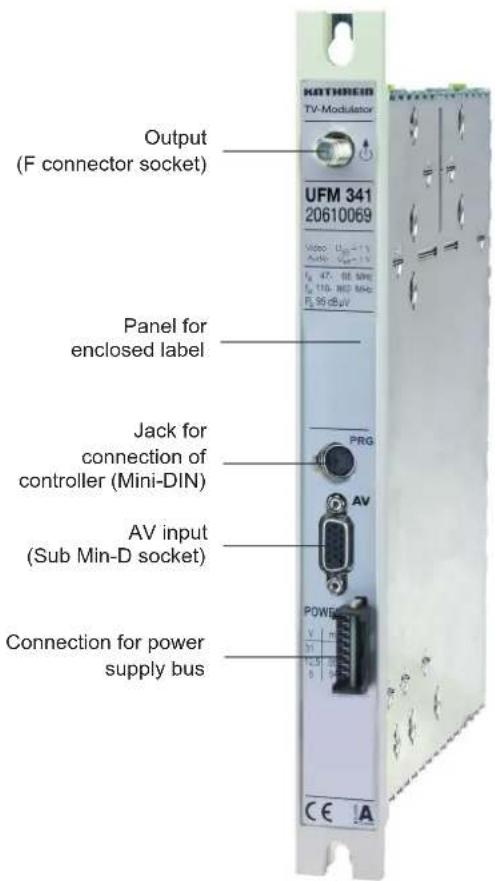
UFM 341 20610069

- TV modulator to insert into UFO®compact base units or UFG 3xx extension units
● To modulate an independent AV signal in the output frequency range of 47-68 MHz and 110-862 MHz - Adjacent channel compatible
- Output level can be set and switched off via base unit controller
- TV sound in stereo, mono or 2-tone; manually or automatically switchable via the data line decoder
● TV standard: B/G, D/K or I settable via the central controller
● Required central controller software version: at least V 8.40 - Required tools:
- Cross-recess screwdriver no. 2
- Slotted screwdriver 0.8 x 4
Note: An adapter cable Sub-Min D to Cinch can be ordered from ESC Grassau under order no. 09901498
Technical Data
| TypeOrder no. | Frequency range (MHz) | Inputvoltageaudio | Inputvoltagevideo | Signal-to-noiseratio1)S/N-weighted | Vid./Aud.carrier-levelspacingT1/T2 | Max. outputlevel / settingrange | Currentconsumption | ||
| InputAudio | InputVideo | Output1)47-68/110-862 | (Veff) | (Vss)(dB) | (dB) (dBμV) (V/mA) | ||||
| UFM 34120610069 | L R | V | C | 1 1 61 | 16/20 95/85-95 | 5/39012.5/22031/5 | |||
Setup Instructions
The TV modulator is set up via the controller on the base unit UFG 3xx.
Required central controller software version: at least version 8.10
For setup connect the controller to the module.
The buttons listed in the following relate to the controller (refer also to the operating instructions for the corresponding base unit UFG 3xx).
Note:
The settings and numerical values shown in the following are presented by way of example, and do not necessarily represent the condition of the TV modulator when shipped.
Select the desired parameter using the “←” and “→” buttons. The selected parameter flashes on the display.
Use the "+" and "-" buttons to make the setting.
Finally, press "M" to save the setting in the module. If the controller is disconnected from the module without saving the settings, the settings originally stored in the module are reactivated.
1 Selecting the output frequency and output channel
Outp. C 69 855.25 MHz
Stereo RF on
Main menu
*** UFM 341 ***
Freq. 855,25 MHz
level -10
Standard B/G
Output sub-menu
You can use the “+” and “-” buttons to adjust the channel continuously from 48.25 to 62.25 MHz and 111.25 to 847.25 MHz in 7 or 8 MHz steps
(according to the standard); the channel is only displayed where applicable.
You can fine-adjust the output frequency in 250 kHz increments on the output channel's sub-menu.
Press the “(sub-menu)” button to switch to the sub-menu and use the “+” and “-” buttons to set the required frequency.
Then press the “(sub-menu)” button to exit the sub-menu.
2 Selecting the output level
Outp. C 69 855.25 MHz
Stereo RF on
Main menu
*** UFM 341 ***
Freq. 855,25 MHz
level -10
Standard B/G
Output sub-menu
You can use the "+" and "-" buttons to adjust the output level continuously in 40 steps.
The setting limits are marked “min” and “max” (comparable to the left and right stop limits of a conventional attenuator).
You can set the output level in the output channel's sub-menu.
Press the “(sub-menu)” button to switch to the sub-menu and use the “+” and “-” buttons to set the required level.
Then press the “(sub-menu)” button to exit the sub-menu.
3 Selecting the TV standard
Outp. C 69 855.25 MHz
Stereo RF on
Main menu
*** UFM 341 ***
Freq. 855.25 MHz
level -10 Standard I
Output sub-menu
You can set the TV standard in the output channel's sub-menu.
Select the TV standard from the controller sub-menu using the "+" or "-" button. The TV standards available to choose from are B/G, D/K and I. The M standard can also be set, though only in the channel raster as per the B or G standard with 4.5 MHz Vid./Aud. carrier-level spacing.
Note: Standards D, K, I and M on output side only in mono mode!
4 Selecting the audio mode
Outp. C 69 855.25 MHz
Stereo RF on
Main menu
Switch modes using the "+" and "-" buttons on the controller (options: "Mono", "Stereo", "2-tone" or "Auto").
Notes on "Auto" mode:
■ Use only for video signal with VPS signal (data line)
■ The display depends on the content of the data line “Auto S” (Stereo), “Auto Z” (2-tone) and “Auto M” (Mono)
■ If there is no VPS signal the switch is automatically made to "2-tone" mode (displayed as "Auto *Z")
The VPS signal is transmitted with all programmes broadcast in German featuring Videotext/Teletext.
Setting "Auto" mode is generally advisable for all such programmes. Depending on the set mode, the switch in the module is made automatically.
5 Disabling the channel unit
Outp. C 69 855.25 MHz
Stereo RF on
Main menu
Outp. * C 69 855.25 MHz
Stereo
RF off
Display „RF off“
Disabling the channel unit means it is for all practical purposes shut down and no further output signal is generated.
You can use the "+" and "-" buttons to select "RF on" or "RF off".
6 Cabling of the SubMin-D socket
| Pin 1 2 6 8 11 | |||||
| Signal | Audio input left | Composite colour in-put; video clamped | Audio input right | Earth Earth | |
Note:
An adapter cable Sub-Min D to Cinch can be ordered from ESC Grassau under order no. 09901498:
ESC GmbH
Tel.: +49 8641 9545-0
E-mail: service@esc-kathrein.de
7 Circuit example

flowchart
graph TD
    A["Remote feed fi Iter"] -->|5V 12.5V 30V| B["Video recorder"]
    B --> C["UFM 341"]
    C --> D["ZF1 UHF"]
    D --> E["UFO 340"]
    E --> F["ZF1 UHF"]
    F --> G["UFO 340"]
    G --> H["ZF1 UHF"]
    H --> I["UFO 340"]
    I --> J["Decoder"]
    J --> K["ZF1 UHF"]
    K --> L["UFO 340"]
    L --> M["ZF1 UHF"]
    M --> N["UFO 340 Programme"]
    C --> O["VHF UHF"]
    D --> P["VHF UHF"]
    F --> Q["VHF UHF"]
    H --> R["VHF UHF"]
    I --> S["VHF UHF"]
    J --> T["VHF UHF"]
    K --> U["VHF UHF"]
    L --> V["VHF UHF"]
    M --> W["VHF UHF"]
    N --> X["VHF UHF"]
    O --> Y["Ground"]
    P --> Y
    Q --> Y
    R --> Y
    S --> Y
    T --> Y
    U --> Y
    V --> Y
    W --> Y
    X --> Y
    Y --> Z["Ground"]
If the UFM 341 is added on to existing systems, note that the said system may still be operating a power supply unit (order no. 1681794) with reduced current capacity. Please be sure to observe the current ratings indicated on the power supply unit label!

Electronic equipment is not household waste - in accordance with directive 2002/96/EC OF THE EUROPEAN PARLIAMENT AND THE COUNCIL dated 27th January 2003 on used electrical and electronic equipment, it must be disposed of properly. At the end of its service life, take this unit for disposal at a relevant offi cial collection point.


- UFO® compact signal processing system TV modulator
- TV modulator
- Setup Instructions
- Note:
- Selecting the output frequency and output channel
- Selecting the output level
- Selecting the TV standard
- Selecting the audio mode
- Notes on "Auto" mode:
- Disabling the channel unit
- Cabling of the SubMin-D socket
- Circuit example
Brand : KATHREIN
Model : UFM 341
Category : Audio/video converter