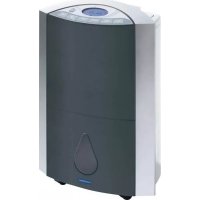
LA120501 - Dehumidifier LANAFORM - Free user manual and instructions
Find the device manual for free LA120501 LANAFORM in PDF.


| Brand | Lanaform |
| Model | LA120501 |
| Category | Dehumidifier |
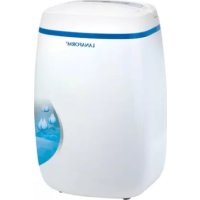
| Type | Dehumidifier with air purification |
| Power supply | 230 V ~ 50 Hz |
| Power | 370 W |
| Weight | 14 kg |
| Maximum dehumidification capacity | Up to 16.2 L/24h (at 26°C, 80% RH) |
| Display | LCD screen with humidity, temperature, mode, timer indicators |
| Operating modes | Automatic and manual dehumidification (low/high), air purification |
| Ionization function | Yes, can be activated in dehumidification or purification mode |
| Timer function | Programmable start or automatic stop (1-24 h) |
| Oscillation function | Air outlet grille adjustable at 90°, with position lock |
| Self-cleaning function | Drying program: ventilation only for 1 hour |
| Automatic defrosting | Yes, compressor stops if condenser temperature < -5°C |
| Filter type | Air filter + removable charcoal filter |
| Filter maintenance | Clean every 15 days: vacuum or soak in warm water |
| Safety - full tank stop | Automatic stop + audible and visual alarm |
| Safety - low temperature | Dehumidification stops if ambient temperature < 5°C |
| Warranty | 2 years |
| Included accessories | Permanent drainage tube, charcoal filter |
Frequently Asked Questions - LA120501 LANAFORM
User questions about LA120501 LANAFORM
0 question about this device. Answer the ones you know or ask your own.
Ask a new question about this device
Download the instructions for your Dehumidifier in PDF format for free! Find your manual LA120501 - LANAFORM and take your electronic device back in hand. On this page are published all the documents necessary for the use of your device. LA120501 by LANAFORM.
USER MANUAL LA120501 LANAFORM
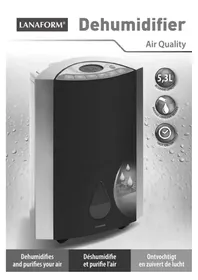
Dehumidifies and purifies your air
Thank you for your interest in Lanaform's dehumidifier. This dehumidifier will enable you, not only to reduce the humidity of your rooms, but also to purify the air you breathe. The LANAFORM dehumidifier allows you to control the level of humidity of the air and prevent excessive of humidity. Simply select the preferred level of humidity and the dehumidifier will automatically manage the percentage of water content in the ambient air.
PLEASE READ ALL THE INSTRUCTIONS BEFORE USING YOUR DEHUMIDIFIER, IN PARTICULAR THESE FEW FUNDAMENTAL SAFETY RULES:
- Check that your mains voltage is compatible with that of the appliance.
- This appliance is not intended for use by persons (including children) whose physical, sensorial or mental capabilities are impaired, or by persons lacking experience or knowledge, unless they are supervised or instructed in the use of the appliance first by a person responsible for their safety. Children should be supervised to ensure that they do not play with the appliance.
- Do not connect or disconnect the plug with wet hands.
- If the power lead is damaged, it must be replaced by a special or similar lead available from the supplier or its after-sales department.
- Never use any appliance with a damaged plug, or after any failure or damage. In this case, return the appliance to the supplier or its after-sales department.
- Always place the dehumidifier on a hard, flat and horizontal surface at a distance from walls (at least 20cm ) and sources of heat such as ovens, radiators, etc.
- Do not tilt the dehumidifier, water could pour and cause damage to the appliance.
- Disconnect the appliance when not in use or before cleaning.
- This appliance is intended for domestic and indoor use only. Do not use the dehumidifier for other purposes.
- Never place any object on the dehumidifier. This could prevent normal operation.
- Never place any object other than the articles listed in this manual in the dehumidifier.
- Never pour liquid in the dehumidifier.
- Clean the dehumidifier using a soft cloth only.
- Never use a spray in the same room as the dehumidifier.
- Wait 5 minutes before restarting your appliance after a power cut or shutdown to allow the systems of the appliance to return to operating status.
- Due to the presence of gas, moving your dehumidifier requires a degree of care. Avoid moving the dehumidifier on its side. Always wait a minimum of 2 hours before connecting it again.
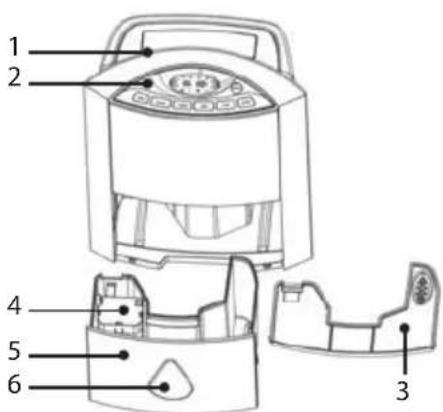
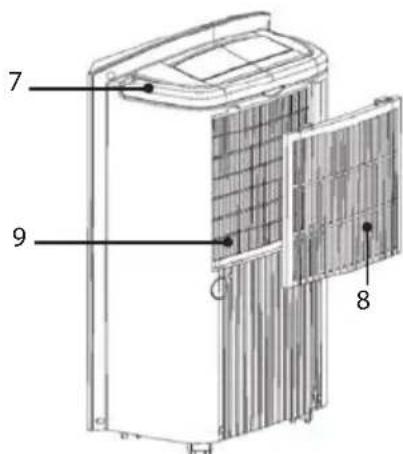
COMPONENTS
FRONT PANEL
- Air vent
- Control panel
- Tank lid
- Float
- Water tank
- Water level indicator
REAR PANEL
- Handle
- Carbon filter
- Air inlet
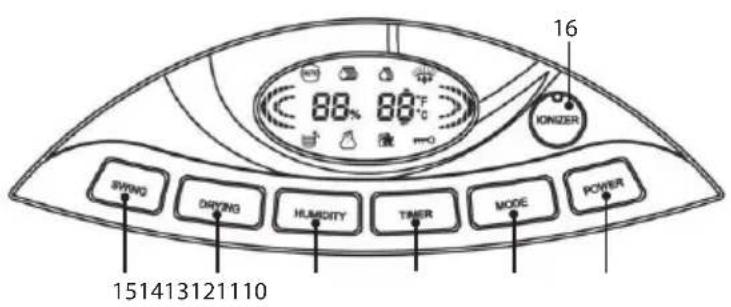
CONTROL PANEL
- On/Off key.
- Mode key: use to program the dehumidifier or purify the air.
- Timer key: use to program the automatic start up or shutdown of the appliance.
- Humidity key: use to select the preferred humidity level if the appliance is running in dehumidifier mode or fan speed if the appliance is running in purification mode.
- Drying key: use to clean the appliance after an extended period without use.
- Swing key: use to direct ventilation for the air vent.
- Ionizer key: use to activate the ionization function.

LCD SCREEN
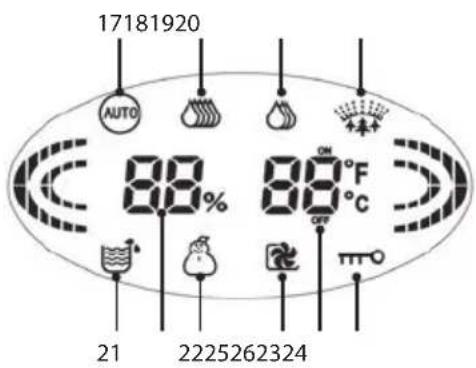
- Auto: indicates that the dehumidifier is in automatic mode.
- High (dehumidifier): Indicates that the dehumidifier is in manual mode and set to a high level.
- Low (dehumidifier): Indicates that the dehumidifier is in manual mode and set to a low level.
- Air purification: Indicates that the appliance is running in air purification mode.
- Water tank: Indicates that the water tank is full.
- Temperature alarm: Indicates that the appliance is located in a room with an ambient temperature of between 5^ and 15^ . If the icon flashes, the temperature of the room is less than 5^ and the dehumidifier program cannot run.
- Drying: Indicates that the appliance is in self-cleaning mode.
- Blocking of the control panel: Indicates that the control panel of the dehumidifier is locked.
- Humidity level indicator: Indicates the level of humidity in the room.
- Temperature/time indicator: Indicates room temperature or the duration before the appliance starts/stops
INSTALLATION
- Check that the water tank is empty before using the dehumidifier.
-
To save energy and improve performance, close all doors and windows when the dehumidifier is on.
-
The dehumidifier must be placed as close as possible to the source of humidity.
- To reduce the noise and vibrations produced by the appliance, we recommend the use of an anti-vibrations mat. These mats are available from specialist stores.
INSTALLATION OF THE WATER TANK
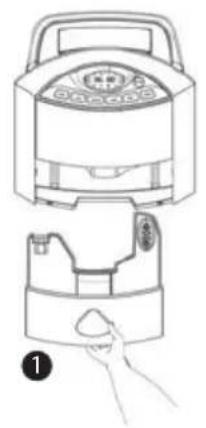
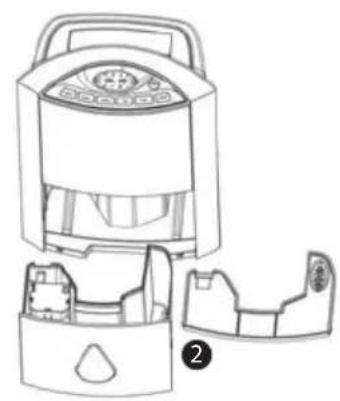
Check that the water tank is empty prior to each use. Empty the tank following the instructions below:
- Check that the appliance is turned off and unplugged before draining the tank.
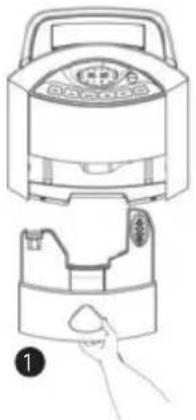
- Place your hand on the bottom of the dehumidifier and remove the base (1).
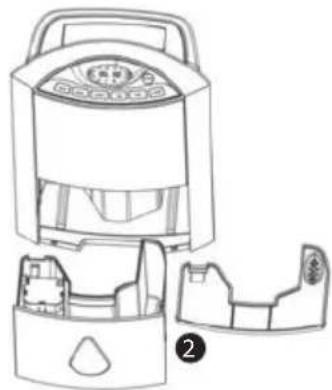
- Remove the cover located above the tank and empty the water (2).
- Replace the cover before refitting the tank.
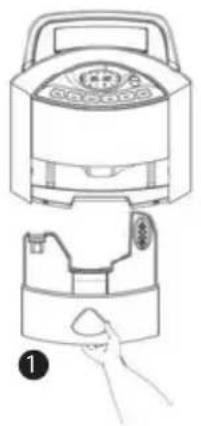
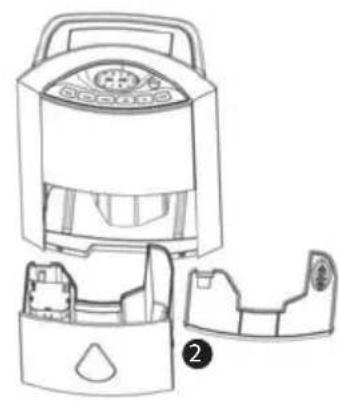
Notes: When the water tank is full, the appliance will immediately cease to operate. The water tank icon (21) will start to flash and the alarm will sound 15 times.
INSTALLATION OF THE DRAIN PIPE
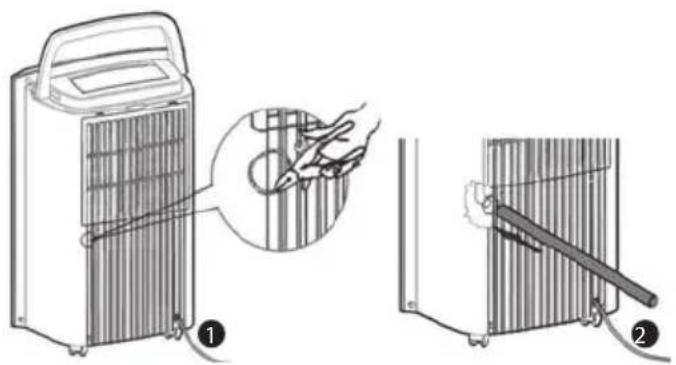
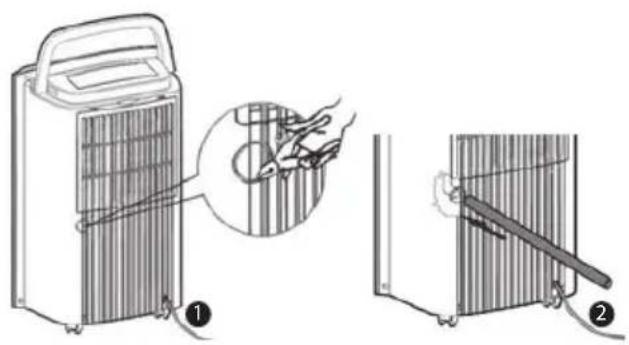
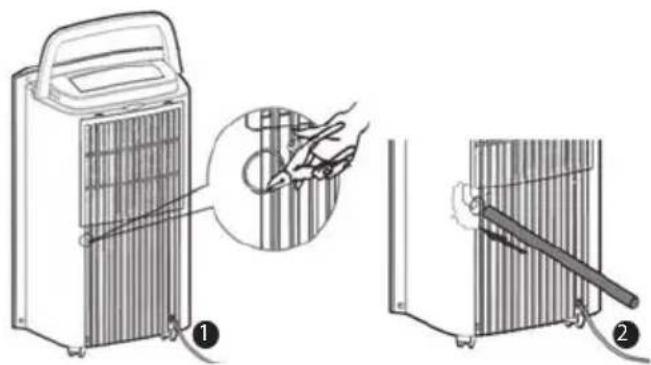
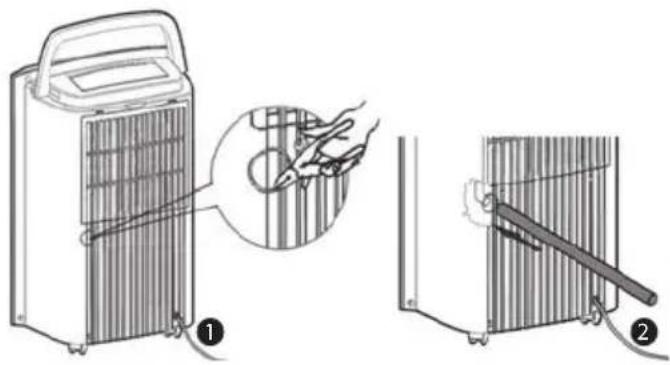
If the appliance is used in a very humid environment, your appliance may be equipped with a permanent drainage connection (supplied) as shown below:
- Cut the cover behind the appliance using scissors or a pair of pliers (not supplied) (1).
- Insert the pipe (supplied) in the drainage hole and check that the pipe fits to avoid any risk of water leakage. (2)
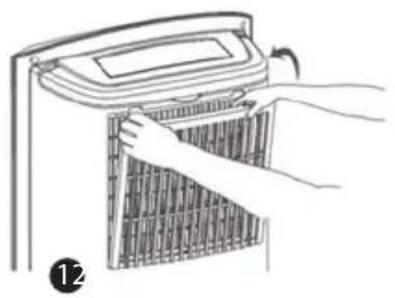
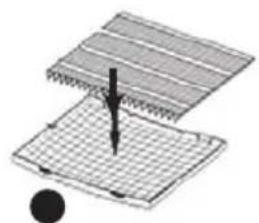
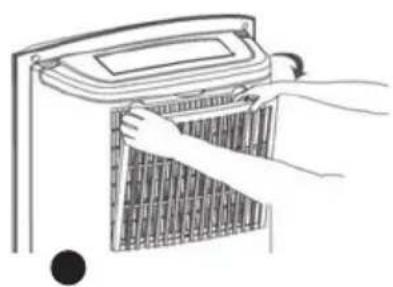
INSTALLATION OF THE CARBON FILTER
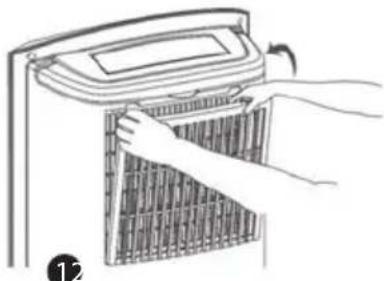
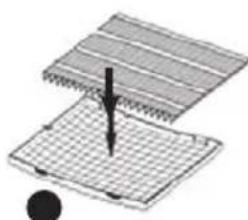
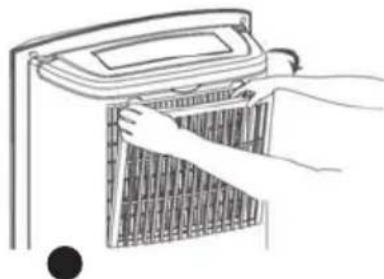
The dehumidifier is fitted with a carbon filter in addition to the air filter located under the grid. This carbon filter clears the room of unpleasant odours. Follow the instructions below to install the carbon filter:
- Open the compartment (1).
- Place the carbon filter over the air filter as shown on the diagram (2).
- Replace the filter in the compartment (3).
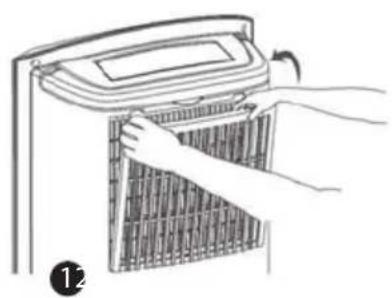
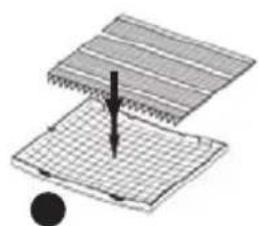
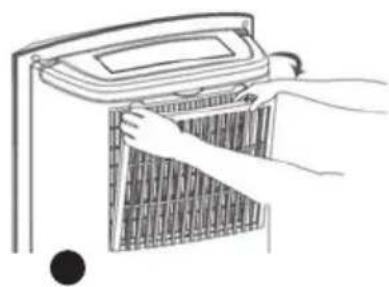
Note: It is not necessary to fit the carbon filter when you use the appliance to dehumidify air in a room. In fact, the absorption capacity of the air is reduced if the carbon filter is fitted.
SETTING PARAMETERS
The LCD screen may display the temperature in degrees Celsius or Fahrenheit. To select the preferred display, press on the Humidity (13) and Timer (12) keys simultaneously.
USE OF THE DEHUMIDIFIER
A. DEHUMIDIFIER FUNCTION
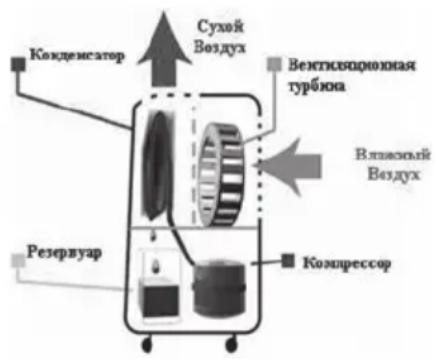
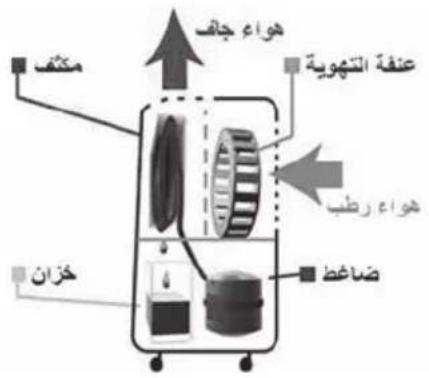
The principle of the dehumidifier involves the suction of humid air from the room. This air is then filtered and directed to a condenser at a lower temperature (the compressor acts on a coolant gas which lowers the temperature of the condenser), which transforms the water vapour in the air into water, which is then collected in a tank. The «dried» air is returned to the room. The most comfortable relative humidity for human beings is between 45% and 55% .
The dehumidifier can operate in manual or automatic mode.
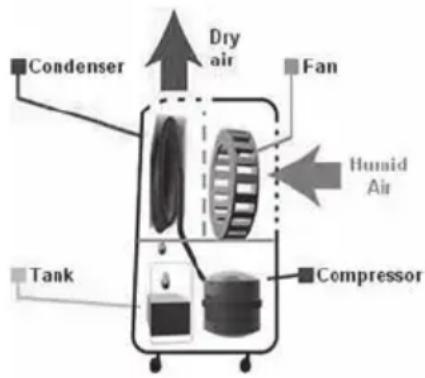
Use in manual mode
- In manual mode, you may select between low (19) or high (18).
- To select the level of the dehumidifier, press on the Power key (10) and then on the Mode key(11) until the desired icon appears.
Use in automatic mode
- In automatic mode, you may set the desired degree of humidity. This can vary between 40% and 70% .
- To select the degree of humidity, press on the Power key (10) and then on the Mode key(11) until the desired icon appears.
- You must then press the Humidity key (13) to select the degree of humidity. The selected degree will flash for a few seconds. When operating, the appliance will indicate the degree of humidity and the temperature of the room.
- The appliance will then automatically maintain or create the selected degree of humidity.
Automatic anti-freeze
- The appliance is equipped with an automatic anti-freeze system. If the temperature of the room is less than 5^ , the dehumidifier program cannot run.
- The dehumidifier is also equipped with a second temperature sensor located near to the condenser. The role of this sensor is to measure the temperature of the air in this area and prevent freezing, which could affect the normal operation of the appliance. This temperature is checked every 38 minutes. If the temperature detected is less than -5^ , the compressor will stop and the anti-freeze program will automatically start. After the anti-freeze program, the fan function will run for 5 minutes. After this period of time, if the temperature is less than 1^ , the appliance will trigger ventilation for a further 3 minutes. When the temperature exceeds 1^ , the dehumidifier will restart.
- The following table indicates mean water quantities extracted over a 24-hour period based on a range of temperatures and levels of humidity* for informative purposes:
| Temperature Degree of humidity | ||
| 60% 80% | ||
| 22° 7,2L 13,5L | ||
| 26° 9L 16,2L | ||
*These figures are mean values and may vary depending on where the appliance is used
B. DIRECTING THE AIR VENT
- When the dehumidifier or air purification functions are running, you may set the direction of the air vent. Press the Swing key (15) once. The grid will rotate 90^ . Press the Swing key (15) a second time, the grid will remain in the desired position.
C. TIMER FUNCTION
This function enables you to program the automatic startup (if the appliance is off) or shutdown (if the appliance is on) of the appliance.
Programming automatic shutdown
When the appliance is running, press the Timer key (12) until the LCD screen displays the intended number of hours. The selected number of hours will flash for a few seconds. The LCD screen will then display the degree of humidity and remaining time before the appliance shuts down. «OFF» will appear below the time.
Programming automatic starts
When the appliance is off, press the Timer key (12) until the LCD screen displays the intended number of hours. The selected number of hours will flash for a few seconds. The LCD screen will then display the degree of humidity in the room and remaining time before the appliance starts. «ON» will appear above the time.
D. AIR PURIFICATION
- The appliance is equipped with an air purification function. To activate this function, start by selecting the Power key (10). Then press the Mode key (11) until the icon (20) appears.
- You may then select the level of operation using the Humidity key (13).
- You can also select the direction of the air vent as described above.
E. IONIZATION
You may activate the air ionization function in dehumidifier or purification mode. Ionization provides many benefits: improved well-being, improved air quality, etc.
To activate the function, press on the lonizer key (16) on the control panel.
F. BLOCKING OF THE CONTROL PANEL
You may lock the control panel to avoid damage to the appliance due to use by others. Hold the Mode key (11) in for 3 seconds. To release the control panel, hold the Mode key (11) on the control panel in for 3 seconds again.
G. SELF-CLEANING FUNCTION
After a long period of inactivity, the appliance may trigger an internal cleaning sequence to remove all water and mould in the dehumidifier.
Press the Drying key (14) to trigger this sequence.
The appliance will then run for 1 hour thanks to the fan (the compressor will not operate during this program). You can stop this program by pressing on either Power (10) to turn off the appliance or on the Drying key (14). The appliance will then return to the previous program.
CLEANING AND MAINTENANCE
Make sure you turn off and unplug your appliance before cleaning.
Never use detergents to clean the dehumidifier.
CLEANING AND MAINTENANCE OF THE WATER TANK
Use clean warm water to clean the water tank and tank cover to avoid any risk of mould.
DRY THE TANK AND TANK COVER USING A SOFT DRY CLOTH.
Cleaning and maintenance of the main unit
CLEAN THE MAIN UNIT USING A WET CLOTH ONLY.
Cleaning of the carbon filter
The carbon filter must be cleaned on a regular basis due to the accumulation of dust (at least once every two weeks, or more often if necessary).
- If the carbon filter is not too dirty, remove the dust using a handheld vacuum.
- In all other cases, clean the carbon filter by soaking in warm water for 5 minutes.
- Leave to dry naturally. Do not bring the filter near to a source of heat.
BREAKDOWN AND REMEDIES
If the appliance malfunctions in everyday use, please refer to the table below:
| Problem Possible cause Solution | ||
| Neither the fan nor the compressor function | No power Maybe the appliance is not connected correctly or your power supply is faulty | |
| The water tank is full or incorrectly fitted | Empty the water tank and/or reposition the tank in the main unit | |
| The fan is running, but not the compressor | The temperature of the room is too low | The appliance stops the dehumidifier program if temperature is below 5°. |
| The level of humidity in the room is too low | The selected level of humidity is higher than that in the room or less than 40%. | |
| The compressor will not run | The temperature around the condenser is less than -5°C. The appliance will stop the dehumidifier program and run the anti-freeze program before restarting operation. | |
| No air emitted through the appliance air vent | The appliance is in self-cleaning mode | No air is emitted after 30 minutes of self-cleaning for a short period |
| Dirty filter Clean the filter | ||
| Very noisy appliance | The appliance is incorrectly positioned | Move the appliance to a flat stable surface or place an anti-vibrations mat under the dehumidifier. |
| Dirty filter Clean the filter. | ||
| No or little dehumidification | Clogged filter Clean the filter | |
| Temperature too low Check room temperature | ||
| Emission of hot air | / The condenser is emitting hot air. The appliance is not malfunctioning. | |
TECHNICAL SPECIFICATION
Voltage: 220-240 Volts
Frequency: 50Hz
Power: 370 Watts
Weight: 14 kg
ADVICE REGARDING THE DISPOSAL OF WASTE
- All the packaging is composed of materials that pose no hazard for the environment and which can be disposed of at your local sorting centre to be used as secondary raw materials. The cardboard may be disposed of in a paper recycling bin. The packaging film must be taken to your local sorting and recycling centre.
- When you have finished using the device, please dispose of it in an environmentally friendly way and in accordance with the law.
LIMITED WARRANTY
LANAFORM® guarantees this product against any material or manufacturing defect for a period of two years from the date of purchase, except in the circumstances described below.
The LANAFORM® guarantee does not cover damage caused as a result of normal wear to this product. In addition, the guarantee covering this LANAFORM® product does not cover damage caused by abusive or inappropriate or incorrect use, accidents, the use of unauthorized accessories, changes made to the product or any other circumstance, of whatever sort, that is outside LANAFORM®'s control.
LANAFORM® may not be held liable for any type of circumstantial, indirect or specific damage.
All implicit guarantees relating to the suitability of the product are limited to a period of two years from the initial date of purchase as long as a copy of the proof of purchase can be supplied.
On receipt, LANAFORM® will repair or replace your appliance at its discretion and will return it to you. The guarantee is only valid through LANAFORM®'s Service Centre. Any attempt to maintain this product by a person other than LANAFORM®'s Service Centre will render this guarantee void.
Voltage:220-240 Volts
Fréquence : 50 HZ
BESCHRANKTE GARANTIE
yjzjbaoljolai jjjjjjjj
y1234567890
m = 311
20213 20213
g 1
yj jia qai
a 1
1 1
(1).
(2)
sla 1 sna 2 sna 3 sna 4 sna 5
21 15
SAAJ 4gj
yaii 1000000000000000000000000000000000000000000000000000
(1)
(17) (Mode(11 1 (Power (10 1
Huminity (13 5
20 1
j( S2) = ( S1) + j( S_3)
5 5 5
1 (Mode 11 k (Power (10 k)
Huminity (13 25
a 1
E
2g 1 g 1 2 2 2 2 2 2 2 2 2 2 2 2 2 2 2 2 2 2 2 2 2 2 2 2 2 2 2 2 2 2 2 2 2 2 2 2 2 2 2 2 2 2 2 2 2
(1onizer (16 2
Jss s4s JF
425+3j0j0g0g0g0g0g0g0g0g0g0g0g0g0g0g0g0g0g0g0g0g0g0g0g0g0g0g0g0g0g0g0g0g0g0g0
ydiolai la aiiis Sj y dss cdlls s
j j j j j j j j j j j j j j j j j j j j j j j j j j j j j j j j j j
yds j 1j j j j j j j j j j j j j j j j j j j j j j j j
4.45 4.65 4.85 4.15 4.25 4.35 4.45
y
aJg jw gno Jauu yj
ai a ai 的最小值为 k .
1 1 1 1 1 1 1 1 1 1 1 1 1 1 1 1 1 1 1 1 1 1 1
124 j 3 3 3 3 3 3 3 3 3 3 3 3 3 3 3 3 3 3 3
5 5
S OBC = S COD + S_ BOC
125401yjyjUysu 100000000000000000000000000000
J 1 J 1 J 1 J 1 J 1 J 1 J 1 J 1 J 1 J 1 J 1 J 1 J 1 J 1 J 1 J 1 J 1 J 1 J 1 J 1 J 1 J 1 J 1 J 1 J 1 J 1 J 1 J 1 J 1 J 1 J 1 J 1 J 1 J 1 J
g j 1
gao cilao
Jus jolj cdo s y jy jy aai gaoa LANAFORM
yj 2j g j j j j j j j j j j j
e 122 g j Jg a LANAFORM
oai j 1j 1i iLANAFORMM
Ecn np6op nCnoB3yeTcB NOpMeueHnX C BbICOKO BnaXHOCTbIO, BO3MOxHa yCTaHOBka NOCToHHoI DpeHaXHO Tpy6Kn (BXoNTB KOMNKeT NoCTaBKN):
- PpOeJaTe OTBepTne C NOMoUbIO HOXHnI nI IaCCATNKeB 3aHeN NaHEn Ipn6opa.
BCTaBBTe Tpy6ky (BXOHT B KOMNJIeKT NocTABKN) BДрehaJHoe OTBepctne.Bo n36eKaHne yTeueK BoDbl, y6eINTEcb,уTO OHa xopoOYo yCTaHOBJeHa. (2)
YCTAHOBKA YGOLbHOrO ΦNJIbTPA
TOMMBO3dyuHoro fNtbpTa, yCTAHOBHeHHoro nOpeWetKo, oCywnteB Bo3dyxa TaKxe 60pyoDBaH yrOHBbIM fNtbpom. OH no3BoJare N36abTbcra OHTHePnAaTHbIX 3anaXOB B NoMeueHN. Iyra YcTAHOKn yrObnHO rHOro fNtbpa cIeDyIte cIeDyUcIM INHCTpyKcIyAM:
- CHIMMTE paMKy (1).
- HanoXnTe yrOJbHbI ΦnIbTp Ha Bo3DyUHbI, KaK 3TO nOKa3aHO Ha pnc. (2).
BCTaBbTe o6paTHo 0nIbTp B pAMky (3).
Ipumeyaue: Het Heo6xOIMOCn IcNoB30BaTb yOrnbHbI ΦNtpr npu OcyeHN B03dyxa B nomeeHN. Pnp NcNoB30BaHN yOrNbHO rO pTa yPoBeHb NorloeHN B03dyxa CHnxJaTc.
YCTAHOBKA NAPAMETPOB OTOBPAXEHN TEMNEPATyPbI
Kndkokpnctaanueckn 3kpan MoKeT OTo6paKaTb TemepaTy B rpaIycax no Cenbcno nn OapeHReTu. TTo6bl Bbl6paTb TIN OTo6paKeHnO ndOBpeMeHNO hXMMTe KONKn Humidity (13) n Timer (12).
NcNoJIb3OBAHNEOCyUHTeJIa
A.ФУHKUЯ OCUWEHЯ
PnHnIocUyHeHn 3aKIOuAeTcB 3a6Ope BnaXHoRo B03DyXa
PomeHn,eroΦnIbTpaunn HnnpaBLeHNn B KOHDeHCaTOp C MeHbWei
Tempepatpyo (KomnPecccop CxIMMaet XlaDaReHTbI, KOTOpBie N03BOJHO
NoHN3ntb Tempepatpy KoHdEHCaTopa).B pezylbTaTe BOJHbIe npbl,
CopejKaUncsB B03DyXne Pneo6pa3yHToC B BOy, KOtOpa Co6nPaeTcB
Bpe3epByape.Takm O6pa3OM «OCyuEHHbI» B03DyX NoCTynaeT B
PomeHn.ДЯЧeLOBeKa Ha6OJIe KOMΦoPTHOI CuNTaETc45-55%
OTHOcHTelhA BLaXHoCTb B03DyXa.
OcunTeB MoKeT pa60TaB B pyHOM n aBTOMaTnueckOM peKmE.
IcnoB30BaHne np6opa B pyHOM pexnme
BpyuHOM pexKMe Bbl MoKeTe Bbl6paTb Hn3KyU (19) uIN BBICoKYU CTeneHb ocyuHeHn (18).
- YTo6bI BbIbPaTb CTeneHb ocUweHnHaXMMte KhONKy Power (10), 3aTeM HaxKMaIe KhONKy Mode (11) noka Ha 3kaPeHe He BbICBeNTcR Heo6xOIMMbI 3HaQOK.
IcnoB3OBAHne np60pa B aBTOMaTHueckom pexnme
B aBTOMaTnueckom pexKIme Bbl MoKeTe yCTaHaBnBaTb XeJaEmbI yPoBeHb BnaXHoCTN. OH MoKeT coCTaBnA rTb OT 40%do70%.
-Утобы установпг Heобхдимь уровь влжногсп НжмITE конку Power (10), затем нахимаite Кноку Mode (11) поka на заразе He BBICBETITСЗHAчOK (17).
3aTeM haxmMaTe KhoNky Humidity (13), 706bI BbIbpaTb Heo6xOIMMbYyPOBeHb BnaXHOCTn. 3HaOK Bbl6paHHoro yPOBn BnaXHOCTn 6ydt MrrAe THeckOJbKO cekyHd. Bo BpeM pa60tI np6Op 6ydt Noka3bBaTb yPOBeHb BnaXHOCTn I TeMnepaTyPb BO3dyxA B NOMeHIN.
- Pnp6op aBTOMaTnueckn HacTpAnBaETcIy IIOdepKahH NIN IOCTnKeHn BbIpaHHOrO ypOBH BnaXHoCTN.
AbTomatnueckoe OTTaBbHne
HENCIPABHOCTN IN CNOCObl INX YCTPAHEHNA
IpouTne, noxanynta, cneyiouyo Ta6nuy B cnyuae HapyuHnHaopMaBHO pa6ObI np60pa B cTaHdApTHbIX yCIOBnX NcNoB3OBaHnA:
a aalwlll aalwlll aalwlll lalwlll olae laawy g yagbwr jzjia Jaaee
alai jia jia jia jia jia jia jia jia jia jia jia jia jia jia jia jia jia jia jia jia jia jia jia jia jia jia jia jia jia jia jia jia jia jia jia jia jia jia jia jia jia jia jia jia jia jia jia jia jia jia j
.12
j y j 13
aegll aaii jiajia jiaai Jaaie aagill ae
yj 14
GgSwing.15
.16
y
LsIgjJzJyBjlll all jJnJ:Auto Jga.17
.18
aaiis yssll bail lJe aaybgl all j!bai j:aaia aygbalj.19
.0gall aaii bai iie jia jiaaii 20
- 21
15 5 jj j j j j j j j j j j j j j j j j j j j j j j j j j j j j j j j j j j j j j
Aa 5
Drying.23
.0221 4y8y8y8y8y8y8y8y8y8y8y8y8y8y8y8y8y8y8y8y8y8y8y8y8y8y8y8y8y8y8y8y8y8y8y8y8y8y8y8y8y8y8y8y8y8y8y8y8y8y8y
jll j 1/0g 20 g 10g 20g 20g 20g 20g 20g 20g 20g 20g 20g 20g 20g 20g 20g 20g 20g 20g 20g 20g 20g 20g 20g 20g 20g 20g
jieeai
aagbdl jjo Jaxiuol jia clllj jy sL
yagjll jya jyks laie a gia lyg ydi jy 1y g jyall jae jlaa gabal slayy
x_2 = -b ± ^2 - 4ac2a
aagabll jao jssjso aegabll jao g
g jzll cai jjiau sluaa gao y gao jzll jc o jiau all cui jiau y gao
aaiailllal jg
y jll jll Jnnl JnJnJnJnJn
ailllll lalil l jai jai
.
.(1)jzjg jyjgljyjx
.(2)clal jil jil jall gale 2gail albll egil
jai jui jia aia gao 1bail 1
jLsic Jaxll jgs jgll Lsi:
clll jia ayai jao yi laie. liiia clll jia
15 y 21
yai
0y jSag,12 bBw g jgll Jaaal sic oaii yos Ls (jglly) pui w g uia aabj jgall algall
(1) ( 34m - 2)
A
.(2)clll 1
a#
aill gll jn aalil lglllgall gaa jia jai all iai gall gell alil
.
iill lll li g poill 5
.(1)a
(2) _i=1^n a_i g_i 与 a_i g_i 相等, 则 g_i g_i+1 与 g_i+1 g_i 相等.
(3) 25 a + b ≤ 125, a ≤ b
e gall yolaiol o jy o jayll glg no ayglal all jy jyll Jiaiinie ayjgrn ie pail slaio: aldo
psill slln Juaaiiie jai
AR
T (12) (Humidity 13
y
a 1
a g a g a g a g a g a g a g a g a g a g a g a g a g a g a g a g a g a g a g a g a g a g a g a g a g a g a g a g a g a g a g a g a g a g a g a g a g a g a g a g a g a g a g a g a g a g a g a g a g a g a g
55
.(18) 19) (19) (10) (10) (10) (10)
151 bairi 1
3%40 1234567890123456789012345678901234567890123456789012345678901234567890123456789012345678901234567890123456789
(Mode(11)(Power(10
Hmidity (13 2
.
111 111 111
5
38 38 38 38 38 38 38 38 38 38 38 38 38 38 38 38 38 38 38 38 38 38 38 38 38 38 38 38 38 38 38 38 38 38 0000000000000000000000000000000000000000000000000000
| 80% | 60% |
| 13.5 | 7.2 |
| 16.2 | 9 |
Jssal jaiy aai yaii
1
yabaiol,alil,olgll,olglaljgclgallagglalglaljla (Swing (15 90 48) (Swing (15
Timer
aiia jia jiall ie alail jiall gaii
aegbll jia aaii iaii 12jao
olll jjis kssg
jai all jsi ydi lla g lae ola Jaaia aieae aeall jssy
aaiy aclti jiaabai bai yailb clljia
1 1
y 1
5 15 Js aal bii yll sia i jai
jki 1
52al 10a la yaaalall
jlll jlll lgljg jglg jglgl
gai jie 1
INSTALACE NADRTE NA VODU
INSTALACE UHLIKOVÉHO FILTRU
CISTENI UHLIKOVHO FILTRU


- PLEASE READ ALL THE INSTRUCTIONS BEFORE USING YOUR DEHUMIDIFIER, IN PARTICULAR THESE FEW FUNDAMENTAL SAFETY RULES:
- COMPONENTS
- FRONT PANEL
- REAR PANEL
- CONTROL PANEL
- LCD SCREEN
- INSTALLATION
- INSTALLATION OF THE WATER TANK
- INSTALLATION OF THE DRAIN PIPE
- INSTALLATION OF THE CARBON FILTER
- SETTING PARAMETERS
- USE OF THE DEHUMIDIFIER
- DEHUMIDIFIER FUNCTION
- Use in manual mode
- Use in automatic mode
- Automatic anti-freeze
- DIRECTING THE AIR VENT
- TIMER FUNCTION
- Programming automatic shutdown
- Programming automatic starts
- AIR PURIFICATION
- IONIZATION
- BLOCKING OF THE CONTROL PANEL
- SELF-CLEANING FUNCTION
- CLEANING AND MAINTENANCE
- CLEANING AND MAINTENANCE OF THE WATER TANK
- DRY THE TANK AND TANK COVER USING A SOFT DRY CLOTH.
- CLEAN THE MAIN UNIT USING A WET CLOTH ONLY.
- BREAKDOWN AND REMEDIES
- TECHNICAL SPECIFICATION
- ADVICE REGARDING THE DISPOSAL OF WASTE
- LIMITED WARRANTY
- BESCHRANKTE GARANTIE
- gao cilao
- YCTAHOBKA YGOLbHOrO ΦNJIbTPA
- YCTAHOBKA NAPAMETPOB OTOBPAXEHN TEMNEPATyPbI
- NcNoJIb3OBAHNEOCyUHTeJIa
- A.ФУHKUЯ OCUWEHЯ
- IcnoB30BaHne np6opa B pyHOM pexnme
- IcnoB3OBAHne np60pa B aBTOMaTHueckom pexnme
- AbTomatnueckoe OTTaBbHne
- HENCIPABHOCTN IN CNOCObl INX YCTPAHEHNA
- a aalwlll aalwlll aalwlll lalwlll olae laawy g yagbwr jzjia Jaaee
- INSTALACE NADRTE NA VODU
- INSTALACE UHLIKOVÉHO FILTRU
- CISTENI UHLIKOVHO FILTRU
Brand : LANAFORM
Model : LA120501
Category : Dehumidifier