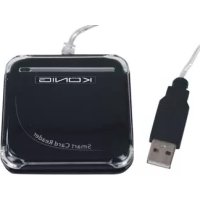
CMPSMARTRW10 - Payment terminal KONIG - Free user manual and instructions
Find the device manual for free CMPSMARTRW10 KONIG in PDF.


User questions about CMPSMARTRW10 KONIG
0 question about this device. Answer the ones you know or ask your own.
Ask a new question about this device
Download the instructions for your Payment terminal in PDF format for free! Find your manual CMPSMARTRW10 - KONIG and take your electronic device back in hand. On this page are published all the documents necessary for the use of your device. CMPSMARTRW10 by KONIG.
USER MANUAL CMPSMARTRW10 KONIG
This model enables data transmissions through the USB interface, and realizes secure and fast smart card transactions. This reader/writer is perfect for personal smart card use, such as authentication or electronic payment.
This smart card reader / writer is an easy way to make existing PC's smart card capable. The smart card reader has the potential to enable smart cards to become a viable form of payment on the internet.
Installation Manual for the Smart Card Reader
The installation steps of the Smart Card Reader's setup driver:
If the driver of the smart card reader has been installed before, please delete the program, restart the computer and reinstall the setup driver of the smart card reader.
When you restart the driver don't restart the computer. Restarting will cause the installation program to fail.
Step one: Put the CD into the CD-ROM and choose (double-click) "Driver.exe" program to start launching driver setup.
Step two: System will begin to install the driver (the progress could take several minutes)
Step three: When the desk is shown the "finish", please click it; i.e. finish the installation
Step four: When installation is confirmed well, you can begin to use it normally.
Step five: Connecting the smartcard reader will show "EMV certified USB Smart Card Reader" on the system.
Step six: After installing, there will be shown "the new system is installed well and can begin to use"
Remarks: After it, you can check whether there is the "Generic USB Smart Card Reader" folder on the "Set Administrator".
Installation Manual for the eCash Checker
Step one: Put the CD into the CD-ROM and then choose the "inquiry system of the eCash checker" folder;
Step two: Open the folder and double-click the "Setup"; The system will start to install.
Step three: After installation, you can use it.
The inquiry functions of the eCash's balance;
Click the "Start"- "All program"- "Inquiry program of the eCash".After these, you can use it.
When you come into the program, please plug the inquiry card into the Smart card reader. Then, click the "Enact Smart Card Reader" at first and click the "Inquiry Balance";i.e. you can begin to use it.
Important Amendment Notice for Internet Explorer User
Step 1: Confirm the Operation System (OS)Windows 98 or newer, and used with Internet Explorer 6.0 or newer
Step 2: Install the driver of the chipset reader
2.1: Use the Driver CD attached in the packaging
2.2: Do not insert the chipset reader when installing the driver
Step 3: IE (Internet Explorer) Setup Amendment
3.1: When accessing to the ATM System of bank terminal at the first time, the ATM system will pop-up a dialogue for "Security Warning", Please press "YES" to install the component of ATM system which is necessarily run during trading.
In order to download the component successfully, please refer to the instruction of IE setup steps in Step 3.2
It is about 10 seconds up to 1 minute for downloading the component (Depends on your network and computer compatibility).
3.2: Referring to IE's
- Select "Enable" item "Binary and script behaviors"
- Select "Prompt" item "Download the unauthorized ActiveX"
- Select "Enable" item "Download the authorized ActiveX"
- Select "Enable" item "Auto-Remind the ActiveX"
- Select "Prompt" item "the safety uncertainty of the ActiveX"
Specifications and features:
USB 1.1 / 2.0 interface
Ideal for internet shopping / banking or user authentication
Manual card insertion / removal
Dimensions: W60 x L60 x H10 mm
Compliant with ISO7816 standard smart card
Compliant with PC/SC 1.0 interface specification
Suitable for windows 98 / 2000 / Me /Xp / Vista
Support T = 1 and T = 0 protocols
Declaration of conformity
We,
Nedis B.V.
De Tweeling 28
Declare that product:
Name: KONIG
Model: CMP-SMARTRW10
Description: SMARTCARD READER
Is in conformity with the following standards
EMC: EN55022:1998+A1:2000+A2:2003
EN55024:1998+A1:2001+A2:2003
EN61000-3-2:2000
EN 61000-3-3:1995+A1:2001
LVD: AC50~1000V, DC75~1500V
Following the provisions of the RoHS directive.
's-Hertogenbosch, August 29, 2007
Mrs. J. Gilad
Purchase Director
Maintenance:
Clean only with a dry cloth. Do not use cleaning solvents or abrasives.
Warranty:
No guarantee or liability can be accepted for any changes and modifications of the product or damage caused due to incorrect use of this product.
General:
Designs and specifications are subject to change without notice.
All logos brands and product names are trademarks or registered trademarks of their respective holders and are hereby recognized as such.
Attention:
This product is marked with this symbol. It means that used electrical and electronic products should not be mixed with general household waste. There is a separate collections system for these products.
Copyright ©

PLEASE NOTE THAT OTHER LANGUAGES CAN BE FOUND ON THE CD INCLUDED WITH THE PRODUCT
KONIG
ELECTRONIC
CMP-SMARTRW10
Smartcard-Reader
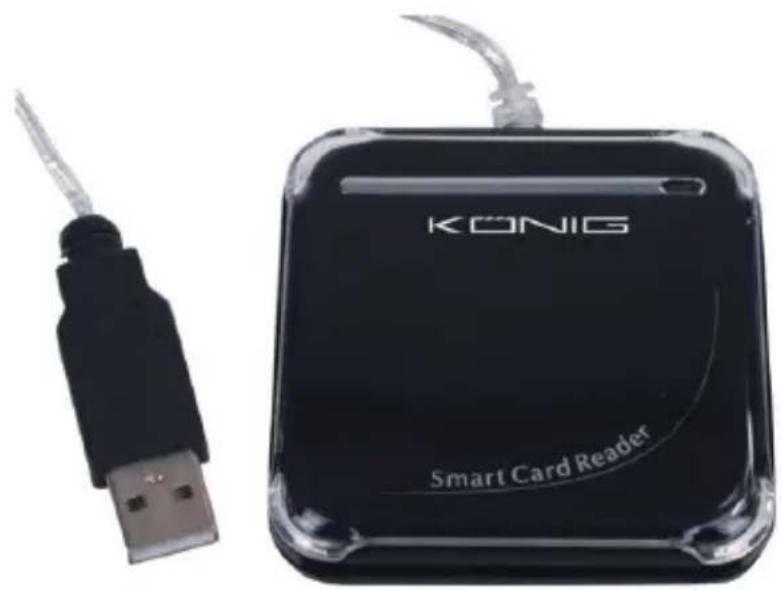
MANUAL
MODE D'EMPLOI
MANUALE
HASZNÁLATI UTMUTATO
BRUKSANVISNING
MANUAL DE UTILIZARE
ANLEITUNG
GEBRUIKSAANWIJZING
MANUAL DE USO
KAYTTOOHJE
NAVOD KPOUZITI
's-Hertogenbosch, 29. August 2007
Frau J. Gilad
Einkaufsleiterin
Wartung:
LVD: AC50~1000V, DC75~1500V
Stap 3: IE (Internet Explorer) Setup Amendment
LVD: AC50~1000V, DC75~1500V
LVD: AC50~1000V, DC75~1500V
LVD: AC50~1000V, DC75~1500V
's-Hertogenbosch, August 29, 2007
Mrs. J. Gilad
Beszerzési Igazgató
LVD: AC50~1000V, DC75~1500V
Steg 3: IE (Internet Explorer) Setup Amendment
Specifications characteristics:
Interfata USB 1.1 / 2.0
LVD: CA50~1000V,CD75~1500V