Memo 66 - Voice recorder OLYMPIA - Free user manual and instructions
Find the device manual for free Memo 66 OLYMPIA in PDF.


| Product type | Digital voice recorder |
| Brand | Olympia |
| Model | Memo 66 |
| Dimensions | 124 × 25 × 15.5 mm |
| Weight | 34.3 g (without batteries), 56.5 g (with batteries) |
| Power supply | 2 AAA/LR03 alkaline batteries, 3V DC |
| Battery life | Approximately 6.5 h recording, 3.5 h playback (volume 5) |
| Recording capacity | 99 messages max; time: SP 91 min, EP 122 min, LP 200 min |
| Recording modes | SP (prolonged playback), EP, LP (long playback) |
| Main functions | Recording, playback, indexing, individual/delete all, lock (Hold), voice activation (VOX), confirmation beep |
| Microphone | Internal condenser microphone; external microphone input 3.5 mm mono |
| Earphone | Headphone output 3.5 mm, impedance 32 ohms |
| Display | LCD |
| Reset | Reset button on the back of the device |
| Operating temperature | 0°C to 40°C |
| Included accessories | Earphone, user manual |
| Care and cleaning | Clean with a dry cloth; avoid moisture |
| Safety | Keep out of reach of children; do not expose to water |
| Spare parts and repairability | No user-serviceable parts; contact customer service if a problem occurs |
Frequently Asked Questions - Memo 66 OLYMPIA
User questions about Memo 66 OLYMPIA
0 question about this device. Answer the ones you know or ask your own.
Ask a new question about this device
Download the instructions for your Voice recorder in PDF format for free! Find your manual Memo 66 - OLYMPIA and take your electronic device back in hand. On this page are published all the documents necessary for the use of your device. Memo 66 by OLYMPIA.
USER MANUAL Memo 66 OLYMPIA
Service-Center Hattingen
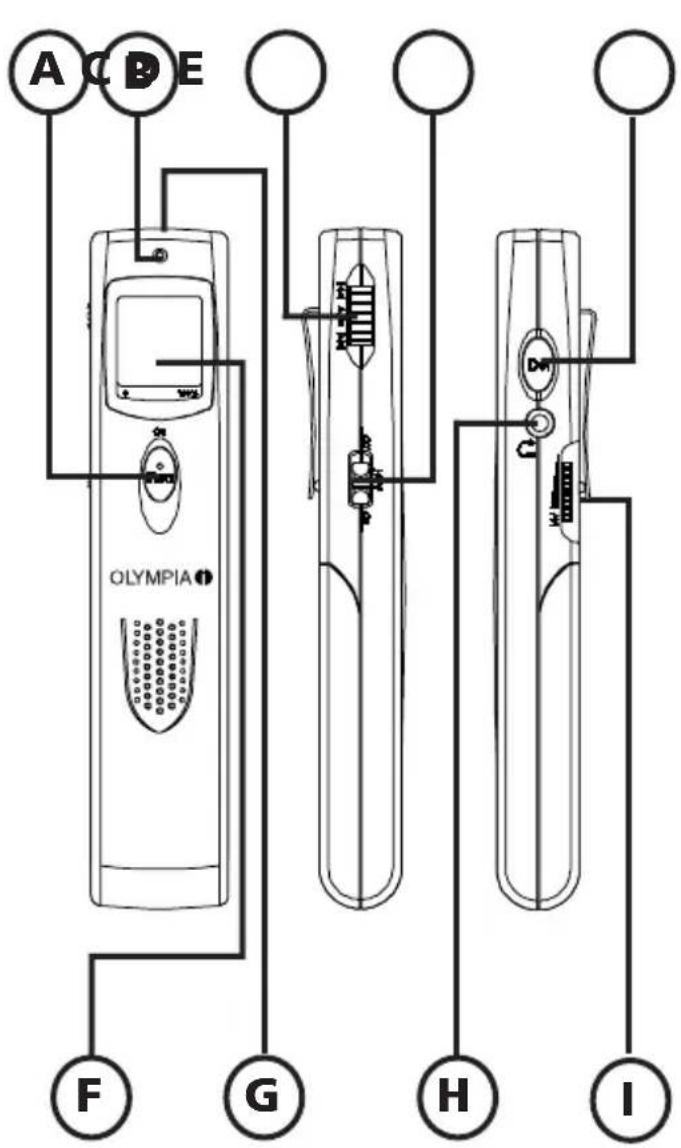
Press to switch the recorder on and to record messages
B LED
C J og dial
- Rotate to scroll forward or backward through your messages
- Press to play back or stop messages
- Press to mark an index during recording
- Use in Set-up mode to scroll between and select settings
D H old on/off Switch
to lock the recorder
EDel
Use to erase selected or all messages
F D i s p l a y
G M i c r o
HHe a d p h o n e
I V olume dial
Rotate to adjust the playback volume
Installing the batteries
- The OLYMPIA MEMO 66 digital recorder uses two 1.5V AAA alkaline batteries.
Insert batteries:
- Open the battery compartment by sliding the battery compartment cover on the back of the recorder in the direction of the arrow.
- Place the batteries into the compartment, making sure they are inserted according to the correct polarity.
- Slide the battery compartment cover back on until it clicks into place.
Replacing the batteries
- The remaining battery indicator shows the battery consumption as follows:
Full Empty



- If the battery mark flashes, replace the new batteries immediately.
Turning the recorder on
To turn the recorder on, simply press the On/Rec switch on the front. The recorder switches itself off automatically if it is not operated for about two minutes.-
The LCD
The LCD provides various information about the status of the recorder. When the recorder is switched on, the initial display shows the record mode that is selected
SP - standard play
EP - extended play or
LP - long play
in the top left corner.
In the top right corner you can see the two-digit index number of the message (00 if no messages are recorded or if you are using the recorder for the first time). Underneath the record mode is a display of the battery status. At the bottom of the display, you can see the duration of the selected message.
The bar at the very bottom of the display corresponds to the scale marked 0 - 100% underneath the LCD and shows the size of the available memory.
Set-up mode
In Set-up mode, you can set various functions on the recorder.
To enter Set-up, make sure the recorder is in stop mode (not recording or playing back messages). Then press and hold the Jog dial for two seconds.
The first display shows the amount of available time left (REMAIN) for recording in the record mode that is displayed in the top left corner. This REMAIN screen is also used to change the recording mode. By rotating the Jog dial up or down, you can scroll to the other functions VOX and BEEP.
To change the record mode:
Press the Jog dial while in the REMAIN screen. You can then scroll between the record modes SP, EP and LP by rotating the Jog dial. To set a mode, press the Jog dial when the desired mode is displayed in the top left corner. The available time left for recording is displayed at the bottom. The recorder then automatically returns to normal operation.
To change the VOX mode:
When VOX, or voice activated recording, is set to on, the recorder will stop recording when it detects several seconds of silence. It resumes recording automatically when a voice is detected again.
In Set-up, rotate the Jog dial to scroll to the VOX display and select it by pressing the Jog dial. Rotate the Jog dial to toggle between VOX on and VOX off, then press the dial to confirm the setting you want. The recorder then automatically returns to normal operation.
To change the BEEP mode:
When BEEP is activated, a confirmation tone will be heard.
In Set-up, rotate the Jog dial to scroll to the BEEP display and select it by pressing the Jog dial. Rotate the Jog dial to toggle between BEEP on and BEEP off, then press the dial to confirm the setting you want. The recorder then automatically returns to normal operation.
Recording
To record a message, press Rec once. The indicator light above the LCD turns red. To record, you can use either the internal microphone or you can plug an external microphone in to the Mic socket on the top of the recorder. Use a condenser type microphone.
For best results, keep a distance of 10 cm (min.) to 30 cm (max.) between the microphone (internal or external) and the sound source. To stop recording, simply press Rec again.
Marking an index during recording
You can mark an index when you are recording. This means you can play back the message from the location of the index instead of having to start right at the beginning. To mark an index, simply press the Jog dial once while recording. An index will be located at the next message number during recording.
Playback
To play back a message:
Use the Jog dial to scroll through the messages until you find the number of the message you want to hear.
Press the Jog dial once to play back the message. The indicator light above the LCD turns green.
To stop playback, simply press the Jog dial again.
Deleting messages
Scroll through the messages to find one you wish to delete by rotating the Jog dial.
Press Del once. The two-digit index number will flash.
Press Del again to confirm the erasure of the single message, press Rec to cancel the erasure, or rotate the Jog dial to togg from a single message to all messages.
When ALL flashes in the display, press Del to confirm the erasure of all messages, or press Rec to cancel the erasure.
Reset
If the recorder should malfunction, use a blunt point (e.g. the tip of a pencil or the nib of a pen) to press the Reset key on the back of the recorder.
If the memory has been corrupted, reset the system as follows:
- Press and hold the Del key;
- At the same time, press the Reset key as described above;
- Release the Reset key;
- Wait until the "REMAIN" icon is displayed.
- Release the Del key.
The memory will be initialised after about 45 seconds.
Model name: OLYMPIA Memo 66
Available SP 91 min
recording EP 122 min
time: LP 200 min
Dimensions: 124 × 25 × 15.5 cm
Weight: 34.3 g (excl. battery)
56.5 g (incl. battery)
Power supply: 3 V DC, LR03,
two AAA or UM-4
alkaline batteries
Battery life: approx. 6.5 hours
recording time,
approx.3.5 hours
speaker playback time
(at volume 5)
Recording media: built-in flash memory
Max.no.ofrecordings: 99 messages
Effective max. output: 54 mW (8 ohm)
Frequency range: 350 - 3600 Hz
Microphone: built-in, condenser
type
Mic. Input: 3.5 mm diameter,
mono type
Earphone: 3.5mm diameter,
IMP 32 ohm
Operating temperature: 0 - 40^
Accessories: user's manual,
earphone
SP - lecture standard
56.5 g (incl. battery)