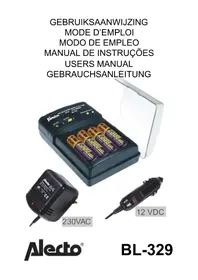
BL329 - Battery charger ALECTO - Free user manual and instructions
Find the device manual for free BL329 ALECTO in PDF.



| Product Type | Battery Charger |
| Brand | Alecto |
| Model | BL329 |
| Compatible batteries | NiCd and NiMH, AA and AAA sizes |
| Number of batteries | 2 or 4 batteries simultaneously |
| Supply voltage | 12-13.8 VDC (via 230V adapter or 12V cigarette lighter cable) |
| AA charge voltage | 2.8 V (2 batteries) / 5.6 V (4 batteries) |
| AAA charge voltage | 2.8 V (2 or 4 batteries) |
| AA charge current | 800 mA (fast charge) / 80 mA (trickle charge) |
| AAA charge current | 300 mA (fast charge) / 30 mA (trickle charge) |
| Discharge current | 85 mA |
| Maximum power | 4.48 VA |
| Functions | Fast charge, trickle charge, discharge, Refresh function (anti-memory effect) |
| LED indicators | Red (charge), yellow (discharge/refresh), green (trickle charge) |
| Protection | Mechanically protected against battery reversal |
| Included accessories | 230V mains adapter and 12V cigarette lighter cable |
| Maintenance | Clean contacts with a dry cloth; do not expose to moisture |
| Safety | Use only with supplied accessories; avoid shocks and drops |
| Repairability | Have repairs done only by qualified personnel |
Frequently Asked Questions - BL329 ALECTO
User questions about BL329 ALECTO
0 question about this device. Answer the ones you know or ask your own.
Ask a new question about this device
Download the instructions for your Battery charger in PDF format for free! Find your manual BL329 - ALECTO and take your electronic device back in hand. On this page are published all the documents necessary for the use of your device. BL329 by ALECTO.
USER MANUAL BL329 ALECTO
Besoin d'aide?
- Suitable for rechargeable batteries (NiCd and NiMH), size AAA en AA.
- Intelligent charger/tricklecharger with discharge function.
- Mechanical protection against faulty placing of the batteries.
- With REFRESH function against the memory-effect of NiCd batteries.
- Batteries are kept 'ready for use'
- Including a 230 Volt power adapter for indoor use and a 12 Volt powercord with lighter-plug for mobile use in a car.
How to use:
- Connect the power adapter or the 12V DC powercord with the charger.
- Install 2 batteries on the left side of the charger and slide the switch into position '2' or install 4 batteries and slide the switch into position '4'.
- Plug the power adapter in a 230 Volt power outlet or plug the 12 Volt lighter plug into the concerning jack in your car. After some seconds the DISCHARGE/CHARGE LED will glow red and the charging begins.
- Press button DISCHARGE/CHARGE to first discharge the batteries to a reference voltage of 1V prior to continue the charge cycle. The DISCHARGE/CHARGE LED will turn yellow.
This discharge-mode will take a wile, depending on the capacity of the installed batteries. To interrupt the discharge-mode and return to the charge-mode, press the DISCHARGE/CHARGE button.
-
When the batteries are discharged to 1V, the BL-329 automatically switches over to the charge-mode. The DISCHARGE/CHARGE LED turns red again.
-
As soon as the batteries are fully charged, the BL-329 constantly measures the batteries using delta-V measurements, the charger switches over to trickle-charge, the DISCHARGE/CHARGE LED turns green. The batteries are kept charged in this mode and are ready for use when needed.
Refresh:
To eliminate the dreaded memory effect found in NiCd batteries and to assure that your NiCd batteries are always performing to their full capacity, the BL-329 has a MEMORY REFRESH function.
-
To activate the MEMORY REFRESH function, simply set the REFRESH switch in the center position (Between the 2 and the 4) and place either 2 or 4 batteries in the BL-329. At this point the REFRESH LED will turn YELLOW.
-
When the REFRESH LED switches off, than you have to set the switch to either '2' or '4' to automatically start charging the batteries to their fully charged state.
Remarks:
- Suitable for rechargeable NiCd or NiMH batteries only, size AA or AAA.
• Always install 2 or 4 batteries to charge / discharge - Never mix battery types in each bank. When charging batteries in Bank 1 or Bank 2, the batteries must be of the same type, size, and capacity.
- Use the charger in a car or indoor only, avoid moisture.
- Avoid dropping or damaging of the charger, in case of a suspected problem consult your dealer. Repairs to be carried out by qualified personnel only.
- If the charger is not in use, disconnect it from the powersource.
- Exhausted batteries must be threaded as chemical waste.

Specifications:
powersupply: 12V-13,8VDC - —●— +
chargevoltage: AA 2,8V/5,6V
AAA 2,8V/5,6V
chargecurrent: AA 800mA quickcharge
80mA tricklecharge
AAA 300mA quickcharge
30mA tricklecharge
decharge: 85mA
powerrequirement: 4,48VA (max)
Possible problems and solutions:
First always check whether the power adapter is plugged in a 230 AC wallsocket or the 12 V DC plug is connected with the cigar-lighter in your car.
| Problem: | Possible cause: | Solution: |
| The red LED on the power adapter does not light. | No power on the wall-socket. | Check the mains power by connecting another device with the wall socket. |
| The yellow LED does not light in the “refresh”-mode. | The switch is not set in the correct position. | The switch should be set in the middle position. |
| Bad electrical contact. | Clean the charger's contacts as well as the contacts of the batteries. | |
| The batteries are installed incorrectly. | Re-install the batteries in the correct way. | |
| The “discharge/charge” LED does not light in the charge-mode. | Bad electrical contact. | Clean the charger's contacts as well as the contacts of the batteries. |
| The batteries are installed incorrectly. | Re-install the batteries in the correct way. | |
| The switch is not set in the correct position. | The switch should be set in the left position (2 batteries) or in the right position (4 batteries) | |
| When charging only 2 batteries, these are not installed in the 2 left banks. | Re-install the 2 batteries into the 2 most left banks. | |
| Only one batterie is installed. | Install a second batterie (same sort and capacity). | |
| Only three batteries are installed and the switch is set to 4 batteries | Install a 4th batterie or remove one battery. Check the switch position (2 or 4 batteries) | |
| The batteries are complete emty because:* they are not used for a longer period* they were empty and still installed in an apparatus | Keep the batteries in the charger. If they are not defect, the charging will effect in a couple of minutes | |
| One or more batteries are defect. | Replace the defective batteries. | |
| Batteries getting hot. | In the quick-charge-mode, a high currecnt flows through the batteries and they will get warm. The maximum allowable temperature of 65°C feels like hot but is acceptable for batteries | N.a. |
| Fully charged batteries are empt too soon. | The batteries are old and/or have the memory effect. | Fully discharge the batteries with the “refresh” function one or more times. In case this does not help solve the problem, the batteries must be replaced. |
Algemeines:

Brand : ALECTO
Model : BL329
Category : Battery charger