Power Pack 00128076 - Power bank HAMA - Free user manual and instructions
Find the device manual for free Power Pack 00128076 HAMA in PDF.



User questions about Power Pack 00128076 HAMA
0 question about this device. Answer the ones you know or ask your own.
Ask a new question about this device
Download the instructions for your Power bank in PDF format for free! Find your manual Power Pack 00128076 - HAMA and take your electronic device back in hand. On this page are published all the documents necessary for the use of your device. Power Pack 00128076 by HAMA.
USER MANUAL Power Pack 00128076 HAMA
Operating Instructions
Bedienungsanleitung
Mode d'emploi
Thank you for choosing a Hama product.
Take your time and read the following instructions and information completely. Please keep these instructions in a safe place for future reference. If you sell the dev please pass these operating instructions on to the new owner.
1. Explanation of Warning Symbols and Notes

Warning
This symbol is used to indicate safety instructions or to draw your attention to specific hazards and risks.

Note
This symbol is used to indicate additional information or important notes.
2. Package Contents
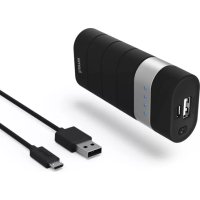
- Power Pack, 5000 mAh
- Micro-USB charging/connecting cable
- T hese operating instructions
3. Safety Notes
- The product is intended for private, non-commercial use only.
- P protect the product from dirt, moisture and overheating, and only use it in a dry environment.
- K eep this product, as all electrical products, out of the reach of children!
- D o not drop the product and do not expose it to any major shocks.
- D o not operate the product outside the power limits given in the specifications.
- D o not open the device or continue to operate it if it becomes damaged.
- D ispose of packaging material immediately according to locally applicable regulations.
- Since the battery is integrated and cannot be removed, you will need to dispose of the product as a whole. Do this in compliance with the legal requirements.
- Do not modify the product in any way. Doing so voids the warranty.
4. Operation
4.1 Charging the Power Pack
e, B egin charging the power pack by connecting the included USB charging/connecting cable to the power pack's Micro-USB (IN 5 V / 1.6 A) input and to a suitable USB charger.
- D o not charge the power pack using a USB port on a computer or notebook.
- C harging begins and ends automatically.
- C harge the Power Pack fully before using it for the first time.

Note - Capacity
- The capacity is always shown when the Power Pack is charging.
- Y ou can find the meanings of the charge level LEDs directly on the reverse side of the power pack.

Warning - Battery
- O nly use suitable charging devices or USB connections for charging.
- A s a rule, do not charge devices or USB connections that are defective and do not try to repair them yourself.
- D o not overcharge the product or allow the battery to completely discharge.
- A void storing, charging or using batteries in extreme temperatures.
- W hen stored over a long period of time, batteries should be charged regularly (at least every three months).
4.2 Charging terminal devices
- C onnect the microUSB charging/connecting cable included to the one of the two USB ports on the Powe
Pack (OUT 1 5V/2.1A / OUT 2 5V/1A) and to the microUSB port on your terminal device (mobile phone, smartphone, etc.). - The Micro-USB charging/connecting cable included may not be suitable for the USB connection on your terminal device. In this case, use the USB cable that was included with your terminal device.
- To start charging, press the button ON/OFF of the Power Pack. The status LEDs show the remaining capacity when the Power Pack is charging.
- The current battery status of your terminal device will appear on this device.
- Press the button ON/OFF of the Power Pack to stop charging and to switch it off. The status LEDs should switch off.
- The Power Pack will automatically switch off after 10 seconds if it is not connected to a terminal device.

Warning - Connecting terminal devices
- Before connecting a terminal device, check whether the power output of the charger can supply sufficient power for the device.
- E nsure that the total power consumption of all connected terminal devices does not exceed 2100mA .
- We recommend that you always use just one of the two USB ports.
- P lease refer to the instructions in the operating manual of your terminal device.
- I t is essential that you observe these specifications and the safety instructions regarding the power supply of your devices.

Note - Optimised charging
- O optimised charging means that the Power Pack recognises the connected terminal device and supplies it with the optimal current to minimise charging time. Note that the maximum current output from the Power Pack is 2100mA , as long as NO terminal device is connected in parallel.
- O f course, any brand of terminal device can be connected to all the USB ports as long as the maximum current consumption for each is not exceeded.

Warning
- N ever connect the charging cable of the Power Pack to both the input and the output of the Power Pack at the same time. This could damage the battery.
- D o not connect any terminal devices while the Power Pack is charging. This could damage the Power Pack and the connected device.
5. Care and Maintenance
Only clean this product with a slightly damp, lint-free cloth and do not use aggressive cleaning agents.
6. Warranty Disclaimer
Hama GmbH & Co. KG assumes no liability and provides no warranty for damage resulting from improper installation/mounting, improper use of the product or from failure to observe the operating instructions and/or safety notes.
7. Service and Support
Please contact Hama Product Consulting if you have any questions about this product.
Hotline: +49 9091 502-115 (German/English)
Further support information can be found here: www.hama.com
8. Technical Data
| Power consumption max. | 1.6 A |
| Power Pack voltage 5 V DC | |
| Typ. capacity: 5000 mAh | |
| Min. capacity: 4910 mAh | |
| Power output max. 2100 mA | |
| Temperature range 0°C – 45°C | |
| Battery type Lithium polymer |
9. Recycling Information
Note on environmental protection:
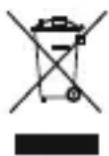
After the implementation of the European Directive 2012/19/EU and 2006/66/EU in the national legal system, the following applies: Electric and electronic devices as well as batteries must not be disposed of with
household waste. Consumers are obliged by law to return electrical and electronic devices as well as batteries at the end of their service lives to the public collecting points set up for this purpose or point of sale. Details to this are defined by the national law of the respective country. This symbol on the product, the instruction manual or the package indicates that a product is subject to these regulations. By recycling, reusing the materials or other forms of utilising old devices/Batteries, you are making an important contribution to protecting our environment.
Bedienungsanleitung
Remarque - Optimised charging
2. KomnJIeK T NOCTaBKN
- Y HNBePcaJIbHbI aKKymyJrTOp aKKymyJrTOpHbI 6JOK nITaHn 5000 mAu
3 arpy304HO-CoeHINHTeHBn Ka6eJIb C MUKpopa3bEmOM USB
Hactoaa Hnctpykua
3. Texhmka 6e30nachoctu
- I 3dJIe npeHa3HaueHo TOnbKO dIa DomaHero npIMHeHn.
Bepb ot rpa3n, BnaH n NCTOCHKOB tenla. 3KcNpyaTnpoBaTb TOnbKO B CyXnx YCNOBnax.
He daBaTb DeTAM! - H e p o n h Tb. Bepe b ot CnMbHbix yIapOB.
C O6JIIOdaTb TexHnueckne XapaKTePnCTnKn. - I 3dJIeNe He OTKpbIbAtb. 3aIpeUaetcJ 3KcJIpyATnpOBaTb HeINcnpaBHOe n3dJIeNe.
- Y TUNIIN3NPOBaTb yNaKOBky B COOTBETCTBUN C MECTHBIMN HOPMaMn.
A KkymyIaTOp 3aMeHe He NODJIeXHT. YTNIN3aCIO npOdykTa PpON3BOIDITb CEJIHKOM COrJaCHO HopMaTINBaM.
3 anpeaetcBHOCTb N3MeHeHnB KOHCTpyKUIO. B npotNBHom clyae rapaHTnHbIe 6o3aTeJIbCTBa aHHynpuyOTc.
4. 3knnyataza
4.1 3apdka aKKymyIaTOPHO6Joka nHTaHn
- 4 To6bl 3apAaKymyIaTOPbIb 6nok nHTAHn, NOdkJIIOUHTe MKNpopa3bEmbl USB Ka6eJN K BXOy aKcyMnyaTOpHOro 6noka (IN 5V/1,6A) IN K COOTBeTCTByuIeMy 3apAHOmy 6nOKy USB.
- He 3apjaKeTe aKKyMylTOpHbI 6nok ot USBpa3beMa KOMnbIOTepa nII HoYt6yka!
- P ouecc 3aepn npoocOuNT aBtOMaTneckn.
- Pered nauaIom 3Kcnpnyatau nn aKKymyIopHbI 6Jok nHTaHn Heo6xOdmo OINH pa3 3apAINTb N0NHOCTbIO.

PpMMeaHHe - EMKocTb
B O Bpem 3apAnKn Tekyuae mKocTb oTo6paXaetcHnepepbIBHO.
- O ctaotuha emkoctb oTo6paxaetcnaMnHa 3aHHe naneHn aKKyMylTOpHOro 6noka.

BHMaHne-AKKymyIaTOp
- П рименят b Tолько COOTBeTCTByHоиe 3apЯнные устюпсва.
- 3 anpeuaetcnaKcnnyaTnpoBaTb npemOnTpopoBaTb HeNCnpaBhIe yCTpOHTBa.
- He noDBepratb akKymyIaTOpbl rIy60kO pa3pIaKe n nepe3apIaKe.
- B epeb OT BbICOKnx TemnepaTypr npxpaHeHn, 3apJe N 3KcNpyaTuIN.
- П ри длntelьHom xpaHeHn 3apЯKaTb He pexe OndHOro pa3aВТрИ MeCya.
4.2 3apraKa okoHeuHbIx yctpoNCTB
- YTO6bI 3apAINtB OKOHeHoe yCTpOInCTBO (cMapTfoH n T.D.), C NOMOUIbIO USB-Ka6eJIa CoeINHInTe yCTpOInCTBO C BbIXoINbIM MnKpopa3bEHom USB aKKyMnyIaTOPHO 6JOKa NiTaHnIA (BbIXoN 1:5B/2,1A / BbIXoN 2:5B/1A).
U SB-ka6eIb c MmKpopa3beMOM n3 KOMnJIeKTa aKKyMyJrTopHOrO 6JIOKa MoXeT He NDoOnu K OKoHeuHomy yCTpoiCTBy. B 3Tom Cnyae BocNoJIb3yIteCb USB-ka6eIem yCTpoiCTBa. - Y To6bl HaaytB 3apnky, HaxMnte KhoNkY ON/OFF 6loka nHTAH. Bo Bpemr 3apnKn TeKyuae EMKocTb OTo6paXaETc CBTeODnOHBiIMn JAmnMn INDnKaun.
X od 3apAKn CMOTpIe Ha dncnlee oKOHeuHOrO yctpoiCTBa. - Yo6bl OTKIIOHTb npoecc 3apAkn, HaxMnte KHOKNy ON/OFF 6Ioka nITAHn. JAmNb IHHnKaun DoJXHbI nOracHyTb.
E cn 3apxmaoe yctpoiCTBO He NOKIOUyeHO, aKKymyIaTOPbI 6JOK aBtOMaTnueeCKN BbIKIOuaeTCn np6bn3ntelbHo uepe3 10 cekyHd.

IpeDynpexKdeneHne! POnKlOuCeHne OKOHeuHbIX yCTpO'CTB
Ipei noKJIOUeHnEM 3apXaemoro yCTpoNCTBa y6eINTEcB,TOero xapaKTepnCTNK COOTBeTCTBYOT aKKymyTAOPHOMy 6NOKy NITAHn.
- O 6üee notpe6JIeMbI TOK BCex NOДКЛHоeHHbIX yCTpoiCTB He DoJIxeh npeBblaTb 2100 mA.
- PekomeHnyetcBcerda noKluOHaTb TOnbKO K Odnomy n3 DByx USB-pa3beMOB.
CobHoaTe HnCTpyKcnn No 3KcnIyataun yCTPOINTB.
C O6IHOaTe npaBnla texHnK 6e3ONaCHocTn no nHTaHNO yCTPOINCTB.

PpmeaHne. OontmajbHa 3apdka
Pexm ONTMaBHOJ 3apKn o6ecneuBaet OIO3HaBaHHe yCTPOINCTBa, BbI6Op ToKa ONTMaBHO JBeJIuHHbI N ObecneueHne MHNMaBHO BPeMeHn 3apAn. MakcmaBHy BbIXoHNo TK aKKyMylTopHO 6Ioka nITaHn CoCTaBnEeT 2100 mA, ecn npaJIeBHO K Hemy He NOdkluOHe Dpyroe yCTPOINCTBO.
- Pn OTCyTCTBn NpeBbIeHn MaKcMmaJIbHO BbIXoHOro ToKa K 06oUM USB-rHe3dAm MOxHo NOkKnIOuHaTb yCtpoNCTBa JIO6bIX Mapok.

PpeynpeKdHne
3 anpeaetc coeHHaB Ka6eJbM BxOu N BixoA kKymyIaTOPHO 6noka. 3TO MoXeT CTaTB npuHOB BixOda aKKymyIaTOPa N3 CToPra.
H e noKlouaTe oKOHeuHbIe yCTpoiCTBa BO BpeM 3apAkn aKKymyIaTOphoro 6noka nITAHN.B IpOTNBOM Clyuae 3TO MOXET npIBecTN K BblxOdy N3 CTPOA 6noka nITAHN I OKOHeuHOrO yCTpoiCTBa.
5. Yxod n TexHnueckoe 06cIyXnBaHne
YnCTKy n3dJIy npOn3BOoNTb TOnbKO 6e3BOPcBOO cnErKa BnaXHo caIΦeTko. 3aPpeuaetc npImeHrTa arpeccNBhble YnCTraUne CpeDCTBa.
6. OTKa3 ot rapaHTnHbIX 06raTeJbCTB
KOMnHaHamaGmbH&Co.KGHe Hecet OTBETCTBEHHOCTb 3a yUepe6,BO3HNKUn BCLeDCTBne He npabNlBHoro MOHTaxa,NoKnHueHna N nCNoIb3OBaHn I3JeHn He No Ha3NaYeHnO,a TaKKe BCLeDCTBnE HcO6JIHODeHn INHCTpyKun N O KcnnyatauN INTexnKBe3OnaCHOCTN.
7. OTeIe Texo6cLyKuBaHnA
IIO BOpocam pemOnTa IIN 3aMeHbI HeNCnpaBbIX
I3dJIIM O6paUaIteCb K IpOaBcy IIN B CepBcHyo
ClyX6y KOMNaHm Hama.
TopyajnHnOToeLaTexo6cnyxNBaHn:
+49 9091 502-115 (HemeKni, aHJIiNCKn)
Poiop6Hee cmOTpnte 3JeCb: www.hama.com
- TexHnueckne xapaKTePncTnKn
86652 Monheim Germany
www.hama.com