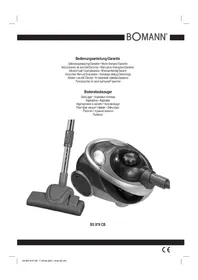
BS 979 CB - Vacuum Cleaner BOMANN - Free user manual and instructions
Find the device manual for free BS 979 CB BOMANN in PDF.


| Product Type | Canister Vacuum Cleaner |
| Brand | Bomann |
| Model | BS 979 CB |
| Power Supply | 220-240 V ~ 50/60 Hz |
| Rated Power | 1800 W |
| Maximum Power | 2300 W |
| Protection Class | II |
| Collection Type | Bagless (transparent container) |
| Filtration Systems | 3: inlet filter, motor protection filter, exhaust filter |
| Washable Filter | Yes (inlet and motor protection filter) |
| Exhaust Filter Replacement Interval | Every 6 months |
| Included Accessories | Hard floor metal brush, parquet brush, turbo brush, 2-in-1 nozzle, upholstery nozzle |
| Remote Control | Yes, infrared (2 AAA batteries included) |
| Power Control | Yes, 3 levels (low, medium, high) |
| Telescopic Tube | Yes |
| Container Level Indicator | Yes |
| Cable Storage | Yes, rewinding button |
| Parking Position | Yes (horizontal and vertical) |
Frequently Asked Questions - BS 979 CB BOMANN
User questions about BS 979 CB BOMANN
0 question about this device. Answer the ones you know or ask your own.
Ask a new question about this device
Download the instructions for your Vacuum Cleaner in PDF format for free! Find your manual BS 979 CB - BOMANN and take your electronic device back in hand. On this page are published all the documents necessary for the use of your device. BS 979 CB by BOMANN.
USER MANUAL BS 979 CB BOMANN
natural_image
Black and white photo of a Benin air purifier with attached circuit breaker (no visible text or symbols)BS 979 CB
CE
DEUTSCH
Inhalt
Overview of the Components ...... Page 3
Instruction Manual...... Page 38
Technical Data Page 41
Guarantee Page
FRANÇAIS
Sommaire
natural_image
Line drawing of a car's front wheel and side wheels with directional arrows indicating motion (no text or symbols)Abb. 1
natural_image
Illustration of hands using a tool to press or install a container with a gridded tray (no text or symbols)Abb. 2
natural_image
Line drawing of a hand placing a small object into a cylindrical container (no text or symbols)Abb. 3
natural_image
Technical line drawing of a helmet component with a circular head and attached straps (no text or symbols)Abb. 4
natural_image
Simple line drawing of a faucet and a small water tank under a sun (no text or symbols)natural_image
Line drawing of a mechanical device with no visible text or symbolsAbb. 5
2. Einlassfi Iter
natural_image
Line drawing of a vacuum cleaner with handle and wheels (no text or symbols)Abb. 6
3. Auslassfi Iter
natural_image
Line drawing of a cartoon-style robot with directional arrows indicating motion (no text or symbols)Afb. 1
Stofopvangbak legen
natural_image
Illustration of hands using a filter to remove seeds from a container (no text or symbols)Afb. 2
natural_image
Line drawing of a hand placing a small object into a cylindrical container (no text or symbols)Afb. 3
natural_image
Line drawing of a helmet with a circular head and attached straps, showing a curved arrow indicating rotation (no text or symbols)Afb. 4
natural_image
Simple line drawing of a faucet and a small water tank under a sun (no text or symbols)natural_image
Line drawing of a car's airbag with no text or symbolsAfb. 5
2. Inlaatfi Iter
natural_image
Line drawing of a vacuum cleaner with handle and wheels (no text or symbols)Afb. 6
3. Uitlaatfi Iter
natural_image
Line drawing of a mechanical device with gears and rotating arrows (no text or symbols)Fig. 1
natural_image
Illustration of hands cleaning a cylindrical container with a filter and a grid pattern (no text or symbols)Fig. 2
natural_image
Line drawing of a hand placing a small object into a cylindrical container (no text or symbols)Fig. 3
natural_image
Technical line drawing of a helmet with a circular component and directional arrow (no text or symbols)Fig. 4
natural_image
Simple line drawing of a faucet and a water tap with sun above (no text or symbols)natural_image
Line drawing of a mechanical device with no visible text or symbolsFig. 5
- Filtre d'aspiration
natural_image
Line drawing of a robotic vacuum cleaner with visible wheels and control panel (no text or symbols)Fig. 6
natural_image
Line drawing of a robotic car with directional arrows indicating motion (no text or symbols)Imagen 1
natural_image
Illustration of hands holding a container with a brush and a grid pattern inside, no text or symbols presentImagen 2
natural_image
Line drawing of a helmet with a circular base and attached straps, showing a curved arrow indicating rotation (no text or symbols)Imagen 4
natural_image
Simple line drawing of a faucet and a water tap with sun above (no text or symbols)natural_image
Line drawing of a robotic vacuum cleaner with control panel and gear mechanism (no text or symbols)Imagen 5
2. Filtro de entrada
natural_image
Line drawing of a robotic car with visible wheels and control panel (no text or symbols)Imagen 6
3. Filtro de salida
natural_image
Line drawing of a hand placing a small object into a cylindrical container (no text or symbols)Imagen 3
P: 1800 W
nom.
P max. 2300 W
Pôr as baterias no controlo remoto
natural_image
Line drawing of a mechanical device with gears and a housing, showing motion direction (no text or symbols)Fig. 1
natural_image
Illustration of hands using a tool to press or spread material inside a container (no text or symbols)Fig. 2
natural_image
Line drawing of a hand placing a component into a cylindrical device (no text or symbols)Fig. 3
natural_image
Line drawing of a helmet with a circular base and attached straps, showing a curved arrow indicating rotation (no text or symbols)Fig. 4
natural_image
Simple line drawing of a faucet and a sink with sun above (no text or symbols)natural_image
Line drawing of a mechanical device with no visible text or symbolsFig. 5
natural_image
Line drawing of a robotic vacuum cleaner with a hand operating the valve (no text or symbols)Fig. 6
3. Filtro de saída
P: 1800 W
P max. 2300 W
natural_image
Line drawing of a car with directional arrows indicating motion (no text or symbols)III. 1
natural_image
Illustration of hands using a tool to press or spread a circular object, with an arrow indicating rotation (no text or symbols present)III.2
natural_image
Line drawing of a hand placing a small object into a cylindrical container (no text or symbols)III. 3
natural_image
Line drawing of a helmet with a circular base and attached straps, showing a curved arrow indicating rotation (no text or symbols)III. 4
natural_image
Simple line drawing of a faucet and a water dispenser with sun above (no text or symbols)natural_image
Line drawing of a mechanical device with no visible text or symbolsIII. 5
natural_image
Line drawing of a robotic vacuum cleaner with a hand operating the valve (no text or symbols)III. 6
natural_image
Line drawing of a robotic vacuum cleaner with rotating arrows indicating motion (no text or symbols)III. 1
natural_image
Illustration of hands using a tool to press or spread a container with a grid pattern (no text or symbols)III. 2
natural_image
Line drawing of a hand placing a small object into a cylindrical container (no text or symbols)III. 3
- Beskyttelsesfi Iter for motoren (i støvbeholderen)
Rense fi Iterinnsatsen
Viktig: Tøm alltid støv- beholderen før du tar ut fi lterinnsatsen.
natural_image
Line drawing of a helmet with a circular head and attached straps, showing a curved arrow indicating rotation (no text or symbols)III. 4
natural_image
Line drawing of a mechanical device with no visible text or symbolsIII. 5
- Innsugingsfi Iter
natural_image
Line drawing of a robotic vacuum cleaner with control panel (no text or symbols)III. 6
- Utslippsfi iter
General Safety Instructions
Read the operating instructions carefully before putting the appliance into operation and keep the instructions including the warranty, the receipt and, if possible, the box with the internal packing.
- The appliance is designed exclusively for private use and for the envisaged purpose. This appliance is not fit for commercial use. Do not use it outdoors (except if it is designed to be used outdoors). Keep it away from sources of heat, direct sunlight, humidity (never dip it into any liquid) and sharp edges. Do not use the appliance with wet hands. If the appliance is humid or wet, unplug it immediately.
- When cleaning or putting it away, switch off the appliance and always pull out the plug from the socket (pull on the plug, not the cable) if the appliance is not being used and remove the attached accessories.
- Do not operate the machine without supervision. If you should leave the workplace, always switch the machine off or remove the plug from the socket (pull the plug itself, not the lead).
- Check the appliance and the cable for damage on a regular basis. Do not use the appliance if it is damaged.
- Do not try to repair the appliance on your own. Always contact an authorized technician. To avoid the exposure to danger, always have a faulty cable be replaced only by the manufacturer, by our customer service or by a qualified person and with a cable of the same type.
- Use only original spare parts.
- Pay careful attention to the following "Special Safety Instructions".
Children and Frail Individuals
- In order to ensure your children's safety, please keep all packaging (plastic bags, boxes, polystyrene etc.) out of their reach.
Caution! Do not allow small children to play with the foil as there is a danger of suffocation!
- In order to protect children or frail individuals from the hazards of electrical equipment, please ensure that this device is only used under supervision. This device is not a toy. Do not allow small children to play with it.
Symbols in these Instructions for Use
Important information for your safety is specially marked. It is essential to comply with these instructions in order to avoid accidents and prevent damage to the machine:
WARNING:
This warns you of dangers to your health and indicates possible injury risks.
CAUTION:
This refers to possible hazards to the machine or other objects.
NOTE: This highlights tips and information.
Special Safety Instructions
- Do not suck up liquids!
- Do not suck up hot ashes or pointed or sharp objects!
- Do not use the appliance in humid rooms!
- Never use without the filter. Check that the filter is inserted correctly!
- Keep hair, clothing and body parts away from the vacuum nozzle during use!
- Keep the vacuum cleaner away from sources of heat like radiators, ovens, etc.!
Overview of the Components
| 1 Cover of outlet fi liter | ||
| 2 Hose | connection | |
| 3 Vacuum | hose | |
| 4 Telescopic suction tube | ||
| 5 Carrying | handle | |
| 6 Dust container with motor protection fi liter | ||
| 7 Accessory | holder | |
| 8 On/off | switch | |
| 9 Cable-winding | key | |
| 10 Cable | ||
| 11 Parking | assistance | |
| 12 Metal floor nozzle | ||
| 13 Parquet brush | ||
| 14 Turbo brush | ||
| 15 Inlet fi liter | ||
| 16 Infrared remote control | ||
| 17 Battery compartment for the remote control | ||
| 18 Power-on light | ||
| 19 Filling level indicator - dust container | ||
Accessories
A „2-in-1“ nozzle (groove and brush nozzle)
B Upholstery nozzle
Start-up
- Insert the connection head of the suction hose into the hose connector until it locks in place. To do so, please press the buttons simultaneously. In order to release the hose again, please press the buttons once more on the connection head.
- Keep the buttons pressed down and then pull out the hose.
- Insert the vacuum tube into the handle if required.
Inserting Batteries into the Remote Control
- Open the battery compartment lid on the handle.
- Insert 2 batteries of type R03 „AAA“ 1.5 V. Please ensure that the polarity is correct (see the floor of the battery compartment or the inscription on the outside)!
- If the remote control is not used for a prolonged period, remove the batteries in order to prevent battery acid leaking.
- Now close the battery compartment.
- Different battery types or new and used batteries must not be used together.
WARNING:
Batteries are not to be disposed of together with domestic wastes. Dispose of the used batteries at the relevant collection bin or at your dealer's.
Never throw batteries into the fire.
Using the Appliance
- Fit on the accessory.
- Unwind the required length of cable and insert the mains plug into a correctly installed 230 V, 50 Hz power socket. Turn the device on by the on/off switch. The power-on lamp lights up.
- Remote control: Turn the device on beforehand with the on/off switch (the power-on lamp lights up). With the remote control on the handle you can turn the device on and off. With the +/- buttons the suction power is increased or reduced.
- Vacuum at a steady speed. There is no need to exert pressure.
i NOTE:
Pay attention to the range that can be covered with the cable length.
Vacuum power regulator (+/- button)
Low vacuum power: For curtains and delicate fabrics.
Medium vacuum power: For long-pile velour carpets and textile flooring.
High vacuum power: For sturdy rugs and floors.
Cable winding device
- Pull out the cable up to the maximum length indicated with the yellow mark.
- Never pull the cable out up to the red mark as the cable winding can be damaged. Said damages are not covered by the warranty.
Winding
Press the cable winding button and guide the cable. Hold the cable to avoid wrapping.
Telescope Vacuum Pipe
The height-adjustable vacuum pipe enables individual alignment to your height.
- Unlock the coupling by pressing the key in the direction of the arrow.
- Slide the vacuum pipe to the desired length. To lock the device, release the key until you hear it lock in place.
Switching off
- Turn the device to standby with the „ 🕒” button on the remote control (the power-on lamp lights up).
- Turn the device off with the on/off switch. The control lamp goes off. Then remove the mains plug from the socket.
Nozzle accessories
i NOTE:
The accessories are to be found in the holder on the telescopic tube.
Groove and
brush nozzle: For vacuuming upholstery, curtains and in corners and crevices etc.
„2-in-1“ nozzle: When this is folded together it can be used as a groove nozzle. If you would like to use the brush nozzle, pull the brush section in the direction of the arrow until it locks in place.
Upholstery nozzle: For cleaning upholstery, curtains etc.
Metal floor nozzle: To clean carpets or smooth surfaces.
Smooth floors:
Press down the lever with the brush symbol with your foot. The brush is now visible.
Carpets:
Press down the opposite lever.
Parquet brush: The floor nozzle is fitted with rollers for improved manoeuvrability. For large areas such as parquet, laminate or tiles etc.
Turbo brush: The floor nozzle is fitted with rollers for improved manoeuvrability. The brush is equipped with a rotating and swivelling brush roller driven by the air current. Removes ground-in dirt, animal hairs, threads and fluff particularly thoroughly. The carpet pile is brushed up to look almost new.
Please note that the turbo brush is not suitable for smooth floors, e.g. parquet, laminate etc. as the surface might be damaged.
Releasing the nozzles: Pull these off while turning slightly.
Filling Level Indicator of the Dust Container
Hold the suction tube loosely in the air. If the filling level indicator (19) lights up the container is full. Empty the container as described below and reinsert it.
Filter
Your machine has three fi liter systems. The traditional dust bag system has been replaced by a transparent dust container. In this, coarse dirt particles and tiny particles floating in the air are swirled out of the suction air by the high speed of the air current.
The purchase of dust bags is no longer necessary.
Once the dust level has reached the MAX mark on the dust container, or the suction power of the vacuum cleaner is reduced, please proceed as follows:
natural_image
Line drawing of a car with directional arrows indicating motion (no text or symbols)III. 1
natural_image
Illustration of hands using a tool to clean or store contents, with no visible text or symbolsIII. 2
natural_image
Line drawing of a hand placing a small object into a cylindrical container (no text or symbols)III. 3
natural_image
Line drawing of a helmet with a circular base and attached straps, showing a curved arrow indicating rotation (no text or symbols)III. 4
Emptying the Dust Container
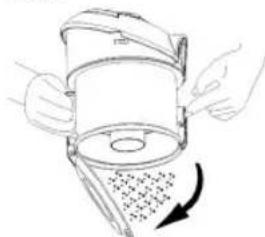
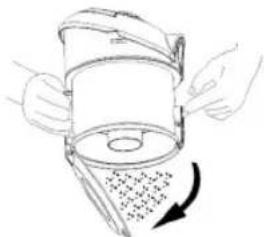
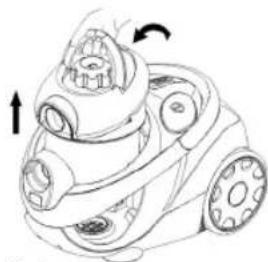
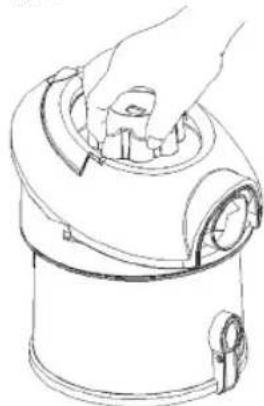
- Turn the device off and remove the mains plug from the socket. Pull the handle of the vacuum cleaner and remove the dust container.
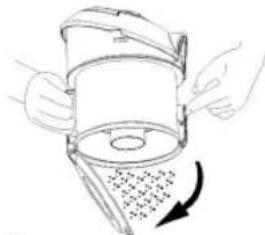
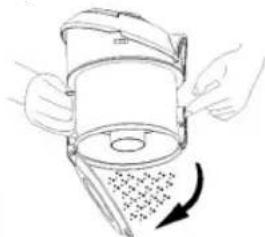
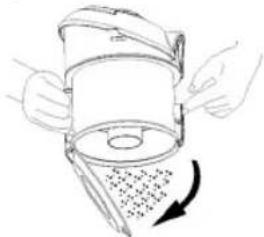
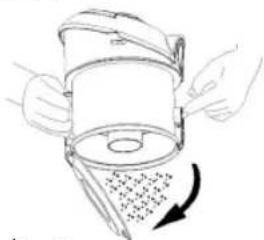
- Press the button on the side of the container to empty its contents.
- Then close the flap of the dust container again.
-
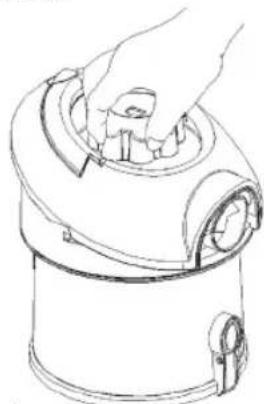
Reinsert the dust container, ensuring that it clearly clicks into place.
-
Motor Protective Filter (in the Dust Container)
Cleaning the Filter Element Important:
Always empty the dust container fi rst before removing the fi lter element.
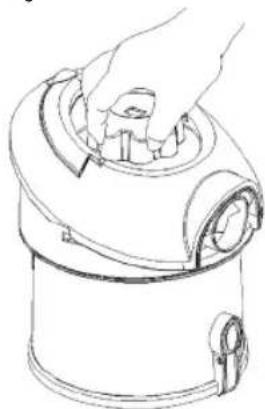
- Remove the dust container (see illustration 1).
- Remove the contents of the dust container. In order to do this, press the button on the dust container (see illustration 2).
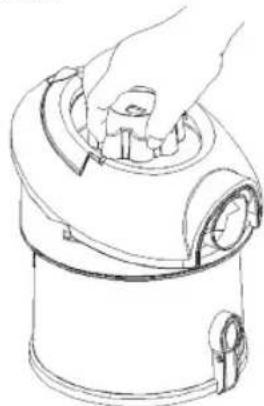
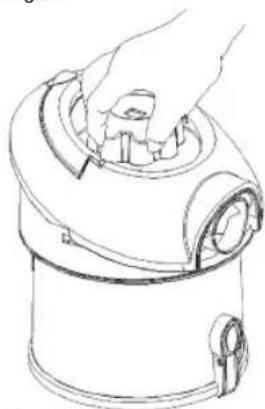
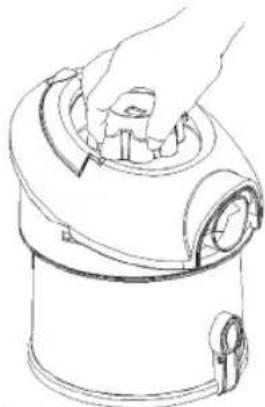
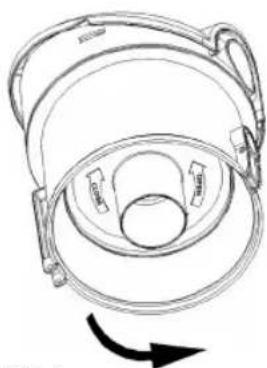
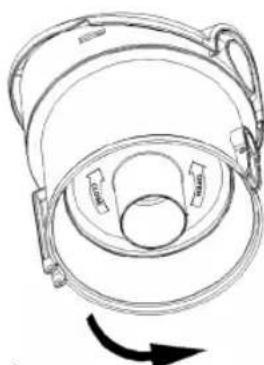
- Turn the lid (see illustration 3) in the direction, and then lift it off, including the filter element.
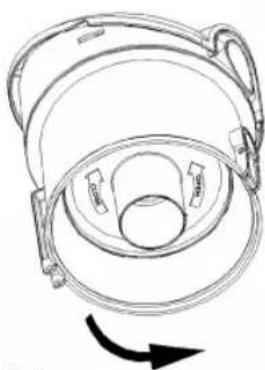
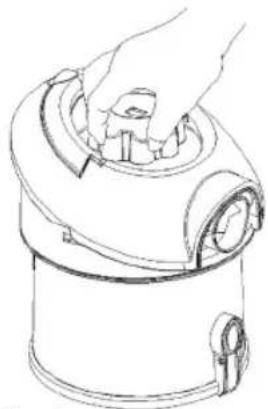
- Turn the fi liter element in the "OPEN" direction to remove it from the lid. Remove the fi liter element (two parts) and clean the main fi liter by tapping out the contents and gently brushing.
- Now replace the components. Please then turn the fi Iter element in the CLOSE direction until it is tight.
- Place the lid on the dust container - the ↓ arrow is located above the 🔊 symbol - and then turn it in the 🔊 direction until it is tight.
natural_image
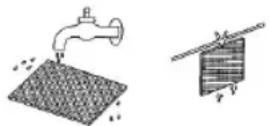
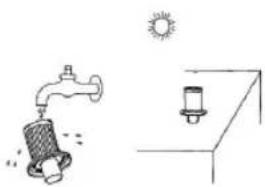
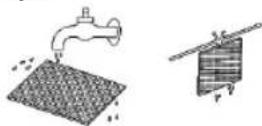
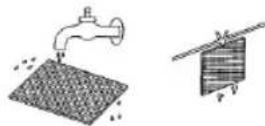
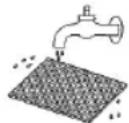
Simple line drawing of a faucet and a water dispenser under a sun (no text or symbols)- Every third time the dust container is emptied, or in the case of severe soiling, clean the fi liter by allowing water to flow through the fi liter fabric against the direction in which the vacuum cleaner blows. The dust container should only be reinserted when it is completely dry!
- Now place this back in position once it has completely dried! Caution: Never wash the fi lter in the washing machine, and please do not use a hairdryer to dry it.
natural_image
Line drawing of a mechanical device with no visible text or symbolsIII. 5
2. Inlet filter
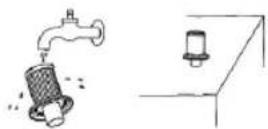
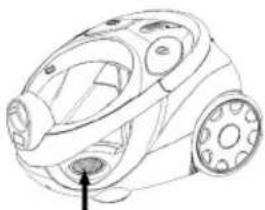
- The inlet fi liter is located below the dust container compartment. Remove the dust container and then the inlet fi liter. Clean the inlet fi liter approximately every tenth time the dust container is emptied, or more frequently if necessary.
- Please ensure that the fi Iter is always clean, as otherwise air circulation cannot be guaranteed. If necessary, the fi Iter can also be washed in warm water without any additives. Place it back into place only once it is completely dry!
natural_image
Line drawing of a vacuum cleaner with handle and wheels (no text or symbols)III. 6
3. Outlet filter
• The appliance is also equipped with an outlet filter.
• In order to ensure that the fi lter works correctly, we recommend that you replace it every six months.
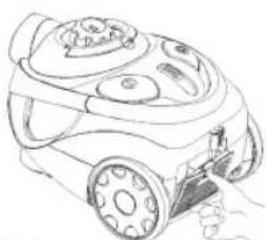
- It is located on the rear part of your appliance behind a ventilation grid.
- Open the ventilation grille by pressing the lever on its side.
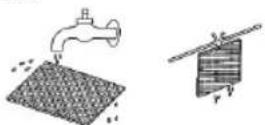
- Then pull the grille out towards the front. Remove the fi Iter and clean as described above. Fit the fi Iter back into place and close the ventilation grid by following the steps above in the opposite order.
Important note!
- Cleaning may become necessary after a shorter time, depending on the conditions of use, e.g. when vacuuming fi ne dust.
- If the suction power of your vacuum cleaner diminishes please clean the filters as described.
- If the suction power suddenly diminishes during operation this may be due to the filters being locked.
Cleaning and storage
Cleaning
- Pull the plug out of the socket before cleaning!
- Clean the casing with a dry cloth.
- Clean the motor protection fi liter approximately every 3. time the vacuum cleaner is emptied. Clean the fi liter in hot water without additives. Put it back into place only once it is completely dry.
Storage
- Let the iron cool down completely.
• Wind the cable completely. - If you position the device horizontally: Please insert the hook of the floor nozzle into the parking assistant on the rear of the device.
- If you position the device vertically: Please insert the hook of the suction tube into the parking assistant on the bottom of the device.
Troubleshooting
| Malfunction | Possible | Causes | Remed |
| When the on/off switch is pressed the device does not switch on. | The device does not have any power supply. | Check the socket with another device and insert the mains plug correctly. | |
| The device cannot be switched on by means of the remote control. | The batteries are fl at. | Check the batteries. Replace them if necessary. | |
| The suction power is too low. | There is something blocking the suction tube. | Check the nozzle, the suction tube and/or the suction hose. | |
| The installed dust container is not properly closed. | Close the dust container (see Figure 2 in the table). | ||
| The dust container is full. | Check the dust container and empty it. | ||
| Whistling noises during the first hours of operation. | This is not a fault. Noises no longer audible after some time. | ||
Technical Data
Model: BS 979 CB
Power supply: 220-240 V, 50/60 Hz
Power consumption:
P_nom : 1800 W
P_max. 2300 W
Protection class:....II
This device has been tested according to all relevant current CE guidelines, such as electromagnetic compatibility and low voltage directives, and has been constructed in accordance with the latest safety regulations.
Subject to technical changes without prior notice!
Guarantee
The device supplied by our Company is covered by a 24 month guarantee starting on the date of purchase (receipt).
During the life of the guarantee any fault of the device or its accessories ascribable to material or manufacturing defects will be eliminated free of charge by repairing or, at our discretion, by replacing it. The guarantee services do not entail an extension of the life of the guarantee nor do they give rise to any right to a new guarantee!
Proof of the guarantee is provided by the proof of purchase. Without proof of purchase no free replacement or repair will be carried out.
If you wish to make a claim under the guarantee please return the entire machine in the original packaging to your dealer together with the receipt.
Defects to consumables or parts subject to wearing as well as cleaning, maintenance or the replacement of said parts are not covered by the guarantee and hence are to be paid!
The guarantee lapses in case of unauthorized tampering.
After the expiry of the guarantee
After the expiry of the guarantee repairs can be carried by the competent dealer or repair service against the payment of the ensuing costs.
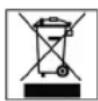
Meaning of the "Dustbin" Symbol
Protect our environment: do not dispose of electrical equipment in the domestic waste.
Please return any electrical equipment that you will no longer use to the collection points provided for their disposal.
This helps avoid the potential effects of incorrect disposal on the environment and human health.
This will contribute to the recycling and other forms of reutilisation of electrical and electronic equipment.
Information concerning where the equipment can be disposed of can be obtained from your local authority.
natural_image
Line drawing of a mechanical device with gears and rotating arrows (no text or symbols)Rys. 1
natural_image
Illustration of hands using a filter to remove seeds from a container (no text or symbols)Rys. 2
natural_image
Line drawing of a hand placing a small object into a cylindrical container (no text or symbols)Rys. 3
natural_image
Line drawing of a helmet with a circular base and attached straps, showing a curved arrow indicating rotation (no text or symbols)Rys. 4
natural_image
Simple line drawing of a faucet and a sink with sun above (no text or symbols)natural_image
Line drawing of a mechanical device with no visible text or symbolsRys. 5
2. Filtr wlotowy
natural_image
Line drawing of a robotic vacuum cleaner with a hand operating the valve (no text or symbols)Rys. 6
3. Filtr wylotowy
natural_image
Line drawing of a mechanical device with gears and a scroll, showing motion direction (no text or symbols)Obr. 1
natural_image
Illustration of hands using a tool to press or inspect a circular object with a grid pattern, no text or symbols presentObr. 2
natural_image
Line drawing of a hand placing a small object into a cylindrical container (no text or symbols)Obr. 3
natural_image
Diagram of a helmet with attached straps and a curved arrow indicating rotation (no text or symbols)Obr. 4
natural_image
Simple line drawing showing a faucet with water flowing into a bucket and a sun above it (no text or symbols)natural_image
Line drawing of a mechanical device with no visible text or symbolsObr. 5
natural_image
Line drawing of a robotic vacuum cleaner with control panel (no text or symbols)Obr. 6
natural_image
Line drawing of a mechanical device with directional arrows indicating motion (no text or symbols)Ábra 1
natural_image
Illustration of hands using a tool to press or write on a container with a grid pattern (no text or symbols)Ábra 2
natural_image
Line drawing of a hand placing a small object into a cylindrical container (no text or symbols)Ábra 3
natural_image
Technical line drawing of a helmet with a circular base and attached straps, showing a curved arrow indicating rotation (no text or symbols)Ábra 4
A porgyüjtő ürítése
natural_image
Line drawing of a mechanical device with no visible text or symbolsÁbra 5
2. Beszívófi Iter
natural_image
Line drawing of a robotic vacuum cleaner with control panel (no text or symbols)Ábra 6
3. Kibocsátófi Iter
natural_image
Line drawing of a mechanical device with gears and a scroll, showing motion direction (no text or symbols)Рис. 1
natural_image
Illustration of hands using a tool to press down a cylindrical device with a circular component and a pointer, showing a curved arrow indicating rotation (no text or symbols present)Рис. 2
natural_image
Line drawing of a hand placing a small object into a cylindrical container (no text or symbols)Рис. 3
natural_image
Line drawing of a helmet with a circular base and handle, showing a curved arrow indicating rotation (no text or symbols)Рис. 4
natural_image
Simple line drawing of a faucet and a small water tank under a sun (no text or symbols)natural_image
Line drawing of a mechanical device with no visible text or symbolsРис. 5
2. Входной фильтр
natural_image
Line drawing of a small vacuum cleaner with a hand holding the blade (no text or symbols)Рис. 6



- DEUTSCH
- Inhalt
- FRANÇAIS
- Sommaire
- Einlassfi Iter
- Auslassfi Iter
- Stofopvangbak legen
- Inlaatfi Iter
- Uitlaatfi Iter
- Filtro de entrada
- Filtro de salida
- Pôr as baterias no controlo remoto
- Filtro de saída
- Rense fi Iterinnsatsen
- General Safety Instructions
- Children and Frail Individuals
- Symbols in these Instructions for Use
- WARNING:
- CAUTION:
- Special Safety Instructions
- Accessories
- Start-up
- Inserting Batteries into the Remote Control
- Using the Appliance
- i NOTE:
- Vacuum power regulator (+/- button)
- Cable winding device
- Winding
- Telescope Vacuum Pipe
- Switching off
- Nozzle accessories
- Filling Level Indicator of the Dust Container
- Filter
- Emptying the Dust Container
- Cleaning the Filter Element Important:
- Inlet filter
- Outlet filter
- Important note!
- Cleaning and storage
- Cleaning
- Storage
- Technical Data
- Guarantee
- After the expiry of the guarantee
- Meaning of the "Dustbin" Symbol
- Filtr wlotowy
- Filtr wylotowy
- A porgyüjtő ürítése
- Beszívófi Iter
- Kibocsátófi Iter
- Входной фильтр
Brand : BOMANN
Model : BS 979 CB
Category : Vacuum Cleaner