CP 11L Puls - Sports Watch Ciclo - Free user manual and instructions
Find the device manual for free CP 11L Puls Ciclo in PDF.


| Product type | Sports heart rate monitor watch |
| Brand | Ciclo |
| Model | CP 11L Puls |
| Power supply (watch) | 1 CR2032 battery (3V) |
| Power supply (belt) | 1 CR2032 battery (3V) |
| Heart rate measurement range | 30 to 220 bpm (accuracy 1 bpm) |
| Stopwatch | 99h 59min 59s (accuracy 1/100s up to 1h) |
| Timer | 9h 59min 59s (accuracy 1s) |
| Water resistance | WATER RESISTANT (water jets, no diving) |
| Operating temperature | 0°C to 50°C |
| Training zones | Well-being (50-65% HRmax), Fitness (65-80%), Performance (80-95%) |
| Main functions | Time, alarm, stopwatch, heart rate, timer, backlight |
| Delivery contents | Watch, belt with sensor, handlebar mount, manual |
| Maintenance and cleaning | Soft damp cloth, no solvents |
| Safety precautions | Consult a doctor before training, risk of latex allergy |
| Batteries | CR2032, 3V (watch and belt) |
| Repairability | Repair by customer service, wear parts not covered |
| Warranty | 2 years (material and manufacturing defects) |
Frequently Asked Questions - CP 11L Puls Ciclo
User questions about CP 11L Puls Ciclo
0 question about this device. Answer the ones you know or ask your own.
Ask a new question about this device
Download the instructions for your Sports Watch in PDF format for free! Find your manual CP 11L Puls - Ciclo and take your electronic device back in hand. On this page are published all the documents necessary for the use of your device. CP 11L Puls by Ciclo.
USER MANUAL CP 11L Puls Ciclo
natural_image
Black and white photo of a CECO light blue cycling record with digital display showing time, speed, and percentage (no text or symbols on the watch face itself)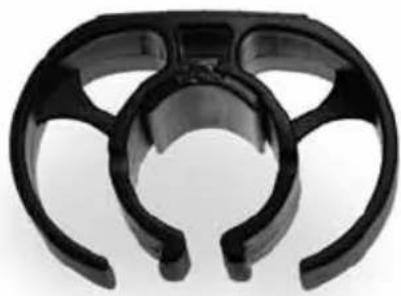
natural_image
Close-up of a black plastic mechanical component with three curved arms (no text or symbols visible)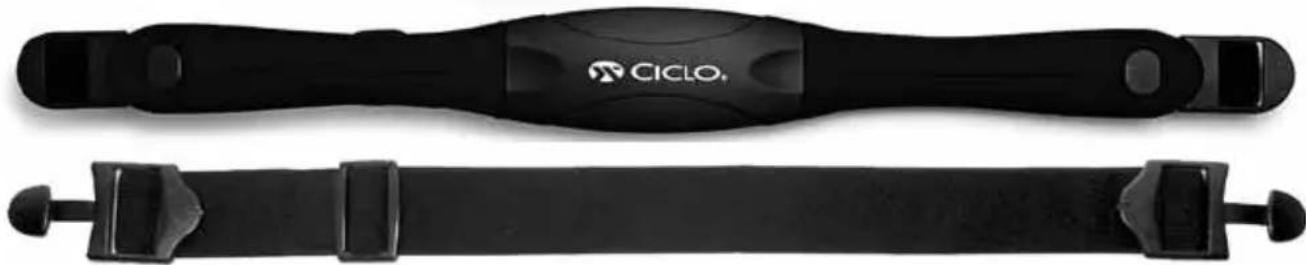
natural_image
Two black athletic fitness trackers with end caps, one labeled 'CICLO' and the other unlabeled (no text on the devices themselves)Seite

Deutsch 1 - 14

Englisch 15 - 26
Französisch 27 - 40

Italienisch 41 - 52

Spanisch 53 - 64

Holländisch 65 - 78

Polnisch 79 - 90
MHR = 220 - (Ihr Alter)
natural_image
Line drawings of hands holding a tool, with no text or symbols present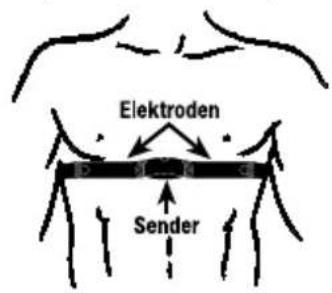
text_image
Elektroden Sendernatural_image
Diagram showing a device being processed from a cable, with no visible text or symbols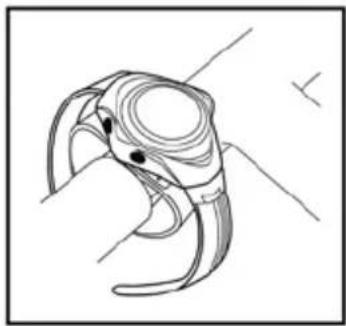
natural_image
Line drawing of a stylized bird head with curved beak and eye (no text or symbols)natural_image
Symmetrical geometric diagram with four labeled points A, B, C, D around a central circle (no text or symbols beyond labels)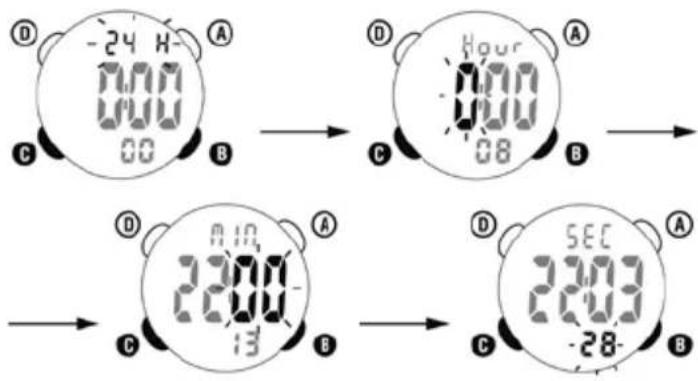
text_image
-24 H 0:00 0:00 00 B Hour 0:00 08 A C B D 23:00 13 A C B SEC 23:00 -28 A BEingabe des DATUMS
text_image
MONTH 34 A B C Dtext_image
13:28 104 58%text_image
① ¥ 00000 A 128 78% → ② ¥ 00236 A 128 78% → ③ ¥ 00000 A 128 78% C B- CP 11 L heart rate monitor
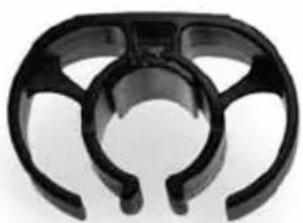
- Universal handlebar bracket
- Transmitter belt
- Elastic strap (adjustable)
- Battery for transmitter (3V / CR2032)
- Battery for heart rate monitor (3V / CR2032)
natural_image
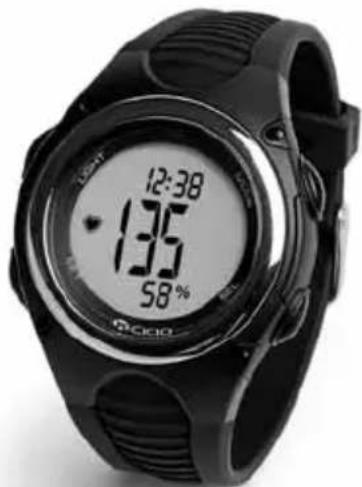
Black and white fitness record watch with digital display showing 12:38, 135, and 58% (no text or symbols on the watch face)Many congratulations!
With the CICLOPULS CP 11 L you have acquired a powerful heartbeat rate measuring unit, which will provide you with valuable information when training. The CICLOPULS CP 11 L possesses state-of-the-art electronics and has a durable and long service life. We wish you a lot of success training with the CICLOPULS CP 11 L.
Please read this operating manual carefully.
natural_image
Close-up of a black plastic mechanical component with curved and straight sections (no text or symbols visible)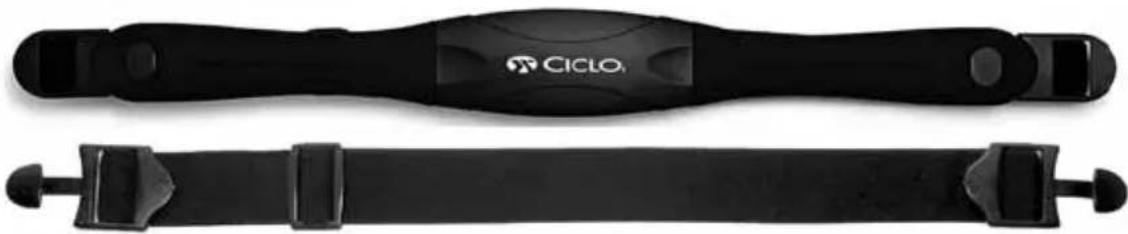
natural_image
Two black athletic band belts with visible branding, no text or symbols on the belts themselvestaBLE of contents
Page
INTRODUCTION 17
USE A PRECISE TRAINING METHOD 17
PERSONAL EXERCISE ZONE 17
EXERCISE ZONE (BPM) 17
FEATURES 18
BATTERY INSTALLATION 18
WEARING THE TRANSMITTER BELT 19
HOW TO USE THE COMPUTER WATCH 19
PROBLEMS, POSSIBLE CAUSES AND SOLUTIONS 20
KEYS OPERATION 20
GETTING START 20
ENTER THE DATE 21
CLOCK SETTING 21
PULSE MODE DISPLAY 22
CURRENT HEART RATE 22
% OF MHR (MAXIMUM HEART RATE) 22
HEART RATE ALARM SETTING 22
TOTAL EXERCISE TIMER(TIMER) 23
AVERAGE HEART RATE (AV HR) 23
STOPWATCH MODE 23
DAILY ALARM TIME SETTING 24
BACKLIGHT 24
GUARANTEE CONDITIONS 24
REPAIR 24
GUARANTEE CERTIFICATE 25
INTRODUCTION
WaRnIng: Always consult your physician before starting a fitness programme. A pulse computer is not a medical device. It is a training tool designed to measure and display your heart rate.
USE A PRECISE TRAINING METHOD
All the experts agree: the heart is the most important muscle in the body and, like all muscles, should be exercised regularly to remain strong and efficient. But how can you determine whether you are exercising your heart both safely and effectively? Fortunately, the heart itself provides you with key information that will help you to examine the effectiveness and the degree of safety of your training method. Your heart rate, which is expressed in a single number (Beats Per Minute), gives a constant account of your body's state of health.
Your heart rate will tell you how fast you are using energy or whether you are exercising too hard or too lax. Obviously, your body does not benefit from a training method, if your heart rate is too low. If it is too high, you run the risk of injury and you will suffer from fatigue. It does not matter whether your goal is to win athletics meetings, lose weight or simply to improve your overall health.
What is important is that you can refine your training method by keeping your heart rate within a certain target zone. In order to accomplish this, you would obviously need to know your precise heart rate at any given moment throughout your training session. Modern technology has now enabled us to present you with wireless electronic pulse computers. Monitoring your heart rate with one of these computers is easy and fun to do.
KNOW YOUR LIMITS AND DETERMINE YOUR PERSONAL EXERCISE ZONE
Exercise zones are established by setting Upper and Lower Heart Rate Limits. These limits constitute a certain percentage of your Maximum Heart Rate (MHR). You may already know your MHR if you are an avid athlete or if you have already taken a Max. Heart Rate test.
If not, the following formula will help you to make an educated guess:
MHR = 220 - (Your age)
e.g. Age: = 20
MHR: = 220 - 20 = 200
For instance, the current heart rate is 150, then 75% will be shown.
EXERCISE ZONE (BPM)
| Burning Fat | Age | 20 | 25 | 30 | 35 | 40 | 45 | 50 | 55 | 60 | 65 |
| Zone 3 | 190 | 185 | 180 | 175 | 171 | 166 | 161 | 156 | 152 | 147 | |
| Performance | |||||||||||
| 80-95 % MHR | 160 | 156 | 152 | 148 | 144 | 140 | 136 | 132 | 128 | 124 | |
| Zone 2 | 160 | 156 | 152 | 148 | 144 | 140 | 136 | 132 | 128 | 124 | |
| Fitness | |||||||||||
| 65-80 % MHR | 130 | 126 | 123 | 120 | 117 | 113 | 110 | 107 | 104 | 100 | |
| Zone 1 | 130 | 126 | 123 | 120 | 117 | 113 | 110 | 107 | 104 | 100 | |
| Health | |||||||||||
| 50-65 % MHR | 100 | 97 | 95 | 92 | 90 | 87 | 85 | 82 | 80 | 77 | |
Zone 1 Health (50% - 65% of the MHR)
This exercise zone is meant for long training sessions of low intensity. Exercising in this zone will improve both your mental and physical healthy.
Zone 2 Fitness (65% - 80% of the MHR)
This exercise zone is used by athletes who wish to increase their strength and improve their endurance while burning a greater number of calories.
Zone 3 Performance (80% - 95% of the MHR)
This training zone is ideal for short and very intensive training sessions. Competitive athletes use this zone in order to build greater speed and explosive power. Exercising in this zone will create an „oxygen debt“ and increase the degree of lactic acid in the muscular tissue.
FEATURES
Heart rate functions
- Current heart rate
- Average heart rate
- Maximum heart rate
- Manual training zone (incl. training zone alarm)
- Auto pulse timer
Additional functions
- Stop watch
- Time (12/24h)
- Date
- Alarm clock
- Night light display
BATTERY INSTALLATION
Computer Watch
Remove the back cover of the watch with a screwdriver, install the 3.0V battery with the positive (+) pole facing up and replace the cover. Remove the battery and reinsert it if the LCD displays irregular figures. This will clear and restart the watch's microprocessor.
Transmitter Belt
Remove the battery cover from the bottom of the belt using a small coin. Install the 3V battery with the positive (+) pole facing the battery cover and replace the cover.
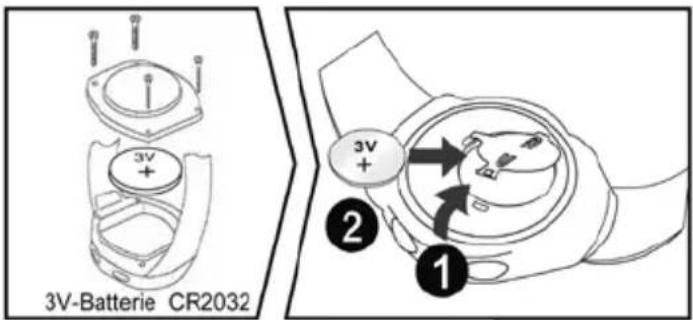
text_image
3V-Batterie CR2032 3V + ② ①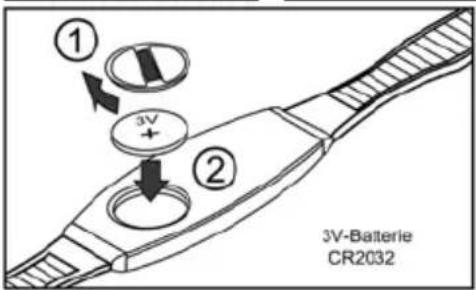
text_image
① ② 3V 3V-Batterie CR2032Do not dispose the batteries with the household waste
WEARING THE TRANSMITTER BELT
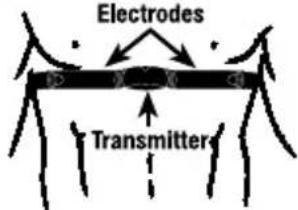
Adjust the elastic belt so that it fits tightly around your chest just below the pectoral muscles. Moisten the transmitter's conductive pads with saliva or ECG gel (available at your local chemist's) in order to ensure a good contact with the skin at all times.
Positioning the Transmitter Belt upward as per diagram.
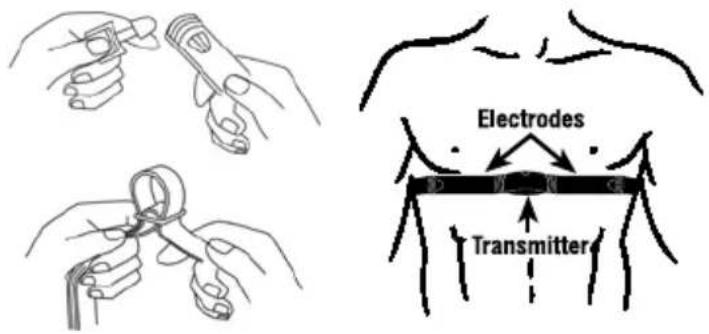
text_image
Electrodes TransmitterHOW TO USE THE COMPUTER WATCH
The computer can be worn like a watch on your wrist or it can be fixed on the handlebar of your bike with the optional mounting system. Keep the computer and the transmitter within a max. operating distance of 60 cm.
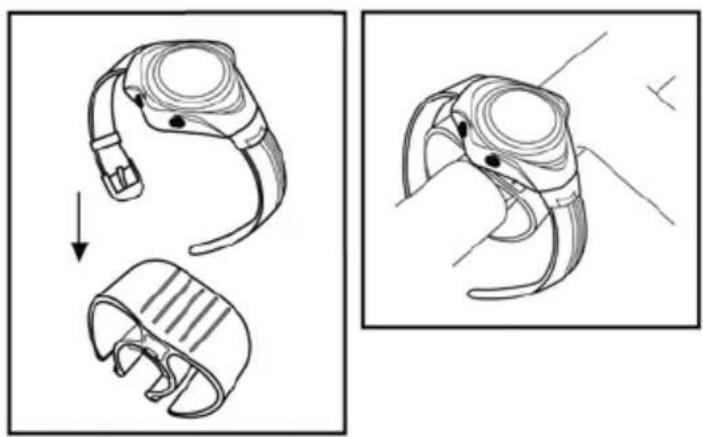
natural_image
Illustration of a smartwatch with a head-mounted sensor and two views showing the same device (no text or symbols present)PROBLEMS, POSSIBLE CAUSES AND SOLUTIONS
| Problem Possible causes | and solutions |
| No heart rate is displayed | Transmitter belt is not positioned as it should.The conductive pads are dirty or were not moistened prior to use.Atmospheric of RE interference.Check or replace the battery of the transmitter. |
| Incorrect heart rate is displayed | The conductive pads are dirty or were not moistened prior to use.The elastic belt is too loose.Weak batteries.Atmospheric or RF interference. |
| Display fades Weak computer battery. Replace it immediately | |
| Irregular figures on the display | Remove the computer battery and reinsert it. |
KEYS OPERATION
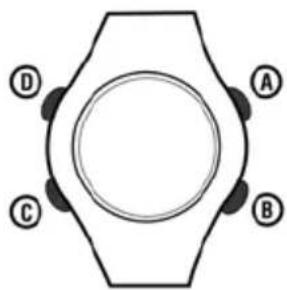
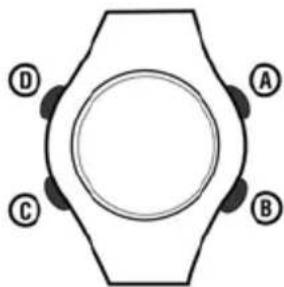
Key "A" (MODE)
Press to scroll through different key operating modes.
In SETTING mode, press to leave and finalize the setting.
Key "B" (SELECT)
In CLOCK mode, press to show month and year.
In PULSE mode, press to select different features (TIME/TIMER/ AVHR).
In SETTING mode, press to adjust the value.
Key "C" (SET)
In CLOCK mode, press to activate daily alarm.
Key "D" (LIGHT)
Press to turn on the backlight
GETTING START
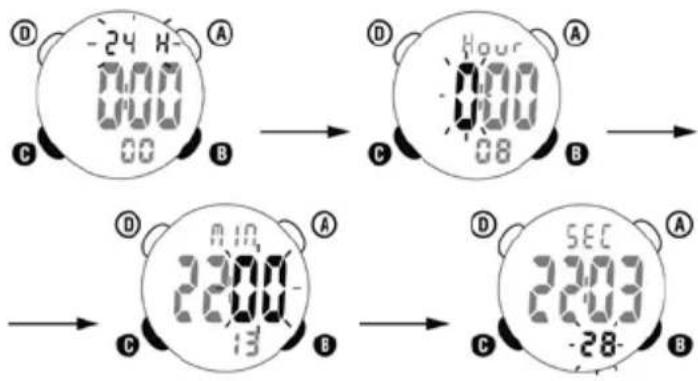
Hold button B and button C together to enter main setting menu. Press button B to adjust the value of each variable and press button C to confirm.
Press A to finish the setting.
natural_image
Symmetrical geometric diagram with four labeled points (A, B, C, D) around a central circle (no text or symbols beyond labels)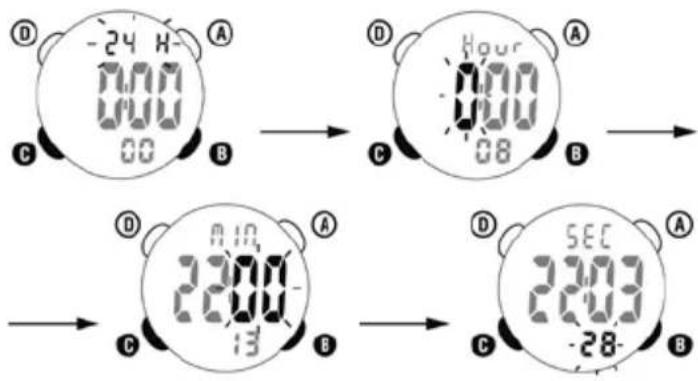
text_image
-24 H 0:00 0:00 00 B Hour 0:00 08 A C B D 23:00 13 A C B SEC 23:00 -28 A BEnter the DATE
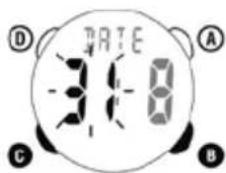
The pre-set date is displayed. Press the button B to adjust the digits and acknowledge with the button C.
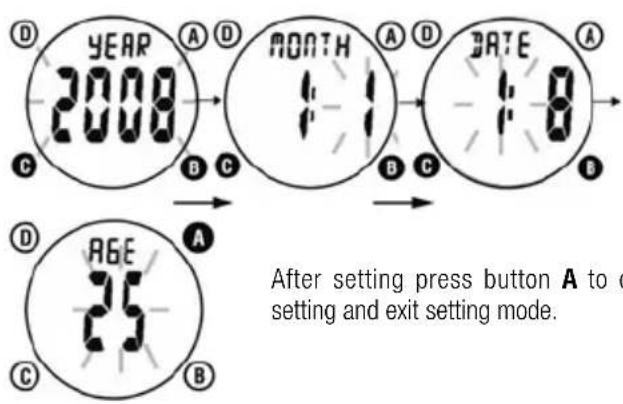
flowchart
graph TD
    A["YEAR 2008"] --> B["MONTH 1:1"]
    B --> C["DATE 1:0"]
    D["AGE 25"] --> E["After setting press button A to exit setting mode."]
CLOCK SETTING
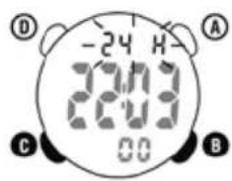
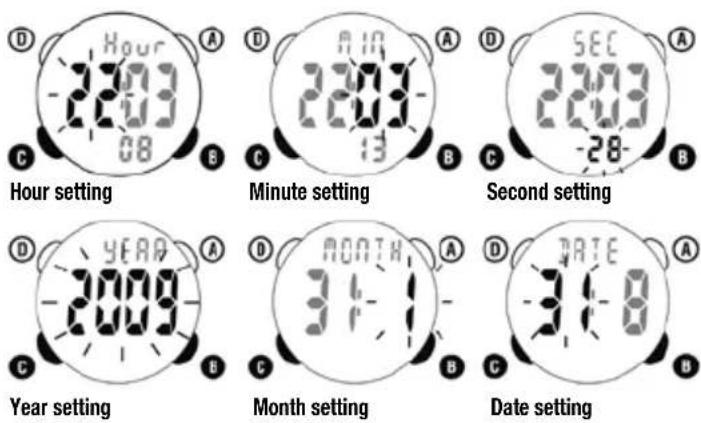
In clock mode, hold button C to enter the clock setting mode.
- Press button B to select 12 hour or 24 hour format
- Press button C to confirm setting.
text_image
-24 H 24:00 00 A B C DFor the calendar clock setting, press button C to adjust the digits and then press button B to confirm setting.
text_image
Hour setting 2003 08 A B C D 8:18 2003 13 A B C SEC 2003 -28- B Year setting YEAR 2009 A B Month setting MONTH 34-1 A B Date setting DATE 34-8 A BAfter setting press button A to confirm setting and exit setting mode.
PULSE MODE DISPLAY
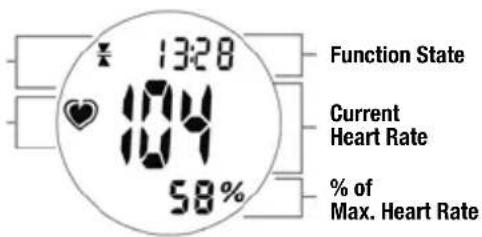
Exercise Zone Alarm Activation
Symbol
text_image
13:28 Function State Current Heart Rate 58% % of Max. Heart RateCURRENT HEART RATE
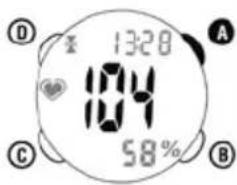
Press button A to return to the PULSE mode display. The current heart rate is displayed on Middle line of the LCD. The heart-symbol on the left hand side will start to flash if a signal is received from the transmission belt. The symbol will freeze and the last heart rate record will be displayed if no signal is received.
For power saving, the watch will automatically return to clock mode if no signal is received for about 2 minutes.
text_image
13:28 104 58%% OF MHR (Maximum Heart Rate)
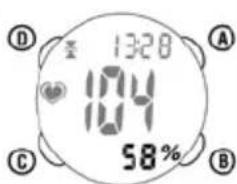
This is the data showing the percentage of Current Heart Rate comparing to Maximum Heart Rate (MHR by age). It is useful to monitor your heart performance safely and effectively during exercise
text_image
13:28 104 58% A B C DHEART RATE ALARM SETTING
In "PULSE" mode, press button B to enter into submode "TIME"
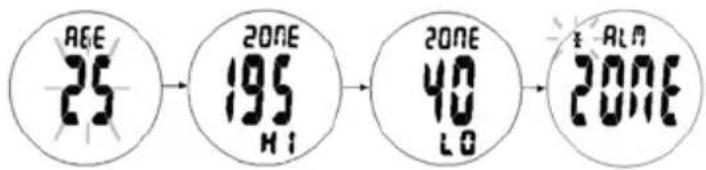
- Hold button C until "AGE" appear to enter into PULSE mode setting.
- Press button B to increment age by 1
- Press button C to confirm and go into ZONE setting for High zone
- The upper limit for the heart rate "ZONE HI" flashes on the display. Press button to go to the desired value. Press button C to confirm
- The lower limit for the heart rate "ZONE LO" flashes on the display. Press button to go to the desired value. Press button C to confirm
- The alarm symbol of the heart rate alarm flashes on the display. Press button B to choose one
▲ alarm will be activated only when your heart rate exceeds the upper limit.
▼ alarm will be activated only when your heart rate drops below the lower limit.
12 alarm will be activated both when your heart rate exceeds the upper or drops below the lower limit.
- After setting press button A to confirm setting and exit setting mode
Alarm Sound On/Off
- Press Button C to select alarm sound on or off.
text_image
AGE 25 ZONE 195 HI ZONE 40 LO ALM 2016TOTAL EXERCISE TIMER(TIMER) - 9 hour 59 min 59 sec
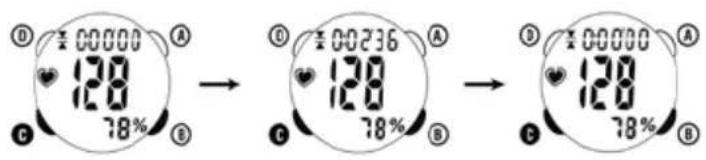
- In pulse mode, press button B to enter the timer mode(TIMER).
- The timer is activated automatically whenever pulse signal is received.
- To reset average heart rate and timer, press button B to enter timer mode (TIMER) and then hold button c until data is clear.
text_image
00000 128 78% 00236 128 78% 00000 128 78%AVERAGE HEART RATE (AV HR)
- In pulse mode, press button B to enter the average heart mode.
The heart rate monitor automatically calculates your maximum heart rate(MHR) on the basis of your age as well as your personal upper and lower limits of the 3 present training zones (Zone 1: 50-65 % of the MHR, Zone 2: 65-80 % of the MHR, Zone 3: 80-95 % of the MHR)
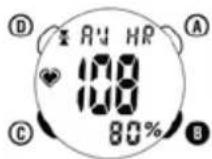
The heart rate monitor now returns automatically to the time mode.
STOPWATCH MODE
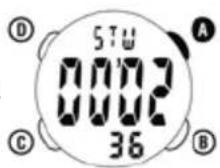
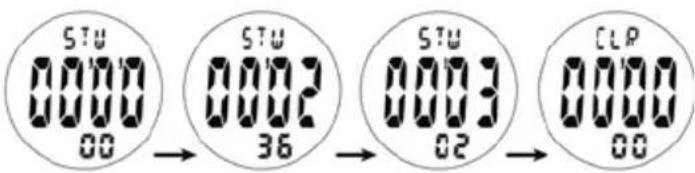
Press the button a to enter stopwatch mode (STW).
Press the button c to start or stop the stopwatch. Press the button B to reset when the stopwatch is stopped.
text_image
STU 0000 00 STU 0002 36 STU 0003 02 CLP 0000 00- Press c to start.
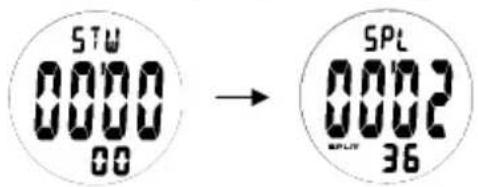
- While the stopwatch running, press B button "SPLIT" appears on the display, the split is for 5 seconds on the display, the timing runs in the background further. This process can be continued as many times.
- Press c to stop the timing.
- Press B to clear the data (CLR appears on the top)
text_image
STW 0000 00 → SPL 0002 36DAILY ALARM TIME SETTING
Alarm Time Setting
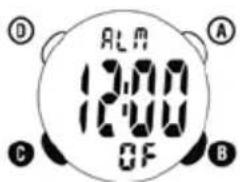
- Press button a to enter ALARM mode.
- Hold button c to enter alarm time setting mode and the hour digits will then flash
- Press button B to adjust the digits and press button c to confirm.
- Repeat the same process to set minute digits
To stop alarm sound, press any button or wait one minute for automatically stopp.
Daily Alarm on / off
- In CLOCK mode, press button C to ON/OFF ALARM.
- In alarm mode, press button C to turn the alarm on or off.
text_image
ALM 13:00 12:00 OF A B C D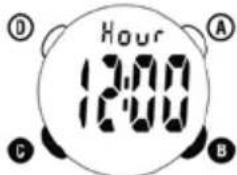
text_image
Hour 12:00 A B C D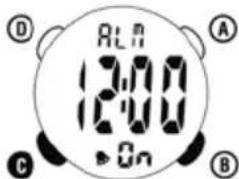
text_image
D ALA 12:00 On A C BBACKLIGHT
- Press button D to turn on the light.
GUARANTEE CONDITIONS
We offer a guarantee for 24 months from the date of purchase on the CICLOPULS CP 11 L. The guarantee is limited to material and processing faults. The batteries are excluded from the guarantee. The guarantee is valid only if the computer, with accessories, has been handled and maintained carefully and according to operating instructions. To return the CICLOPULS CP 11 L under conditions/terms of the guarantee, please refer to your dealer, your local distributor or send the computer with the proof of purchase(date) and all accessories, and with sufficient postage, to:
CICLOSPORT SERVICE
Please read through the operating manual again carefully before sending in the device and check the battery. In case of valid guarantee claims, the repaired device or a replacement device will be returned free of charge.
REPAIR
If the device is sent for repair, or the warranty claim is not accepted, repairs up to the value of 19 Euros will be carried out automatically. If the cost of the repairs exceeds this amount, the owner of the device will be notified in advance. The repaired device will be returned against payment.
GUARANTEE CERTIFICATE
Sender:
Name
First Name
Street, No.
Code / Location
Telephone (during the day)
Reason for sending in:
After expiry of the guarantee period:
Repairs should be carried out up to the amount of EURO ____
Disposal of Old Electrical & Electronic Equipment (Applicable in the European Union and other European countries with separate collection systems).
This symbol on the product or on its packaging indicates that this product shall not be treated as household waste. Instead it shall be handed over to the
applicable collection point for the recycling of electrical and electronic equipment. By ensuring this product is disposed of correctly, you will help prevent potential negative consequences for the environment and human health, which could otherwise be caused by inappropriate waste handling of this product. The recycling of materials will help to conserve natural resources. For more detailed information about recycling of this product, please contact your local city office, your household waste disposal service or the shop where you purchased the product.

CICLOSPORT®
www.ciclosport.de
CONTENU DE LA LIVRAISON
natural_image
Close-up of a black plastic mechanical component with symmetrical cutouts (no text or symbols visible)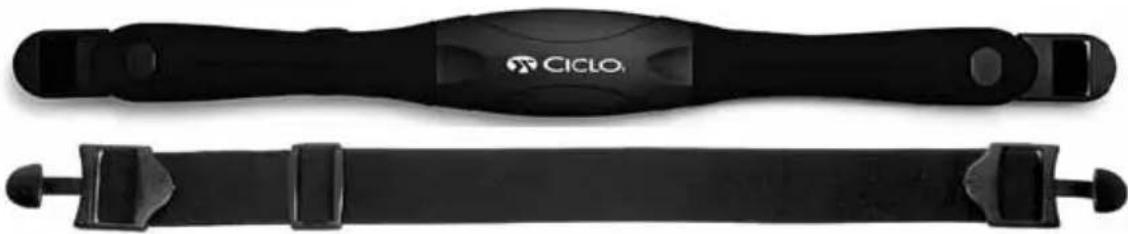
natural_image
Two black athletic fitness belts with visible branding, no text or symbols on the belts themselvesFélicitations!
natural_image
Diagram showing a device being processed from a cable, with no visible text or symbols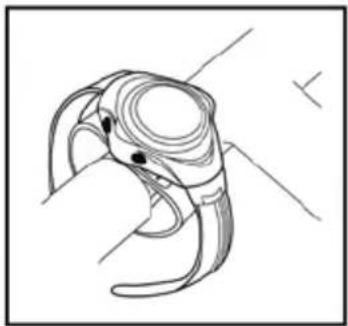
natural_image
Line drawing of a stylized bird head with curved beak and eye (no text or symbols)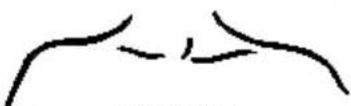
text_image
Electrodes TransmitterA = Touche MODE
B = Touche SEL
C = Touche SET
D = Touche Lumière
natural_image
Top-down view of a hexagonal mechanical component with four labeled points (A, B, C, D) and a central circular hole (no text or symbols beyond labels)text_image
Medical diagram showing human torso with bandage and internal anatomy, including a magnified view of the lower limb structure.text_image
Diagram illustrating water droplets entering a pipe with labeled components and directional arrowsZone Sport performance
text_image
A 98 138 88%natural_image
Black and white fitness record with digital display showing time, speed, and percentage (no text or symbols on wrist)Congratulazioni!
natural_image
Black plastic mechanical component with three curved arms and a central hole (no text or symbols visible)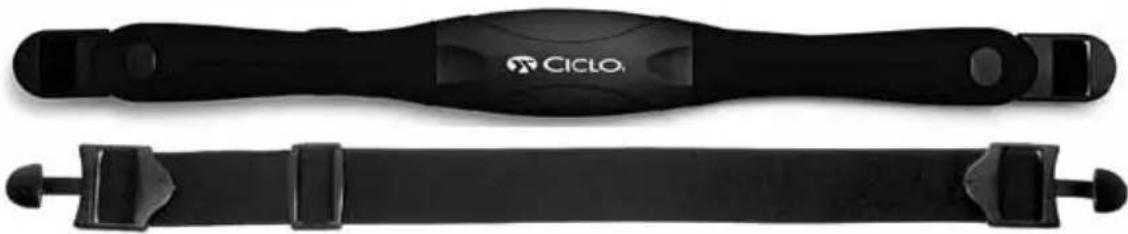
natural_image
Two black athletic band belts with visible branding, no text or symbols on the belt itselfINDICE
INTRODUZIONE 43
USARE UN PROGRAMMA DI ALLENAMENTO SPECIFICO 43
CONOSCERE IL VOSTRO LIMITE E DETERMINARE
IL VOSTRO ALLENAMENTO PERSONALE 43
ALLENAMENTO (BPM) 43
FEATURES 44
INSTALLAZIONE BATTERIA 44
TABELLA 44
INSTALLAZIONE BATTERIA 44
LAVAGGIO FASCIA CARDIO 45
USO COMPUTER 45
PROBLEMI, POSSIBILI CAUSE E SOLUZIONI 46
OPERAZIONI 46
IMPOSTAZIONI DI PARTENZA 46
DATA 47
OROLOGIO 47
MODALITA' DISPLAY 48
BATTITO CORRENTE 48
% DI MHR (MASSIMO BATTITO CARDIACO) 48
SELEZIONE ACUSTICA BATTITO CARDIACO 48
TOTALE TEMPO D'ESERCIZIO (TIMER) 49
MEDIA BATTITO CARDIACO (AV HR) 49
CRONOMETRO 49
SELEZIONE TEMPO DI ALLARME 50
ALARME ON / OFF 50
LUCE 50
GUARANTEE CONDITIONS 50
RIPARAZIONI 51
CERTIFICATO DI GARANZIA 51
INTRODUZIONE
ATTENZIONE: CONSULTARE SEMPRE IL VOSTRO MEDICO PRIMA DI PARTIRE CON UN PROGRAMMA SPORTIVO. IL COMPUTER NON DA INDICAZIONI MEDICHE. E' UN SUPPORTO DESTINATO ALLA MISURAZIONE E TRASMETTE LE INDICAZIONI DEL VOSTRO CUORE.
USARE UN PROGRAMMA DI ALLENAMENTO SPECIFICO
TEST 1 (50% - 65% del MHR)
TEST 2 (65% - 80% del MHR)
TEST 3 (80% - 95% of the MHR)
natural_image
Illustration of a hand holding a device with a magnified view showing the process (no text or symbols)PROBLEMI, POSSIBILI CAUSE E SOLUZIONI
natural_image
Simple geometric diagram of a hexagonal shape with four labeled corner points (A, B, C, D) and a central circle (no text or symbols beyond labels)TASTO "C" (SET)
text_image
MONTH 3 A B C DSelezione mese
text_image
DATE 3:18 A B C DSezione data
text_image
13:28 104 58%Funzioni
Display corrente
Battito e % massima
BATTITO CORRENTE
natural_image
Black and white fitness record with digital display showing 12:38, 135, and 58% (no text or symbols on wrist)¡Enhorabuena!
natural_image
Close-up of a black plastic mechanical component with curved and straight sections (no text or symbols visible)
natural_image
Two black athletic band belts with visible branding, no text or symbols on the belt itselfINDICE
INTRODUCCIÓN 55
USAN UN MÉTODO DE ENTRENAMIENTO PRECISO 55
CONOZCA SUS LÍMITES Y DETERMINAR SU
ZONA DE EJERCICIO PERSONAL 55
EJERCICIO DE LA ZONA (BPM) 55
CARACTERÍSTICAS 56
natural_image
Line drawings of hands holding a tool, no text or symbols present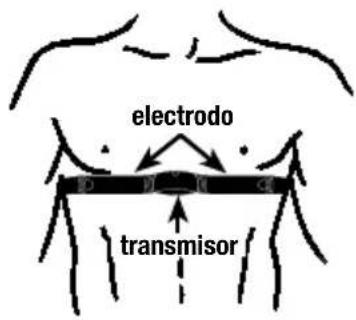
text_image
electrodo transmisorCÓMO USAR EL RELOJ DE INFORMÁTICA
natural_image
Diagram showing a device being processed from a cable, with no visible text or symbols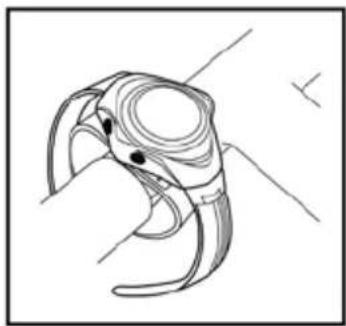
natural_image
Line drawing of a stylized bird head with curved beak and eye (no text or symbols)PROBLEmAs, CAUsAs y sOLUCIONEs POsIBLEs
natural_image
Simple geometric diagram with a central circle and four labeled corner points (A, B, C, D) at the top and bottom corners respectively (no text or symbols beyond labels)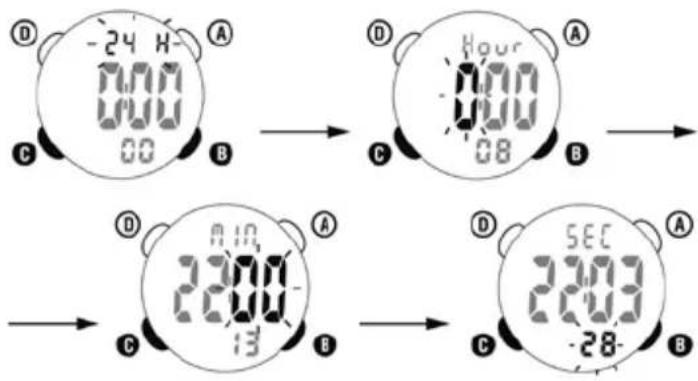
text_image
-24 H 00:00 00:00 A B C Hour 00:00 08 A B D 23:00 13 A B C SEC 23:00 -28 A BIntroduzca la fecha
text_image
00000 128 78% → 00236 128 78% → 00000 128 78%natural_image
Black and white fitness record with digital display showing 12:38, 135, and 58% (no text or symbols on wrist)Van harte gelukgewenst!
natural_image
Close-up of a black plastic mechanical component with three curved cutouts (no text or symbols visible)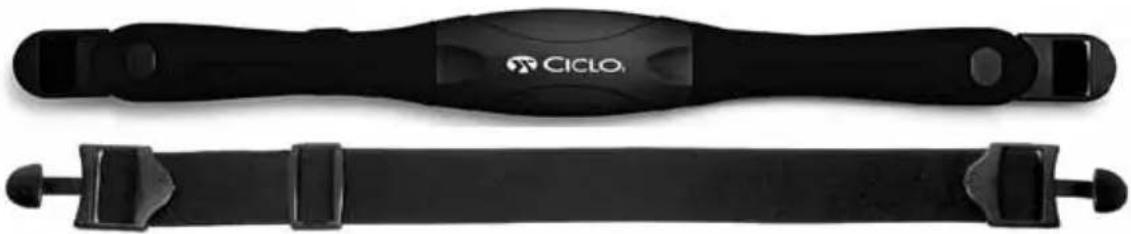
natural_image
Two black athletic band belts with visible branding, no text or symbols on the belt itselfINHOUDSOPGAVE
INLEIDING 69
GEBRUIK EEN JUISTE TRAININGSMETHODE 69
PERSOONLIJKE TRAININGSZONE 69
TRAININGSZONE (SPM) 69
FUNCTIONS 70
INSTALLATIE VAN DE BATTERIJ 70
DE BORSTRIEM MET ZENDER DRAGEN 71
GEBRUIK VAN DE HARTSLAGCOMPUTER 71
PROBLEMEN, MOGELIJKE OORZAKEN EN OPLOSSINGEN 72
BEDIENING MET TOETSEN 72
AAN DE SLAG 72
INVOER DATUM 73
INSTELLING KLOK 73
WEERGAVE HARTSLAGMODUS 74
HUIDIGE HARTSLAG 74
% VAN MHS (MAXIMALE HARTSLAG) 74
INSTELLING HARTSLAGSIGNAAL 74
TIMER VOOR VOLLEDIGE TRAINING 75
GEMIDDELDE HARTSLAG (AV HR) 75
STOPWATCHMODUS 75
INSTELLING DAGELIJKSE WEKFUNCTIE 76
DAGELIJKSE WEKFUNTIE AAN/UIT 76
ACHTERGRONDVERLICHTING 76
GARANTIEVOORWAARDEN 76
REPARATIES 76
GARANTIEBEWIJS 77
INLEIDING
$$ \text { MHS: } 2 2 0 - 2 0 = 2 0 0 $$
natural_image
Diagram showing a device being processed from a cable, with no visible text or symbols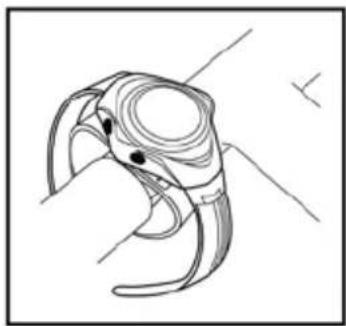
natural_image
Line drawing of a stylized bird head with curved beak and eye-like appendages (no text or symbols)PROBLEMEN, MOGELIJKE OÖRZAKEN EN OPLOSSINGEN
natural_image
Simple geometric diagram of a hexagonal shape with labeled corners A, B, C, D (no text or symbols beyond labels)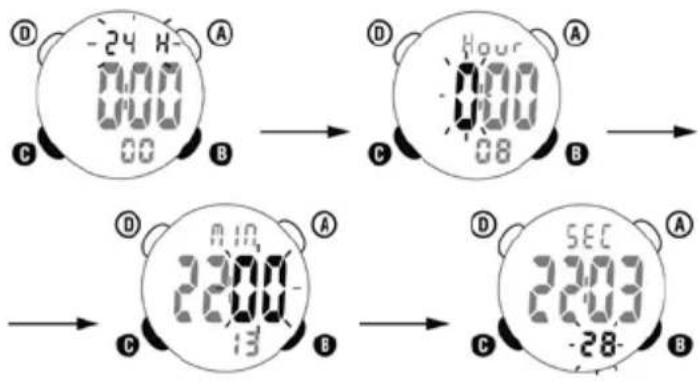
text_image
-24 H 0:00 0:00 00 B Hour 0:00 08 A C B D 23:00 13 A C B SEC 23:00 -28 A C BInvoer DATUM
text_image
00000 120 78% 00236 120 78% 00000 120 78%GEMIDDELDE HARTSLAG (AV HR)
text_image
ALA 12:00 OnGARANTIEVOORWAARDEN
natural_image
Black and white fitness record with digital display showing time, speed, and angle (no readable text or symbols beyond clock face)Wielkie gratulacje!
natural_image
Close-up of a black plastic mechanical component with curved and straight sections (no text or symbols visible)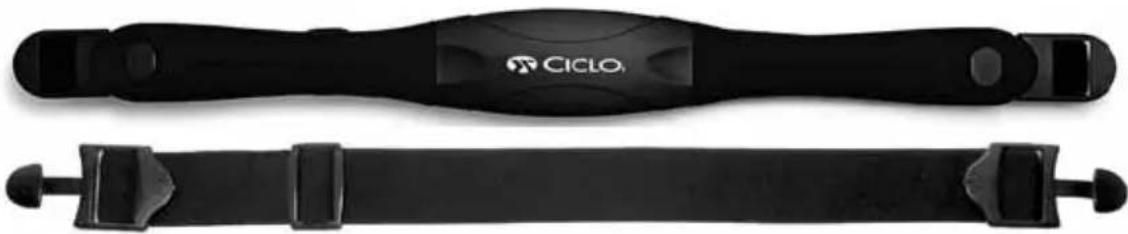
natural_image
Two black athletic bandaged devices, one labeled 'CICLO' and the other unlabeled, shown without any text or symbols on the body.rZECZY
heatmap
| Burning Fat | Zone 1 | Zone 2 | Zone 3 | |---|---|---|---| | WYDAJNOŚĆ | - | - | 190 | | 80-95 % MHR | - | 160 | 185 | | Fitness | - | 160 | 156 | | 65-80 % MHR | - | 130 | 126 | | ZDROWIE | - | 130 | 126 | | 50-65 % MHR | - | 100 | 97 | | 95 | - | 95 | 92 | | 90 | - | 90 | 87 | | 85 | - | 85 | 82 | | 80 | - | 80 | 77 | | 65 | - | 104 | 100 | The chart displays a heatmap with numerical values for each metric at specific age points. The color scale indicates 'White' to 'Red' and 'Black' to 'Blue'. The Y-axis labels are 'Burning Glycogen' and 'Age'. The X-axis is unlabeled but represents time or time intervals. Values are estimated based on the numeric labels inside the heatmap.ZonE 1 ZdrowiE
text_image
Electrodes TransmitterJAK UŻYWAĆ PULSOMETRU
natural_image
Illustration of a smartwatch with a hand operating the mode, showing two steps: before and after assembly (no text or symbols present)PROBLEMY I MOŻLIWOŚCI ICH ROZWIĄZANIA
natural_image
Simple geometric diagram of a hexagonal shape with four labeled corner points (A, B, C, D) and a central circle (no text or symbols beyond labels)