CP 12L Puls - Sports Watch Ciclo - Free user manual and instructions
Find the device manual for free CP 12L Puls Ciclo in PDF.


| Product type | Sports watch with heart rate monitor |
| Brand | Ciclo |
| Model | CP 12L Puls |
| Watch power supply | 1 CR2032 3V battery (duration ~1 year) |
| Chest strap power supply | 1 CR2032 3V battery (duration ~2 years) |
| Transmission frequency | 5.3 KHz |
| Main functions | Heart rate measurement, training zones (HI/LO), calorie expenditure (KCAL), stopwatch, countdown timer, lap time (16 laps), alarm (8 max), date, backlight |
| Heart rate setting range | Upper limit: 100-240 bpm, lower limit: 30-179 bpm |
| Time display | 12h or 24h, adjustable time zone |
| Memory | 16 lap times with average heart rate |
| Calorie expenditure setting | Sex (M/F), weight (20-225 kg), activity parameter (00010-00131) |
| Operating temperature | 0 °C to 50 °C |
| Warranty | 2 years (excluding improper use, wear parts, broken casing, transmitter) |
| Maintenance and cleaning | Clean the watch with a damp cloth; wash the transmitter strap by hand with a synthetic detergent, do not expose to sunlight |
| Safety | Consult a doctor before use if heart problems, pacemaker, diabetes; avoid strong electromagnetic fields |
| Batteries and recycling | Non-rechargeable batteries, do not incinerate, follow recycling instructions |
Frequently Asked Questions - CP 12L Puls Ciclo
User questions about CP 12L Puls Ciclo
0 question about this device. Answer the ones you know or ask your own.
Ask a new question about this device
Download the instructions for your Sports Watch in PDF format for free! Find your manual CP 12L Puls - Ciclo and take your electronic device back in hand. On this page are published all the documents necessary for the use of your device. CP 12L Puls by Ciclo.
USER MANUAL CP 12L Puls Ciclo
Heart rate monitor with calorie consumption and night-light-display.

Deutsch 2-15

English 16-29

Franzdisch 30-41

italienisch 42-53

Spanish 54-65

2.1 Putting on the heart rate transmission belt 19
-
USING THE BUTTONS 19
-
SETTINGS 21
Setting the time 21
Setting the alarm time 21
Setting the date 21
Setting the heart rate limits (training zones) 21
Heart rate alarm on/off 21
Setting the calorie consumption 22
- Operating mode 22
Stop watch mode 22
Countdown timer mode 23
Lap time mode 23
Power saving mode 23
To reset the CP 12L 23
6.Information on batteries 24
CP 12L battery 24
Transmitter bolt battery 24
7.Troubleshooting 24
8. Cleaning and care 25
9.Warranty 25
10.Technical data 26
Guarantee certificate 28
Congratulations!
You have purchased a high performance heart rate monitor which will provide you with extremely important information for your training routine.
CICLOPUs CP 12L is fitted with state of the art electronic equipment and you will be surprised by its long life span.
We are sure that you will obtain excellent results with CICLOPuls CP 12L.
Please read these operating instructions carefully.
Table of contents:
1. Watch with wristband
2. Transmitter belt
3. Adjustable elastic chest belt
Operating instruction
1. GENERAL INFORMATION
Sport helps keep the human body young and fit. Whoever carries out regular sports activities will feel the benefits first hand - feeling healthier, fitter and able to work hard.
CICLOPuls CP 12L is the ideal device for measuring heart rate, and guiding and monitoring a training routine by setting upper and lower heart rate values. If the upper or lower heart rates are exceeded, CP 12L emits an optical and acoustic warning signal. The CP 12L also calculates the calories consumed.
Warning: whoever carries out sport should have a general medical check up on his/her general state of health - especially beginners, persons older than 35 years of age and anyone who has suffered from illnesses or injuries in the past. It is recommended that a doctor be consulted in any case in the presence of risk factors, such as smoking, high blood pressure, high cholesterol values, diabetes, lack of exercise and excess weight.
People with pacemakers should consult their doctor before using any heart rate measurement device!
2. GETTING GOING
The following general rules apply:
Measurement of the heart rate is only possible if the transmitter bell is fitted correctly and the CP 12L lies within the transmitter's reception range (approx. 70~cm ).
Press the Mode button to start the receiver filled in the CP 12L. If the CP 12L does not receive any heart rate signal for more than 5 minutes it automatically switches off, and remains in standby mode. If the Mode button is pressed, the CP 12L returns to the normal operation mode (the heart rate receiver will also start at the same time).
A heart-shaped symbol will flash on the display when the
CP 12L receives the heart rate signals from the transmission bell.
2.1 Putting on the heart rate transmission belt
The transmitter belt is hung in the elastic chest belt and fastened around the upper body. The transmitter (the plastic part with the company logo) should lie over in middle of the upper stomach, immediately below the breastbone, so that the logo on the transmitter is legible viewed from
the front (see illustration). The electrodes in the belt, to the right as left of the transmitter, must be in contact with the skin.
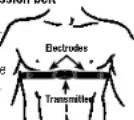
Pull the bolt tight so that it cannot slip and constant contact with the body is guaranteed during movement.
If the CP 12L fails to display any heart rate, it probably means that there is no contact between the skin and the electrodes. Moistening the electrodes and the underlying skin often helps. Best results are obtained if electrode gel is used (available from pharmacies).
3. USING THE BUTTONS
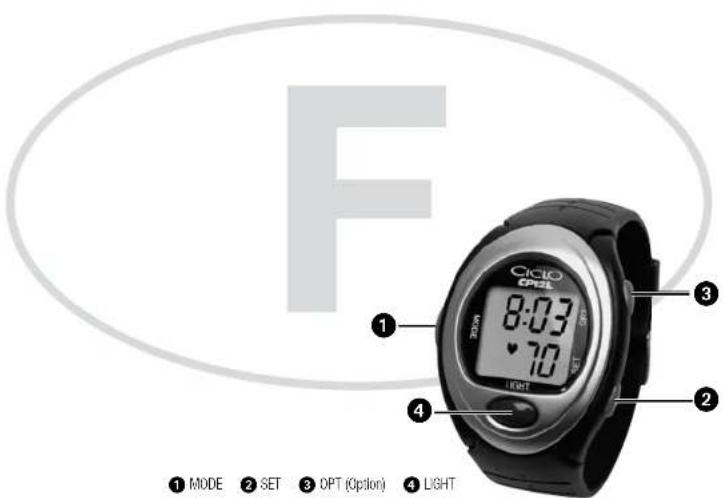
The CICLOPS CP 12L has four buttons
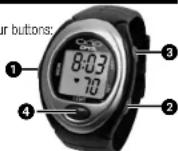
1 MODE-bution
SET按钮
3. OPT-buTpon (Option)
LIGHT-BUTTEN
Mode button
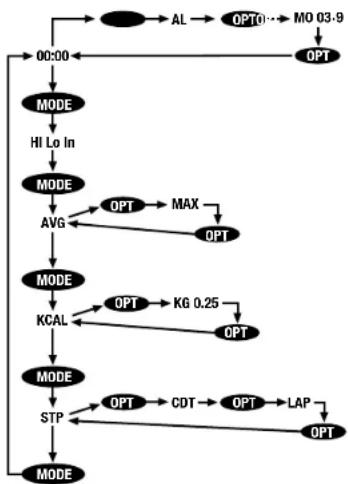
For switching between various modes. Shortly press in Time mode Training zone mode Heart rate mode (AVG) Kilocalorie mode (KCAL) Stop watch mode (STP) Time mode.
Option button
For switching over from time mode Alarm (AL) Date Time mode.
From heart rate mode Average heart rate (AVG) Maximum
heart rate (MAX) Average heart rate (AVG).
From stop watch mode (STP) Timer (CDT) Lap times (LAP)
Stop watch mode (STP).
Set button
For selling upper and lower heart rate, time, date, alarm time, ti
mer, calorie consumption parameters.
For starting of timer and training and lap times.
Alarm/light button
For switching on backlight and activating/deactivating the signal
tone.
4. SETTINGS
Setting the time (initial display 0.00)
CP 12L in time mode (Display: 00:00)
- Press SET-buhton for approx. 2 sec. until "hold" disappears.
Press SET按钮 to choose between AM and PM disp - Confirm with MODE按钮 hour is blinking.
-Set the current hour with SET -button. - Confirm with MODE按钮→minutes are blinking.
-Set the minutes with SET按钮 - Confirm with MODE-button → second time zone display is
blinking
Set the time shift with SFT - button
-Return to line mode with MODE-button
HidcOET button approval 2 sac switch between normal time
TND OF P-Button approx. 2 sec. switch between normal time and second time zone
Setting the alarm time (max. 8 alarms)
CP 12L in alarm time mode (Display: AL)
- Press SET-button for approx. 2 sec, until "hold" disappears.
With SET button set alarm on (All on) or (off).
With OPT-button set the week day for the first alarm.
Confirm with MODE button hour is blinking.
With SET-bution set the hour.
-Confirm with MDF-bution→minutes are blinking
With SET按钮set的minutes
With MODE button return to the alarm time mode.
Hold OPT-button for approx. 2 sec. → switch-over between
alarms 1 to 8. Setting of the alarms 2 to 8 is analogous.
Setting the date
CP 12L in date mode (Display: date e.g. Mo 03-9)
- Press SET-button [or approx. 2 sec, until "hold" disappears.
With SET-putton→set year(2003 to 2053)
- Confirm with MODE按钮→month is blinding
With SET button set the month.
- Confirm with MODE-button. Set the day.
With MODE button return to the date mode.
Setting the heart rate limits (training zones)
CP 12L in training zone mode (Display alternatives: HI, Lo, In
shows the training time in, above and below the heart rate limits).
Set upper and lower limit value
Press SET按钮 for approx. 2 sec. until "hold" disappears.
- Press SET按钮 to set the upper limit value Hb between 100 and
240
-
Confirm with MODE-button lower limit value is blinking.
-
Press SET-button to set the lower limit value (Loi) between 30 and
179
- Return to training zone mode with MODE-button.
Heart rate alarm on/off
Shortly press the light button to turn the alarm on/off ja symbol
will appear in the left of the display when the heart rate alarm is
turned on).
The alarm will sound every 6 seconds if the heart rate is above or below the set heart rate limits.
Setting the calorie consumption
Set sex, weight and activity (necessary for the calculation of the
CP 12L in calcrie mode (Display: KCAL)
Press SET-button for approx. 2 sec. until "hold" disappears.
With SET-button select the sex M (male) or F (female).
Confirm with MODE button weight is blinking.
- With SET按钮 set weight (from 20 to 225 kg).
Note: you can choose between kgs and english pounds (lbs) with OPT-bution.
Confirm with MODE button calorie parameter is blinking.
With SET-button set calorie parameter (00010 to 00131). Guidelines: Jogging 00036-00069, aerobics 00047-00061, cycling 00029-00079.
With MODE按钮 return to calorie mode.
For the calorie consumption to be calculated, the stop watch must be started.
Press the OPT-button during the training sequence to show the reduction of fat which has occurred (max. 1.3 kg).
5. Operating mode
The display will show the current heart rate during your training. When the current heart rate is above or below the set heart rate limits, the value will start blinking and an upward or downward pointing arrow will show if the value is above or below the set limits. An additional alarm can be set which will sound when values drop/rise. The arrows/alarm will disappear as soon as the current heart rate is within the set heart rate limits.
Stop watch mode
CP 12L in stop watch mode (Display: STP)
- Press OPT button for approx. 2 sec to switch on (R on) or off (R off) the recuperating heart rate function.
If recuperating heart rate function is switched off.
- Press SET-button → start training time (stop watch).
Press SET button stop training time.
- Press SET-button training time continues.
Press SET按钮 for 2 sec. → reset training time (this also resets average heart rate, maximum heart rate and calorie).
If recuperating heart rate function is switched on:
- Press SET button → start training time.
- Press SET button start recuperating heart rate function R (3 min):
The ciprofen time is displayed for 5 sec., the watch counts down from 3 min. to 0. A signal tone marks the end of the rest period. The heart rate (ordered at the start of the recuperating heart rate function) is displayed on the upper line and the current heart rate on the lower line.
Press SET-button for 2 sec. ending of the recuperating heart rate function R.
- Press again SET-button for 2 sec. → reset training time.
Press shortly SET按钮 training period continues.
Countdown timer mode (max. 9 hrs, 59 min.)
CP 12L in countdown mode (Display: CDT)
Press MODE button for 2 sec. until "hold" disappears.
With SET-button set the hours (0-9).
Confirm with MODE按钮 minutes are blinking.
- With SET-button set the minutes.
With MODE按钮 return to the countdown mode.
With SET-button start or stop the countdown timer.
Alarm sounds and 0:00:00 appears after the countdown time has expired.
- Press SET-button for 2 sec. → set initial value.
Lap time mode (max. 16 training laps)
CP 12L in lap time mode (Display: LAP)
- With SET-button start the lap time measurement.
- With SET button stop the time measurement for the current lap. The time measurement for the next lap starts automatically.
Max. lap time = 99 min, 59 sec.
- Press MODE button to stop the time measurement without starting the next lap.
Lap time memory
Retrieving total time, number of laps, average lap time and average heart rate from the memory.
Press MODE-bution for approx. 2 sec. In 2 sec, intervals the total time and number of laps with average lap time and average heart rate are displayed. (LAP AVG).
- Press SET button several times to call up individual lap times
- With MODE-button leave memory back to lap time mode.
- Press SET button for 2 sec. delete lap times.
Power saving mode (display shows only time)
No signal reception after approx. 5 min. CP 12L will switch to power saving mode.
To reset the CP 12L
- Press all 4 buttons for approx. 3 sec.
- Press SET-button, the watch counts from 3 to 0.
- Press MODE按钮, and then OPT-button → delivery setting
6. Information on batteries
The battery in the CP 12L should last for approximately 1 year and the battery in the chest belt should last for approximately 2 years (based on an average use of 1 hour per day).
CP 12L battery:
The battery can be changed by a watchmaker (preferably with the help of these instructions), or personally by the user, if sufficiently dextrous. The tools required are a crosspoint screwdriver and tweezers to handle the small screws.
N.B.: Changing the battery erases all values and settings.
Take note of all personalised values and those to be inserted.
- Place the watch on a clean, non-scratch surface with the display facing downwards.
- Loosen the four screws and remove the protective base plate Use a pin to loosen the battery fixing clip on the upper side.
- Remove the old battery and fit a new C82032 lithium battery.
with the positive pole facing upwards.
- Relock the battery fixing clip.
- Check that the rubber gasket for the metal cover is still positioned correctly, to keep the device watertight.
- Replace the protective base plate and fix it with the four screws (crosswise and without too much force).
- Check the display, the buttons and the acoustic alarm.
If a button does not work correctly, check that the innerpart has been positioned correctly!
- It can occur that the processor is not correctly reset after changing the battery. If this happens, meaningless values, or no values at all, may appear on the display. In this case, remove the new battery, wait approximately 20 seconds and re-insert the battery.
- Reset the personal values and those to be inserted.
If the battery is changed correctly, in accordance with the instructions, the warranty is still valid.
Transmitter belt battery:
Unscrew the battery cover in an anticlockwise direction and remove the old battery. Hit a new CR2032 lithium battery, with the positive pole facing upwards, and replace the cover.
Dispose of batteries in a safe and responsible manner.
7. Troubleshooting
No or random values on Display
- Check battery
Display Is black or reacts too slow:
Temperature to high or low (min. 0 - max. 55°C)
- Display was too long in the direct sun
- Check battery
Alarm sounds in regular intervals:
- Check if heart rate alarm is switched on
The heart rate is not displayed/wrong/fluctuant:
Receiver is not turned on: press Mode button
Check transmitter belt
Skin is too dry/cold
Distance between CP 12L and the belt is too big (no more than 70 cm).
- Interference of foreign devices such as pylon, other heart rate monitors, mobile phones etc.
The values will return to normal when away from foreign devices
8. Cleaning and care
Please protect CP 12L from direct sunlight, heat and frost avoid temperatures under 0^ and over 50^
Washing the heart rate belt
The transmitter belt with the built in electrodes is not allowed to be put into the washing machine! To clean the belt, carefully handwash it with using a synthetic washing powder or liquid. This is especially vital after it has come into contact with salt water. Do not leave in the direct sun to dry! The elastic belt is washable but must be dry before using it.
The watch should also be cleaned (with a moist cloth) after coming into contact with either salt water or sweat. Make sure not to press any buttons when watch is in contact with water.
9. Warranty
We offer a guarantee for 2 years from the date of purchase on the CP 12L. The guarantee is limited to material and processing faults. Brokten transmitters, or damages of wasted parts of CP 12L are excluded from the guarantee.
The guarantee is valid only if the computer, with accessories, has been handled and maintained carefully and according to operating instructions.
The guarantee will take place through changes of or repairing the defective parts. The guarantee doesn't cover direct, indirect or subsequent damages which are related to the product.
This guarantee doesn't limit any rights of the consumer (considering relative national law) in respect to the dealer.
To return the CP 12L under conditions/terms of the guarantee please refer to your dealer or your local distributor. Or send the computer with the proof of purchase date and all accessories and with sufficient postage to:
CICLO SPORT Service
Before sending your device, please read the instructions carefully, especially Section 7 (Troubleshooting), to check whether a fault actually exists.
If a warranty claim is accepted, either a replacement device will be provided or the faulty device will be repaired and returned.
If the device is sent for repair, or the warranty claim is not accepted, repairs up to the value of 19 Euros will be carried out automatically. If the cost of the repairs exceeds this amount, the owner of the device will be notified in advance. The repaired device will be returned against payment.
Answers to queries about products (FAQ) can be found on the CICLOSPORT website: http://www.cicloport.de
Other queries can also be sent by e-mail to the CICLOSPORT Customer Care Service at: cico-service@ciclospodet.org
10. Technical data
CP 12L
Water resistance: up to 20 m, not to be used while swimming (ensure that no button is pressed when the device is in contact with water)
Min and max temperature: 0^ bis 50^
Battery: CR2032 Lithium
Average battery life:
1 year (average use of one hour per day)
Transmitter belt
Min and max temperature: 0^ bis 50^
Battery: CR2032 Lithium
Average battery life:
2 years (average use of one hour per day)
Transmitting frequency: 5.3 kHz

Disposal of Old Electrical & Electronic Equipment (Applicable in the European Union and other European countries with separate collection systems)
This symbol on the product or on its packaging indicates that this product that is not to be discarded as household waste, instead, will be used for other purposes.
recycling of electrical and electronic equipment. By creating this product, it is dependent on correctly, you will help prevent potential negative consequences for the environment and human health which could otherwise be caused by inappropriate waste handling of this product. The recycling of materials will help to conserve natural resources. For more detailed information about recycling of this product, please contact your local city office, your municipal waste disposal service or the shop where you purchased the product.
Subject to technical alterations and fault.
Guarantee certificate:
Sender
Name
First name
Street No.
Code Location
Telephone (curing the day)
fax
Reason for return:
After expiry of the guarantee:
Repairs should be carried out up to a value of Euro
schakelen (R on) ofuit te schakelen (R off).