WR1995 - Fridge TRISTAR - Free user manual and instructions
Find the device manual for free WR1995 TRISTAR in PDF.



| Brand | TriStar |
| Model | WR1995 |
| Product type | Wine refrigerator / Wine cabinet |
| Capacity | 61 bottles |
| Dimensions (H x W x D) | 810-825 mm x 590 mm x 571 mm |
| Net weight | Approximately 45 kg |
| Power supply | 220-240 V ~ 50/60 Hz, 16 A |
| Upper zone temperature range | 12 °C to 22 °C |
| Lower zone temperature range | 5 °C to 12 °C |
| Temperature zones | 2 independent electronically adjustable zones |
| Regulation type | Digital with LED display |
| Shelf types | Sliding shelves and bottle storage shelves |
| Activated carbon filter | Yes, replace every 6 months |
| Interior lighting | Not specified (probably LED) |
| Door | Glass door with adjustable hinges |
| Child safety | Lockable control (not specified, but passive safety by design) |
| Defrosting | Automatic (frost melts naturally when off) |
| Connection | Mandatory grounded outlet, no extension cord |
| Installation | Built-in or freestanding, rear clearance 2-6 cm, spirit level required |
| Interior cleaning | Water and mild detergent once a year |
| Condenser cleaning | Dust twice a year (metal grille at the back) |
| Error codes | E2 (upper sensor), E3 (lower sensor), E8 (too cold), E9 (overheating) |
| Repairability index | Not provided, but spare parts available through authorized dealer |
| Warranty | Consult the seller |
Frequently Asked Questions - WR1995 TRISTAR
User questions about WR1995 TRISTAR
0 question about this device. Answer the ones you know or ask your own.
Ask a new question about this device
Download the instructions for your Fridge in PDF format for free! Find your manual WR1995 - TRISTAR and take your electronic device back in hand. On this page are published all the documents necessary for the use of your device. WR1995 by TRISTAR.
USER MANUAL WR1995 TRISTAR
text_image
Diagram of a refrigerator with numbered labels pointing to the interior structure.natural_image
Simple line drawing of a kitchen appliance with a knob and fan (no text or symbols)text_image
(Rooster ,etc)HET INSTALLEREN VAN EEN TOESTEL MET EEN VOORZETDEU
natural_image
3D rendering of a row of cylindrical mechanical components (no text or symbols visible)Opslagplateau Ref:AXL
natural_image
Close-up of a black electronic component with multiple cylindrical pins arranged in a row (no visible text or symbols)Schuifplateau Ref: AXM
natural_image
Black plastic tray with slots and two cylindrical clips attached (no text or symbols visible)Uw Claret opslaan:
natural_image
Pure diagram of parallel lines with wavy top and bottom, no text or symbols presentBovenaanzicht
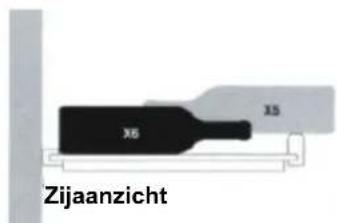
text_image
X6 15 ZijaanzichtAchterkant van kast
Uw Bourgogne opslaan:
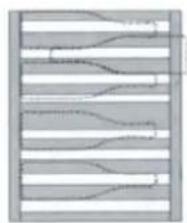
natural_image
Abstract pattern of wavy lines within a rectangular frame (no text or symbols)Bovenaanzicht
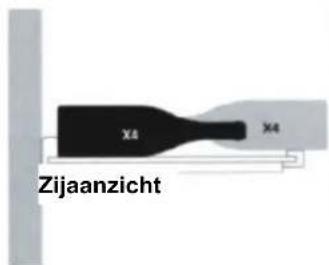
text_image
X4 X4 ZijaanzichtAchterkant van kast
text_image
PLATEAUSTEUN WANDPLAAT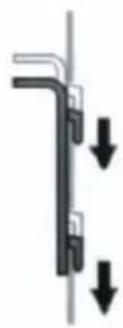
natural_image
Pure mechanical diagram showing a bent pipe or bracket with two downward arrows indicating force or direction (no text or symbols)SCHUIFPLATEAU
■MODELES: WR-1994 WR-1995
Note----1
text_image
Diagram of a refrigerator with numbered labels pointing to the interior panelnatural_image
Simple line drawing of a kitchen appliance with a button and fan (no text or symbols)natural_image
Stacked cylindrical objects arranged in a row, no visible text or symbolsnatural_image
Close-up of a row of cylindrical electronic components on a base plate (no visible text or symbols)Etagège coulissante Ref: AXM
natural_image
Black plastic tray with slatted side and two cylindrical clips attached (no text or symbols visible)natural_image
Pure diagram of parallel lines within a rectangular boundary, no text or symbols presentVue aérienne
natural_image
Abstract pattern of wavy and horizontal lines with no text or symbolsVue aérienne
text_image
Diagram of a refrigerator with numbered labels pointing to the interior panelnatural_image
Simple line drawing of a mounted air vent with a base and circular button (no text or symbols)4.
natural_image
Stacked cylindrical objects arranged in a row, no visible text or symbolsnatural_image
Black-and-white photo of a row of cylindrical electronic components on a base plate (no visible text or symbols)natural_image
Black plastic tray with slats and a cylindrical object on top (no text or symbols visible)natural_image
Pure diagram of parallel lines with no text, numbers, or symbolsDraufsicht
natural_image
Abstract pattern of horizontal wavy lines and curved segments within a rectangular frame (no text or symbols)Draufsicht
natural_image
Pure mechanical diagram showing a vertical pipe or channel with downward arrows indicating force or movement (no text or symbols)EINSCHUBREGAL
Thanks for choosing our product, please read this manual carefully before using it. This instruction manual is the universal-purpose version for the models of wine cabinet manufactured by our Co. The appearance of the units that you purchase might be slightly different from the ones described in the manual, but it does not affect your proper operations and usage. Please read carefully the sections corresponding to the specific model you choose, and keep the manual properly so as to facilitate your reference at later time.
■MODEL: WR-1994 WR-1995
Note----1
Your wine cabinet----2
Installing your wine cabinet----3
Putting into service-Temperature settings----5
Layout and storage 7
Routine maintenance----9
Operating problems----10
NOTE

Note
- The parameter is subject to change without prior notice, the final data and circuit diagram is on rating label. Please pay attention to latest data.
- It's common that there are drips on the glass door when humidity in the air is high or the temperature different largely between inside of the cabinet and the environment temperature. Rub it clear with dry soft cloth will be OK.
- The film attached to the unit is to avoid scull and you can take it down if you do not like it.
- It is normal to frost on the inter-backside of the cabinet. The frost will melt naturally when the cabinet stops wording.
- If the appliance is broken and not be used for ever, don't throw it freely, send it to the recycle bin.
1-IMPORTANT SAFETY INSTRUCTIONS
You must always observe some basic precautions when using yourwine cabinet, including: Only use your wine cabinet for the use intended, as described in this guide.
Never unplug the wine cabinet by pulling on the power cord, Grip the plug firmly and pull straight out to remove from wall socket.
Immediately repair or replace any worn or damaged cord, Never use a cord that is split on which shows signs of wear along its length or on its ends.
Do not allow children to climb on. sit on or stand on the wine cabinet, nor hang from its sheleves. They could damage the wine cabinet and injure themselves seriously.
Do not use an extension cord.

DANGER
Risk of child entrapment. Before you throw away your old refrigerator or freezer:
-
Take off the doors
-
Leave the shelves in place so that children may not easily climb inside.
If the supply cord is damaged, it must be replaced by the manufacturer, its service agent or similarly qualified persons in order to avoid a hazard.
2-CONNECTING TO MAINS SUPPLY
The wine cabinet's power cord is equipped with a plug witch fits into any standard socket with earth connection, to prevent any risk of shock. Have the mains socket checked by a qualified Electrician to make sure it is actually connected to earth.
If this is not the case, you must have it replaced with a socket which is suitably earthed.
If the power cord is damaged, have it replaced by a qualified electrician to prevent any risk.
If the wall socket is not equipped with an earth connection, it is your responsibility and your duty to have it replaced with a suitably earthed wall socket, if the plug does not match your socket, you may have another fitted.

Note
- For your safety, wine cabinet must be correctly earthed
- New electrical cables and plugs should be fitted by a qualified electrician.
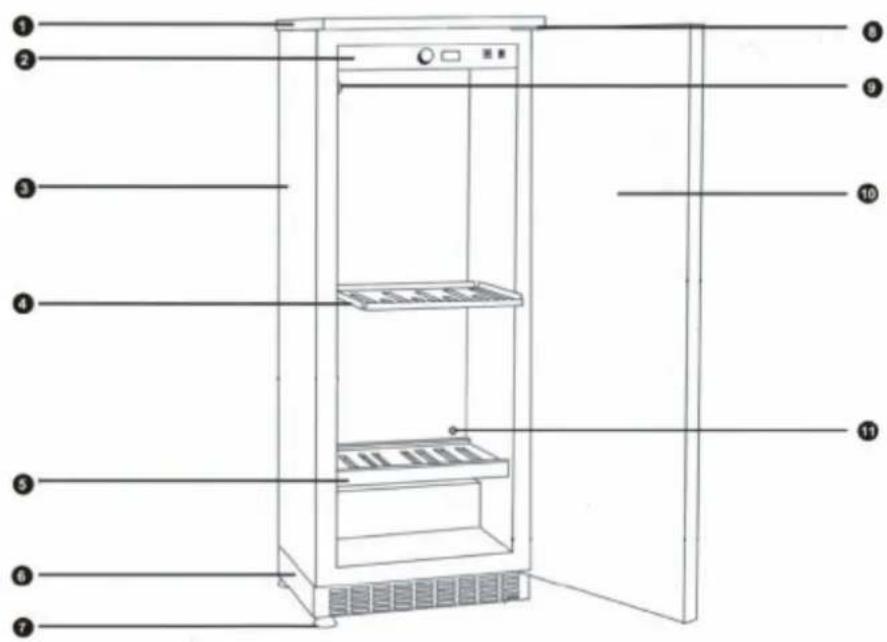
YOUR WINE CABINET
text_image
Diagram of a refrigerator with numbered labels pointing to the interior panel1 Removable Plate
2 Control Panel and Temperature Settings
3 Cabinet
4 Sliding shelf
5 Storage shelf
6 Front Ventilation Base
7 4 Adjustable Feet
8 Hinge
9 Activated Charcoal Filter
10 Door
11 Free Ventilation Hole
INSTALLING YOUR WINE CABINET
-When you receive your cabinet, make sure when you unpack it there is no defect in its external appearance (from shocks, deformation, etc.).
-Open the door and check to see that the inside is complete (walls, shelves hinges, control panel, etc.)
-If you wish to install your cabinet under a worktop, you will need to remove the top plate which is fixed from underneath by two front screws in the hinges and two screws behind in the angle brackets. Keep the two front screws if you wish to encase the unit under a worktop so as to fix it to existing worktop (see diagrams page 4)
-Now carry the cabinet to where you want to install it. Make sure the place selected is:
-away from any source of heat
-not too damp(laundry room, utility room, bathroom, etc.)
-on a stable level surface
-equipped with a power point(standard socket, rated voltage, 16A, connected to earth)
-Make sure the On/Off switch located on the right of the control panel is in the off position.
-Take out the mains lead and connect it as shown in section 3. Check the power point supply (fuses in, fuse amperage, circuit breaker working, You can if you wish use another appliance to check the power supply.)
-Adjust the four feet underneath the cabinet (screwing them up or unscrewing them) so that your cabinet is level (it is advisable to use a spirit level).
-Slide the cabinet into its final position, leaving a space of between 2 and 6 cm between the wall and the rear wall of the cabinet, for installation under a worktop (Model 103), fix the cabinet to the worktop using two screws in the top hinges (see diagram below).
-Do not obstruct the front ventilation grille.
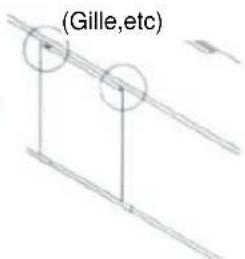
-Make a ventilation hole (flush-mounted grille) in the worktop (see diagram 4 below)
-Remove the protective materials from the inside of the cabinet.
-Remove the protective paper form the charcoal filter that you will find in the accessories pack, Form inside the cabinet, position the filter in the round box located in the top back of the cabinet.
-Arrange the shelves to suit your convenience (see section 6.)
-Wait 48 hours before switching the cabinet on so as to allow the fluids to settle.
NB: If ever you need to move the cabinet, do not tilt it at an angle of more that 45^ , and always on the side where the lead comes out.
The appliance must be positioned so that the plug is accessible.
INSTALLING YOUR WINE CABINET
103: Installation Diagram
- Remove the plate by unscrewing the 2 screws located under the 2 hinges (door open) and the 2 screws behind in the angle brackets.
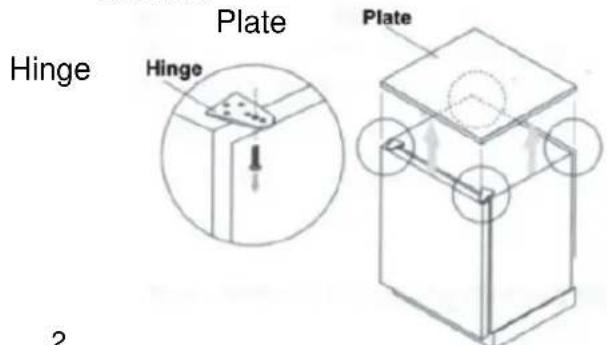
text_image
Hinge Plate Hinge Plate 2- Adjust the 4 feet
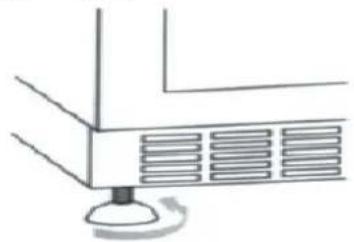
natural_image
Simple line drawing of a kitchen appliance with a knob and fan (no text or symbols)- Slide the cabinet into its final position
te final position.
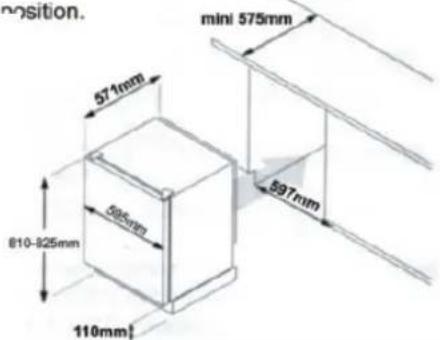
text_image
position. mini 575mm 571mm 897mm 500mm 810-825mm 110mm4.
- Screw the 2 screws through the hinges and into the worktop.
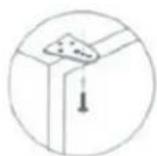
Ventilation Hole
text_image
(Gille,etc)8.
INSTALLING A UNT WITH A TECHNICAL DOOR
- Level the unit side the cabinet
- Open the door of the unit a 90^ angle.
1 - Drawing for unit placed on the floor.
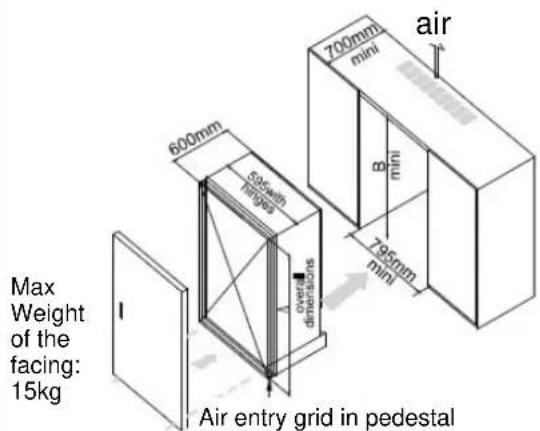
text_image
Max Weight of the facing: 15kg 600mm 500mm dimensions overall dimensions 700mm mini air B mini 795mm mini Air entry grid in pedestal- Fix the facing of the kitchen cabinet on the door of the unit (8 screws included).
- Be sure the gasket seals properly.
2-Drawing for unit placed in a cabinet
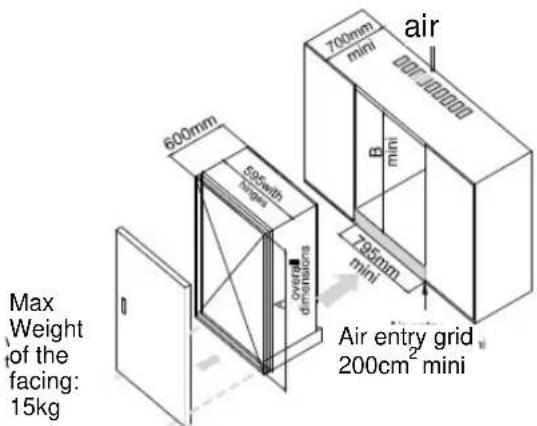
text_image
Max Weight of the facing: 15kg 600mm 500mm with dimensions A overall dimensions 700mm mini air B mini 700mm mini Air entry grid 200cm² mini| Effective Volume A | mini(mm) | A mini(mm) | B mini(mm) |
| 3 | 815 | 830 | 915 |
| 188 | 1215 | 1230 | 1315 |
| 270 | 1615 | 1630 | 1715 |
Note:
A=Body+Pedestal(90mm)+Feet(20-35mm)
All around the appliance must have 100 mm space.
4
PUTTING INTO SERVICE-TEMPERATURE SETTINGS
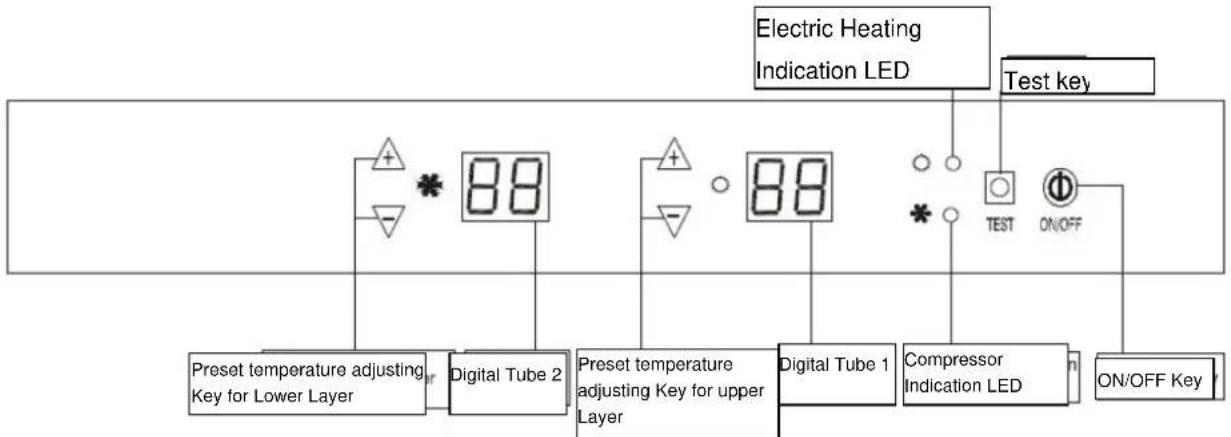
flowchart
graph TD
    A["Preset temperature adjusting Key for Lower Layer"] --> B["Digital Tube 2"]
    B --> C["Preset temperature adjusting Key for upper Layer"]
    C --> D["Digital Tube 1"]
    D --> E["Compressor Indication LED"]
    E --> F["Test key"]
    E --> G["ON/OFF Key"]
    H["Electric Heating Indication LED"] --> I["+ - * 88"]
    J["Test key"] --> K["○ TEST ON/OFF"]
Digital Tube1: Indicate the current temperature or preset temperature of upper layer. When +/- Key is pressed, display on the digital tube flashes, indicating the preset temperature. If no temperature setting operation occurs within five seconds, the system will automatically return to the display of ambient temperature in the storage cabinet, with the accuracy of 1^(1^)
The introduction about malfunction code: E2 Faults of upper layer's cabinet temperature sensor.
The sensor is short circuit or open circuit.(10seconds later the system will close and this code will display. The buzzer will tweet every 2 seconds.)
E9 is Superheating protection. After compressor operating 4 hours under any condition, when the upper layer sensor detects the cabinet temperature no less than 25^ (77°F), the buzzer will alarm and tweet every 2 seconds. When the detected cabinet temperature is >30^ , "E9" malfunction code will display. The Electrical Heating will close and compressor will go on working. (The buzzer will tweet every 2 seconds). When Upper layer sensor detects the cabinet Temperature reaches 21^ , the system will restart automatically and the temperature will display normally.
Preset Temperature Adjusting Key for Upper Layer: Press this key to adjust the preset temperature of upper layer. Every time it is pressed, the preset temperature of upper layer is increased or decreased by 1^(1^) . Temperature setting range is 12^-22^(54^-72^)
Digital Tube2: Indicate the current temperature or preset temperature of lower layer. When +/- Key is pressed, display on the digital tube flashes, indicating the preset temperature. If no temperature setting operation occurs within five seconds, the system will automatically return to the display of ambient temperature in the storage cabinet, with accuracy of 1^(1^)
The introduction about malfunction code: E3 faults of lower layer's cabinet temperature sensor. The sensor is short circuit or open circuit.(10 seconds later the system will close and this code will display. the buzzer will tweet every 2 seconds)
E8 is Supercooling protection. When the lower layer sensor detects the cabinet temperature reaches 3°C(37°F), the compressor will stop, but electrical heating keeps going on."E8"
Malfunction code will display.(The buzzer will tweet every 1 second). When the detected cabinet temperature is no less than 6^(43^) , the system will restart automatically and the temperature will display normally.
Preset Temperature Adjusting Key for Lower Layer: Press this key to adjust the preset temperature of lower layer. Every time it is pressed, the preset temperature of lower layer is increased or decreased by 1^(1^) . temperature setting range is 5^-12^(41^-54^)
Compressor Indicator LED: This LED comes on while the compressor is operating, and goes out when the compressor stops operation.
Electric Heating Indicator LED: this LED comes on during operation of electric heating device and goes out when electric heating device stops operation.
PUTTING INTO SERVICE-TEMPERATURE SETTINGS
TEST Key: If this Key is pressed in Standby state, the compressor and electric heating device will operate at the same time. and Compressor Indicator LED and Electric Heating Indicator LED will come on at the same time. When this key is released, the system returns to previous standby state. This key is invalid in operational state.
Notes:
1 There should be at least 5-minute interval between compressor stopping and starting again, the compressor should operate for at least five minutes after it is started up and then its operation can be stopped depending on actual conditions.
2. The temperature indicating range of Digital Tube 1 and Digital Tube 2 is 0^ - 37^(32^ - 99^) . When the temperature is below 0^(32^) in the storage cabinet, indicated temperature is , and when the ambient temperature is above 37^(99^) in the storage cabinet, the indicated temperature is 37^(99^) .
3 the difference of temperature displayed on Digital Tube 1 and Digital Tube 2 should be above 5^(41^) .
4. The temperature setting range of upper layer (12°C-22°C) and lower layer (5°C-12°C) are effective when the ambient temperature is ≤slant 32°C, otherwise it would be difficult to reach the lowest setting temperature of upper layer and lower layer.
5.the difference between display temperature and setting temperature is ± 1.5^(3^) ,when the cabinet temperature is balanced.
LAYOUT AND STORAGE
Your cabinet was designed to be flexible, to be able to adapt to your requirements.
DIFFERENT TYPES OF LAYOU
natural_image
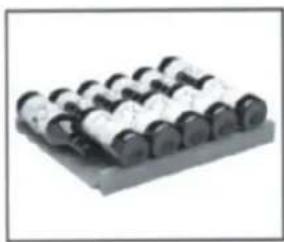
Row of cylindrical mechanical components on a base plate (no visible text or symbols)Storage Shelf
Ref:AXL
Capacity:61bottles Max.Weight85kg
natural_image
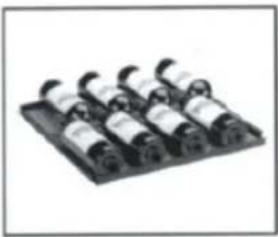
Black-and-white photo of a row of cylindrical electronic components on a base (no visible text or symbols)Sliding Shelf
Ref: AXM
Capacity:8 bottles
Max.Weight15kg
HOW TO USE YOUR STORAGE SHELF(AXL)
natural_image
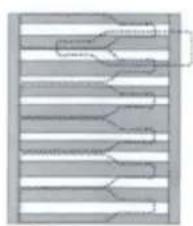
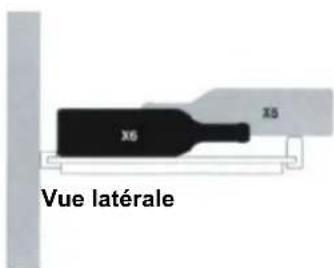
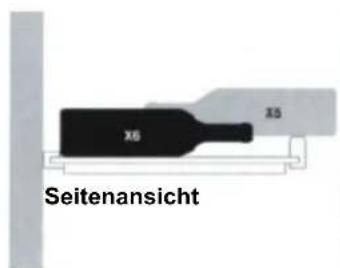
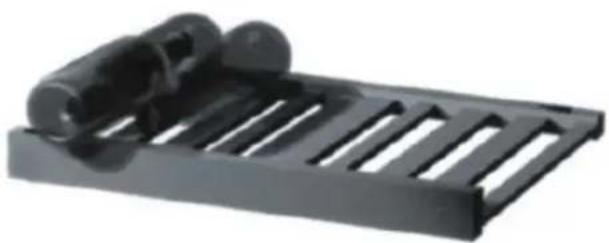
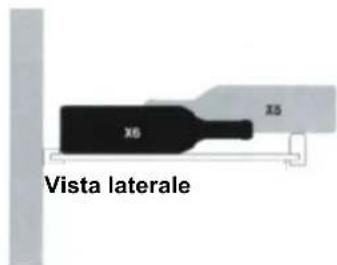
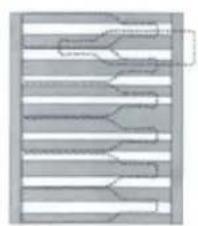
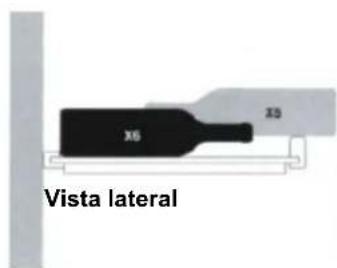
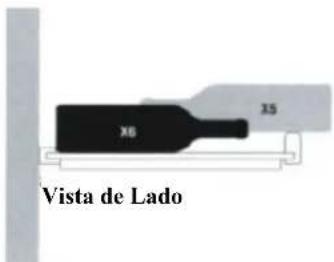
Black plastic tray with slats and two cylindrical clips attached (no text or symbols visible)To store your Claret:
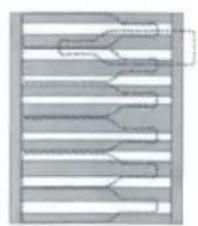
natural_image
Pure diagram of parallel lines with no text, numbers, or symbolsTop View
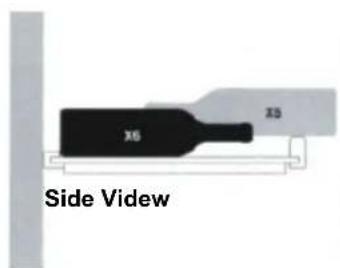
text_image
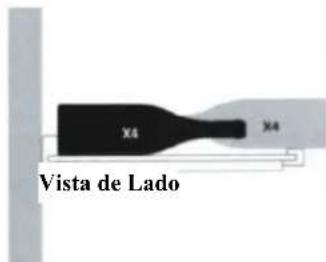
X6 X5 Side VidewBack of Cabinet
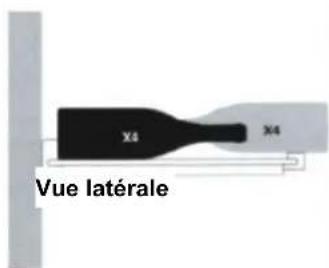
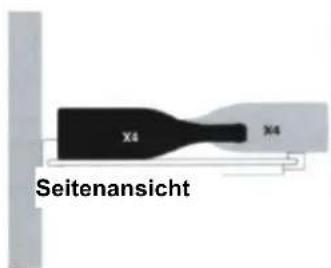
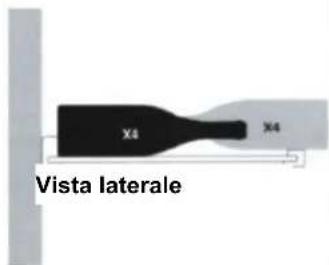
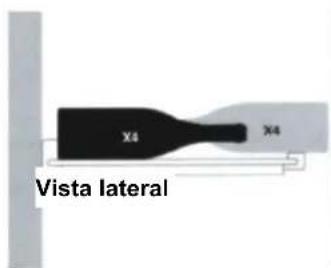
To store your Burgundy:
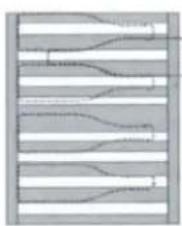
natural_image
Pure diagram of parallel wavy lines within a rectangular frame, no text or symbols presentTop View
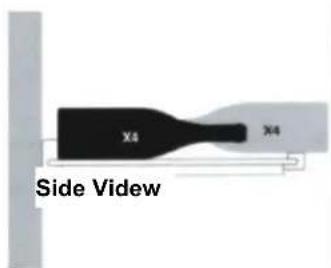
text_image
X4 X4 Side VidewBack of Cabinet
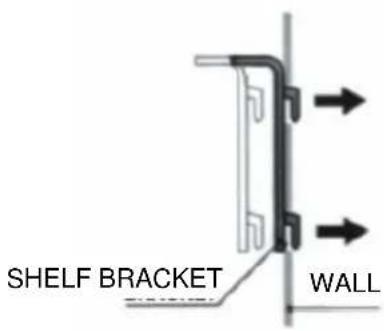
Fitting shelf brackets (read carefully if you intend to modify your cabinet's shelf positions)
STORAGE SHELF
To move a storage shelf, first remove all bottles, then move the shelf brackets and make sure to fit them back into slots as shown below:
LAYOUT AND STORAGE
text_image
SHELF BRACKET WALL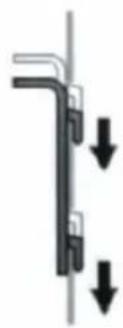
natural_image
Pure mechanical diagram showing a bent pipe or bracket with two downward arrows indicating force or displacement (no text or symbols)SLIDING SHELF
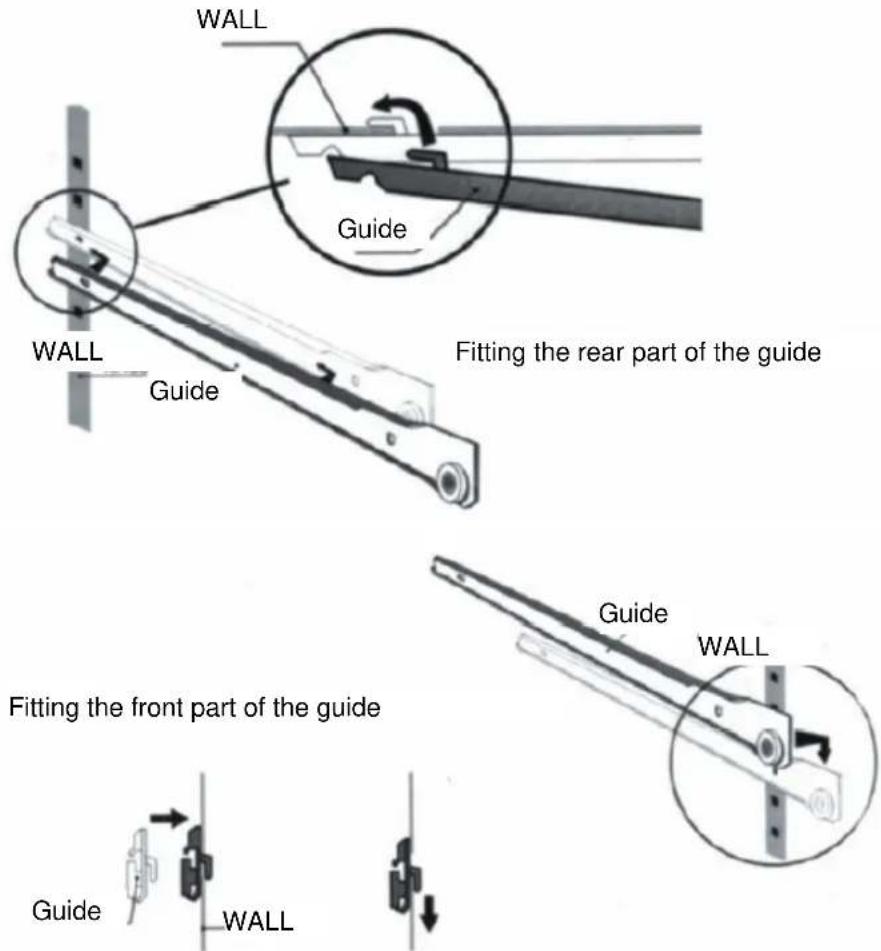
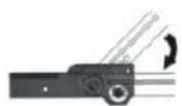
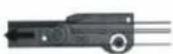
To move a sliding shelf, first remove all bottles, then remove the sliding shelf by sliding it towards you while lifting the front part, remove the sliding guides from the walls, while making sure not to mix up the right and left guides, then refit them as shown below:
text_image
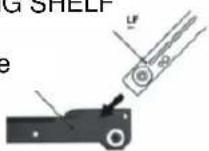
WALL Guide WALL Guide Fitting the rear part of the guide Guide WALL Fitting the front part of the guide Guide WALLThen refit the sliding shelf as shown below:
SLIDING SHELF
Guide
LAYOUT AND STORAGE
RECOMMENDATIONS FOR LAYOUT AND STORAGE OF YOUR WINE CABINET
Your cabinet was designed to store a maximum number of bottles in total security, we recommend that you observe the tips below to optimize loading.
- Spread your bottles out as evenly as possible over the shelves, so that weight is not concentrated in one point. Also make sure your bottles do not touch the back of the cabinet, ore the step at bottom.
- Also make that bottles are not all grouped together at the top or bottom of the cabinet.
- Observe the loading instructions provided in section 6, according to the type of storage fixtures with which your cabinet is equipped, and never stack bottles on a sliding shelf.
- Never try to pull out more than one sliding shelf at a time.
PLEASE NOTE
Before modifying your cabinet's original configuration in any way, be sure to ask your dealer for advice.
ROUTINE MAINTENANCE
Your cabinet is easy to operate and has proven its reliability, it will provide long-lastiong satisfaction if you follow the simple maintenance and cleaning operations listed below.
- Replace the activated charcoal filter in our cabinet's upper ventilation hole half a year (your dealer keeps this accessory in stock).
- Remove dust from the condenser (metal screen on the back of the cabinet) twice year.
- Make sure the power cord is unplugged before cleaning the back of your cabinet, or before moving it.
- Clean the inside of your cabinet thoroughly once a year, after unplugging and unloading it (use water and a mild cleaning product, then rinse carefully).
To assure that your wine cabinet provides long-lasting service, you should check it regularly and inform your dealer if you note anything unusual.
NOTE:
Disposal of insulation materials: don't dispose by yourself. Please turn to national appointed waste recycle organization.
OPERATING PROBLEMS
START-UP
Compressor does not start even though the desired temperature is lower than the temperature in the room.
- Check the wall socket by plugging in any type of electrical device, and male sure that the on/off button in pressed.
- Press the TEST button and check that the two red and green indicator lights light up (in the standby status).
- If the compressor still does not start after steps 1 and 2, contact your dealer.
Compressor does not stop
- Place your hand on the condenser (metal screen at the back of your cabinet) to check its temperature contact your dealer if cold.
- If the condenser is hot, set the cold temperature as high as possible (as far as it will go clockwise) and make sure that the cold circuit operation indicator goes off, if the compressor does not stop, unplug the cabinet and contact your dealer.
DURING OPERATION
A digital tube display indicate a temperature below the temperature you set.
- check the temperature set-points
- check that the red hot circuit operation indicator light is on.
- Press the TEST button, and check that the two red and green indicator lights on the right side of the panel are on. If either step 1 or 3 is incorrect contact your dealer.
Digital tube display indicates a temperature above the temperature you set.
- check the temperature set-points.
- Check that the green cold circuit operation indicator light is on.
- Press the TEST button, and check that the two red and greed indicator lights on the right side of the panel are on, if either step 2 or 3 is incorrect contact your dealer.
Contact your dealer, if after adjusting set-points and testing hot and cold circuit indicator lights either of the two problems above are not corrected.
Note: the refrigeration unit must only be serviced by a refrigeration technician, who must check the circuit for leaks before putting back into service, any servicing of the electrical circuit must only be performed by an electrician.
NB: whatever the case, if your cabinet does not seem to be operating normally, unplug it and call your dealer.
Mobiletto per Vini
text_image
Diagram of a refrigerator with numbered labels pointing to the interior structure.natural_image
Simple line drawing of a mounted air vent with a base and a circular button, no text or symbols present.2.
natural_image
Stacked cylindrical objects arranged in a row, no visible text or symbolsnatural_image
Black-and-white photo of a row of cylindrical electronic components on a base plate (no visible text or symbols)natural_image
Black plastic tray with slats and two cylindrical clips, no text or symbols visiblenatural_image
Pure electrical circuit lines without any symbolsVista dall'alto
text_image
X6 X5 Vista lateraleRetro del Mobiletto
natural_image
Abstract pattern of wavy lines and horizontal bands with no text or symbolsVista dall'alto
text_image
X4 X4 Vista lateraleRetro del Mobiletto
■MODELO: WR-1994 WR-1995
Nota----1
text_image
Diagram of a refrigerator with numbered labels pointing to the interior panelnatural_image
Simple line drawing of a kitchen appliance with a knob and fan (no text or symbols)natural_image
Row of cylindrical mechanical components on a base plate (no visible text or symbols)natural_image
Black-and-white photo of a row of cylindrical electronic components on a base (no visible text or symbols)natural_image
Black plastic tray with slatted side and two cylindrical clips on top (no text or symbols visible)Para almacenar su Claret:
natural_image
Pure diagram of parallel lines with no text, numbers, or symbolsVista superior
text_image
X5 X5 Vista lateralnatural_image
Pure diagram of layered structures with no text, numbers, or symbolsVista superior
text_image
X4 X4 Vista lateralnatural_image
Pure mechanical diagram showing a vertical pipe or channel with two downward arrows indicating force or direction (no text or symbols)ESTANTE MÓVIL
■MODELO: WR-1994 WR-1995
Nota----1
text_image
Diagram of a refrigerator with numbered labels pointing to the interior structure.natural_image
Simple line drawing of a kitchen appliance with a button and fan (no text or symbols)text_image
is final position. mini 575mm 574mm 597mm 595mm 610.325mm 110mmnatural_image
Stacked cylindrical objects arranged in a row, no visible text or symbolsnatural_image
Close-up of a black electronic component with multiple cylindrical pins (no visible text or symbols)Prateleira Deslizante Ref: AXM
natural_image
Black plastic tray with slots and a cylindrical clip attached (no text or symbols visible)natural_image
Pure diagram of parallel wavy lines within a rectangular frame, no text or symbols presentVista de
text_image
XB 35 Vista de LadoParte de trás do
natural_image
Abstract pattern of horizontal gray and white stripes with wavy lines (no text or symbols)Vista de
text_image
X4 X4 Vista de LadoParte de trás do
natural_image
Pure mechanical diagram showing a vertical pipe or channel with two downward arrows indicating force or movement (no text or symbols)PRATELEIRA DESLIZANTE
Guidelines for protection of the environment
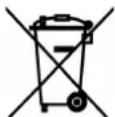

This appliance should not be put into the domestic garbage at the end of its useful life, but must be disposed of at a central point for recycling of electric and electronic domestic appliances. This symbol on appliance, instruction manual and packaging puts your attention to this important issue. The materials used in this appliance can be recycled. By recycling used domestic appliances you contribute an important push to the protection of our environment. Ask your local authorities for information regarding the point of recollection..