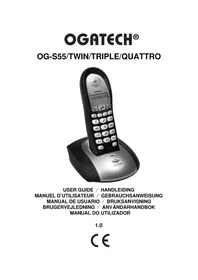
Ogatech og s55 - Phone TOPCOM - Free user manual and instructions
Find the device manual for free Ogatech og s55 TOPCOM in PDF.


User questions about Ogatech og s55 TOPCOM
0 question about this device. Answer the ones you know or ask your own.
Ask a new question about this device
Download the instructions for your Phone in PDF format for free! Find your manual Ogatech og s55 - TOPCOM and take your electronic device back in hand. On this page are published all the documents necessary for the use of your device. Ogatech og s55 by TOPCOM.
USER MANUAL Ogatech og s55 TOPCOM
To use 'Caller ID' (display caller), this service has to be activated on your phone line. Normally you need a separate subscription from your telephone company to activate this function. If you don't have the Caller ID function on your phone line, the incoming telephone numbers will NOT be shown on the display of your telephone.
Belangrijk
4 Battery low indication 4
5 Operation 5
5.1 Outgoing calls 5
5.2 Incoming calls 5
5.3 Activate/deactivate hands free function 5
5.4 Programming memory numbers 6
5.5 Calling a memory number 6
5.6 Mute function 6
5.7 Setting the volume 6
5.8 Paging 6
5.9 Flash button (R) 6
5.10 Setting the ring volume and melody 7
5.11 Key lock.. 7
5.12 Setting the dialling mode 7
6 Caller-ID function (CLIP) 8
6.1 New calls 8
6.2 Consulting the Call list 8
6.3 Calling a number from the Call list 8
6.4 Erasing a number from the Call list 8
6.5 Store a number from the call log into the memory 9
7 Register/de-register a handset 9
7.1 Register to a OGATECH OG-S55 base 9
7.2 Subscribing a OGATECH OG-S55 DECT GAP Headset 9
7.3 Removing a handset 10
8 Call transfer and Intercom between two handsets 10
8.1 Call transfer and conference call during an external call 10
8.2 Internal call (intercom) 11
9 Troubleshooting 11
10 Technical Data 11
11 Default settings 11
12 Warranty 12
12.1 Warranty period 12
12.2 Warranty handling 12
12.3 Warranty exclusions 12
Nederlands
- Only use the charger plug supplied. Do not use other chargers, as this may damage the battery cells.
- Only insert rechargeable batteries of the same type. Never use ordinary, non-rechargeable batteries. Insert rechargeable batteries so they connect to the right poles (indicated in the battery compartment of the handset).
- Do not touch the charger and plug contacts with sharp or metal objects.
- The operation of some medical devices may be affected.
- The handset may cause an unpleasant buzzing sound in hearing aids.
- Do not place the basic unit in a damp room or at a distance of less than 1.5m away from a water source. Keep water away from the handset.
- Do not use the telephone in environments where there is a risk of explosions.
- Dispose of the batteries and maintain the telephone in an environment-friendly manner.
- As this telephone cannot be used in case of a power cut, you should use a mains-independent telephone for emergency calls, e.g. a mobile phone.
- This telephone uses rechargeable batteries. You have to dispose of the batteries in an environment friendly manner according to your country regulations.
Disposal of the device (environment)

At the end of the product lifecycle, you should not throw this product into the normal household garbage but bring the product to a collection point for the recycling of electrical and electronic equipments. The symbol on the product, user guide and/or box indicate this.
Some of the product materials can be re-used if you bring them to a recycling point. By re-using some parts or raw materials from used products you make an
important contribution to the protection of the environment. Please contact your local authorities in case you need more information on the collection points in your area.
Cleaning
Clean the telephone with a slightly damp cloth or with an anti-static cloth. Never use cleaning agents or abrasive solvents.
To be connected to the public analogue telephone network.
The CE symbol indicates that the unit complies with the essential requirements of the R&TTE directive.

This product works with rechargeable batteries only. If you put non-rechargeable batteries in the handset and place it on the base, the handset will be damaged and this in NOT covered under the warranty conditions.
1 Buttons
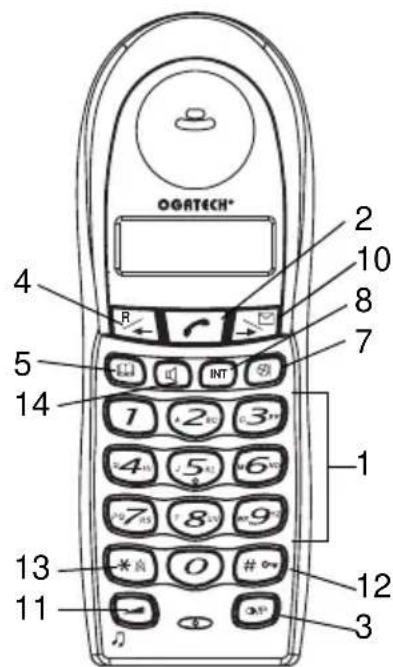
Handset
- Numerical buttons
- Line button
- Redial / Pause button
- Flash R/ Scroll R/
- Memory button
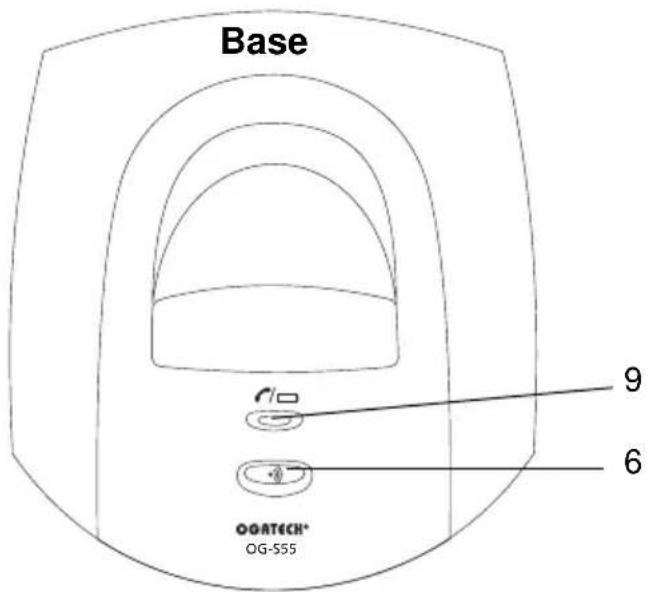
- Paging button (tq retrieve the handset)
- Mute button
- Int button Int
- Charge indicator (LED)
- Call log/Scroll
- Volume/melody button
- Key lock
- Ringer ON/OFF
- Handsfree
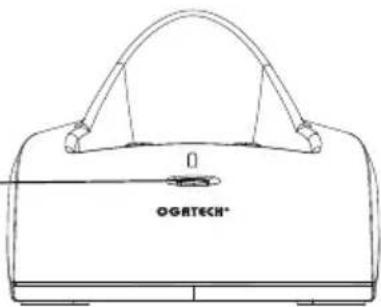
- Charge indicator (LED) multi charger
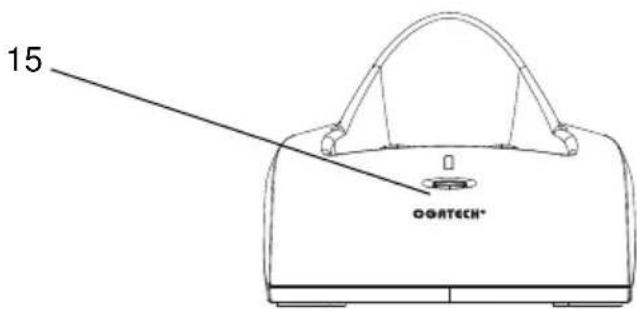
Charger
15
2 Di s p l a y


| ICON: MEANING: | |
| √ | You are online |
| ♂ | New numbers in call list |
| ♀ | Rechargeable battery level indicator |
| T3) | The antenna indicates the quality of reception. The antenna blinks when the handset is out of range! |
| ♂ | Microphone is muted |
| ☑ | Memory records are being retrieved or set up |
| ← | The keypad is locked |
| ▲ | There are more digits on the left |
| ▶ | There are more digits on the right |
| ☐ | During hands free |
| ✗ | When ring buzzer is turned off |
| ◎ | There are new messages in your voice mail |
| [E] | During internal call |
| HS-x x = handset | number |
3 l n s t a l l a t i o n
3.1 Base
- Plug one end of the phone cable into the phone unit and the other end into the telephone line wall socket.
- Connect the small plug of the AC adaptor to the phone and the other end of the adapter cable to the electric socket.
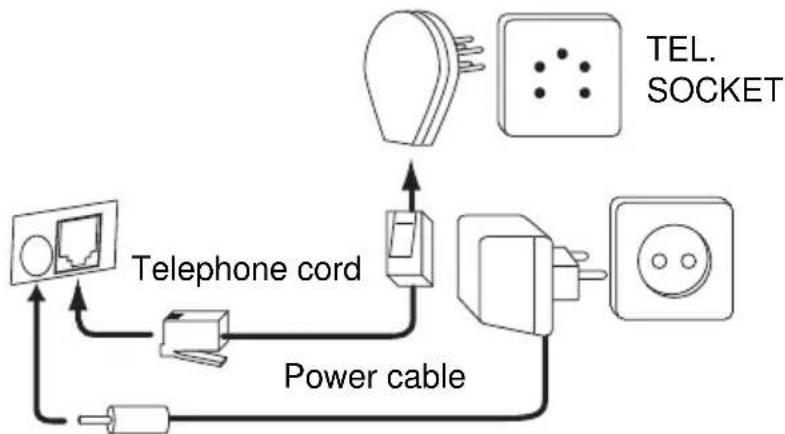
3.2 Multi charger
- Connect the AC adaptor to the electric socket
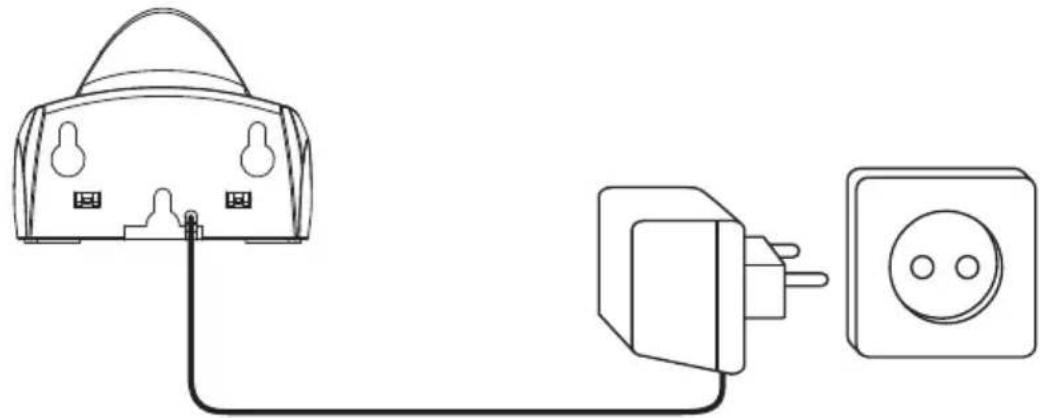
3.3 Handset
- Insert 2 rechargeable batteries (AAA) inside the battery compartment of the handset..
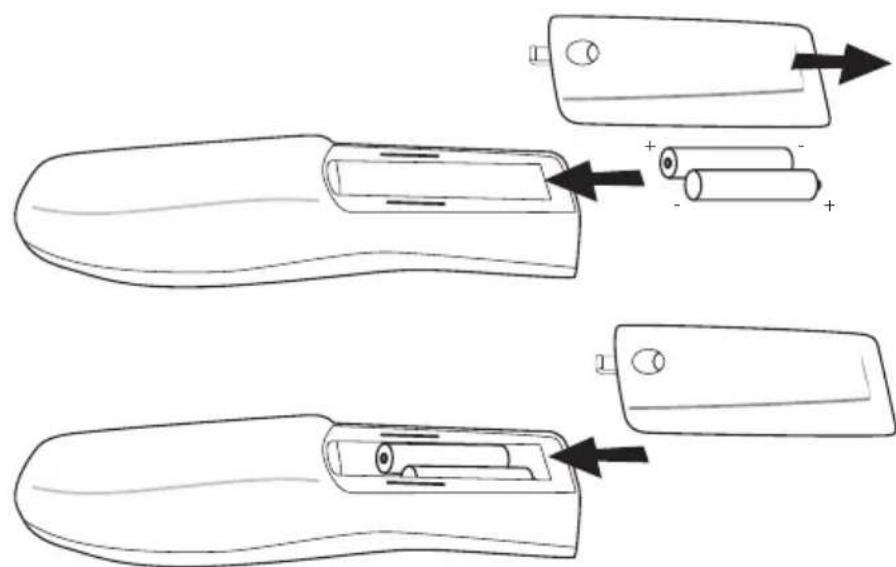
Put the handset on the base unit. The red Charge LED will lit as long as the handset is on the base.
Charge the handset for a period of 24 hours before using the handset for the first time. To extend the battery life time, discharge the batteries completely from time to time. As soon as the handset emits a warning tone or when the battery icon is empty, you have to put it back on the base unit for charging.
4 Battery low indication
When the battery is empty, the handset no longer carries out operations. When a battery is completely empty and you have put the handset on the base unit for a short period of time, the Battery symbol will appear to be fully charged but this is actually not the case. The battery capacity will decrease rapidly. We advise you to put the handset on the base unit for 12 hrs so that it can be recharged completely.
- F电厂 battery
Empty battery
When you are in the middle of a conversation and the battery is almost empty, the handset will emit a warning signal. Place the handset on the base unit to charge.
5 O p e r a t i o n
5.1 Outgoing calls
5.1.1 Making a phone call
- Press the Line button. You will hear the dial tone.
- Enter the desired telephone number.
- Press the Line button when you want to terminate the call.
5.1.2 Call setup with dial preparation
- Enter the desired telephone number. An incorrect number can be corrected by means of the Mute button. When you haven't pressed a button for 10 seconds, the number you've already entered will disappear and the handset returns to standby mode.
- Press the Line button. The number will be dialled automatically.
- Press the Line button when you want to terminate the call.
5.1.3 Redialling the last number dialled
- Press the Line key.
- The Line/Charge indicator (LED) on the base unit will blink.
- You will hear the dial tone.
- Press the Redial key . The number you last called is dialled automatically.
5.1.4 Redial one of the last 3 numbers dialled
- Press the Redial key. The number you last called appears on the display. If you would like to dial one of the last 3 numbers dialled, press the Redial key a few times until the desired number appears on the display.
- Press the Line key.
- The number shown on the display is dialled automatically.
After finishing your call, press the Line key to hang up.
5.2 Incoming calls
- When a call comes in, the handset will start to ring. The LED on the base will blink.
- Press the Line button to answer the incoming call.
5.3 Activate/deactivate hands free function
This function allows you to communicate without having to pick up the handset. When you are on the phone, press the Hands free key to activate the hands free function.
Press the same button to deactivate the hands free function.

When you are calling in hands free mode and you want to change the volume, press the Volume button.

When you use the hands free function for a long time, the batteries will be empty more quickly!
5.4 Programming memory numbers
You can program 10 indirect numbers (of max. 25 digits) in the phone's memory.
- Press and hold the Memory button until the -icon appears on the display.
- Enter the telephone number you wish to store.
- Press the Memory button again to confirm.
- Enter the memory location (0-9) where you want to store the number.
- You will hear a confirmation tone and the -icon will disappear.

If you wish to insert a pause, press the Redial/Pause button on the location where you want a pause of 3 sec.
5.5 Calling a memory number
- Press the Memory button , followed by the number of the memory location (0-9).
- Press the Line button. The memory number will be dialled automatically.
- Press the Line button when you want to terminate the call.
5.6 Mute function
It is possible to deactivate the microphone during a conversation. Now you can speak openly without being heard by your correspondent.
- Press the Mute button during a conversation. The microphone will be deactivated.
The MUTE symbol appears on the display. - Press the Mute button again when you want to continue the conversation.
5.7 Setting the volume
During a conversation you can set the volume by pressing the Volume button. You can set the volume alternatively in Hi, Medium and Low.

The hands free receiver volume is also adjustable as above described!
5.8 Paging
When you press the Paging button on the base unit, the handset emits a ringing signal for 20 seconds. This signal helps you find a lost handset. Press any key to stop the ringing on a handset.
5.9 Flash button (R)
When you press the R button, also called flash or recall, the unit generates a line interruption (of 100 ms or 250 ms). It gives you the possibility to use the special services of your telephone provider and/or to transfer calls when you have a telephone exchange.
5.9.1 Setting the Flash time
- Press and hold the radial button for 3 sec.
The display will show:
'S' for 100ms
or 'L' for 250ms
- The flash time setting will disappear after 2 sec. from the display
5.10 Setting the ring volume and melody
5.10.1 Handset melody
- Press and hold the melody button until the current melody is heard.
- Select the desired melody (1-9) by means of the scroll keys or by entering a number (1 - 9).
- Press again to confirm the setting
5.10.2 Handset ring volume
- Press the volume button in standby
The handset will ring in the current volume - Press 1-5 or use the scroll keys to-select the desired volume
- Press '0' to turn the volume OFF

- You can turn the ringer volume of each individual handset ON or OFF by simply press and hold the key in standby.
- The base unit will never ring!
5.11 Key lock
When the keypad is locked, pressing any key will have no effect during standby (except holding the key).
- Press and hold the key
- appears on the display and the keypad is locked
- Press and hold the key again to unlock the keypad
When there is an incoming call, you can still answer the call by pressing the Line button. During the call, the keypad functions as normal. When the call is ended, the keypad will be locked again
5.12 Setting the dialling mode
There are two types of dialling mode:
DTMF/Tone dialling (the most common) (default)
Pulse dialling (for older installations)
To change the mode of dialling:
- Press and hold the flash R button to toggle between dialling modes:
'P' will appear when set to pulse or 'T' when set to tone (DTMF) dialling
After 5 sec. the unit returns to standby

You can change by accident the dial mode of the phone when pressing the recall/Flash key 'R' for 5 sec in standby. The wrong dialling mode will cause that the number isn't dialled correctly or isn't dialled at all.
6 Caller-ID function (CLIP)
The OGATECH OG-S55 displays the telephone numbers of incoming calls. This function is only possible if you are subscribed to a telephone operator that provides this service. Contact your telephone provider for more information. When you receive a call, the numbers are saved in a Call list. This list can hold 20 telephone numbers (each of max. 25 digits). If the number is longer then 14 digits, you can press the -key to show the other digits!
6.1 New calls
When you've received a new unanswered call, the CLIP symbol will blink on the display.
6.2 Consulting the Call list
- Press the Call Log button. The last received call is shown on the display. If the list is empty, 'NO CLIP' is shown on the display.
The following will be shown on the display:
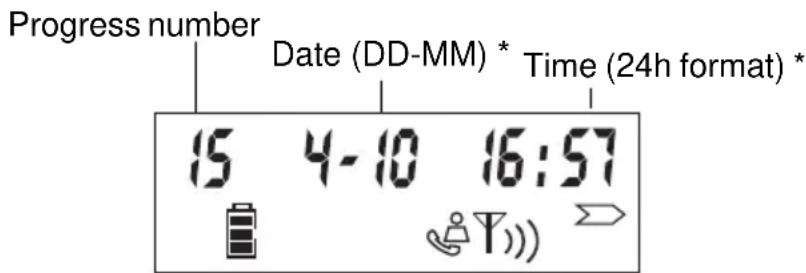
- After 5 seconds, the telephone number will be shown. You can skip the date/time by pressing the button.
- Use the left scroll key to scroll to the previous call. Use the button to show the next call.
-
You can leave the Call list by pressing the button.
-
Only when the network sends the time/date together with the telephone number!!! On some networks with caller ID, time and date will not be displayed
6.3 Calling a number from the Call list
- Scroll through the Call list until the desired number is shown on the display.
- Press the Line button. The number will be dialled automatically.
6.4 Erasing a number from the Call list
- Scroll through the Call list until the desired number is shown on the display.
- Press and hold the Mute button for 3 sec. to erase the number.
6.5 Store a number from the call log into the memory
- Scroll through the Call list until the desired number is shown on the display.
- Press and hold the Memory button for 3 sec.
- Enter the memory location (0-9) where you want to store the number
- Enter the Memory button again to confirm and to go back to standby
7 Register/de-register a handset
7.1 Register to a OGATECH OG-S55 base
You can subscribe 4 handsets to one base unit. By default, each handset is subscribed as handset 1 on the base unit upon delivery (base unit 1).
!!! You only need to subscribe the handset if:
The handset subscription has been removed from the base unit (e.g. for reinitialisation)
- You want to subscribe a different handset to this base unit.
The below procedure is only applicable to a OGATECH OG-S55 handset and base unit!!
Keep the Paging key on the base unit pressed for 10 seconds until the Line/Charge indicator on the base unit begins to blink rapidly. The Line/Charge indicator will blink rapidly for one minute. During this minute, the base unit is in register mode and you must do the following to subscribe the handset:
- Press and hold the key for 3 sec, then press and hold the * key for 3 sec.
- The following will appear on the display:
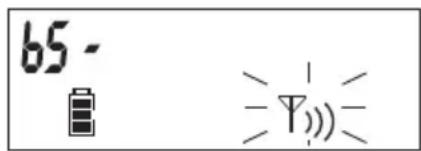
- Enter the number of the base unit you would like to subscribe the handset to (1-4)
- The unit will start searching for the base and when found it will ask to enter the pin code (4 digits):
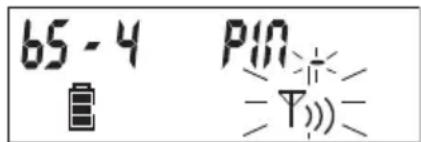
- Enter the base pin code (0000). If the pin is wrong, the handset will restart the searching for the base.
- When the handset is registered, it will show 'HS' followed by the handset number.
7.2 Subscribing a OGATECH OG-S55 DECT GAP Headset
Press the Paging key on the base unit for 10 seconds until the Line/charge indicator on the base unit starts to blink quickly. The line/charge indicator will blink quickly for one minute. During this minute, the base unit is in subscribing mode and you must do the following to subscribe the headset:
-
Turn ON the headset by pressing the ON/OFF button until you hear two beep tones. At the same time the red and green LED will lit ones.
-
Remove the rubber cover of the power socket so that the hole of the power socket is free. Pull out the rubber cover from the headset so that the registration key hole is free also.
-
Press the headset registration key. The red LED will flash rapidly.
-
If after a few seconds the green LED flashes slowly, the registration is successful.
- If the red LED flashes slowly, the registration is failed. Repeat above procedure.
7.3 Removing a handset
You can remove a handset from a base to allow another handset to be registered:
- Press and hold the key for 3 sec, then press and hold the key for 3 sec.
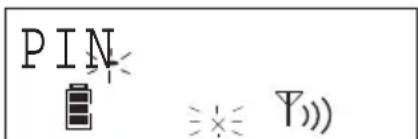
- Enter the pin code (0000). If the pin is wrong, the handset will go back to standby.
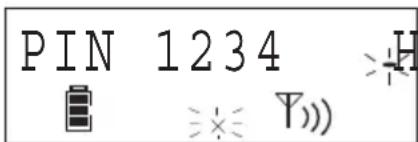
- Enter the handset number (1-4) you want to remove
- The unit will go back to standby is the removal is successfully. If not, it will ask again to enter the handset number.

You can only remove existing handsets and others then the one you are using.
8 Call transfer and Intercom between two handsets

These functions only work when more than one handset (like a Twin/Triple/Quattro version) is registered to the base!
8.1 Call transfer and conference call during an external call
- During an external call, press the INT key followed by the number (1-4) of the other handset.
-
The other handset will start to ring:
-
When the other handset takes the line you can talk internally. If you hang up, the external line will be connected with the other handset. If you press and hold the INT key for 3 seconds you can talk with the 2nd handset and external line at the same time (conference call)
-
Or press the INT key again to return to the external call.
-
Press the Line button to end the call.
8.2 Internal call (intercom)
- In standby press the INT key followed by the number (1-4) of the other handset.
- The other handset will start to ring. You can stop the ringing by pressing the line button .
- If the other handset answers the call by pressing the Line button you can talk internally.
- Press the Line button to end the call.
9 Troubleshooting
| Problem | Possible cause | Solution |
| No Display | Batteries not charged | Check the position of the batteries |
| Recharge the batteries | ||
| No dialling tone | Telephone cable not properly connected | Check the connection of the telephone cable |
| Volume of conversation partner too low | Adjust the volume during the conversation by pressing the volume key | |
| Handset ringer volume too low | Adjust the ringer volume | |
| Not possible to dial a number | Wrong dial mode | See §5.13 to set the correct dial mode |
10 Technical Data
Range: up to 300 m in open space
up to 50m in buildings
Dialling options: DTMF (tone) and Pulse
Batteries: 2 x 1.2V, 600 mAh AAA Type NiMH rechargeable
Max. standby time: approx. 100 hours
Max. talk time: 11 hours
Ambient temperature: +5^ to +45^
Permitted relative air humidity: 25 to 85%
Power supply base adapter: 220/230V, 50 Hz
Memories 10 indirect with max. 25 digits
11 Default settings
Flash time 100 ms
Dialling mode Tone
Ring volume Level 3
Ring melody Ringer 8
Base pin 0000
12 Warranty
12.1 Warranty period
The devices have a 36-month warranty period. The warranty period starts on the day the new unit is purchased. There is no warranty on standard or rechargeable batteries (AA/AAA type).
Consumables or defects causing a negligible effect on operation or value of the equipment are not covered.
The warranty has to be proven by presentation of the original or copy of the purchase receipt, on which the date of purchase and the unit-model are indicated.
12.2 Warranty handling
A faulty unit needs to be returned to an authorized service centre including a valid purchase note and a filled in service card.
If the unit develops a fault during the warranty period, the service centre will repair any defects caused by material or manufacturing faults free of charge, by either repairing or exchanging the faulty units or parts of the faulty units. In case of replacement, colour and model can be different from the original purchased unit.
The initial purchase date shall determine the start of the warranty period. The warranty period is not extended if the unit is exchanged or repaired by the service centre.
12.3 Warranty exclusions
Damage or defects caused by incorrect treatment or operation and damage resulting from use of non-original parts or accessories are not covered by the warranty.
The warranty does not cover damage caused by outside factors, such as lightning, water and fire, nor any damage caused during transportation.
No warranty can be claimed if the serial number on the units has been changed, removed or rendered illegible.
Any warranty claims will be invalid if the unit has been repaired, altered or modified by the buyer.
This appliance may only be used with rechargeable batteries. If you want to replace the originally included batteries, please check whether the batteries you use are suitable and rechargeable. Alkaline batteries may under NO circumstances be used in the handsets. If you use Alkaline batteries and place the handset on the basis, the batteries will heat up and may explode. Any damage which may be caused cannot be recovered from the manufacturer and the damage thus caused to the appliance is not covered by the warranty conditions. Any repairs will be charged to you.
Nederlands
Bel melodie Melodie 8
Basis pincode 0000
12 Garantie
12.1 Garantieperiode
When the battery is empty, the handset no longer carries out operations. When a battery is completely empty and you have put the handset on the base unit for a short period of time, the Battery symbol will appear to be fully charged but this is actually not the case. The battery capacity will decrease rapidly. Wir empfehlen Ohnen, den Handapparat fur 12 Stunden in der Basisstation zu halten, so dass er wieder komplett aufgeladen wird.
- Or press the INT key again to return to the external call.
Opringning DTMF (tone) & Pulse
Batterier: 2 × 1,2V , 600 mAh AAA type NiMh genopladelig
Maks. standbytid: ca. 100 timer
Maks. samtaletid: 11 timer
Ladeenheter for handsett
2 Dis p l a y

| Symbol: Betydning: | |
| ✓ | Du er online |
| ♂ | Nye nummer i ringelisten |
| ♀ | Oppladbar batterinivå-indicator |
| TMS | Antennen indikerer mottakskvaliteten.Antennen blinker{när händsettet er utnfor rekkevidde! |
| ♂ | Mikrofon er sperret |
| ♀ | Minne lagret i minnet hentes fram erer valgt |
| ♂ | Tastaturet er{låst |
| ↓ | Ikke flere nummer til venstre |
| ▲ | Ikke flere nummer til høyre |
| △ | Ved handsfree |
| △ | När ringsesummeren er slätt av |
| ◎ | Ny beskjed på din Telefonsvarer |
| ◎ | Under internet anrop |
| HS-x x=händsettnummer | |
3 Installasjon
3.1 Baseenhet
3.2 Ladeenheter for handsett
11 Standardinnstilling
Flash-tid 100 ms
Ringemodus Tone
Ringevolum Niva 3
Ringemelodi Ringelyd 8
Base pin 0000
12 Garanti
12.1 Garantiperiode
Produktene leveres med 36 maneders garanti. Garantiperioden gjelder fra den denen det nye produit blir kjopt. Det gis ingen garanti for standard eller oppladbare batterier (type AA/ AAA). Garantien gjelder ikke for forbruksdeler uller defekter som ikke medforer merkbar virkning på apparatets funksjon.
Garantien mä dokumenteres med den originale kjøpskvitteringen aller en kopi av/DDne, der kjopsdat oogrodktmodell er angitt.
12.2 Garantibestemmelser
The hands free receiver volume is also adjustable as above described!
5.8 Marcar
RETURN WITH YOUR DEFECT PRODUCT
Original Proof of Purchase has to be attached to this return card to be valid for warranty