GSI 6104 - Dishwasher Eudora - Free user manual and instructions
Find the device manual for free GSI 6104 Eudora in PDF.



| Product type | Dishwasher |
| Brand | Eudora |
| Model | GSI 6104 |
| Capacity | 12 place settings |
| Dimensions (W x H x D) | 45 x 85 x 60 cm |
| Weight | 35 kg |
| Electrical supply | 220-240 V ~ 50 Hz |
| Power consumption | 1900 W |
| Water consumption | 12 L per cycle |
| Noise level | 49 dB(A) |
| Wash programs | Soak (P1), Delicate 40°C (P2), ECO 45°C (P3), Normal 55°C (P4), Intensive 65°C (P5), Quick 30°C (P6) |
| Special functions | Delayed start (1-12 h), Quick wash / Half load, 3-in-1 function |
| Display | Multifunction screen |
| Water softener | Adjustable (D1 to D3) |
| Visual indicators | Low salt, low rinse aid |
| Safety | Automatic stop when door opened |
| Installation type | Freestanding (independent installation) |
| Routine maintenance | Cleaning filters, checking wash arms |
Frequently Asked Questions - GSI 6104 Eudora
User questions about GSI 6104 Eudora
0 question about this device. Answer the ones you know or ask your own.
Ask a new question about this device
Download the instructions for your Dishwasher in PDF format for free! Find your manual GSI 6104 - Eudora and take your electronic device back in hand. On this page are published all the documents necessary for the use of your device. GSI 6104 by Eudora.
USER MANUAL GSI 6104 Eudora
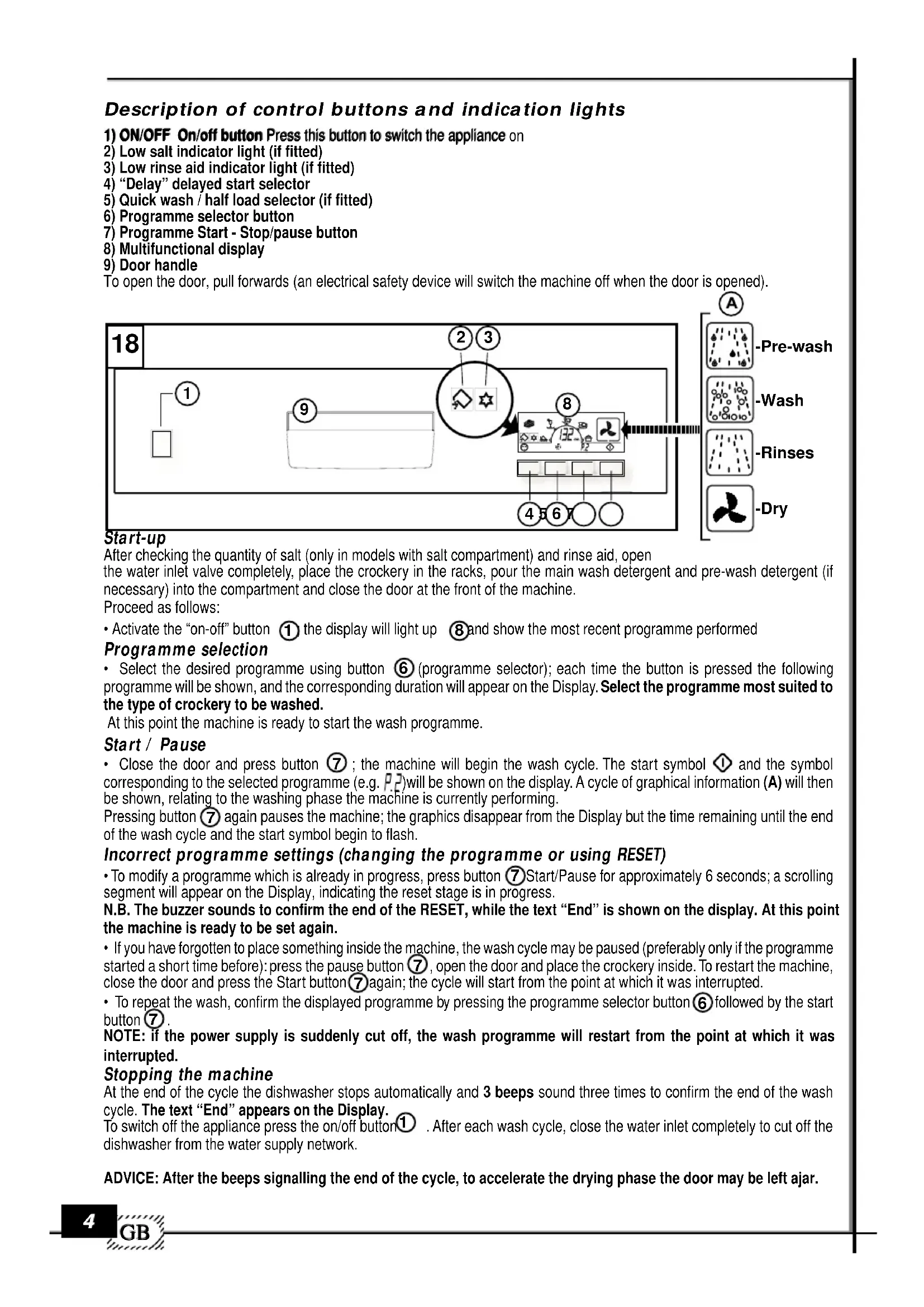
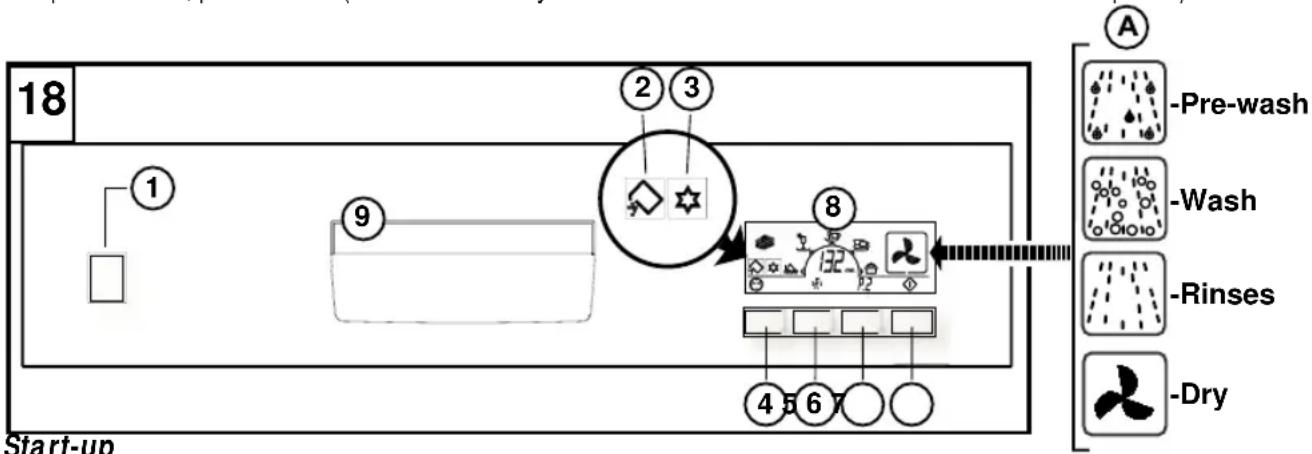
Description of control buttons and indication lights
1) ON/OFF On/off button Press this button to switch the appliance on
2) Low salt indicator light (if fitted)
3) Low rinse aid indicator light (if fitted)
4) "Delay" delayed start selector
5) Quick wash / half load selector (if fitted)
6) Programme selector button
7) Programme Start - Stop/pause button
8) Multifunctional display
9) Door handle
To open the door, pull forwards (an electrical safety device will switch the machine off when the door is opened).
flowchart
graph LR
    A["Start-up"] --> B["1"]
    B --> C["2"]
    C --> D["3"]
    D --> E["4"]
    E --> F["5"]
    F --> G["6"]
    G --> H["7"]
    H --> I["8"]
    I --> J["Pre-wash icon"]
    I --> K["Wash icon"]
    I --> L["Rinses icon"]
    I --> M["Dry icon"]
Start-up
After checking the quantity of salt (only in models with salt compartment) and rinse aid, open the water inlet valve completely, place the crockery in the racks, pour the main wash detergent and pre-wash detergent (if necessary) into the compartment and close the door at the front of the machine.
Proceed as follows:
- Activate the "on-off" button ① the display will light up ⑧ and show the most recent programme performed
Programme selection
- Select the desired programme using button ⑥ (programme selector); each time the button is pressed the following programme will be shown, and the corresponding duration will appear on the Display. Select the programme most suited to the type of crockery to be washed.
At this point the machine is ready to start the wash programme.
Start / Pause
- Close the door and press button ⑦; the machine will begin the wash cycle. The start symbol ① and the symbol corresponding to the selected programme (e.g. P.2) will be shown on the display. A cycle of graphical information (A) will then be shown, relating to the washing phase the machine is currently performing.
Pressing button ⑦ again pauses the machine; the graphics disappear from the Display but the time remaining until the end of the wash cycle and the start symbol begin to flash.
Incorrect programme settings (changing the programme or using RESET)
- To modify a programme which is already in progress, press button ⑦ Start/Pause for approximately 6 seconds; a scrolling segment will appear on the Display, indicating the reset stage is in progress.
N.B. The buzzer sounds to confirm the end of the RESET, while the text “End” is shown on the display. At this point the machine is ready to be set again.
- If you have forgotten to place something inside the machine, the wash cycle may be paused (preferably only if the programme started a short time before): press the pause button ⑦, open the door and place the crockery inside. To restart the machine, close the door and press the Start button ⑦ again; the cycle will start from the point at which it was interrupted.
- To repeat the wash, confirm the displayed programme by pressing the programme selector button ⑥ followed by the start button ⑦.
NOTE: if the power supply is suddenly cut off, the wash programme will restart from the point at which it was interrupted.
Stopping the machine
At the end of the cycle the dishwasher stops automatically and 3 beeps sound three times to confirm the end of the wash cycle. The text "End" appears on the Display.
To switch off the appliance press the on/off button ^① . After each wash cycle, close the water inlet completely to cut off the dishwasher from the water supply network.
ADVICE: After the beeps signalling the end of the cycle, to accelerate the drying phase the door may be left ajar.
1) ON/OFF On/off button Press this button to switch the appliance on
2) Low salt indicator light (if fitted)
3) Low rinse aid indicator light (if fitted)
4) "Delay" delayed start selector
5) Quick wash selector
6) Programme selector button
7) Multifunctional display
To open the door, pull forwards (an electrical safety device will switch the machine off when the door is opened).
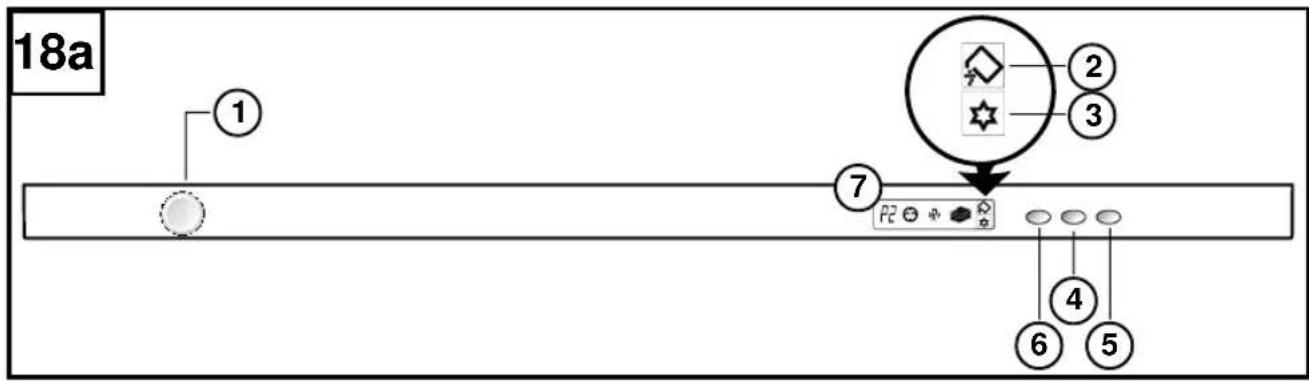
text_image
18a ① ⑦ ② ③ P2 ④ ⑥ ⑤Start-up
After checking the quantity of salt (only in models with salt compartment) and rinse aid, open the water inlet valve completely, place the crockery in the racks, pour the main wash detergent and pre-wash detergent (if necessary) into the compartment and close the door at the front of the machine.
Proceed as follows:
- Activate the "on-off" button ①; the display will light up and show the most recent programme performed.
Programme selection
- Press button ⑥ (programme selector) to display the washing symbol above/below ( ) and after approximately 3 seconds the duration time for the selected programme will appear. Every time button ⑥ is pressed, the following programme is selected.
Select the programme most suited to the type of crockery to be washed.
At this point the machine is ready to start the wash programme.
Start
- Close the door; after the beep signalling the start of the programme the dishwasher performs the wash cycle automatically. Note: To display details of the programme in progress, press the programme selector button ⑥ ; this will display the type of programme currently in progress for 5 seconds.
Incorrect programme settings (changing the programme or using RESET)
• To modify a programme which is already in progress open the door and press the Programme selector button ⑥ for approximately 6 seconds. A scrolling segment on the Display indicates the machine is in reset mode. Close the door immediately. N.B. The buzzer sounds to confirm the end of the RESET, and the text “End” is shown on the display. At this point the machine is ready to be set again.
- If you have forgotten to place something inside the machine, the wash cycle may be paused (preferably only if the programme started a short time before): open the door and place the crockery inside. To restart the machine, close the door; the cycle will start from the point at which it was interrupted.
• To repeat the wash, confirm the displayed programme by pressing the programme selector button ⑥ and close the door. NOTE: if the power supply is suddenly cut off, the wash programme will restart from the point at which it was interrupted.
Stopping the machine
At the end of the cycle the dishwasher stops automatically and 3 beeps sound three times to confirm the end of the wash cycle. The text "End" appears on the Display; when the door is opened the Display lights up and the text is shown for a further 10 seconds, after which the number of the most recent programme performed remains visible.
To switch off the machine, press the on/off button ①. After each wash cycle, close the water inlet completely to cut off the dishwasher from the water supply network.
ADVICE: After the beeps signalling the end of the cycle, to accelerate the drying phase the door may be left ajar.
Options
NOTE: All the options must be set after selecting one of the programmes.
- Delayed start (Delay) ⑤ This button is used to set a delay time between 1 and 12 hours. The first time the button is pressed the function is activated and the display shows the delayed start symbol ( ), while the text "1H" is displayed in the numerical area. Each subsequent press of the button increases the delay time by 1 hour, up to a maximum of 12 hours. The next press of the button deactivates the function; the "clock" symbol disappears and the duration of the selected programme reappears in the numerical area. Once the delay time has been set, close the dishwasher door and press the start button (if necessary); the delay time countdown will begin and the clock symbol will begin to flash until the selected programme begins. Until the programme begins, the Display will show the remaining time when the door is opened.
To deactivate the delay, RESET the machine.
- Quick wash (IF APPLICABLE):
The "QUICK WASH (R) symbol appears on the display when the button is pressed. At this point the machine is ready to start the wash programme.
• Half load (IF APPLICABLE):
The "1/2 LOAD" option is deactivated by default and the machine therefore washes loads on both upper and lower racks. If the "1/2 LOAD" button is pressed once the wash will be performed using the upper rack only (this will be indicated by the corresponding
symbol on the display, (12) If the button is pressed again the wash will be performed on the lower rack only and the lower rack symbol (12) will be shown. If the button is pressed once more the "1/2 LOAD" function will be deactivated. The "1/2 LOAD" function may be activated with all programmes and is deactivated at the end of the programme.
NOTE: When the half load function is activated the duration of the wash cycle is reduced.
- 3 in 1 FUNCTION: Press and hold button ⑤ QUICK WASH (or 1/2 LOAD if provided) for 5 seconds; the "3 in 1" function is activated, a confirmation beep is emitted and the tablet symbol ( ) is shown on the display. This function remains active for all programmes, until it is deactivated by pressing button ⑤ for 5 seconds, when the tablet symbol disappears from the display.
The use of combined detergents (such as 3 in 1 tablets or similar products) may remove the need for rinse aid and salt. The "3 in 1" function may be activated for all programmes; the rinse aid indicator light is deactivated.
N.B. It is good practice to follow the instructions given on the container for the products mentioned above.
- Up to a water hardness of 21^ dH ( 37^ f) it is not necessary to use salt; set the regeneration adjustment to D1 (see paragraph entitled "adjusting the water softening system").
- Where water hardness is greater than 21^ dH ( 37^ f), salt must be used.
In this case fill the salt compartment and adjust the regeneration system to position D3.
Advice: Superior washing results can be achieved with the use of traditional detergents combined with salt and rinse aid.
WARNING: When traditional detergents are used the water softening system must be adjusted accordingly.
TABLE OF WASH PROGRAMMES (display version)
| Wah cycles | Cycle number | BUTTONS | DETERGENT | Dishes and degree of dirt | Cycle description | |
| ON OFF 1 | pre-wash | wash | ||||
| Rinse | P1 | ● | Pans and dishes until the next wash cycle | Short cold wash to prevent food residue from drying up and forming crusts on the dishes | ||
| Rapid 40°C | P2 | ● | ● | Little dirty dishes | Main wash2 rinses (1 cold – 1 warm) | |
| ECO 45°C | P3 | ● | ● | ● | Very dirty delicate dishes | 1 cold pre-wash - Main wash2 rinses (1 cold – 1 warm) |
| Normal 55°C (EN 50242) | P4 | ● | ● | ● | Normally dirty dishes | 1 cold pre-wash – Main wash2 rinses (2 cold – 1 warm) |
| Intensive 65°C | P5 | ● | ● | ● | Very dirty dishes (except delicate pieces) | 1 warm Pre-wash – Main wash3 rinses (2 cold – 1 warm) |
| (Optional) Rapid 30°C | ● | ● | Little dirty dishes | Main wash2 rinses warm | ||
TABLE OF ERROR CODES
N.B.: Anomalies are signalled in the following way:
A continuous beep sounds until the programme with the error is reset.
| Error | When this occurs | Checks to carry out | Action to be taken |
| LED 4 | At the beginning of the cycle | - Tap closed- Filter of loading tube blocked- Water supply tube bent- Insufficient water pressure | - Reset the dishwasher- Check- Reset the dishwasher- Verify the water pressure |
N.B.: Upon contacting the authorised technical assistance centre always communicate the type of error encountered.