WT 590 - Alarm bell TECHNOLINE - Free user manual and instructions
Find the device manual for free WT 590 TECHNOLINE in PDF.



| Product type | Radio-controlled alarm ringer with projector |
| Brand | TECHNOLINE |
| Model | WT 590 |
| Display | 24-hour LCD (hours, minutes, seconds), calendar (weekday, date, month), indoor temperature in °C |
| Projection | Projected time on wall/ceiling, max distance 2 m, 4-position orientation (90° rotation), adjustable to 180° |
| Time reception | DCF-77 signal, range approx. 1,500 km, automatic search every hour |
| Alarm | With 5-minute snooze, max duration 1 min 36 s, activation/deactivation via AL/HR button |
| Additional functions | Manual time setting, time zone (±9 h), LED backlight (2 s after button press), alternate display (temperature, seconds, alarm, date) |
| Power supply | 2 AA 1.5 V batteries (LR6) or AC/DC power adapter (HX0180450150D2E): input 230 V~50 Hz, output 3 V DC 100 mA |
| Battery life | Approximately 12 months with alkaline batteries (recommended) |
| Dimensions (L × W × H) | 123 × 42 × 91 mm |
| Weight | Approximately 150 g (without batteries, estimate) |
| Operating temperature | 0 °C to +49 °C |
| Care and cleaning | Clean with a soft, damp cloth, without solvents or abrasives |
| Safety | Do not expose to water, extreme temperatures, or shocks; do not open the casing; use only non-rechargeable alkaline batteries; remove used batteries |
| Included accessories | Power adapter HX0180450150D2E, user manual (47 pages) |
Frequently Asked Questions - WT 590 TECHNOLINE
User questions about WT 590 TECHNOLINE
0 question about this device. Answer the ones you know or ask your own.
Ask a new question about this device
Download the instructions for your Alarm bell in PDF format for free! Find your manual WT 590 - TECHNOLINE and take your electronic device back in hand. On this page are published all the documents necessary for the use of your device. WT 590 by TECHNOLINE.
USER MANUAL WT 590 TECHNOLINE
FUNKGESTEUERTE PROJEKTIONS-UHR MIT DIGITAL-THERMOMETER
RADIO CONTROLLED PROJECTION CLOCK WITH DIGITAL THERMOMETER
PENDULE PROJECTEUR RADIO-COMMANDEE
AVEC THERMOMETRE NUMERIQUE
RADIOGRAFISCH BESTUURDE PROJECTIEKLOK
MET DIGITALE THERMOMETER
OROLOGIO A CONTROLLO RADIO CON PROIEZIONE E
TERMOMETRO DIGITALE
RELOJ DE PROYECCION CON TERMOMETRO DIGITAL RADIO
CONTROLADO
Betriebsanleitung
Instructions manual
Congratulations on purchasing this Projection clock with DCF-77 radio-controlled time. The operation of this product is simple and straightforward and by reading this operating manual, users will receive the optimum benefits of all its features.
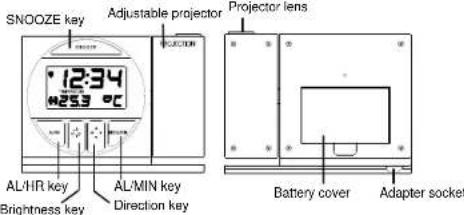
FEATURES:
- DCF-77 Radio controlled time with manual setting option
24 hours time display (hour, minutes, seconds)
Calendar display (weekday, date, month)
- Alarm snooze function
Time zone [±9 hours]
- Indoor temperature display in degree Celsius
- LED back-light
SETTING UP:
The Projection clock can be batteries operated or powered by the provided AC/DC adapter.
BATTERIES INSTALLATION
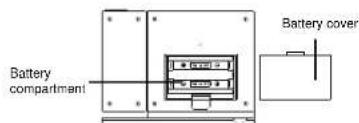
- Open the battery cover at the back of the Projection clock as indicated above.
- Checking the correct polarization, insert 2 × AA , IEC LR6.1.5V Alkaline batteries into the battery compartment and replace the cover.
-
When the batteries are inserted, all the segments of the LCD will light up briefly and a "beep" will sound. The Projection clock will now start receiving the DCF time signal. After approximate 3 to 5 minutes, the DCF time will be displayed.
-
If reception is not successful within approximately 7-10 minutes, the Projection clock will attempt to receive the signal in the next following hour. Your Projection clock is now operational.
TO USE THE PROJECTOR POWER ADAPTER
The unit comes with an adapter unit for using the projector for an extended period of time, such as throughout the night.
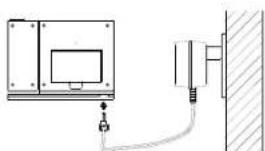
To install the adapter: HX0180450150D2E
Important!
Make sure that your household voltage is 230V! Otherwise it can result in damaging your Projection clock.
- Connect the power adapter to a wall socket
- Insert the adapter into the jack at the bottom of the clock
-
The Projection clock will now start receiving the DCF time signal. After approximate 3 to 5 minutes, the DCF time will be displayed.
-
If reception is not successful within approximately 7-10 minutes, the Projection clock will attempt to receive the signal in the next following hour. Your Projection clock is row operational.
Note: If the Projection clock is powered through the adapter, the projection will be constantly ON at the highest brightness level unless the brightness level is manually changed to a lower brightness level afterward. And the brightness of the projection can be change accordingly to enhance the clarity of the projected time by pressing the key.
If the Projection clock is battery operated, the projection will also be ON at the highest level. The intensity of the brightness level of the projection cannot be changed. It is a good time to place the clock at an appropriate location.
Important! Please remember to turn the projection OFF after the reception of DCF time when powered with batteries, otherwise the batteries will wear off very quickly!
BATTERIES POWERED WITH THE USE OF AC/DC ADAPTER
If the Projection clock is first powered by batteries and the power adapter is subsequently used for extended period of time. The main power source of the Projection clock will switch to AC/DC power. The batteries will then act as a backup power source in the case of power failure.
TO RESET THE PROJECTION CLOCK
To reset the Projection clock to the factory default setting or in case of a malfunction, please remove all batteries from the unit and unplug the AC/DC adapter from any power source. Wait at least for 3 minutes before powering up the Projection clock again.
FUNCTION KEYS:
The radio-controlled Projection clock uses the following keys:
SNOOZE : Alarm snooze function
Show alarm time
:Exit the setting modes
AL/HR: Enter time setting mode, and alarm setting mode
:Activate or deactivate alarm
: Stop alarm and snooze function
Set the hours and month
:Back-light-On
MODE/MIN : Toggle between indoor temperature, seconds, alarm time, and date display
:Enter time zone setting mode
: Sel the minutes, day and weekday
:Back-light-On
: Set the brightness level of the projection (in A/C power mode) (BR(GlueNesStigh, Low, OFF)
key)Activate the projection mode (in batteries operated mode)
:BacklightOn
: Project the image direction (can display 4 different orientations)
(DIFFUSE the projection mode (in batteries operated mode) key)Back-light On
HOW TO USE THE PROJECTOR
The projector projects the current time onto a wall or ceiling, preferable within a darkened room. It can be adjusted forward and backward 180^ for maximum projection range. The projection image can also be adjusted in 4 upright positions, each with a rotation of 90^ .
To project the time onto a flat surface
1. Point the projection lens to the appropriate direction (max. distance of the projection is 2 meters)
2. Adjust the intensity of the projector light with the key
3. Adjust the projection image in an upright position with the key
Note:
The projector will only project the current time. It will not project the seconds, date or temperature information.
BADIO CONTROLLED TIME:
The time base for the radio-controlled time is a Cosium Atomic Clock operated by the Physikalisch Technische Bundesanstalt Braunschweig which has a time deviation of less than one second in every one million years. The time is coded and transmitted from Mainflingen near Frankfurt via frequency signal DCF-77 (77.5 khz) and has a transmitting range of approximately 1,500 km. The Projection clock receives this signal and converts it to show the precise time and so when within this range the received time is completely accurate.
CHECKING FOR DCF-77 RECEPTION:
The Projection clock will automatically start scanning for the DCF-77 frequency signal after the battery is inserted. In normal surroundings (for example away from interfering sources such as TV sets), it takes between 3-5 minutes to receive the signal. If after 10 minutes of inserting the batteries into the alarm clock and the DCF-77 signal is not received, then check the following list before manually setting the time (see Manual time setting):
- The distance of the Projection clock should be at least 1.5-2.0 meters away from interfering sources such as computer monitors or TV sets.
- Avoid placing the alarm clock onto or in the immediate proximity of metal, doors, windows frames or structures.
- Within thick concrete rooms such as basements and tower blocks, the DCF-77 signal is naturally weaker. In extreme cases, place the alarm clock closer to a window and/or point its front or rear towards the general direction of the Frankfurt/Main transmitter (avoid positioning within close proximity of metal frames or structures).
Note:
Users may be located in areas where atmospheric disturbances are the direct cause for not receiving the DCF-77 frequency signal. During nighttime, atmospheric disturbances are usually less severe and reception is possible in most cases. With a single daily reception, it is adequate for the alarm clock to keep time deviation to below 0.5 seconds in a period of 24 hours.
When the clock is trying to receive the DCF signal, the reception icon will flash on the LCD. Once the signal is "locked", the DCF-77 lower icon will stay fixed on LCD and the received time will automatically correct the manually set time. As well as the time, the date will also be received by the Projection clock and will be displayed accordingly in the calendar section of the LCD.
ALARM SETTING:
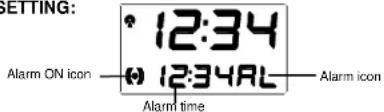
To set alarm:
- Press and hold the AL/HR key, the ( ) icon will appears and the AL icon on the LCD starts flashing.
- Set the hours and minutes of the desired alarm time by use of the AL/HR (hours) or the MODE/MIN (minutes) keys respectively.
- Once the alarm time is set, press the SNOOZE key to confirm and exit or wait approximately 8 seconds for automatic timeout.
TO ACTIVATE / DEACTIVATE THE ALARM:
Press the AL/HR key. The alarm icon ( ) will appear/disappear indicating that it is ON or OFF.
Note: the maximum duration of the alarm ringing is 1 minute 36 seconds.
SNOOZE SETTING:
The snooz time is set as default for 5 minutes by the manufacturer. The snooz mode will be activated from the start of next minute after the SNOOZE key was pressed - it does not count the current minute that it was pressed in.
To use the snooze feature, simply press the SNOOZE key when the alarm is sounding and the alarm will snooze for 5 minutes before automatically sounding again. When the alarm is snoozin, the alarm icon (()) will start flashing indicating that the alarm is active but is in Snooze mode.
LCD SCREEN
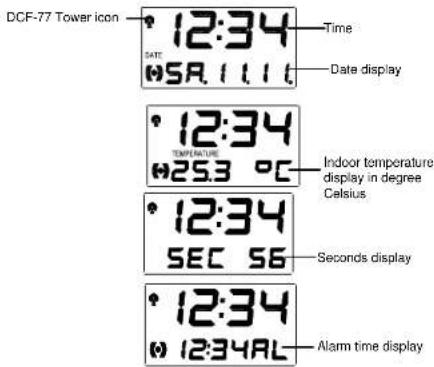
The Projection clock can display information of date, indoor temperature, seconds and alarm time on the LCD only. The projection will only display the time.
The clock LCD can toggle between the 4 display modes when pressing and the MODE/MIN key:
MANUAL TIME SETTING:
In some cases after inserting the batteries, the Projection clock may not be able to receive the DCF-77 signal. In this situation, the time should be manually set (before manual setting see Checking DCF-77 Reception above).
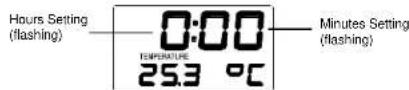
- Immediately after inserting the battery, press and hold down the MODE/MIN key until the time on the LCD starts flashing.
- Set the time by using the AL/HR and the MODE/MIN keys respectively.
- Press the SNOOZE key to enter the Calendar setting mode or wait for about 8 seconds for automatic timeout.
Note: The Projection clock will still try and receive the signal despite the time being manually set. When it receives the signal, then the DCF tower icon will stay fixed on the LCD. If reception has been unsuccessful, then the DCF tower icon will disappear but reception will still be attempted the following hour.
CALENDAR SETTING
The date default of the Projection Alarm clock is MO 1.1. in the year 2000. Once the radio controlled time signals are received, the date is automatically updated. However, if the signals are not received, you can adjust the date manually. To do this:
-
The year digits start flashing. Use the MODE/MIN key to set the year (the range runs from 2000 to 2029).
-
Press the SNOOZE key again to enter the month and date setting (flashing).
- Use the AL/HR key to set the month and the MODE/MIN key to set the day
- Press the SNOOZE key again to enter the weekday setting (flashing).
- Use the MODE/MIN key to set the weekday.
- Press the SNOOZE key once more to confirm all settings and to exit or do not touch any buttons for around 8 seconds. The mode will return to normal.
TIME ZONE SETTING:
Time zone 0^ = Central Europe
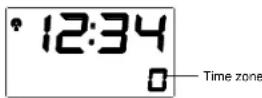
To change to a different time zone (±9 hours):
- In normal mode display: press and hold down the MODE/MIN key to enter the time setting mode
- Use the MODE/MIN key again to select the desired time zone. Each press changes the digits by 1 hour.
- When the desired time zone is selected, press the SNOOZE key to confirm and exit or wait for about 8 seconds for automatic return to the normal mode display.
Note: If the time zone is changed to another time zone other than "0", the calendar will not be displayed.
BACK-LIGHT:
The LED back-light is automatically switched ON when any keys are pressed. The back-light will be switched on for approximately 2 seconds before automatically switching OFF. However, if any of the keys are pressed and held down, then LED back-light will remain ON constantly until the key is released.
Environmental reception effects
The clock obtains the accurate time with wireless technology. Same as all wireless devices, the reception is maybe affected by the following circumstances:
- long transmitting distance
- nearby mountains and valleys
- near freeway, railway, airports, high voltage cable etc.
- near construction site
among tall buildings - inside concrete buildings
near electrical appliances (computers, TV's, etc) and metallic structures - inside moving vehicles
Place the clock at a location with optimal signal, i.e. close to a window and away from metal surfaces or electrical appliances.
Precautions
This main unit is intended to be used only indoors.
Do not subject the unit to excessive force or shock.
Do not expose the unit to extreme temperatures, direct sunlight, dust or humidity.
Do not immerse in water.
- Avoid contact with any corrosive materials
Do not dispose this unit in a fire as it may explode.
Do not open the inner back case or tamper with any components of this unit.
Batteries safety warnings
- Use only alkaline batteries, not rechargeable batteries.
Install batteries correctly by matching the polarities +/- .
Always replace a complete set of b - Never mix used and new batteries.
- Remove exhausted batteries immediately.
- Remove batteries when not in use
Do not recharge and do not dispose of batteries in fire as the batteries may explode.
Ensure batteries are stored away from metal objects as contact may cause a short circuit. - Avoid exposing batteries to extreme temperature or humidity or direct sunlight.
- Keep all batteries out of reach from children. They are a choking hazard.
Use the product only for its intended purpose!
Consideration of duty according to the battery law
Old batteries do not belong to domestic waste because they could cause damages of health and environment. You can return used batteries free of charge to your dealer and collection points. As end-user you are committed by law to bring back needed batteries to distributors and other collecting points!
Consideration of duty according to the law of electrical devices
This symbol means that you must dispose of electrical devices separated from the General household waste when it reaches the end of its useful life. Take your unit to your local waste collection point or recycling centre. This applies to all countries of the European Union, and to other European countries with a separate waste collection system.

SPECIFICATIONS:
Recommended operating temperatures : 0^ to +49^ with 0.1^ resolution
Power source
Batteries:2xAA,IEC LR6,1.5V
Battery life : Approximately 12 months (A) Battery life : Approximately 12 months
Alkaline battery recommended
AC power (HX0180450150D2E): INPUT 230VAC 50HZ (use the provided AC/DC adapter only)
Projection distance : max. 2 meter
Dimensions (L x W x H) : 123 x 42 x 91mm
MAINTENANCE:
- Avoid placing the alarm clock in areas prone to vibration and shock as this may damage and inaccurate readings.
- Avoid exposure to sudden changes in temperature such as direct sunlight, extreme cold and wet or moist conditions.
- When cleaning the display and casing, use a soft damp cloth only.
Do not use solvents or souring agents as they may mark the LCD and casing.
- Do not submerge the alarm clock into water.
- Do not attempt to make any repairs to the alarm clock. Return it to its original point of purchase for repair by a qualified engineer. Opening and tampering with the unit may invalidate its guarantee.
PENDULE PROJECTEUR RADIO-COMMANDEE AVEC THERMOMETRE NUMERIQUE
TOUCHES DE FONCTION:
SNOOZE: Repeteeralam
: Stop alarm on repeteeralarm