3005 The Connector - Other computer accessories TIVOLI AUDIO - Free user manual and instructions
Find the device manual for free 3005 The Connector TIVOLI AUDIO in PDF.



User questions about 3005 The Connector TIVOLI AUDIO
0 question about this device. Answer the ones you know or ask your own.
Ask a new question about this device
Download the instructions for your Other computer accessories in PDF format for free! Find your manual 3005 The Connector - TIVOLI AUDIO and take your electronic device back in hand. On this page are published all the documents necessary for the use of your device. 3005 The Connector by TIVOLI AUDIO.
USER MANUAL 3005 The Connector TIVOLI AUDIO
Declaration of Conformity 115
text_image
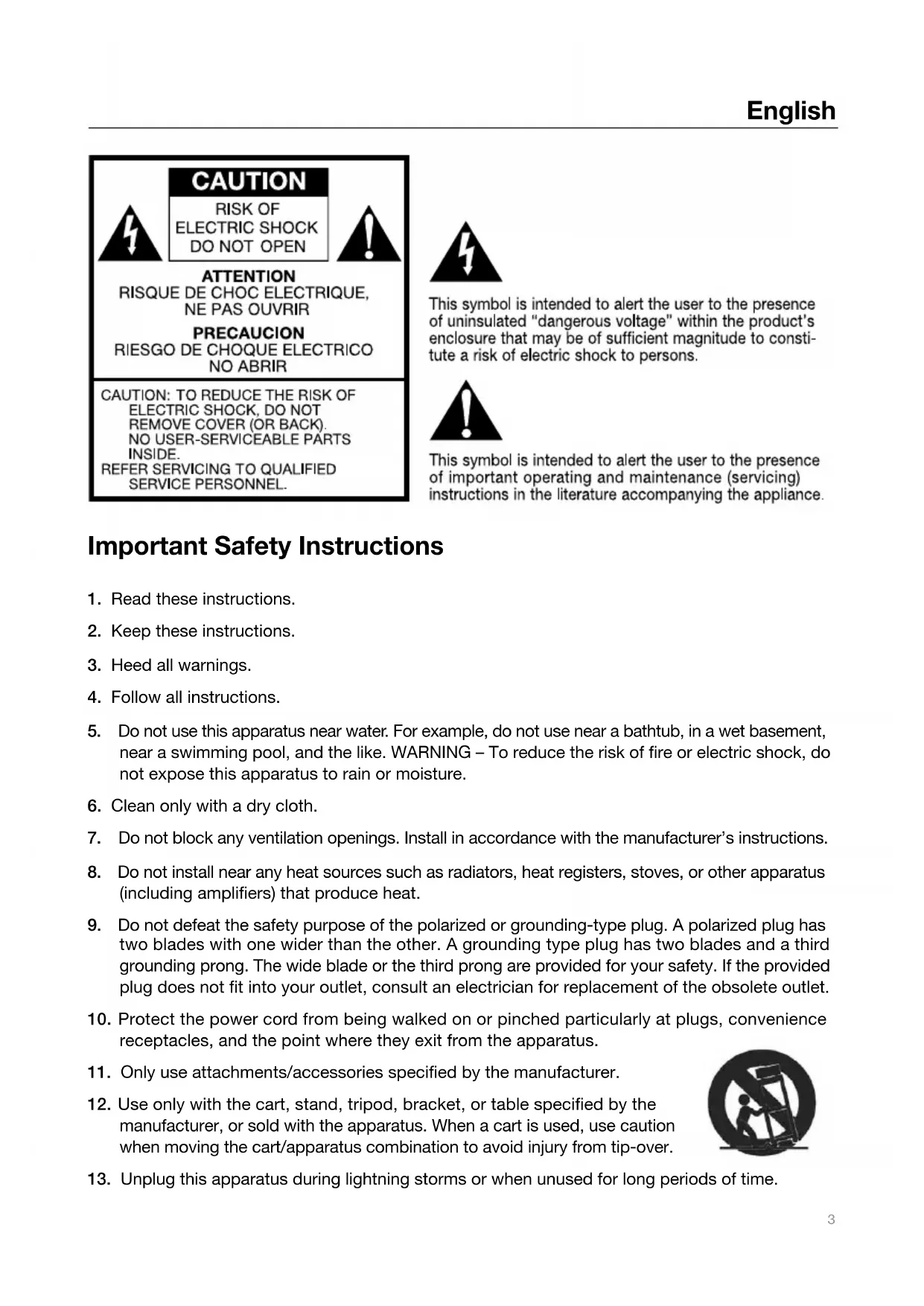
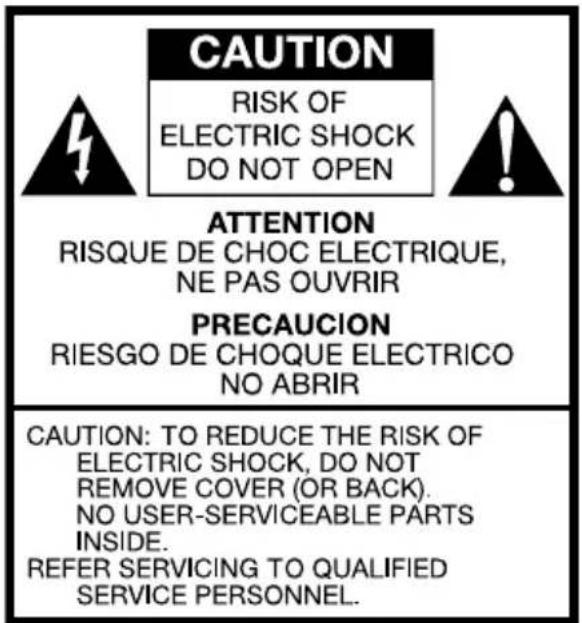
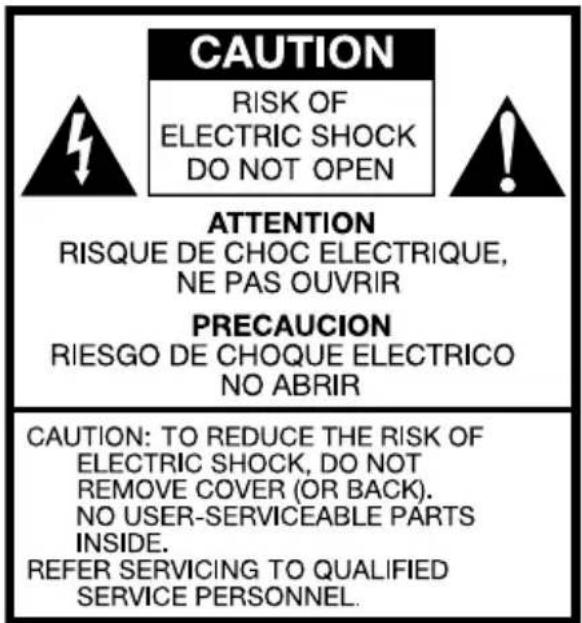
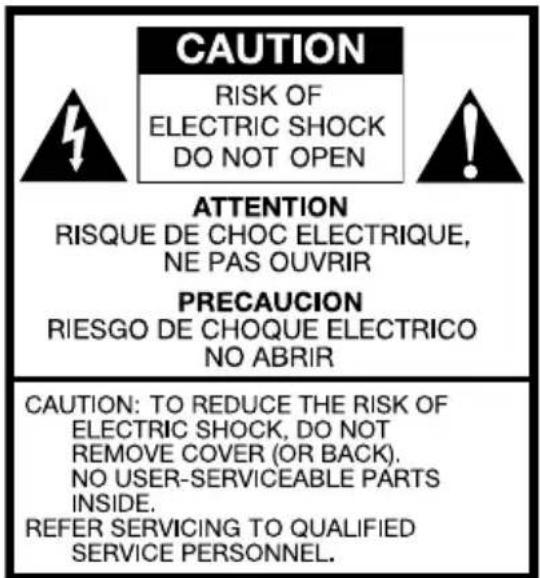
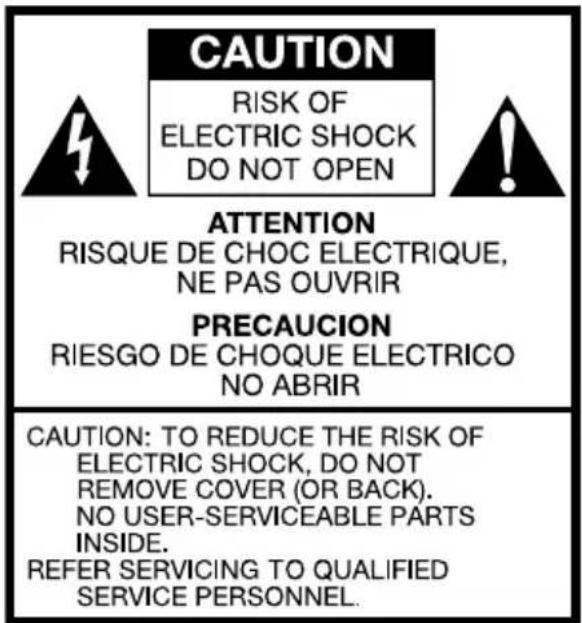
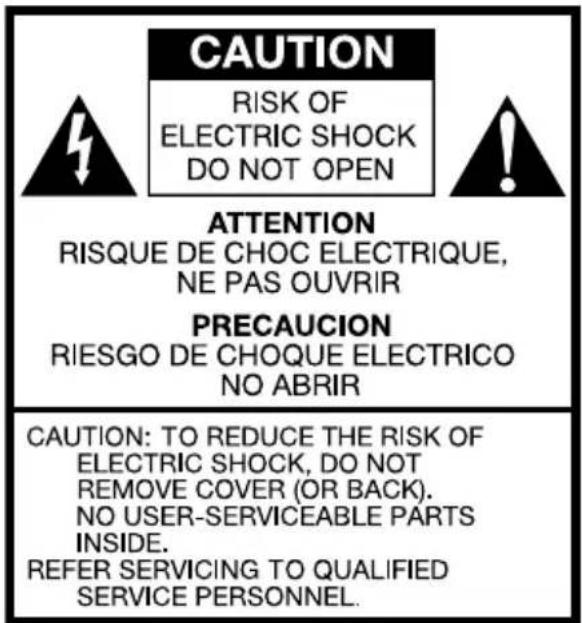
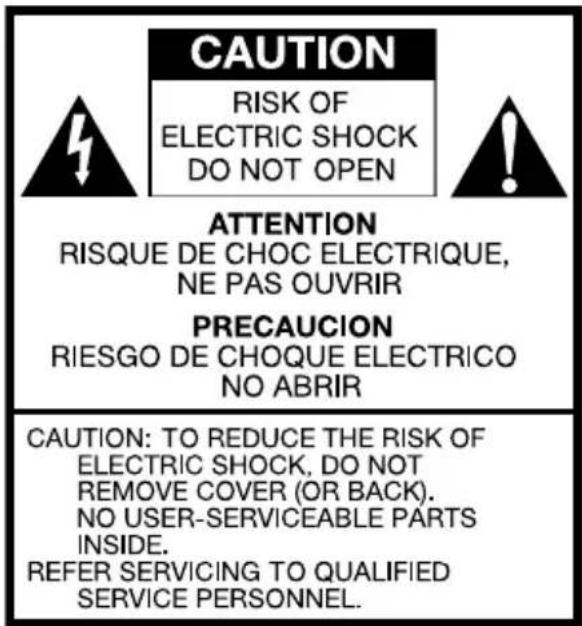
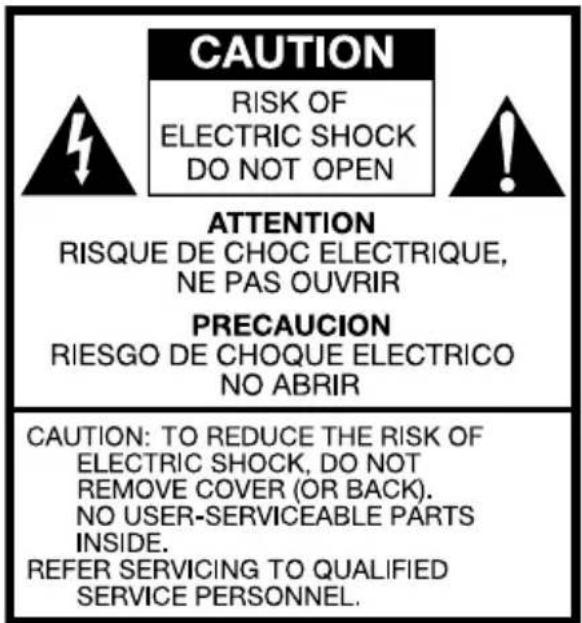
CAUTION RISK OF ELECTRIC SHOCK DO NOT OPEN ATTENTION RISQUE DE CHOC ELECTRIQUE, NE PAS OUVRIR PRECAUCION RIESGO DE CHOQUE ELECTRICO NO ABRIR CAUTION: TO REDUCE THE RISK OF ELECTRIC SHOCK, DO NOT REMOVE COVER (OR BACK). NO USER-SERVICEABLE PARTS INSIDE. REFER SERVICING TO QUALIFIED SERVICE PERSONNEL.
This symbol is intended to alert the user to the presence of uninsulated "dangerous voltage" within the product's enclosure that may be of sufficient magnitude to constitute a risk of electric shock to persons.

This symbol is intended to alert the user to the presence of important operating and maintenance (servicing) instructions in the literature accompanying the appliance.
Important Safety Instructions
-
Read these instructions.
-
Keep these instructions.
-
Heed all warnings.
-
Follow all instructions.
-
Do not use this apparatus near water. For example, do not use near a bathtub, in a wet basement, near a swimming pool, and the like. WARNING – To reduce the risk of fire or electric shock, do not expose this apparatus to rain or moisture.
-
Clean only with a dry cloth.
-
Do not block any ventilation openings. Install in accordance with the manufacturer's instructions.
-
Do not install near any heat sources such as radiators, heat registers, stoves, or other apparatus (including amplifiers) that produce heat.
-
Do not defeat the safety purpose of the polarized or grounding-type plug. A polarized plug has two blades with one wider than the other. A grounding type plug has two blades and a third grounding prong. The wide blade or the third prong are provided for your safety. If the provided plug does not fit into your outlet, consult an electrician for replacement of the obsolete outlet.
-
Protect the power cord from being walked on or pinched particularly at plugs, convenience receptacles, and the point where they exit from the apparatus.
-
Only use attachments/accessories specified by the manufacturer.
-
Use only with the cart, stand, tripod, bracket, or table specified by the manufacturer, or sold with the apparatus. When a cart is used, use caution when moving the cart/apparatus combination to avoid injury from tip-over.

natural_image
Silhouette of a person climbing a ladder inside a circular frame (no text or symbols)-
Unplug this apparatus during lightning storms or when unused for long periods of time.
-
Refer all servicing to qualified service personnel. Servicing is required when the apparatus has been damaged in any way, such as power-supply cord or plug is damaged, liquid has been spilled or objects have fallen into the apparatus, the apparatus has been exposed to rain or moisture, does not operate normally, or has been dropped.
- For added protection for this product during a lightning storm, or when it is left unattended and unused for long periods of time, unplug it from the wall outlet. This will prevent damage to the product to lightning and power-line surges.
- Operate this product only from the type of power source indicated on the rear panel. For products using an external power supply, use an exact replacement if lost or damaged. For products operating from battery power, refer to the user manual.
- Unplug this product from the wall outlet and refer servicing to qualified service personnel under the following conditions:
a. When the power supply cord or plug is damaged.
b. If liquid has been spilled or objects have fallen into the product.
c. If the product has been exposed to water or rain.
d. If the product does not operate normally by following the operating instructions.
e. If the product has been dropped or damaged in any way.
f. When the product exhibits a distinctive change in performance. - Keep this product a safe distance away from naked flame, such as a lit candle.
- Apparatus shall not be exposed to dripping or splashing and no objects filled with liquids, such as vases, shall be placed on the apparatus.
- The recommended operating temperature range is 41^ F to 104^ F ( 5^ C to 40^ C).
- As the main plug is used to disconnect the system from the mains, connect the system to an easily accessible AC outlet.
- The system is not disconnected from the mains as long as it is connected to the AC outlet, even if the system itself has been turned off.

natural_image
Simple line drawing of a trash bin with no text or symbolsThis product can be recycled. Products bearing this symbol must NOT be thrown away with normal household waste. At the end of the product's life, take it to a collection point designated for recycling of electrical and electronic devices. Find out more about return and collection points through your local authority.
The European Waste Electrical and Electronic Equipment (WEEE) Directive was implemented to dramatically reduce the amount of waste going to landfills, thereby reducing the environmental impact on the planet and on human health. Please act responsibly by recycling used products. If this product is still useable, consider giving it away or selling it.
The Connector Instructions
Congratulations on your purchase of The Connector. The Connector's ease of use, unique features, and distinct styling make it a perfect compliment to any of Tivoli Audio's radios.
In order to take full advantage of what The Connector is capable of, please take a moment to read this owner's manual and safety instructions. If you have any questions, please do not hesitate to contact your authorized dealer or distributor.
On behalf of all of us, thank you for choosing Tivoli Audio and enjoy The Connector.
About Tivoli Audio
Tivoli Audio was founded by Tom DeVesto with the mission of bringing simple to use, elegantly designed, high quality audio products to consumers. As CEO and head of research and development at his former company, Cambridge SoundWorks, Tom was responsible for the development of many of the best selling home entertainment and multi-media products on the market. He also held senior management positions in product development at both Advent and Kloss Video.
*Cambridge SoundWorks is a registered trademark of Creative Labs, Singapore.
Packed with The Connector you should find one of each:
- Switching external power supply with exchangeable country plug adapter
- Remote control (battery installed)
• 9 Universal dock adapters
• 1.1m/3'8" Stereo 3.5mm Audio cable
Getting Started:
Before you begin, be sure your Tivoli Audio radio and The Connector are both turned off.
- Connect one end of the included audio cable to the "Auxiliary" input on your Tivoli Audio radio, and the other end to the "Audio Out" on the back of The Connector.
- To watch videos from your iPod on a television, connect a composite or S-Video cable (not included) from the "Video Out" or "S-Video" output on the back of The Connector to the composite video or S-Video input on your television set. Set your television's source switch to the proper input so you can view the video. Be sure your iPod video settings are enabled in order to get a video signal.
- Insert the adapter plug into the included external power supply. Connect the external power supply's cable to the DC input on the back of The Connector and plug the other end into a wall outlet.
- Depending on your iPod model (see chart below); insert the correct dock adapter into the well of The Connector. Each dock adapter has its own number on the bottom. Failure to use the correct dock adapter (or no adapter at all) could result in intermittent contact or damage to The Connector and/or your iPod. Once the dock adapter is firmly locked in place you may dock your iPod. The Tivoli Audio logo will flash while The Connector communicates with your iPod.
- Rotate The Connector's back support wheel counter clockwise until the rubber pad makes solid contact with the back of your iPod.
- Turn up the volume on your Tivoli Audio radio to the desired level and use The Connector's remote control to play music from your iPod.
iPod Dock Adapter chart
| Adapter # iPod Model | ||
| 9 5G iPod with | video 30GB | |
| 9 U2 iPod with | video 30GB | |
| 9 iPod classic | 80GB | |
| 10 5G iPod with | video 60GB, 80GB | |
| 10 iPod classic | 160GB | |
| 11 iPod nano | (2nd generation) 2GB, 4GB, 8GB | |
| 12 iPhone 4GB, 8GB,16GB | ||
| 13 iPod nano | (3rd generation) 4GB, 8GB | |
| 14 iPod touch | 8GB, 16GB, 32GB | |
| 15 iPhone 3G/ | 3GS 8GB, 16GB, 32GB | |
| 16 iPod touch | (2nd generation) 8GB, 16GB, 32GB | |
| 17 iPod nano | (4th generation) 8GB, 16GB | |
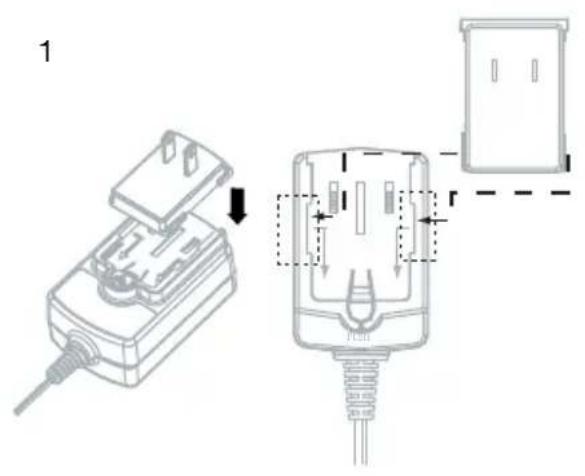
Installing the Adapter Plug:
- Place the step on the adapter plug into the left and right grooves of the power adapter as shown in the drawing.
Note: The length of the step should match the grooves on the power supply to be inserted properly.
- Slide the adapter plug towards the base of the power adapter until it locks.
Note: Make sure the adapter plug is firmly locked and cannot move.
text_image
1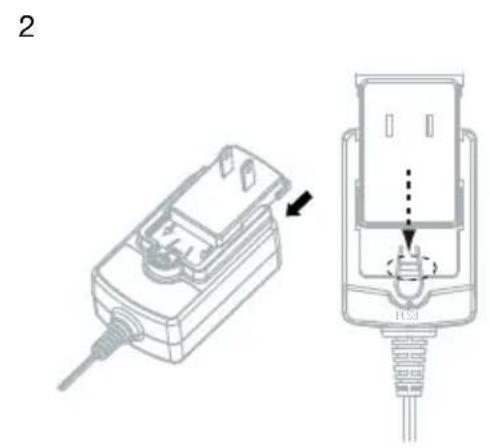
natural_image
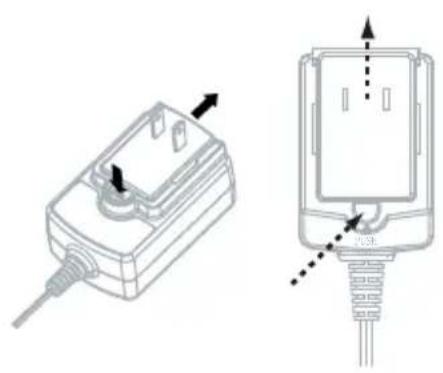
Technical illustration of a device with an arrow indicating assembly or connection (no text or symbols present)Changing the Adapter Plug:
- Press and hold the button above the word marked "PUSH".
- Slide the adapter plug towards the grooves and remove.
natural_image
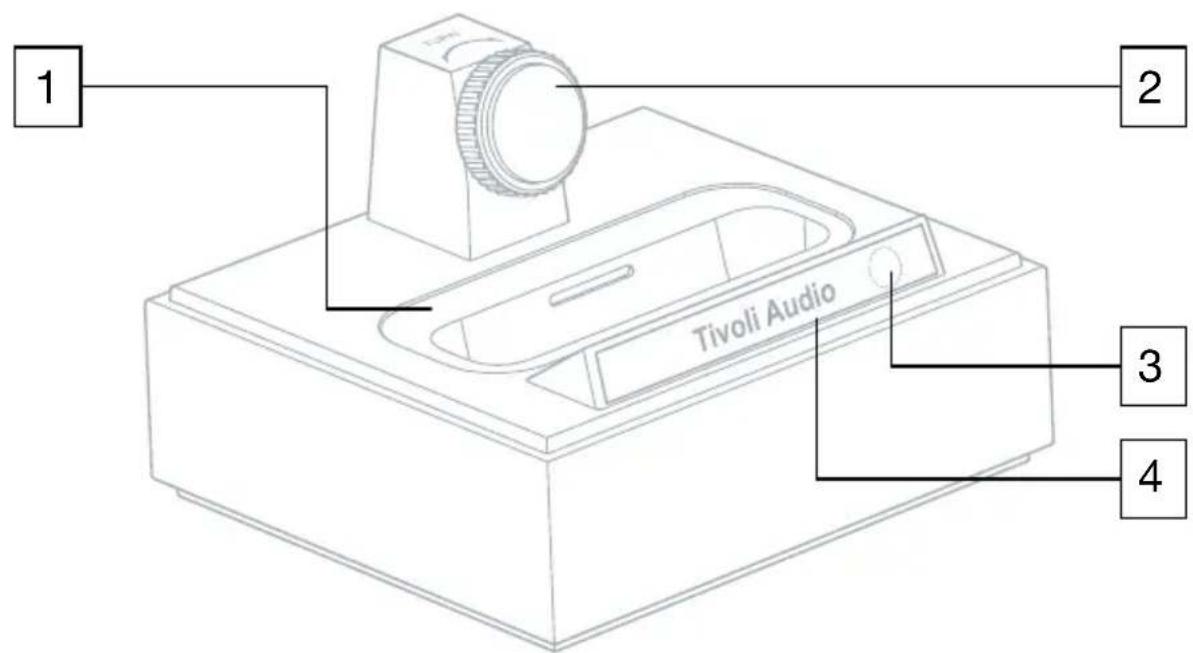
Technical line drawing of a mechanical device with two views: top shows internal components, bottom shows a plug inserted into a socket (no text or symbols)Guide to Features (Front):
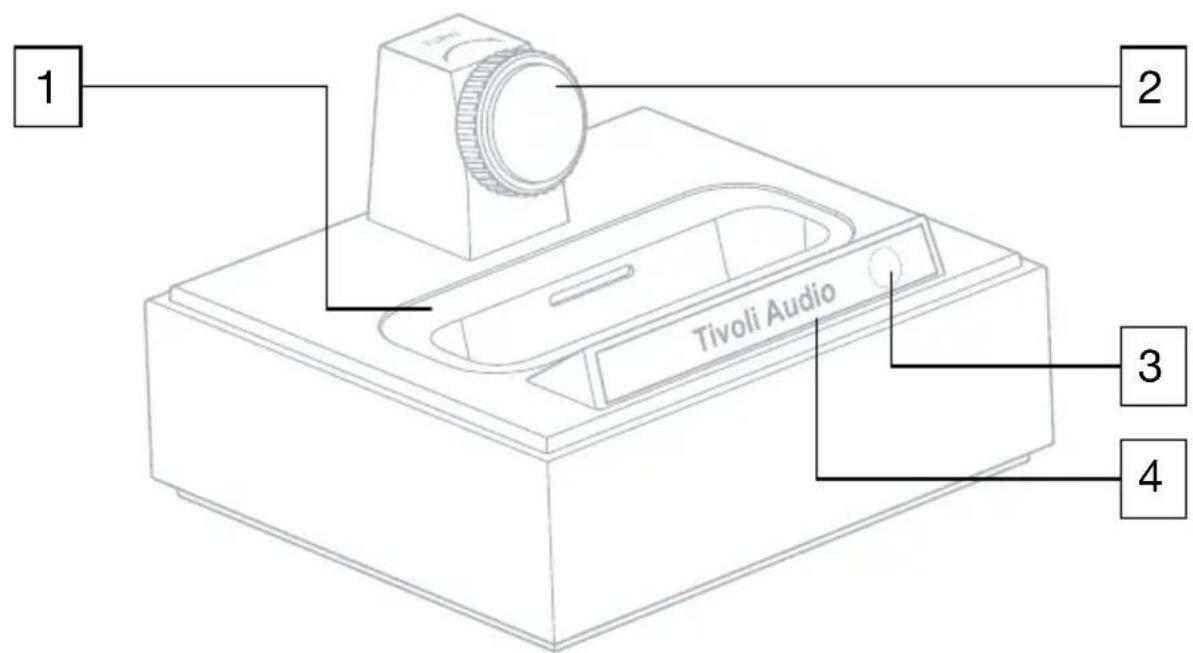
text_image
1 2 Tivoli Audio 3 4-
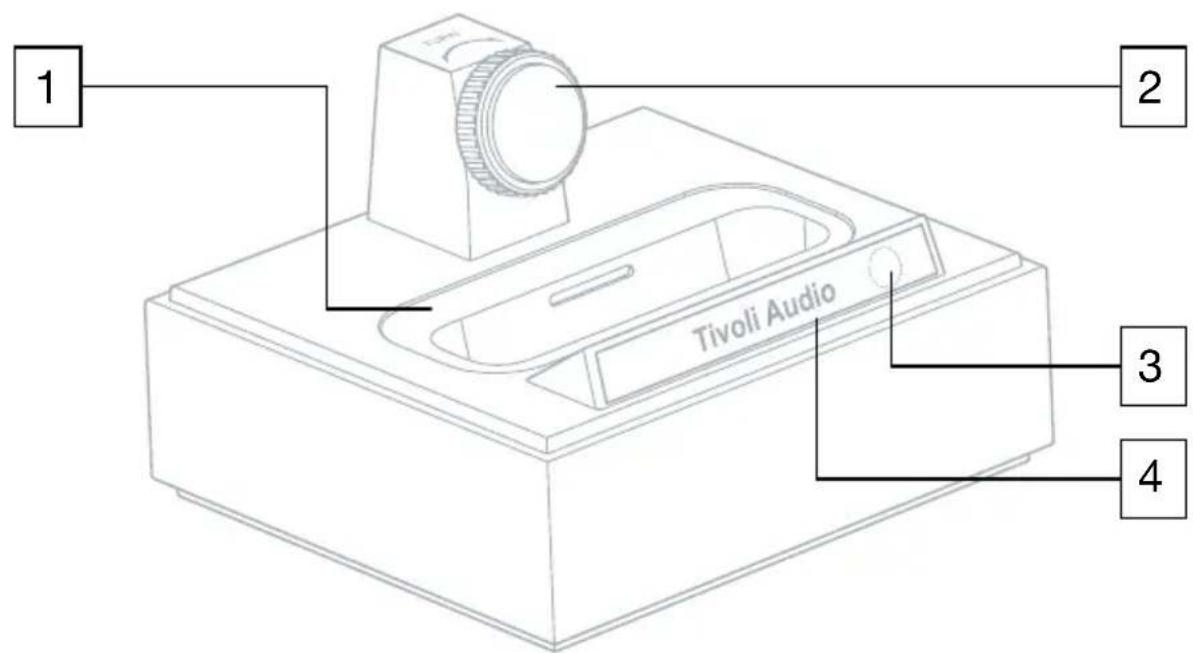
UNIVERSAL WELL: Insert the adapter designed to fit your model iPod from the included 9 adapters, or use the adapter supplied with your iPod if one was included. Failure to use the correct dock adapter (or no adapter at all) could result in intermittent contact or damage to The Connector and/or your iPod. Your warranty does not include damage resulting from improper use.
-
BACK SUPPORT WHEEL: Rotate the wheel counter clockwise to extend it toward your iPod, or clockwise to back the wheel away from your iPod. Be sure to adjust the wheel according to each iPod model, as an incorrect setting could put stress on the connector. Although you can use The Connector without using the back support, the wheel provides additional support to your iPod.
-
IR SENSOR: Receives commands from the included remote control.
-
TIVOLI AUDIO POWER LIGHT: Illuminates any time your iPod is docked and The Connector is plugged in and turned on. The logo flashes to confirm each time a remote control command is received. The logo will flash for several seconds when an iPod is initially docked as The Connector establishes communication with the iPod.
Guide to Features (Rear panel):
Note: Audio and video connections should always be made while The Connector is turned off.
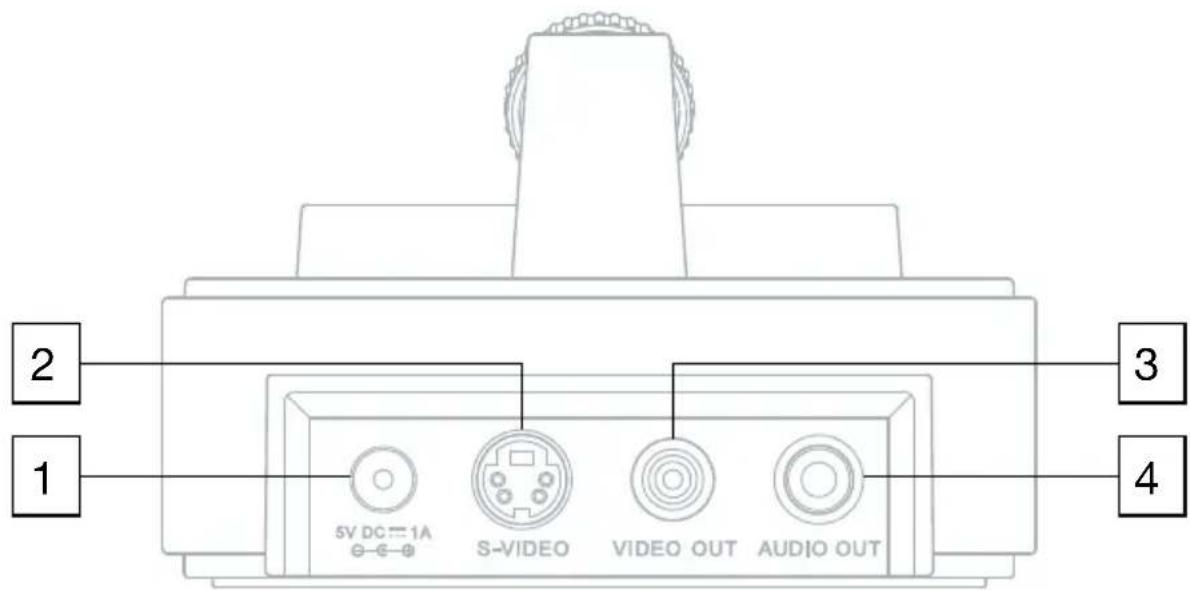
text_image
2 1 3 4 5V DC = 1A S-VIDEO VIDEO OUT AUDIO OUT- 5VDC 1A: Connect the included external power supply's cable into this input. Should the power supply ever be damaged or misplaced, use only a like replacement. The power supply's connector is 5.5 ~mm / 2.1 ~mm center positive. Using a different power supply could result in damage to The Connector or your iPod.
- S-VIDEO: Connect an S-Video cable (not included) to this output, and the other end of the cable to a television's S-Video input to watch videos stored on your iPod. This output will provide a superior picture to the composite video output. Be sure your iPod video settings are enabled in order to get a video signal.
- VIDEO OUT: Connect a composite video cable (not included) to this output, and the other end of the cable to a television's composite input to watch videos stored on your iPod. Be sure your iPod video settings are enabled in order to get a video signal.
- AUDIO OUT: Connect one end of the included audio cable to this output, and the other end to the Auxiliary input of your Tivoli Audio radio (or other audio device). This output is not designed for use with headphones.
Note: Be sure your iPod video settings are enabled (if your iPod model supports video out) in order to get a video signal.
Guide to Features (Remote Control):
Note: The Tivoli Audio logo will flash each time a command from the remote control is received.
flowchart
graph TD
    A["2"] --> B["MENU"]
    C["3"] --> B
    B --> D["SELECT"]
    D --> E["4"]
    D --> F["5"]
    G["6"] --> H["+"]
    I["7"] --> J["-"]
    K["8"] --> L["MUTE"]
    M["1"] --> N["Switch"]
    O["9"] --> P["X"]
    Q["10"] --> R["Sun"]
    S["11"] --> T["Switch"]
-
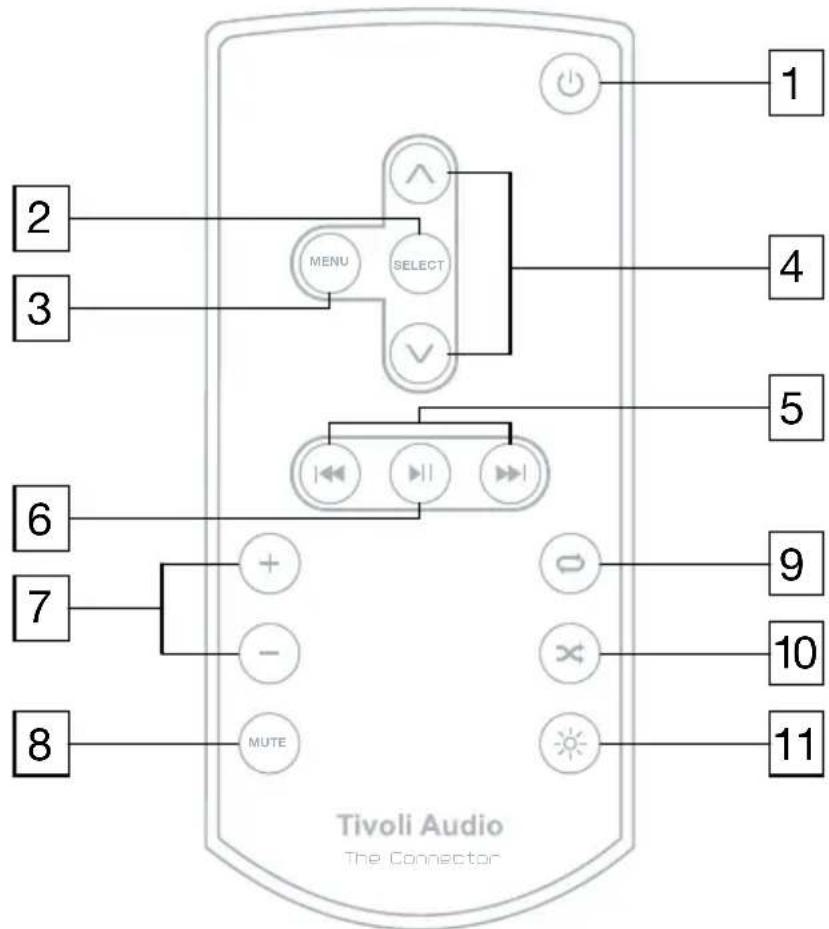
POWER: Docking an iPod will automatically power The Connector on. Otherwise, with an iPod docked, press to turn The Connector on or off. The Tivoli Audio logo with illuminate or extinguish depending on the power status. A properly docked iPod will receive a charge regardless of whether The Connector is on or off.
-
SELECT: Press to select the highlighted item.
-
MENU: Press to access the iPod's main menu. When in the menu, press to go back.
-
UP/DOWN: Press to navigate up or down through the iPod's menu.
-
BACK/FORWARD: Press to go back or advance tracks. Press and hold to fast reverse or fast forward through a track while it is playing.
-
PLAY/PAUSE: Press to play a song/video. Press a second time to pause playback. Press a third time to resume playback.
-
VOLUME +/-: Press to increase or decrease the volume. This will not control the volume of your Tivoli Audio radio or the docked iPod, just The Connector.
-
MUTE: Press to mute the audio output. Press again to restore audio.
-
REPEAT: Press once to repeat the track currently playing. Press again to repeat all. Press a third time to cancel repeat play.
- SHUFFLE: Press to randomly shuffle tracks. Press again to cancel shuffle play.
- BACKLIGHT: Press to activate the iPod's backlight for the amount of time set in the iPod's menu.
Note: Different iPod models have different software. The above commands may not work on some iPod models or may behave differently than described. This is a function of your iPod's software, not The Connector.
Helpful Hints:
Positioning: Place The Connector on a flat, stable surface. Do not leave the audio cable or power cord where they might be tripped over. Should you experience any interference with your Tivoli Audio radio (or other device) while using The Connector, move The Connector or the radio further apart from each other.
Docking: When inserting your iPod, be sure it is firmly seated all the way down in the well. Also be sure you are using the correct dock adapter for your iPod. If your iPod has a skin/case, you may need to remove it since it could prevent a good connection. When docking your iPod, certain functions will be unavailable while the iPod establishes communication with The Connector. Please wait until the link has been established (the Tivoli Audio logo will stop flashing). Otherwise, you may need to re-dock your device
Cleaning: Never use any harsh cleansers or solvents on The Connector's wood veneer or other parts, as this could damage the finish.
Wood color: The Connector's base uses a real wood veneer. Since natural wood varies greatly, it is not possible to achieve an exact wood color/grain match between The Connector and a Tivoli Audio radio. You might also notice the wood darken over time with exposure to sunlight. Again, this is normal for real wood.
iPod: If you have questions about how to use your iPod, please contact Apple Inc directly, or the establishment where you purchased your iPod.
Re-set: Should you need to re-set The Connector for any reason, disconnect the power supply and plug it back in.
Limited Warranty:
Tivoli Audio manufactures its products to very high standards and we are confident our products will perform well. Accordingly, we provide a limited warranty on this product against manufacturing defects in material and workmanship to the original owner. This warranty is non-transferable.
Products purchased in the European Union and Norway have a minimum warranty term of two years. For countries where minimum warranty terms are determined by statute, the warranty term is the statutory period required. In all other locations, the warranty term is one year.
This Limited Warranty covers the functionality of the product for its normal, intended use as specified in this Owner's Manual. It does not cover a malfunction or damage that has resulted from improper or unreasonable use or installation, using the charger to charge alkaline batteries, faulty ancillary equipment, modifications, unauthorized repair, shipping damage or loss, abuse, accidents, use on improper voltage/current, power surges, lightning or other acts of God, excess moisture, normal wear and tear, commercial use, or purchase from unauthorized dealers. Proof of purchase as evidence the unit was purchased from an authorized dealer may be required for warranty service. Please contact the dealer of purchase or local distributor for warranty service or repair.
Please refrain from opening this product or taking it apart as doing so will void this Limited Warranty. There are no user serviceable parts inside. Tivoli Audio will not pay for costs incurred due to correction of reception problems, elimination of externally generated static/noise, loss of time, inconvenience, loss of use of product, or damage caused by improper use of this product.
In the event the product is returned during the warranty term and is eligible for service under this Limited Warranty, we will repair or replace any defective parts within a reasonable period of time and free of charge.
THIS LIMITED WARRANTY GIVES YOU SPECIFIC LEGAL RIGHTS SUBJECT TO SPECIFIED CONDITIONS. YOU MAY ALSO HAVE OTHER LEGAL RIGHTS WHICH APPLY TO THE PRODUCT YOU HAVE ACQUIRED. THESE LEGAL RIGHTS VARY FROM COUNTRY TO COUNTRY. SOME PLACES DO NOT ALLOW THE EXCLUSION, RESTRICTION, OR MODIFICATION OF CERTAIN IMPLIED RIGHTS OR THEIR EFFECT. IN THOSE SITUATIONS THIS LIMITED WARRANTY WILL ONLY APPLY TO THE EXTENT THAT THE APPLICABLE LAW ALLOWS.
The laws of your country may provide you with legal claims against the seller or manufacturer of this product. This Limited Warranty does not affect those rights.
The provisions of the Limited Warranty are in lieu of any other warranties or conditions, except those provided by law. This Limited Warranty does not affect any legal rights provided to you by law and does not preclude any remedy you may have under law.
In countries where liability limits are not precluded by statute, the maximum liability of Tivoli Audio shall not exceed the purchase price paid by you for the product. In countries where limitations of liability are precluded by law, Tivoli Audio shall be liable for no more than the direct damages for bodily injury, and/or real or personal property arising from the negligence of Tivoli Audio.
Where not prohibited by law, Tivoli Audio shall not be liable for special, incidental, consequential,
or indirect damages. Some places do not allow limitations on the exclusion or limitation of relief, special, incidental, consequential or indirect damages, or the limitation of liability to specified amounts, so the above limitations or exclusions may not apply to you.
This Limited Warranty is void if the label bearing the serial number has been removed or defaced.
If you purchased an extended service contract from your dealer and service is required after the term of this Limited Warranty has expired, please contact your extended service contract provider to obtain service.
For your convenience, you may register your product for warranty service online at our website, www.tivoliaudio.com. There is no legal obligation for you to provide personal information. However, such information allows us to maintain a record of the Tivoli Audio products acquired by you and better understand the purchasers of our products. The information collected will be used for marketing purposes by Tivoli Audio and, where permitted, to contact you in relation to the products you have acquired or other products which might be of interest to you from Tivoli Audio or other companies. The information that you provide may be processed in another country.
Please visit the Tivoli Audio FAQ section at http://www.tivoliaudio.com prior to any request for warranty service as information available there may answer your questions or concerns.
For service, please contact your dealer or local distributor.
Specifications:
Model: The Connector
Dimensions: 89.5mm W x 57mm H x 79mm D (3.52" W x 2.24" H x 3.11" D)
Weight: 0.128 kg (4.5 oz.)
All specifications subject to change without notice.
Tivoli Audio reserves the right to make product changes without notice.
Tivoli Audio, the Tivoli Audio logo, and The Connector are registered trademarks of Tivoli Audio, LLC. Patent Pending. iPod, iPod classic, iPod nano, and iPod touch are trademarks of Apple Inc., registered in the U.S. and other countries.
Made for:
iPod nano (1st, 2nd, 3rd, 4th, and 5th generation)
iPod touch (2nd and 3rd generation)
iPod classic
iPod with video
iPod with color display
iPod with Click Wheel

text_image
CAUTION RISK OF ELECTRIC SHOCK DO NOT OPEN ATTENTION RISQUE DE CHOC ELECTRIQUE, NE PAS OUVRIR PRECAUCION RIESGO DE CHOQUE ELECTRICO NO ABRIR CAUTION: TO REDUCE THE RISK OF ELECTRIC SHOCK, DO NOT REMOVE COVER (OR BACK). NO USER-SERVICEABLE PARTS INSIDE. REFER SERVICING TO QUALIFIED SERVICE PERSONNEL.
natural_image
Simple line drawing of a trash bin with no text or symbols| Adapter # iPod Model | ||
| 9 5G iPod with video 30GB | ||
| 9 U2 iPod with video 30GB | ||
| 9 iPod classic 80GB | ||
| 10 5G iPod with video 60GB, 80GB | ||
| 10 iPod classic 160GB | ||
| 11 iPod nano (2nd generation) 2GB, 4GB, 8GB | ||
| 12 iPhone 4GB, 8GB,16GB | ||
| 13 iPod nano (3rd generation) 4GB, 8GB | ||
| 14 iPod touch 8GB, 16GB, 32GB | ||
| 15 iPhone 3G/3GS 8GB, 16GB, 32GB | ||
| 16 iPod touch (2nd generation) 8GB, 16GB, 32GB | ||
| 17 iPod nano (4th generation) 8GB, 16GB | ||
natural_image
Technical illustration of a mechanical device with an arrow indicating a component, shown from two views (no text or symbols present)natural_image
Technical line drawing of a mechanical device with two views: one showing internal components and arrows indicating direction (no text or symbols)Model: The Connector
TM
Dimensioner: 89.5mm W x 57mm H x 79mm D
Vægt: 0.128 kg (4.5 oz.)
iPod nano (1st, 2nd, 3rd, 4th, and 5th generation)
iPod touch (2nd and 3rd generation)
iPod classic
iPod with video
iPod with color display
iPod with Click Wheel

text_image
CAUTION RISK OF ELECTRIC SHOCK DO NOT OPEN ATTENTION RISQUE DE CHOC ELECTRIQUE, NE PAS OUVRIR PRECAUCION RIESGO DE CHOQUE ELECTRICO NO ABRIR CAUTION: TO REDUCE THE RISK OF ELECTRIC SHOCK, DO NOT REMOVE COVER (OR BACK). NO USER-SERVICEABLE PARTS INSIDE. REFER SERVICING TO QUALIFIED SERVICE PERSONNEL.
natural_image
Silhouette of a person climbing a ladder inside a circular frame (no text or symbols)natural_image
Simple line drawing of a trash bin with no text or symbolsnatural_image
Technical line drawing of a mechanical device with an arrow indicating a component (no text or symbols present)natural_image
Technical line drawing of a mechanical device with two views: top shows internal components, bottom shows a cable or connector (no text or symbols)iPod nano (1st, 2nd, 3rd, 4th, and 5th generation)
iPod touch (2nd and 3rd generation)
iPod classic
iPod with video
iPod with color display
iPod with Click Wheel

text_image
CAUTION RISK OF ELECTRIC SHOCK DO NOT OPEN ATTENTION RISQUE DE CHOC ELECTRIQUE, NE PAS OUVRIR PRECAUCION RIESGO DE CHOQUE ELECTRICO NO ABRIR CAUTION: TO REDUCE THE RISK OF ELECTRIC SHOCK, DO NOT REMOVE COVER (OR BACK). NO USER-SERVICEABLE PARTS INSIDE. REFER SERVICING TO QUALIFIED SERVICE PERSONNEL.
natural_image
Silhouette of a person climbing a ladder inside a circular frame (no text or symbols)natural_image
Simple line drawing of a trash bin with no text or symbolsnatural_image
Technical line drawing of a device component with an arrow indicating assembly direction (no text or symbols present)natural_image
Technical line drawing of a mechanical device with two views: top shows internal components, bottom shows a connector (no text or symbols)Dimensiones: 89.5mm W x 57mm H x 79mm D (3.52" W x 2.24" H x 3.11" D)
Peso: 0.128 kg (4.5 oz.)
iPod nano (1st, 2nd, 3rd, 4th, and 5th generation)
iPod touch (2nd and 3rd generation)
iPod classic
iPod with video
iPod with color display
iPod with Click Wheel
CE
text_image
CAUTION RISK OF ELECTRIC SHOCK DO NOT OPEN ATTENTION RISQUE DE CHOC ELECTRIQUE, NE PAS OUVRIR PRECAUCION RIESGO DE CHOQUE ELECTRICO NO ABRIR CAUTION: TO REDUCE THE RISK OF ELECTRIC SHOCK, DO NOT REMOVE COVER (OR BACK). NO USER-SERVICEABLE PARTS INSIDE. REFER SERVICING TO QUALIFIED SERVICE PERSONNEL.
natural_image
Simple line drawing of a trash bin with diagonal lines crossing it, no text or symbols presentnatural_image
Technical line drawing of a mechanical device with a close-up view showing internal components (no text or symbols)natural_image
Technical line drawing of a mechanical component with two views: top shows internal components, bottom shows electrical connector (no text or symbols)iPod nano (1st, 2nd, 3rd, 4th, and 5th generation)
iPod touch (2nd and 3rd generation)
iPod classic
iPod with video
iPod with color display
iPod with Click Wheel

text_image
CAUTION RISK OF ELECTRIC SHOCK DO NOT OPEN ATTENTION RISQUE DE CHOC ELECTRIQUE, NE PAS OUVRIR PRECAUCION RIESGO DE CHOQUE ELECTRICO NO ABRIR CAUTION: TO REDUCE THE RISK OF ELECTRIC SHOCK, DO NOT REMOVE COVER (OR BACK). NO USER-SERVICEABLE PARTS INSIDE. REFER SERVICING TO QUALIFIED SERVICE PERSONNEL.
natural_image
Silhouette of a person climbing a ladder inside a circular frame with a diagonal line (no text or symbols)natural_image
Simple line drawing of a trash bin with no text or symbolsnatural_image
Technical line drawing of a mechanical component with an arrow indicating assembly (no text or symbols present)natural_image
Technical line drawing of a mechanical device with two views: top shows internal components, bottom shows a connector (no text or symbols)Dimensioni: 89.5mm W x 57mm H x 79mm D (3.52" W x 2.24" H x 3.11" D)
Peso: 0.128 kg (4.5 oz.)
iPod nano (1st, 2nd, 3rd, 4th, and 5th generation)
iPod touch (2nd and 3rd generation)
iPod classic
iPod with video
iPod with color display
iPod with Click Wheel

text_image
WAARSCHUWING KANS OP ELEKTRISCHE SCHOKKEN APPARAAT NIET OPENEN ATTENTION RISQUE DE CHOC ELECTRIQUE, NE PAS OUVRIR PRECAUCION RIESGO DE CHOQUE ELECTRICO NO ABRIR WAARSCHUWING: OM DE KANS OP ELEKTRISCHE SCHOKKEN TE REDUCEREN, DIENT U DE BEHUIZING VAN DIT APPARAAT NIET TE OPENEN. ER BEVINDEN ZICH GEEN ZELF TE REPAREREN OF IN TE STELLEN ONDERDELEN IN HET TOESTEL. RICHT U ZICH VOOR REPARATIES TOT EEN GEKWALIFICEERD TECHNICUS.
natural_image
Simple line drawing of a trash bin with no text or symbolsnatural_image
Technical line drawing of a device with an arrow indicating a component, shown from two views (no text or symbols present)Verwisselen van de stekkeradapter:
natural_image
Technical line drawing of a device with two views: one showing internal components and arrows indicating direction (no text or symbols)Model: The Connector
TM
Afmetingen: 89,5 mm x 57 mm x 79 mm (bhd
Gewicht: 0,128 kg
iPod nano (1st, 2nd, 3rd, 4th, and 5th generation)
iPod touch (2nd and 3rd generation)
iPod classic
iPod with video
iPod with color display
iPod with Click Wheel

text_image
CAUTION RISK OF ELECTRIC SHOCK DO NOT OPEN ATTENTION RISQUE DE CHOC ELECTRIQUE, NE PAS OUVRIR PRECAUCION RIESGO DE CHOQUE ELECTRICO NO ABRIR CAUTION: TO REDUCE THE RISK OF ELECTRIC SHOCK, DO NOT REMOVE COVER (OR BACK). NO USER-SERVICEABLE PARTS INSIDE. REFER SERVICING TO QUALIFIED SERVICE PERSONNEL.
natural_image
Silhouette of a person climbing a ladder inside a circular frame (no text or symbols)natural_image
Simple line drawing of a trash bin with no text or symbolsnatural_image
Technical line drawing of a mechanical component with an arrow indicating assembly direction (no text or symbols present)natural_image
Technical line drawing of a device with two views: top shows internal components, bottom shows a connector (no text or symbols)Funksjoner front:
text_image
1 2 Tivoli Audio 3 4iPod nano (1st, 2nd, 3rd, 4th, and 5th generation)
iPod touch (2nd and 3rd generation)
iPod classic
iPod with video
iPod with color display
iPod with Click Wheel

text_image
CAUTION RISK OF ELECTRIC SHOCK DO NOT OPEN ATTENTION RISQUE DE CHOC ELECTRIQUE, NE PAS OUVRIR PRECAUCION RIESGO DE CHOQUE ELECTRICO NO ABRIR CAUTION: TO REDUCE THE RISK OF ELECTRIC SHOCK, DO NOT REMOVE COVER (OR BACK). NO USER-SERVICEABLE PARTS INSIDE. REFER SERVICING TO QUALIFIED SERVICE PERSONNEL.
natural_image
Silhouette of a person climbing a ladder inside a circular frame (no text or symbols)natural_image
Simple line drawing of a trash bin with diagonal lines crossing it, no text or symbols present.natural_image
Technical line drawing of a device with an arrow indicating assembly or connection (no text or symbols present)natural_image
Technical line drawing of a device with two views: one showing internal components and arrows indicating direction, the other showing a plug inserted into a socket (no text or symbols)Malli: The Connector
TM
iPod nano (1st, 2nd, 3rd, 4th, and 5th generation)
iPod touch (2nd and 3rd generation)
iPod classic
iPod with video
iPod with color display
iPod with Click Wheel

text_image
CAUTION RISK OF ELECTRIC SHOCK DO NOT OPEN ATTENTION RISQUE DE CHOC ELECTRIQUE, NE PAS OUVRIR PRECAUCION RIESGO DE CHOQUE ELECTRICO NO ABRIR CAUTION: TO REDUCE THE RISK OF ELECTRIC SHOCK, DO NOT REMOVE COVER (OR BACK). NO USER-SERVICEABLE PARTS INSIDE. REFER SERVICING TO QUALIFIED SERVICE PERSONNEL.
natural_image
Silhouette of a person using a ladder inside a circular frame (no text or symbols)natural_image
Simple line drawing of a trash bin with no text or symbolsnatural_image
Technical line drawing of a device with an arrow indicating assembly or connection (no text or symbols present)Att byta adapterplugg:
natural_image
Technical line drawing of a mechanical component with two views: top shows internal structure, bottom shows exploded view (no text or symbols)Guide till Funktioner (Frontpanel):
text_image
1 2 Tivoli Audio 3 4Dimensioner (BxHxD): 89.5mm x 57mm x 79mm
Vikt: 0.128 kg
iPod nano (1st, 2nd, 3rd, 4th, and 5th generation)
iPod touch (2nd and 3rd generation)
iPod classic
iPod with video
iPod with color display
iPod with Click Wheel

DECLARATION OF CONFORMITY
Application of Council Directive(s): EMC Directive 2001/95/EC for CE Marking Standard(s) to which conformity is declared:
EN55013/A2 (2006)
EN55020 (2007)
EN61000-3-2 (2006)
EN61000-3-3/A2 (2005)
IEC60825-1
EN60065/A1 (2006)
And
Regulation 278 Energy Usage (2009)
Manufacturer/Applicant name: Tivoli Audio, LLC
Manufacturer's Address: Seaport Center, 70 Fargo Street, Suite 900, Boston, MA 02210 USA
Importer's Name:
Importer's Address:
Type of Equipment: Universal dock/charger for iPod
Manufacturer's model codes: CW, followed by the color code, such as CWAL for Aluminum Light.
Importer's Brand name: Tivoli Audio The Connector
Importer's model code: Same as Manufacturer's Model code.
Year of manufacture: 2010
I, the undersigned, hereby declare the equipment specified above is manufactured by our company, Tivoli Audio, LLC, and confirmed by above Directive(s) and Standard(s).
Date: July 15, 2010

Authorized Signature
Peter Skiera
Authorized Name
Senior Product Manager
Position
This manual was written by Peter Skiera and cannot be reproduced in whole or in part without the permission of Tivoli Audio. The information included within this owner's manual was accurate at the time of printing. Tivoli Audio shall not be held liable for operational, technical, or editorial errors/omissions. Visit our website for the latest version of the owner's manual.
http://www.tivoliaudio.com
For more information about other exciting products from Tivoli Audio, please visit our website or contact us directly (in English):
Tivoli Audio, LLC
Seaport Center
70 Fargo Street, Suite 900
Boston, MA 02210 USA
1.877.297.9479 (US only)
1.617.345.0066
www.tivoliaudio.com
help@tivoliaudio.com