HiTrax Pulse 42.7007 - Sports Watch TFA - Free user manual and instructions
Find the device manual for free HiTrax Pulse 42.7007 TFA in PDF.



| Product Type | Heart rate monitor sports watch |
| Brand | TFA Dostmann |
| Model | HiTrax Pulse 42.7007 |
| Power Supply | 2 CR2032 lithium batteries (1 in the watch, 1 in the chest strap) |
| Main Functions | Heart rate (instant, maximum, average), programmable target zone with alarm, calorie expenditure, stopwatch, clock, alarm, calendar with day of week, EL backlight |
| Included Accessories | Elastic chest strap with sensor |
| Dimensions (watch) | Approximately 45 mm diameter, 12 mm thickness (estimate) |
| Weight (watch) | Approximately 50 g (estimate) |
| Display | LCD with electroluminescent (EL) backlight |
| Heart rate measurement range | 35 to 250 beats/min |
| Stopwatch resolution | 1/100 second, up to 23h59min59s |
| Calorie resolution | 1 kcal, up to 19999.99 kcal |
| Maintenance | Store in a dry place, avoid extreme temperatures, clean with a soft damp cloth. Do not use solvents. |
| Safety | Device not intended for medical use. Keep out of reach of children. Do not open or repair yourself. |
| Spare parts and repairability | Replaceable CR2032 batteries. For any other issues, contact the retailer. |
| General Information | Manual available in multiple languages. Specifications subject to change without notice. |
Frequently Asked Questions - HiTrax Pulse 42.7007 TFA
User questions about HiTrax Pulse 42.7007 TFA
0 question about this device. Answer the ones you know or ask your own.
Ask a new question about this device
Download the instructions for your Sports Watch in PDF format for free! Find your manual HiTrax Pulse 42.7007 - TFA and take your electronic device back in hand. On this page are published all the documents necessary for the use of your device. HiTrax Pulse 42.7007 by TFA.
USER MANUAL HiTrax Pulse 42.7007 TFA
(MHR = maximum heart rate record)
ALARM PULSOBERGRENZE ALARM PULSUNTERGRENZE
STOPPUHR/PULSANZEIGE WECKALARM
Congratulations! You have got a HiTrax PULSE heart rate monitor. With this instrument you can monitor your heart rate.
Your HiTrax PULSE consists of a chest strap which registers the heart beat, and a watch which receives these signals and monitors them on an LCD display. Furthermore, HiTrax PULSE offers other useful features to optimize your training.
Note: Read this manual thoroughly before using the heart rate monitor.
2. Functions
Heart rate
Maximum pulse
Average pulse
- Programmable training zone (upper and lower limit) with alarm
Calorie consumption
- Stopwatch
Time
- Alarm
- Date with weekday
EL-Backlight
Incl.2 lithium batteries CR 2032 3 V
Equipment:chest strap
3. Getting started
- The heart rate monitor HiTrax PULSE is supplied with inserted batteries. To activate the watch, press any button.
- The energy saving feature switches off the clock automatically at 12.00 when not used (no functions are active.
- If the unit was activated for the first time, the basic setting and personal data have to be set.
3.1 Basic setting
3.1.1 How to adjust the date and the time format
- Press and hold SET/REST button for 3 seconds in clock mode to enter setting mode. The year digits start flashing.
HiTRAX PULSE - Heart rate monitor
- Press SET/REST button (reverse) or START/STOP button (forward) to adjust the year. Press and hold the buttons for fast setting.
- Press MODE button. The month digits start flashing.
- Press SET/REST (reverse) or START/STOP (forward) button to adjust the data (flashing).
- Press MODE button to select the next digits. The sequence is shown as follows:
YEAR MONTH DAY HOUR MINUTE 12/24HR
- When setting 12/24Hr, press SET/REST button to select 12-hour or 24-hour display format. If 12-hour display format is selected, there will be a sun for daytime and a moon for nighttime.
The actual weekday will be automatically marked in the lower display.
3.1.2 Backlight
Press EL button.
- The backlight will light for 3 seconds.
3.1.3 Personal settings
Setting the Age
- Press MODE button to select to view "Age".
- Press START/STOP button to set the age.
- Hold the button, you will enter fast mode.
-
Please note that the numbers only run upwards.
The setting range is between 5 and 99 years (Default: 16 years). -
Setting the weight (KG)
After setting the age press SET/REST button.
"KG" appears on the display.
- Set your weight with START/STOP button.
- Please note that the numbers only run upwards.
The setting range is between 20 - 199 KG (Default: 50 KG).
- Setting the maximum oxygen uptake (VO2 = VO2 max.)
After setting the weight press SET/REST button again.
- " VO2" appears on the display.
HiTRAX PULSE - Heart rate monitor
GB
- Set your maximum oxygen uptake with START/STOP button.
- Please note that the numbers only run upwards.
-
At the age of 20-30, the average value is between 35-40 ml/min/kg. Top athletes can peak values of 80-90 ml/min/kg.
The setting range is between 10 - 94 ml/min/kg (Default: 40). -
Indication of maximum heart rate (MHR)
-
After setting the maximum oxygen uptake press SET/REST button again.
MHR appears on the display.
The maximum heart rate (MHR) is calculated by using the below formula: MHR = 220 - age of user. -
Indication of relative heart rate (%)
After calling up the maximum heart rate, press SET/REST button again.
- " % " appears on the display.
- In addition to absolute heart rate reading the watch also includes a relative heart rate reading to the user. The relative heart rate is the percentage that compares the acquired heart rate with the maximum heart rate.
- After all adjustments are completed, press MODE button to exit the setting mode. If there is no button operation for about 1 minute in setting mode, the watch will return back to normal mode automatically.
4. Operation
4.1 4.2 Equipping the chest strap
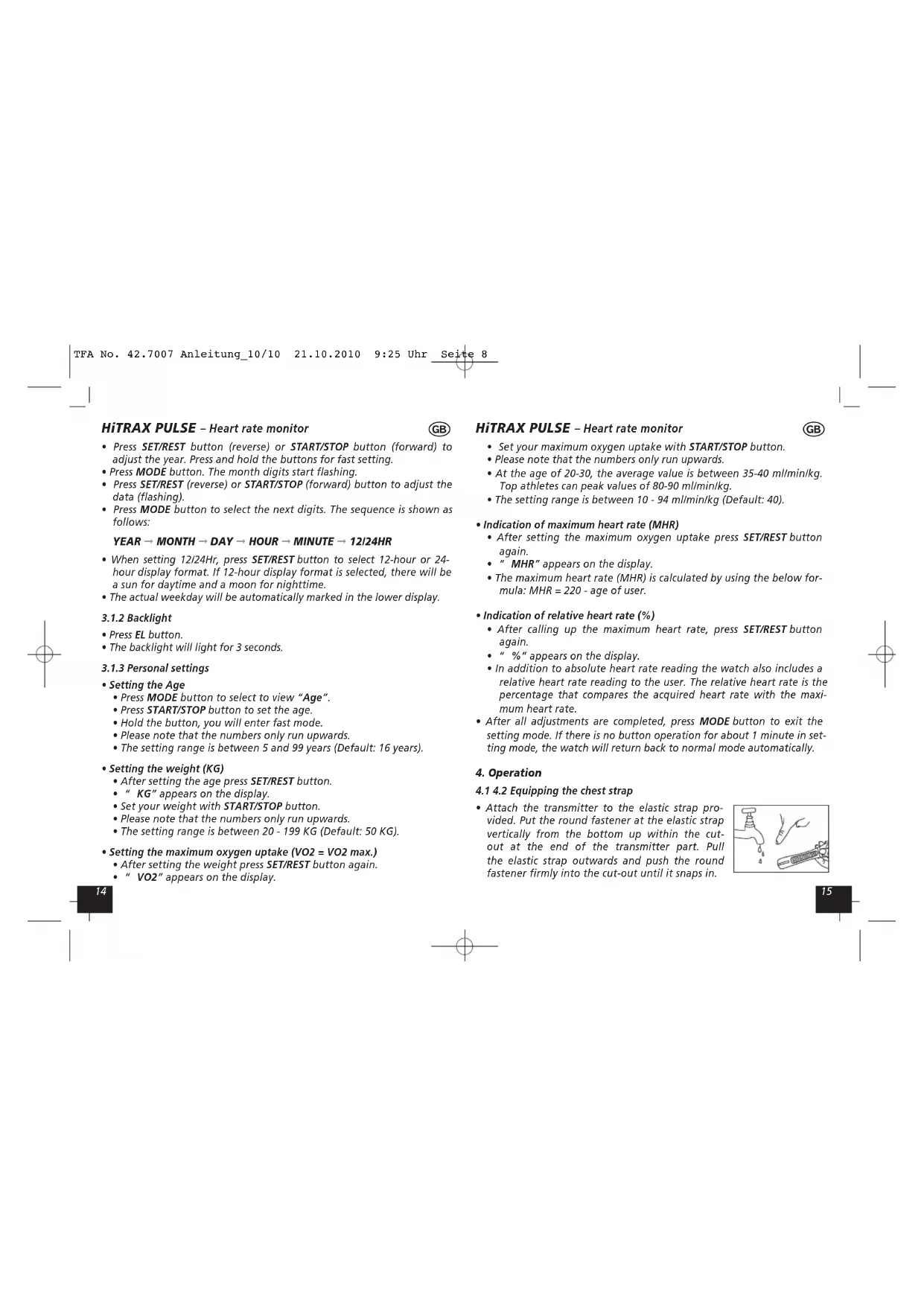
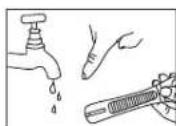
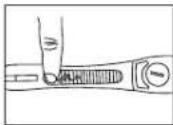
- Attach the transmitter to the elastic strap provided. Put the round fastener at the elastic strap vertically from the bottom up within the cut-out at the end of the transmitter part. Pull the elastic strap outwards and push the round fastener firmly into the cut-out until it snaps in.
HiTRAX PULSE - Heart rate monitor
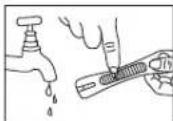
- On the inside of the chest strap you will find grooved surfaces. These are the sensors that detect your heart beat later. Wet the grooved electrode areas (grooved surfaces) of the transmitter with water.
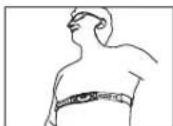
- Secure the transmitter on your chest below the chest muscle. The sensor should be placed directly on your skin above your heart.
- To close thehest strap, put the pin into the opening provided. Move the chest strap until there is an optimal contact. It can last some time to get a stable contact.

4.2 Queries of the data
- Press MODE button to enter the respective display area. The sequence is shown as follows:
DATE/TIME DATE/TIME/HEART RATE DATE/TIME/MAX. HEART RATE DATE/TIME/0 HEART RATE ALARM HEART RATE UPPER LIMIT
ALARM HEART RATE LOWER LIMIT STOP WATCH/HEART RATE ALARM PERSONAL DATA
HiTRAX PULSE - Heart rate monitor
4.2.1 Heart rate measurement
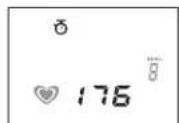
- Press MODE button to enter pulse mode. The "heart symbol" will be displayed.
- When the heart rate signal is received from the transmitter, the heart rate is shown on the display. It can last some time to get the correct value.
4.2.2 Maximum heart rate
- Press MODE button to get the maximum heart rate. "MAX" will be displayed next to the heart symbol. This value is the highest measured heart rate and is stored until it is exceeded.
4.2.3 Average heart rate
- Press MODE button to get the average heart rate.
AVG" will be displayed next to the heart symbol.
The average heart rate is calculated from all measured heart rate values.
Note: The measuring range for the heart rate ranges from 35-250!
4.2.4 Programmable training zone
- You can set a heart rate zone to avoid exceeding or falling below a target heart rate. When measured during the training, you get a beep as an indication that you are outside the set heart rate zone and can enhance your workout or slow down accordingly. This helps to achieve defined training goals.
Desirable heart rate range
- The desirable heart rate range is the realm that is defined by the upper and lower limits.
- Get the limits by consulting a doctor or trainer.
- Let yourself be guided by the maximum heart rate (MHR), calculated from your personal settings.
HiTRAX PULSE - Heart rate monitor

TRAINING TIPS:
There are 3 training zones:
- The Health Zone (50 to 70% of maximum heart rate) This zone is for beginners and people who haven't been practicing for a long time. When exercising in the Health Zone the intensity should be low and relaxed.
- The Fitness Zone (70 to 80% of maximum heart rate)
Workout in this zone improves your fitness, when you already have been exercising for a while and feel fit. If you have regular Zone Two intensity exercise, the heart is made stronger as well as it helps to convert food into energy. - The High Performance Zone (80 to 100% of maximum heart rate) Exercising in this zone is to get your maximum fitness. It is generally only to be recommended for those who can exercise in the Fitness Zone for 30-45 minutes without problems. The intensity should be increased step by step.
Setting of upper heart rate
- Press MODE button to enter the upper limit.
- You can confirm the default value with MODE button.
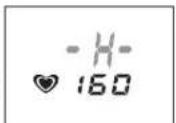
To access the setting mode, press and hold SET/REST button. The value is flashing. Press START/STOP or SET/REST button to adjust the desired value. Hold the buttons, you will enter fast mode. - Confirm with MODE button.
To activate (H flashes)/turn off the alarm function, press SET/REST button.
HiTRAX PULSE - Heart rate monitor
Setting of lower heart rate
- Press MODE button to enter the lower limit. Set the lower limit in the same way.
- Confirm with MODE button.
To activate (L flashes)/turn off the alarm function, press SET/REST button.
4.2.5 Stopwatch and indication of calories
Stopwatch
- Press MODE button to enter stop watch mode.
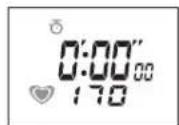
- Minutes, seconds and 1/100-seconds as well as the indication of pulse with heart symbol are shown on the display.
- Press START/STOP button to start the stop watch.
- Press START/STOP button again to stop the stop watch. The display stops, but time is running in the background. This feature allows you to record lap times.
- PRESS SET/REST button to stop the stop watch completely.
- Press START/STOP button to start the stop watch again.
- Press and hold SET/REST button to reset the stop watch to 0:00.00.
Note: Resoluton: 1/100 Sec., measuring range: 23 hr 59 m 59 s
Calorie consumption
- Press START/STOP or SET/REST button to stop the stop watch.
- Press SET/REST button to show the calorie consumption.
- Press START/STOP button to return to the time display. The clock will still continue to run (if you stopped it with START/STOP button) in the background. This function makes it possible to call up the calorie consumption per round.
Note:
Resolution: 1 Kcal, measuring range: 19999.99 Kcal
- Press MODE button to enter Alarm mode.
- Press and hold SET/REST for 3 seconds to enter setting mode. The hour digits start flashing.
- Press SET/REST (reverse) or START/STOP (forward) to adjust the flashing digits. Press and hold the buttons for fast setting.
- Press MODE button. The minute digits start flashing.
- Press SET/REST (reverse) or START/STOP (forward) to adjust the minutes.
- Confirm it with MODE button.
- Press SET/REST button to toggle the alarm function on or off. If the alarm function is "on", the alarm icon will be shown.
After all adjustments are completed, press MODE button to exit the setting mode. - Press any button to stop the alarm sound.
5. Battery replacement
- Batteries: Watch 1 x CR 2032, transmitter 1 x CR 2032
- Please contact a specialized dealer for battery change of the watch.
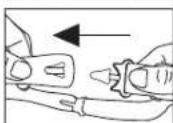
- The battery of the chest strap you can change by yourself. Open the battery compartment with a coin in the direction indicated by the arrow.
- Insert the battery, "+"-pole upwards. Close the battery door.
- Observe correct polarity. Low batteries should be changed soon to avoid the damage resulting from a leaking battery. Batteries contain harmful acids. Wear protective glasses and gloves when handling with leaked batteries.
Caution:
Please do not dispose of old electronic devices and empty batteries in household waste. To protect the environment, take them to your retail store or to appropriate collection sites according to national or local regulations.
HiTRAX PULSE - Heart rate monitor

6. Maintenance
- Keep it in a dry place.
- Do not expose the instrument to extreme temperatures, vibration or shock.
- Clean it with a soft damp cloth. Do not use solvents or scouring agents.
- If the unit does not work properly, change the batteries.
7. Liability disclaimer
The product is not a toy. Keep it out of reach of children.
The product is not to be used for medical purpose or for public information, but is determined for home use only.
The specifications of this product may change without prior notice.
- No part of this manual may be reproduced without written consent of TFA Dostmann.
- Please do not try to repair the unit. Contact the original point of purchase. Please change the battery before complaining. No guarantee if the instrument is handled or opened improperly.
HiTRAX PULSE - Cardioférequencemetre
1. Introduction
Felicitation!
(MHR = maximum heart rate record)



- ALARM PULSOBERGRENZE → ALARM PULSUNTERGRENZE
- STOPPUHR/PULSANZEIGE → WECKALARM
- Functions
- Getting started
- Basic setting
- HiTRAX PULSE - Heart rate monitor
- YEAR → MONTH → DAY → HOUR → MINUTE → 12/24HR
- Backlight
- Personal settings
- GB
- Operation
- 4.2 Equipping the chest strap
- Queries of the data
- Heart rate measurement
- Maximum heart rate
- Average heart rate
- Programmable training zone
- Desirable heart rate range
- TRAINING TIPS:
- Setting of upper heart rate
- Setting of lower heart rate
- Stopwatch and indication of calories
- Stopwatch
- Calorie consumption
- Note:
- Battery replacement
- Caution:
- Maintenance
- Liability disclaimer
- HiTRAX PULSE - Cardioférequencemetre
- Introduction
Brand : TFA
Model : HiTrax Pulse 42.7007
Category : Sports Watch