
HiTrax Tip - Sports Watch TFA - Free user manual and instructions
Find the device manual for free HiTrax Tip TFA in PDF.


| Product type | Sports heart rate monitor (sports watch) |
| Brand | TFA |
| Model | HiTrax Tip |
| Power supply | 1 CR2025 3V battery |
| Display | Digital with EL backlight |
| Heart rate measurement range | 43 to 200 beats per minute |
| Heart rate accuracy | ECG accuracy |
| Main functions | Time, date, daily alarm, stopwatch (1/100s, 99h59min59.99s), timer (99h59min59s), pulse measurement, pulse alarm (upper/lower limits), hourly chime |
| Time format | 12h or 24h |
| Automatic calendar | From 2000 to 2099 |
| Care | Clean with a soft, damp cloth. Do not use solvents or abrasive agents. |
| Safety | Private use only, not medical. Consult a doctor before setting a training zone. Do not open or repair yourself. |
| Repairability | Battery replaceable by a professional. In case of problem, return to the point of sale. |
| Pulse measurement | Direct contact of the rear sensor with the skin. Place your middle finger on the upper sensor and index finger on the lower sensor for about 5 seconds. |
| Heart rate alarm | Double beep when exceeding the upper or lower limits. |
Frequently Asked Questions - HiTrax Tip TFA
User questions about HiTrax Tip TFA
0 question about this device. Answer the ones you know or ask your own.
Ask a new question about this device
Download the instructions for your Sports Watch in PDF format for free! Find your manual HiTrax Tip - TFA and take your electronic device back in hand. On this page are published all the documents necessary for the use of your device. HiTrax Tip by TFA.
USER MANUAL HiTrax Tip TFA
Thank you for your purchase. This watch includes 5 functional modes: Current Time, Heart Rate Alert, Daily Alarm, Chronograph and Timer Mode.
With this watch, you also get ECG accurate heart rate readings without the use of a chest strap! How?
Simply put the watch on you wrist, place two fingers on the sensors located on the face of the watch, and watch your heart rate display in the digital window within seconds!
WARNING!
• DO NOT use this Watch for commercial or professional
• Make sure that you fully understand the functions and limitations of this watch before using it.
- This Watch is a supplementary device for measuring heart rate; it is NOT a substitute for medical devices. You should periodically compare the heart rate reading acquired with this watch with the reading from a doctor.
- Consult a doctor or trainer before setting your Upper and Lower heart rate limits.
2.0 Care and Maintenance
- Press any key to switch on the watch
- Read this manual thoroughly before using the watch.
- Do not expose the instrument to extreme temperatures, vibration or
- Clean it with a soft damp cloth. Do not use solvents or scouring agents.
- Please contact a specialized dealer for battery change of the watch (CR2025 3V Lithium battery).
- Please do not dispose of old electronic devices and empty batteries in household waste. To protect the environment, take them to your retail store or to appropriate collection sites according to national or local regulations.
- Please do not try to repair the unit. Contact the original point of purchase. Please let change the battery before complaining. No guarantee if the instrument is handled or opened improperly.

3.0 Designation of the watch
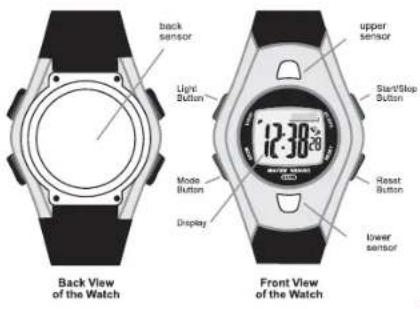
4.0 Button Operation Summary
[mode] Button
- Press the button to select one of the 5 functional modes in functional modes: Press and hold the button to select setting display. In any setting display, Press the button to choose between different settings. Press and hold the button to exit setting sequence.
[start/stop] Button
In Current Time Mode: press the button to select between the Date Display and Time Display. In Daily Alarm Mode: Press the button to select between ON and OFF for daily alarm. In Chronograph Mode and Timer Mode: Press the button to start/stop the counting. In setting displays: press the button to scroll through the settings.
[reset] Button
- In Daily Alarm Mode: Press the button to select between ON and OFF for hourly chime. In Chronograph Mode (stop-counting): Press the button to reset to zero display. In Timer Mode (stop-counting): Press the button to reset the timer to target time. In setting displays: press the button to scroll through settings.
[light] Button
- In any functional mode/display, press the button once to turn ON the EL back light for about 3 seconds.
![TFA HiTrax Tip - [light] Button - 1](/content/2026/06/1240093/images/01b06ba3182ffcf35e2e60917407606f85dbfd9260a59974978a19ec4ba72e55.jpg)
flowchart
graph TD
    A["Current Time Mode"] --> B["Timer Mode"]
    B --> C["Chronograph Mode"]
    C --> D["Daily Alarm Mode"]
    D --> E["Heart Rate Alert ON"]
    E --> F["Heart Rate Alert OFF"]
    F --> G["Start/Stop"]
    G --> H["Clock Signal"]
    style A fill:#f9f,stroke:#333
    style B fill:#ccf,stroke:#333
    style C fill:#cfc,stroke:#333
    style D fill:#fcc,stroke:#333
    style E fill:#cff,stroke:#333
    style F fill:#ffc,stroke:#333
    style G fill:#fcf,stroke:#333
    style H fill:#cff,stroke:#333
6.0 Current Time mode

Time Display and Date Display
Press the [start/stop] button once to select between the Time Display and Date Display.
The Date Display will change to Time Display automatically if NO keystroke has been activated for about 8 seconds.
6.1 Setting the Current Time Mode
![TFA HiTrax Tip - [light] Button - 3](/content/2026/06/1240093/images/d9ab81af1909e318f87fcd547d25d12009d6e4493857015176138987aa4949e9.jpg)
flowchart
graph TD
    A["12:30:28"] --> B["hold [mode"]]
    B --> C["1. second"]
    C --> D["reset Second to zero"]
    C --> E["2. minute"]
    E --> F["3. hour"]
    C --> G["5. month"]
    G --> H["4. year"]
    C --> I["6. day"]
    I --> J["7. month-day"]
    J --> K["'m'(month-day) changes to 'd' (day-month). 'd' (day-month) changes to 'm'' (month-day)."]
    J --> L["8. 12Hr/24Hr"]
    L --> M["'9. beep ON/OFF"]
    M --> N["'on'(ON) changes to 'of'(OFF).'"]
    M --> O["'on'(OFF) changes to 'on'(ON)."]
    C --> P["2. minute"]
    P --> Q["3. hour"]
    C --> R["5. month"]
    R --> S["4. year"]
    C --> T["6. day"]
    T --> U["7. month-day"]
    U --> V["'m'(month-day) changes to 'd' (day-month). 'd' (day-month) changes to 'm'' (month-day)."]
    U --> W["'on'(ON) changes to 'of'(OFF).'"]
    C --> X["'on'(ON) changes to 'on'(ON)."]
    style A fill:#f9f,stroke:#333
    style B fill:#ccf,stroke:#333
    style C fill:#cfc,stroke:#333
    style D fill:#fcc,stroke:#333
    style E fill:#fcc,stroke:#333
    style F fill:#fcc,stroke:#333
    style G fill:#fcc,stroke:#333
    style H fill:#fcc,stroke:#333
    style I fill:#fcc,stroke:#333
    style J fill:#fcc,stroke:#333
    style K fill:#fcc,stroke:#333
    style L fill:#fcc,stroke:#333
    style M fill:#fcc,stroke:#333
    style N fill:#fcc,stroke:#333
    style O fill:#fcc,stroke:#333
    style P fill:#fcc,stroke:#333
    style Q fill:#fcc,stroke:#333
    style R fill:#fcc,stroke:#333
    style S fill:#fcc,stroke:#333
    style T fill:#fcc,stroke:#333
    style U fill:#fcc,stroke:#333
    style V fill:#fcc,stroke:#333
6.1 Setting the Current Time Mode
To Set the Current Time Mode
- To set the current time and date, and their display formats, press and hold the [mode] button for about 2 seconds to select the setting display (the second digits will start flashing).
The Setting Sequence - When the seconds digits start to flash, press the [mode] button to move the flashing following the setting sequence of the adjacent diagram or press the [start/stop] or [reset] button to reset the second digits to zero.
- If one of the settings (minute, hour, year, month, date) is flashing, press the [start/slop] or [reset] button to scroll through the setting (hold the button down to scroll the setting at a faster pace).
- When the 'month-date' or 'date-month' digits is flashing, press the [start/slop] or [reset] button to switch between month-date ('m' icon appear) and date-month (of icon appear).
- When the '12' or '24' icon is flashing, press the [start/stop] or [reset] button to switch between '12' (12 hour format) and '24' (24 hour format).
- When the beep 'on' or 'oF' icon is flashing, press the [start/stop] or [reset] button to switch between 'on' (key tone ON) and 'oF' (key tone OFF).
- When the designated setting appears, press and hold the [mode] button for about 2 seconds to exit the setting sequence. The setting display will change to Current Time Mode automatically if NO keystroke has been activated for about 1 minute.
7.0 About Heart Rate Measurement
natural_image
Diagram of a wristwatch with a circular dial and labeled measurement point 'be' (no text or symbols beyond label)Back View of the Watch

Front View of the Watch
7.0 About Heart Rate Measurement
- In exercise or sports, your heart naturally speeds up in pumping blood to the body in accordance with your increased energy level. This watch can calculate that increase expressed as the number of beats per minutes (bpm) to determine a safe target heart rate for each individual.
PRECAUTIONS/TIPS
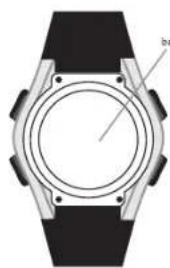
- A heart rate sensor is located on the back of the watch. The back sensor must make firm contact with the user's skin during measurement.
- DO NOT take heart rate measurement when diving or under water.
- Clean the back cover occasionally by applying a few drops of water; wipe it dry with a paper towel, removing any residual grease.
- DO NOT use hand cream; it will insulate the signal between the skin and the sensors.
- Clean skin and fingers with soap and water for better signal transmission.
- DO NOT use the fingertips where the skin is dry and thick. For those with extremely dry skin, moisten fingers and wrist with tap water or apply a conductive gel.
- Hold the watch firmly when taking measurement in motion,
- During the measurement, avoid any awkward motion. Awkward motion creates undesired muscle noise; hence an erogenous heart beat reading may result.
7.1 Getting a Heart Rate Reading

8.0 Heart Rate Alert Function
About the Heart Rate Alert Function
- By presetting a target heart rate range, you can activate the heart rate alert function. This function helps prevent the user from going over or under a target heart rate.
- In course of doing exercise or sports: When the user takes a heart rate measurement that is out of the preset desirable range, this watch will beep twice. Hence, the user could render the appropriate actions such as slowdown or speed up the exercise.
- For example, some training sessions may require the trainee maintaining his/her heartbeat at a predefined range (the desirable range) to achieve training objective. This watch can remind the trainee whether his/her heartbeat is out of the objective range all the time.
Upper & Lower Limits and Desirable Heart Rate Range
- The desirable heart rate range is the realm that defined by the upper and lower limits.
1) Get the limits by consulting a doctor or trainer.
2) Calculate the limits by using the user's age and gender. - Check the coming '8.2 Setting the Heart Rate Alert Mode' Section for more detail on setting the Limits.
8.1 Heart Rate Alert Mode

flowchart
graph TD
    A["Heart Rate Alarm Turn ON"] --> B["Heart Rate Alarm Mode (Upper Limit Display)"]
    B --> C["2 seconds*2"]
    C --> D["Heart Rate Alarm Mode (Lower Limit Display)"]
    D --> E["2 seconds"]
    E --> F["Heart Rate Alarm Mode (Age & Gender Display)"]
    F --> G["2 seconds*1"]
    G --> H["Heart Rate Alarm Off"]
    H --> I["Heart Rate Alarm Mode (Alert Off Display)"]
    I --> J["2 start/stop"]
    J --> K["Heart Rate Alarm Turn ON"]
    K --> L["Heart Rate Alarm Mode (Upper Limit Display)"]
    L --> M["2 seconds"]
    M --> N["Heart Rate Alarm Mode (Lower Limit Display)"]
    N --> O["2 seconds"]
    O --> P["Heart Rate Alarm Mode (Age & Gender Display)"]
    P --> Q["2 seconds"]
    Q --> R["Heart Rate Alarm Off"]
Heart Rate Alert Function Mode
Note *1: If the Upper or Lower Limits are Calculated by Age and Gender.
Note **2: If the Upper or Lower Limits are NOT Calculated by Age and Gender
8.1 Heart Rate Alert Mode
When Heart Rate Alert Function Is ON
- The following displays will be appeared on the display every 2 seconds:
1) Upper Limit Display - the preset upper limit that set for the heart rate alert function
2) Lower Limit Display - the preset lower limit that set for the heart rate
3) Age and Gender Display (see note 1) - the age and gender that set for the upper and lower limit calculation.
When Heart Rate Alert Function is OFF
• The '---' and 'oF' will be appeared on the display.
Select ON or OFF in Heart Rate Alert Function
- To select ON or OFF in Heat Rate Alert Function, press the [start/stop] button once.
Heart Rate Alert Indications
1) When your heart rate results fall within the set range: The watch will beep once, and the digits will remain still.
2) If your heart rate is higher than the set range: The watch will beep twice, and the 'H' indicator and acquired heart rate reading will start flashing.
3) If your heart rate is lower than the set range: The watch will beep twice, and the 'L' indicator and acquired heart rate reading will start flashing.
8.2 Setting the Heart Rate Alert Mode
flowchart
graph TD
    A["User's Age"] -->|hold["mode"]| B["Age Setting Display"]
    C["User's Gender"] -->|hold["mode"]| D["Gender Setting Display"]
    E["Lower Limit Setting Display"] -->|lower limit (bpm)| F["Lower Limit Setting Display"]
    G["Upper Limit Setting Display"] -->|upper limit (bpm)| H["Upper Limit Setting Display"]
    I["Human Activity"] -->|hold["mode"]| J["Human Activity"]
    K["Heart Rate Alarm Setting Sequence"] --> L["Heart Rate Alarm Setting Sequence"]
8.2 Setting the Heart Rate Alert Mode
To Set the Heart Rate Alert Mode
• To presel your target heart rate:
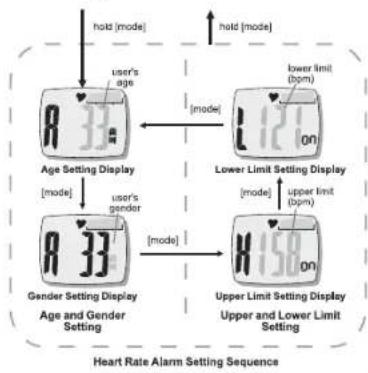
1) Input your target heart rate range (lower and upper limits), or 2) In put your age and gender (lower and upper upper limits will be automatically calculated).
- To set the heart rate alert mode, press and hold the [mode] button for about 2 seconds to select the setting display (the 'age' digits will start flashing).
The Setting Sequence
- When the 'age' digits start to flash, press the [mode] button to move the flash following the sequence of the adjacent diagram, or press the [start/stop] or [reset] button to scroll through the setting (hold the button down to scroll at a faster pace). If the 'gender' is flashing, press the [start/stop] or [reset] button to scroll the setting between M' (male) and F' (female).
- If one of the settings (upper limit and lower limits) is flashing, press the [start/stop] or [reset] button to scroll through the setting (hold the button down to scroll at a faster pace).
- When the designated setting appears, press and hold the [mode] button for about 2 seconds to exit the setting sequence. The setting display will change to Current Time Mode automatically if NO keystroke has been activated for about 1 minute.
8.3 What is Relative Heart Rate
• Maximum Heart Rate (MHR) is calculated by using the below formula.
• MHR Female = 226 - user age.
• MHR Male = 220 - user age
Relative Heart Rate (RHR) is calculated by using the below formula
• RHR= acquired heart rate ÷ MHR X100%
8.3 What is Relative Heart Rate
Relative Heart Rate
- In addition to absolute heart rate reading, the Watch also includes a relative heart rate reading to user. The relative heart rate is the percentage that compare the acquired heart rate with the maximum heart rate.
- Once the user has set his/her heart rate objective range by using his/her age and gender, the Watch will use that data to calculate his/her maximum (MHR) heart rate by using the below formula.
• MHR Female = 226 - user age.
• MHR Male = 220 - user age.
NOTE: If you set the objective range by entering the limit directly, the watch will recall the last set age-gender data for maximum heart rate calculation.
- The Watch will further show relative heart rate (RHR) by using the below formula when he/she gets a heart rate measurement.
• RHR= acquired heart rate ÷ MHR X100%
Relative Heart Rate Bar Graph
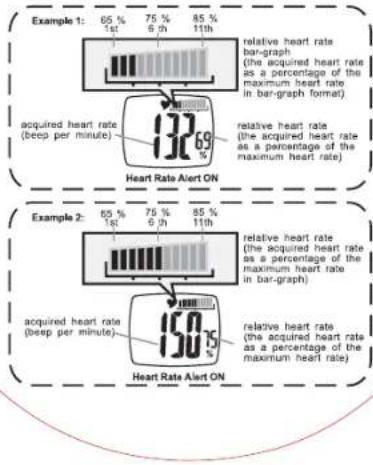
- The relative heart rate is also expressed by a bar graph which showing on the right top hand corner of the display.
- The bar graph display range is from 65%(1st. bar) to 85% (11th. bar). If the acquired relative heart rate falls below or above the display range, the bar graph and the heart rate reading will flash on the display.
8.4 Examples on Relative Heart Rate
bar
| Example | Time Point | Heart Rate Alert ON (%) | |---|---|---| | Example 1 | 1st | 65 | | Example 1 | 6th | 75 | | Example 1 | 11th | 85 | | Acquired heart rate (beep per minute) | 132 | 69 | | Heart Rate Bar-graph (the acquired heart rate as a percentage of the maximum heart rate in bar-graph format) | 132 | 69 | | Heart Rate Alert ON | 150 | 50 | | Example 2 | 1st | 65 | | Example 2 | 6th | 75 | | Example 2 | 11th | 85 | | Heart Rate Bar-graph (the acquired heart rate as a percentage of the maximum heart rate in bar-graph) | 11th | 69 | | Heart Rate Alert ON | 11th | 50 |8.4 Examples on Relative Heart Rate
- The below is two examples which illustrate the operations on Relative Heart Rate.
- Example 1: A male exerciser at his 30th. has set the heart rate objective range by using age and gender, then he takes a heart rate measurement during the exercise, and the acquired heart rate is 132 beats per minute.
• Maximum heart rate= 220-30 = 190 bpm. Then,
• The acquire heart rate = 132 bpm (by measurement)
• The relative heart rate = 132 ÷ 190 X 100% = 69%
• The bar-graph = the 3 rd. bar (69%) - Example 2: A female user at her 28th, has set the heart rate objective range by using age and gender, then she takes a heart rate measurement during the exercise, and the acquired heart rate is 150 beats per minute.
• Maximum heart rate= 226-28 = 198 bpm. Then,
• The acquire heart rate = 150 bpm (by measurement)
• The relative heart rate = 150 ÷ 198 X 100% = 75%
• The bar-graph = the 6 th. bar (75%)
flowchart
graph TD
    A["Chime OFF, Alarm OFF"] -->|start/stop| B["1:28 RL"]
    C["Chime OFF, Alarm ON"] -->|reset| D["1:28 RL"]
    E["Chime ON, Alarm ON"] -->|reset| F["1:28 RL"]
    G["Chime ON, Alarm ON"] -->|reset| H["1:28 RL"]
    I["Chime ON, Alarm ON"] -->|reset| J["1:28 RL"]
    K["Chime ON, Alarm ON"] -->|reset| L["1:28 RL"]
    M["Chime ON, Alarm ON"] -->|reset| N["1:28 RL"]
    O["Chime ON, Alarm ON"] -->|reset| P["1:28 RL"]
    Q["Chime ON, Alarm ON"] -->|reset| R["1:28 RL"]
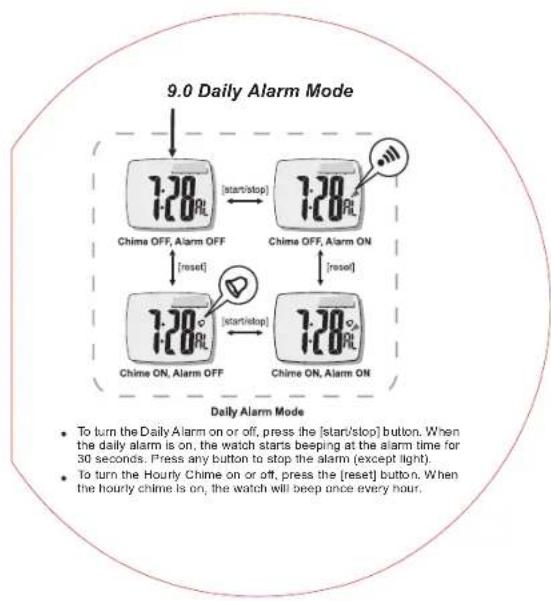
- To turn the Daily Alarm on or off, press the [start/slop] button. When the daily alarm is on, the watch starts beeping at the alarm time for 30 seconds. Press any button to stop the alarm (except light).
• To turn the Hourly Chime on or off, press the [reset] button. When the hourly chime is on, the watch will beep once every hour.
9.1 Setting the Daily Alarm Mode
Press and hold the [mode] button to select the setting display

Daily Alarm Moda


Setting the hour


Setting the minute
Daily Alarm Setting Sequence
- The 'hour' digits start to flash. Press the [start/stop] button or [reset] button to scroll through the setting.
- Confirm with [mode] button. Set the 'minute' digits in the same way.
- Press and hold the [mode] button to exit the setting sequence. The setting display will change to Currant Time Mode automatically if NO keystroke has been activated for 1 minute.

flowchart
graph TD
    A["Chronograph Mode (Zero/ Display)"] -->|flashing["start/stop"]| B["Chronograph Mode (Counting Display)"]
    B -->|stop flashing| C["Chronograph Mode (Stop Counting Display)"]
    C -->|elapsed Time (the chronograph is stop counting)| D["Chronograph Mode (Under 1 hour)"]
    D -->|counting time (minute, seconds and 1/100 second)| E["Chronograph Mode (Over 1 Hour)"]
    E -->|counting time (hour, minute and seconds)| F["End"]
10.0 To Use the Chronograph Mode
- In 'Zero' Display, press the [start/stop] button once to start the counting. When it is counting, press the [start/stop] button once again to stop the counting, and the elapsed time of which the chronograph is counting will appear.
- When the elapsed time is displaying, repeat the above mentioned key operations to get the accumulative elapsed time or press the [reset] button to reset the chronograph (ready for a new counting).
- The maximum counting range of the chronograph is 99 hours, 59 minutes and 59.99 seconds.
flowchart
graph TD
    A["Timer Mode 0:30"] -->|hold["mode"]| B["Setting the Hour 0:30"]
    C["Setting the Second 0:30"] -->|hold["mode"]| B
    D["Setting the Minute 0:30"] -->|[mode]| B
    B -->|[mode]| E["Time Mode Setting Sequence"]
11.0 Timer Mode
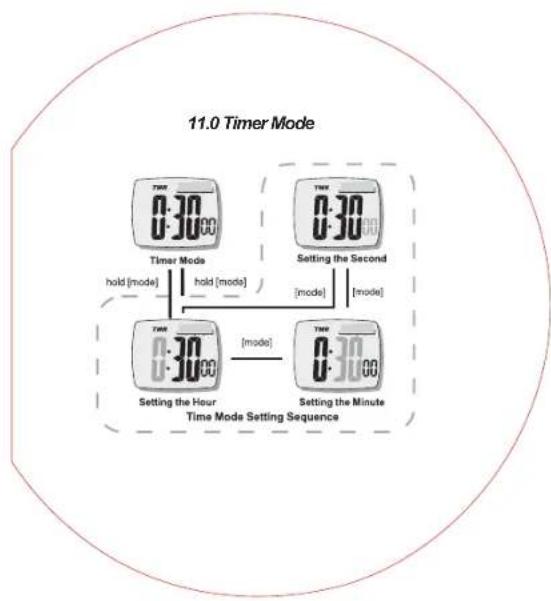
- Press and hold the [mode] button to select the setting display. The 'hour' digits start to flash. Press the [start/stop] button or [reset] button to scroll through the setting.
- Confirm with [mode] button. Set the 'minute' and 'second' digits in the same way. The maximum time is 99 hours, 59 minutes and 59 second.
- Press and hold the [mode] button to exit the setting sequence. The setting display will change to Currant Time Mode automatically if NO keystroke has been activated for 1 minute.
11.0 Using the Timer Mode
flowchart
graph TD
    A["Start"] --> B["Timer Mode (Zero Display)"]
    B --> C{set the target time to 30 minutes}
    C --> D["Timer Mode (Stop-Counting)"]
    D --> E{reset}
    E --> F["Timer Mode (Stop-Counting)"]
    F --> G{stop counting}
    G --> H["Timer Mode (Stop-Counting)"]
    H --> I{reset}
    I --> J["Timer Mode (Stop-Counting)"]
    J --> K{stop counting}
    K --> L["Timer Mode (Stop-Counting)"]
    L --> M{reset}
    M --> N["Timer Mode (Stop-Counting)"]
    N --> O{stop counting}
    O --> P["Timer Mode (Stop-Counting)"]
    P --> Q{reset}
    Q --> R["Timer Mode (Stop-Counting)"]
    R --> S{stop counting}
    S --> T["Timer Mode (Stop-Counting)"]
    T --> U{reset}
    U --> V["Timer Mode (Stop-Counting)"]
    V --> W{stop counting}
    W --> X["Timer Mode (Stop-Counting)"]
    X --> Y{reset}
    Y --> Z["Timer Mode (Stop-Counting)"]
    Z --> AA{stop counting}
    AA --> AB["Timer Mode (Stop-Counting)"]
    AB --> AC{reset}
    AC --> AD["Timer Mode (Stop-Counting)"]
    AD --> AE{stop counting}
    AE --> AF["Timer Mode (Stop-Counting)"]
    AF --> AG{reset}
    AG --> AH["Timer Mode (Stop-Counting)"]
    AH --> AI{stop counting}
    AI --> AJ["Timer Mode (Stop-Counting)"]
    AJ --> AK{reset}
    AK --> AL["Timer Mode (Stop-Counting)"]
    AL --> AM{stop counting}
    AM --> AN["Timer Mode (Stop-Counting)"]
    AN --> AO{reset}
    AO --> AP["Timer Mode (Stop-Counting)"]
    AP --> AQ{stop counting}
    AQ --> AR["Timer Mode (Stop-Counting)"]
    AR --> AS{reset}
    AS --> AT["Timer Mode (Stop-Counting)"]
    AT --> AU{stop counting}
    AU --> AV["Timer Mode (Stop-Counting)"]
    AV --> AW{reset}
    AW --> AX["Timer Mode (Stop-Counting)"]
    AX --> AY{stop counting}
    AY --> AZ["Timer Mode (Stop-Counting)"]
    AZ --> BA{reset}
    BA --> BB["Timer Mode (Stop-Counting)"]
    BB --> BC{stop counting}
    BC --> BD["Timer Mode (Stop-Counting)"]
    BD --> BE{reset}
    BE --> BF["Timer Mode (Stop-Counting)"]
    BF --> BG{stop counting}
    BG --> BH["Timer Mode (Stop-Counting)"]
    BH --> BI{reset}
    BI --> BJ["Timer Mode (Stop-Counting)"]
    BJ --> BK{stop counting}
    BK --> BL["Timer Mode (Stop-Counting)"]
    BL --> BM{reset}
    BM --> BN["Timer Mode (Stop-Counting)"]
    BN --> BO{stop counting}
    BO --> BP["Timer Mode (Stop-Counting)"]
    BP --> BQ{reset}
    BQ --> BR["Timer Mode (Stop-Counting)"]
    BR --> BS{stop counting}
    BS --> BT["Timer Mode (Stop-Counting)"]
    BT --> BU{reset}
    BU --> BV["Timer Mode (Stop-Counting)"]
    BV --> BW{stop counting}
    BW --> BX["Timer Mode (Stop-Counting)"]
    BX --> BY{reset}
    BY --> BZ["Timer Mode (Stop-Counting)"]
    BZ --> CA["stop counting"]
11.1 Using the Timer Mode
To Use the Timer Mode
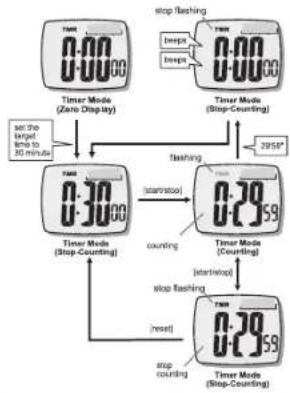
- Once a target time has been set (for example 30 minutes), press the [start/stop] button once to start the countdown. The countdown time will be displayed continuously throughout the countdown.
- To stop countdown, press the [start/stop] button once.
T. P. ALL-Ti
To Reset the Timer
- To reset the timer to the preset target time before the countdown reaches zero, press the [reset] button once (when the timer has stopped counting).
- To start the counter at a target time, set a new value for the target time. Check the previous '11.1 Setting the Timer Mode' Section for more detail on how to set the Timer Mode.
Timer Alarm Sound
- When the timer nears the last 5 seconds, the watch will beep once for each second left. When it hits zero, the watch will beep for about 10 seconds
- You can stop the boeping by pressing any button (except the [light] button).
12.0 Specifications
Current Time Mode
• Hour, minute and second
• Month, day, day of week and year
• 12 / 24 hour format selectable
• Month-day/Day-month selectable
• Auto calendar from year 2000 to 2099
• Hourly Chime on the hours
Hearth Rate Alert Mode
• Measuring range: 43 to 200 beats per minute
• 1 Heart Rate Alert (upper and lower limit)
Daily Alarm Mode
• Daily Alarm: 1 daily alarm
• Alarm Duration: about 30 seconds
Chronograph Mode
• Resolution: 1/100 second
• Counting range: 99 hours, 59 minutes, 59.99 seconds
• Measuring mode: Elapsed time and accumulative elapsed
Timer Mode
• Resolution: 1 second
- Setting limit: 99 hours, 59 minutes, 59 seconds
Others
• Electro-luminescent backlight
13.0 Potential Causes for: NO Heart Rate Reading or Long Response Time
1) Cause: Dry Skin.
Solution: Apply conductive gel or saliva thoroughly to fingers and wrist area. (Even water will help if conductive gel is not available).
2) Cause: Fingers are not placed firmly over the sensors.
Solution: Make sure fingers (not the tips) lay fist and firmly over the sensors and watch is placed securely on wrist. Do not use the very tips of your fingers (i.e. visualize tip toeing with your fingertips.)
Fingertips do not allow for enough contact, therefore, ECG will not be picked up.
3) Cause: Muscle tremors, caused by: A) Pressing down too hard on the sensors with fingertips. B) Person Is in motion and holding the watch in an awkward manner.
Solution: It is best to place your index finger on the 6:00 sensor, and middle finger on the 12:00 sensor. This will ensure good and consistent readings even while walking or jogging with arms swung naturally.
4) Cause: Dead skin on wrist.
Solution: Usually rubbing your skin with a towel will help.
5) Cause: A thin layer of body grease can insulate the ECG signal-basically prevents the back sensor on the watch from picking up one's ECG.
Solution: wipe wrist and the back of watch with a tissue or soft towel.
6) Cause: Hairy arms.
Solution: Apply conductive gel to wrist area.
7) Cause: Irregular heartbeats.
Solution: N/A it is difficult to consistently pick up a reading for those with irregular heart beats. Inconsistent response times are expected for those with arrhythmia.
natural_image
Diagram of a smartwatch with sensor placement and black strap (no text or symbols)

- WARNING!
- Care and Maintenance
- Button Operation Summary
- [mode] Button
- [start/stop] Button
- [reset] Button
- [light] Button
- Setting the Current Time Mode
- About Heart Rate Measurement
- PRECAUTIONS/TIPS
- Heart Rate Alert Function
- About the Heart Rate Alert Function
- Upper & Lower Limits and Desirable Heart Rate Range
- Heart Rate Alert Mode
- When Heart Rate Alert Function Is ON
- When Heart Rate Alert Function is OFF
- Heart Rate Alert Indications
- Setting the Heart Rate Alert Mode
- To Set the Heart Rate Alert Mode
- The Setting Sequence
- What is Relative Heart Rate
- Relative Heart Rate
- Relative Heart Rate Bar Graph
- Examples on Relative Heart Rate
- Setting the Daily Alarm Mode
- To Use the Chronograph Mode
- Timer Mode
- Using the Timer Mode
- To Use the Timer Mode
- Timer Alarm Sound
- Specifications
- Current Time Mode
- Hearth Rate Alert Mode
- Chronograph Mode
- Others
- Potential Causes for: NO Heart Rate Reading or Long Response Time
Brand : TFA
Model : HiTrax Tip
Category : Sports Watch