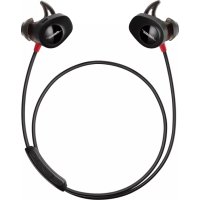
SoundSport Pulse - Wireless Earbuds BOSE - Free user manual and instructions
Find the device manual for free SoundSport Pulse BOSE in PDF.



| Product Type | Wireless in-ear headphones |
| Brand | Bose |
| Model | SoundSport Pulse |
| Wireless technology | Bluetooth 4.1 (2.4 GHz band) |
| Built-in sensor | Heart rate (left earbud) |
| Battery life | Up to 5 hours |
| Charging time | Approximately 2 hours |
| Charging connector | USB (micro-USB) |
| Ear tips | StayHear+ Pulse, 3 sizes (S, M, L) |
| Resistance | Sweat resistant (not submersible) |
| Main functions | Play/pause, skip track, volume, calls, voice assistant, heart rate tracking |
| Voice guide | 11 pre-installed languages (including French) |
| Maintenance and cleaning | Ear tips: wash with soapy water; nozzles: dry cotton swab |
| Safety | Use at moderate volume; do not expose to water or excessive heat; keep out of reach of children |
| Spare parts and repairability | Spare parts available through Bose customer service; battery replaceable only by professional |
| General information | Limited warranty; compatible with iOS and Android; Bose Connect app |
Frequently Asked Questions - SoundSport Pulse BOSE
User questions about SoundSport Pulse BOSE
0 question about this device. Answer the ones you know or ask your own.
Ask a new question about this device
Download the instructions for your Wireless Earbuds in PDF format for free! Find your manual SoundSport Pulse - BOSE and take your electronic device back in hand. On this page are published all the documents necessary for the use of your device. SoundSport Pulse by BOSE.
USER MANUAL SoundSport Pulse BOSE
natural_image
Black Boise brand earbuds with a white 'BASE' logo, shown against a plain white background (no text or symbols on the device itself)OWNER'S GUIDE • BRUGERVEJLEDNING
Please read and keep all safety and use instructions.
WARNINGS/CAUTIONS
- Do NOT use the headphones at a high volume for any extended period.
- To avoid hearing damage, use your headphones at a comfortable, moderate volume level.
- Turn the volume down on your device before placing the headphones in/on your ears, then turn the volume up gradually until you reach a comfortable listening level.
- Use caution and follow applicable laws regarding mobile phone and headphone use if using the headphones for phone calls while driving. Some jurisdictions impose specific limitations, such as single earpiece configuration, on the use of such products while driving. DON'T use the headphones for any other purpose while driving.
- Focus on your safety and that of others if you use the headphones while engaging in any activity requiring your attention, e.g., while riding a bicycle or walking in or near traffic, a construction site or railroad, etc. Remove the headphones or adjust your volume to ensure you can hear surrounding sounds, including alarms and warning signals.
- Do NOT use the headphones if they emit any loud unusual noise. If this happens, turn the headphones off and contact Bose customer service.
- Do NOT submerge or expose the headphones for extended period to water, or wear while participating in water sports, e.g., swimming, waterskiing, surfing, etc.
- Remove headphones immediately if you experience a warming sensation or loss of audio.
- Do NOT use mobile phone adapters to connect headphones to airplane seat jacks, as this could result in injury or property damage due to overheating.

Contains small parts which may be a choking hazard. Not suitable for children under age 3.

This product contains magnetic material. Consult your physician on whether this might affect your implantable medical device.
- Do NOT make unauthorized alterations to this product.
- Use this product only with an agency approved power supply which meets local regulatory requirements (e.g., UL, CSA, VDE, CCC).
- Do not expose products containing batteries to excessive heat (e.g. from storage in direct sunlight, fire or the like).
Regulatory Information
NOTE: This equipment has been tested and found to comply with the limits for a Class B digital device, pursuant to Part 15 of the FCC Rules. These limits are designed to provide reasonable protection against harmful interference in a residential installation. This equipment generates, uses, and can radiate radio frequency energy and, if not installed and used in accordance with the instructions, may cause harmful interference to radio communications. However, there is no guarantee that interference will not occur in a particular installation. If this equipment does cause harmful interference to radio or television reception, which can be determined by turning the equipment off and on, the user is encouraged to try to correct the interference by one or more of the following measures:
- Reorient or relocate the receiving antenna.
- Increase the separation between the equipment and receiver.
- Connect the equipment into an outlet on a circuit different from that to which the receiver is connected.
- Consult the dealer or an experienced radio/TV technician for help.
Changes or modifications not expressly approved by Bose Corporation could void the user's authority to operate this equipment.
This device complies with part 15 of the FCC Rules and with Industry Canada license-exempt RSS standard(s). Operation is subject to the following two conditions: (1) This device may not cause harmful interference, and (2) this device must accept any interference received, including interference that may cause undesired operation.
This device complies with FCC and Industry Canada radiation exposure limits set forth for general population. It must not be co-located or be operating in conjunction with any other antennas or transmitters.
Meets IMDA Requirements.
CAN ICES-3 (B)/NMB-3(B)
Management Regulation for Low-power Radio-frequency Devices
Article XII
According to “Management Regulation for Low-power Radio-frequency Devices” without permission granted by the NCC, any company, enterprise, or user is not allowed to change frequency, enhance transmitting power or alter original characteristic as well as performance to an approved low power radio-frequency devices.
Article XIV
The low power radio-frequency devices shall not influence aircraft security and interfere legal communications; If found, the user shall cease operating immediately until no interference is achieved. The said legal communications means radio communications operated in compliance with the Telecommunications Act.
The low power radio-frequency devices must be susceptible with the interference from legal communications or ISM radio wave radiated devices.

Bose Corporation hereby declares that this product is in compliance with the essential requirements and other relevant provisions of Directive 2014/53/EU and all other applicable EU directive requirements. The complete declaration of conformity can be found at: www.Bose.com/compliance
For Europe:
Frequency band of operation 2400 to 2483.5 MHz.
Bluetooth®: Maximum transmit power less than 20 dBm EIRP.
Bluetooth Low Energy: Maximum power spectral density less than 10 dBm/MHz EIRP.
This symbol means the product must not be discarded as household waste, and should be delivered to an appropriate collection facility for recycling. Proper disposal and recycling helps protect natural resources, human health and the environment. For more information on disposal and recycling of this product, contact your local municipality, disposal service, or the shop where you bought this product.

Please dispose of used batteries properly, following local regulations. Do not incinerate.

Removal of the rechargeable lithium ion battery in this product should be conducted only by a qualified professional. Please contact your local Bose retailer or see http://products.bose.com/static/compliance/index.html for further information.


| Names and Contents of Toxic or Hazardous Substances or Elements | ||||||
| Toxic or Hazardous Substances and Elements | ||||||
| Part Name | Lead (Pb) | Mercury (Hg) | Cadmium (Cd) | Hexavalent (CR(VI)) | Polybrominated Biphenyl (PBB) | Polybrominated diphenylether (PBDE) |
| PCBs X 0 0 0 0 0 | ||||||
| Metal Parts X 0 0 0 0 0 | ||||||
| Plastic Parts 0 0 0 0 0 0 | 0 | |||||
| Speakers X 0 0 0 0 0 | ||||||
| Cables X 0 0 0 0 0 | ||||||
| This table is prepared in accordance with the provisions of SJ/T 11364.O: Indicates that this toxic or hazardous substance contained in all of the homogeneous materials for this part is below the limit requirement of GB/T 26572. |  | |||||
| X: Indicates that this toxic or hazardous substance contained in at least one of the homogeneous materials used for this part is above the limit requirement of GB/T 26572. | ||||||
Date of Manufacture: The eighth digit in the serial number indicates the year of manufacture; "8" is 2008 or 2018.
China Importer: Bose Electronics (Shanghai) Company Limited, Part C, Plan 9, No. 353 North Riying Road, China (Shanghai) Pilot Free Trade Zone
EU Importer: Bose Products B.V., Gorslaan 60, 1441 RG Purmerend, The Netherlands
Taiwan Importer: Bose Taiwan Branch, 9F-A1, No.10, Section 3, Minsheng East Road, Taipei City 104, Taiwan Phone Number: +886-2-2514 7676
Mexico Importer: Bose de México, S. de R.L. de C.V., Paseo de las Palmas 405-204, Lomas de Chapultepec, 11000 México, D.F. Phone Number: +5255 (5202) 3545
Input Rating: 5V 1A
The Bluetooth ^® word mark and logos are registered trademarks owned by Bluetooth SIG, Inc. and any use of such marks by Bose Corporation is under license.
The N-Mark is a trademark or registered trademark of NFC Forum, Inc. in the United States and in other countries.
Apple, the Apple logo, iPad, iPhone, and iPod are trademarks of Apple Inc., registered in the U.S. and other countries.
The trademark “iPhone” is used in Japan with a license from Aiphone K.K. App Store is a service mark of Apple Inc.
Use of the Made for Apple badge means that an accessory has been designed to connect specifically to the Apple product(s) identified in the badge, and has been certified by the developer to meet Apple performance standards.
Apple is not responsible for the operation of this device or its compliance with safety and regulatory standards.
Android, Google Play and the Google Play logo are trademarks of Google LLC.
Bose Corporation Headquarters: 1-877-230-5639.
©2018 Bose Corporation. No part of this work may be reproduced, modified, distributed or otherwise used without prior written permission.
Getting Started
Unpacking.... 8
Headphone components 9
Powering on/off.... 10
Bose® Connect App
Features.... 11
Charging the Battery
Connecting the USB cable 12
Checking the battery.... 13
Headphone Status Indicators
Bluetooth indicator 14
Battery indicator.... 14
Importance of Proper Fit
Choosing the correct StayHear®+ Pulse tip.... 15
Fitting the earbuds to your ear 15
Changing the StayHear®+ Pulse tips 16
Voice Prompts
Pre-installed languages 17
Changing the language 17
Bluetooth Technology
Pairing your mobile device using the Bose® Connect app (recommended) 18
Choosing an alternate pairing method.... 19
Pairing your mobile device using the Bluetooth menu.... 20
Pairing your mobile device using NFC 21
Disconnecting a mobile device 22
Reconnecting a mobile device 22
Managing Multiple Connected Devices
Switching between two connected mobile devices 23
Identifying connected mobile devices 23
Reconnecting a previously paired mobile device.... 23
Clearing the headphone pairing list.... 23
Using the Bose® Connect app.... 23
Heart Rate Sensor
Viewing your heart rate in the Bose® Connect app.... 24
Viewing your heart rate in a fitness app.... 24
Headphone Controls
Media playback and volume functions.... 25
Call functions.... 26
Care and Maintenance
Storing 27
Cleaning.... 27
Replacement parts and accessories.... 27
Customer service 28
Limited warranty 28
Technical information.... 28
Troubleshooting 29
Unpacking
Carefully unpack the carton and confirm that the following parts are included:
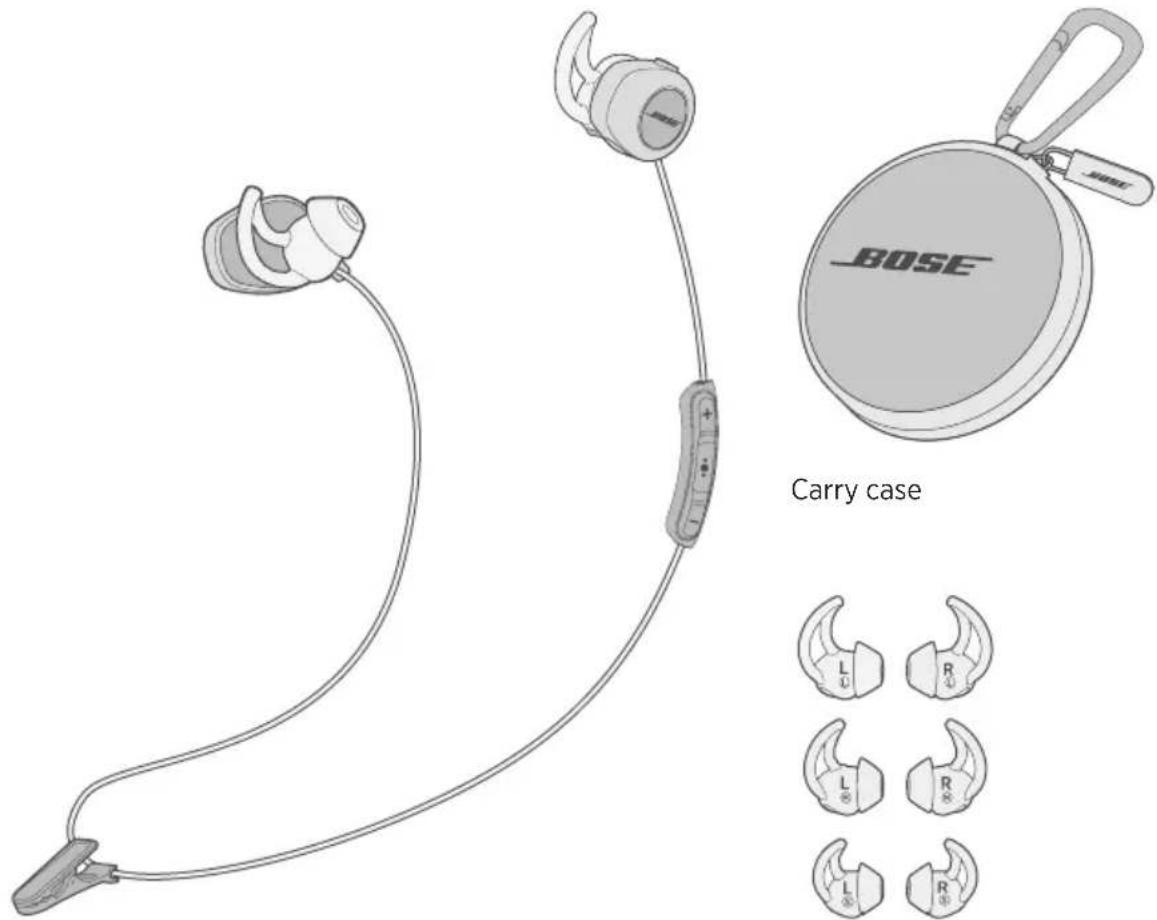
Bose® SoundSport® Pulse wireless headphones
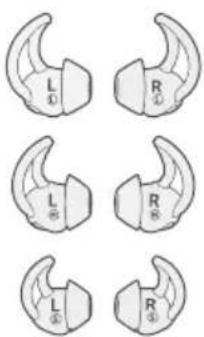
StayHear ^® + Pulse tips: Large (L) and Small (S)
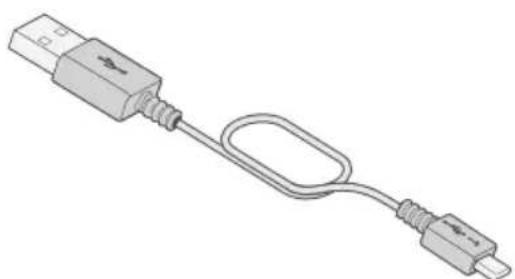
natural_image
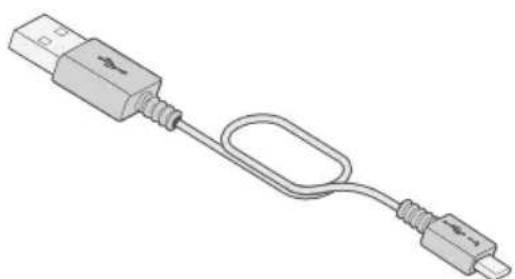
Illustration of a USB cable with connector port and connector end (no text or symbols)Note: Medium (M) tips are attached to the earbuds.
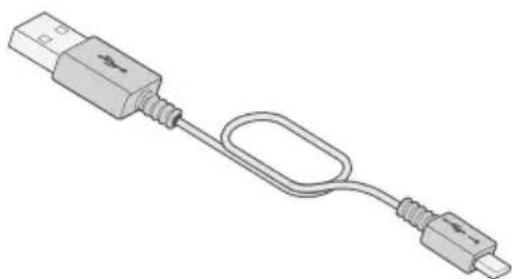
USB cable
If any part of the product is damaged, do not use it. Contact your authorized Bose dealer immediately or Bose customer service.
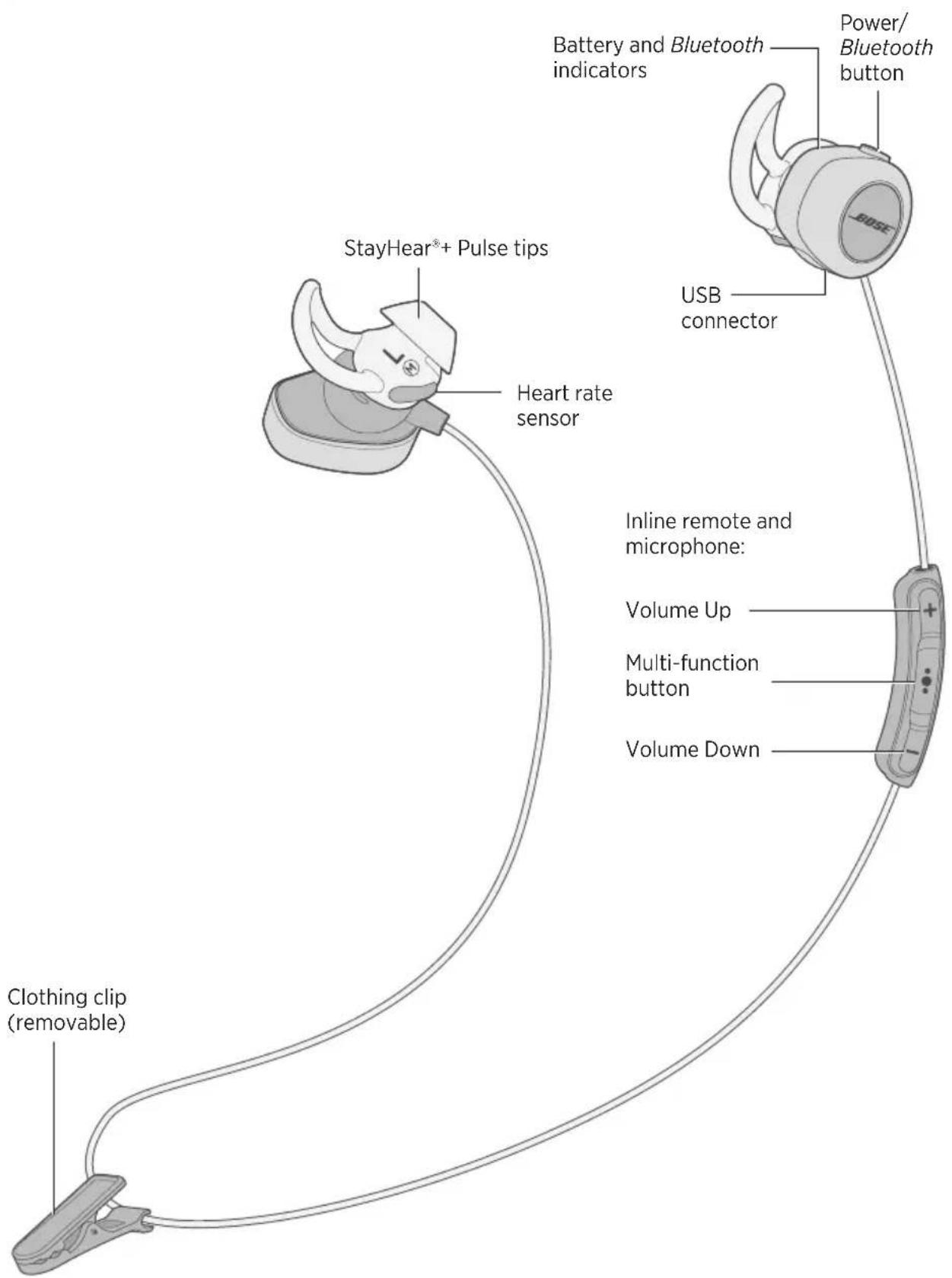
Headphone components
Powering on/off
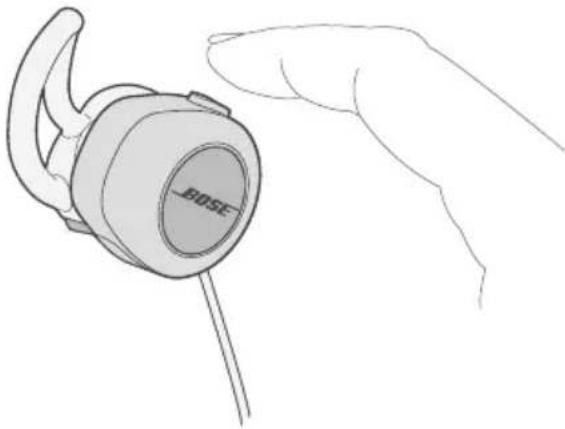
To power on:
Press the Power/Bluetooth button until the battery indicator glows green, yellow, or red (to indicate the current battery charge level).
To power off:
Press and hold the Power/Bluetooth button until the battery indicator blinks three times and you hear the power-down tones.
natural_image
Line drawing of a hand holding a Bose brand earbell (no text or symbols on the device itself)Enhance your experience with the Bose® Connect app.
Features
- Unlock the full potential of your SoundSport® Pulse wireless headphones.
- Free app compatible with most Apple and Android™ systems.
- Easily pair your mobile device with your headphones (see page 18).
• View your real-time heart rate (see page 24). - Easily connect and switch between multiple mobile devices.
- Disable voice prompts.
- Keep your headphones up-to-date with the latest software.
- Customize headphone settings, like voice prompt language and standby timer.

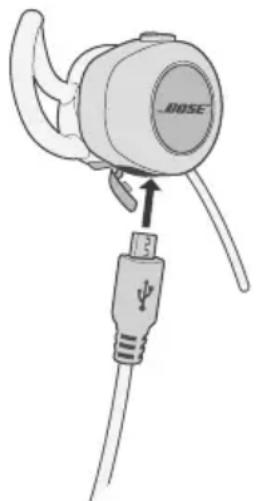
Connecting the USB cable
CAUTION: Use this product only with an agency approved power supply which meets local regulatory requirements (e.g., UL, CSA, VDE, CCC).
- Open the hinged door on the bottom of the right earbud.
- Plug the small end of the USB cable into the USB connector.
natural_image
Illustration of a BOSE ear adapter with a USB cable connector (no text or symbols)-
Plug the other end into a USB wall charger or computer that is powered on.
-
While charging, the battery indicator blinks amber.
- When the battery is fully charged, the battery indicator glows green.
- Allow up to two hours to fully charge the battery. A full charge powers the headphones for up to five hours.
- The headphones will not play while charging.
Note: Before charging, be sure the headphones are at room temperature, between 41^ F ( 5^ C) and 104^ F ( 40^ C).
Checking the battery
- Each time you power on the headphones, the voice prompt announces the headphone battery charge level, and the battery indicator glows for 10 seconds. When you press any of the headphone controls, the battery indicator glows for 10 seconds. For more information, see “Battery indicator” on page 14.
- While the headphones are in use, the battery indicator blinks red when the battery needs charging.
- If you are connected to an Apple device, the device displays the headphone battery charge level near the upper right corner of the screen.
The Bluetooth and battery indicators are located on the back of the right earbud.
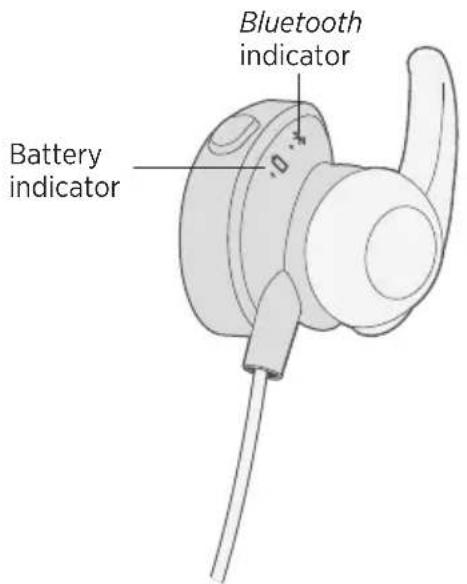
Bluetooth indicator
| Indicator activity System state | |
| Blinking blue Ready to pair | |
| Blinking white Connecting | |
| Solid white Connected | |
Battery indicator
| Indicator activity System state | |
| Green Medium to full charge | |
| Amber Low charge | |
| Blinking amber Charging | |
| Blinking red Need to charge | |
| Solid red Charging error - contact Bose® customer service | |
Choosing the correct StayHear®+ Pulse tip
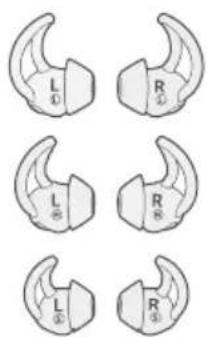
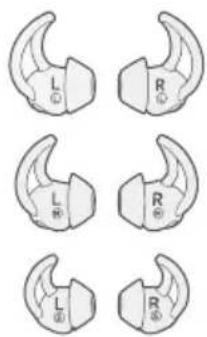
For optimal audio performance, it is important to choose the correct size StayHear®+ Pulse tip. Select the size that gives you the best comfort and fit in each ear. To determine the best fit, you may need to try all three sizes. You may need a different size for each ear.
Note: To test the fit, try speaking aloud. Your voice should sound muffled in both ears; if not, select another tip size.
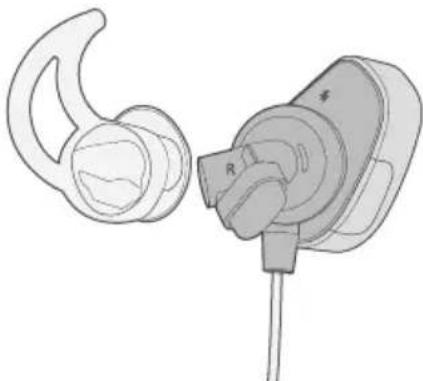
Each StayHear®+ Pulse tip and earbud is marked with either an L or an R. Be sure to attach the left tip to the left earbud and the right tip to the right earbud.
natural_image
Line drawing of a pair of earbuds with a connector, no text or symbols presentFitting the earbuds to your ear
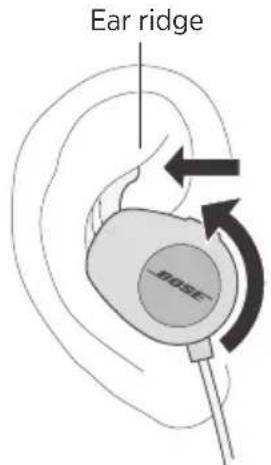
The StayHear®+ Pulse tip allows the earbud to rest comfortably and securely in your ear. The tip wing fits just under your ear ridge.
-
Insert the earbud so the StayHear®+ Pulse tip gently rests in the opening of the ear canal.
-
Tilt the earbud back and tuck the tip wing under the ear ridge until it is secure.
Changing the StayHear®+ Pulse tips
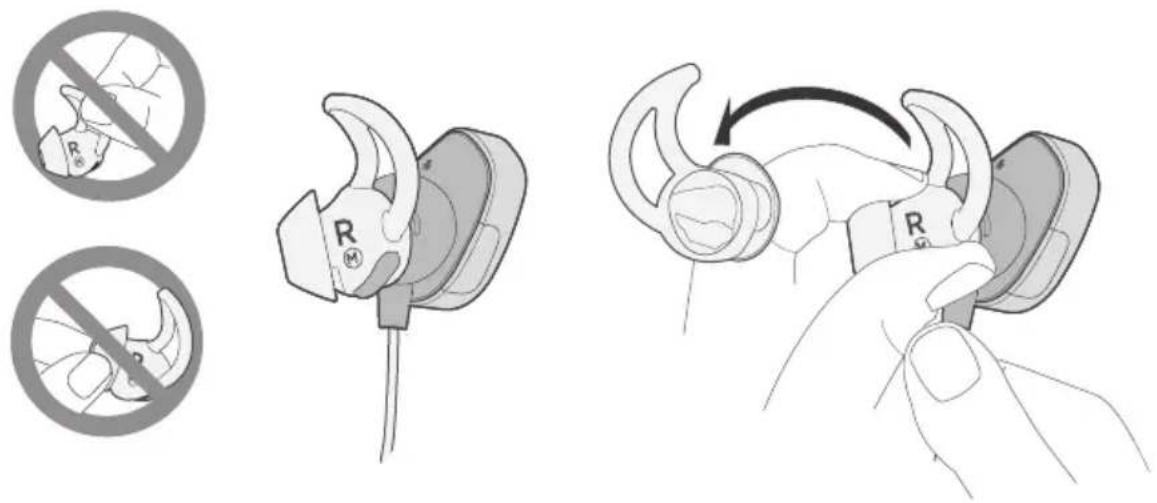
- Holding the earbud by the stem, gently grasp the attached StayHear®+ Pulse tip and peel it away from the earbud.
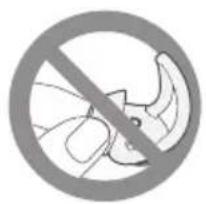
CAUTION: To prevent tearing, grasp the StayHear®+ Pulse tip by its base. Do not pull on the tip wing.
- Align the opening of the new StayHear®+ Pulse tip with the earbud nozzle and rotate the tip onto the nozzle.
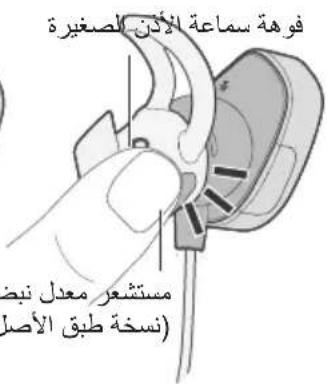
Note: Make sure the heart rate sensor (left earbud) and heart rate sensor replica (right earbud) protrude through the matching cutouts on the tips.
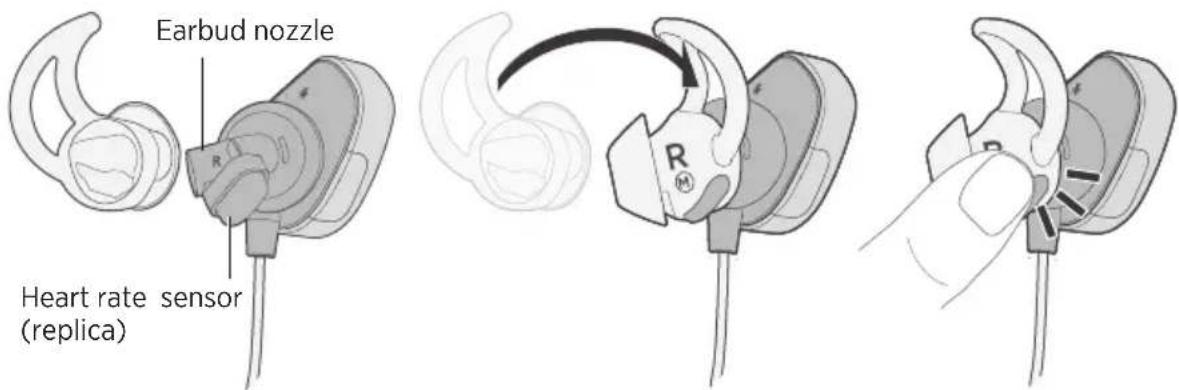
- Press the base of the tip until it clicks securely into place.
Voice prompts guide you through the pairing and connecting processes.
Pre-installed languages
The following languages are pre-installed on your headphones:
- English • German • Korean • Swedish
- Spanish • Mandarin • Italian • Dutch
- French • Japanese • Portuguese
Check for additional languages
Additional languages may be available. To check for language updates, download the Bose® Updater.
Visit: btu.Bose.com
Changing the language
When you turn on the headphones for the first time, the voice prompts are in English. To select a different language:
- Press and hold and simultaneously until you hear the voice prompt for the first language option.
- Press dr to move through the list of languages.
- When you hear your language, press and hold ••• to select.
Note: You can also change the voice prompt language using the Bose Connect app.
Bluetooth wireless technology lets you stream music from mobile devices such as smartphones, tablets and laptop computers. Before you can stream music from a mobile device, you must pair the mobile device with your headphones.
Pairing your mobile device using the Bose® Connect app (recommended)
- Power on your headphones.
natural_image
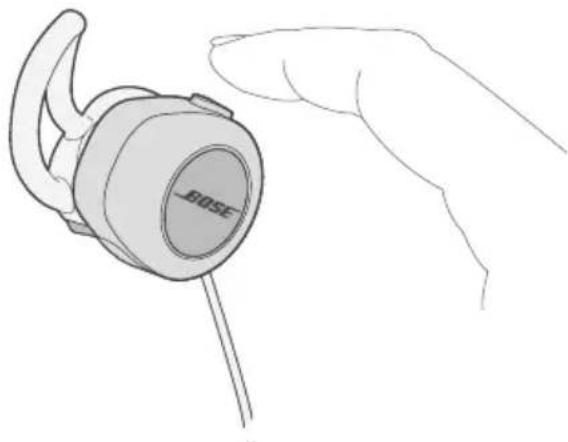
Line drawing of a hand holding a Bose-branded earbell (no text or symbols on the device itself)- Download the Bose® Connect app and follow the on-screen connection instructions.
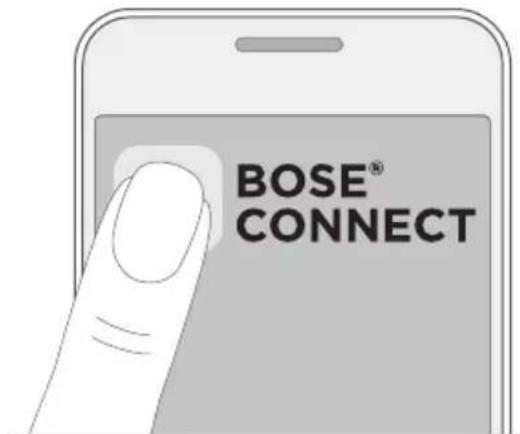
Once paired, you hear "Connected to
Choosing an alternate pairing method
If you are unable to pair your mobile device using the Bose® Connect app, you can pair using the Bluetooth settings menu or Near Field Communication (NFC).
What is NFC?
NFC uses Bluetooth technology to let two devices establish wireless communication with each other by simply tapping the devices together. Refer to your mobile device owner's guide to see if your model supports NFC.
| If your mobile device does not supportBluetooth pairing via NFC or if you are unsure: | Follow the instructions for “Pairing your mobile device using theBluetooth menu” on page 20. |
| If your mobile device supportsBluetooth pairing using NFC: | Follow the instructions for “Pairing your mobile device using NFC” on page 21. |
Note: If your mobile device supports Bluetooth pairing via NFC, you can use either pairing method.
Pairing your mobile device using the Bluetooth menu
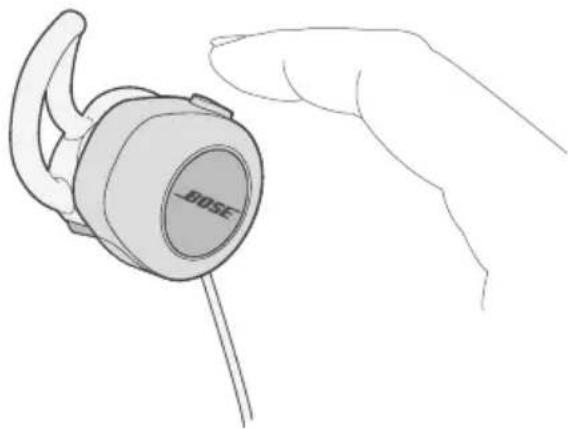
- With your headphones powered on, press and hold the Power/Bluetooth button until you hear "Ready to pair" or the Bluetooth indicator blinks blue.
natural_image
Line drawing of a hand holding a Bose-branded earbell (no text or symbols on the device itself)- On your mobile device, turn on the Bluetooth feature.
Tip: The Bluetooth feature is usually found in the Settings menu.
- Select your Bose® SoundSport® Pulse wireless headphones from the device list.
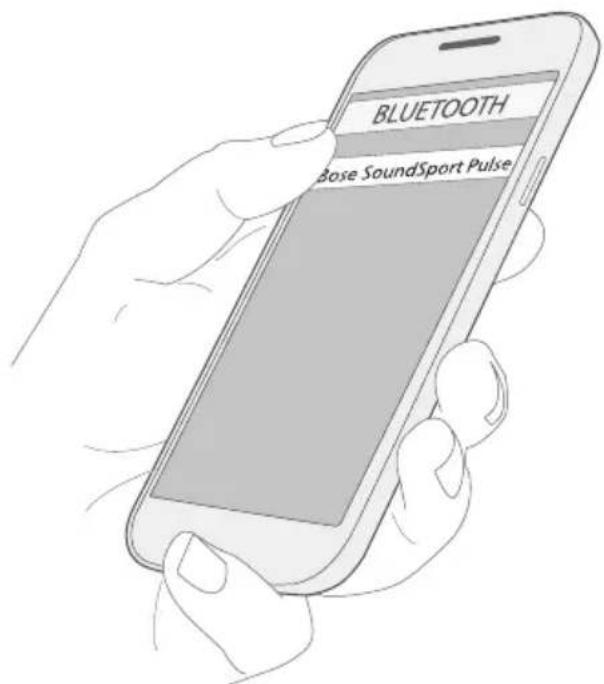
Once paired, you hear "Connected to
Pairing your mobile device using NFC
-
With your headphones powered on, unlock your mobile device and turn on the Bluetooth and NFC features. Refer to your mobile device owner's guide to learn more about these features.
-
Tap the NFC touchpoint on your mobile device to the back of the inline remote.
Your mobile device may prompt you to accept pairing.
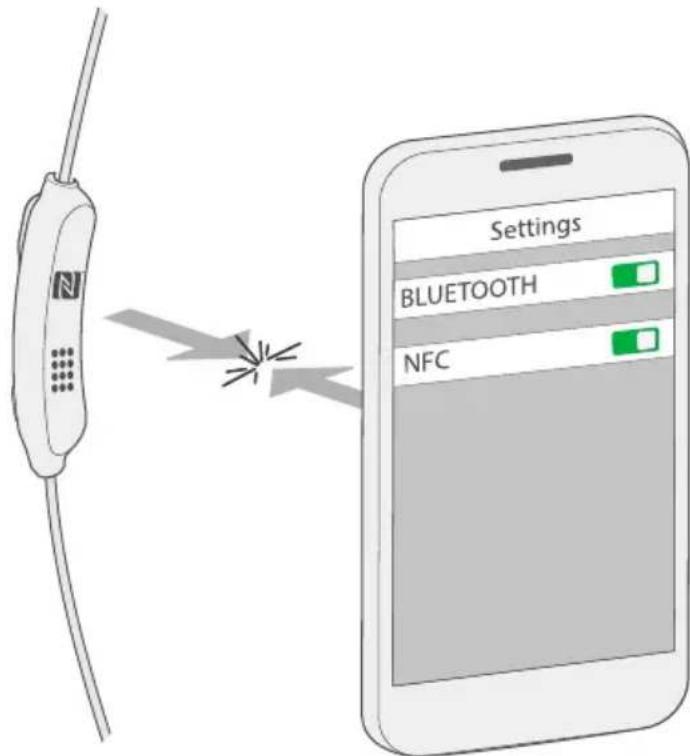
Once paired, you hear "Connected to
Disconnecting a mobile device
- Turn off the Bluetoothfeature on your mobile device.
- If your mobile device supports NFC, tap the NFC touchpoint on your mobile device to the back of the inline remote.
Reconnecting a mobile device
- When powered on, the headphones try to reconnect with the two most recently-connected mobile devices.
Note: The mobile devices must be within range and powered on.
- If your mobile device supports NFC, tap the NFC touchpoint on your mobile device to the back of the inline remote.
You can store up to eight paired mobile devices in the headphone pairing list and your headphones can be actively connected to two mobile devices at a time.
Note: You can only play audio from one mobile device at a time.
Switching between two connected mobile devices
- Pause audio on your first mobile device.
- Play audio on your second mobile device.
Identifying connected mobile devices
Press the Power/Bluetooth button to hear which mobile devices are currently connected.
Reconnecting a previously paired mobile device
- Press the Power/Bluetooth button to hear which mobile device is connected.
- Press the Power/Bluetooth button again within three seconds to connect to the next mobile device in the headphone pairing list. Repeat until you hear the correct mobile device name.
- Play audio on the connected mobile device.
Clearing the headphone pairing list
- Press and hold the Power/Bluetooth button for 10 seconds, until you hear “Bluetooth device list cleared.”
- Delete your SoundSport® Pulse wireless headphones from the Bluetooth list on your mobile device.
All mobile devices are cleared and the headphones are ready to pair a new mobile device.
Using the Bose® Connect app
You can also easily manage multiple connected devices using the Bose Connect app. For more information, see “Bose® Connect App” on page 11.
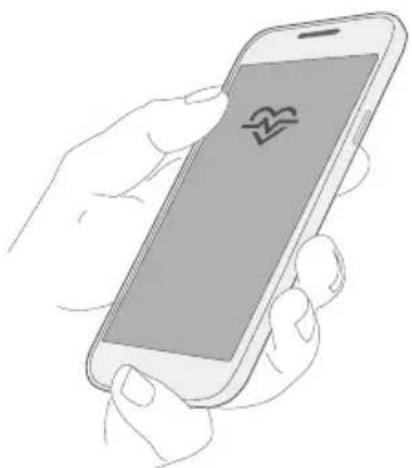
Viewing your heart rate in the Bose® Connect app
After your headphones are connected to your mobile device, you can view your real-time heart rate in the Bose® Connect app.
natural_image
Line drawing of a hand holding a smartphone with a heart-shaped app icon on the screen (no text or symbols)Note: To view your heart rate, make sure the left earbud is securely in place throughout your workout.
Viewing your heart rate in a fitness app
After your headphones are connected to your mobile device, you can view your heart rate in most popular fitness apps. To begin, set up your headphones as the heart rate sensor in your fitness app.
Tips for setup
- During setup, keep your earbuds in your ears.
- During setup, move away from any other devices with heart rate sensors.
- In your fitness app's Settings menu, look for a "Devices," "Hardware" or "Heart Rate Monitor" menu. Select "Search for sensor" or "Auto-connect."
- Some fitness apps may require you to select HR-Bose SoundSport Pulse as the heart rate sensor in the device list.
- Some fitness apps may require you to select "Start workout" to view your heart rate.
• Make sure the left earbud is securely in place throughout your workout. - Refer to your fitness app's help menu for more information on connecting to a heart rate sensor.
• To view setup videos and help articles for specific fitness apps, visit: global.Bose.com/Support/SSP
Note: Some fitness apps require a paid subscription to view detailed heart rate data.
Media playback and volume functions
The headphone controls are located on the inline remote below the right earbud.

| Function What to do | |
| Play/Pause | Press ●●●. |
| Skip Forward | Press ●●● twice quickly. |
| Skip Backward | Press ●●● three times quickly. |
| Fast forward | Press ●●● twice quickly and hold the second press. |
| Rewind | Press ●●● three times quickly and hold the third press. |
| Volume Up | Press +. |
| Volume Down | Press —. |
Call functions
| Function What to do | |
| Answer a call | Press ●●●. |
| End a call | Press ●●●. |
| Decline an incoming call | Press and hold ●●● for one second. |
| Answer a second incoming call and put the current call on hold | While on a call, press twice. |
| Decline a second incoming call and stay on current call | While on a call, press and hold ●●● for one second. |
| Switch between two calls | With two active calls, press ●●● twice. |
| Create a conference call | With two active calls, press and hold ●●● for one second. |
| Activate voice control | While not on a call, press and hold ●●● for one second.Refer to your mobile device's owners guide for compatibility and usage information about this feature. |
| Mute/unmute a call | While on a call, press + and -simultaneously. |
Storing
- Turn off the headphones when not in use.
- Before storing the headphones for more than a few months, fully charge the battery.
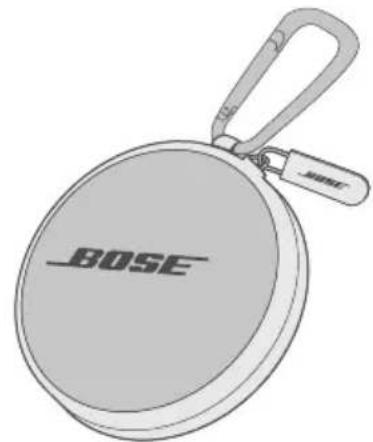
- Place the headphones in the carry case for storage.
Cleaning
Your headphones may require periodic cleaning.
StayHear®+ Pulse tips: Remove the tips from the earbuds and wash them with a mild detergent and water. Make sure you thoroughly rinse and dry the tips before attaching them to the earbuds.
Headphone nozzles: Clean only with a dry, soft cotton swab or equivalent. Never insert any cleaning tool into the nozzle.
Replacement parts and accessories
Replacement parts and accessories can be ordered through Bose customer service.
Customer service
For additional help using your headphones, visit: global.Bose.com/Support/SSP
Limited warranty
Your headphones are covered by a limited warranty. Visit our website at global.Bose.com/warranty for details of the limited warranty.
To register your product, visit global.Bose.com/register for instructions. Failure to register will not affect your limited warranty rights.
Technical information
Input Rating: 5V -1A
| Problem What to do | |
| Headphones don’t turn on | Power on the headphones (see “Powering on/off” on page 10).Charge the battery. |
| Headphones don’t pair with mobile device | On your mobile device:- Turn theBluetoothfeature off and then on.- Delete your Bose®SoundSport®Pulse headphones from theBluetoothlist on your mobile device. Pair again.Move your mobile device closer to the headphones and away from any interference or obstructions.Pair a different mobile device (see page 18).Visit: global.Bose.com/Support/SSP to see how-to videos.Clear the headphone pairing list:Press and hold the Power/Bluetoothbutton for 10 seconds until you hear “Bluetoothdevice list cleared.”Delete your Bose SoundSport Pulse headphones from theBluetoothlist on your mobile device. Pair again.Power the headphones off and then on.Power your mobile device off and then on. |
| Headphones don’t pair with NFC-enabled mobile device | Make sure your mobile device supports NFC.Unlock your mobile device and turn on theBluetoothand NFC features.Tap the NFC touchpoint on the back of your mobile device to the back of the inline remote.Power the headphones off and then on.Power your mobile device off and then on. |
| No sound | Power on the headphones and charge the battery.Increase the volume on your headphones and mobile device.Press the Power/Bluetoothbutton to hear the connected mobile device. Make sure you are using the correct device.Move your mobile device closer to the headphones and away from any interference or obstructions.Use a different music source.Pair a different mobile device (see page 18).If two mobile devices are connected, pause audio on the first mobile device and play audio on the other mobile device.If two mobile devices are connected, move the mobile devices within range of the headphones (30 ft. or 9 m). |
| Poor sound quality | Use a different music source.Pair a different mobile device (see page 18).Disconnect the second mobile device.Move the mobile device closer to the headphones, and away from any interference or obstructions.Clear any debris or wax buildup from the earbuds and headphone nozzles. |
| Headphones don't charge | Open the hinged door on the bottom of the right earbud and securely connect the small end of the USB cable to the USB connector. Make sure the connector on the cable is correctly aligned with the connector on the headphones.Secure both ends of the USB cable.If your headphones have been exposed to high or low temperatures, let the headphones return to room temperature and then try charging again. |
| Heart rate does not appear in Bose Connect app | In the Bose Connect app, make sure your Bose® SoundSport® Pulse headphones are connected to your mobile device.Make sure the left earbud fits securely in your ear. You may need to try a different size StayHear®+ Pulse tip.Close and relaunch the Bose Connect app.Power the headphones off and then on.On your mobile device, turn the Bluetooth feature off and then on. |
| Heart rate does not appear in fitness app | In the Bluetooth list on your mobile device, make sure your Bose® SoundSport® Pulse headphones are selected.Make sure the left earbud fits securely in your ear. You may need to try a different size StayHear®+ Pulse tip.In some fitness apps, you may need to select “Start workout” to view your heart rate.Close and relaunch the fitness app.Power the headphones off and then on.On your mobile device, turn the Bluetooth feature off and then on.Refer to your fitness app's help menu for more information on connecting to a heart rate sensor.To view setup videos and help articles for specific fitness apps, visit: global.Bose.com/Support/SSP |
| Heart rate drops out | Make sure the left earbud fits securely in your ear. You may need to try a different size StayHear®+ Pulse tip.Clean the heart rate sensor on the left earbud.Close and relaunch the fitness app.Delete the heart rate sensor from the fitness app, then add it again.Power the headphones off and on. |
| StayHear®+ Pulse tips falling off | Securely attach the tips to the earbuds (see “Changing the StayHear®+ Pulse tips” on page 16.) |
| Lost StayHear®+ Pulse tips | Contact Bose customer service for replacement tips. |
Management Regulation for Low-power Radio-frequency Devices
Artikel XII
Importør i Kina: Bose Electronics (Shanghai) Company Limited, Part C, Plan 9, No. 353 North Riying Road, Kina (Shanghai) Pilot Free Trade Zone
Importør i EU: Bose Products B.V., Gorslaan 60, 1441 RG Purmerend, Holland
Importør i Taiwan: Bose Taiwan Branch, 9F-A1, No.10, Section 3, Minsheng East Road, Taipei City 104, Taiwan Telefonnummer: +886-2-2514 7676
Importør i Mexico: Bose de México, S. de R.L. de C.V., Paseo de las Palmas 405-204, Lomas de Chapultepec, 11000 México, D.F. Telefonnummer: +5255 (5202) 3545
Inputklassifikation: 5V 1A
natural_image
Line drawing of a hand holding a Bose brand earbell (no text or symbols on the device itself)
natural_image
Illustration of a JOSE brand ear adapter with USB cable connector (no text or symbols)natural_image
Line drawing of a pair of earbuds with a connector, no text or symbols presentnatural_image
Line drawing of a hand holding a Bose-branded ear cap (no text or symbols on the device itself)natural_image
Line drawing of a hand holding a Bose-branded earbell (no text or symbols on the device itself)natural_image
Line drawing of a hand holding a smartphone with a heart symbol on the screen (no text or symbols present)China: Bose Electronics (Shanghai) Company Limited, Part C, Plan 9, No. 353 North Riying Road, China (Shanghai) Pilot Free Trade Zone
EU: Bose Products B.V., Gorslaan 60, 1441 RG Purmerend, Niederlande
Taiwan: Bose Taiwan Branch, 9F-A1, No.10, Section 3, Minsheng East Road, Taipei City 104, Taiwan Telefonnummer: +886-2-2514 7676
Mexiko: Bose de México, S. de R.L. de C.V., Paseo de las Palmas 405-204, Lomas de Chapultepec, 11000 México, D.F. Telefonnummer: +5255 (5202) 3545
natural_image
Line drawing of a hand holding a Bose brand earbell (no text or symbols on the device itself)
natural_image
Illustration of a JOSE brand ear adapter with USB cable connector (no text or symbols)natural_image
Line drawing of an earbuds and a charging plug device (no text or symbols)natural_image
Line drawing of a hand holding a Bose-branded ear cap (no text or symbols on the device itself)natural_image
Line drawing of a hand holding a Bose-branded ear cap (no text or symbols on the device itself)natural_image
Line drawing of a hand holding a smartphone with a screen displaying a heart symbol (no text or symbols on the device)Importeur in China: Bose Electronics (Shanghai) Company Limited, Part C, Plan 9, No. 353 North Riying Road, China (Shanghai) Pilot Free Trade Zone
Importeur in de EU: Bose Products B.V., Gorslaan 60, 1441 RG Purmerend, Nederland
Importeur in Taiwan: Bose Taiwan Branch, 9F-A1, No.10, Section 3, Minsheng East Road, Taipei City 104, Taiwan Telefoonnummer: +886-2-2514 7676
Importeur in Mexico: Bose de México, S. de R.L. de C.V., Paseo de las Palmas 405-204, Lomas de Chapultepec, 11000 México, D.F. Telefoonnummer: +5255 (5202) 3545
Ingangsspecificaties: 5 V — 1 A
natural_image
Illustration of a BOSE brand light case with a handle and wrist strap (no text or symbols on the object itself)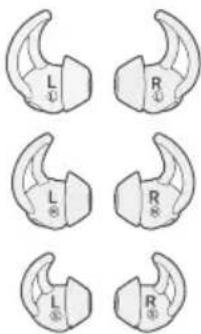
StayHear®+ Pulse-dopjes: Groot (L) en klein (S)
natural_image
Illustration of a USB cable with connector port and connector end (no text or symbols)natural_image
Line drawing of a hand holding a Bose brand earbell (no text or symbols on the device itself)
natural_image
Illustration of a JOSE brand ear adapter with USB cable connector (no text or symbols)natural_image
Line drawing of a pair of earbuds and a connector device (no text or symbols)natural_image
Line drawing of a hand holding a Bose-branded ear cap (no text or symbols on the device itself)natural_image
Line drawing of a hand holding a Bose-branded earbell (no text or symbols on the device itself)natural_image
Line drawing of a hand holding a smartphone with a screen displaying a heart symbol (no text or numbers present)Importador en China: Bose Electronics (Shanghai) Company Limited, Part C, Plan 9, No. 353 North Riying Road, China (Shanghai) Pilot Free Trade Zone
natural_image
Line drawing of a hand holding a Bose brand earbell (no text or symbols on the device itself)
natural_image
Illustration of a JOSE brand ear adapter with USB cable connector (no text or symbols)natural_image
Line drawing of a pair of earbuds and a connector plug (no text or symbols)natural_image
Line drawing of a hand holding a Bose brand earbell (no text or symbols on the device itself)natural_image
Line drawing of a hand holding a Bose-branded ear cap (no text or symbols on the device itself)natural_image
Line drawing of a hand holding a smartphone with a heart symbol on the screen (no text or symbols present)natural_image
Illustration of a USB connector with a coiled cable (no text or symbols)natural_image
Line drawing of a hand holding a Bose brand earbell (no text or symbols on the device itself)
natural_image
Illustration of a JOSE brand ear adapter with USB cable connector (no text or symbols)natural_image
Line drawing of a pair of earbuds with a connector, no text or symbols presentnatural_image
Line drawing of a hand holding a Bose brand earbell (no text or symbols on the device itself)natural_image
Line drawing of a hand holding a Bose-branded ear cap (no text or symbols on the device itself)natural_image
Line drawing of a hand holding a smartphone with a heart symbol on the screen (no text or symbols present)Application Bose® Connect
Caractéristiques 11
natural_image
Line drawing of a hand holding a Bose brand earbell (no text or symbols on the device itself)natural_image
Illustration of a JOSE brand ear adapter with USB cable connector (no text or symbols)natural_image
Line drawing of a pair of earbuds with a connector, no text or symbols presentnatural_image
Line drawing of a hand holding a Bose brand earbell (no text or symbols on the device itself)natural_image
Line drawing of a hand holding a Bose-branded earbell (no text or symbols on the device itself)natural_image
Line drawing of a hand holding a smartphone with a screen displaying a QR code (no text or symbols on the device)Importatore per la Cina: Bose Electronics (Shanghai) Company Limited, Part C, Plan 9, No. 353 North Riying Road, Cina (Shanghai) Pilot Free Trade Zone
Cuffie wireless Bose® SoundSport® Pulse
natural_image
Illustration of a BOSE-branded object with a handle and label (no text or symbols on the object itself)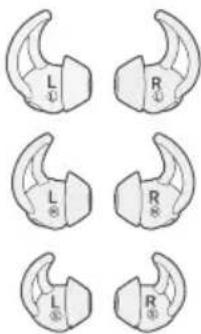
natural_image
Illustration of a USB connector with a coiled cable (no text or symbols)natural_image
Line drawing of a hand holding a Bose brand earbell (no text or symbols on the device itself)
natural_image
Illustration of a JOSE brand ear adapter with USB cable connector (no text or symbols)natural_image
Line drawing of an earbuds and a connector device (no text or symbols)natural_image
Line drawing of a hand holding a Bose brand earbell (no text or symbols on the device itself)natural_image
Line drawing of a hand holding a Bose-branded ear cap (no text or symbols on the device itself)natural_image
Hand holding a smartphone with a screen displaying a logo (no text or symbols visible)Kínai importôr: Bose Electronics (Shanghai) Company Limited, Part C, Plan 9, No. 353 North Riying Road, China (Shanghai) Pilot Free Trade Zone
EU-importôr: Bose Products B.V., Gorslaan 60, 1441 RG Purmerend, The Netherlands
Tajvani importör: Bose Taiwan Branch, 9F-A1, No.10, Section 3, Minsheng East Road, Taipei City 104, Taiwan Phone Number: +886 -2 -2514 7676
Mexikói importör: Bose de México, S. de R.L. de C.V., Paseo de las Palmas 405-204, Lomas de Chapultepec, 11000 Mexico, D.F. Telefonszám: +5255 (5202) 3545
Névleges bemenet: 5 V 1A
natural_image
Line drawing of a hand holding a Bose brand earbell (no text or symbols on the device itself)
natural_image
Illustration of a JOSE brand ear adapter with USB cable connector (no text or symbols)natural_image
Line drawing of an earbuds and a connector device (no text or symbols)natural_image
Line drawing of a hand holding a Bose-branded ear cap (no text or symbols on the device itself)natural_image
Line drawing of a hand holding a Bose-branded earbell (no text or symbols on the device itself)natural_image
Line drawing of a hand holding a smartphone with a screen displaying a logo (no text or symbols on the device)Management Regulation for Low-power Radio-frequency Devices
Artikkel XII
Importør for Kina: Bose Electronics (Shanghai) Company Limited, Part C, Plan 9, No. 353 North Riying Road, Kina (Shanghai) Pilot Free Trade Zone
Importør for EU: Bose Products B.V., Gorslaan 60, 1441 RG Purmerend, Nederland
Importør for Taiwan: Bose Taiwan Branch, 9F-A1, No.10, Section 3, Minsheng East Road, Taipei City 104, Taiwan. Telefon: +886 -2 -2514 7676
Importor for Mexico: Bose de México, S. de R.L. de C.V., Paseo de las Palmas 405-204, Lomas de Chapultepec, 11000 México, D.F. Telefonnummer: +5255 (5202) 3545
Strømforsyning: 5V 1A
natural_image
Line drawing of a hand holding a Bose brand earbell (no text or symbols on the device itself)
natural_image
Illustration of a JOSE brand ear adapter with USB cable connector (no text or symbols)- Koble den andre enden til en USB-vegglader eller datamaskin som er slått på.
natural_image
Line drawing of a pair of earbuds and a connector (no text or symbols)natural_image
Line drawing of a hand holding a Bose-branded ear cap (no text or symbols on the device itself)natural_image
Line drawing of a hand holding a Bose-branded ear cap (no text or symbols on the device itself)natural_image
Line drawing of a hand holding a smartphone with a screen displaying a heart symbol (no text or numbers present)Importer — Chiny: Bose Electronics (Shanghai) Company Limited, Part C, Plan 9, No. 353 North Riying Road, China (Shanghai) Pilot Free Trade Zone
Importer — UE: Bose Products B.V., Gorslaan 60, 1441 RG Purmerend, Holandia
Importer — Tajwan: Bose Taiwan Branch, 9F-A1, No.10, Section 3, Minsheng East Road, Taipei City 104, Tajwan, numer telefonu: +886-2-2514 7676
Importer — Meksyk: Bose de México, S. de R.L. de C.V., Paseo de las Palmas 405-204, Lomas de Chapultepec, 11000 México, D.F. Numer telefonu: +5255 (5202) 3545
Zasilanie: 5 V J A
natural_image
Illustration of a USB connector with a coiled cable (no text or symbols)natural_image
Line drawing of a hand holding a BIDSE-branded ear cap (no text or symbols on the device itself)
natural_image
Illustration of a JOSE brand ear adapter with USB cable connector (no text or symbols)natural_image
Line drawing of a pair of earbuds with a connector, no text or symbols presentnatural_image
Line drawing of a hand holding a Bose-branded earbell (no text or symbols on the device itself)natural_image
Line drawing of a hand holding a Bose-branded ear cap (no text or symbols on the device itself)natural_image
Line drawing of a hand holding a smartphone with a heart symbol on the screen (no text or symbols present)Importör, Kina: Bose Electronics (Shanghai) Company Limited, Part C, Plan 9, No. 353 North Riying Road, Kina (Shanghai) Pilot Free Trade Zone
Importör, EU: Bose Products B.V., Gorslaan 60, 1441 RG Purmerend, Nederländerna
Importör, Taiwan: Bose Taiwan Branch, 9F-A1, No.10, Section 3, Minsheng East Road, Taipei City 104, Taiwan Telefon: +886 -2 -2514 7676
Importör, Mexico: Bose de México, S. de R.L. de C.V., Paseo de las Palmas 405-204, Lomas de Chapultepec, 11000 México, D.F. Telefon: +5255 (5202) 3545
natural_image
Line drawing of a hand holding a Bose brand earbell (no text or symbols on the device itself)
Ansluta USB-kabeln
natural_image
Illustration of a JOSE brand ear adapter with USB cable connector (no text or symbols)natural_image
Line drawing of a pair of earbuds and a connector (no text or symbols)natural_image
Line drawing of a hand holding a Bose-branded ear cap (no text or symbols on the device itself)natural_image
Line drawing of a hand holding a Bose-branded earbell (no text or symbols on the device itself)- Aktivera Bluetooth-funktionen på den mobila enheten.
natural_image
Illustration of a hand holding a smartphone with a heart symbol on the screen (no text or symbols present)natural_image
Illustration of a USB connector with a coiled cable (no text or symbols)สายเคเบิล USB
natural_image
Line drawing of a hand holding a Bose brand earbell (no text or symbols on the device itself)natural_image
Illustration of a BOSE ear adapter with USB cable connector (no text or symbols)natural_image
Line drawing of a pair of earbuds with a connector, no text or symbols present- English • German • Korean • Swedish
- Spanish • Mandarin • Italian • Dutch
- French • Japanese • Portuguese
natural_image
Line drawing of a hand holding a Bose-branded earbell (no text or symbols on the device itself)natural_image
Line drawing of a hand holding a Bose-branded earbell (no text or symbols on the device itself)natural_image
Line drawing of a hand holding a smartphone with a heart symbol on the screen (no text or symbols present)중국 수입업체: Bose Electronics (Shanghai) Company Limited, Part C, Plan 9, No. 353 North Riying Road, China (Shanghai) Pilot Free Trade Zone
EU 수입업체: Bose Products B.V., Gorslaan 60, 1441 RG Purmerend, The Netherlands
대만 수입업체: Bose Taiwan Branch, 9F-A1, No.10, Section 3, Minsheng East Road, Taipei City 104, Taiwan 전화 번호: +886-2-2514 7676
멕시코 수입업체: Bose de México, S. de R.L. de C.V., Paseo de las Palmas 405-204, Lomas de Chapultepec, 11000 México, D.F. 전화 번호: +5255 (5202) 3545
입력 정격: 5V --- 1A
natural_image
Line drawing of a hand holding a Bose-branded ear cap (no text or symbols on the device itself)natural_image
Illustration of a BOSE ear adapter with a USB cable connector (no text or symbols)natural_image
Line drawing of a pair of earbuds with a connector, no text or symbols present귀에 이어버드 착용
natural_image
Line drawing of a hand holding a Bose-branded earbell (no text or symbols on the device itself)natural_image
Line drawing of a hand holding a Bose brand earbell (no text or symbols on the device itself)natural_image
Line drawing of a hand holding a smartphone with a screen displaying a heart symbol (no text or numbers present)natural_image
Line drawing of a pair of wireless earbuds with attached earphones and straps (no text or symbols)natural_image
Line drawing of a BOSE brand light case with a handle and logo (no text or symbols on the object itself)便携包
StayHear®+ Pulse 耳塞:
大号(L)和小号(S)
natural_image
Illustration of a USB connector with a coiled cable (no text or symbols)注意:中号(M)已被安装在耳机上。
USB 线缆
natural_image
Line drawing of a hand holding a Bose brand earbell (no text or symbols on the device itself)natural_image
Illustration of a headset with a USB connector and a label 'MOSE' on the head (no other text or symbols)natural_image
Line drawing of a pair of earbuds with a connector, no text or symbols present将耳机正确地戴在耳朵上
natural_image
Line drawing of a hand holding a Bose-branded ear cap (no text or symbols on the device itself)natural_image
Line drawing of a hand holding a Bose brand earbell (no text or symbols on the device itself)natural_image
Line drawing of a hand holding a smartphone with a heart-shaped logo on the screen (no text or symbols)natural_image
Line drawing of a pair of wireless earbuds with attached earphones and straps (no text or symbols)natural_image
Line drawing of a BOSE brand light case with a handle and logo (no text or symbols on the object itself)便攜包
natural_image
Illustration of a USB cable with connector and port (no text or symbols)注意:中號(M)已被安裝在耳機上。
USB 連接線
natural_image
Line drawing of a hand holding a Bose brand earbell (no text or symbols on the device itself)
連接 USB 連接線
natural_image
Illustration of a device with a connector labeled 'NOSE' and a USB cable, showing no text or symbols beyond the label.natural_image
Line drawing of a pair of earbuds with a connector, no text or symbols present將耳機正確地戴在耳朵上
natural_image
Line drawing of a hand holding a BISE earbell (no text or symbols on the device itself)natural_image
Line drawing of a hand holding a Bose-branded earbell (no text or symbols on the device itself)natural_image
Line drawing of a hand holding a smartphone with a heart symbol on the screen (no text or symbols present)Bose Corporation Headquarters: 1-877-230-5639.
natural_image
Line drawing of a hand holding a Bose brand earbell (no text or symbols on the device itself)natural_image
Illustration of a NBSE earphone connected to a USB cable (no text or symbols)natural_image
Line drawing of a pair of earbuds and a connector (no text or symbols)イヤホンの耳への装着
natural_image
Line drawing of a hand holding a Bose-branded earbell (no text or symbols on the device itself)natural_image
Line drawing of a hand holding a Bose-branded earbell (no text or symbols on the device itself)natural_image
Line drawing of a hand holding a smartphone with a heart symbol on the screen (no text or symbols present)global.Bose.com/Support/SSP
保証
Bose Electronics (Shanghai) Company Limited, Part C, Plan 9, No. 353 North Riying Road, China (Shanghai) Pilot Free Trade Zone
natural_image
Illustration of a BOSE-branded object with a handle and tag (no text or symbols on the object itself)حقية العمل
natural_image
Line drawing of a pair of wireless earbuds with earphones and a connector (no text or symbols)natural_image
Illustration of a USB connector with a coiled cable (no text or symbols)USB كبل
natural_image
Line drawing of a hand holding a Bose brand earbell (no text or symbols on the device itself)natural_image
Diagram of a wireless ear adapter with a USB cable connector (no text or symbols)natural_image
Line drawing of a pair of earbuds with a connector, no text or symbols presentStayHear®+ Pulse تغیر سدادات
natural_image
Prohibition sign with a crossed-out hand holding a small object, no text or symbols present.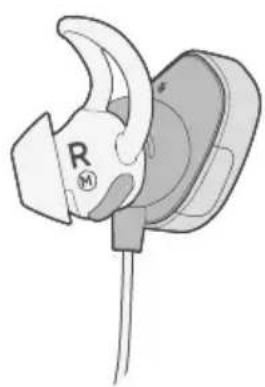
natural_image
Illustration of a white earbell with a curved handle and a black circular base, no text or symbols present.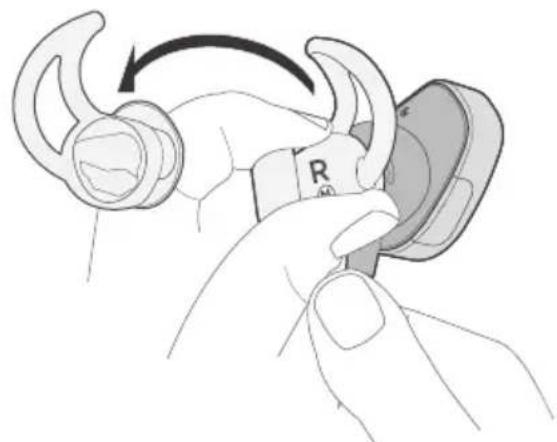
natural_image
Illustration of a hand holding a connector with a curved hook and a switch, showing a rotation arrow (no text or symbols)natural_image
Line drawing of a pair of earbuds with a connector, no text or symbols present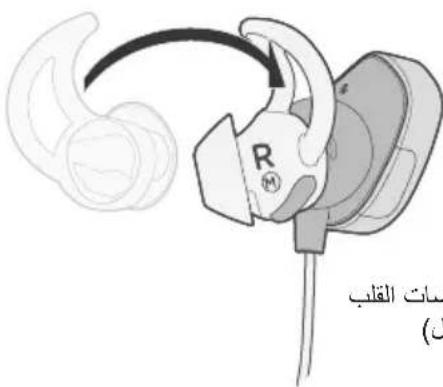
natural_image
Line drawing of a hand holding a Bose-branded earbell (no text or symbols on the device itself)- .
natural_image
Line drawing of a hand holding a Bose brand earbell (no text or symbols on the device itself)natural_image
Line drawing of a hand holding a smartphone with a heart symbol on the screen (no text or symbols present)global.Bose.com/Support/SSP
global.Bose.com/Support/SSP
الضمان المحدود
- Please read and keep all safety and use instructions.
- WARNINGS/CAUTIONS
- Regulatory Information
- CAN ICES-3 (B)/NMB-3(B)
- Management Regulation for Low-power Radio-frequency Devices
- Article XII
- Article XIV
- For Europe:
- Getting Started
- Bose® Connect App
- Charging the Battery
- Headphone Status Indicators
- Importance of Proper Fit
- Voice Prompts
- Bluetooth Technology
- Managing Multiple Connected Devices
- Heart Rate Sensor
- Headphone Controls
- Care and Maintenance
- Unpacking
- Headphone components
- Powering on/off
- To power on:
- To power off:
- Features
- Connecting the USB cable
- Checking the battery
- Bluetooth indicator
- Battery indicator
- Choosing the correct StayHear®+ Pulse tip
- Fitting the earbuds to your ear
- Changing the StayHear®+ Pulse tips
- Pre-installed languages
- Check for additional languages
- Changing the language
- Pairing your mobile device using the Bose® Connect app (recommended)
- Choosing an alternate pairing method
- What is NFC?
- Pairing your mobile device using the Bluetooth menu
- Pairing your mobile device using NFC
- Disconnecting a mobile device
- Reconnecting a mobile device
- Switching between two connected mobile devices
- Identifying connected mobile devices
- Reconnecting a previously paired mobile device
- Clearing the headphone pairing list
- Using the Bose® Connect app
- Viewing your heart rate in the Bose® Connect app
- Viewing your heart rate in a fitness app
- Tips for setup
- Media playback and volume functions
- Call functions
- Storing
- Cleaning
- Replacement parts and accessories
- Customer service
- Limited warranty
- Technical information
- Artikel XII
- Application Bose® Connect
- Artikkel XII
- Ansluta USB-kabeln
- 귀에 이어버드 착용
- 将耳机正确地戴在耳朵上
- 連接 USB 連接線
- 將耳機正確地戴在耳朵上
- イヤホンの耳への装着
- 保証
- StayHear®+ Pulse تغیر سدادات
- الضمان المحدود
Brand : BOSE
Model : SoundSport Pulse
Category : Wireless Earbuds