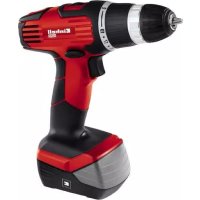
THCD 14 42 - Screwdriver EINHELL - Free user manual and instructions
Find the device manual for free THCD 14 42 EINHELL in PDF.



| Product type | Cordless screwdriver |
| Brand | Einhell |
| Model | THCD 14 42 |
| Rated voltage | 14.4 V DC |
| No-load speed | 0-350 / 0-1100 rpm (2 speeds) |
| Adjustable torque | 19+1 positions (including drilling) |
| Chuck capacity | 10 mm max. |
| Weight | 1.7 kg |
| Power supply type | NiCd battery 14.4 V (mains charger 230 V ~ 50 Hz) |
| Charging time | 3 to 5 hours |
| Sound level | Sound pressure LpA 65.3 dB(A), sound power LwA 76.3 dB(A) |
| Vibration level | Drilling in metal: ≤ 2.5 m/s²; screwdriving: ≤ 2.5 m/s² |
| Battery type | NiCd |
| Intended use | Screwing/unscrewing, drilling in wood, metal and plastic |
| Warranty | 24 months (material or manufacturing defects); wear parts 6 months |
| Maintenance and cleaning | Clean with a damp cloth and a little soap; do not use detergents |
| Included accessories | Charger, charging adapter, magnetic screw holder |
| Speed switching | Yes, 1st and 2nd speed (when stopped) |
| Direction of rotation | Adjustable (forward/reverse + lock) |
Frequently Asked Questions - THCD 14 42 EINHELL
User questions about THCD 14 42 EINHELL
0 question about this device. Answer the ones you know or ask your own.
Ask a new question about this device
Download the instructions for your Screwdriver in PDF format for free! Find your manual THCD 14 42 - EINHELL and take your electronic device back in hand. On this page are published all the documents necessary for the use of your device. THCD 14 42 by EINHELL.
USER MANUAL THCD 14 42 EINHELL
Caution - Read the operating instructions to reduce the risk of inquiry

Wear ear-muffs. The impact of noise can cause damage to hearing.

Wear a breathing mask. Dust which is injurious to health can be generated when working on wood and other materials. Never use the device to work on any materials containing asbestos!

Wear safety goggles. Sparks generated during working or splinters, chips and dust emitted by the device can cause loss of sight.
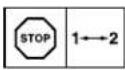
Change the gear only when the drill is at a standstill. If you fail to observe this point, the gearing may be damaged.
15
GB
Important!
When using the equipment, a few safety precautions must be observed to avoid injuries and damage. Please read the complete operating instructions and safety regulations with due care. Keep this manual in a safe place, so that the information is available at all times. If you give the equipment to any other person, hand over these operating instructions and safety regulations as well. We cannot accept any liability for damage or accidents which arise due to a failure to follow these instructions and the safety instructions.
1. Safety regulations
The corresponding safety information can be found in the enclosed booklet.
Caution!
Read all safety regulations and instructions. Any errors made in following the safety regulations and instructions may result in an electric shock, fire and/or serious injury. Keep all safety regulations and instructions in a safe place for future use.
2. Layout and items supplied
2.1 Layout (Fig. 1a/1b)
- Torque adjustment (setting ring)
- Quick-change drill chuck
- Changeover switch
- On/Off switch
- Battery
- Charging unit
- Charging adapter
- Pushlock button
- Magnetic screw holder
- Selector switch for 1st/2nd gear
2.2 Items supplied
Please check that the article is complete as spcified in the scope of delivery. If parts are missing, please contact our service center or the nearest branch of the DIY store where you made your purchase at the latest within 5 work days after purchasing the article and upon presentation of a valid bill of purchase. Also, refer to the warranty table in the warranty provisions at the end of the operating instructions.
- Open the packaging and take out the equipment with care.
- Remove the packaging material and any packaging and/or transportation braces (if available).
Check to see if all items are supplied. - Inspect the equipment and accessories for transport damage.
If possible, please keep the packaging until the end of the guarantee period.
Important!
The equipment and packaging material are not toys. Do not let children play with plastic bags, foils or small parts. There is a danger of swallowing or suffocating!
Cordless drill/screwdriver
Battery
Charging unit
Charging adapter
Original operating instructions
Safetyinstructions
3. Proper use
The cordless drill/screwdriver is designed for tightening and undoing screws, as well as for drilling in wood, metal and plastic.
The equipment is to be used only for its prescribed purpose. Any other use is deemed to be a case of misuse. The user / operator and not the manufacturer will be liable for any damage or injuries of any kind caused as a result of this.
Please note that our equipment has not been designed for use in commercial, trade or industrial applications. Our warranty will be voided if the machine is used in commercial, trade or industrial businesses or for equivalent purposes.
·16·
GB
4. Technical data
Motor supply voltage: 14.4 V DC
Idling speed: 0-350/0-1100 min ^-1
Torque settings: 19+1
Clockwise/Counter-clockwise: Yes
Clamping range of drill chuck: ...max. 10 mm
Battery charge voltage: 18 V DC
Battery charge current: 0.4 A
Battery charger supply voltage: 230 V ~ 50Hz
Charging time: max. 3-5 hours
Battery type: NcD
Weight: 1.7 kg
Sound and vibration
Sound and vibration values were measured in accordance with EN 60745.
Lp6 sound pressure level 65,3 dB(A)
Kuncertainty 3 dB
Lsound power level 76,3dB(A)
Kuncertainty 3 dB
Wear ear-muff s.
The impact of noise can cause damage to hearing.
Total vibration values (vector sum of three directions) determined in accordance with EN 60745.
Drilling in metal
Vibration emission value a ≤ 2.5m / s^2
Kuncertainty = 1.5m / s
Screwing without hammer action
Vibration emission value a_h ≤ 2.5m / s^2
Kuncertainty = 1.5m / s^2
Warning!
The specifi ed vibration value was established in accordance with a standardized testing method. It may change according to how the electric equipment is used and may exceed the specifi ed value in exceptional circumstances.
The specified vibration value can be used to compare the equipment with other electric power tools.
The specified vibration value can be used for initial assessment of a harmful eff ect.
Keep the noise emissions and vibrations to a minimum.
- Only use appliances which are in perfect working order.
Service and clean the appliance regularly.
Adapt your working style to suit the appliance.
Do not overload the appliance.
Have the appliance serviced
Have the appliance serviced whenever he-
cessary. Switch the appliance off when it is not in use.
- Switch the appliance on when it is not in use.
- Wear protective gloves.
Residual risks
Even if you use this electric power tool in accordance with Instructions, certain residual risks cannot be rules out. The following hazards may arise in connection with the equipment's construction and layout:
- Lung damage if no suitable protective dust
mask is used - Damage to hearing if no suitable ear protec
tion is used. - Health damage caused by hand-arm vibrations if the equipment is used over a prolonged period or is not properly guided and maintained.
5. Before starting the equipment
Be sure to read the following information before
you put the cordless screwdriver into operation:
1. Charge the battery only with the charging unit supplied.
2. Only everov use sharp drill bits and screwdriver bits which are suitable for the purpose and in faultless condition.
3. Always check for concealed electric cables and gas and water pipes when drilling and screwing in walls.
6. Operation
6.1 Charging the battery (Fig. 2-3)
- Remove the battery pack (5) from the handle (Fig. 2) by pressing the pushlock buttons (8) on the left and right side of the battery pack (5).
- Check that your mains voltage is the same as that marked on the rating plate. Plug the battery charger (6) into the power socket and connect the charging cable (a) to the charging adapter (7). The red LED on the charging
·17·
GB
adapter (7) then comes on.
3. Plug the battery pack (5) into the charging adapter. The green LED and the red LED will come on to indicate that the battery pack is being charged.
4. The battery pack is fully charged after 3-5 hours. Remove the battery from the charging adapter and disconnect the charging unit from the power socket.
Caution! The battery charger does not switch off automatically when the battery is fully charged.
If the battery pack fails to charge, check for the following:
Voltage at the power socket
Good contact at the charging contacts of the charging unit
If the battery pack still fails to charge, send
the charging unit
and the battery pack
to our customer service center.
To ensure that the battery pack provides long service, you should take care to recharge it promptly. You must recharge the battery pack when you notice that the power of the cordless equipment drops. Never fully discharge the battery pack. This will cause it to develop a defect!
6.2 Torque setting (Fig. 4 / Item 1)
The cordless screwdriver is fitted with a mechanical torque selector.
The torque for a particular scrow size is set with the setting ring (1). The torque is dependent on a number of factors:
- On the type and hardness of the material involved
On the type and length of the screws used
On the requirements that the screw connection has to satisfy
The grating disengagement of the coupling indicates that the selected torque level has been reached.
Caution! Only ever adjust the setting ring when the equipment is at a standstill.
Caution! For screwing purposes, the drill/hammer drill selector switch (13) must be changed to the „Drill" setting!
6.3 Drilling (Fig. 4/Item 1)
For drilling purposes, adjust the setting ring for the torque to the last setting "Drill". In the drill setting the slip coupling is non-functional. The maximum torque is available for drilling.
6.4 Changeover switch (Fig. 5/Item 3)
The slide switch above the On/Off switch is for setting the direction of rotation of the cordless screwdriver and for preventing the cordless screwdriver from being switched on inadvertently. You can select between clockwise and counterclockwise rotation. To avoid causing damage to the gearing, the direction of rotation must only be changed when the screwdriver is at a standstill. When the slide switch is in the middle position, the On/Off switch is blocked.
6.5 On/Off switch (Fig. 5/Item 4)
Infi nitely variable speed control is possible with the On/Off switch. The further you push the switch, the higher the speed of the cordless screwdriver.
6.6 Changing the bit (Fig. 6)
Caution! Set the changeover switch (3) to its center position whenever you carry out any work (for example changing the tool, maintenance work etc.) on the spindle conveyor.
work,etc.);on the cordier Open the chuck (2).
- The chuck opening (a) must be large enough to hold the tool (drill bit or screwdriver bit).
- Select the suitable tool. Push the tool as far as possible into the chuck opening (a).
- Tighten the chuck (2) and then check that the tool is secure.
6.7 Screwing
It is advisable to use self-centering screws (e.g. Torx, cross recessed head) as these will enable you to work safely and reliably. Always make sure that the bit used is of the same size and shape as the screw. Set the torque to suit the screw size as specified in the instructions.
6.8 Magnetic screw holder (Fig. 4/Item 9)
Screws can be placed on the magnetic screw holder for easy reach during operation.
GB
6.9 Selector switch for 1st/2nd gear (Fig.4 / Item 10)
You can work with a higher or lower speed depending on the position of the selector switch. Change the gear only when the drill is at a standstill. If you fail to observe this point, the gearing may be damaged.
and plastic. Never place defective equipment in your household refuse. The equipment should be taken to a suitable collection center for proper disposal. If you do not know the whereabouts of such a collection point, you should ask in your local council offices.
7. Cleaning, maintenance and ordering of spare parts
Always pull out the mains power plug before starting any cleaning work.
9. Storage
Store the equipment and accessories out of children's reach in a dark and dry place at above freezing temperature. The ideal storage temperature is between 5 and 30^ . Store the electric tool in its original packaging.
7.1 Cleaning
- Keep all safety devices, air vents and the motor housing free of dirt and dust as far as possible. Wipe the equipment with a clean cloth or blow it with compressed air at low pressure.
We recommend that you clean the device immediately each time you have finished using it.
Clean the equipment regularly with a moist cloth and some soft soap. Do not use cleaning agents or solvents; these could attack the plastic parts of the equipment. Ensure that no water can seep into the device. The ingress of water into an electric tool increases the risk of an electric shock.
7.2 Maintenance
There are no parts inside the equipment which require additional maintenance.
7.3 Ordering replacement parts:
Please quote the following data when ordering replacement parts:
Type of machine
Article number of the machine
Identification number of the machine
Replacement part number of the part required For our latest prices and information please go to www.jsc-gmbh.info
8. Disposal and recycling
The equipment is supplied in packaging to prevent it from being damaged in transit. The raw materials in this packaging can be reused or recycled. The equipment and its accessories are made of various types of material, such as metal
·19·

GB
For EU countries only
Never place electric power tools or batteries in your household refuse!
Recycling alternative to the requested returning of equipment: Instead of returning the equipment to the manufacturer, the owner of the electrical equipment is obliged to ensure that the equipment is properly disposed of if relinquishing ownership. The old equipment as well as any batteries can be returned to a suitable collection point that will dispose of the equipment in accordance with the national recycling and waste disposal regulations. This does not apply to any accessories or aids without electrical components supplied with the old equipment.
The reprinting or reproduction by any other means, in whole or in part, of documentation and papers accompanying products is permitted only with the express consent of the ISC GmbH.
Subject to technical changes
20
GB
Warranty provisions
isc GmbH or the DIY store where you made you purchase guarantees the repair of defects or replacement of the equipment in accordance with the overview below. Statutory guarantee claims are unaffected.
| Category Example Warranty | ||
| Defect with regard to material or construction | 24 months | |
| Wear parts* Drill chuck 6 months | ||
| Consumables* Bit inserts/drill bits | Warranty only in case of an im- | mediate defect (24 hours after purchase / date on the bill) |
| Missing parts 5 work days | ||
- Not necessarily included in the scope of delivery!
For consumables, wear parts and missing parts iSC GmbH guarantees the correction of defects or a new delivery only if the defect is reported within 24 hours (consumables), 5 work days (missing parts) or 6 months (wear parts) after purchase and the purchase date is verified with the bill.
In case of defects concerning the material or construction, we kindly request you to submit the equipment together with the fully completed warranty card supplied with the equipment. It is important that you enter an exact description of the defect.
To do so, answer the following questions:
Did the equipment work at all or was it defective from the beginning?
Did you notice anything (symptom or defect) prior to the failure?
What malfunction does the equipment have in your opinion (main symptom)? Describe this malfunction.
·21·

GB
Warranty certificate
Dear Customer,
All of our products undergo strict quality checks to ensure that they reach you in perfect condition. In the unlikely event that your device develops a fault, please contact our service department at the address shown on this guarantee card. Of course, if you would prefer to call us then we are also happy to offer our assistance under the service number printed below. Please note the following terms under which guarantee claims can be made:
- These guarantee terms cover additional guarantee rights and do not affect your statutory warranty rights. We do not charge you for this guarantee.
- Our guarantee only covers problems caused by material or manufacturing defects, and it is restricted to the rectification of these defects or replacement of the device. Please note that our devices have not been designed for use in commercial, trade or industrial applications. Consequently, the guarantee is invalidated if the equipment is used in commercial, trade or industrial applications or for other equivalent activities. The following are also excluded from our guarantee: compensation for transport damage, damage caused by failure to comply with the installation/assembly instructions or damage caused by unprofessional installation, failure to comply with the operating instructions (e.g. connection to the wrong mains voltage or current type), misuse or inappropriate use (such as overloading of the device or use of non-approved tools or accessories), failure to comply with the maintenance and safety regulations, ingress of foreign bodies into the device (e.g. sand, stones or dust), effects of force or external influences (e.g. damage caused by the device being dropped) and normal wear resulting from proper operation of the device. This applies in particular to rechargeable batteries for which we nevertheless issue a guarantee period of 12 months. The guarantee is rendered null and void if any attempt is made to tamper with the device.
- The guarantee is valid for a period of 2 years starting from the purchase date of the device. Guarantee claims should be submitted before the end of the guarantee period within two weeks of the defect being noticed. No guarantee claims will be accepted after the end of the guarantee period. The original guarantee period remains applicable to the device even if repairs are carried out or parts are replaced. In such cases, the work performed or parts fitted will not result in an extension of the guarantee period, and no new guarantee will become active for the work performed or parts fitted. This also applies when an on-site service is used.
- In order to assert your guarantee claim, please send your defective device postage-free to the address shown below. Please enclose either the original or a copy of your sales receipt or another dated proof of purchase. Please keep your sales receipt in a safe place, as it is your proof of purchase. It would help us if you could describe the nature of the problem in as much detail as possible. If the defect is covered by our guarantee then your device will either be repaired immediately and returned to you, or we will send you a new device.
Of course, we are also happy offer a chargeable repair service for any defects which are not covered by the scope of this guarantee or for units which are no longer covered. To take advantage of this service, please send the device to our service address.
Also refer to the restrictions of this warranty concerning wear parts/consumables and missing parts as set forth in the warranty conditions in these operating instructions.
22



Endast for EU-lander
6.1 Nabijeni akumulatoru (obr. 2-3)
- Akumulator (5) yvtahnout z rukojei (obr. 2), pitom stlacit akupdokva tlickta (8) na prave a levo strane akupdatoru (5).
- Porovnejie, zda souhlasi sifove napelii uvedene na typovem stitiku sif sovym napetim, ktere je k dispezici. Zastrte nabijecu (6) do za-suvky a spoje nabijeci kabel (a) s nabijecim adaptere (7). Cervena LED na nabijecim adaptere (7) se rozsvilf.
- Zastréte akumulator (5) do nabijeciho adaptéru. Zelena a cervena LED signalizuji, ze je akumulator nabijon.
- Po 3-5 hod. je akumulator pine nablity. Vyjmeto akumulator z nabijecho adapturo a vyatrannete nabijceKze ze zasuvky.
Pozor! Po pnlem nabit nenasleduje zadne automaticke vypnuit.
Pokud by nabijeni akumulatorveho clanku nebylo moins, zkontrolute
zda je v zasuvce sifov napeti.
- zda je bezvadny kontakt na nabijocich kontaktech nabijeczko.
Pokud by jesté stale nabljeni nebylo możne, prosim Váry, abstye
nabijecku
aakumulatorovcianek
6.1 Nabitie akumulatora (obr. 2-3)
- Akumulator (5) vytiahnite z rukoviile (abr. 2), prot stlae ataureatlata (5). na praje a favoj strana ataureatlata (5).
- Provorajne, ci siofev napatie uvedene na typovom stilku zodpoveda pritomnemu elektrickemu napatli siete. Zasutna nabijačuk (6) do zaudyvy a zapojte nabijac kábel (a) do nabijaceho adaptára (7). Začne blikaf servena kontrolka LED na nabijacom adaptári (7).
- Zasunite akumulator (5) do nabijaceho adaptera. Zolona a corvona konkrolka LED signalizuji, ze prebieh napiabianekumulatora.
- Po 3-5 hodinach je akumulator uplna nablity.
Vyberte akumulator z nabijacijo adaptable a viyhnite nabijacko za zasuvky.
Pozor! Pri plon nabit sa neuskutozn! automaticke vypnutne nabijania!
Ak by nemalo byf mayne nabilie akumulatora, skontrolte prosim
ci je v zasuvke pritonne siefove napatio.
- ājä kontakt na nablajcich kontaktoch nablajckv bezchynbnom stave.
Ak by ešia stavé nemalo byt moze nahtie akumulatóra prosime vá, aby ste
nabijaacku
aakumulator
zaslai nasmu zakaznickemu servisu.
V zaujme dihej zivostosti akumulatora by sle sa mai postar o vache opatovne nabianie akumulatora. To je potrobnye kazdom prapide vtedy, ked zistle, ze sa vykon akumulatoroveho skurkovaaca zacne znizovat. Akumulatory by nemal by nikdy uphe vbylt. To tozi vegdie k poskodeniu akumulatorai
6.2 Nastavenie tocIveho momentu
obr.4/pol.1)
Akumulatorov skrukovač je yvbaveny mech-anikym nastavimonit točvho momentu.
G8 explains the following conformity according to EU directives and norms for the following product
X2006/42/EC
Annex IV
Notified Body: Notified Body
Rnith 6d Baby No.3
2000/14/EC_2005/88/EC
An
Annex VI
Noise measured Imax = dB[A] guaranteed Imax = dB(A) P = KW - LQ = cm
Notified Body:
2006/28/EC
Emission No.:
Standard references: EN 60745-1; EN 60745-2-1; EN 60745-2-2; EN 55014-1;
EN 55014-2; EN 61000-3-2; EN 61000-3-3; EN 60335-1; EN 60335-2-29
Subject to change without notice
Archive-File/Record: NAPR001825
Documents registrar: Georg Riedel
Wissenweg 22, D-94405 Landau 134
·87·

EH 06/2012 (01)
Anl_TH_CD_14_4_2_SPK1.indb 88
22.06.12 11:51


- GB
- Important!
- Safety regulations
- Caution!
- Layout and items supplied
- Layout (Fig. 1a/1b)
- Items supplied
- Proper use
- Technical data
- Sound and vibration
- Wear ear-muff s.
- Drilling in metal
- Screwing without hammer action
- Warning!
- Keep the noise emissions and vibrations to a minimum.
- Residual risks
- Before starting the equipment
- Operation
- Charging the battery (Fig. 2-3)
- Caution! The battery charger does not switch off automatically when the battery is fully charged.
- Torque setting (Fig. 4 / Item 1)
- Caution! Only ever adjust the setting ring when the equipment is at a standstill.
- Drilling (Fig. 4/Item 1)
- Changeover switch (Fig. 5/Item 3)
- On/Off switch (Fig. 5/Item 4)
- Changing the bit (Fig. 6)
- Screwing
- Magnetic screw holder (Fig. 4/Item 9)
- Selector switch for 1st/2nd gear (Fig.4 / Item 10)
- Cleaning, maintenance and ordering of spare parts
- Storage
- Cleaning
- Maintenance
- Ordering replacement parts:
- Disposal and recycling
- Warranty provisions
- Warranty certificate
- 22
- Nabijeni akumulatoru (obr. 2-3)
- Pozor! Po pnlem nabit nenasleduje zadne automaticke vypnuit.
- Nabitie akumulatora (obr. 2-3)
- Pozor! Pri plon nabit sa neuskutozn! automaticke vypnutne nabijania!
- Nastavenie tocIveho momentu
- obr.4/pol.1)
Brand : EINHELL
Model : THCD 14 42
Category : Screwdriver