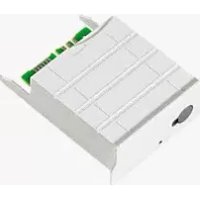
XKM 3100 W - Washing machine MIELE - Free user manual and instructions
Find the device manual for free XKM 3100 W MIELE in PDF.


| Product type | WLAN module |
| Brand | Miele |
| Model | XKM 3100 W |
| Compatibility | Miele appliances: ovens, dishwashers, coffee machines, dryers, washing machines, etc. |
| Features | WLAN connection, LED indicator, WPS/Reset button |
| Connection methods | Via the Miele@mobile App or WPS |
| Power supply | Via the host appliance |
| Safety | Compliant with European directive 1999/5/EC |
| Repairability | Not repairable, replace with original Miele part |
| Box contents | WLAN module XKM 3100 W, installation and mounting instructions |
| LED - Normal status | Flashing green: connection established and data transfer |
| LED - No connection | Solid yellow |
| LED - WPS connection | Alternating flashing red/yellow/green |
| WPS button | Short press to start WPS connection |
| Reset button | Long press (≥10s) to restore factory settings |
| Operating temperature | According to the host appliance |
| Permissible humidity | According to the host appliance |
| Weight | Approx. 50 g |
| Dimensions (approx.) | Approx. 5 x 3 x 1 cm |
| Installation | Insert into the provided housing until it clicks |
| Power disconnection | Disconnect the host appliance before installation |
Frequently Asked Questions - XKM 3100 W MIELE
User questions about XKM 3100 W MIELE
0 question about this device. Answer the ones you know or ask your own.
Ask a new question about this device
Download the instructions for your Washing machine in PDF format for free! Find your manual XKM 3100 W - MIELE and take your electronic device back in hand. On this page are published all the documents necessary for the use of your device. XKM 3100 W by MIELE.
USER MANUAL XKM 3100 W MIELE
Fitting and installation instructions
es Miele@home 2.0
Warning and Safety instructions 27
Caring for the environment 29
Module description and installation 30
Box contents 30
Module description 30
Fitting the WiFi module in Miele domestic appliances 30
Location of module slot: 31
Ovens 31
Microwave combination ovens 31
Steam ovens. 31
Dishwashers 32
Coffee machines 32
Tumble dryers 32
Washing machines and washer-dryers 32
Connecting to a WiFi 33
1.1. Logging in by app 33
Download the Miele@mobile app 33
2. Logging in by WPS 33
This WiFi module complies with current safety requirements. Inappropriate use can, however, lead to personal injury and damage to property.
To avoid the risk of accidents or damage to the module and Miele appliances it is essential to read these fitting and installation instructions before installing the WiFi module. They contain important information for the installation of the WiFi module.
Keep these fitting and installation instructions in a safe place and pass them on to any future owner.
These fitting and installation instructions describe the scope of function of the WiFi module.
Correct application
The WiFi module has the sole function of establishing a WiFi connection between a Miele domestic appliance and a WiFi network within a building.
Availability
Because WiFi technology, as supported by the WiFi module, can be intermittently or completely disrupted, it is not possible to guarantee constant availability of the stated functions. The range of the wireless connection can be increased by using a commercially available WiFi repeater. For more information please consult your Miele dealer or Miele Service.
EU conformity
Miele hereby declares that the WiFi module complies with the fundamental requirements and the other applicable regulations of Directive 1999/5/EC. A complete declaration of conformity can be obtained from the address at the end of these instructions.
Technical safety
-
Check the WiFi module for any visible damage before installation. Do not install or use a damaged WiFi module.
Before connecting the WiFi module, ensure that the connection data on the data plate (fuse rating, voltage and frequency) match the mains electricity supply. If in any doubt, consult a qualified electrician.
A faulty WiFi module must not be repaired. It may only be exchanged for a genuine Miele replacement part.
The WiFi module is only disconnected from the electrical mains supply if: -
the washing machine has been switched off at the wall socket and the plug withdrawn, or
- the mains fuse has been switched off, or
- the screw out fuse has been completely withdrawn, or
- the residual current breaker has been activated.
Disconnect the Miele appliance from the mains power supply before installing or removing the WiFi module.
en - Caring for the environment
Disposal of the packing material
The packaging is designed to protect the appliance from damage during transportation. The packaging materials used are selected from materials which are environmentally friendly for disposal and should be recycled.
Recycling the packaging reduces the use of raw materials in the manufacturing process and also reduces the amount of waste in landfill sites.
Disposing of your old appliance
Electrical and electronic appliances often contain valuable materials. They also contain specific materials, compounds and components, which were essential for their correct function and safety. These could be hazardous to human health and to the environment if disposed of with your domestic waste or if handled incorrectly. Please do not, therefore, dispose of your old appliance with your household waste.
Please dispose of it at your local community waste collection / recycling centre for electrical and electronic appliances, or contact your dealer or Miele for advice. You are also responsible by law for deleting any personal data that may be stored on the appliance being disposed of. Please ensure that your old appliance poses no risk to children while being stored prior to disposal.
Box contents
- XKM 3100 W WiFi module
- Fitting and installation instructions
Module description
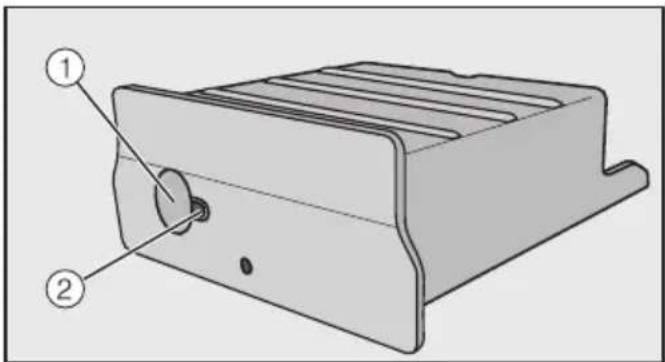
① Button
This button has two functions.
- WPS Push button
A brief press starts the WPS log in procedure.
- Reset button
A longer press (min.10 seconds) resets the WiFi module to the factory default settings.
② LED
Flashes to show the various operating states of the WiFi module.
- Yellow constant, green off
WiFi module is ready for use / no connection established with WiFi network.
- Yellow off, green flashing
Normal operation / connection established with network and data transmission in progress.
Yellow/green/red flashing alternately
WPS log in is in progress.
Fitting the WiFi module in Miele domestic appliances
The WiFi module can only be used in the following Miele domestic appliances:
Ovens and Microwave combination ovens from H 6XXX (B, BP, BM, BPX, BMX)
- Steam ovens, Steam ovens with microwave and Steam combination ovens from DG 6XXX, DGM 6XXX and DGC 6XXX
- Coffee machines from CVA 6XXX
- Dishwashers from G 6XXX
Tumble dryers from T1
- Washing machines from W1
-Washer-dryers from WT 1
Disconnect the Miele appliance from the mains electrical supply before fitting the WiFi module.
The module slot must be freely accessible. Built-in appliances must be removed again in order to access the slot. Observe the appliance operating or installation instructions.
Remove the sticker from the module slot (if present).
Push the WiFi module into the module slot as far as it will go until you hear an audible click.
If you want to connect the appliance with WPS log in to the WiFi router, the button on the WiFi module will need to remain accessible.
Replace the appliance.
- Connect the Miele appliance to the mains electrical supply.
The WiFi module will be active after approx. one minute.
Location of module slot:
Ovens

Microwave combination ovens
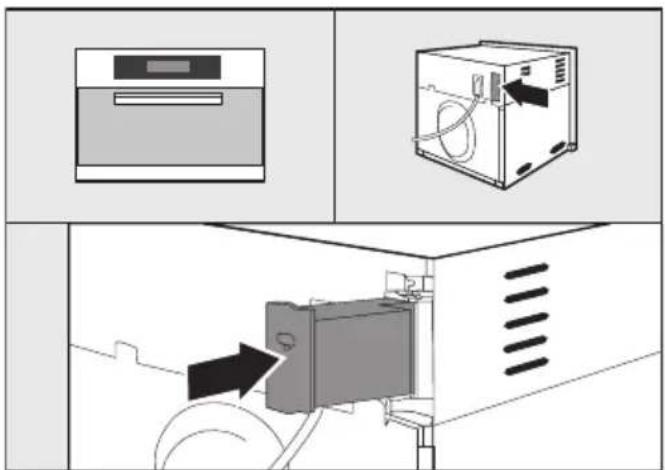
Steam ovens

en - Module description and installation
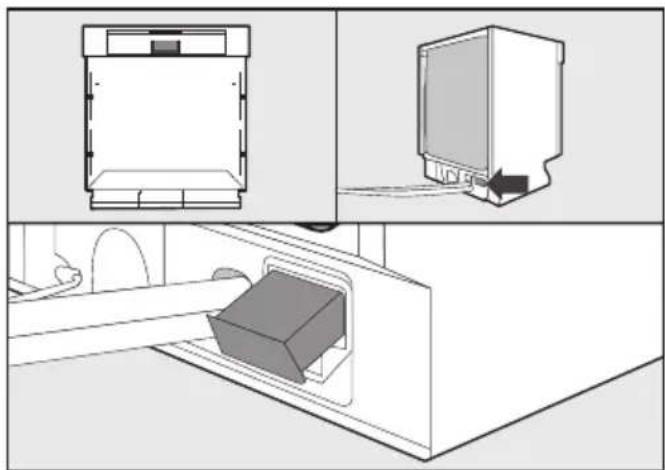
Dishwashers
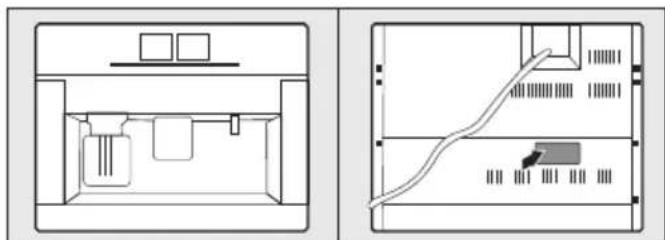
Coffee machines
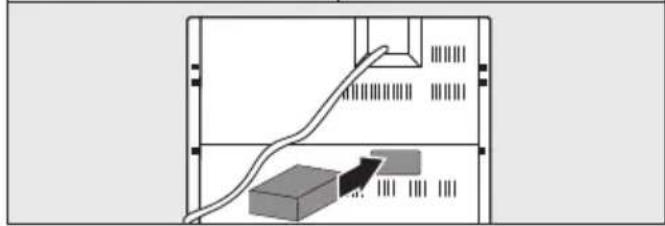
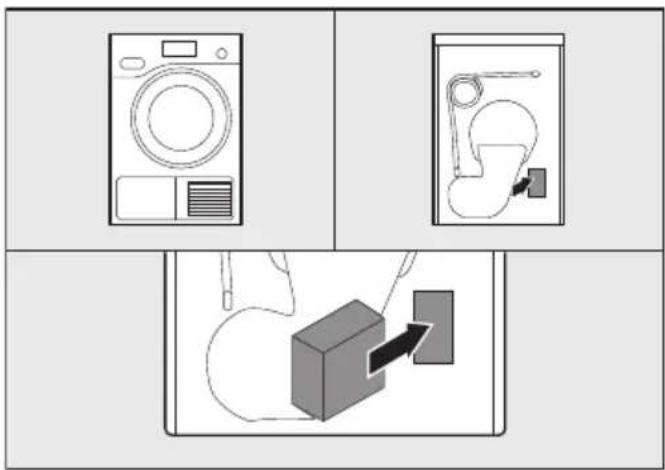
Tumble dryers

Washing machines and washer-dryers

After installing the WiFi module in the Miele appliance, the Miele appliance must be logged in to a local WiFi network. There are two ways of doing this:
1. Logging in by app
Download the Miele@mobile app
The operating system of your mobile device (smartphone / tablet) needs to be at least iOS version 8® or Android 4.4™.
You can get the appropriate "Miele@mobile" app for the WiFi module for free from the respective app stores.
Search in App Store or Google PlayTM for the Miele@mobile app.


- Download the app to your mobile device.
To log in using the app you will need:
- A mobile device with the Miele@mobile app installed on it
- The name of your local WiFi network and the password for it
-
The serial number of your Miele domestic appliance (this can be found on the data plate; see the operating instructions for the appliance)
-
Switch the Miele appliance on.
Start the Miele@mobile app.
Select add Miele appliance.
- Follow the further instructions given by the app.
2. Logging in by WPS
A WiFi router is required with WPS support.
- Switch the Miele appliance on.
- Briefly press the button on the WiFi module.
The LED will begin to flash red / yellow / green.
Activate the WPS function on your WiFi router within two minutes.
The LED will light up green if the WPS log in is successful.
Tip: For some appliances the WPS function can be activated via the Miele@home setting. For more information see the appliance operating instructions.
Please note that the WPS log in is only active for 2 minutes.
1. Connexion via I'App
2. Prijava putem WPS
- Correct application
- Availability
- EU conformity
- Technical safety
- en - Caring for the environment
- Disposal of the packing material
- Disposing of your old appliance
- Box contents
- Module description
- ① Button
- - WPS Push button
- - Reset button
- ② LED
- - Yellow constant, green off
- - Yellow off, green flashing
- Yellow/green/red flashing alternately
- Fitting the WiFi module in Miele domestic appliances
- Location of module slot:
- Ovens
- Microwave combination ovens
- Steam ovens
- en - Module description and installation
- Logging in by app
- Download the Miele@mobile app
- Logging in by WPS
- Connexion via I'App
- Prijava putem WPS
Brand : MIELE
Model : XKM 3100 W
Category : Washing machine