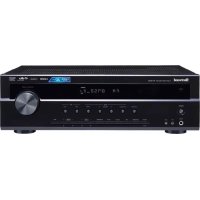
RX4105 - Receiver SHERWOOD - Free user manual and instructions
Find the device manual for free RX4105 SHERWOOD in PDF.



User questions about RX4105 SHERWOOD
0 question about this device. Answer the ones you know or ask your own.
Ask a new question about this device
Download the instructions for your Receiver in PDF format for free! Find your manual RX4105 - SHERWOOD and take your electronic device back in hand. On this page are published all the documents necessary for the use of your device. RX4105 by SHERWOOD.
USER MANUAL RX4105 SHERWOOD
- Read Instructions - All the safety and operating instructions should be read before the product is operated.
- Retain instructions - The safety and operating instructions should be retained for future reference.
- Heed Warnings - All warnings on the product and in the operating instructions should be adhered to.
- Follow Instructions - All operating and use instructions should be followed.
- Cleaning - Unplug this product from the wall outlet before cleaning. Do not use liquid cleaners or aerosol cleaners. Use a damp cloth for cleaning.
- Attachments - Do not use attachments not recommended by the product manufacturer as they may cause hazards.
- Water and Moisture - Do not use this product near water - for example, near a bath tub, wash bowl, kitchen sink, or laundry tub; in a wet basement, or near a swimming pool; and the like.
- Accessories - Do not place this product on an unstable cart, stand, tripod, bracket, or table. The product may fall, causing serious injury to a child or adult, and serious damage to the product. Use only with a cart, stand, tripod, bracket, or table recommended by the manufacturer, or sold with the product. Any mounting of the product should follow the manufacturer's instructions, and should use a mounting accessory recommended by the manufacturer.
- A product and cart combination should be moved with care. Quick stops, excessive force, and uneven surfaces may cause the product
and cart combination to overturn.
- Ventilation - Slots and openings in the cabinet are provided for ventilation and to ensure reliable operation of the product and to protect it from overheating, and these openings must not be
blocked or covered. The openings
should never be blocked by placing the product on a bed, sofa, rug, or other similar surface. This product should not be placed in a built-in installation such as a bookcase or rack unless proper ventilation is provided or the manufacturer's instructions have been adhered to.

PORTABLE CART WARNING
- Power Sources - This product should be operated only from the type of power source indicated on the marking label. If you are not sure of the type of power supply to your home, consult your product dealer or local power company. For products intended to operate from battery power, or other sources, refer to the operating instructions.
- Grounding or Polarization - This product may be equipped with a polarized alternating-current line plug (a plug having one blade wider than the other). This plug will fit into the power outlet only one way. This is a safety feature. If you are unable to insert the plug fully into the outlet, try reversing the plug. If the plug should still fail to fit, contact your electrician to replace your obsolete outlet. Do not defeat the safety purpose of the polarized plug.
AlternateWarnings - This product is equipped with a three-wire grounding-type plug, a plug having a third(grounding) pin. This plug will only fit into a grounding-type power outlet. This is a safety feature. If you are unable to insert the plug into the outlet, contact your electrician to replace your obsolete outlet. Do not defeat the safety purpose of the grouting-type plug. - Power-Cord Protection - Power-supply cords should be routed so that they are not likely to be walked on or pinched by items placed upon or against them, paying particular attention to cords at plugs, convenience receptacles, and the point where they exit from the product.
- Outdoor Antenna Grounding - If an outside antenna or cable system is connected to the product, be sure the antenna or cable system is grounded so as to provide some protection against voltage surges and built-up static charges. Article 810 of the National Electrical Code, ANSI/NFPA 70, provides information with regard to proper grounding of the mast and supporting structure, grounding of the lead-in wire to an antenna discharge unit, size of grounding conductors, location of antenna-discharge unit,
connection to grounding electrodes, and requirements for the grounding electrode. See Figure 1.
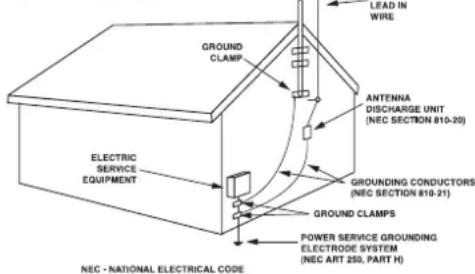
Figure 1 Example of antenna grounding as per National Electrical Code,ANSI/NFPA 70
- Lightning - For added protection for this product during a lightning storm, or when it is left unattended and unused for long periods of time, unplug it from the wall outlet and disconnect the antenna or cable system. This will prevent damage to the product due to lightning and power-line surges.
- Power Lines - An outside antenna system should not be located in the vicinity of overhead power lines or other electric light or power circuits, or where it can fall into such power lines or circuits. When installing an outside antenna system, extreme care should be taken to keep from touching such power lines or circuits as contact with them might be fatal.
- Overloading - Do not overload wall outlets, extension cords, or integral convenience receptacles as this can result in a risk of fire or electric shock.
- Object and Liquid Entry - Never push objects of any kind into this product through openings as they may touch dangerous voltage points or short-out parts that could result in a fire or electric shock. Never spill liquid of any kind on the product.
- Servicing - Do not attempt to service this product yourself as opening or removing covers may expose you to dangerous voltage or other hazards. Refer all servicing to qualified service personnel.
- Damage Requiring Service - Unplug this product form the wall outlet and refer servicing to qualified service personnel under the following conditions:
a) When the power-supply cord or plug is damaged,
b) If liquid has been spilled, or objects have fallen into the product,
c) If the product has been exposed to rain or water,
d) If the product does not operate normally by following the operating instructions. Adjust only those controls that are covered by the operating instructions as an improper adjustment of other controls may result in damage and will often require extensive work by a qualified technician to restore the product to its normal operation.
e) If the product has been dropped or damaged in any way, and
f) When the product exhibits a distinct change in performance - this indicates a need for service.
- Replacement Parts - When replacement parts are required, be sure the service technician has used replacement parts specified by the manufacturer or have the same characteristics as the original part. Unauthorized substitutions may result in fire, electric shock, or other hazards.
- Safety Check - Upon completion of any service or repairs to this product, ask the service technician to perform safety checks to determine that the product is in proper operating condition.
- Wall or Ceiling Mounting - The product should be mounted to a wall or ceiling only as recommended by the manufacturer.
- Heat - The product should be situated away from heat sources such as radiators, heat registers, stoves, or other products (including amplifiers) that produce heat.
Introduction
READ THIS BEFORE OPERATING YOUR UNIT


CAUTION :TO REDUCE THE RISK OF ELECTRIC SHOCK,DO NOT REMOVE COVER (OR BACK).NOUSER- SERVICEABLE PARTS INSIDE.REFER SERVICING TO QUALIFIED SERVICE PERSONNEL.

This symbol is intended to alert the user to the presence of uninsulated "dangerous voltage" within the product's enclosure that may be of sufficient magnitude to constitute a risk of electric shock to persons.

This symbol is intended to alert the user to the presence of important operating and maintenance (servicing) instructions in the literature accompanying the appliance.
WARNING : TO REDUCE THE RISK OF FIRE OR ELECTRIC SHOCK, DO NOT EXPOSE THIS APPLIANCE TO RAIN OR MOISTURE.
Caution regarding installation
Note : For heat dispersal, do not install this unit in a confined space such as a bookcase or similar enclosure.

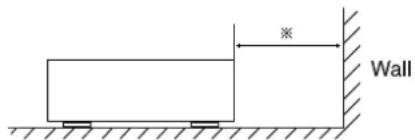
Do not block ventilation openings or stack other equipment on the top.
Note to CATV System Installer :
This reminder is provided to call the CATV system installer's attention to Article 820-40 of the NEC that provides guidelines for proper grounding and, in particular, specifies that the cable ground shall be connected to the grounding system of the building, as close to the point of cable entry as practical.
FCC INFORMATION
This equipment has been tested and found to comply with the limits for a Class B digital device, pursuant to Part 15 of the FCC Rules. These limits are designed to provide reasonable protection against harmful interference in a residential installation. This equipment generates, uses and can radiate radio frequency energy and, if not installed and used in accordance with the instructions, may cause harmful interference to radio communications. However, there is no guarantee that interference will not occur in a particular installation. If this equipment does cause harmful interference to radio or television reception, which can be determined by turning the equipment off and on, the user is encouraged to try to correct the interference by one or more of the following measures:
Reorient or relocate the receiving antenna.
- Increase the separation between the equipment and receiver.
- Connect the equipment into an outlet on a circuit different from that to which the receiver is connected.
- Consult the dealer or an experienced radio/TV technician for help.
Caution: Any changes or modifications in construction of this device which are not expressly approved by the party responsible for compliance could void the user's authority to operate the equipment.
FOR YOUR SAFETY
| U.S.A CANADA | 120 V | Units shipped to the U.S.A and CANADA are designed for operation on 120 V AC only. Safety precaution with use of a polarized AC plug. However, some products may be supplied with a nonpolarized plug. CAUTION : To prevent electric shock, match wide blade of plug to wide slot, fully insert. ATTENTION : Pour éciter chocs électriques, introduire la lame la plus large de la fiche dans la borne correspondante de la prise et pousser jusqu'à au fond. |
CAUTION
- Leave a space around the unit for sufficient ventilation.
- Avoid installation in extremely hot or cold locations, or in an area that is exposed to direct sunlight or heating equipment.
- Keep the unit free from moisture, water, and dust.
- Do not let foreign objects in the unit.
The ventilation should not be impeded by covering the ventilation openings with items, such as newspapers, table-cloths, curtains, etc. - No naked flame sources, such as lighted candles, should be placed on the unit.
- Please be care the environmental aspects of battery disposal.
The unit shall not be exposed to dripping or splashing for use. - No objects filled with liquids, such as vases, shall be placed on the unit.
- Do not let insecticides, benzene, and thinner come in contact with the set.
- Never disassemble or modify the unit in any way.
Notes on the AC power cord and the wall outlet.
The unit is not disconnected from the AC power source(mains) as long as it is connected to the wall outlet, even if the unit has been turned off. - When disconnecting the power cord from the wall outlet, always pull the plug, not the power cord.
- Disconnect the plug from the wall outlet when not using the unit for long periods of time.
- The wall outlet shall be installed near the unit and shall be easily accessible.
CONTENTS
ENGLISH
SAFETY INSTRUCTIONS 2
Introduction
- READ THIS BEFORE OPERATING YOUR UNIT 3
System Connections 5
Front Panel & Remote Controls 7
- REMOTE CONTROL OPERATION RANGE 9
- LOADING BATTERIES 9
Operations
LISTENING TO A PROGRAM SOURCE 10
LISTENING TO RADIO BROADCASTS 12
RECORDING 14
OTHER FUNCTIONS 14
Troubleshooting Guide 15
Specifications 16
System Connections
- Do not plug the AC input cord into the wall AC outlet until all connections are completed.
- Be sure to connect the white RCA pin cords to the L (left) and the red RCA pin cords to the R (right) jacks when making audio connections.
- Make connections firmly and correctly. If not, it can cause loss of sound, noise or damage to the receiver.
- If the electricity fails or the AC input cord is left unplugged for more than several days, the memorized contents will be cleared. Should this happen, memorized them again.
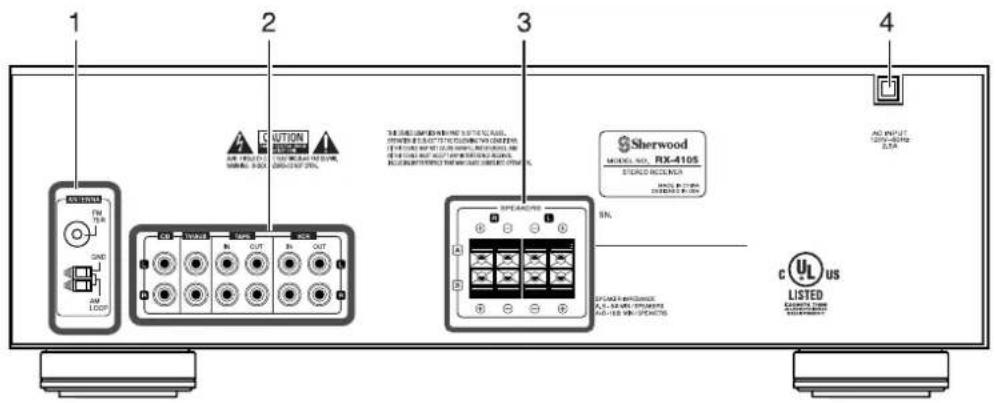
1. CONNECTING ANTENNAS
- Change the position of the FM indoor antenna until you get the best reception of your favorite FM stations.
A 75Ω outdoor FM antenna may be used to further improve the reception. Disconnect the indoor antenna before replacing it with the outdoor one. - Place the AM loop antenna as far as possible from the receiver, TV set, speaker cords and the AC input cord and set it to a direction for the best reception.
- If the reception is poor with the AM loop antenna, an AM outdoor antenna can be used in place of the AM loop antenna.
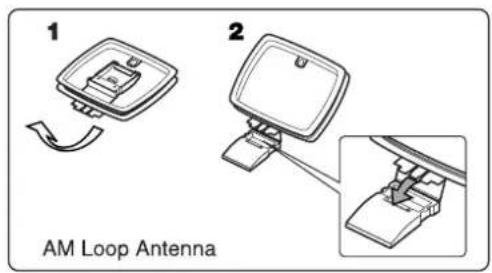
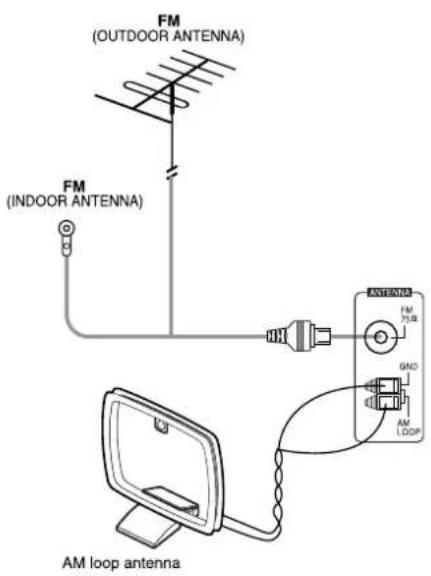
2. CONNECTING AUDIO/VIDEO COMPONENTS
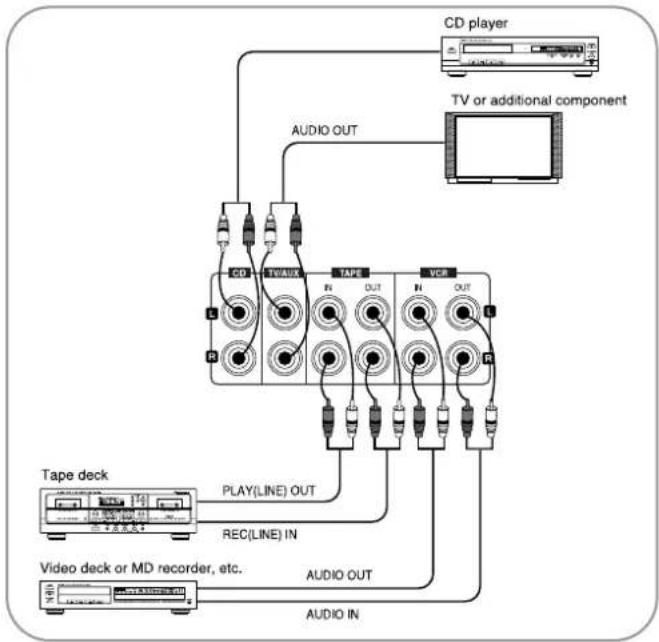
The VCR jacks may also be connected to an additional component such as MD recorder, tape deck, etc.
The TV/AUX jacks may also be connected to an additional component such as a TV, DVD player, etc.
3. CONNECTING SPEAKERS
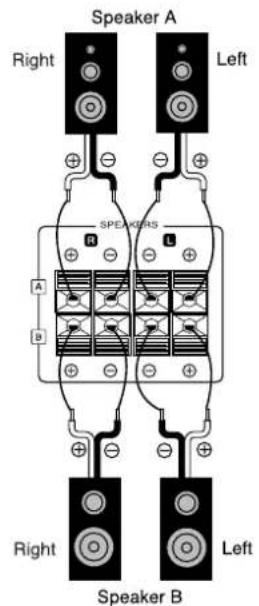
- Usually SPEAKER A terminals are used for only a pair of speakers. When you have another pair of speakers, SPEAKER B terminals can be used.
- Never short-circuit the + and - speaker cords.
- Be sure to connect speakers firmly and correctly according to the channel (left and right) and the polarity (+ and -).
■ Note
- For safe amplifier operation, use the speakers with impedance of over 8 when you use only SPEAKER A or B terminals and use the speakers with impedance of over 16 when you use both SPEAKER A and B terminals.
4. AC INPUT CORD
- Plug this cord into a wall AC outlet.
Front Panel & Remote Controls
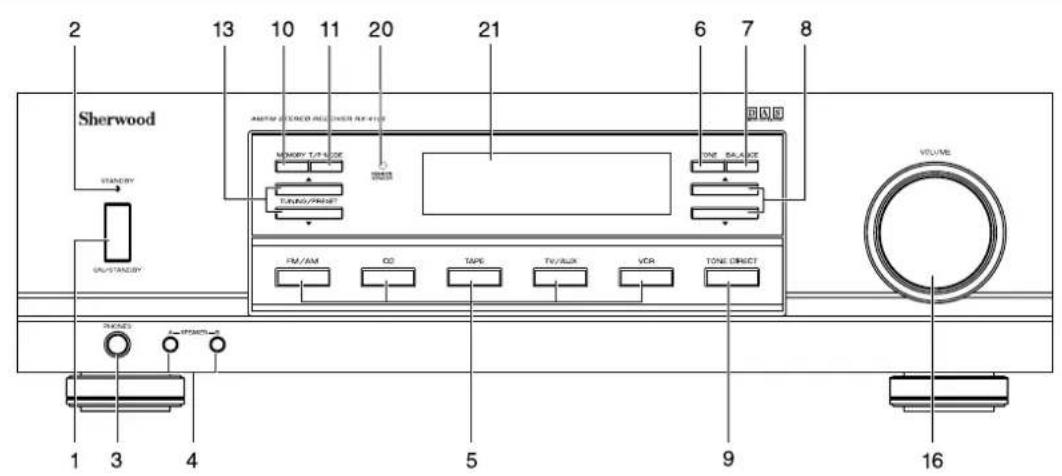
■ FRONT PANEL
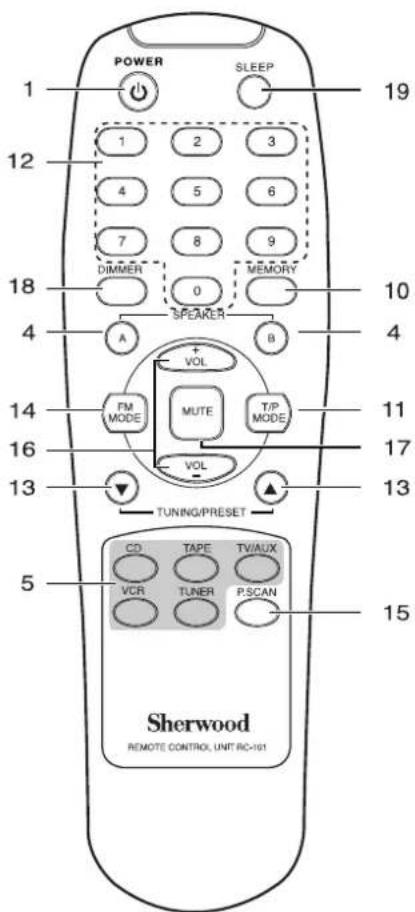
■ REMOTE CONTROLS
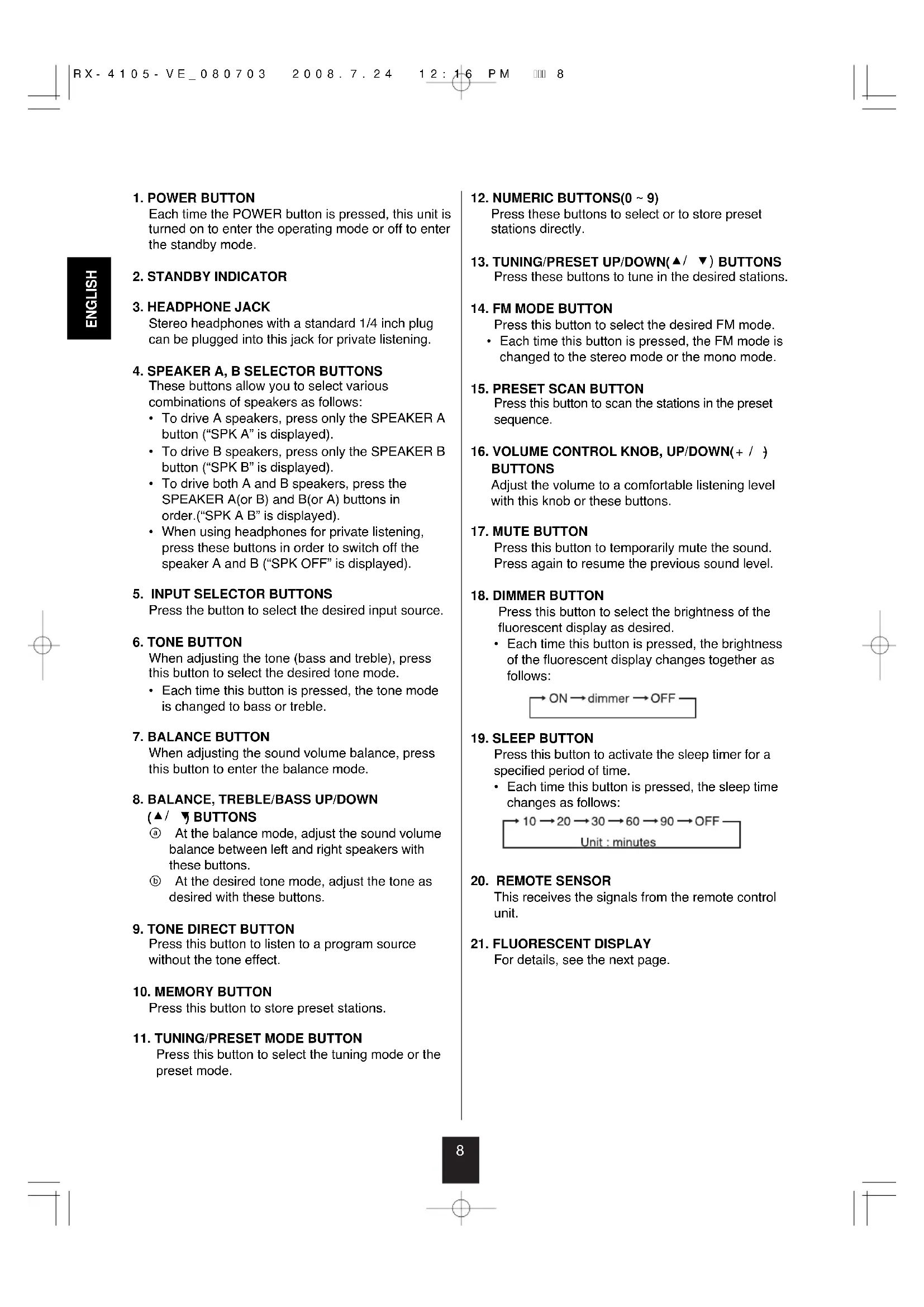
1. POWER BUTTON
Each time the POWER button is pressed, this unit is turned on to enter the operating mode or off to enter the standby mode.
2. STANDBY INDICATOR
3. HEADPHONE JACK
Stereo headphones with a standard 1/4 inch plug can be plugged into this jack for private listening.
4. SPEAKER A, B SELECTOR BUTTONS
These buttons allow you to select various combinations of speakers as follows:
To drive A speakers, press only the SPEAKER A button ("SPK A" is displayed).
- To drive B speakers, press only the SPEAKER B button ("SPK B" is displayed).
To drive both A and B speakers, press the SPEAKER A(or B) and B(or A) buttons in order.("SPK A B" is displayed).
- When using headphones for private listening, press these buttons in order to switch off the speaker A and B ("SPK OFF" is displayed).
5. INPUT SELECTOR BUTTONS
Press the button to select the desired input source.
6. TONE BUTTON
When adjusting the tone (bass and treble), press this button to select the desired tone mode.
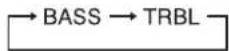
Each time this button is pressed, the tone mode is changed to bass or treble.
7. BALANCE BUTTON
When adjusting the sound volume balance, press this button to enter the balance mode.
8. BALANCE, TREBLE/BASS UP/DOWN
(/BUTTIONS
At the balance mode, adjust the sound volume balance between left and right speakers with these buttons.
At the desired tone mode, adjust the tone as desired with these buttons.
9. TONE DIRECT BUTTON
Press this button to listen to a program source without the tone effect.
10. MEMORY BUTTON
Press this button to store preset stations.
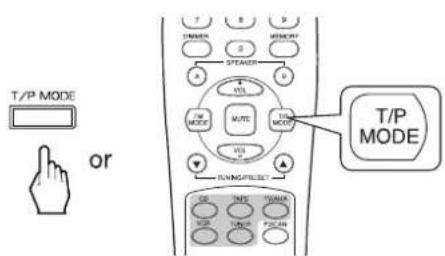
11. TUNING/RESET MODE BUTTON
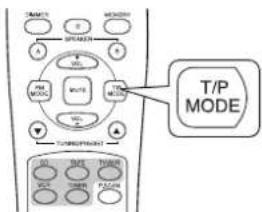
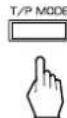
Press this button to select the tuning mode or the preset mode.
12. NUMERIC BUTTONS(0 ~ 9)
Press these buttons to select or to store preset stations directly.
13. TUNING/PRESET UP/DOWN(▲/▼) BUTTONS
Press these buttons to tune in the desired stations.
14. FM MODE BUTTON
Press this button to select the desired FM mode.
Each time this button is pressed, the FM mode is changed to the stereo mode or the mono mode.
15. PRESET SCAN BUTTON
Press this button to scan the stations in the preset sequence.
16. VOLUME CONTROL KNOB, UP/DOWN(+ / ) BUTTONS
Adjust the volume to a comfortable listening level with this knob or these buttons.
17. MUTE BUTTON
Press this button to temporarily mute the sound.
Press again to resume the previous sound level.
18. DIMMER BUTTON
Press this button to select the brightness of the fluorescent display as desired.
Each time this button is pressed, the brightness of the fluorescent display changes together as follows:

19. SLEEP BUTTON
Press this button to activate the sleep timer for a specified period of time.
Each time this button is pressed, the sleep time changes as follows:

20. REMOTE SENSOR
This receives the signals from the remote control unit.
21. FLUORESCENT DISPLAY
For details, see the next page.
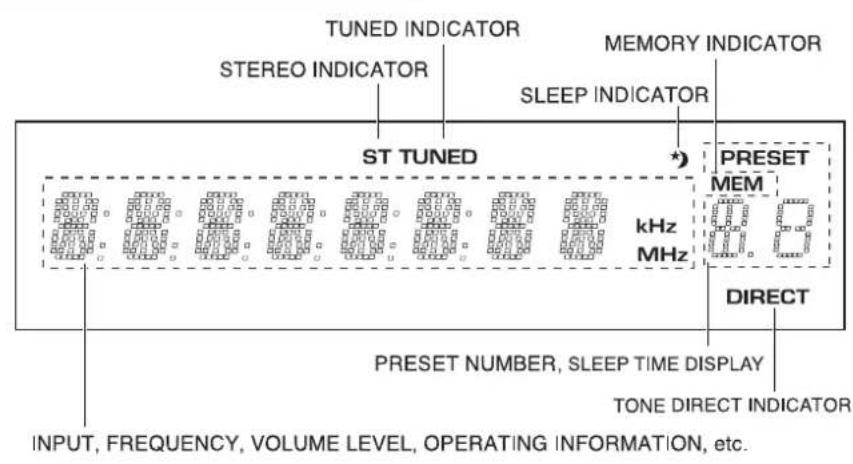
FLUORESCENT DISPLAY
REMOTE CONTROL OPERATION RANGE
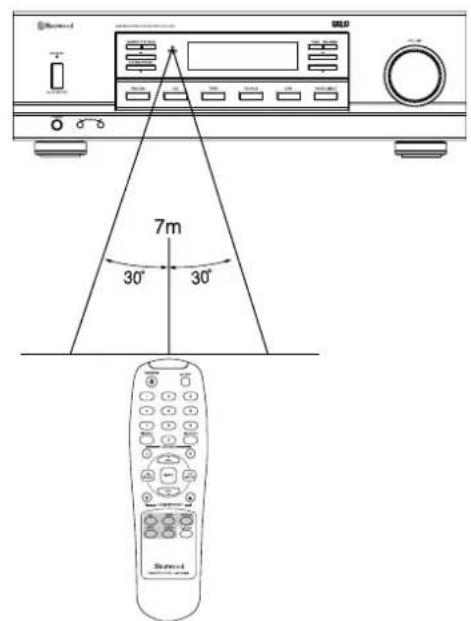
- Use the remote control unit within a range of about 7 meters (23 feet) and angles of up to 30 degrees aiming at the remote sensor.
LOADING BATTERIES
- Remove the cover.
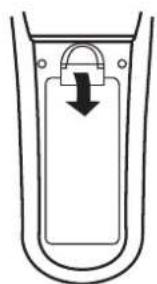
- Load two batteries matching the polarity.
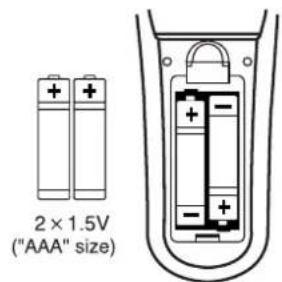
- Remove the batteries when they are not used for a long time.
- Do not use the rechargeable batteries(Ni-Cd type).
Operations
LISTENING TO A PROGRAM SOURCE
ENGLISH
1. Turn the power on.
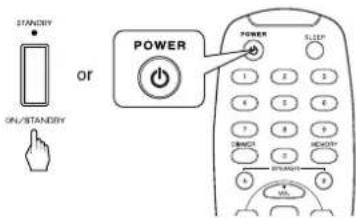
Each time this button is pressed, this unit is turned on to enter the operating mode or off to enter the standby mode.
- In the standby mode, the STANDBY indicator lights up. This means that the receiver is not disconnected from the AC mains and a small amount of current is retained to support the memorized contents and operation readiness.
- In the standby mode, if an INPUT SELECTOR button is pressed, the unit is turned on automatically and the desired input is selected.
2. Switch the desired speakers on.
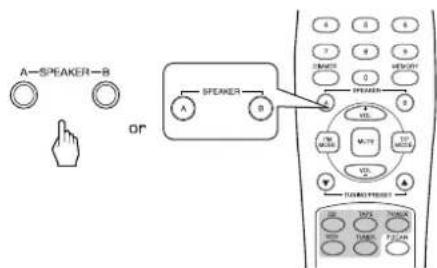
- Then the corresponding speaker indication("SPK A(or/and) B") is displayed and the sound can be heard from the speakers connected to the selected speaker terminals.
- When using the headphones for private listening, press the corresponding SPEAKER button to switch off both A and B speakers.
3. Select the desired input source.
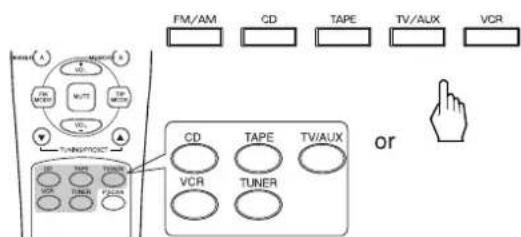
Each time the FM/AM button on the front panel or the TUNER button on the remote control is pressed, the band is changed to AM or FM.
4. Operatethe selected component for playback.
5. Adjust the volume to a comfortable listening level.
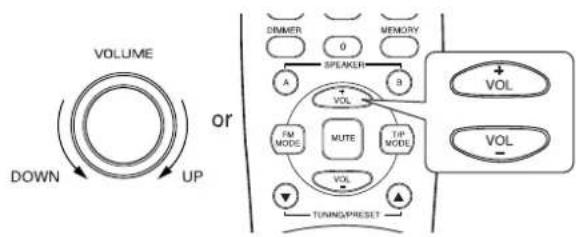
6. To mute the sound.
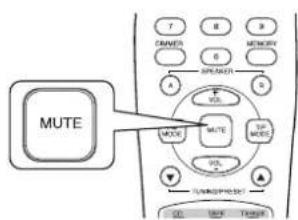
- "MUTE" lights up and flickers.
To resume the previous sound level, press this button again.
7. To listen with the headphones.
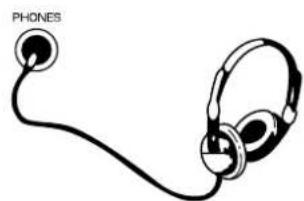
- Be sure to switch off both A and B speakers.
Adjusting the tone(bass and treble)
8. Enter the tone mode.
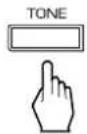
Each time this button is pressed, the corresponding tone mode is selected and shown for 3 seconds as follows:
Note:
- When the tone direct function is activated, the tone mode cannot be entered and "TON DIR" flickers for 3 seconds.
9. At the desired tone mode, adjust the tone as desired.
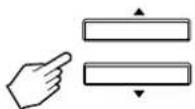
If the tone display disappears, start from the step 8 again.
Notes:
- Extreme settings at high volume may damage your speakers.
In general, the bass and treble levels are adjusted to 0.
10. To listen to a program source without the tone effect.
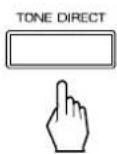
- "TON DIR" is displayed, "DIRECT" lights up and the sound that bypasses the tone circuitry will be heard.
- To cancel the tone direct function, press this button again to display "TON CTRL", and then "DIRECT" goes off.
Adjusting the sound volume balance
11. Enter the balance mode.
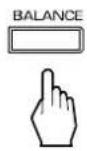
- "BAL" and the balance level is displayed for 3 seconds.
12. Adjust the sound volume balance between the left and right speakers.
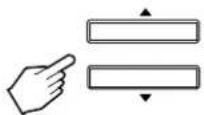
If the balance display disappears, start from the step 11 again.
Note:
In general, the balance level is set to 0.
LISTENING TO RADIO BROADCASTS
Auto tuning
- Select the tuner and then the desired band.
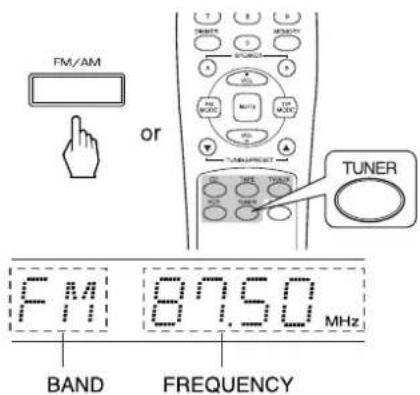
Each time this button is pressed, the band is changed to FM or AM.
- Select the tuning mode.
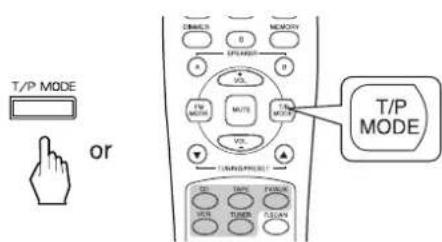
Each time this button is pressed, the mode changes as follows:
Tuning mode:"PRESET"goes off. Presetmode:"PRESET"lightsup.
- Press the TUNING/PRESET UP(▲) or DOWN(▼) button for more than 0.5 second.
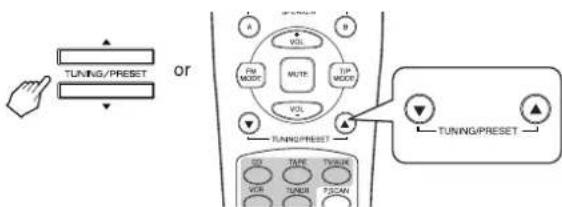
The tuner will now search until a station of sufficient strength has been found. The display shows the tuned frequency and "TUNED".
If the station found is not the desired one, simply repeat this operation.
- Weak stations are skipped during auto tuning.
Manual tuning
- Manual tuning is useful when you already know the frequency of the desired station.
- Perform the steps 1 and 2 in "Auto tuning" procedure and press the TUNING/PRESET UP (▲) or DOWN (▼) button repeatedly until the right frequency has been reached.
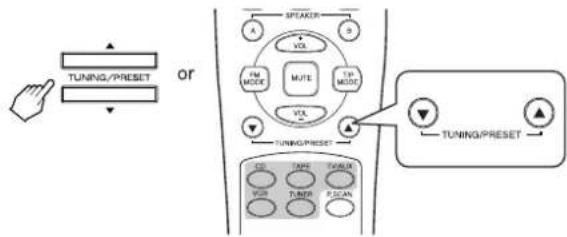
Presetting radio stations
-
You can store up to 30 preferred stations in the memory.
-
Tune in the desired station with auto or manual tuning.
- Press the MEMORY button.
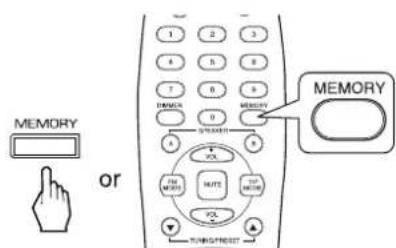
"MEM" is flickering for 5 seconds.
- Select the desired preset number (1~30) and press the MEMORY button.
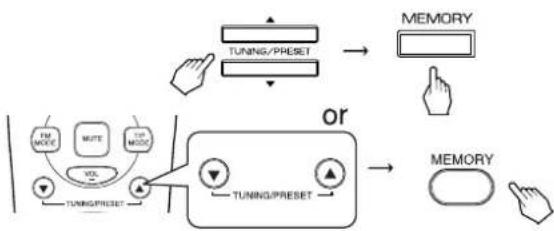
- When using the NUMERIC buttons on the remote control.
Examples)
For "3":
3
For "15":
within 2 seconds
For "30":
The station has now been stored in the memory.
- When using the NUMERIC buttons, the station is stored automatically without pressing the MEMORY button.
- A stored frequency is erased from the memory by storing another frequency in its place.
- If "MEM" goes off, start again from the above step 2.
- Repeat the above steps 1 to 3 to memorize other stations.
The following items, set before the receiver is turned off, are memorized.
- INPUT SELECTOR settings
- Preset stations,etc.
Note
If the electricity fails or the AC input cord is disconnected for more than several days, they are all cleared. So you should memorize them again.
Tuning to preset stations
- After selecting the tuner as an input source, select the preset mode.
-
Then "PRESET" lights up.
-
Select the desired preset number.
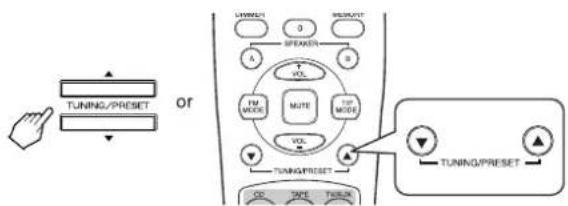
- When using the NUMERIC buttons on the remote control.
Examples)
For "3":
3
For "15":
1
Within 2 seconds
For "30":
- When selecting the desired preset number with the NUMERIC buttons, the desired preset station will be tuned to automatically without selecting the preset mode.
Listening to FM stereo broadcasts
While listening to FM broadcasts,
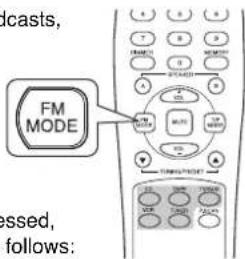

Stereo mode: "ST" lights up
Mono mode : "ST" goes off.
- When FM stereo broadcasts are poor because of weak broadcast signals, select the FM mono mode to reduce the noise, then FM broadcasts are reproduced in monaural sound.
Scanning preset stations in sequence
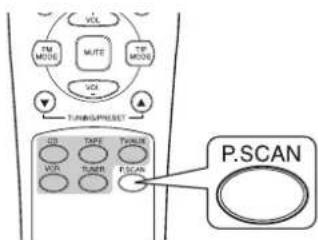
- The receiver will start scanning the stations in the preset sequence.
- At the desired station, press this button again to stop scanning.
RECORDING
The volume, tone(bass, treble) and balance settings have no effect on the recording signals.
- When you select tuner, CD or TV/AUX as a recording source, recording may be made on TAPE or VCR, or both simultaneously.
Recording with TAPE Recording with VCR
- Select the desired input as a recording source except for TAPE.
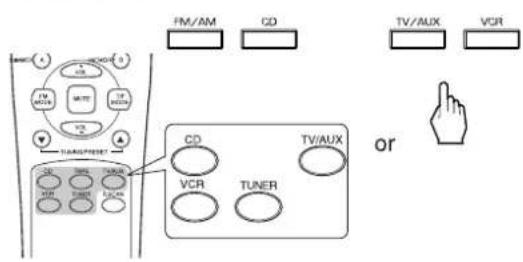
- Start recording on the TAPE.
-
Start play on the desired input.
-
Select the desired input as a recording source except for VCR.
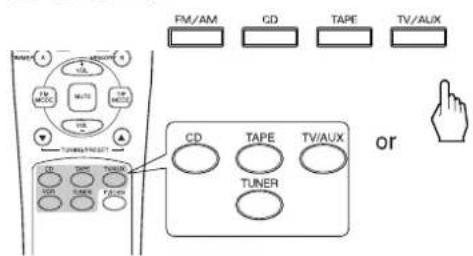
- Start recording on the VCR.
- Start play on the desired input.
The audio signals from the desired input will be recorded onto the VCR.
OTHER FUNCTIONS
Operating the sleep timer
The sleep timer allows the sy to continue to operate for a specified period of time before automatically shutting off.
To set the receiver to automatically turn off after the specified period of time, press the SLEEP button.
Each time this button is pressed, the sleep time changes as follows:

- While operating the sleep timer, "★" lights up.
- When the sleep time is selected, the fluorescent display is dimly lit.
Adjusting the brightness of the fluorescent display
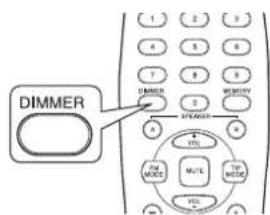
Each time this button is pressed, the brightness of the fluorescent display changes together as follows:

- In the display OFF mode, pressing any button will restore the display ON mode.
Troubleshooting Guide
If a fault occurs, run through the table below before taking your receiver for repair.
If the fault persists, attempt to solve it by switching the receiver off and on again. If this fails to resolve the situation, consult with your dealer. Under no circumstances should you repair the receiver yourself as this could invalidate the warranty.
| PROBLEM POSSIBLE CAUSE REMEDY | ||
| No power | ·The AC input cord is disconnected. ·Poor connection at AC wall outlet or the outlet is inactive. | ·Connect the cord securely. ·Check the outlet using a lamp or another appliance. |
| No sound | ·The speaker cords are disconnected. ·The volume is adjusted too low. ·The MUTE button on the remote control is pressed to ON. ·Speakers are not switched on. ·Incorrect selection of the input source. ·Incorrect connections between the components. | ·Check the speaker connections. ·Adjust the volume. ·Press the MUTE button to cancel the muting effect. ·Press the SPEAKER A or B button to ON. ·Select the desired input source correctly. ·Make connections correctly. |
| Stations cannot be received | ·No antenna is connected. ·The desired station frequency is not tuned in. ·The antenna is in wrong position. | ·Connect an antenna. ·Tune in the desired station frequency. ·Move the antenna and retry tuning. |
| Preset stations cannot be received | ·An incorrect station frequency has been memorized. ·The memorized stations are cleared. | ·Memorize the correct station frequency. ·Memorize the stations again. |
| Poor FM reception | ·No antenna is connected. ·The antenna is not positioned for the best reception. | ·Connect an antenna. ·Change the position of the antenna. |
| Continuous hissing noise during FM reception, especially when a stereo broadcast is received. | ·Weak signals. | ·Change the position of the antenna. ·Install an outdoor antenna. |
| Continuous or intermittent hissing noise during AM reception, especially at night. | ·Noise is caused by motors, fluorescent lamps or lightning, etc. | ·Keep the receiver away from noise sources. ·Install an outdoor AM antenna. |
| No recording | ·Incorrect selection between the components. ·Incorrect operation of each component for playback and recording. | ·Make connections correctly. ·Operate each component correctly. |
| Remote control unit does not operate. | ·Batteries are not loaded or exhausted. ·The remote sensor is obstructed. | ·Replace the batteries. ·Remove the obstacle. |
Specifications
ENGLISH
AMPLIFIER SECTION
Power output, stereo mode, 8 Ω, THD 0.08%, 40 Hz~20 kHz 2X10⁵ W
Total harmonic distortion, 8 Ω, 100 W, 20 Hz~20 kHz 0.04 %
- Intermodulation distortion
60 Hz: 7 kHz= 4:1 SMPTE, 8 Ω, 100 W 0.1%
Input sensitivity, 47k Line 200 mV
- Signal to noise ratio, IHF "A" weighted Line 93 dB
Frequency response Line, 10Hz 95kHz
Output level TAPE/VCR OUT, 2.2k 200 mV
Bass/Treble control, 100Hz / 10kHz
FM TUNER SECTION
Tuning frequency range 87.5~108 MHz
- Usable sensitivity, THD 3%, S/N 30 dB 15 dBf
50 dB quieting sensitivity, mono/stereo 25.2/45.2 dBf
- Signal to noise ratio, 65 dBf, mono/stereo 68/65 dB
Total harmonic distortion, 65 dBf, 1 kHz, mono/stereo 0.5/0.8%
Frequency response, 25Hz 14kHz
- Stereo separation, 1 kHz 35 dB
- Capture ratio 4 dB
IF rejection ratio 80 dB
AM TUNER SECTION
- Tuning frequency range 520~1710 kHz
- Usable sensitivity 800μV/m
- Signal to noise ratio 40 dB
- Selectivity 25 dB
GENERAL
Power supply 120 V~60 Hz
Power consumption 2.5A
Dimensions (W× H× D) 440x138x332 mm(17-3/8x5-7/16x13 inches)
Weight (Net) 9.0 kg(19.85 lbs)
Note: Design and specifications are subject to change without notice for improvements.
CONSIGNES DE SECURITE
INFORMATIONS RELATIVES AU FCC
ECOUTE D'UNE SOURCE PROGRAMMEE
Adjusting the tone(bass and treble)
m = 311