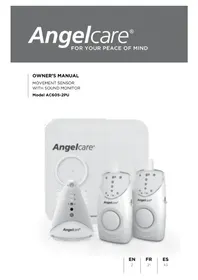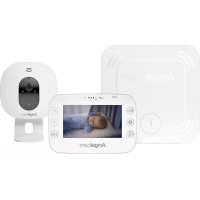
AC201 - Baby monitors ANGELCARE - Free user manual and instructions
Find the device manual for free AC201 ANGELCARE in PDF.



| Product type | Baby movement and sound monitor |
| Brand | Angelcare |
| Model | AC201 (non-rechargeable version) / AC201-R (rechargeable version) |
| Main functions | Movement detection, audio monitoring, absence of movement alarm, sound and movement LED indicators, A/B channel selection |
| Monitoring modes | Sound & Movement, Tic Off, Sound Only |
| Baby unit power supply | 4 AAA alkaline batteries (in case of power failure) + included AC adapter |
| Parent unit power supply | Model AC201: 4 AAA alkaline batteries + AC adapter; Model AC201-R: rechargeable Ni-MH battery (charged via adapter) |
| Battery life | Varies with usage; blinking orange LED indicates low battery |
| Range | Up to several meters (no range indicator) |
| Channels | 2 channels (A and B) |
| Movement detection | 2 passive movement sensors to be placed under the mattress |
| Audio monitoring | Built-in microphone in the baby unit, radio transmission to the parent unit |
| Sound display | 4 yellow LEDs on the parent unit indicating sound intensity |
| Alarm | Triggers after 15 seconds without movement (pre-alarm), then continuous alarm after additional 5 seconds |
| AC adapter included | Yes, for both units |
| Safety | Passive sensors (no current), cables out of reach (minimum 1 meter from crib), non-medical use |
| Maintenance and cleaning | Unplug before cleaning; dust with a dry cloth; do not immerse; for sensors, damp cloth with mild antiseptic |
| Warranty | 1 year, covers material and manufacturing defects |
| Included accessories | 2 movement sensors with cables, 2 AC adapters, 2 units (baby and parent), user guide |
| Important note | Does not replace direct supervision; do not use for twins in the same crib |
Frequently Asked Questions - AC201 ANGELCARE
User questions about AC201 ANGELCARE
0 question about this device. Answer the ones you know or ask your own.
Ask a new question about this device
Download the instructions for your Baby monitors in PDF format for free! Find your manual AC201 - ANGELCARE and take your electronic device back in hand. On this page are published all the documents necessary for the use of your device. AC201 by ANGELCARE.
USER MANUAL AC201 ANGELCARE
Movement & Sound Monitor
Movement & Sound Monitor (Rechargeable)
5 Easy Steps to Operate Your AngelcareMonitor 4
Warnings 5
Instructions 5
Testing Your AngelcareMonitor 5
Operating tips 5
Troubleshooting
NO - INNHOILDSFORTEGNEALSE
Garanti 23
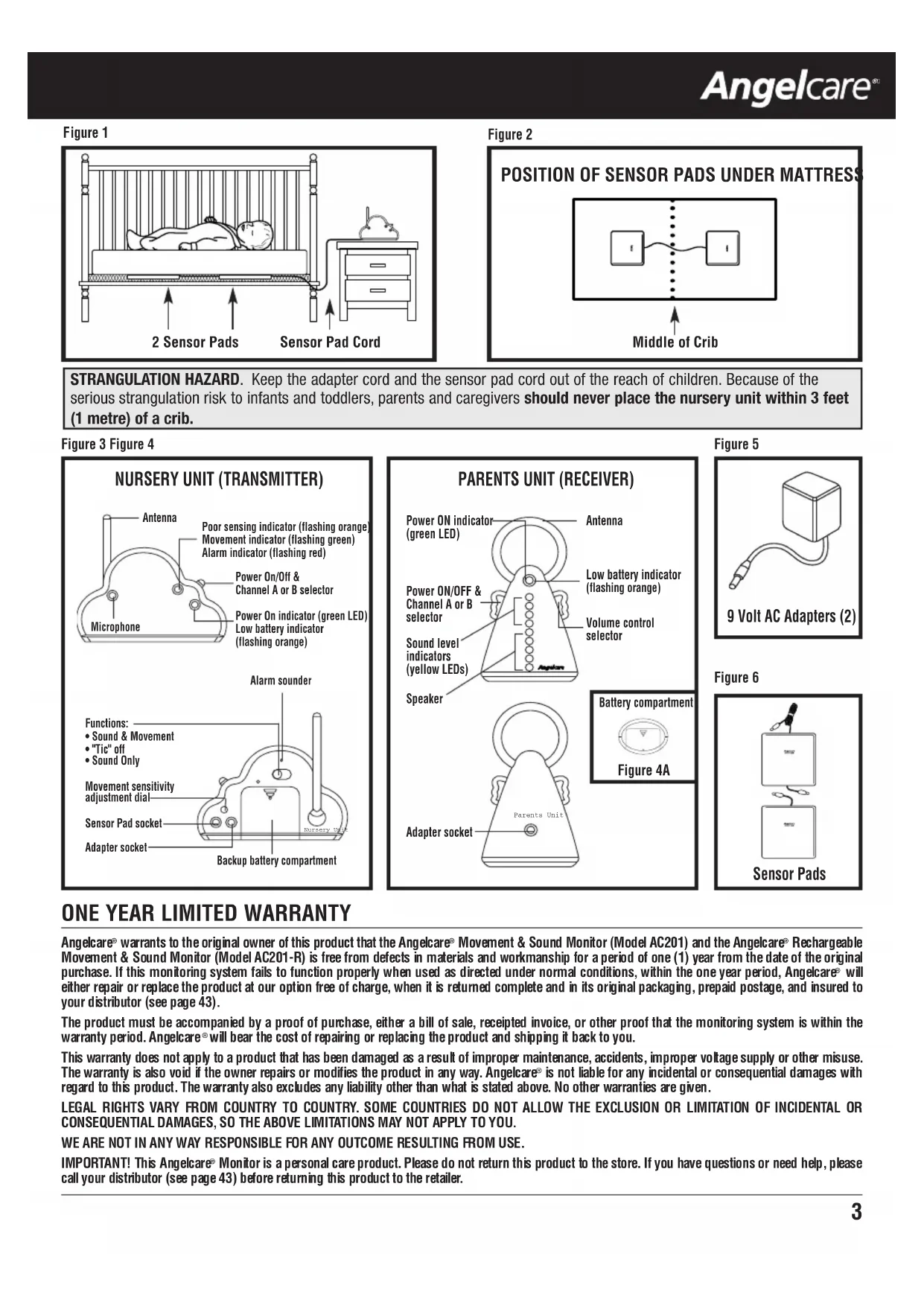
STRANGULATION HAZARD. Keep the adapter cord and the sensor pad cord out of the reach of children. Because of the serious strangulation risk to infants and toddlers, parents and caregivers should never place the nursery unit within 3 feet (1 metre) of a crib.
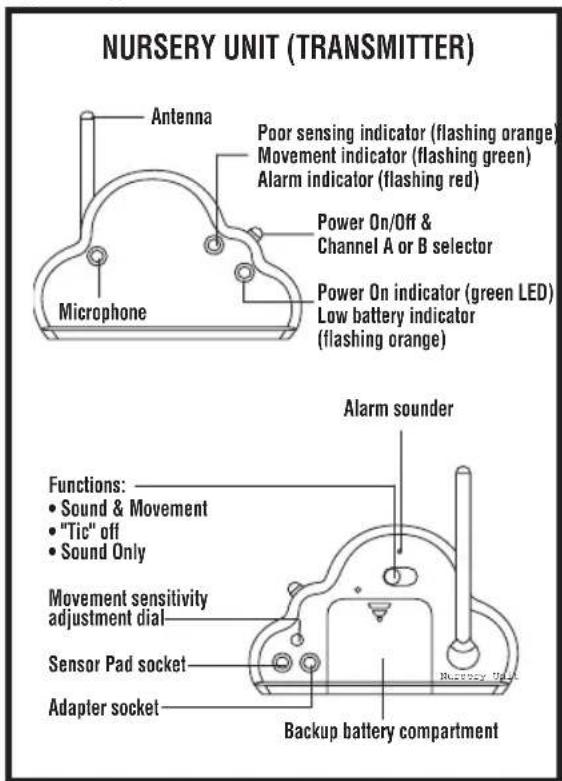
Figure 3 Figure 4
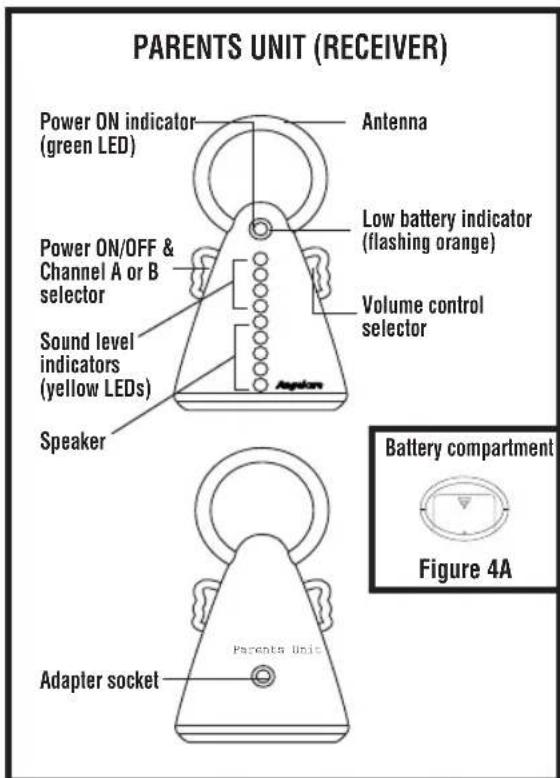
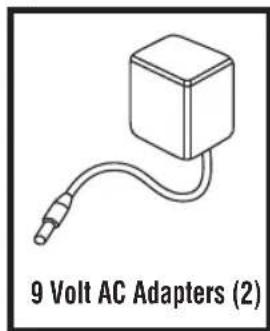
Figure 5
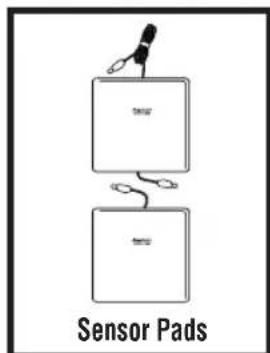
Figure 6
ONE YEAR LIMITED WARRANTY
Angelcare warrants to the original owner of this product that the Angelcare Movement & Sound Monitor (Model AC201) and the Angelcare Rechargeable Movement & Sound Monitor (Model AC201-R) is free from defects in materials and workmanship for a period of one (1) year from the date of the original purchase. If this monitoring system fails to function properly when used as directed under normal conditions, within the one year period, Angelcare will either repair or replace the product at our option free of charge, when it is returned complete and in its original packaging, prepaid postage, and insured to your distributor (see page 43).
The product must be accompanied by a proof of purchase, either a bill of sale, receipted invoice, or other proof that the monitoring system is within the warranty period. Angelcare will bear the cost of repairing or replacing the product and shipping it back to you.
This warranty does not apply to a product that has been damaged as a result of improper maintenance, accidents, improper voltage supply or other misuse. The warranty is also void if the owner repairs or modifies the product in any way. Angelcare is not liable for any incidental or consequential damages with regard to this product. The warranty also excludes any liability other than what is stated above. No other warranties are given.
LEGAL RIGHTS VARY FROM COUNTRY TO COUNTRY. SOME COUNTRIES DO NOT ALLOW THE EXCLUSION OR LIMITATION OF INCIDENTAL OR CONSEQUENTIAL DAMAGES, SO THE ABOVE LIMITATIONS MAY NOT APPLY TO YOU.
WE ARE NOT IN ANY WAY RESPONSIBLE FOR ANY OUTCOME RESULTING FROM USE.
I t i t t t t t t t t t t t t t t t t t t t t t t t t t t t t t t t t t t t t t t t t t t t t t t t t t t 0
5 EASY STEPS TO OPERATE YOUR ANGELCARE MONITOR
STEP 1. SENSOR PADS
Connect the two Sensor Pads together using the shorter wires. Position Sensor Pads as illustrated (Figures 1 and 2). If you are using a bassinet or small crib, position the one Sensor Pad with 2 cords under mattress. Connect the long Sensor Pad cord to the Nursery Unit (Figure 3). The printed side of Sensor Pads MUST face up. DO NOT tuck thick bedding under the edges of the mattress.
Sensor Pads must rest on a completely flat and rigid surface. If your crib has a flexible or uneven base (metal spring base, etc.), place a piece of 6mm (1/4^) plywood to cover the full size of the crib base.
STEP 2. NURSERY UNIT (TRANSMITTER)
- Insert 4 AAA batteries into Nursery Unit (for battery backup in case of power failure).
- Connect Sensor Pads to Nursery Unit (Figures 3 and 6).
- On the back of the Nursery Unit, select 1 of the 3 functions of how you want to monitor your baby from the Parents Unit:
Sound & Movement: To hear sounds, see sound lights and hear a "Tic" sound with every movement baby makes.
Tic off: Same as Sound & Movement function BUT without the "Tic" sound.
Sound Only: To hear sounds and see sound lights on Parents Unit.
- Connect AC adapter to Nursery Unit and plug adapter into an electrical outlet.
NOTE: The sensitivity adjustment has been preset. DO NOT ADJUST UNLESS NECESSARY. If poor capture of movement (orange flashing light) or false alarm occurs, consult the Movement Sensitivity Adjustment section.
STEP 3. PARENTS UNIT (RECEIVER)
Model AC201: Insert 4 AAA batteries into Parents Unit. Or, connect AC adapter to Parents Unit and plug adapter to an electrical outlet.
Model AC201-R: The pre-installed NiMh rechargeable batteries need to be charged for 15 hours continuously before first-time use. To charge, connect the AC adapter to the Parents Unit. Plug AC adapter to an electrical outlet (Figure 4). The batteries will charge as long as it is connected to a powered AC adapter. The position of the switches will not effect charging.
For longest battery life, recharge the Parents Unit when the orange Low Battery light flashes. Batteries need to be charged for 12 hours continuously.
NOTE: Only the Parents Unit is rechargeable in Model AC201-R.
- Adjust the volume control to the desired level.
STEP 4. TO USE MONITOR
Place baby in crib and switch both units ON by selecting either channel A or B. If reception is not clear, switch to other channel. Make sure both units are on the same channel. When removing baby from crib, switch Nursery Unit to the OFF position. If you forget to switch OFF, a "pre-alarm Tic" will sound after 15 seconds as a reminder.
To avoid feedback (whistling sound), keep both units at least 3 meters apart (10 feet).
STEP 5. BATTERY MODE
- When unplugging AC adapter from each unit, make sure unit is switched OFF. Otherwise, unit will revert to battery mode.
- The monitor will revert to battery mode during a power failure only if batteries are inserted in both units. Insert batteries into Nursery Unit and Parents Unit for Model AC201. When orange Low Battery indicator flashes, change batteries promptly (or recharge Parents Unit for Model AC201-R).
Note:
- Test your Angelcare Monitor BEFORE first-time use and then on a periodic basis.
- When monitor is in use, DO NOT use crib mobile or other crib accessories that produce vibrations. Alarm will not sound as monitor is still detecting movement.
- The Angelcare Monitor is perfectly safe. The Sensor Pads and their cords are entirely passive. They carry no electrical current and do not radiate any form of energy. The Nursery Unit emits only very low power radio signals through its antenna. These signals do not present a safety hazard.
- Your monitor can be used in any crib or sleeping area (that has no motion or vibration) designed to safely hold a baby.
- To monitor twins, you need one AC201 Movement & Sound Monitor and one AC100 Movement Monitor. The sound monitor of the AC201 is sufficient to monitor both babies in the same room. Having two AC201 Movement & Sound Monitors in one room will cause interference. Do not use the Angelcare® to monitor movement of two babies in one crib or bassinet.
Warnings
- This product is NOT a medical device nor a device to prevent cases of Sudden Infant Death Syndrome (SIDS).
- This product is NOT a substitute for direct supervision of your baby. Check your baby's activities at regular intervals. Monitor of premature babies, or those considered to be at risk, should be carried out only under the supervision of a doctor or health professional.
- The Sensor Pads may detect movement from many sources from both inside and outside your baby's room, for example: far washing machines, loud music, etc. Ensure that all vibration sources are eliminated before using the Angelcare Monitor. Avoid contact with crib when monitor is in use. Refer to the Movement Sensitivity Adjustment and Troubleshooting sections.
- ALWAYS place both units on flat surface in an upright position, away from baby's reach.
- DO NOT touch the end of the adapter cord when plugged into an electrical outlet.
- The Angelcare Monitor uses public airwaves to transmit signals. The Parents Unit may pick up signals or interference from other nursery monitors in your area. Your monitor may even be picked up by other households. To protect your privacy, make sure both units are in the OFF position when not in use.
- This product should be serviced by qualified personnel. There are no user serviceable parts inside monitor. Refer all service questions to your distributor (see page 43).
Instructions
RETAIN INSTRUCTIONS: Keep user's manual for future reference.
WATER, MOISTURE AND HEAT DAMAGE: Keep all components away from water (sink, bath tub, swimming pool) and places that emit help (stove, radiator).
VENTILATION: ALWAYS place both units on flat surface in an upright position so that air can flow freely around them.
AC POWER SOURCE: Use ONLY the AC adapters supplied with the Angelcare Monitor.
CORD PROTECTION: Avoid damage to the cords of the Sensor Pads and adapters. Route cords so that they are not likely to be walked or pinched by items placed upon or against them.
CLEANING: Disconnect all units before cleaning. DO NOT immerse water. Use a dry cloth to keep monitor free from dust. DO NOT spray with cleaning products or solvents. Wipe Sensor Pads with a very slightly damp cloth with an antiseptic or mild detergent.
OBJECT AND LIQUID ENTRY: Care should be taken so that objects do not fall onto units and that liquids are not spilled into either unit or Sensor Pads through their openings.
NON-USE PERIODS: When not using monitor for long periods, remove the batteries from both units and disconnect the AC adapter from electrical outlet.
Testing Your Angelcare Monitor
Note: Test your Angelcare Monitor BEFORE first-time use and then on a periodic basis.
The Angelcare Monitor can be used outside of the crib, in a differenYellow Sound Lights
s t t or mattress. Consult the Movement Sensitivity Adjustment section.
Step 1. On the Nursery Unit, switch to the "Sound Only" function. Have someone else speak into the Nursery Unit or place a radio near
Nursery Unit. You should hear sound from the Parents Unit. If there is no sound, refer to the Troubleshooting section. Make sure that both units are on the same channel, either both on A or B. If reception is not clear, switch to other channel.
Step 2. Test monitor to detect movement. Switch Nursery Unit to the "logSound & Movement" function. The Movement indicator light will flash red, green and then emit a single "Tic" sound. Place your hand on the mattress. The green light will continue to flash with your every movement. Remove hand from mattress. Due to no movement, a "pre-alarm Tic" sound will emit after 15 seconds. 5 seconds later, the alarm will sound and the red light will flash continuously.
NOTE: If alarm does not sound, the Sensor Pads may be detecting a continuous vibration from the floor, a strong draft or the crib is being touched. Avoid contact with crib when monitor is in use. Place crib near a solid supporting wall and away from strong air currents. The sensitivity of the Sensor Pads may need to be reduced, consult the Movement Sensitivity Adjustment section.
Step 3. To stop alarm, place your hand lightly on mattress for Sensor Pad to reselect movement. The red Alarm indicator light on the Nursery Unit will continue to flash 1 minute (Figure 3).
Step 4. Verify that the battery mode is functional by operating both units without the AC adapters. The green Power light should appear on both units.
Parents Unit: When orange Low Battery indicator light appears, replace batteries promptly for Model AC201. For Model AC201-R, recharge Parents Unit for 12 hours.
Nursery Unit: When orange Low Battery indicator light appears a rapid "clicking" is heard, replace batteries promptly. If not, the light will eventually turn red and the monitor will stop working.
Operating Tips
eMovement Sensitivity Adjustment
The sensitivity adjustment dial has been preset to suit most situations. However in certain circumstances, the sensitivity may not be ideal. DO NOT increase sensitivity unless false alarms occurs and you have followed the advice in the Troubleshooting section for false alarms. Make a note of the pre-set position of the dial should you wish to return to it.
The movement indicator light on the Nursery Unit will flash orange when monitor barely detects movement. This could be a result of: baby being in a very deep sleep or baby having moved away from Sensor Pad to edge of crib. If alarm does NOT sound, no adjustment of sensitivity is required. If the Movement indicator light flashes orange most of the time with baby directly over the location of either Sensor Pad, a false alarm may occur. If this happens, adjust the sensitivity.
To adjust sensitivity, increase dial to the next setting. Retest monitor.
rChannel selection for sound reception
Make sure that both units are on the same channel, either both on A or B. If reception is not clear, switch to other channel. If interference persists, consult the Troubleshooting section.
NOTE: This monitoring system is NOT equipped with an out-of-range indicator. No sound will be received if the Parents Unit and Nursery Unit are too far apart.
AC power source
Model AC201: The AC adapters should be used whenever possible to extend the battery life. Batteries can be kept in units while using A power source.
Model AC201-R: Use AC adapter on Nursery Unit whenever possible to extend the battery life. For Parents Unit, use AC adapter only to charge NiMh batteries.
Replacing the rechargeable batteries (Model AC201-R only)
When the NiMh batteries in the Parents Unit will not charge or only hold their charge for a short period of time, batteries need to be replaced. Use only rechargeable batteries in the Parents Unit. Plug the Parents Unit into an electrical outlet. Allow new batteries to charge continuously for 15 hours.
TROUBLESHOOTING
| Problem Possible Cause Solution | ||
| False alarms. | ·Baby was removed from crib and Nursery Unit was not switched OFF. ·Sensor Pad cord not connected properly to Nursery Unit. ·Sensor Pads are not in full contact with crib mattress, or crib mattress is not resting on a completely flat or rigid surface. ·Baby has moved away from Sensor Pads, to the edge of the crib. | ·Turn Nursery Unit to the OFF position. ·Verify the connection between the Sensor Pad and Nursery Unit. Unplug and reconnect the cord. ·Make sure there is no bedding between mattress and Sensor Pads. Sensor Pads must rest on a completely flat and rigid surface. If your crib has a flexible or uneven base (metal spring base, etc.), place a piece of 6 mm (1/4") plywood to cover the full size of the crib base. ·Make sure Sensor Pads are positioned as described in the 5 Easy Steps section. Sensitivity may need to be adjusted to consult the Movement Sensitivity Adjustment section. |
| Alarm will not sound. | ·Nursery Unit is detecting movement when crib is being touched. ·Nursery Unit is detecting movement from outside the crib such as motorized devices, strong drafts, etc... ·Sensitivity is set too high. | ·Avoid contact with the crib when monitor is ON. ·Place crib near a solid supporting wall to avoid Sensor Pad from detecting movement from outside crib. ·You may need to decrease the sensitivity, consult the Movement Sensitivity Adjustment section. |
| Movement indicator light is flashing orange (monitor is barely detecting movement). | ·Sensor Pads are not in full contact with crib mattress, or crib mattress is not resting on a completely flat or rigid surface. ·Baby is in a very deep sleep or has moved away from Sensor Pads, to the edge of the crib. | ·Make sure there is no bedding between mattress and Sensor Pads. Sensor Pads must rest on a completely flat and rigid surface. If your crib has a flexible or uneven base (metal spring base, etc.), place a piece of 6 mm (1/4") plywood to cover the full size of the crib base. ·Make sure Sensor Pads are positioned as described in the 5 Easy Steps section. Consult Movement Sensitivity Adjustment section. |
| No sound is being transmitted. | ·Units are too far apart. ·Batteries are low or improperly installed. ·AC adapters are not connected properly or electrical outlet out of order. ·One of the units is not ON. ·Units are set to different channels. | ·Bring Parents Unit closer to Nursery Unit. ·Check / replace batteries or recharge Parents Unit (Model AC201-R only). ·Ensure both units are ON. ·Make sure both units are on the same channel, either both A or B. |
| Power ON indicator (green light) does not light up. | ·Batteries are low or improperly installed. ·AC adapters are not connected properly or electrical outlet is out of order. ·One of the units is not ON. | ·Check / replace batteries or recharge Parents Unit (Model AC201-R only). ·Check connections or change to another electrical outlet. ·Make sure both units are ON and on the same channel, either both A or B. |
| Very weak reception. | ·Units are too far apart. ·One or both units are placed near a large metal mass. ·One or both units are not in the upright position. ·Batteries are low. | ·Bring units closer together. ·Change the position of one or both units. ·Place units on flat surface away from baby's reach. ·Replace the batteries or recharge Parents Unit (Model AC201-R only). |
| Static, distortion, interference (interference from other monitors, wireless phones, walkie-talkies, etc...). | ·Parents Unit is out of range. ·Units are set to different channels. ·Parents Unit located near motorized devices, fluorescent lights, television, etc... | ·Bring units closer together. ·Make sure both units are ON and on the same channel, either both on channel A or B. ·Rotate Parents Unit or move it away from source of interference. |
| Feedback (loud noises emitted from Parents Unit). | ·Units are too close to each other. | ·Move units farther apart (at least 3 meters / 10 feet apart) |
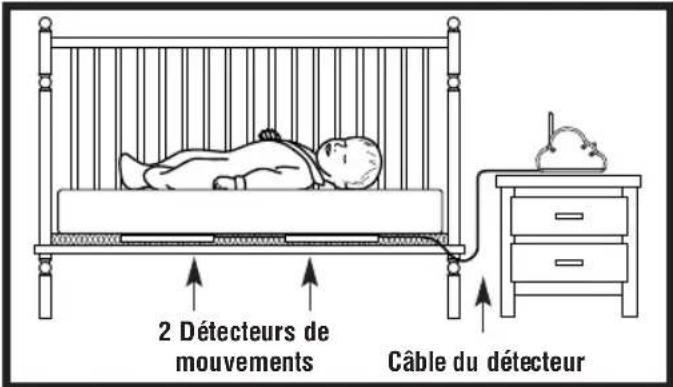
Figure 1
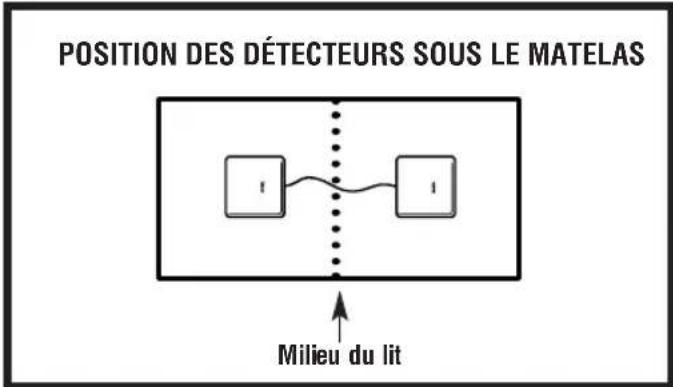
Figure 2
STEG 2. BARNKAMMARENHET (SANDARE)
This device complies with Part 15 of the FCC Rules. Operation is subject to the following two conditions: (1) This device may not cause harmful interference, and (2) This device must accept any interference received, including interference that may cause undesired operation.
This equipment has been tested and found to comply with the limits for Class B Digital Device, pursuant to Part 15 of the FCC Rules. These limits are designed to provide reasonable protection against harmful interference in a residential installation. This equipment generates and can radiate radio frequency energy and, if not installed and used in accordance with the instructions, may cause harmful interference to radio communications. However, there is no guarantee that interference will not occur in a particular installation. If this equipment does cause harmful interference to radio or television reception, which can be determined by turning the equipment off and on, the user is encouraged to try to correct the interference by one or more of the following measures.
Reorient or relocate the receiving antenna
- Increase the separation between the equipment and receiver
- Connect the equipment into an outlet on a circuit different from that to which the receiver is connected
- Consult the dealer or an experienced radio/TV technician for help
Any changes or modifications not expressly approved by the party responsible for compliance could void the user's authority to operate the equipment.
L'UTILISATION DE CE DISPOSITIF EST AUTORISÉE SEULEMENT AUX CONDITIONS SUIVANTES: (1) IL NE DOIT PAS PRODUIR DE BROUILLAGE, ET (2) L'UTILISATEUR DU DISPOSITIF DOIT ÉTRE PRET À ACCEPTER TOUT BROUILLAGE RADIOÉLECTRIQUE REÇU, MÈME SI CE BROUILLAGE EST SUSCEPTIBLE DE COMPROMETTURE LE FONCTIONNEMENT DU DISPOSITIF.
User Guide Statement
Angelcare Monitors Inc. declares that the AC201 and AC201-R are in conformity with all essential requirements and other relevant provisions of the R&TTE Directive (1999/5/EC):
This product is marked with C0165 which signifies conformity with Class II product requirements specified in the R&TTE Directive.