BikePilot - Gps BLAUPUNKT - Free user manual and instructions
Find the device manual for free BikePilot BLAUPUNKT in PDF.



| Product type | GPS navigation for bike |
| Brand | Blaupunkt |
| Model | BikePilot |
| Dimensions (approx.) | 90 x 55 x 20 mm |
| Weight (approx.) | 150 g |
| Power supply | Integrated rechargeable battery (Lithium-Ion) |
| Battery life (approx.) | 10 hours in normal use |
| Display | Color resistive touchscreen |
| Navigation | Voice and visual guidance, OpenStreetMap (OSM) maps |
| Main functions | Navigation, trip computer, training, route planning (Tour), track and favorites memory |
| Connectivity | USB port, microSD card reader (card not included) |
| GPS reception | GPS satellite, requires at least 4 satellites, does not work indoors or in tunnels |
| Mounting bracket | Bicycle handlebar mount included |
| Operating temperature | -10°C to 50°C (estimate) |
| Maintenance and cleaning | Clean with a soft dry cloth, avoid abrasive products. Protect from prolonged sun exposure to prevent overheating. |
| Safety | Do not use while riding, securely attach to handlebar, remove the device when parking to prevent theft. |
| Warranty | 36 months from the date of purchase, subject to presentation of the receipt |
| After-sales service | Contact the manufacturer via the Blaupunkt website, do not return without prior agreement |
Frequently Asked Questions - BikePilot BLAUPUNKT
User questions about BikePilot BLAUPUNKT
0 question about this device. Answer the ones you know or ask your own.
Ask a new question about this device
Download the instructions for your Gps in PDF format for free! Find your manual BikePilot - BLAUPUNKT and take your electronic device back in hand. On this page are published all the documents necessary for the use of your device. BikePilot by BLAUPUNKT.
USER MANUAL BikePilot BLAUPUNKT
First Service Center
Kleine Duselstr. 21
DE-30171 Hannover
Thank you for choosing a Blaupunkt navigation system for bicycles.
A sound decision! We wish you every success and many exciting kilometres with your new BikePilot.
It goes without saying that we will be glad to assist you after your purchase if needs be.
If you have a technical question or problem, you can reach us by telephone on +49 (0)511 / 123 83 506 or by email at support@first-servicecenter.de
The full handbook, as well as versions in other languages can be downloaded from www.blaupunkt.de
Please register your product on our website without delay.
This allows you to take advantage of the latest software, the most up-to-date maps etc. - and mostly free of charge, of course.
You can order new and additional map material via our website: www.blaupunkt.de or at our online store: http://www.blaupunkt-store.de
Please note!
- Modifications may be made to the product without prior notice being given. We would like to apologise in advance for any inconvenience that this may cause.
- Please make backup copies of the GPS navigation device data. Blaupunkt cannot accept any liability for the loss of map data or other data.
- The manual has been carefully checked. Nevertheless, errors cannot be entirely excluded. Should you discover an error, please contact customer service: First Service Center.
- Please read the instructions contained in this manual carefully, and use only Blaupunkt accessories so as to avoid the possibility of damage. Failure to observe the instructions will void all guarantees and can present a hazard to your personal safety. In such cases Baros GmbH, Blaupunkt Mobility Division cannot accept any liability.
- Due to developments in traffic conditions, the data contained in electronic navigation maps may not always correspond with the existing traffic signs. Follow the rules of the road, pay attention to road signs and ride in a manner appropriate to the prevailing conditions. Operating the GPS navigation device while in motion can cause serious accidents. Baros GmbH, Blaupunkt Mobility Division accepts no liability for accidents and losses arising from improper use.
- You will find information on software updates and upgrades at: www.blaupunkt.de
The figures in the manuals correspond in each case with the object concerned; according to model they may differ slightly.
To operate the device, please use ONLY a blunt stylus or your fingertips. The screen surface is susceptible to scratching. Do not use sharp instruments or long fingernails to operate the device.
For your own safety's sake, do not operate the device while riding your bicycle!
Make sure that you use the product as intended. It is only intended as an aid during travel. It is not suitable for use where precise distance measurement, direction measurement or cartography are to be performed.
The computed route is only intended as an aid to navigation. It is the responsibility of the person in charge of the vehicle to pay attention to road signs, no-entry signs and local road conditions.
Your BikePilot uses mapping material from Open Street Map (OSM). These maps
are drawn up and continuously extended through community effort. It is possible that, depending on the country and locality, they may not be complete in some regions. We would like to ask you to excuse such omissions. Nevertheless, the maps provided by OSM are the best ones available to our knowledge. Especially in off-road areas these maps offer unbeatable advantages, and we are sure that you will come to appreciate them on your bike trips.
When you leave your bicycle unattended, please make sure that the device is not exposed to direct sunlight over a long period of time. If the battery overheats, this can lead to serious damage to the device as well as to malfunctions. And please bear in mind that it may be stolen! We advise you to remove the BikePilot whenever you leave your bicycle unattended and to switch it off or to standby mode.
The GPS satellite system is operated by the United States Government.
The United States Government is exclusively responsible for the performance and functioning of the GPS signal. Any modification to the GPS system may affect its accuracy and precision.
With the exception of glass, the GPS signal cannot penetrate solid objects. If you are inside a building or tunnel, the GPS signal will not be received.
At least 4 GPS satellites are needed to determine one's position. The reception quality can be affected by external influences such as bad weather. Problems can also arise under avenues of trees with dense foliage, in woods or between high buildings.
Other wireless devices or on-board electronics of vehicles can interfere with the GPS signal reception or give rise to unstable positioning.
Operating elements
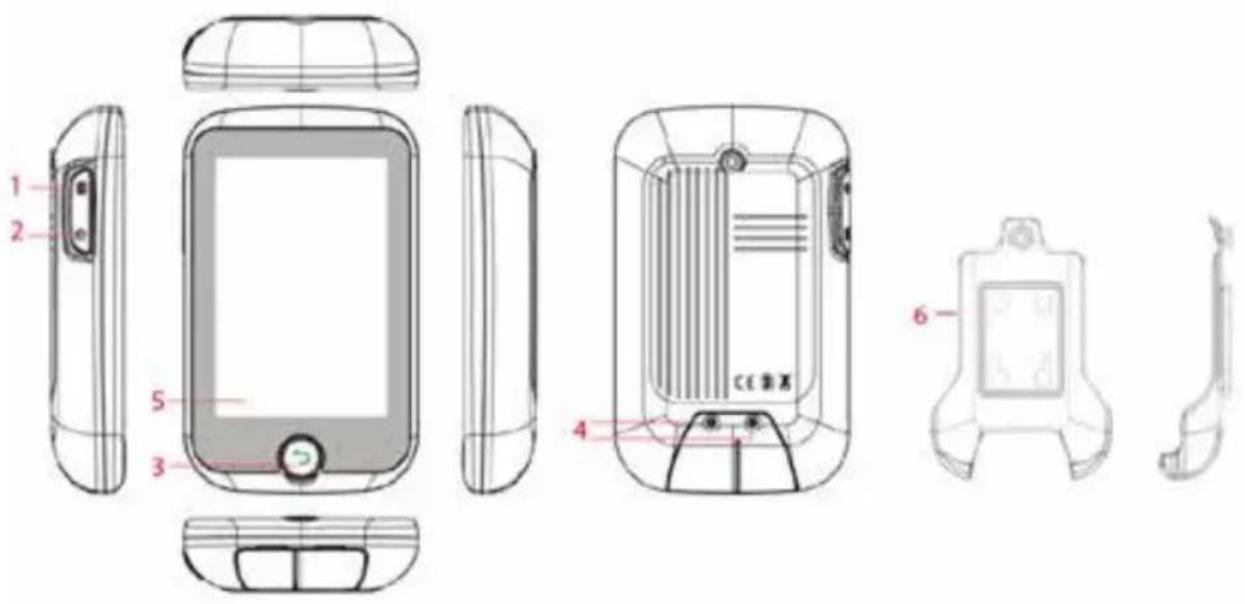
| 1. Function key 2. ON/OFF switch | |
| 3. Central menu key 4. | Slot for mini SD card and USB connection (both beneath the cover) (An SD card is not included in the scope of delivery) |
| 5. Touch display 6. Holder | |
1 Discover the possibilities
1.1 Main menu
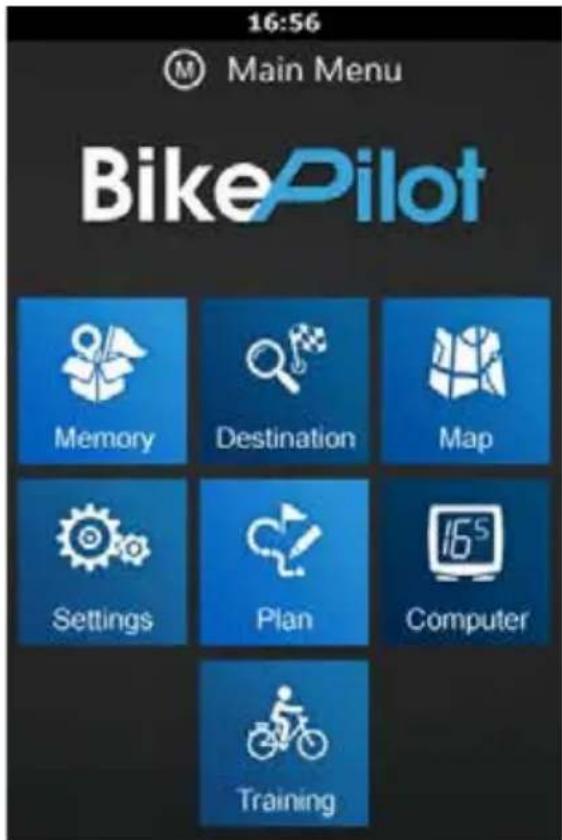
On start-up, the main menu issues a welcome message. Here you can choose between Map, Computer, Storage, Training, Destination, Tour and Settings.
Note: The display may vary from model to model.
Note: Use the Menu key (4) on the front to jump to the previous menu level.
1.2 Map
In map mode you can see where you are at the moment, follow navigation instructions, store your present position under 'Favourites', record your trip or search for addresses and locations.
1.3 Computer
The computer menu displays data and other information about your trip.
You can choose between two layouts with two or four visible display fields respectively.
Use the keys on the bottom bar to make adjustments.
The content of the information fields can be changed by touching the screen.
1.4 Memory
The memory menu displays your stored and imported routes and favourites.
You can also access all stored data via this sub-menu.
1.5 Training
You can set up your own training programmes based on a variety of options such as distance, time and calories.
1.6 Destination
You can select your navigation target in the Destination menu.
1.7 Tour plan (with altitude display)
Our pioneering 'Tour' function enables you to set up tours very easily.
By touching the screen you can add or remove new points on the route easily, modify
sub-routes, store the route for re-use at a later date and navigate towards
destinations using the start key.
1.8 Settings
The Settings menu allows you to modify and fine-tune the functionality of your
device. You can
- configure system options,
manage your accounts, - change the language,
- change the sound settings,
- display information about your product,
- change the brightness of the background lighting and set how long it remains lit up,
- and set the date, time and time zone.
2 Using the device for the first time
When you switch on the device for the first time (or again after it has been reset to the factory settings), certain items of data must be entered.
2.1 Language setting & EULA
Select the language you would like to use; read and confirm the End User Licence Agreement (EULA).
2.2 Accounts
Set up an account and make any device adjustments that suit your requirements. To acknowledge an item, touch it on the screen.
2.3 Date and time
You can set the date and time via GPS or manually. If you choose 'GPS', only the format and the time zone can be set.
With manual setting it is also possible to adjust the date and time.
3 Mounting the bracket on your bicycle
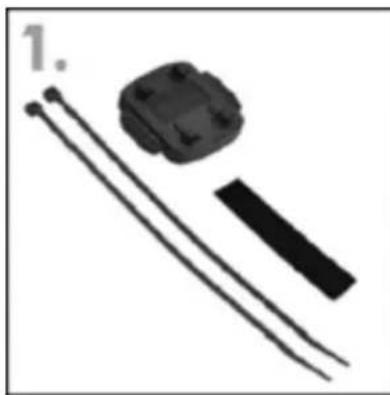
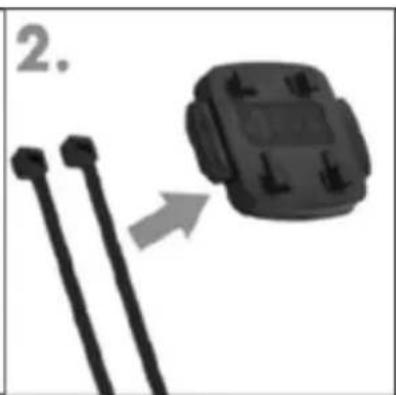
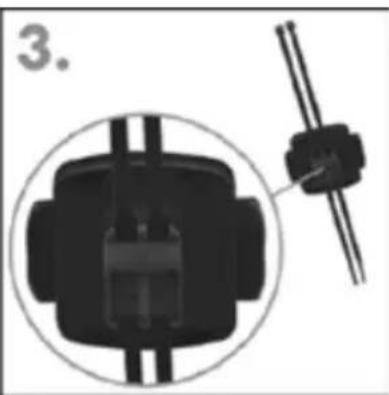
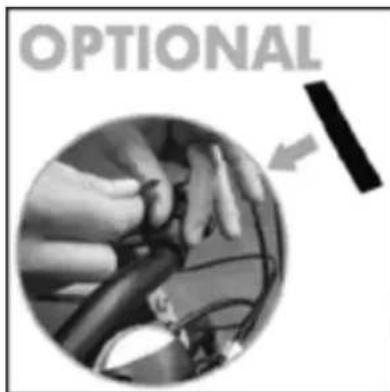
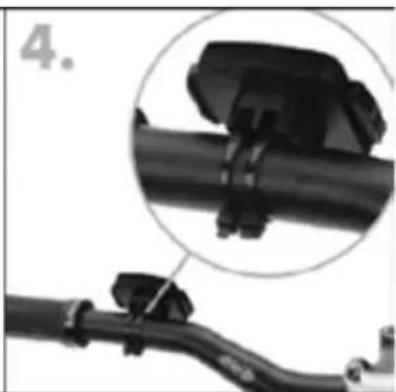
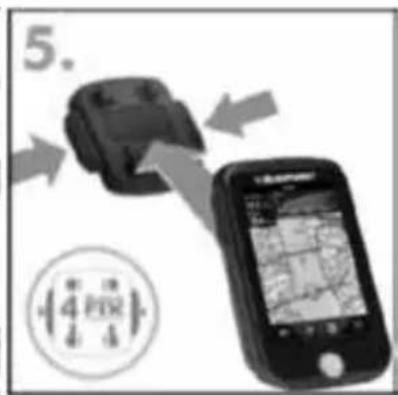
Please attach the navigation system to your bicycle in such a way that it will not cause injury if an accident occurs or you fall.
Turn the screen to a position that ensures minimum glare through reflection. The bracket should be attached to the handlebars in such a way that it can be seen as easily as possible with the least possible glare.
When you leave your bicycle unattended we recommend that you remove the device so that it does not get stolen!
Note!
Check whether any local laws regarding limitations to the attachment of items to bicycles apply!
Do not fix the device close to gear mechanisms or any other items in such a way that may impede the operation or affect the safety of your bicycle.
Warranty declaration
Please retain the receipt for this device at least until the guarantee period expires, as you will need it if you wish to lodge a claim later.
You (the end user) have a guarantee period of 36 months from the date of purchase. The device has been manufactured in accordance with state-of-the-art manufacturing procedures and subjected to stringent quality control.
If a defect should arise during the guarantee period, please contact only the manufacturer and the dealer who sold the device to you.
Hotline: +49 (0)511 - 123 83 506 or support@first-servicecenter.de
The warranty does not apply to damage caused by improper use or external influences
(water, falling, sunlight, impact or breakage).
Customer service / Contact
If your device should be defective or you have a problem with it, please send it to us at the address given below, bearing in mind the following points.
- Always send the device in the original packaging.
- Include a covering letter with a description of the error and your full address as well as
- a copy of the receipt.
- Please make sure the packet has sufficient postage.
Service Centre address:
First Service Center
Kleine Duselstr. 21
30171 Hanover, Germany
You can call our telephone hotline on: +49 (0)511 - 123 83 506 or send us a fax to +49 (0)511 - 161 253 6 or email us at: support@first-servicecenter.de
Declaration of Conformity
Hereby Baros GmbH declares, that the device Navigationsystem Blaupunkt BikePilot is in compliance with the essential requirements and other relevant regulations of Directive 1999/5/EC. The Declaration of Conformity can be found at: blaupunkt.com