
PowerShot ELPH 100 HS - Camera CANON - Free user manual and instructions
Find the device manual for free PowerShot ELPH 100 HS CANON in PDF.
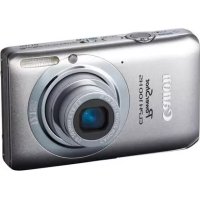

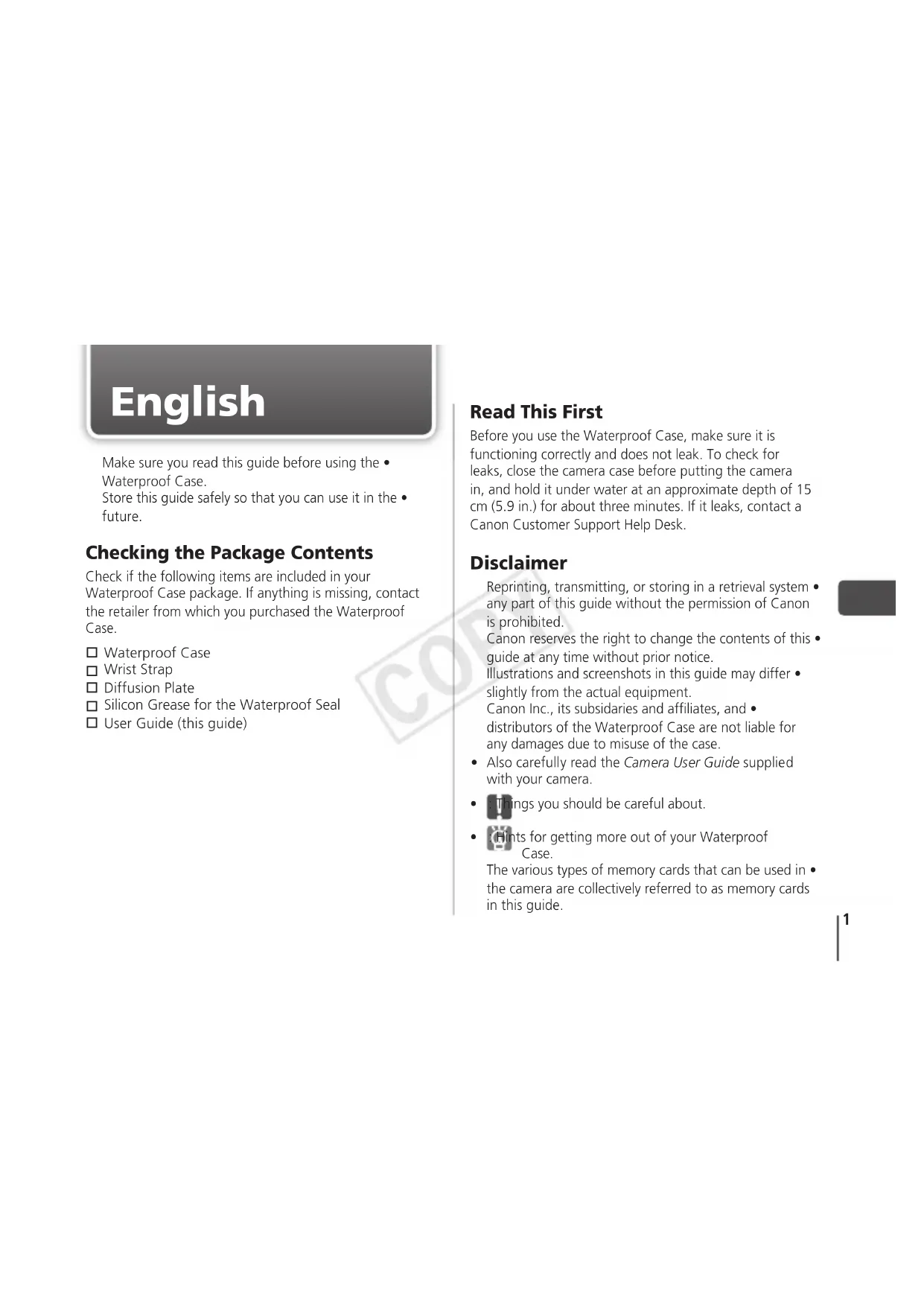


| Product Type | Waterproof Camera Housing |
| Brand | Canon |
| Compatible Model | PowerShot ELPH 100 HS |
| Water Resistance | IPX8, maximum depth 40 meters |
| Body Material | Polycarbonate |
| External Dimensions | 128.8 x 81.3 x 66.4 mm (excluding protruding parts) |
| Weight | Approx. 235 g (with diffusion plate) |
| Operating Temperatures | 0 to 40 °C |
| Seal | O-ring seal, annual replacement recommended |
| Main Functions | Underwater use up to 40 m, access to controls (zoom, shutter, video, functions), flash diffused via diffusion plate |
| Maintenance | Rinse with fresh water after sea use, dry completely, apply silicone grease to seal |
| Safety | Do not use as a flotation device, avoid shocks and high temperatures, check seal before each dive |
| Spare Parts | Seal O-ring, diffusion plate, wrist strap, silicone grease |
| Repairability | Contact Canon customer service for seal replacement |
| Box Contents | Waterproof housing, wrist strap, diffusion plate, silicone grease, user guide |
Frequently Asked Questions - PowerShot ELPH 100 HS CANON
User questions about PowerShot ELPH 100 HS CANON
0 question about this device. Answer the ones you know or ask your own.
Ask a new question about this device
Download the instructions for your Camera in PDF format for free! Find your manual PowerShot ELPH 100 HS - CANON and take your electronic device back in hand. On this page are published all the documents necessary for the use of your device. PowerShot ELPH 100 HS by CANON.
USER MANUAL PowerShot ELPH 100 HS CANON
User Guide
Russian
Canon Digital Camera Waterproof Case
Instruction Manual
Chinese
Japanese
Read this first
Make sure you read this guide before using the Waterproof Case.
Store this guide safely so that you can use it in the future.
Checking the Package Contents
Check if the following items are included in your Waterproof Case package. If anything is missing, contact the retailer from which you purchased the Waterproof Case.
Waterproof Case, Wrist Strap, Diffusion Plate, Silicon Grease for the Waterproof Seal, User Guide (this guide)
Read This First
Before you use the Waterproof Case, make sure it is functioning correctly and does not leak. To check for leaks, close the camera case before putting the camera in, and hold it under water at an approximate depth of 15 cm (5.9 in.) for about three minutes. If it leaks, contact a Canon Customer Support Help Desk.
Disclaimer
Reprinting, transmitting, or storing in a retrieval system any part of this guide without the permission of Canon is prohibited.
Canon reserves the right to change the contents of this guide at any time without prior notice.
Illustrations and screenshots in this guide may differ slightly from the actual equipment.
Canon Inc., its subsidiaries and affiliates, and distributors of the Waterproof Case are not liable for any damages due to misuse of the case.
- Also carefully read the Camera User Guide supplied with your camera.
- Things you should be careful about. Hints for getting more out of your Waterproof Case.
The various types of memory cards that can be used in the camera are collectively referred to as memory cards in this guide.

Safety Precautions
Before using the Waterproof Case, ensure that you read the safety precautions below. Always ensure that the Waterproof Case is operated correctly.
The safety precautions noted on the following pages are intended to prevent injuries to yourself and other persons, or damage to the equipment.

Warning
Denotes the possibility of serious injury or death.

Caution Denotes the possibility of injury.
Caution
Denotes the possibility of damage to the Waterproof Case and camera.

Warning
Be sure to remove the camera after using the Waterproof Case.
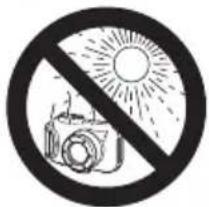
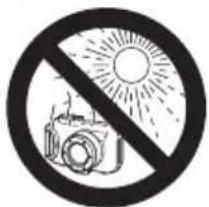
Leaving the camera in the Waterproof Case and placing it in direct sunlight or other places subject to high temperatures may result in fire, or cause the case to burst.
Do not use the Waterproof Case as a personal flotation device (such as a life preserver).

Caution
Immediately turn off the camera if the Waterproof Case leaks.
Leaks could result in fire or electrical shock. Thoroughly wipe the Waterproof Case interior and the camera dry and contact a Canon Customer Support Help Desk.
Caution
Be careful of condensation.
Moving the Waterproof Case rapidly between hot and cold temperatures may cause condensation (water droplets) to form on its internal surfaces. If this occurs, stop using the camera as the condensation may cause a malfunction. Remove the camera, and wipe off the condensation from the case and camera with a soft, dry cloth so that it is completely dry.
Do not insert the camera with the strap attached. Do not press the buttons or lever with unnecessary force when using the case underwater.
Do not spray the waterproof seal with tap-water. Do not damage the waterproof seal, or allow dirt to accumulate between the waterproof seal and the case.
Do not disassemble or modify the Waterproof Case. The above actions could cause leaks.
Avoid using or storing the Waterproof Case in the following places.
Depths exceeding 40 meters (130 ft.).
Places subject to temperatures above 40°C (104°F).
Avoid placing or storing the Waterproof Case in the following places.
Places subject to strong sunlight.
Humid or dusty areas.
Near substances such as
naphthalene or insecticides.
Do not drop or throw the Waterproof Case.
The above actions may warp the case and cause malfunctions.
Use only the supplied silicon grease.
Use of other waterproofing products may impair the strength of the Waterproof Case.
Waterproof Seal
Debris stuck to the waterproof seal may cause water leakage. Catching a single strand of hair, or a tiny grain of sand in the seal can cause leaks.
If you notice that the waterproof seal is damaged or cracked, stop using the case immediately and contact a Canon Customer Support Help Desk.
When storing your Waterproof Case, keep it open to prevent the waterproof seal from deforming and to maintain its waterproof capabilities.
Protect the waterproof seal from dust and scratches during storage.
To ensure that the case remains watertight, you should replace the seal once a year.
Contact a Canon Customer Support Help Desk for replacement seals.

Components Guide
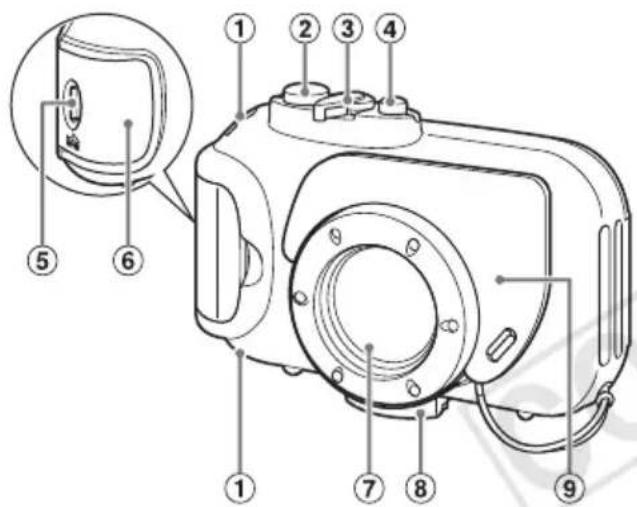
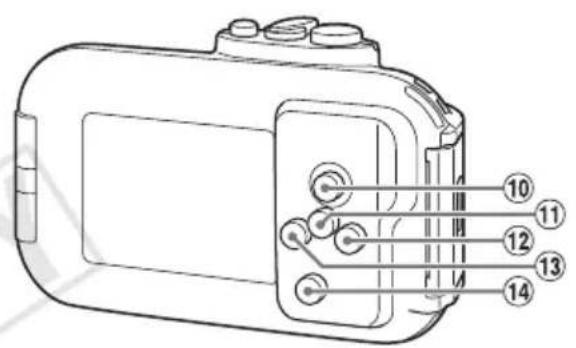
① Strap Mounts ② Shutter Button ③ Zoom Lever ④ Power Button ⑤ Lock Release Switch ⑥ Catch Lens Window ⑧ Tripod Socket Diffusion Plate
Movie Button FUNC./SET (Function/Set) Button 12 (Flash)/Button (3 Macro)/Button (Playback) Button
Preparations
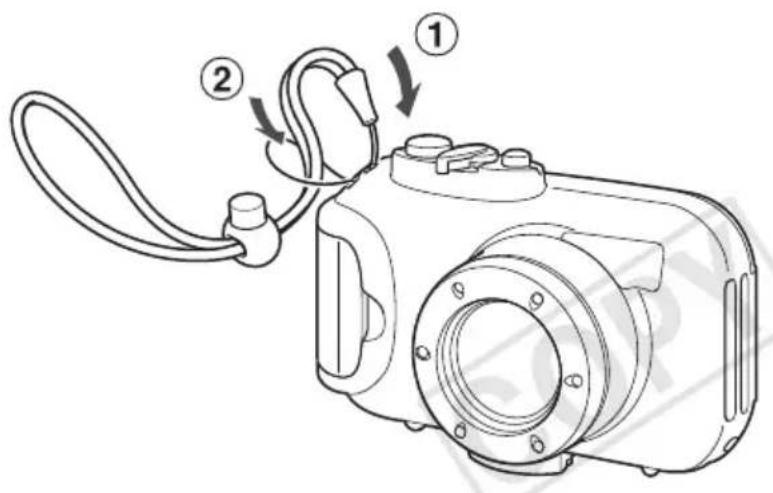
1 Attach the strap.
Do not attach any straps except for the ones included with the Waterproof Case.
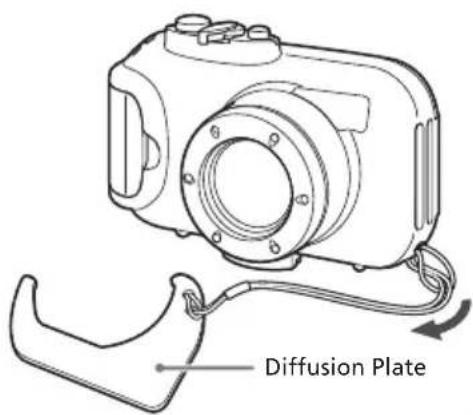
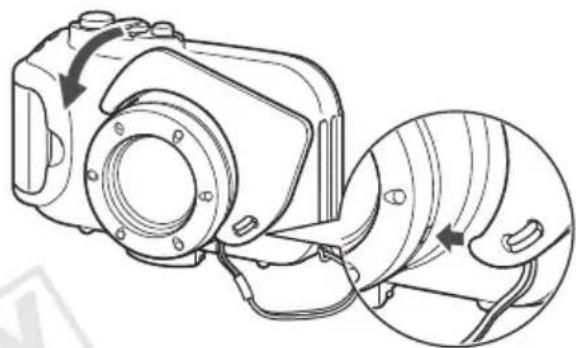
2 Attach the diffusion plate.

Do not scratch the surface of the diffusion plate, as this may prevent light from the flash from being properly diffused.
The effectiveness of the diffusion plate may be impaired if the subject is too close to the camera.
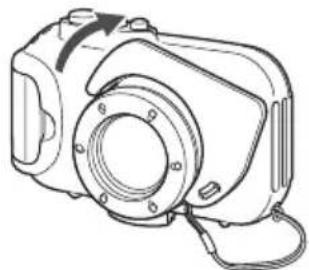
Removing the Diffusion Plate
Lift and remove the diffusion plate.
②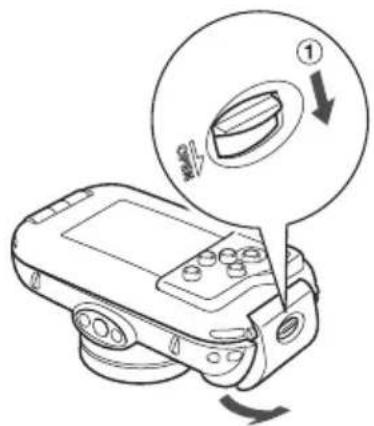
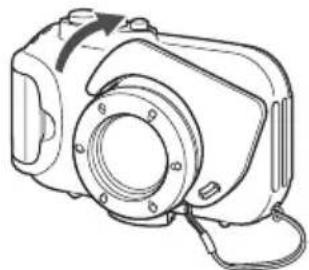
3 Release the catch to open the case. When using commercially available
When using commercially available anticondensation products, the anticondensation solution should only be applied to the inside surface of the lens window using a soft, dry cloth. If anticondensation solution comes in contact with any surface other than the inside of the lens window, wipe it off immediately with a soft, dry cloth, as it could lead to deterioration of the Waterproof Case.
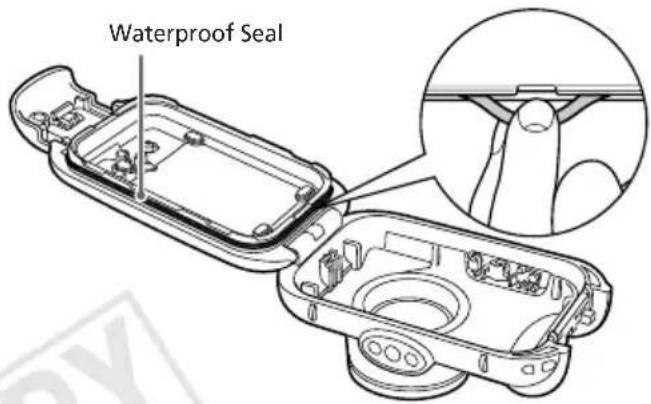
Apply silicon grease to the waterproof seal.
- Remove the waterproof seal as shown. Do not dig your fingernails into it or pull on it forcibly.
- Using a cotton swab, wipe off any debris in the mounting groove.
- Apply a small amount (droplet) of grease to your fingertip, and evenly coat the entire surface of the waterproof seal.
- Place the waterproof seal back in the seal mounting groove. Take care not to twist it.
Preparing the Camera

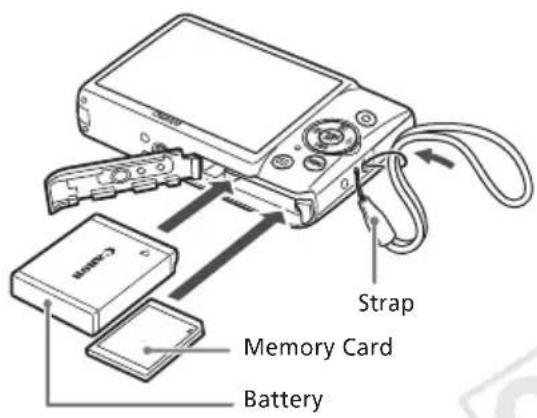
5 Remove the strap, and make sure the battery and memory card are in the camera.
Refer to the Camera User Guide for information on the correct battery, and how to insert the battery and memory card. Use a battery that is adequately charged. Check the estimated capacity of your memory card and ensure there is enough space to record images.
Inserting the Camera Into the Case
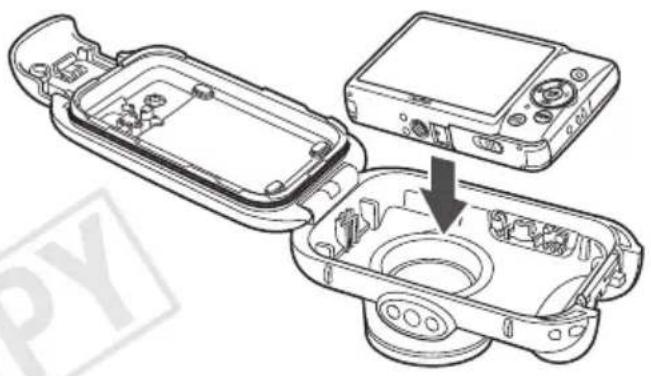
6 Insert the camera into the Waterproof Case.
Choose a place well away from salty sea air. Keep the lens window clean by wiping it gently with a dry cloth.
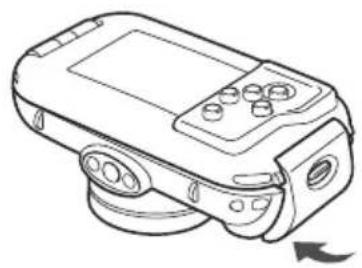
7 Close the case.
Make sure that the waterproof seal is free of debris.
Make sure that the catch is securely locked.

Using the Camera
Refer to the Camera User Guide for details on how to use the camera. However, when the camera is inserted into the case, the following operation methods are different:
How to Use the FUNC. Menu
1 Press the FNC button. Press the left/right buttons to choose a menu item, then press the FUNC button. Press the left/right buttons to choose an item, then press the button.
Available Shooting Modes
When the camera is inserted into the case, Shooting modes are limited to AUTO, or You can choose the Shooting mode in FUNC. menu.
Custom White Balance
In mode, choose the FUNC. menu to set the white balance manually. Try this for adjusting the white balance to the shooting conditions.
After choosing in the FUNC. menu, make sure the entire screen is filled with a plain, white colored subject. Press the FUC button for more than 1 second, then release the FUC button.

When the camera is inserted into the case, certain functions will be limited:
The following functions are not available:
Magnified display
Scroll Display
Movie editing
Customizing the self-timer
Functions that use ◁, ▽ and MENU are not available.
Removing the Camera
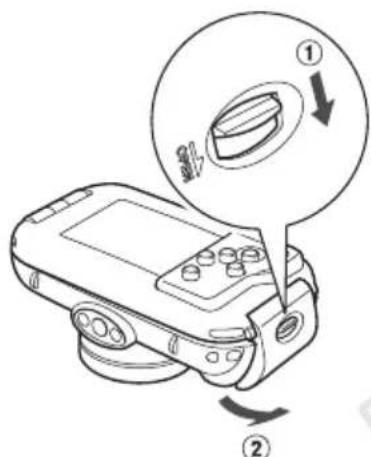
Thoroughly dry the case, wiping off all the water.
Remove any dirt, sand, hair or other debris from the case and wash it with clean, running water to remove any salt deposits.
2 Open the case and remove the camera.
Care and Maintenance
Make sure to do the following after using the Waterproof Case.
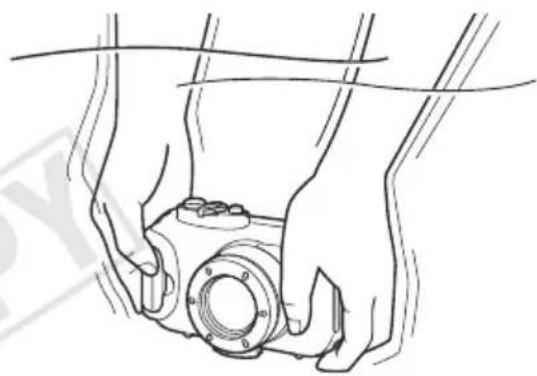
1 Close the case.
Do not wash the interior of the Waterproof Case with water. Wipe it with a soft, dry cloth.
2 Thoroughly wash the case with clean water, then wipe it completely dry with a soft, dry cloth.
After using the case in the ocean, soak it in clean water for several hours to remove any salt deposits.
Specifications
| Waterproof Capability: | Meets IEC/JIS protection rating "IPX8" equivalent For use within a depth of 40m (130 ft.) |
| Waterproofing: Seal (crimp-type O-ring) | |
| Body Materials: Polycarbonate | |
| Camera Operating Temperatures: 0 to 40 °C (32 to 104 °F) | |
| Dimensions: 128.8 x 81.3 x 66.4 mm (5.07 x 3.20 x 2.61 in.) (excluding protrusions) | |
| Volume: Approx. 370 cm3(22.6 in.3)* | |
| Weight: Approx. 235 g (8.29 oz.) (Waterproof Case only*) | |
*Including diffusion plate All data noted here are based on Canon's testing standards. Product specifications and appearance are subject to change without prior notice.
Deutsch
IEC/JIS protection grade, IPX8
40 metres (130 feet) maximum.
Volume: Approximately 370 cm
Weight: Approximately 235 g
(underwater housing only*)
LIMITATION OF LIABILITY
Reproduction, transmission, or storage of this manual or any part thereof in any retrieval system is prohibited without the permission of Canon Inc.
Canon Inc. reserves the right to make changes to the contents of this manual at any time without prior notice.
The illustrations and screen examples in this manual may differ slightly from the actual equipment.
Canon Inc., its subsidiaries and affiliates, and its distributors are not liable for any damages arising from the incorrect use of this product.
Also, carefully read the camera user manual included with the camera. Pay attention to the items that require attention. Recommendations for the most effective use of the underwater housing.
In this manual, for cameras of various types that may be used with the camera, the collective term is used.
Precautions
Before using the underwater housing, carefully read the safety precautions below. Strictly follow the rules for proper handling of the underwater housing. The precautions described on the following pages are intended to prevent injury to yourself and others, as well as damage to the equipment.
!Caution
Indicates the possibility of serious injury or death.
Indicates the possibility of injury.
Warning
Indicates the possibility of damage to the waterproof case or the camera.

Precautions
After using the waterproof case, be sure to remove the camera from it.
If you leave the camera in the waterproof case under direct sunlight or in other places with high temperature, it may lead to fire or explosion of the case.
Do not use the waterproof case as a substitute for other safety equipment (for example, instead of a safety float).

Warning
If the waterproof case starts to leak, immediately turn off the camera.
Leakage may lead to fire or electric shock. Carefully dry the camera and the inside surfaces of the waterproof case, then contact the service center of Canon company.
Warning
Avoid condensation.
Rapid movement of the waterproof case from a high-temperature zone to a low-temperature zone may cause condensation (water droplets) on the internal surfaces. In such a case, stop using the camera, because condensation may lead to malfunctions. Remove the camera and dry the case and the camera with a soft dry cloth.
Do not install the camera with the strap attached. - When using the case underwater, press the buttons with gentle force.
Do not expose the waterproof gasket to direct sunlight.
Do not allow damage to the waterproof gasket, and also prevent accumulation of dirt between the waterproof gasket and the housing.
Do not disassemble the waterproof case and do not make any changes to its construction.
This may lead to leaks.
Do not use or store the waterproof case in the following places: at depths exceeding 40 m; in places where the temperature exceeds 40°C.
Do not leave or store the waterproof case in the following places:
Under direct sunlight; in humid or dusty places; near heating appliances, such as stoves or heaters.
Do not drop the waterproof case and do not throw it.
The above actions may lead to deformation of the case and cause malfunctions in its operation.
Use only the supplied grease. Using other lubricants may affect the characteristics of the waterproof case and may cause damage.
Waterproof case
If dirt gets on the waterproof gasket, leaks may occur. Leaks are also possible if a single hair or a grain of sand gets on the gasket.
If you notice that the waterproof gasket is damaged or cracked, immediately stop using the case and contact Canon customer support.
When storing the waterproof case, keep the gasket open to prevent deformation of the waterproof gasket and maintain its ability to let water through.
When storing, ensure that dust does not get on the waterproof gasket and protect the gasket from scratches.
The waterproof case gasket should be replaced once a year. For spare gaskets, contact the Canon customer support service.
Component description
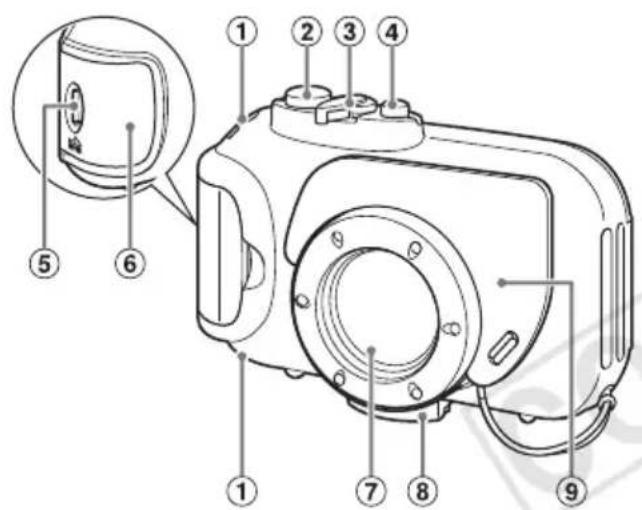
① Strap mount ② Shutter button ③ Zoom lever (4) ON/OFF button ⑤ Lock lever ⑥ Battery cover ⑦ Window for the diffuser
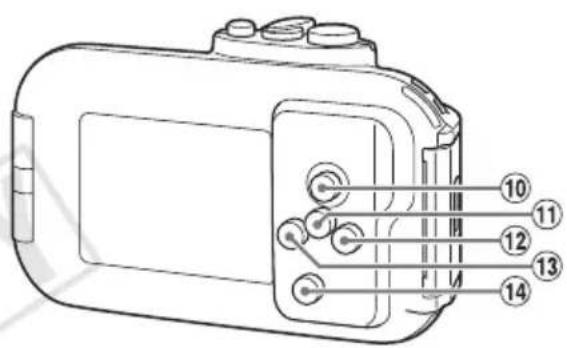
Movie button 11 FUNC./SET button (Function/Set) (Flash) button (Macro) button 14 (Playback) button
Preparation
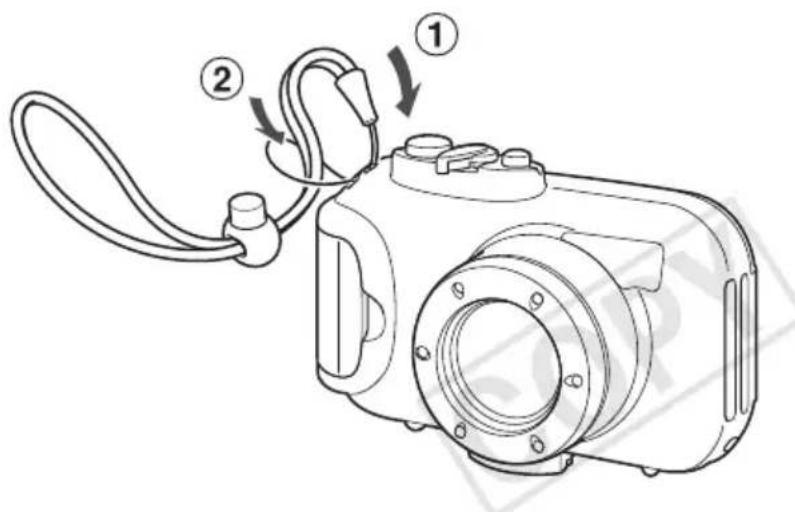
1 Attach the strap. Do not attach any other straps except the one included with the waterproof case.
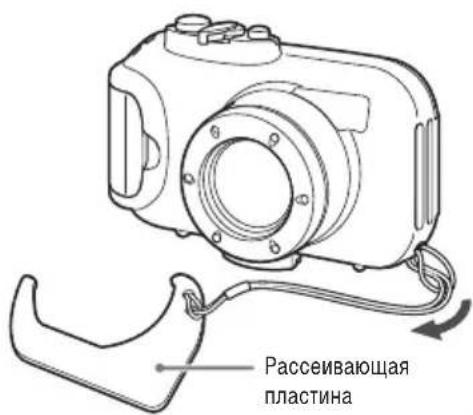
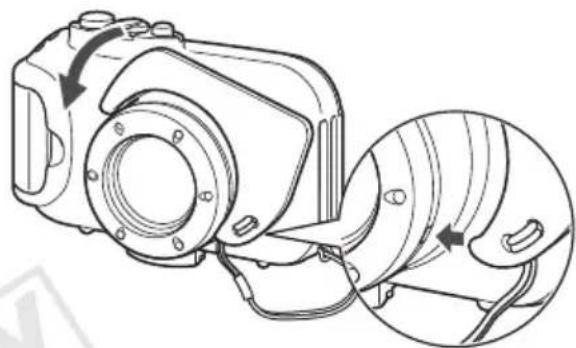
2 Install the diffuser.

Protect the surface of the diffuser from scratches, as they may cause incorrect diffusion of the flash light.
If the subject is too close to the camera, the effectiveness of the diffuser may decrease.
Removing the diffuser
Hold the diffuser and remove it.
2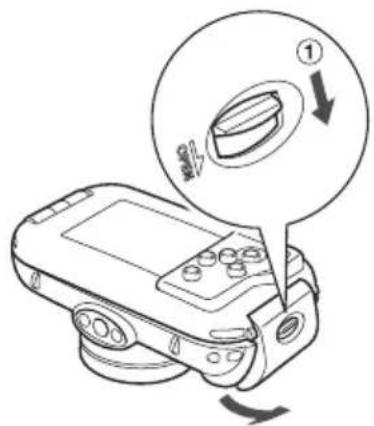
To open the case, release the lock.
Use of commercially available anti-condensation agents: Apply anti-condensation solution only to the inner surface of the window for the lens. If any other surface, except the inner side of the lens window, comes into contact with the anti-condensation solution, wipe it off immediately with a soft dry cloth, as it may damage the waterproof case gasket.
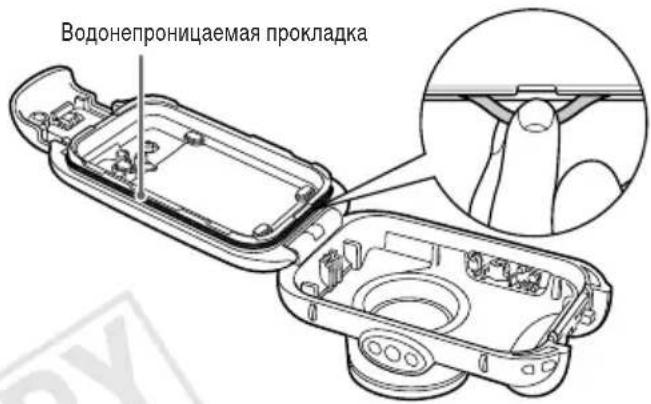
Apply silicone grease to the waterproof case gasket.
1. Install the waterproof gasket as shown in the figure. Do not pull it with your feet or stretch it with force. 2. Use a cotton swab to remove all dirt from the mounting groove. 3. Apply a small amount (drop) of lubricant to the ends of the ring and evenly coat the entire surface of the waterproof gasket with lubricant. 4. Insert the waterproof gasket carefully into the mounting groove. Make sure the gasket is not twisted.

Camera preparation
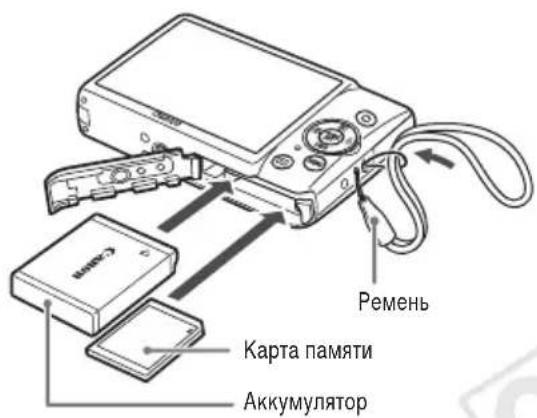
5. Remove the lens cap and make sure the memory card and battery are installed in the camera.
For information about the battery to be used, as well as about installing the battery and memory card, see the camera user manual. Use a sufficiently charged battery.
Check the free capacity of the memory card and make sure there is enough space for recording images.
Installing the camera in the underwater housing
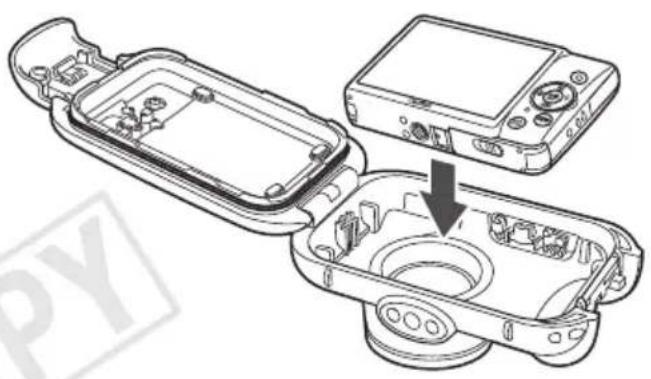
6. Install the camera in the waterproof housing.

Choose a location with low humidity, away from salty sea air. Ensure the cleanliness of the lens window, carefully wiping it with a dry cloth.
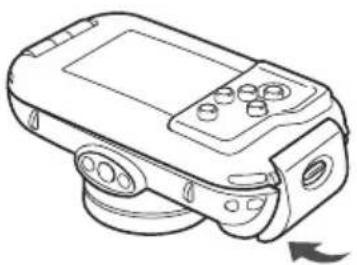
Close the housing.
Make sure there is no dirt on the waterproof gasket.
Make sure the lock is securely closed.

Using the camera
For detailed shooting operations with the camera, see the camera user manual. However, if the camera is installed in the housing, the following operating methods change.
Using the FNC menu.
1. Press the button. 2. Use the buttons to select the menu item, then press the FNC button. 3. Use the buttons to select the item, then press the FNC button. SET
Shooting modes
When the camera is installed in the tripod, only the AUTO shooting mode is available. The shooting mode can be selected in the FUNC menu.
White balance
To set the white balance, select the icon in the FUNC menu. Adjust this function to set the white balance according to the shooting conditions.
After selecting the icon in the FUNC menu, make sure the entire screen is filled with a flat white object. Press the FNE SET button and hold it for at least 1 second, then release the FNE SET button.

When the camera is installed in the tripod, some functions are limited.
The following functions are unavailable.
Zoom mode
Screen scrolling
Editing video clips
Self-timer setting
Functions that require using the MENU button are unavailable.
Removing the camera
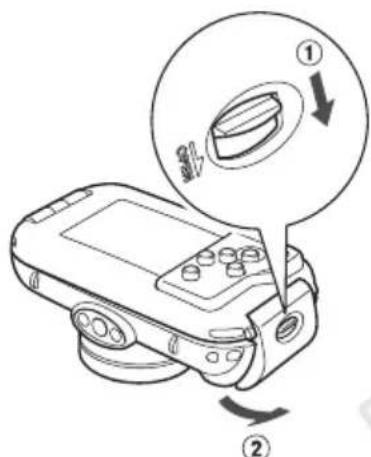
Carefully remove the tripod, wiping off any water.
Remove all dirt, sand, water droplets, or other foreign matter from the tripod, then rinse it with clean fresh water to remove any remaining salt.
Close the bag and remove the camera.
Maintenance
After using the waterproof bag, be sure to perform the following operations.
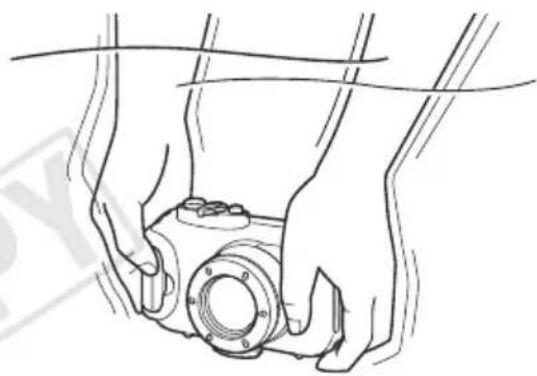
Close the bag.
Do not wash the inside surfaces with water. Do not immerse the bag in water. Wipe them with a soft dry cloth.
2 Carefully wash the bag with clean water, then dry it by wiping with a soft dry cloth.
After using the bag in the ocean, immerse it in fresh water for several hours to remove all salt residue.
Technical specifications
Waterproof rating:
Meets the requirements equivalent to
protection level IPX8 of IEC/JIS standard
© CANON INC. 2010 PRINTED IN JAPAN
- JAPANESE
- CHECKING THE PACKAGE CONTENTS
- READ THIS FIRST
- DISCLAIMER
- SAFETY PRECAUTIONS
- WARNING
- BE SURE TO REMOVE THE CAMERA AFTER USING THE WATERPROOF CASE
- CAUTION
- IMMEDIATELY TURN OFF THE CAMERA IF THE WATERPROOF CASE LEAKS
- BE CAREFUL OF CONDENSATION
- WATERPROOF SEAL
- COMPONENTS GUIDE
- PREPARATIONS
- ATTACH THE STRAP
- DO NOT ATTACH ANY STRAPS EXCEPT FOR THE ONES INCLUDED WITH THE WATERPROOF CASE
- ATTACH THE DIFFUSION PLATE
- REMOVING THE DIFFUSION PLATE
- RELEASE THE CATCH TO OPEN THE CASE. WHEN USING COMMERCIALLY AVAILABLE
- APPLY SILICON GREASE TO THE WATERPROOF SEAL
- PREPARING THE CAMERA
- REMOVE THE STRAP, AND MAKE SURE THE BATTERY AND MEMORY CARD ARE IN THE CAMERA
- INSERTING THE CAMERA INTO THE CASE
- INSERT THE CAMERA INTO THE WATERPROOF CASE
- CLOSE THE CASE
- USING THE CAMERA
- HOW TO USE THE FUNC. MENU
- AVAILABLE SHOOTING MODES
- CUSTOM WHITE BALANCE
- REMOVING THE CAMERA
- THOROUGHLY DRY THE CASE, WIPING OFF ALL THE WATER
- OPEN THE CASE AND REMOVE THE CAMERA
- CARE AND MAINTENANCE
- THOROUGHLY WASH THE CASE WITH CLEAN WATER, THEN WIPE IT COMPLETELY DRY WITH A SOFT, DRY CLOTH
- SPECIFICATIONS
- DEUTSCH
- LIMITATION OF LIABILITY
- PRECAUTIONS
- AFTER USING THE WATERPROOF CASE, BE SURE TO REMOVE THE CAMERA FROM IT
- IF THE WATERPROOF CASE STARTS TO LEAK, IMMEDIATELY TURN OFF THE CAMERA
- AVOID CONDENSATION
- WATERPROOF CASE
- COMPONENT DESCRIPTION
- PREPARATION
- INSTALL THE DIFFUSER
- REMOVING THE DIFFUSER
- TO OPEN THE CASE, RELEASE THE LOCK
- APPLY SILICONE GREASE TO THE WATERPROOF CASE GASKET
- CAMERA PREPARATION
- REMOVE THE LENS CAP AND MAKE SURE THE MEMORY CARD AND BATTERY ARE INSTALLED IN THE CAMERA
- INSTALLING THE CAMERA IN THE UNDERWATER HOUSING
- INSTALL THE CAMERA IN THE WATERPROOF HOUSING
- CLOSE THE HOUSING
- USING THE FNC MENU
- SHOOTING MODES
- WHITE BALANCE
- MAINTENANCE
- TECHNICAL SPECIFICATIONS
Brand : CANON
Model : PowerShot ELPH 100 HS
Category : Camera