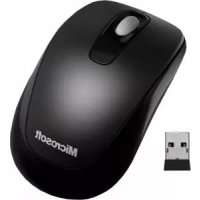
2CF00012 - Mouse MICROSOFT - Free user manual and instructions
Find the device manual for free 2CF00012 MICROSOFT in PDF.



| Product Type | Wireless Mouse |
| Brand | Microsoft |
| Model | 2CF00012 |
| Dimensions (approx.) | 100 x 60 x 30 mm |
| Weight (with batteries) | Approximately 100 g |
| Power Supply | 2 AA batteries (alkaline recommended) |
| Connectivity | Wireless 2.4 GHz or Bluetooth |
| Buttons | Left, right buttons, clickable scroll wheel |
| Detection Technology | LED optical (Class 1) |
| Operating Temperature | 5°C to 35°C |
| Care and Cleaning | Clean with a dry cloth only |
| Safety Precautions | Do not expose to moisture, do not disassemble, keep out of reach of children |
| Spare Parts and Repairability | No user-serviceable parts |
| Recycling Instructions | Do not dispose of with household waste, take to a collection point |
Frequently Asked Questions - 2CF00012 MICROSOFT
User questions about 2CF00012 MICROSOFT
0 question about this device. Answer the ones you know or ask your own.
Ask a new question about this device
Download the instructions for your Mouse in PDF format for free! Find your manual 2CF00012 - MICROSOFT and take your electronic device back in hand. On this page are published all the documents necessary for the use of your device. 2CF00012 by MICROSOFT.
USER MANUAL 2CF00012 MICROSOFT
Important safety and health information
Guia do Produto
International Technical Support Numbers (partial list only) 277
Product Guide
Read this guide for important safety and health information that apply to the Microsoft ^® device that you have purchased.
For more information visit http://www.microsoft.com/hardware
This symbol identifies safety and health messages in the Product Guide and other product manuals.
Warning:
Failure to properly set up, use, and care for this product can increase the risk of serious injury or death, or damage to the device or devices. Read this guide and keep all printed guides for future reference. For replacement guides, go to www.microsoft.com/hardware or refer to the Microsoft Help and Support section for contact information.
▲ Important Safety Information
AC-Powered Devices Battery-Powered Devices Headset Devices Webcam Devices Wireless Devices Game Controllers, Keyboards,and Mouse Devices Devices with Laser Pointers All Devices
Laser and LED Specifications Regulatory Information Category II Equipment Radio and TV Interference Regulations Disposal of Waste Batteries and Electrical and Electronic Equipment Patent Information Customer Support Options
▲ Important Safety Information
AC-Powered Devices
These precautions apply to all products that plug into a standard wall power outlet.
Failure to take the following precautions can result in serious injury or death from electric shock or fire or in damage to the device.
To select an appropriate power source for your device:
- Use only the power supply unit and AC power cord that came with your device or that you received from an authorized repair center.
- Confirm that your electrical outlet provides the type of power indicated on the power supply unit (in terms of voltage [V] and frequency [Hz]). If you are not sure of the type of power supplied to your home, consult a qualified electrician.
- Do not use non-standard power sources, such as generators or inverters, even if the voltage and frequency appear acceptable. Only use AC power provided by a standard wall outlet.
- Do not overload your wall outlet, extension cord, power strip, or other electrical receptacle. Confirm that they are rated to handle the total current (in amps [A]) drawn by the device (indicated on the power supply unit) and any other devices that are on the same circuit.
To avoid damaging the power cords and power supply:
- Protect the power cords from being walked on.
- Protect cords from being pinched or sharply bent, particularly where they connect to the power outlet, the power supply unit, and the device.
- Do not jerk, knot, sharply bend, or otherwise abuse the power cords.
- Do not expose the power cords to sources of heat.
- Keep children and pets away from the power cords. Do not allow them to bite or chew on them.
- When disconnecting the power cords, pull on the plug—do not pull on the cord.
If a power cord or power supply becomes damaged in any way, stop using it immediately. Unplug your device during lightning storms or when unused for long periods of time.
For devices with an AC power cord that connects to the power supply, always connect the power cord according to the following instructions:
1 Plug the AC power cord into the power supply until it stops.
2 Plug the other end of the AC power cord into the wall outlet.
Battery-Powered Devices
These precautions apply to all products that use rechargeable or disposable batteries.
Improper use of batteries may result in battery fluid leakage, overheating, or explosion. Released battery fluid is corrosive and may be toxic. It can cause skin and eye burns, and is harmful if swallowed.
To reduce the risk of injury:
- Keep batteries out of reach of children.
-
Do not heat, open, puncture, mutilate, or dispose of batteries in fire.
-
Do not mix new and old batteries or batteries of different types (for example, carbon-zinc and alkaline batteries).
- Do not allow metal objects to touch the battery terminals on the device; they can become hot and cause burns.
- Remove the batteries if they are worn out or before storing your device for an extended period of time. Always remove old, weak, or worn-out batteries promptly and recycle or dispose of them in accordance with Local and National Disposal Regulations.
- If a battery leaks, remove all batteries, taking care to keep the leaked fluid from touching your skin or clothes. If fluid from the battery comes into contact with skin or clothes, flush skin with water immediately. Before inserting new batteries, thoroughly clean the battery compartment with a damp paper towel, or follow the battery manufacturer's recommendations for cleanup.
Disposable (non-rechargeable) batteries only:
- Caution Risk of explosion if battery is replaced by an incorrect type. Use and replace only with correct size and type (alkaline, zinc-carbon, or zinc-chloride) of batteries.
Rechargeable batteries only:
- Caution Risk of explosion if battery is replaced by an incorrect type. Use and replace only with the same type and rating as the batteries provided. Charge only with the recharger provided with the product.
Lithium button cell batteries only:
- Perchlorate Material — special handling may apply. See: www.dtsc.ca.gov/hazardouswaste/perchlorate
Headset Devices
Extended exposure to high volumes when using a headset may result in temporary or permanent hearing loss. To prevent damage to your headset, avoid sitting or stepping on the headset, its cable, or the cable connector.
Webcam Devices
Webcam with magnetic and adhesive mounting
Applying the attachment disc next to or directly to a CRT-based display screen may cause permanent visual distortion of the displayed image near the area mounted. After the adhesive attachment disc has been applied to the mounting surface, removing it may damage the cosmetic coating and/or leave an adhesive residue.
Wireless Devices
Before boarding any aircraft or packing a wireless device in luggage that will be checked, remove the batteries from the wireless device or turn the wireless
device off (if it has an on/off switch). Wireless devices can transmit radio frequency (RF) energy, much like a cellular telephone, whenever batteries are installed and the wireless device is turned on (if it has an on/off switch).
Game Controllers, Keyboards, and Mouse Devices Health Warning
Use of game controllers, keyboards, mice, or other electronic input devices may be linked to serious injuries or disorders.
When using a computer, as with many activities, you may experience occasional discomfort in your hands, arms, shoulders, neck, or other parts of your body. However, if you experience symptoms such as persistent or recurring discomfort, pain, throbbing, aching, tingling, numbness, burning sensation, or stiffness, DO NOT IGNORE THESE WARNING SIGNS. PROMPTLY SEE A QUALIFIED HEALTH PROFESSIONAL, even if symptoms occur when you are not working at your computer. Symptoms like these can be associated with painful and sometimes permanently disabling injuries or disorders of the nerves, muscles, tendons, or other parts of the body. These musculoskeletal disorders (MSDs) include carpal tunnel syndrome, tendonitis, tenosynovitis, and other conditions.
While researchers are not yet able to answer many questions about MSDs, there is general agreement that many factors may be linked to their occurrence, including: overall health, stress and how one copes with it, medical and physical conditions, and how a person positions and uses his or her body during work and other activities (including use of a keyboard or mouse). The amount of time a person performs an activity may also be a factor.
Some guidelines that may help you work more comfortably with your computer and possibly reduce your risk of experiencing an MSD can be found in the "Healthy Computing Guide" installed with this device's software, or in the "Healthy Gaming Guide" available at www.xbox.com. If this device did not come with software, you can access the "Healthy Computing Guide" at www.microsoft.com/hardware or (in the United States only) by calling (800) 360-7561 to request a CD at no charge.
If you have questions about how your own lifestyle, activities, or medical, or physical condition may be related to MSDs, see a qualified health professional.
Photosensitive Seizures
A very small percentage of people may experience a seizure when exposed to certain visual images, including flashing lights or patterns that may appear in video games. Even people who have no history of seizures or epilepsy may have an undiagnosed condition that can cause these “photosensitive epileptic seizures” while watching video games.
These seizures may have a variety of symptoms, including lightheadedness, altered vision, eye or face twitching, jerking or shaking of arms or legs,
disorientation, confusion, or momentary loss of awareness.
Seizures may also cause loss of consciousness or convulsions that can lead to injury from falling down or striking nearby objects.
Immediately stop playing and consult a doctor if you experience any of these symptoms. Parents should watch for or ask their children about the above symptoms — children and teenagers are more likely than adults to experience these seizures. The risk of photosensitive epileptic seizures may be reduced by taking the following precautions:
- Sit or stand farther from the television screen.
- Use a smaller television screen.
- Play in a well-lit room.
- Do not play when you are drowsy or fatigued.
If you or any of your relatives have a history of seizures or epilepsy, consult a doctor before playing.
Devices with Laser Pointers
Caution Use of controls or adjustments, or performance of procedures other than those specified herein may result in hazardous radiation exposure.
- Do not stare into beam.
- Do not shine a laser pointer at anyone. Laser pointers are designed to illuminate inanimate objects.
- Do not allow minors to use a pointer unsupervised. Laser pointers are not toys.
- Do not point a laser pointer at a mirror-like (reflective) surface. A reflected beam can act like a direct beam on the eye.
- Do not disassemble the device.
- Do not use the device outside of its specified operating temperature range +41°F (+5°C) to +95°F (+35°C). If the device is exposed to an environment outside of its prescribed operation, turn off the device and allow the temperature to stabilize within the specified operating range before using the device.
All Devices
Do Not Attempt Repairs
Do not attempt to take apart, open, service, or modify the hardware device or power supply. Doing so could present the risk of electric shock or other hazard. Any evidence of any attempt to open and/or modify the device, including any peeling, puncturing, or removal of any of the labels, will void the Limited Warranty.
Choking Hazard
This device may contain small parts which may be a choking hazard to children under 3. Keep small parts away from children.
Usage and Cleaning
Use in accordance with these instructions:
- Do not use near any heat sources.
- Only use attachments/accessories specified by Microsoft.
- Clean only with dry cloth.
- Do not allow this product to become wet. To reduce the risk of fire or shock, do not expose this product to rain or other types of moisture.
Adhesive Mounting
Some devices use adhesive tape to mount components in your workspace. DO NOT mount on antiques, heirlooms, or other valuable or irreplaceable items. After mounting, removing the adhesive may damage the cosmetic coating and/or leave an adhesive residue.
Laser and LED Specifications
Caution Use of controls or adjustments, or performance of procedures other than those specified herein may result in hazardous radiation exposure.
Laser Devices
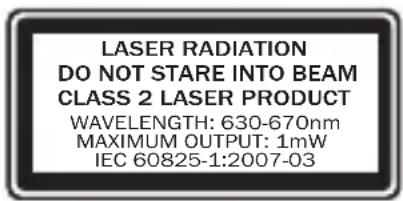
This device complies with International Standard IEC 60825-1:1993+A1+A2 (IEC 60825-1:2001-08) for a Class 1 and Class 2 laser product. This device also complies with 21 CFR 1040.10 and 1040.11 except for deviations pursuant to Laser Notice No. 50, dated June 24, 2007.
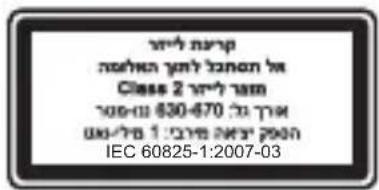
Class 2 Laser Devices
Beam description: Collimated (parallel) beam of light
Laser power output: < 1 milliwatt Emitted laser wavelength: 630 – 670 nanometers
This optical device has no serviceable parts. The Class 2 laser beam is emitted from the front of the device.
Optical (LED) Mouse
This product has been evaluated to comply with International Standard IEC 60825-1:1993+A1+A2 (IEC 60825-1:2001-08).
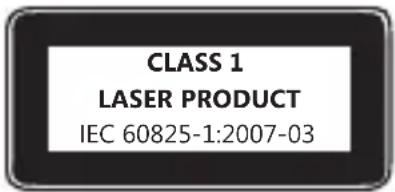
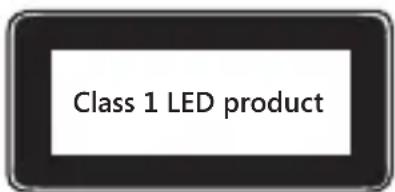
This product uses LEDs that are considered Class 1 (IEC 60825-1:1993+A1+A2).
LED output power: < 67.8μW (photochemical limit), < 4.2mW (thermal limit)
LED nominal wavelength: 470nm (blue), 635nm (red)
A Class 1 product is safe under reasonably foreseeable conditions of operation as described by IEC 60825-1. However, it is recommended that you not direct the light (which is emitted from the bottom of the device) at anyone's eyes.
This optical device has no serviceable parts.
Regulatory Information
Not intended for use in machinery, medical, or industrial applications. Any changes or modifications not expressly approved by Microsoft could void the user's authority to operate this device. This product is for use with NRTL-Listed (UL, CSA, ETL, etc.), and/or IEC/EN 60950 compliant (CE marked) Information Technology equipment. No serviceable parts included.
This device is rated as a commercial product for operation at +41°F (+5°C) to +95°F (+35°C).
This Class B digital apparatus complies with Part 15 of the U.S. Federal Communications Commission (FCC) rules, Canadian ICES-003, RSS-Gen, RSS-210, and RSS-310. Operation is subject to the following two conditions: (1) this device may not cause interference, and (2) this device must accept any interference received, including interference that may cause undesired operation.
For Bluetooth and 2.4 GHz devices only: To comply with FCC RF exposure requirements, the following operating configurations must be satisfied: the antenna has been installed by the manufacturer and no changes can be made. The wireless devices must not be co-located or operating in conjunction with any other antenna or transmitter. Except for headset and handheld devices, wireless devices must be at least 20 cm between the antenna of the wireless device and all persons.
For 802.11a devices only: This product is restricted to indoor use only to reduce any potential for harmful interference with licensed operation in the 5.15 to 5.25 GHz frequency range.
Microsoft Corporation; One Microsoft Way; Redmond, WA 98052-6399; U.S.A. United States: (800) 426-9400; Canada: (800) 933-4750
Statement of Compliance with EU Directives
Hereby, Microsoft Corporation declares that this product is in compliance with the essential requirements and other relevant provisions of Directives, 2006/95/EC, 2004/108/EC and 1999/5/EC.
The technical documentation as required by the Conformity Assessment procedure is kept at the following address:
Company: Microsoft Ireland Operations Ltd.
Address: The Atrium Building 3
Carmenhall Road, Sandyford Industrial Estate, DUBLIN 18
Country: Ireland
Telephone number: +353 1 295 3826
Fax number: +353 1 706 4110
Internet: http://www.microsoft.com/ireland/

Complies with IDA Standards DB102868
Complies with IDA Standards DB100398
Category II Equipment
27 MHz Devices
Radio frequency (RF) output power: < 54 dBμV/m at 3 m
Keyboard with two channels – RF frequencies: 27.095 MHz (channel 1), 27.195 MHz (channel 2)
Keyboard with a single channel – RF frequency: 27.195 MHz or 27.095 MHz
Mouse with two channels – RF frequencies: 27.045 MHz (channel 1), 27.145 MHz (channel 2)
Mouse with a single channel – RF frequency: 27.145 MHz or 27.045 MHz
Radio and TV Interference Regulations
The Microsoft hardware device(s) can radiate radio frequency (RF) energy. If not installed and used in strict accordance with the instructions given in the printed documentation and/or onscreen help files, the device may cause harmful interference with other radio-communications devices (for example AM/FM radios, televisions, baby monitors, cordless phones, etc.). There is, however, no guarantee that RF interference will not occur in a particular installation.
To determine if your hardware device is causing interference to other radio-communications devices, disconnect the device from your computer or remove
the device's batteries (for a battery operated device). If the interference stops, it was probably caused by the device. If the interference continues after you disconnect the hardware device or remove the batteries, turn the computer off and then on again. If the interference stopped when the computer was off, check to see if one of the input/output (I/O) devices or one of the computer's internal accessory boards is causing the problem. Disconnect the I/O devices one at a time and see if the interference stops.
If this hardware device does cause interference, try the following measures to correct it:
- Relocate the antenna of the other radio-communications device (for example AM/FM Radios, televisions, baby monitors, cordless phones, etc) until the interference stops.
- Move the hardware device farther away from the radio or TV, or move it to one side or the other of the radio or TV.
- Plug the computer into a different power outlet so that the hardware device and radio or TV are on different circuits controlled by different circuit breakers or fuses.
- If necessary, ask your computer dealer or an experienced radio-TV technician for more suggestions. For more information about interference issues, go to the FCC Web site at:
http://www.fcc.gov/cgb/consumerfacts/interference.html
You can also call the FCC at 1-888-CALL FCC to request Interference and Telephone Interference fact sheets.
Disposal of Waste Batteries and Electrical & Electronic Equipment
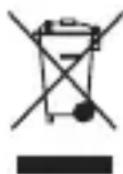
This symbol on the product or its batteries or its packaging means that this product and any batteries it contains must not be disposed of with your household waste. Instead, it is your responsibility to hand this over to an applicable collection point for the recycling of batteries and electrical and electronic equipment. This separate collection and recycling will help to conserve natural resources and prevent potential negative consequences for human health and the environment due to the possible presence of hazardous substances in batteries and electrical and electronic equipment, which could be caused by inappropriate disposal. For more information about where to drop off your batteries and electrical and electronic waste, please contact your local city/municipality office, your household waste disposal service, or the shop where you purchased this product. Contact weee@microsoft.com for additional information on WEEE and waste batteries.
Patent Information
United States and/or international patents pending.
Customer Support Options
If you have a question about your Microsoft hardware product, do the following:
- Check the system requirements for your product (located on the packaging) to make sure that your system is compatible.
- Read through all printed documentation.
- For additional product information and product support, go to the Microsoft Hardware Web site at www.microsoft.com/hardware
Note For regional support policy details and more, go to http://support.microsoft.com/international.aspx and select your country or region from the list. If there is no Microsoft subsidiary office in your country or region, please contact the establishment from which you obtained your Microsoft product.
Information and views expressed in this document, including URL and other Internet Web site references, may change without notice.
This document does not provide you with any legal rights to any intellectual property in any Microsoft product. You may copy and use this document for your internal, reference purposes..
© 2011 Microsoft Corporation.
Microsoft, IntelliEye, IntelliMouse, and Windows are trademarks of the Microsoft group of companies.
Bluetooth is a registered trademark of Bluetooth SIG, Inc.
All other trademarks are property of their respective owners
Guia do Produto
© 2011 Microsoft Corporation.
Adresse : The Atrium Building 3
Carmenhall Road, Sandyford Industrial Estate, DUBLIN 18
Pays : Irlande
Options de support client
© 2011 Microsoft Corporation.
Carmenhall Road, Sandyford Industrial Estate, DUBLIN 18
País: Irlanda
© 2011 Microsoft Corporation.
Adres: The Atrium Building 3
Carmenhall Road, Sandyford Industrial Estate, DUBLIN 18
Land: Ierland
Telefoonnummer: +353 1 295 3826
Faxnummer: +353 1 706 4110
Internet: http://www.microsoft.com/ireland/

© 2011 Microsoft Corporation.
Adresse: The Atrium Building 3
Carmenhall Road, Sandyford Industrial Estate, DUBLIN 18
Land: Irland
Telefonnummer: +353 1 295 3826
Faxnummer: +353 1 706 4110
Internet: http://www.microsoft.com/ireland/

Carmenhall Road, Sandyford Industrial Estate,
DUBLIN 18
Χώρα: Ιρλανδία
Carmenhall Road, Sandyford Industrial Estate, DUBLIN 18
País: Irlanda
Número de telefone: +353 1 295 3826
Número de fax: +353 1 706 4110
Internet: http://www.microsoft.com/ireland/

© 2011 Microsoft Corporation.
Carmenhall Road, Sandyford Industrial Estate, DUBLINO 18
Paese: Irlanda
© 2011 Microsoft Corporation.
Şirket: Microsoft Ireland Operations Ltd.
Adres: Atrium Building 3
Carmenhall Road, Sandyford Industrial Estate,
DUBLIN 18
Ülke: Irlanda
Telefon numarası: +353 1 295 3826
Faks numarası: +353 1 706 4110
Internet: http://www.microsoft.com/ireland/

© 2011 Microsoft Corporation.
Klasse 2-laserenheder
Beskrivelse af stråle: Kollimeret (parallel) lysstråle
Üdgangseffekt for laser: < 1 milliwatt
Adresse: The Atrium Building 3
Carmenhall Road, Sandyford Industrial Estate, DUBLIN 18
Land: Irland
Telefonnummer: +353 1 295 3826
Faxnummer: +353 1 706 4110
Internet: http://www.microsoft.com/ireland/

Kategori II-udstyr
27 MHz enheder
© 2011 Microsoft Corporation.
Osoite: The Atrium Building 3
Carmenhall Road, Sandyford Industrial Estate, DUBLIN 18
Maa: Irlanti
Puhelinnumero: +353 1 295 3826
Faksinumero: +353 1 706 4110
Internet: http://www.microsoft.com/ireland/

Luokan II laite
27 MHz:n laitteet
© 2011 Microsoft Corporation.
Class 2-laserenheter
Adress: The Atrium Building 3
Carmenhall Road, Sandyford Industrial Estate,
DUBLIN 18
Land: Irland
Telefonnummer: +353 1 295 3826
Faxnummer: +353 1 706 4110
Internet: http://www.microsoft.com/ireland/

Kategori II-utrustning
27 MHz-enheter
This Class B digital apparatus complies with Part 15 of the U.S. Federal Communications Commission (FCC) rules, Canadian ICES-003, RSS-Gen, RSS-210, and RSS-310. Operation is subject to the following two conditions: (1) this device may not cause interference, and (2) this device must accept any interference received, including interference that may cause undesired operation.
Adresa: The Atrium Building 3
Carmenhall Road, Sandyford Industrial Estate, DUBLIN 18
Država: Irska
Telefon: +353 1 295 3826
Adresa: The Atrium Building 3
Carmenhall Road, Sandyford Industrial Estate, DUBLIN 18
Země: Irsko
Cím: The Atrium Building 3
Carmenhall Road, Sandyford Industrial Estate, DUBLIN 18
Ország: Írország
Adres: The Atrium Building 3
Carmenhall Road, Sandyford Industrial Estate, DUBLIN 18
Kraj: Irlandia
Numer telefonu: +353 1 295 3826
Numer faksu: +353 1 706 4110
Internet: http://www.microsoft.com/ireland/

Sprzęt 2. kategorii
© 2011 Microsoft Corporation.
Microsoft Corporation; One Microsoft Way; Redmond, WA 98052-6399; S.U.A. Statele Unite: (800) 426-9400; Canada: (800) 933-4750
Carmenhall Road, Sandyford Industrial Estate, DUBLIN 18
Tară: Irlanda
Număr de telefon: +353 1 295 3826
Număr de fax: +353 1 706 4110
Internet: http://www.microsoft.com/ireland/

© 2011 Microsoft Corporation.
Adresa: The Atrium Building 3
Carmenhall Road, Sandyford Industrial Estate, DUBLIN 18
Krajina: Írsko
Telefónne číslo: +353 1 295 3826
Naslov: The Atrium Building 3
Carmenhall Road, Sandyford Industrial Estate, DUBLIN 18
Država: Irska
Telefon: +353 1 295 3826
Statement of Compliance with EU Directives
Hereby, Microsoft Corporation declares that this product is in compliance with the essential requirements and other relevant provisions of Directives, 2006/95/EC, 2004/108/EC and 1999/5/EC.
The technical documentation as required by the Conformity Assessment procedure is kept at the following address:
Company: Microsoft Ireland Operations Ltd.
Address: The Atrium Building 3
Carmenhall Road, Sandyford Industrial Estate, DUBLIN 18
Country: Ireland
Telephone number: +353 1 295 3826
Fax number: +353 1 706 4110
Internet: http://www.microsoft.com/ireland/

http://www.microsoft.com/japan/enable/products/supportinfo.mspx
© 2011 Microsoft Corporation.
© 2011 Microsoft Corporation.
© 2011 Microsoft Corporation.
© 2011 Microsoft Corporation.
ת. Household Industry Sector
IEC60825-הכלה (1:1993+A1+A2 (IEC 60825-1:2001-08 CFR 21) Class 2 - Class 1 Laser Notice 1040.11 - 1040.10 .2007, 24 No. 50
(LED) כר בְרִי
IEC 60825-הכלה (IEC 60825-1:2001-08 .(1:1993+A1+A2)
.GHz 5.25 5.15 07:30-17:30, 19:40-19:40, 19:40-19:40, 19:40-19:40, 19:40-19:40, 19:40-19:40, 19:40-19:40, 19:40-19:40, 19:40-19:40, 19:40
Microsoft Corporation 2011 ©
Microsoft Software Software Windows - Microsoft, IntelliEye, IntelliMouse
Bluetooth SIG, Inc. 70-12-0000
International Technical Support Numbers (Partial List Only)
Argentina
Technical Support (Australian Callers Only): 13 20 58 Technical Support (International Callers): +61 2 9870 2200 Technical Support (Fax): +61 2 9870 2466
Austria
Microsoft Österreich Kundensupport Telefonnummer: 08000 123 345 Belgium and Luxembourg 02/503.31.13 (Belgium) 8002 43 53 (Luxemburg)
Bolivia
Technical Support Phone: 86-21-96081318 Technical Support (Toll Free): 800-820-3800
Colombia
com/contactus/cu_sc_more_
master?ws=support#tab3
Τηλέφωνο
Technical Support Phone: (852)
23889600
Technical Support Phone (Macao SAR
Technical Support Phone (Toll Free):
0120-54-2244
Korea
Customer Service Center (Toll): 1577-
9700 (Domestic), 82-2-567-7881
(International)
Latin American Countries
www.microsoft.com/latam/
contactenos
México
Technical Phone Support
Technical Phone Support
You can also visit our website http://
support.microsoft.com/contactus/
for questions or visit http://support.
microsoft.com/OAS for technical
online support information
New Zealand
Technical Support Phone:
0800-444-335
Norway
Personal Support: +47 23 500 500
(option 2+2)
Professional Support: +47 23 500 777
Panamá
Personal Support: +46 8 55 99 00 00 Professional Support: +46 8 751 09 80
Taiwan
Technical Support Phone: 886-2-2999-88-33 Technical Support (Toll Free): 0800-00-88-33
Turkey
Technical Support Phone (Toll): +90 212 33 66 999 (Toll) 4446787 (Inside Turkey only) United Kingdom Technical Support Phone: 0844 800 2400 (National Rate)
Uruguay

- Guia do Produto
- Product Guide
- AC-Powered Devices
- To select an appropriate power source for your device:
- To avoid damaging the power cords and power supply:
- Battery-Powered Devices
- To reduce the risk of injury:
- Disposable (non-rechargeable) batteries only:
- Rechargeable batteries only:
- Lithium button cell batteries only:
- Headset Devices
- Webcam Devices
- Webcam with magnetic and adhesive mounting
- Wireless Devices
- Game Controllers, Keyboards, and Mouse Devices Health Warning
- Photosensitive Seizures
- Devices with Laser Pointers
- All Devices
- Do Not Attempt Repairs
- Choking Hazard
- Usage and Cleaning
- Adhesive Mounting
- Laser and LED Specifications
- Laser Devices
- Class 2 Laser Devices
- Optical (LED) Mouse
- Regulatory Information
- Statement of Compliance with EU Directives
- Category II Equipment
- MHz Devices
- Radio and TV Interference Regulations
- Disposal of Waste Batteries and Electrical & Electronic Equipment
- Patent Information
- Customer Support Options
- Options de support client
- Klasse 2-laserenheder
- Kategori II-udstyr
- MHz enheder
- Luokan II laite
- MHz:n laitteet
- Class 2-laserenheter
- Kategori II-utrustning
- MHz-enheter
- Sprzęt 2. kategorii
- ת. Household Industry Sector
- (LED) כר בְרִי
- International Technical Support Numbers (Partial List Only)
- Argentina
- Austria
- Bolivia
- Colombia
- Korea
- Latin American Countries
- México
- New Zealand
- Norway
- Panamá
- Taiwan
- Turkey
- Uruguay
Brand : MICROSOFT
Model : 2CF00012
Category : Mouse