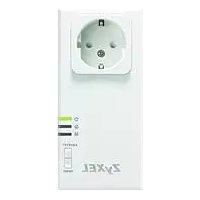
ZYPLA407 - Network card / adapter ZYXEL - Free user manual and instructions
Find the device manual for free ZYPLA407 ZYXEL in PDF.

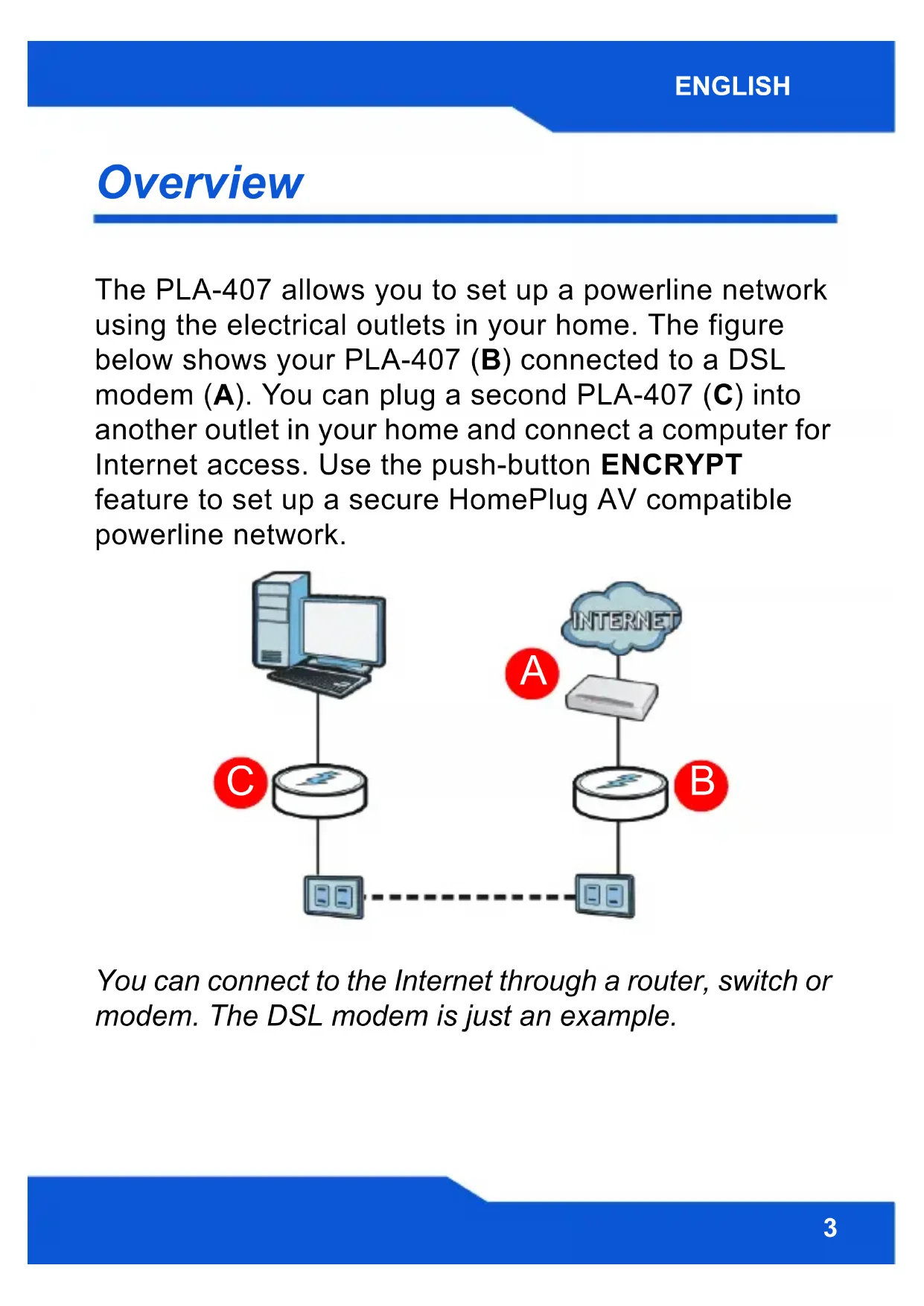


| Product Type | Powerline Adapter (Power Line Communication) |
| Brand | ZyXEL |
| Model | ZYPLA407 |
| Technology | HomePlug AV |
| Connectivity | Ethernet RJ-45 (10/100 Mbps) |
| Maximum Speed | Up to 200 Mbps |
| Ports | 1 Ethernet port, 1 integrated power socket with filter |
| Standards | IEEE 802.3, HomePlug AV |
| Security | AES 128-bit encryption via ENCRYPT button |
| Power Supply | 100-240 V AC, 50/60 Hz |
| Power Consumption | Less than 5 W |
| Dimensions (L x W x H) | Approximately 100 x 60 x 30 mm |
| Weight | Approximately 200 g |
| LED Indicators | Power, Network (activity) |
| Feature | Power socket with integrated noise filter |
| Installation | Plug-and-play, configuration via ENCRYPT button |
| Compatible Operating Systems | Windows, Mac, Linux (via web interface) |
| Package Contents | 1 PLA-407 adapter, 1 Ethernet cable, quick start guide |
| Maintenance and Cleaning | Clean with a soft, dry cloth. Do not use liquids. |
| Safety | Plug directly into a wall socket. Do not overload. Unplug before cleaning. |
Frequently Asked Questions - ZYPLA407 ZYXEL
User questions about ZYPLA407 ZYXEL
0 question about this device. Answer the ones you know or ask your own.
Ask a new question about this device
Download the instructions for your Network card / adapter in PDF format for free! Find your manual ZYPLA407 - ZYXEL and take your electronic device back in hand. On this page are published all the documents necessary for the use of your device. ZYPLA407 by ZYXEL.
USER MANUAL ZYPLA407 ZYXEL
natural_image
White ZyXEL wireless device with a power socket and ports, mounted on a stand (no visible text or symbols beyond branding)ZyXEL
Panels
Overview
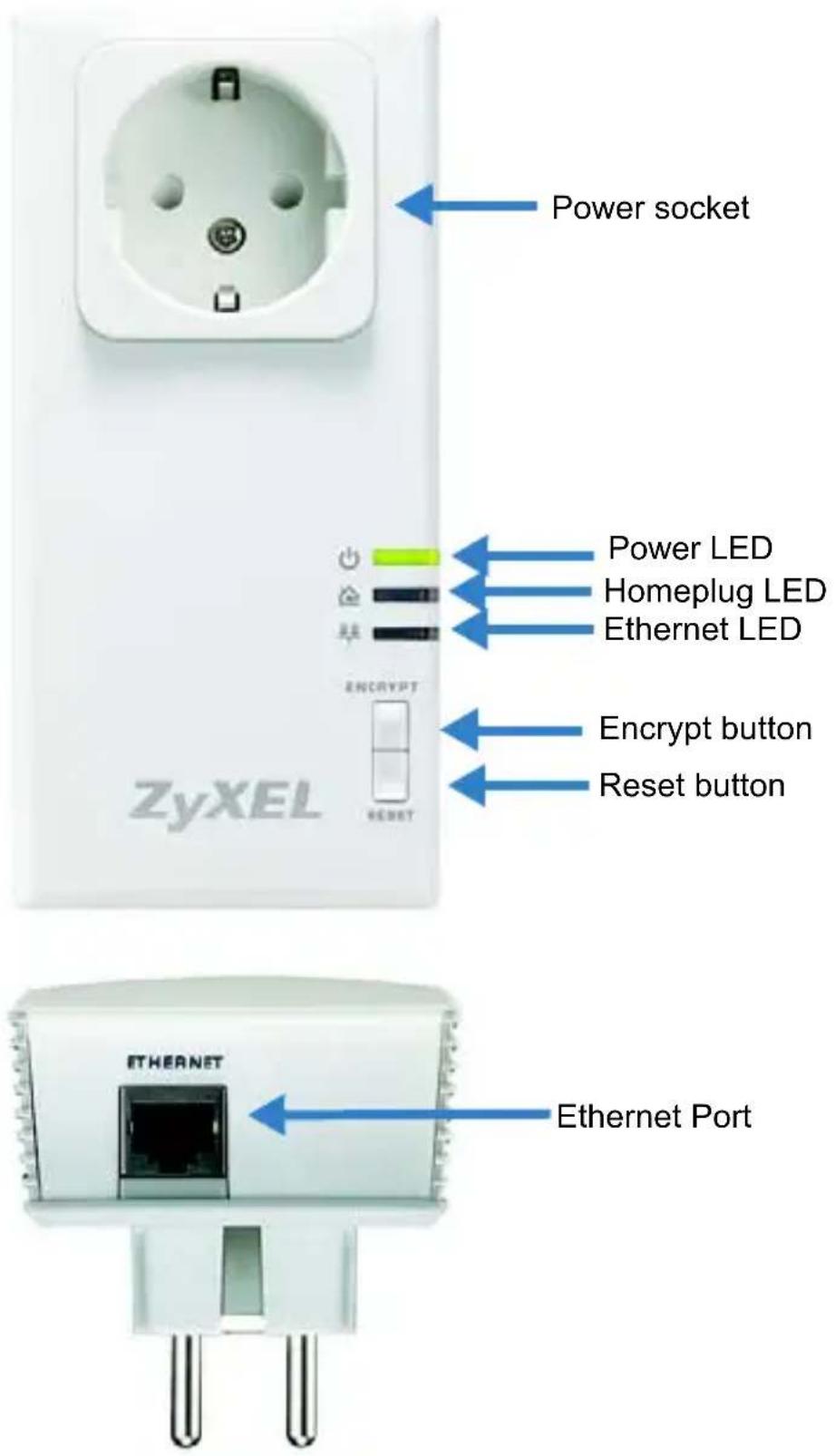
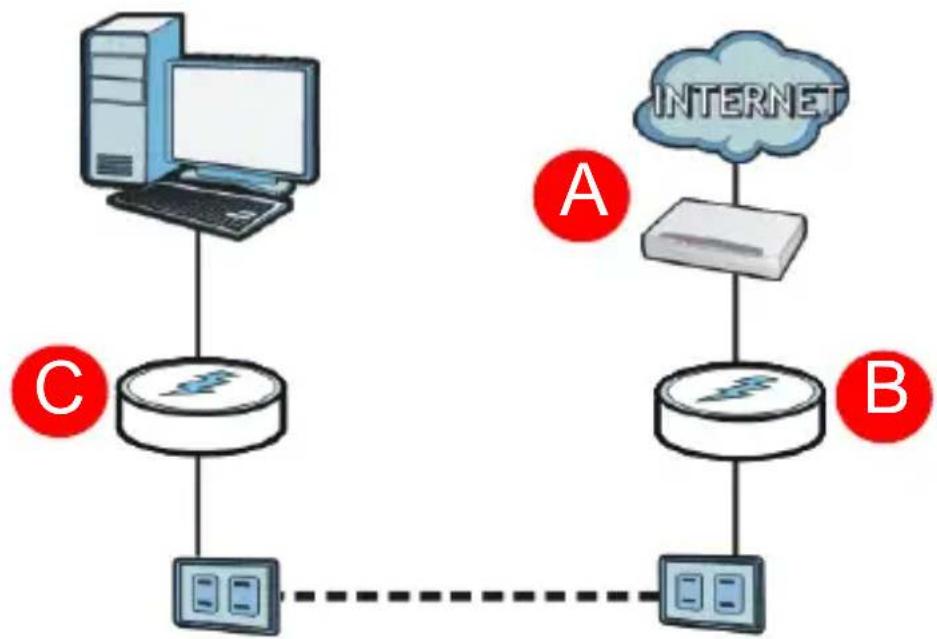
The PLA-407 allows you to set up a powerline network using the electrical outlets in your home. The figure below shows your PLA-407 (B) connected to a DSL modem (A). You can plug a second PLA-407 (C) into another outlet in your home and connect a computer for Internet access. Use the push-button ENCRYPT feature to set up a secure HomePlug AV compatible powerline network.
flowchart
graph TD
    subgraph Circuit_C
        A["Router"] --> B["Computer"]
        B --> C["Switch"]
        C --> D["Switch"]
        D --> E["Switch"]
    end
    subgraph Circuit_A
        F["Switch"] --> G["Server"]
        G --> H["Internet"]
        H --> I["Server"]
        I --> J["Switch"]
    end
    subgraph Circuit_B
        K["Switch"] --> L["Server"]
        L --> M["Switch"]
        M --> N["Switch"]
        N --> O["Switch"]
    end
    style Circuit_C fill:#f9f,stroke:#333
    style Circuit_A fill:#bbf,stroke:#333
    style Circuit_B fill:#bfb,stroke:#333
You can connect to the Internet through a router, switch or modem. The DSL modem is just an example.
This Quick Start Guide shows you how to do the following:
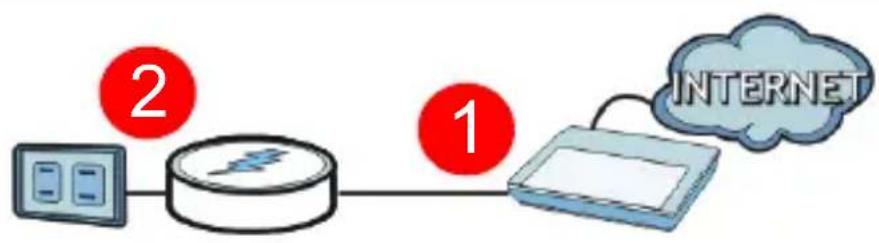
- Connect the PLA-407 to a Cable/DSL Modem or Router (4)
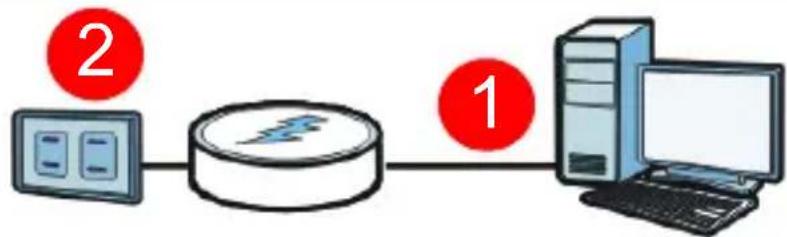
- Connect the PLA-407 to a Computer (5)
Connect the PLA-407 to a Cable/DSL Modem or Router
flowchart
graph LR
    A["Device 1"] --> B["Router"]
    B --> C["Network Device"]
    C --> D["Internet"]
- Use an Ethernet cable to connect the ETHERNET port on the PLA-407 to an available Ethernet port of your modem, router or switch.
- Plug the PLA-407 into a power outlet.
- The power (LED) should be on and the Ethernet (LED) should be on or blinking.
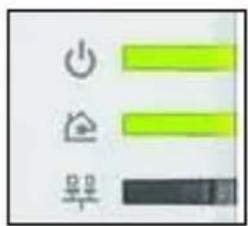

If none of the LEDs are on, unplug your device and recheck your hardware connections.
Connect the PLA-407 to a Computer
flowchart
graph LR
    A["Device 2"] --> B["Router"]
    B --> C["Server"]
    C --> D["Laptop"]
-
Use an Ethernet cable to connect the ETHERNET port on the PLA-407 to the Ethernet port on your computer.
-
Plug the PLA-407 into a power outlet.
-
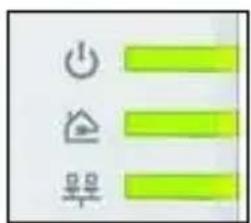
The power (LED) should be on and the Ethernet (LED) should be on or blinking.
-
When the PLA-407 detects a connection to another PLA-407 (or another HomePlug AV compatible powerline adapter), the HomePlug ( LEDs turn on.
Pass-Through Design and Noise Filter
The PLA-407 has a power socket into which you can plug another network device or power strip. The extra socket can filter out interference from the electrical devices so that it does not affect the Powerline network. Refer to the User's Guide for more information on this feature.
Plug in another device such as a router or switch to the Powerline network you have set up.
If you are having trouble setting up your connections, make sure:
- Your outlets are working properly. Unplug the PLA-407 and plug in another electrical appliance that you know works.
- The Ethernet cables you are using are Category 5 or higher. Most cables are labeled with their specifications.
- All Ethernet cables are securely connected.
Congratulations! This sets up your powerline network. See the User's Guide for instructions on using the PLA-4xx Configuration Utility and/or ENCRYPT button to set up your secure Powerline network.
Übersicht


natural_image
Symbol of a trash bin crossed out by two diagonal lines, representing no waste or discharge (no text or labels)

Pass-Through Design en Noise Filter
| ENGLISH DEUTSCH | ||
| Green Product Declaration | Green Product Declaration | |
| RoHS Directive 2002/95/EC |  | RoHS Directive 2002/95/EC  |
| WEEE Directive 2002/96/EC (WEEE: Waste Electrical and Electronic Equipment) 2003/108/EC |  | WEEE Directive 2002/96/EC (WEEE: Waste Electrical and Electronic Equipment) 2003/108/EC  |
| Declaration Signature: |  | Unterschrift des Erklärenden: Alan Cho |
| Name/Title: Alan Cho / Quality Assurance Director Date (yyyy/mm/dd): 2009/3/24 | Name/Titel: Alan Cho / Quality Assurance Director Datum (JJJJ/MM/TT): 2009/3/24 | |
| FRANÇAIS ESPAÑOL | |||
| Déclaration de Produit Green | Declaración de Producto Ecológico | ||
| Directive RoHS 2002/95/EC |  | Directiva RoHS 2002/95/EC |  |
| Directive DEEE 2002/96/EC (DEEE : Déchets des Equipements Electriques et Electroniques) 2003/108/EC |  | Directiva REEE 2002/96/EC (REEE : Residuos de Equipos Eléctricos y Electrónicos) 2003/108/EC |  |
| Signature de la déclaration : Nom/Titre : Alan Cho / Quality Assurance Director Date (aaaa/mm/jj) : 2009/3/24 |  | Firma de declaración:  | |
| Nombre/Título: Alan Cho / Quality Assurance DirectorFecha (aaaa/mm/dd): 2009/3/24 | |||
| ITALIANO SVENSKA | ||
| Dichiarazione Green Product | Miljödeklaration | |
| Direttiva RoHS 2002/95/CE |  | RoHS Direktiv 2002/95/EC |
| Direttiva RAEE 2002/96/CE (RAEE: Rifiuti di Apparecchiature Elettriche ed Elettroniche) 2003/108/CE |  | WEEE Direktiv 2002/96/EC (WEEE: hantering av elektriskt och elektroniskt avfall) 2003/108/EC |
| Firma dichiarazione: | Alan Cho | Deklaration undertecknad av: Alan Cho |
| Nome/titolo: Alan Cho / Quality Assurance Director Data (aaaa/mm/gg): 2009/3/24 | Namn/Titel: Alan Cho / Quality Assurance Director Datum (åååå/mm/dd): 2009/3/24 | |
NEDERLANDS
Productmilieuverklaring

Naam/titel: Alan Cho / Quality Assurance Director
Datum(jjjj/mm/dd): 2009/3/24
Declaration of Conformity
We, ZyXEL Communications Corp., located at No.6, Innovation Rd II, Science-Park, Hsin-Chu, 300, Taiwan, declare under our sole responsibility that the product:
Product information
Model Number : Powerline Pass-Thru Ethernet Adapter
Product Name : PLA-407
Produced by
Company Name : ZyXEL Communications Corporation
Company Add. : No. 6, Innovation Road II, Science-Park, Hsin-Chu, 300, Taiwan
to which this declaration relates, is in conformity with the following standards or other normative documents:
EN 55022:2006/A1:2007
EN 61000-3-2: 2006
EN 61000-3-3:1995+A1:2001+A2:2005
EN 50412-2-1: 2005
Following the provisions of 2004/108/EC; 92/31/EEC Directive; 93/68/EEC, 99/5/EEC and LVD 2006/95/EC.
In accordance with Annex III of the Directive 1999/5/EC.
The TCF-File is located at:
| Company Name : ZyXEL Communications UK Limited |
| Company Address : 11 The Courtyard, Eastern Road, Bracknell, Berkshire, RG12 2XB United Kingdom |
Person is responsible for marking this declaration:
| Hung-Chun Kuo | Managing Director |
| Name (Full Name) | Position/ Title |
| 2008-08-05 | Hung-Chun Kuo |
| Date | Legal Signature |
Brand : ZYXEL
Model : ZYPLA407
Category : Network card / adapter