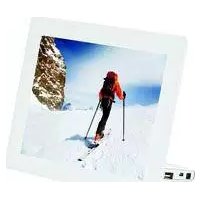
AF 5087MS - Digital photo frame AGFAPHOTO - Free user manual and instructions
Find the device manual for free AF 5087MS AGFAPHOTO in PDF.



| Product type | Digital photo frame |
| Brand | AgfaPhoto |
| Model | AF 5087MS |
| Screen diagonal | 8 inches (20.3 cm) |
| Screen resolution | 800 × 600 pixels |
| Screen format | 4:3 |
| Screen type | LCD-TFT |
| Internal memory | 1 GB (up to 4000 photos) |
| Memory card reader | SD, MMC, MS, SDHC, XD |
| Connectivity | USB Host (USB stick), USB Device (computer) |
| Supported audio formats | MP3 |
| Supported video formats | Motion JPEG, MPEG-4 |
| Power supply | Power adapter 5V/2A (input 100-240VAC) |
| Power consumption | 6.3 W (operating) |
| Dimensions (W × H × D) | 203 × 163 × 90 mm |
| Weight | 0.5 kg |
| Operating temperature | 5°C to 45°C |
| Operating humidity | 20% to 80% RH |
| Functions | Slideshow, music and video playback, date/time display, alarm, timer |
| Included accessories | Remote control (with battery), power adapter, user manual |
| Safety | Use only the supplied adapter, do not open or repair yourself |
| Maintenance | Clean with a soft, dry cloth, do not use liquids |
| Repairability | Repairs must be carried out by an authorized technician |
Frequently Asked Questions - AF 5087MS AGFAPHOTO
User questions about AF 5087MS AGFAPHOTO
0 question about this device. Answer the ones you know or ask your own.
Ask a new question about this device
Download the instructions for your Digital photo frame in PDF format for free! Find your manual AF 5087MS - AGFAPHOTO and take your electronic device back in hand. On this page are published all the documents necessary for the use of your device. AF 5087MS by AGFAPHOTO.
USER MANUAL AF 5087MS AGFAPHOTO
natural_image
Child watching a digital screen displaying a couple on a wooden deck over clouds, with a colorful kite flying nearby (no text or symbols visible)Einleitung
Sehr geehrter Kunde
Fernbedienung
(AF 5077/5087/5107MS)
natural_image
Three electronic devices: a square display, a plug connected to a cable, and a remote control with four buttons (no text or symbols visible)Hinweis

natural_image
Pure electrical circuit lines without any symbolsnatural_image
Pure electrical circuit lines without any symbolsHinweis

flowchart
graph TD
    A["1"] --> B["2"]
    B --> C["3"]
Im Menü navigieren
natural_image
Grid of black-and-white photos showing various car and landscape scenes including a domed building, airplane, waterfall, and cars (no text or symbols)Copyright © 2009 Sagem Communications
Introduction
Cher client
Supports mémoire photo
Télécommande
(AF 5077/5087/5107MS)
natural_image
Three electronic devices: a square display, a plug connected to a cable, and a remote control with a keypad (no text or symbols visible)Remarque

natural_image
Gray rectangular object with a plus sign and circular symbol at the bottom (no text or symbols present)natural_image
Pure electrical circuit lines without any symbolsRemarque

flowchart
graph TD
    A["1"] --> B["2"]
    B --> C["3"]
natural_image
Grid of black-and-white photos showing luxury car and landscape scenes, including a domed building, airplane, waterfall, and cars (no text or symbols)Dimensions (L × H × P) 190 × 153 × 80 mm
Poids 0,4kg
Cartes mémoire photo compatibles ..SD/MMC/MS/SDHC/XD
Format Photo ...... JPEG
Dimensions (L × H × P) 190 × 153 × 80 mm
Poids 0,4kg
raccordement USB / port USBUSB-Host, USB Device
Cartes mémoire photo compatibles ..SD/MMC/MS/SDHC/XD
Format Photo ......JPEG
Cartes mémoire photo compatibles. SD/MMC/MS/SDHC/XD
Format Photo ...... JPEG
Dimensions (L × H × P).... 203 × 163 × 90 mm
Poids 0,5 kg
Cartes mémoire photo compatibles. SD/MMC/MS/SDHC/XD
Format Photo ...... JPEG
Dimensions (L × H × P) 255 × 203 × 90 mm
Poids 0,8kg
Cartes mémoire photo compatibles ..SD/MMC/MS/SDHC/XD
Format Photo JPEG
Dimensions (L × H × P) 255 × 203 × 90 mm
Poids 0,8kg
Cartes mémoire photo compatibles ..SD/MMC/MS/SDHC/XD
Format Photo JPEG
Copyright © 2009 Sagem Communications
Introduction
Dear Customer
Thank you for purchasing our photo frame. Get ready to experience photography like never before! The photo frame allows you to view photos, audio and video files—all without a computer.
High definition LCD screen
Your digital photo frame includes a built-in memory, a memory card slot and a USB port. Files on the built-in memory can be deleted and files on memory card and USB-disc can be copied.
Supports browse mode (thumbnails of 20 images per page at a time). Your digital photo frame supports photo rotate and stretch function.
An automatic, continuous slide show with background music lets you enjoy all of your photos with ease.
The included remote control makes it simple to select photo-, music- and movies files, change settings and more.
Additional functions like time and date display, alarm clock and an automatic on and off switch are also available.
We hope you enjoy your device and its many functions!
About this User Manual
With the installation guide on the following pages, you can start using your device quickly and easily. Detailed descriptions can be found in the following sections of this user manual.
Read the entire user manual carefully. Follow all safety instructions in order to ensure proper operation of your device. The manufacturer accepts no liability if these instructions are not followed.
Multiple models of this device series are described in this user manual. Please note that some functions are only available with specific models.
Symbols Used
DANGER!

DANGER!
Warns about dangers for people, damage to the device or other objects as well as possible loss of data. Injuries or damage can result from improper handling.
Notice

Troubleshooting
This symbol designates tips that will help you to use your device more effectively and easily.
Safety Instructions and Recommendations
Do not make any changes or settings that are not described in this user manual. Physical injury or damage to the device or loss of data can result from improper handling. Take note of all warning and safety notes indicated.
Setting Up the Device
The device is exclusively for indoor use only. The device should rest securely on a stable, flat surface. Position all cables in such a way that no one will stumble on them, thus avoiding possible injuries to persons or damage to the device itself.
Always handle the unit with care. Avoid touching the LCD screen. Never place heavy or sharp objects on the LCD panel, frame or power cord.
Protect the device against direct sunlight, heat, large temperature fluctuations and moisture. Do not place the device in the vicinity of heaters or air conditioners. Observe the information on temperature and humidity in the technical data.
The device should not be switched on immediately after being moved from a cold to a warm room or vice versa or into a cold room which heated up quickly. In such cases, wait at least three hours until the device has adapted to the changed conditions (temperature, humidity...).
In the event that the device becomes too hot, or if you see smoke coming from the device, you must immediately pull the power cable out of the power socket. Have your device examined by trained professionals at a technical service location. To prevent the spread of fire, open flames should be kept away from the device.
Do not plug in the device in moist rooms. Never touch the mains cable or the mains connection with wet hands.
Do not allow liquids to enter into the device. Disconnect the device from the power socket if liquids or foreign objects have entered the device and have your device examined by trained professionals at a technical service location.
Do not allow children to handle the device without supervision. The packing materials should be kept out of the hands of children.
Power Supply
Use only the enclosed power adapter (see chapter Appendix / Technical Data). Check whether the mains voltage of your device (indicated on the type label) matches the mains voltage available at the setup location. This equipment complies with the voltage type specified on the unit.
Never touch the power cable if the insulation is damaged. Replace damaged wires immediately. Use suitable cables only; if necessary please contact our technical customer service or your retailer.
Before cleaning the surface of your device, disconnect it from the power network. Use a soft, lint-free cloth. Never use liquid, gaseous or easily flammable cleansers (sprays, abrasives, polishes, alcohol). Do not allow any moisture to reach the interior of the device.
Only clean the display with a dry, soft cloth. If the display breaks, a mildly corrosive liquid may escape. Avoid all contact with your skin and eyes.
h a s Repairs
Do not make any repairs to the device yourself. Improper maintenance can result in injuries or damage to the device. Only have your device repaired by an authorised service centre.
Do not remove the type label from your device; this would void the warranty.
Photo Memory Media
Only use storage media that are compatible with the device. In order to prevent damage to the card or the unit, please turn off the power before removing or inserting the card.
Never pull out the memory card while the device is accessing it. This could cause data to be damaged or lost.
EN
Overview
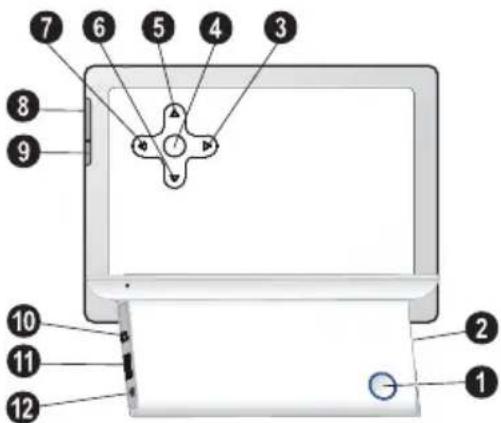
Device Overview
① On/Off switch
②—Slot for Memory card
3 ←—Navigating in the Menu / Decrease the brightness, contrast and colour saturation / Skips to the previous image, previous row or page
④ OK—Confirms the selection / Starting, interrupting the slide show
⑤ ↑—Navigating in the Menu / Increase the volume / Switch on the background music during slide show
6 ⏻—Navigating in the Menu / Decrease the volume
7 ➕—Navigating in the Menu / Increase the brightness, contrast and colour saturation / Skips to the next image, next row or page
⑧ MENU—Calling the main menu / press and hold: Switch on the analog clock
⑨ —Calling up the settings menu
10 ⬇—Mini USB connection – for connecting a computer
11 - Socket—USB port for a storage medium
12 - Socket - Port for power supply
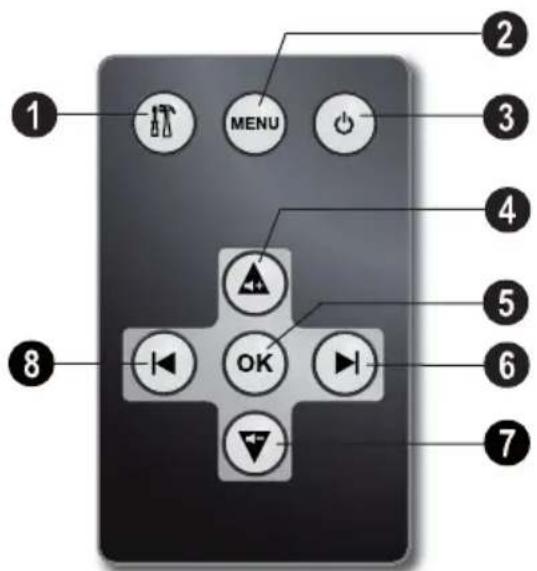
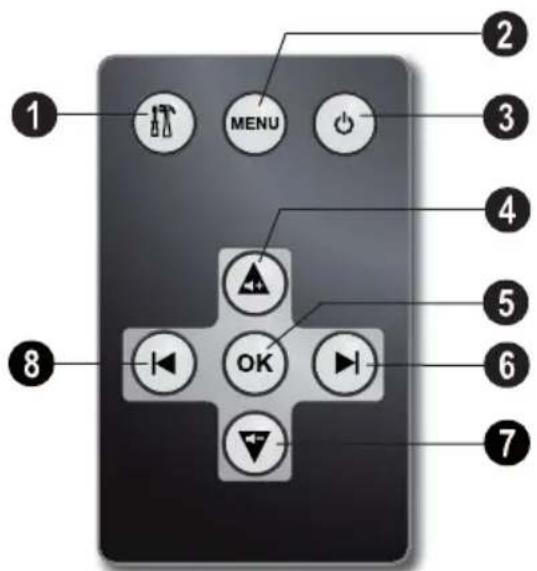
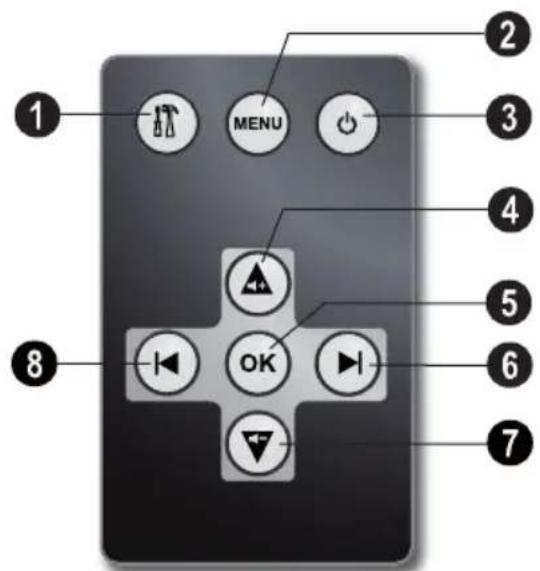
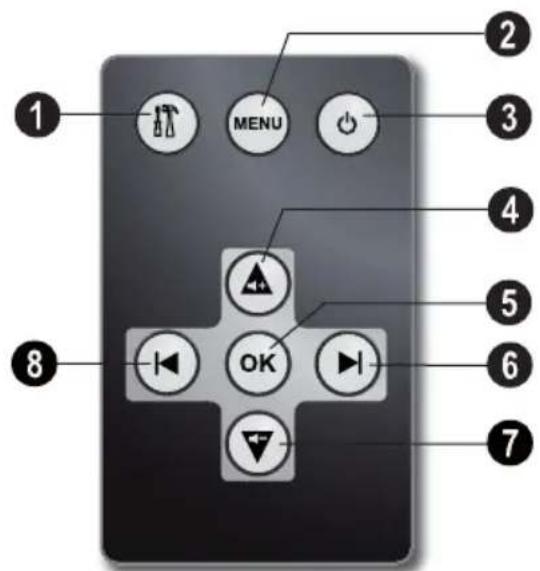
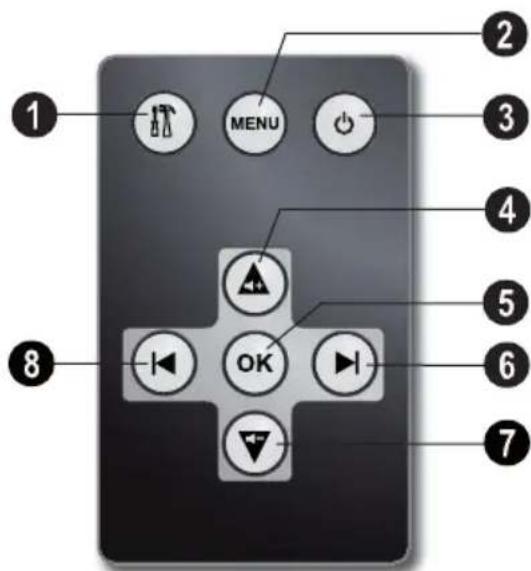
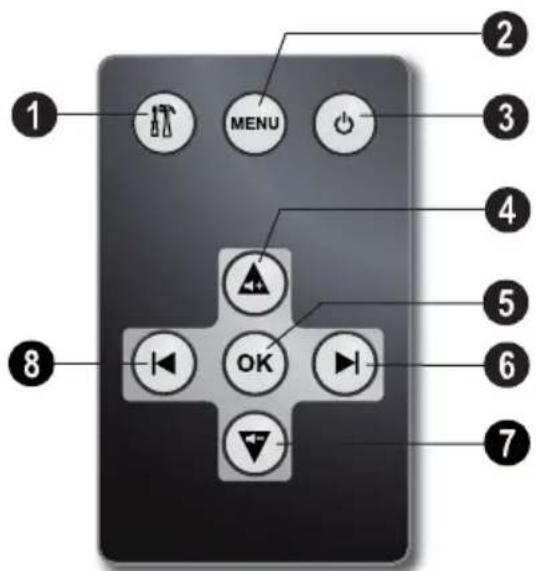
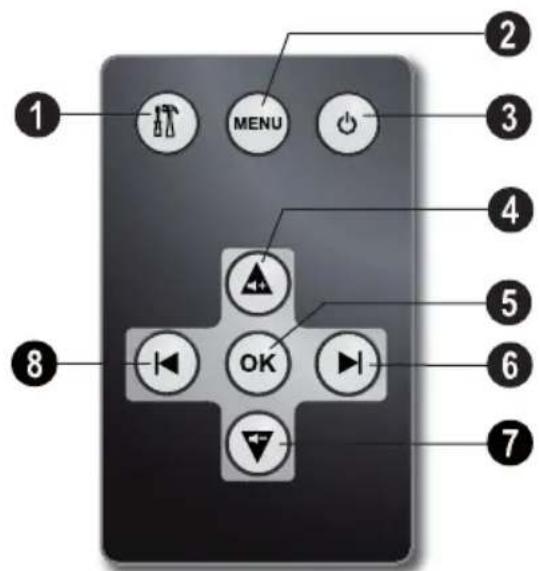
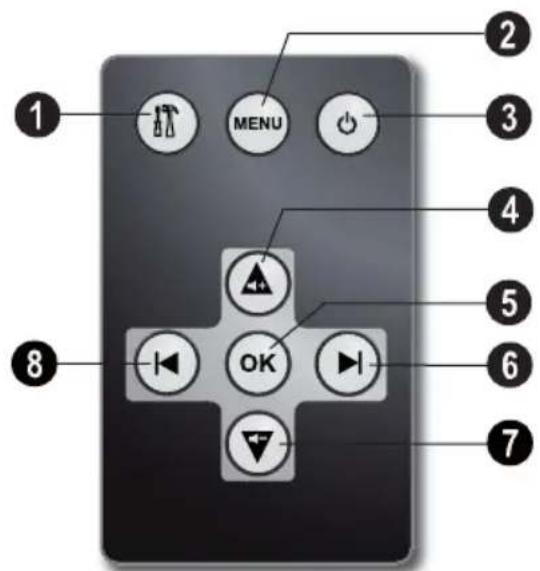
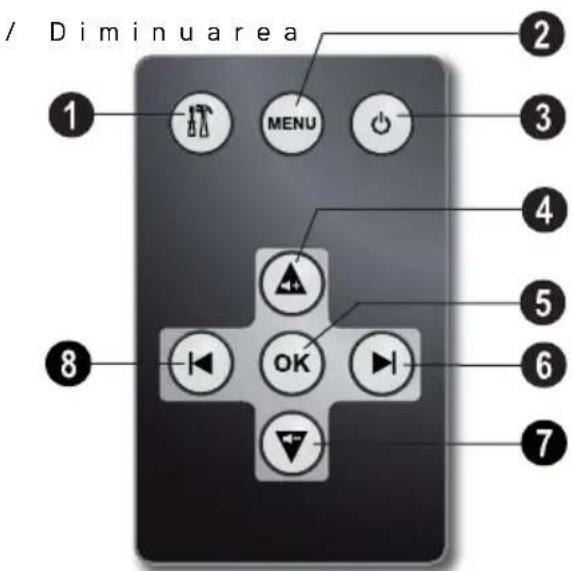
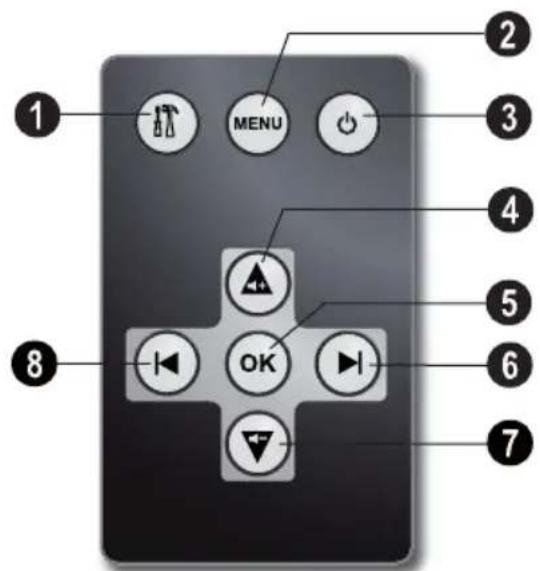
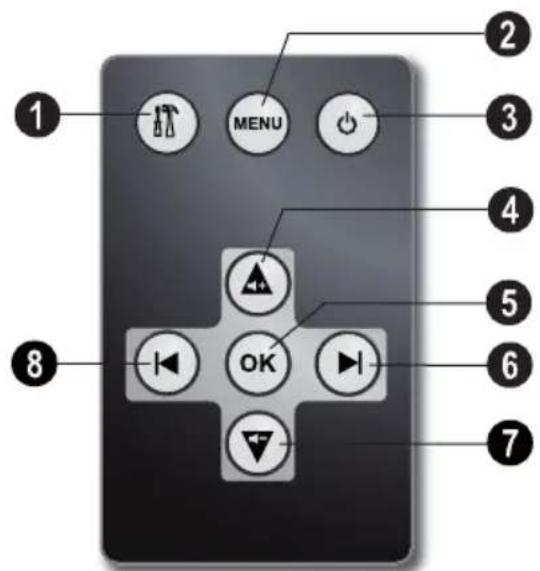
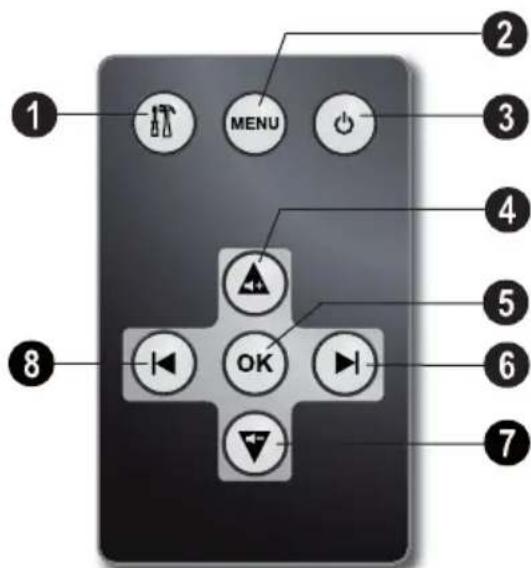
Remote Control
(AF 5077/5087/5107MS)
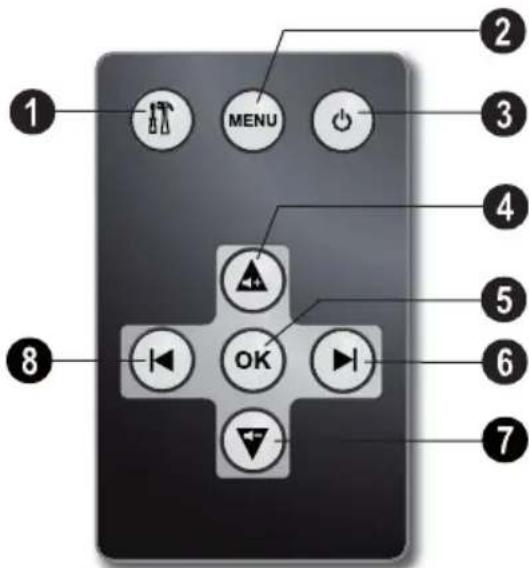
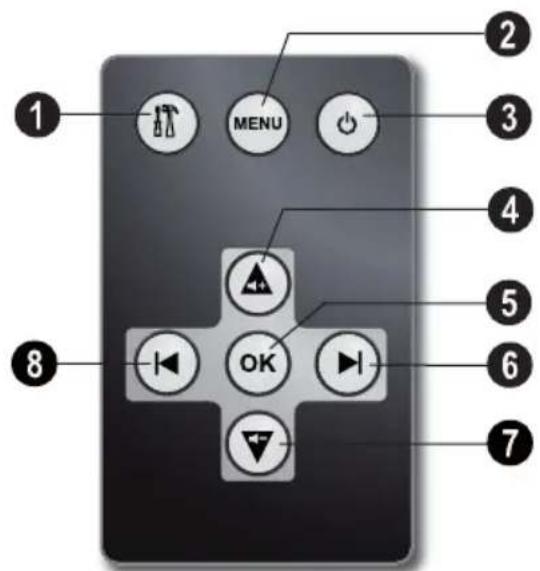
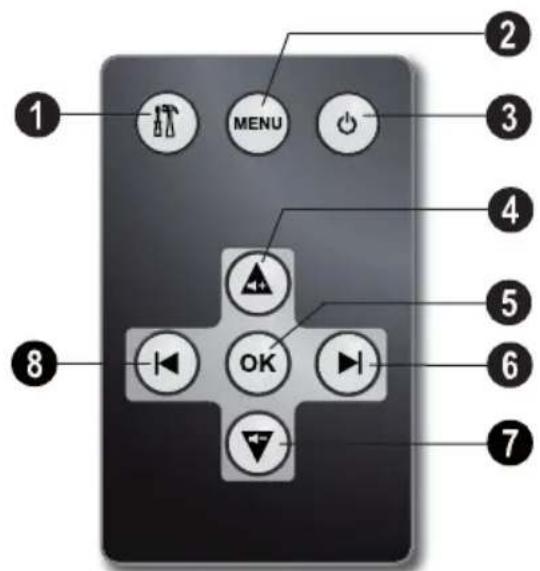
①—Calling up the settings menu
②—Calling the main menu / press and hold: Switch on the analog clock
③—Switching On and Off
4—Navigating in the Menu / Increase the volume / Switch on the background music during slide show
⑤—Confirms the selection / Starting, interrupting the slide show
6—Navigating in the Menu / Increase the brightness, contrast and colour saturation / Skips to the next image, next row or page
⑦—Navigating in the Menu / Decrease the volume
⑧—Navigating in the Menu / Decrease the brightness, contrast and colour saturation / Skips to the previous image, previous row or page
Initial Operation
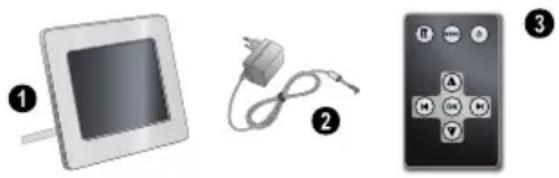
Packing Contents
① Digital photo frame with bracket
② Power supply with exchangeable plugs
③ A remote control (with battery) (AF 5077/5087/5107MS)
User Guide (not depicted)
natural_image
Three electronic devices: a square monitor, a charging plug, and a remote control (no text or symbols visible)Notice

Missing Package Contents
If one of the parts is missing or damaged, please contact your retailer or our customer service.
Connecting power supply
CAUTION!

Mains Voltage at the Site of Installation!
Check whether the mains voltage of your device (indicated on the type label) matches the mains voltage available at the setup location.
1 Choose the right plug for your country and slide it onto the power adapter. Ensure that the plug snaps in completely.
2 Insert the small plug of the power supply into the socket on the rear side of your device. Insert the power supply unit into the socket.
Connecting to the PC
Using the USB cable, you can connect your photo frame to a computer to transfer files between the internal memory and computer.
1 Switch the device off using the on/off switch on the rear.
2 With the frame turned off, connect the small end of the cable to the digital picture frame and the large end to your computer.
3 Switch the device on using the on/off switch on the rear. Allow the computer a few moments to recognize the new hardware. Compatible photo, music and video files can be copied onto the internal memory.
4 If the connection with the computer is disconnected, the digital photoframe will restart automatically.
Inserting a Memory Card
1 Insert a memory card into the appropriate card slot at the rear of the device. Your photo frame supports the following memory cards: SD/MMC/MS/SDHC/XD.
DANGER!

Inserting a Memory Card!
Only use storage media that are compatible with the device.
Never pull out the memory card while the device is accessing it. This could cause data to be damaged or lost.
2 Switch the device on using the on/off switch on the rear. The player will start slide show after the start screen be displayed.
Notice

Many Photos on the Memory Card
If the memory card contains many photos, it can take some time until the slide show starts.
3 Press OK at the rear during a slide show to stop the slide show.
Notice

Using USB device and memory card at the same time
If a USB storage device is used at the same time as a storage card, the images from the memory card are displayed first.
EN
Installing or Changing the Batteries of the Remote Control
DANGER!

Risk of explosion with incorrect type of batteries
CAUTION! RISK OF EXPLOSION IF BATTERY IS REPLACED BY ONE OF AN INCORRECT TYPE.
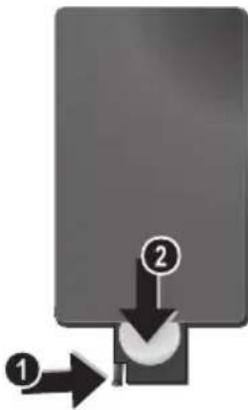
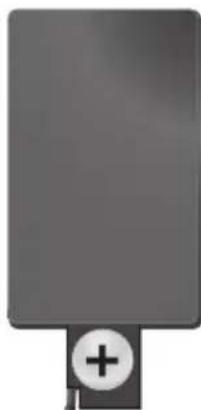
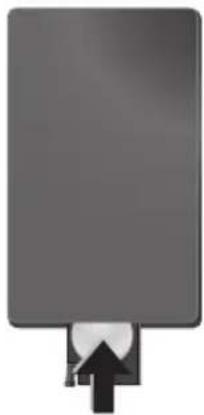
1 Take the battery compartment from the remote control by opening the locking mechanism [1] and pulling out the battery compartment [2].
flowchart
graph TD
    A["①"] --> B["Process Block"]
    C["②"] --> B
    B --> D["End"]
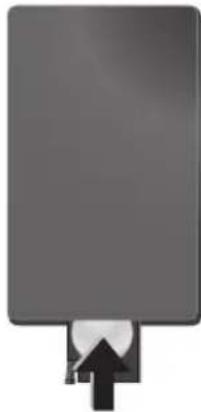
2 Insert the new batteries into the battery compartment with the positive and negative poles as shown on the back of the remote control. Make sure the polarities(+ and -) are aligned correctly.
natural_image
Gray rectangular object with a plus sign and circular symbol at the bottom (no text or symbols present)3 Push the battery compartment back into the remote control until the locking mechanism engages.
natural_image
Pure electrical circuit lines without any symbolsNotice

Normally the batteries will last for around one year. If the remote control does not work, please replace the batteries. If the player is not used for a long time, take out the batteries. So you can prevent leakage and possible damage to the remote control.
The batteries used should be disposed of according to the recycling regulations of your country.
Using the Remote Control
Point the remote control to the remote sensor on the front panel of the device. Its working limits is within an angle of 30 degrees and a distance of 2 meter. When using the remote control, no obstacle should be placed between the remote control and remote sensor.
Playback
Overview of the Menu Functions
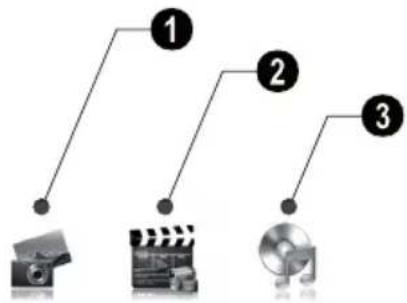
There are three items on the main menu.
① Photo Menu
② Video Menu
(AF 5077/5087/5107MS)
③ Music Menu
(AF 5077/5087/5107MS)
flowchart
graph TD
    A["1"] --> B["2"]
    B --> C["3"]
Navigating in the Menu
1 Press MENU on the remote control or MENU on the device.
2 Select the desired menu using ◀/▶.
3 Confirm with.
Photo Playback
1 Select the photo menu in the main menu and confirm using OK.
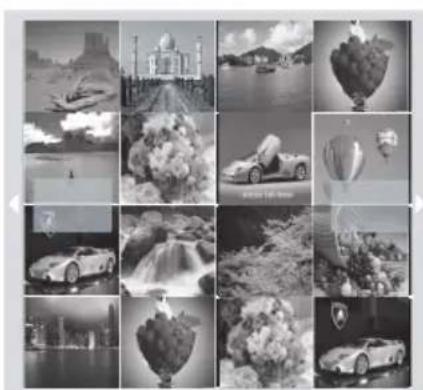
2 Then the frame will display 16 thumbnail images per page.
natural_image
Grid of black-and-white photos showing various scenes including aircraft, a domed building, waterfalls, and cars (no text or symbols)3 Use ⬆/↓ or ↔/→ to select the image from which to start the slide show
4 Press OK to start the slide show.
5 Press OK to pause the slide show. A 'pause symbol' appears on the screen.
6 Press ⬇/→ to skip top the previous or next image.
7 End the slide show using MENU.
Notice

Calling up Menu
During the slideshow you can return to the main menu by pressing MENU at any time.
Setting the Background Music of the Slide Show
(AF 5077/5087/5107MS)
Notice

As background music, you can only use files that are stored together with the photos in the internal memory on the memory card or the USB connection.
1 During the slide show press ▲ on the remote control or ⬆ on the device, to start the background music.
Notice

Using ▲/▼, set the volume.
Music Playback
(AF 5077/5087/5107MS)
1 Select the music menu in the main menu and confirm using.
2 Using ◀/▶ or ▲/▼ select the music title you want to play.
3 Press OK to start playback.
Additional informations will be displayed during playback.
4 To stop, press OK.
Movie Playback
(AF 5077/5087/5107MS)
1 Select the video menu in the main menu and confirm using.
2 Using ⬆/▶ or ▲/▼ select the video title you want to play.
3 Press OK to start playback. To stop, press OK.
Notice

Additional Playback Functions
During playback, you can skip to the previous or next song by using ◀/▶ or ▲/▼.
During playback, press the OK on the remote control to pause and to resume playback.
Adjusting Volume Level
(AF 5077/5087/5107MS)
During playback you can adjust the volume using ▼/▲ on the remote control. Press repeatedly ▼ to switch off the volume (mute function).
Settings
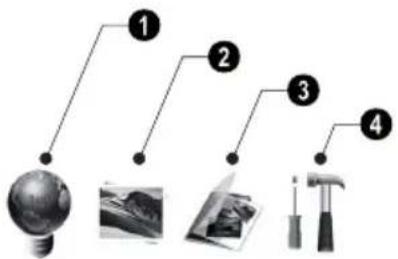
The settings menu contains four items and can be called up using 📄 on the device or 🌐 on the remote control.
① ECO Settings (Automatically switch on/off, Adaption of the LCD brightness automatically (AF 5077/5087/5107MS))
② Picture-Settings (Slide show settings, rotating image)
③ File Management (Copy files, delete files, playlists)
④ Basic-Settings (Brighness, contrast, date, clock)
flowchart
graph TD
    A["Light bulb"] --> B["1"]
    A --> C["2"]
    A --> D["3"]
    A --> E["4"]
ECO Settings
The digital picture frame can be switched on or off automatically or the brightness of the LCD screen can be adapted according the ambient light (AF 5077/5087/5107MS).
Select from the following settings:
Switching On and Off Automatically
The digital photo frame can be switched on or off at a particular time of the day.
1 Press IT.
2 Using with OK.

3 The symbol is selected.
4 Use ⏻/→ to select the coloured symbol and confirm using OK.
5 Select the time at which the digital photo frame should be switched on using ⏻/→.
6 Confirm with OK. The colour of the cursor will change from white to red.
7 Select the time at which the digital photo frame should be switched off using ⏻/→.
8 Confirm with OK. The colour of the cursor will change from red to white. The time period when the digital picture frame is switched on, is marked green.
9 To delete a time period, mark the time period again. The green marking will be removed.
10 Press ↓ and select the symbol √ using ⏻/→.
11 Confirm with OK.
12 You can exit with ⚠.
Notice

Switching Automatic On/Off
You can deactivate the automatic on/off. The actual setting is retained.
1 Press
2 Using ⬇/Ⓧ select the symbol and confirm with OK.
3 The symbol is selected.
4 Select using ⬇/→ the black/white symbol (automatic switched off) or the coloured symbol (automatic switched on).
5 Confirm with OK.
6 You can exit with 📄.
Automatic adaption of the LCD brightness
(AF 5077/5087/5107MS)
With this function the brightness of the LCD screen can be adapted according the ambient light.
1 Press IT.
2 Using with OK.
←/→ select the symbol and confirm
3 Using OK.
select the symbol and confirm with
4 Select using ⬇/⇨ the black/white symbol firm(automatic switched off) or the coloured symbol (automatic switched on).
5 Confirm with OK.
nd You can exit with Ⅲ.
Modifying the Picture Settings
Here you can rotating the images, changing aspect ratio, determine the transition effects or adjusting the slide show speed.
1 Press IT.
2 Using ⏻/Ⓧ select (Picture Setting) and confirm with OK.
3 U s e ↑/↓ to select the required symbol.
Rotating Image—Change the orientation of the image
Aspect Ratio—The digital photo frame has a wide screen with 4:3 aspect ratio. Select whether you would like to view the image in the original format, in the wide screen format (16:9) or if the image should be stretched to match the shape of the screen.
Transition Effects—Allows you to choose different styles of slide show effects.
Slide Show Speed—Select from the displayed times.
Personal Frame - Select from different frames for displaying the pictures.
4 Select the required setting using ⏻/→.
5 Confirm with OK.
6 You can exit with 📄.
File Management
Files on the memory card or USB disk can be copied. Files in the internal memory can be deleted.
7 Using ⏻/⇨ to select icon and press OK to start copying or deleting.
Notice

Copy all Files from the Memory Card
Select and confirm using OK to copy all files from the memory card to the internal memory.
Notice

Cancel Process
Select and confirm using OK to cancel the process.
8 The screen will display the processing bar. After finish copying, you can find the image in the internal memory.
Starting Mode
Select whether you would like images, movies or images and movies to be played automatically after Power on.
1 Press
2 Using ⬆/⇨ select (File Management) and confirm with OK.
3 Using ⬆ select and confirm with OK.
4 Select from the options displayed using ⬇/→ and confirm using OK.
5 You can exit with 📄.
Copy / Delete Files
1 Press
2 Using ⬆/⇨ select (File Management) and confirm with OK.
3 Using ↑ to select (copy) or (delete) and confirm with OK.
4 Using ⬆/↓, ⇔/→ select the file you want to copy or delete.
5 Mark the file using OK.
Notice

Cancelling the Selection
Press again OK to cancel the selection.
6 Using ⏻ to select the symbol line at the bottom of the screen.
Playlists
Create your own playlist for images, movies and music.
Only images, movies and music in this playlists will be played back. You can create up to five playlists.
Creating Playlist
1 Press IT.
2 Using ⬆/⇨ select (File Management) confirm with OK.
3 Select (Playlists) using / and confirm with .
4 Select using ⬆/→ wether you would like to create a playlist for music, images or movies.
5 Confirm with OK.
6 Confirm 'OFF' using OK to create a new playlist.
7 Using ⬆/⇨ select e.g. playlist 1 and confitory default.
with OK.
5 Select the de
8 Select using ⬆/↓ or ↔/→ the file you want to add to the playlist. Mark the file using OK.
9 Mark further files using OK 8 Confirm the modified setting using .
10 Using ⏻ to select the symbol line at the bottom of the screen.
11 Using ⬇/⇨ to select → icon and press OK to save the playlist.
12 You can exit with 📄.
You can allocate the following settings:
(Clock)—Setting the time and date.
onfitory default.
5 Select the desired setting using ⬆/↓.
6 Confirm with
7 Modify the setting using ⏻/→.
8 ^i Confirm the modified setting using .
Switching Playlist On/Off
1 Press IT.
2 Using ⬆/→ select (File Management) and confirm with OK.
3 Select {Playlists} using ⬆/↓ and confirm with ➕.
4 Select using ⬇/⇨ wether you would like to switch on a playlist for music, images or movies.
5 Confirm with OK.
6 Confirm e.g. playlist1 using OK.
7 Select the desired playlist using ⬇/→.
Notice

Switching Playlist Off
With the selection of 'OFF' using ⬇/
the playlist will be switched off. All images, movies or music files are available again.
Modifying the Basic Settings
1 Press 📄.
2 Using ⏻/⇨ select the symbol and confirm with OK.
3 U s e ▲/▼ to select the setting you would like to allocate.
4 Confirm with.
and , (Brightness, Contrast, Colour saturation)—Adjustment of brightness, contrast, and colour saturation of the LCD screen.
[Alarm] (AF5077/5087/5107MS)—Setting of the alarmtime, on/off of the alarm and the selection of the alarmtone.
1 (Calendar) – Setting of year, month, day.
⚠️ (Default)—Restore the settings to the fac-
9 You can exit with 📄.
Service
Changing the frame
You can change the frame of the device using the picture frames supplied. The frames are held with magnets.
1 Press on the change frames key on the back of the device. Remove the frame.
2 Place the picture frame onto the device until it engages on the magnets.
| Problems Solutions | |
| Photo Frame does not power on. Check that you connect the AC adapter to the frame properly. | |
| Cannot save files Make sure that enough internal memory is available. Re-start the picture frame and delete some files in order to free up memory space. | |
| No sound Make sure the file format is supported, the computer and the frame are correct connected or the memory card is not damaged. | |
| Memory card can not be recognized if you connected the frame to a computer, the inserted memory card can not be recognized. | |
| Not all files of the memory card will be shown for the slide show, movie and music play back. | Check whether a playlist is switched on. |
Appendix
Technical Data AF 5077PS
Dimensions (L × H × W).... 190 × 153 × 80 mm
Weight.... 0,4 kg
Mains Connection Input: 100–240V\~ / 50–60Hz Output: 5V== / 2A
Recommended Ambient 5–45°C
Relative humidity....20 - 80%
Power Consumption
Device is switched on (slide show).....5,0W
Screen size....7"
Aspect ratio 4:3
Resolution....800 × 600 Pixel
Internal memory.....128 MB MB or up to 500 photos
USB Port.... USB-Host
Compatible Memory Cards.SD/MMC/MS/SDHC/XD
Photo formats.....JPEG
Technical Data AF 5077MS
Dimensions (L × H × W).... 190 × 153 × 80 mm
Weight.... 0,4kg
Mains Connection Input: 100-240V\~/50-60Hz Output: 5V==/2A
Recommended Ambient 5–45°C
Relative humidity....20 - 80%
Power Consumption
Device is switched on (slide show)....4.3W
Screen size....7"
Aspect ratio 4:3
Resolution....800 × 600 Pixel
Internal memory..256 MB MB or up to 1000 photos
USB Port.... USB-Host, USB Device
Compatible Memory Cards.SD/MMC/MS/SDHC/XD
Photo formats......JPEG
Music formats ...... MP3
Video formats ....Motion Jpeg, Mpeg-4
Technical Data AF 5087PS
Dimensions (L × H × W).... 203 × 163 × 90 mm
Weight.... 0,5kg
Mains Connection Input: 100–240V\~ / 50–60Hz Output: 5V== / 2A
Recommended Ambient.... 5-45°C
Relative humidity....20 - 80%
Power Consumption
Device is switched on (slide show) 5,4W
Screen size....8"
Aspect ratio 4:3
Resolution....800 × 600 Pixel
Internal memory.....128 MB MB or up to 500 photos
USB Port ....USB-Host
Compatible Memory Cards SD/MMC/MS/SDHC/XD
Photo formats..... JPEG
Technical Data AF 5087MS
Dimensions (L × H × W).... 203 × 163 × 90 mm
Weight.... 0,5kg
Mains Connection Input: 100–240 V \~ / 50–60 Hz Output: 5 V = / 2 A
Recommended Ambient 5–45°C
Relative humidity....20 - 80%
Power Consumption
Device is switched on (slide show) 6.3W
Screen size.....8"
Aspect ratio 4:3
Resolution....800 × 600 Pixel
Internal memory.....1 GB MB or up to 4000 photos
USB Port ....USB-Host, USB Device
Compatible Memory Cards SD/MMC/MS/SDHC/XD
Photo formats...... JPEG
Music formats ...... MP3
Video formats ....Motion Jpeg, Mpeg-4
Technical Data AF 5107PS
Dimensions (L × H × W).... 255 × 203 × 90 mm
Weight.... 0,8 kg
Mains Connection Input: 100–240V \~ / 50–60Hz Output: 5V = / 2A
Recommended Ambient.... 5–45°C
Relative humidity....20 - 80%
Power Consumption
Device is switched on (slide show)....6,1W
Screen size.....10,4"
Aspect ratio 4:3
Resolution....800×600 Pixel
Internal memory.....128 MB MB or up to 500 photos USB Port..... USB-Host
Compatible Memory Cards.SD/MMC/MS/SDHC/XD
Photo formats......JPEG
Technical Data AF 5107MS
Dimensions (L × H × W).... 255 × 203 × 90 mm
Weight.... 0,8kg
Mains Connection Input: 100–240V \~ / 50–60Hz Output: 5V == / 2A
Recommended Ambient 5–45°C
Relative humidity....20 - 80%
Power Consumption
Device is switched on (slide show)....6,6W
Screen size....8"
Aspect ratio 4:3
Resolution....800×600 Pixel
Internal memory..... 1 GB MB or up to 4000 photos
USB Port.... USB-Host, USB Device
Compatible Memory Cards.SD/MMC/MS/SDHC/XD
Photo formats......JPEG
Music formats ...... MP3
Video formats ....Motion Jpeg, Mpeg-4
All data are provided for reference purposes only.
AgfaPhotoreserves the right to make any changes without prior notice.
AgfaPhoto is used under license of Agfa-Gevaert NV & Co. KG or Agfa-Gevaert NV. Neither Agfa-Gevaert NV & Co KG nor Agfa-Gevaert NV manufacture this product or provide any product warranty or support.
For service, support and warranty information, contact the distributor or manufacturer.
Contact: AgfaPhoto Holding GmbH, www.agfaphoto.com
Manufacturer: Sagem Communications, www.sagem-communications.com
CE
The CE marking certifies that the product meets the main requirements of the European Parliament and Council directive 1999/5/CE on telecommunications terminal equipment, regarding safety and health of users and regarding electromagnetic interference.
The declaration of compliance can be consulted on the site www.agfaphoto.com
Preservation of the environment as part of a sustainable development logic is an essential concern of AgfaPhoto. The desire of AgfaPhoto is to operate systems observing the environment and consequently it has decided to integrate environmental performances in the life cycle of this products, from manufacturing to commissioning use and elimination.

Packaging: The presence of the logo (green dot) means that a contribution is paid to an approved national organisation to improve package recovery and recycling infrastructures to facilitate. Please respect the sorting rules set up locally for this kind of waste.
Batteries: If your product contains batteries, they must be disposed of at appropriate collection points.
Product: The crossed-out waste bin stuck on the product means that the product belongs to the family of electrical and electronic equipment. In this respect, the European regulations ask you to dispose of it selectively;
- At sales points in the event of the purchase of similar equipment.
- At the collection points made available to you locally(drop-off centre, selective collection, etc.).
In this way you can participate in the re-use and upgrading of Electrical and Electronic Equipment Waste, which can have an effect on the environment and human health.
The paper and cardboard packaging used can be disposed of as recyclable paper. Have the plastic wrapping and Styrofoam packaging recycled or dispose of it in the non-recyclable waste, depending on the requirements in your country.
Trademarks: The references mentioned in this manual are trademarks of the respective companies. The lack of the trademarks ® and ™ does not justify the assumption that these dedicated terminologies are free trademarks. Other product names used herein are for identification purposes only and may be trademarks of their respective owners. AgfaPhoto disclaims any and all rights in those marks.
Neither AgfaPhoto nor its affiliates shall be liable to the purchaser of this product or third parties for damages, losses, costs, or expenses incurred by the purchaser or third parties as a result of accident, misuse, or abuse of this product or unauthorized modifications, repairs, or alterations to this product, or failure to strictly comply with AgfaPhoto operating and maintenance instructions.
AgfaPhoto shall not be liable for any damages or problems arising from the use of any options or any consumable materials other than those designated as original AgfaPhoto products or AgfaPhoto approved products.
AgfaPhoto shall not be held liable for any damage resulting from electromagnetic interference that occurs from the use of any interface cables other than those designated as AgfaPhoto products.
All rights reserved. No part of this publication may be reproduced, stored in a retrieval system or transmitted in any form or by any means, electronic, mechanical, photocopying, recording, or otherwise, without the prior written permission of AgfaPhoto. The information contained herein is designed only for use with this product. AgfaPhoto is not responsible, if this information is applied to other devices.
This user manual is a document that does not represent a contract.
Errors, printing errors and changes are reserved.
Copyright © 2009 Sagem Communications
Introduzione
IT
Stimato cliente,
Telecomando
(AF 5077/5087/5107MS)
natural_image
Three electronic devices: a square display, a plug-in cable, and a remote control (no text or symbols visible)Nota

natural_image
Pure electrical circuit lines without any symbolsnatural_image
Pure electrical circuit lines without any symbolsNota

flowchart
graph TD
    A["1"] --> B["2"]
    B --> C["3"]
Navigare nel menu
natural_image
Grid of black-and-white photos showing various scenes including a jet, Taj Mahal, cars, and landscapes (no text or symbols)Dimensioni (L × A × P).... 190 × 153 × 80 mm
Peso 0,4kg
Dimensioni (L × A × P).... 190 × 153 × 80 mm
Peso 0,4kg
Dimensioni (L × A × P).... 203 × 163 × 90 mm
Peso 0,5 kg
Dimensioni (L × A × P).... 203 × 163 × 90 mm
Peso 0,5 kg
Copyright © 2009 Sagem Communications
Inleiding
Geachte klant
Afstandsbediening
(AF 5077/5087/5107MS)
natural_image
Three electronic devices: a square remote, a plug-in cable, and a control panel with switches (no text or symbols visible)Opmerking

Ontbrekende delen
natural_image
Gray rectangular object with a plus sign and circular symbol at the bottom (no text or symbols present)natural_image
Pure electrical circuit lines without any symbolsOpmerking

flowchart
graph TD
    A["1"] --> B["2"]
    B --> C["3"]
natural_image
Grid of black-and-white photos showing cars, landscapes, and urban scenes (no text or symbols)[Non-Text]
[Non-Text]
[Non-Text]
onderste
Apparaat is ingeschakeld (diashow)...... 5,0W
Fotodiagonaal....7"
Apparaat is ingeschakeld (diashow)..... 4,3W
Fotodiagonaal....7"
Apparaat is ingeschakeld (diashow)...... 5,4W
Fotodiagonaal....8"
Apparaat is ingeschakeld (diashow)...... 6,3W
Fotodiagonaal....8"
Apparaat is ingeschakeld (diashow)...... 6,1W
Fotodiagonaal....10,4"
Apparaat is ingeschakeld (diashow)...... 6,6W
Fotodiagonaal....8"
Copyright © 2009 Sagem Communications
Control remoto
(AF 5077/5087/5107MS)
natural_image
Three electronic devices: a square remote, a plug-in cable, and a control panel (no text or symbols visible)Nota

natural_image
Pure electrical circuit lines without any symbolsnatural_image
Simple gray rectangular shape with a black upward arrow at the bottom (no text or symbols)Nota

flowchart
graph TD
    A["1"] --> B["2"]
    B --> C["3"]
Navegar por el menú
natural_image
Grid of black-and-white photos showing luxury car designs and landscapes, including a domed building, hot air balloon, waterfall, and cars (no text or symbols)Copyright © 2009 Sagem Communications
Introdução
Estimado cliente
Comando à distância
(AF 5077/5087/5107MS)
natural_image
Three electronic devices: a square monitor, a plug connected to a cable, and a remote control with four buttons (no text or symbols visible)Indicação

natural_image
Pure electrical circuit lines without any symbolsnatural_image
Pure electrical circuit lines without any symbolsIndicação

flowchart
graph TD
    A["1"] --> B["2"]
    B --> C["3"]
Navegar no menu
natural_image
Grid of black-and-white photos showing various scenes including a domed cityscape, airplane, car, and hot air balloons (no text or symbols)Copyright © 2009 Sagem Communications
Introduktion
Bäste kund
Fjärrkontroll
(AF 5077/5087/5107MS)
natural_image
Three electronic devices: a square display, a plug connected to a cable, and a remote control with buttons (no text or symbols visible)Anvisningar

natural_image
Pure electrical circuit lines without any symbols3 Skjut in batterifacket i fjärrkontrollen tills låset hakar in.
natural_image
Pure graphical icon of a rectangular object with an upward arrow, no text or symbols present.Anvisningar

flowchart
graph TD
    A["1"] --> B["2"]
    B --> C["3"]
Navigering i menyn
natural_image
Grid of black-and-white photos showing various car and landscape scenes including a domed cityscape, hot air balloon, waterfall, and modern city skyline (no text or symbols)Copyright © 2009 Sagem Communications
Úvod
Vážený zákazníku,
Dálkový přístup
(AF 5077/5087/5107MS)
natural_image
Three electronic devices: a square display, a plug connected to a cable, and a remote control with four buttons (no text or symbols visible)Poznámka

natural_image
Pure electrical circuit lines without any symbolsnatural_image
Simple gray rectangular object with a black upward arrow at the bottom (no text or symbols)Poznámka

flowchart
graph TD
    A["1"] --> B["2"]
    B --> C["3"]
Procházení nabídkou
natural_image
Grid of black-and-white photos showing various car and landscape scenes including a domed building, airplane, waterfall, and cars (no text or symbols)Copyright © 2009 Sagem Communications
Bevezetés
Tisztelt Vásárló!
Távvezérlés
(AF 5077/5087/5107MS)
natural_image
Three electronic devices: a square display, a plug-in cable, and a remote control (no text or symbols visible)Megjegyzés

Hiány
natural_image
Pure electrical circuit lines without any symbolsnatural_image
Pure electrical circuit lines without any symbolsMegjegyzés

flowchart
graph TD
    A["1"] --> B["2"]
    B --> C["3"]
A menü használata
natural_image
Grid of black-and-white photos showing cars, landscapes, and urban scenes (no text or symbols)flowchart
graph TD
    A["1"] --> B["2"]
    B --> C["3"]
    C --> D["4"]
ECO beállítások
Copyright © 2009 Sagem Communications
Wstep
Szanowny Kliencie!
Zdalne sterowanie
(AF 5077/5087/5107MS)
natural_image
Three electronic devices: a square display, a charger connected to a cable, and a remote control with four buttons (no text or symbols visible)Wskazówku

natural_image
Pure electrical circuit lines without any symbolsnatural_image
Pure electrical circuit lines without any symbolsWskazówku

flowchart
graph TD
    A["1"] --> B["2"]
    B --> C["3"]
Nawigacja w menu
natural_image
Grid of black-and-white photos showing various car and landscape scenes including a domed city, airplane, hot air balloon, and cars (no text or symbols)Producent: Sagem Communications, www.sagem-communications.com

Copyright © 2009 Sagem Communications
Introducere
Stimate client
Telecomanda
(AF 5077/5087/5107MS)
natural_image
Three electronic devices: a square display, a plug-in cable, and a remote control (no text or symbols visible)Indicatie

natural_image
Gray rectangular object with a plus sign and a small circular symbol at the bottom (no text or symbols present)natural_image
Pure electrical circuit lines without any symbolsIndicatie

flowchart
graph TD
    A["1"] --> B["2"]
    B --> C["3"]
Navigare în meniu
natural_image
Grid of black-and-white photos showing various scenes including a desert, airplane, cars, and landscapes (no text or symbols)Copyright © 2009 Sagem Communications
Úvod
Vážený zákazník,
Diaľkový prístup
(AF 5077/5087/5107MS)
natural_image
Three electronic devices: a square display, a plug-in cable, and a remote control (no text or symbols visible)Poznámka

natural_image
Pure electrical circuit lines without any symbolsnatural_image
Pure graphical icon of a rectangular object with an upward arrow, no text or symbols present.Poznámka

flowchart
graph TD
    A["1"] --> B["2"]
    B --> C["3"]
natural_image
Grid of black-and-white photos showing various car and landscape scenes including a domed building, hot air balloons, waterfall, and modern cars (no text or symbols)Copyright © 2009 Sagem Communications
Giriş
Sayın müşterimiz,
Uzaktan kumanda
(AF 5077/5087/5107MS)
natural_image
Three electronic devices: a square display, a plug-in adapter, and a remote control with control buttons (no text or symbols visible)Uyari

natural_image
Diagram showing a device with two labeled arrows pointing to a circular component (no text or symbols present)natural_image
Pure electrical circuit lines without any symbolsnatural_image
Pure electrical circuit lines without any symbolsUyari

flowchart
graph TD
    A["1"] --> B["2"]
    B --> C["3"]
Menüde gezinme
natural_image
Grid of black-and-white photos showing luxury and urban scenes including a domed city, hot air balloons, cars, and landscapes (no text or symbols)Copyright © 2009 Sagem Communications
Εισαγωγή
Αγαπητέ πελάτη
Τηλεχειριστήριο
(AF 5077/5087/5107MS)
natural_image
Three electronic devices: a square display, a plug-in socket connected to a power cord, and a remote control with four buttons (no text or symbols visible)Οδηγία

natural_image
Gray rectangular object with a plus sign and circular symbol at the bottom (no text or symbols present)natural_image
Pure electrical circuit lines without any symbolsΟδηγία

flowchart
graph TD
    A["1"] --> B["2"]
    B --> C["3"]
Πλοήγηση στο μενού
natural_image
Grid of black-and-white photos showing various scenes including a Daraj Mirac, water, cars, and landscapes (no text or symbols)Copyright © 2009 Sagem Communications
Введение
natural_image
Three electronic devices: a flat-screen monitor, a plug-in cable, and a remote control with control buttons (no text or symbols visible)Замечания

flowchart
graph TD
    A["①"] --> B["→"]
    C["②"] --> D["↓"]
natural_image
Gray rectangular object with a plus sign and circular base (no text or symbols)natural_image
Pure electrical circuit lines without any symbolsЗамечания

flowchart
graph TD
    A["1"] --> B["2"]
    B --> C["3"]
natural_image
Grid of black-and-white photos showing various luxury and scenic landmarks including Taj Mahal, Sydney Opera House, and cars (no text or symbols)Copyright © 2009 Sagem Communications
AgfaPhoto is used under license of Agfa-Gevaert NV & Co. KG or Agfa-Gevaert NV. Neither Agfa-Gevaert NV & Co. KG nor Agfa-Gevaert NV manufacture this product or provide any product warranty or support. For service, support and warranty information, contact the distributor or manufacturer.
AF 5077/5087/5107PS, AF 5077/5087/5107MS
Booklet
253243477-A


- Einleitung
- Sehr geehrter Kunde
- Fernbedienung
- Hinweis
- Im Menü navigieren
- Introduction
- Cher client
- Supports mémoire photo
- Télécommande
- Remarque
- Dear Customer
- About this User Manual
- Symbols Used
- DANGER!
- Notice
- Troubleshooting
- Safety Instructions and Recommendations
- Setting Up the Device
- Power Supply
- h a s Repairs
- Photo Memory Media
- EN
- Overview
- Device Overview
- Remote Control
- Initial Operation
- Packing Contents
- Missing Package Contents
- Connecting power supply
- CAUTION!
- Mains Voltage at the Site of Installation!
- Connecting to the PC
- Inserting a Memory Card
- Inserting a Memory Card!
- Many Photos on the Memory Card
- Using USB device and memory card at the same time
- Installing or Changing the Batteries of the Remote Control
- Using the Remote Control
- Playback
- Overview of the Menu Functions
- Navigating in the Menu
- Photo Playback
- Calling up Menu
- Setting the Background Music of the Slide Show
- Music Playback
- Movie Playback
- Additional Playback Functions
- Adjusting Volume Level
- Settings
- ECO Settings
- Switching On and Off Automatically
- Switching Automatic On/Off
- Automatic adaption of the LCD brightness
- Modifying the Picture Settings
- File Management
- Copy all Files from the Memory Card
- Cancel Process
- Starting Mode
- Copy / Delete Files
- Cancelling the Selection
- Playlists
- Creating Playlist
- Switching Playlist On/Off
- Switching Playlist Off
- Modifying the Basic Settings
- Service
- Changing the frame
- Appendix
- Technical Data AF 5077PS
- Technical Data AF 5077MS
- Technical Data AF 5087PS
- Technical Data AF 5087MS
- Technical Data AF 5107PS
- Technical Data AF 5107MS
- Introduzione
- Stimato cliente,
- Telecomando
- Nota
- Navigare nel menu
- Inleiding
- Geachte klant
- Afstandsbediening
- Opmerking
- Ontbrekende delen
- [Non-Text]
- Control remoto
- Navegar por el menú
- Introdução
- Estimado cliente
- Comando à distância
- Indicação
- Navegar no menu
- Introduktion
- Bäste kund
- Fjärrkontroll
- Anvisningar
- Navigering i menyn
- Úvod
- Vážený zákazníku,
- Dálkový přístup
- Poznámka
- Procházení nabídkou
- Bevezetés
- Tisztelt Vásárló!
- Távvezérlés
- Megjegyzés
- Hiány
- A menü használata
- ECO beállítások
- Wstep
- Szanowny Kliencie!
- Zdalne sterowanie
- Wskazówku
- Nawigacja w menu
- Introducere
- Stimate client
- Telecomanda
- Indicatie
- Navigare în meniu
- Vážený zákazník,
- Diaľkový prístup
- Giriş
- Sayın müşterimiz,
- Uzaktan kumanda
- Uyari
- Menüde gezinme
- Εισαγωγή
- Αγαπητέ πελάτη
- Τηλεχειριστήριο
- Οδηγία
- Πλοήγηση στο μενού
- Введение
- Замечания
Brand : AGFAPHOTO
Model : AF 5087MS
Category : Digital photo frame