ManualGo.com
Performer FC9164 - Aspirateur PHILIPS - Free user manual and instructions
Find the device manual for free Performer FC9164 PHILIPS in PDF.


Download the instructions for your Aspirateur in PDF format for free! Find your manual Performer FC9164 - PHILIPS and take your electronic device back in hand. On this page are published all the documents necessary for the use of your device. Performer FC9164 by PHILIPS.
USER MANUAL Performer FC9164 PHILIPS
Congratulations on your purchase and welcome to Philips! To fully
benet from the support that Philips offers, register your product
at www.philips.com/welcome.
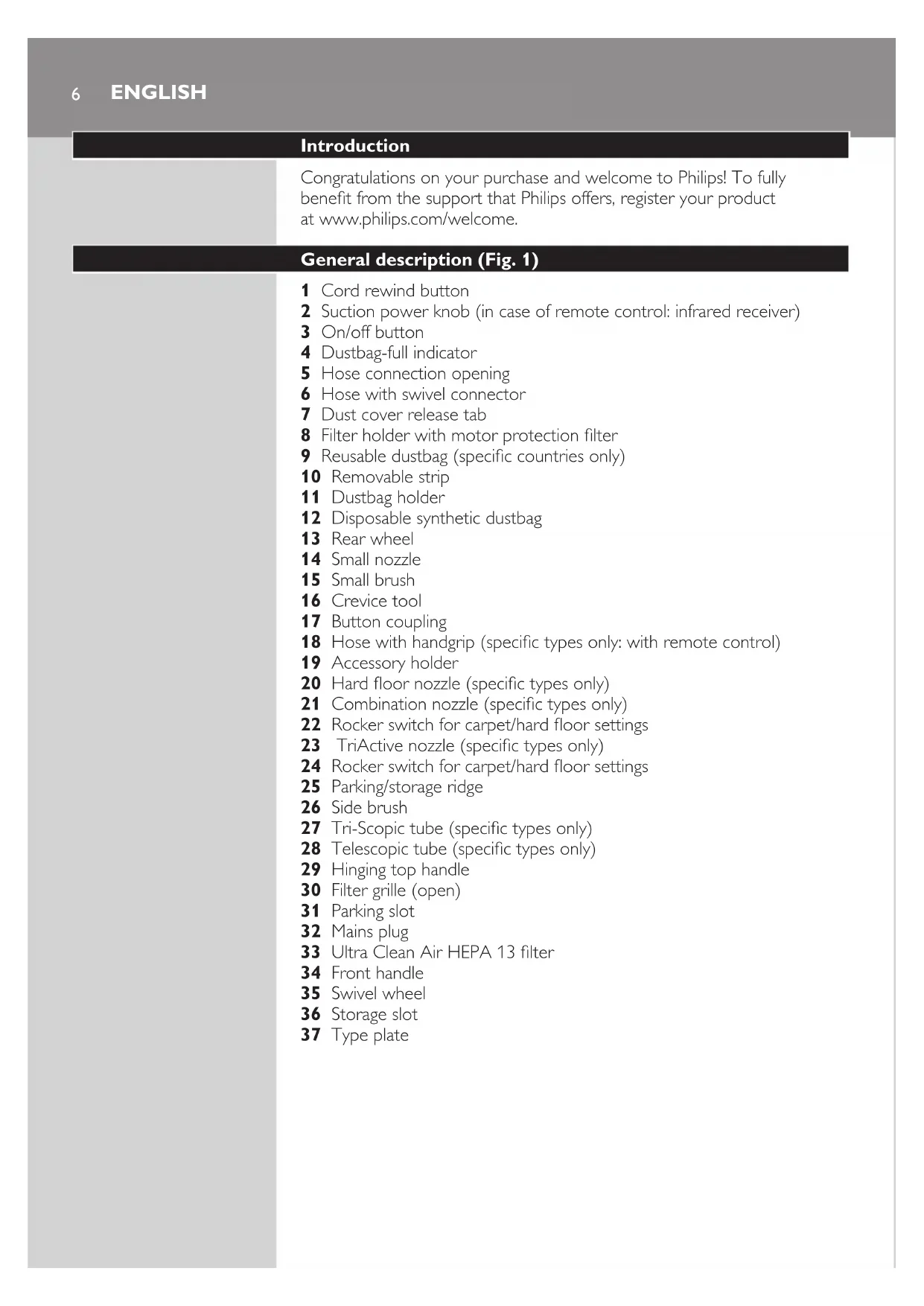
General description (Fig. 1)
1 Cord rewind button
2 Suction power knob (in case of remote control: infrared receiver)
4 Dustbag-full indicator
5 Hose connection opening
6 Hose with swivel connector
7 Dust cover release tab
8 Filter holder with motor protection lter
9 Reusable dustbag (specic countries only)
18 Hose with handgrip (specic types only: with remote control)
20 Hard oor nozzle (specic types only)
21 Combination nozzle (specic types only)
22 Rocker switch for carpet/hard oor settings
23 TriActive nozzle (specic types only)
24 Rocker switch for carpet/hard oor settings
25 Parking/storage ridge
27 Tri-Scopic tube (specic types only)
28 Telescopic tube (specic types only)
29 Hinging top handle
Read this user manual carefully before you use the appliance and save it for
substances and do not suck up ashes until they are cold.
- Check if the voltage indicated on the appliance corresponds to the
local mains voltage before you connect the appliance.
- Do not use the appliance if the plug, the mains cord or the appliance
- If the mains cord is damaged, you must have it replaced by Philips, a
service centre authorised by Philips or similarly qualied persons in
order to avoid a hazard.
- This appliance is not intended for use by persons (including children)
with reduced physical, sensory or mental capabilities, or lack of
experience and knowledge, unless they have been given supervision
or instruction concerning use of the appliance by a person responsible
- Children should be supervised to ensure that they do not play with
- Do not point the hose, the tube or any other accessory at the eyes
or ears nor put it in your mouth when it is connected to the vacuum
cleaner and the vacuum cleaner is switched on.
- When you use the vacuum cleaner to vacuum ashes, ne sand, lime,
cement dust and similar substances, the pores of the dustbag become
clogged. As a result, the dustbag-full indicator will indicate that the
dustbag is full. Replace the disposable dustbag or empty the reusable
dustbag, even if it is not full yet (see chapter ‘Replacing/emptying
- Never use the appliance without the motor protection lter. This could
damage the motor and shorten the life of the appliance.
- Only use Philips s-bag ` synthetic dustbags or the reusable dustbag
provided (some countries only).
- The translucent display panel is made of recyclable polycarbonate
- During vacuum cleaning, especially in rooms with low air humidity, your
vacuum cleaner builds up static electricity. As a result you can experience
electric shocks when you touch the tube or other steel parts of your
vacuum cleaner. These shocks are not harmful to you and do not
damage the appliance. To reduce this inconvenience we advise you:
1 to discharge the appliance by frequently holding the tube against
other metal objects in the room (for example legs of a table or chair,
ENGLISH 72 to raise the air humidity level in the room by placing water in the room.
For example, you can hang containers lled with water from your
radiators or place bowls lled with water on or near your radiators.
Electromagnetic elds (EMF)
This Philips appliance complies with all standards regarding electromagnetic
elds (EMF). If handled properly and according to the instructions in this
user manual, the appliance is safe to use based on scientic evidence
2 Todisconnectthehose,pushthebuttonsandpullthehoseout
Tri-Scopic tube (specic types only)
- To disconnect the tube from the handgrip, press the spring-loaded lock
button and pull the handgrip out of the tube.
ENGLISH82 Adjustthetubetothelengthyoundmostcomfortableduring
vacuuming.Pressoneofthetwocollarsdownwardsandpullthe
Telescopic tube (specic types only)
thetube.Fitthespring-loadedlockbuttonintotheopeningin
- To disconnect the tube from the handgrip, press the easy-release
button (1) and pull the handgrip out of the tube (2).
2 Adjustthetubetothelengthyoundmostcomfortableduring
Nozzles and accessories
Note: You can also connect the nozzles and accessories directly to the handgrip
ENGLISH 92 Todisconnectthenozzleoranaccessoryfromthetube,pressthe
spring-loadedlockbuttonandpullthenozzleoutofthetube.
TriActive nozzle (specic types only)
The TriActive nozzle is a multi-purpose nozzle for carpets and hard oors.
- The side brushes catch more dust and dirt at the sides of the nozzle
and allow you to clean better along furniture and other obstacles.
- The opening at the front of the nozzle allows you to vacuum larger
increasemanoeuvrability.
2 Tocleancarpets,pushtherockerswitchagain.
, Thebrushstripdisappearsintothenozzlehousingandthewheelis
loweredautomatically.
Combination nozzle (specic types only)
The combination nozzle can be used on either carpets or hard oors.
1 Tocleanhardoors,pushtherockerswitchontopofthenozzle
English102 Tocleancarpets,pushtherockerswitchagain.
, Thebrushstripdisappearsintothenozzlehousing.
Hard oor nozzle (specic types only)
- The hard-oor nozzle is designed for gentle cleaning of hard oors.
tube.Usethesamemethodasforthetube.
- Use the crevice tool to clean narrow corners or hard-to-reach places.
- Use the small nozzle to clean small areas, e.g. the seats of chairs and
- Use the small brush nozzle to clean computers, bookshelves etc.
1 Snaptheaccessoryholderontothehandgrip.
2 Snaptwoaccessoriesintotheaccessoryholder:
ENGLISH 11- Crevice tool and small nozzle.
- Crevice tool and small nozzle.
Note: The small nozzle must be placed in the accessory holder as shown in
Infrared remote control (specic types only)
1 Removethebatterycompartmentcover.
2 Placethebatteriesinthebatterycompartment.
Makesurethe-and+polespointintherightdirection.
3 Reattachthebatterycompartmentcover
2 Presstheon/offbuttonontopoftheappliancewithyourfootto
switchontheappliance.
English12Adjusting suction power
During vacuuming, you can adjust the suction power.
- Use maximum suction power to vacuum very dirty carpets and hard
- Use minimum suction power to vacuum curtains, table carpets, etc.
Infrared remote control (specic types only)
With the infrared remote control, you can set the suction power to one
of 5 different suction power settings.
- When you switch on the appliance, it always starts operating at the
highest suction power setting.
- To reduce the suction power by one setting, press the - button.
To increase the suction power by one setting, press the + button.
Suction power knob (specic types only)
- During vacuum cleaning, you can adjust the suction power with
the suction power knob on top of the appliance
appliancethenstartsoperatingatthepreviouslyselectedsuction
brushesfrombecomingbent.
Alwaysunplugtheappliancebeforeyoureplacethedisposabledustbag
oremptythereusabledustbag.
Note: In some cases, the dustbag-full indicator can indicate that the dustbag
is full, even though it is not. This may occur if the pores of the dustbag are
clogged (e.g. when you have vacuumed ashes, ne sand, lime, cement dust and
similar substances) or if something is blocking the nozzle, tube and/or hose.
If the pores of the dustbag are clogged, you have to replace the dustbag, even
if it is not full yet. If the dustbag is not clogged but not full either, something is
blocking the nozzle, tube and/or hose. In this case, do not replace the dustbag
but remove the obstruction.
ENGLISH14Replacing the disposable dustbag
- Replace the dustbag as soon as the dustbag-full indicator has changed
colour permanently, i.e. even when the nozzle is not placed on
5 Putthedustbagholderbackintothevacuumcleaner.
Note: If you have not inserted a dustbag, you cannot close the cover.
English 15Emptying the reusable dustbag (specic countries only)
In some countries, this vacuum cleaner also comes with a reusable dustbag
that can be used and emptied repeatedly. You can use the reusable dustbag
instead of disposable dustbags.
Note: Only wipe the body of the appliance with a moist cloth.
ENGLISH16HEPA 13 lter
The HEPA 13 lter is able to remove 99.95% of all particles down to
0.0003mm in size from the outlet air. This not only includes normal house
dust, but also harmful microscopic vermin such as dust mites and their
excrements, which are well-known causes of respiratory allergies.
Note: To guarantee optimal dust retention and performance of the vacuum
cleaner, always replace the HEPA lter every 2 years with an original Philips
lter of the correct type (see chapter ‘Ordering accessories’). You can dispose
of the old lter with the normal household waste.
Replacing the HEPA 13 lter
Note: For optimal results, replace the HEPA 13 lter every 2 years. If you want
to minimise the impact on the environment, you can wash the HEPA 13 lter.
Washing the HEPA 13 lter (FC917x series only)
To wash the HEPA 13 lter, follow the instructions below.
1 RinsetheHEPA13lterunderahotslow-runningtap.
Note: Cleaning does not restore the original colour of the lter, but does restore
its ltration power.
English 17Ordering accessories
If you have any difculties obtaining dustbags, lters or other accessories
for this appliance, please contact the Philips Consumer Care Centre in your
country or consult the worldwide guarantee leaet.
classic long performance dustbags last 50% longer
than standard dustbags, thanks their non-clogging material. Available
under type number FC8021.
anti-allergy dustbags reduce the exposure to allergens.
Their HEPA 10 ltration level gives you a clean and healthy home
environment. Available under type number FC8022.
anti-odour dustbags have an odour-absorbing coating.
This coating absorbs and neutralises unpleasant smells caused by
decomposing pet hair or food scraps. Available under type number
- Washable Ultra Clean Air HEPA 13 lters are available under type
- The non-rechargeable batteries of the remote control contain
substances that may pollute the environment. Do not throw away
batteries with the normal household waste, but dispose of them at an
ofcial collection point for batteries. Always remove the batteries of the
remote control (specic types only) before you discard and hand in the
appliance at an ofcial collection point.
- Do not throw away the appliance with the normal household waste
at the end of its life, but hand it in at an ofcial collection point for
recycling. By doing this, you help to preserve the environment.
Guarantee and service
If you need service or information or if you have a problem, please visit the
Philips website at www.philips.com or contact the Philips Consumer
Care Centre in your country. You nd its phone number in the worldwide
guarantee leaet. If there is no Consumer Care Centre in your country, go
to your local Philips dealer.
ENGLISH18Troubleshooting
This chapter summarises the most common problems you could
encounter with the appliance. If you are unable to solve the problem with
the information below, contact the Consumer Care Centre in your country.
1 Thesuctionpowerisinsufcient.
A The dustbag may be full.
- Empty the reusable dustbag (specic types only) or replace the paper
B The lters may be dirty.
- Clean or replace the lters.
C The suction power may be set to a low setting.
- Set the suction power to a higher setting.
D The nozzle, tube or hose may be blocked up.
- To remove the obstruction, disconnect the blocked-up item and
connect it (as far as possible) the other way around. Switch on the
vacuum cleaner to force the air through the blocked-up item in
2 Theinfraredremotecontrol(specictypesonly)doesnotfunction.
A Perhaps the batteries do not make proper contact or have not been
inserted in the proper way.
- Remove the lid of the battery compartment and push the batteries
back into place. Make sure that the - and + poles point in the right
B The batteries may be empty.
- Replace the batteries.
3 WhenIusemyvacuumcleanerIsometimesfeelelectricshocks.
A Your vacuum cleaner builds up static electricity. The lower the air
humidity in the rooms, the more static electricity the appliance builds
- To reduce this inconvenience, we advise you to discharge the appliance
by frequently holding the tube against other metal objects in the room
(for example legs of a table or chair, a radiator etc.).
- To reduce this inconvenience, we advise you to raise the air humidity
level in the room by placing water in the room. For example, you can
hang containers lled with water from your radiators or place bowls
lled with water on or near your radiators.
English 1920 DANSK Introduktion
polycarbonate (>PC/ABS<).