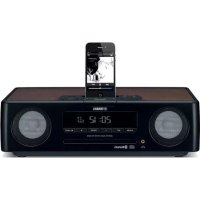
TSX-B235 - Speakers YAMAHA - Free user manual and instructions
Find the device manual for free TSX-B235 YAMAHA in PDF.


User questions about TSX-B235 YAMAHA
0 question about this device. Answer the ones you know or ask your own.
Ask a new question about this device
Download the instructions for your Speakers in PDF format for free! Find your manual TSX-B235 - YAMAHA and take your electronic device back in hand. On this page are published all the documents necessary for the use of your device. TSX-B235 by YAMAHA.
USER MANUAL TSX-B235 YAMAHA
1 To assure the finest performance, please read this manual carefully. Keep it in a safe place for future reference.
2 Install this unit in a well ventilated, cool, dry, clean place away from direct sunlight, heat sources, vibration, dust, moisture and cold. For proper ventilation, allow the following minimum clearances.
Top: 15cm (6 in)
Rear: 10cm (4 in)
Sides: 10cm (4 in)
3 Locate this unit away from other electrical appliances, motors, or transformers to avoid humming sounds.
4 Do not expose this unit to sudden temperature changes from cold to hot, and do not locate this unit in an environment with high humidity (i.e. a room with a humidifier) to prevent condensation inside this unit, which may cause an electrical shock, fire, damage to this unit, and/or personal injury.
5 Avoid installing this unit where foreign object may fall onto this unit and/or this unit may be exposed to liquid dripping or splashing. On the top of this unit, do not place:
- Other components, as they may cause damage and/or discoloration on the surface of this unit.
- Burning objects (i.e. candles), as they may cause fire, damage to this unit, and/or personal injury.
- Containers with liquid in them, as they may fall and liquid may cause electrical shock to the user and/or damage to this unit.
6 Do not cover this unit with a newspaper, tablecloth, curtain, etc. in order not to obstruct heat radiation. If the temperature inside this unit rises, it may cause fire, damage to this unit, and/or personal injury.
7 Do not plug in this unit to a wall outlet until all connections are complete.
8 Do not operate this unit upside-down. It may overheat, possibly causing damage.
9 Do not use force on switches, knobs and/or cords.
10 When disconnecting the power cable from the wall outlet, grasp the plug; do not pull the cable.
11 Do not clean this unit with chemical solvents; this might damage the finish. Use a clean, dry cloth.
12 Only voltage specified on this unit must be used. Using this unit with a higher voltage than specified is dangerous and may cause fire, damage to this unit, and/or personal injury. Yamaha will not be held responsible for any damage resulting from use of this unit with a voltage other than specified.
13 To prevent damage by lightning, keep the power cable disconnected from a wall outlet or this unit during a lightning storm.
14 Do not attempt to modify or fix this unit. Contact qualified Yamaha service personnel when any service is needed. The cabinet should never be opened for any reasons.
15 When not planning to use this unit for long periods of time (i.e. vacation), disconnect the AC power plug from the wall outlet.
16 Be sure to read the "TROUBLESHOOTING" section on common operating errors before concluding that this unit is faulty.
17 Before moving this unit, press to set the unit to off, and disconnect the AC power plug from the wall outlet.
18 Condensation will form when the surrounding temperature changes suddenly. Disconnect the power cable from the outlet, then leave this unit alone.
19 When using this unit for a long time, this unit may become warm. Turn off, then leave this unit alone for cooling.
20 Install this unit near the wall outlet and where the AC power plug can be reached easily.
21 The batteries shall not be exposed to excessive heat such as sunshine, fire or the like. When you dispose of batteries, follow your regional regulations.
- Keep the batteries in a location out of reach of children. Batteries can be dangerous if a child were to put in his or her mouth.
- If the batteries grow old, the effective operation range of the remote control decreases considerably. If this happens, replace the batteries with new one as soon as possible.
- Do not use old batteries together with new ones.
- Do not use different types of batteries (such as alkaline and manganese batteries) together. Read the packaging carefully as these different types of batteries may have the same shape and color.
- Exhausted batteries may leak. If the batteries have leaked, dispose of them immediately. Avoid touching the leaked material or letting it come into contact with clothing, etc. Clean the battery compartment thoroughly before installing new batteries.
- If you plan not to use the unit for a long period of time, remove the batteries from the unit. Otherwise, the batteries will wear out, possibly resulting in a leakage of battery liquid that may damage the unit.
- Do not throw away batteries with general house waste. Dispose of them correctly in accordance with your local regulations.
22 Excessive sound pressure from earphones and headphones can cause hearing loss.
This unit is not disconnected from the AC power source as long as it is connected to the wall outlet, even if this unit itself is turned off by . In this state, this unit is designed to consume a very small quantity of power.
WARNING
TO REDUCE THE RISK OF FIRE OR ELECTRIC SHOCK, DO NOT EXPOSE THIS UNIT TO RAIN OR MOISTURE.
CAUTION
Danger of explosion if battery is incorrectly replaced. Replace only with the same or equivalent type.
There is a chance that placing this unit too close to a CRT-based (Braun tube) TV set might impair picture color. Should this happen, move this unit away from the TV set.
CONTENTS
NAMES OF PARTS AND THEIR FUNCTIONS ......2
Top panel / Front panel. 2
Front panel display. 3
Rear panel. 3
Remote control. 4
TURING THE UNIT ON. 5
ADJUSTING THE TONE (remote control only) ....6
ADJUSTING THE BRIGHTNESS OF THE FRONT PANEL DISPLAY (remote control only) 6
CHARGING WITH THE CHARGING PORT 6
LISTENING TO CD AND USB DEVICES 7
Listening to a CD. 7
Listening to a USB device 8
Using repeat/shuffle playback (remote control only).....9
LISTENING TO EXTERNAL SOURCES. 9
LISTENING TO MUSIC FROM YOUR Bluetooth COMPONENT. 10
Playing back from your Bluetooth component. 10
Connecting an already-paired component via Bluetooth... 11
Disconnecting a Bluetooth connection 12
LISTENING TO DAB STATIONS (TSX-B235D only) ...12
Preparing for DAB reception 12
Selecting DAB stations. 13
Presetting DAB stations (remote control only) 14
Selecting preset DAB stations. 14
LISTENING TO FM STATIONS 15
Selecting an FM station. 15
Presetting FM stations (remote control only) 16
Selecting preset FM stations 17
USING THE ALARM FUNCTION (IntelliAlarm)....18
Setting the alarm 19
Operations while the alarm sound is playing. 20
USING THE "DTA CONTROLLER" 21
USING THE SLEEP TIMER 21
SETTING AUTO POWER STANDBY FUNCTION
(main unit only) 21
TROUBLESHOOTING 22
NOTES ON DISCS AND USB DEVICES 25
SPECIFICATIONS 26
(at the end of this manual)
Additional information..
Features
- Play back music from external devices such as your audio/data CDs, USB devices, or external devices via the AUX jack, and listen to the radio.
- (TSX-B235D only) Listen to the DAB radio.
- By the Bluetooth technology, you can enjoy clear sound without wire connections. One touch pairing enabled by NFC technology.
- Use your favorite music or a beep tone as an alarm. When the set time arrives, the music you select is played at the volume that you specify, giving you the ideal start to your day (IntelliAlarm function).
- By using the free "DTA CONTROLLER" application for a smartphone and tablet computer, you can control this unit and take advantage of more sophisticated alarm functionality (E S P. 21).
- You can easily store and recall of your favorite radio stations, up to 30 FM and 30 DAB stations (DAB function is only for TSX-B235D).
- Bass, middle, and treble can be adjusted to your taste.
About this manual
- References to the iPod appearing in this manual also include the iPhone and iPad.
- If an operation can be performed using either the buttons on the unit itself or from the remote control, the explanation will focus on operation using the main uint.
- ! indicates precautions for use of the unit and its feature limitations.
indicates supplementary explanations for better use.
Supplied accessories
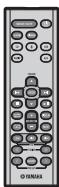
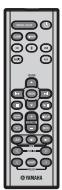
Remote control
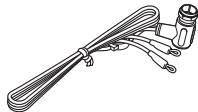
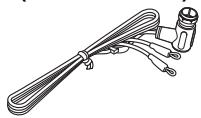
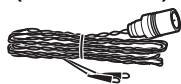
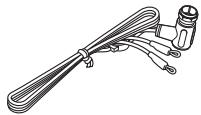
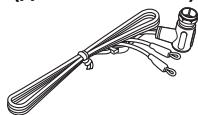
DAB/FM antenna (for TSX-B235D)
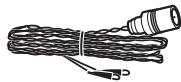
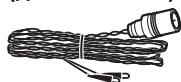
FM antenna (for TSX-B235)

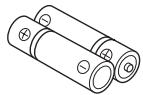
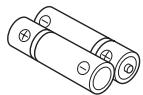
Batteries (x 2) (AAA, R03, UM-4)

USB cap (x 2)
Keep the USB cap out of reach of children so as to ensure that it is not mistakenly swallowed.
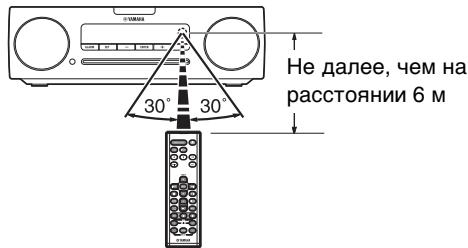
How to use the remote control

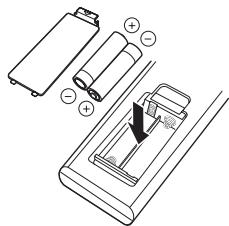
Installing batteries in the remote control
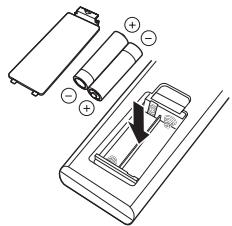
Check the "+" and - of the batteries and insert them the correct way around.
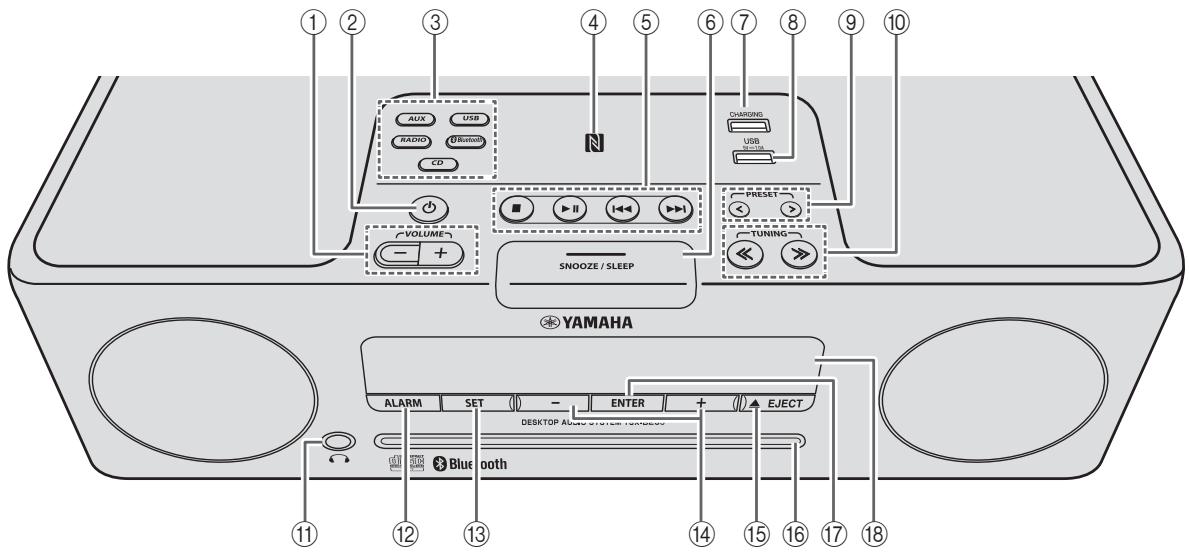
Top panel / Front panel
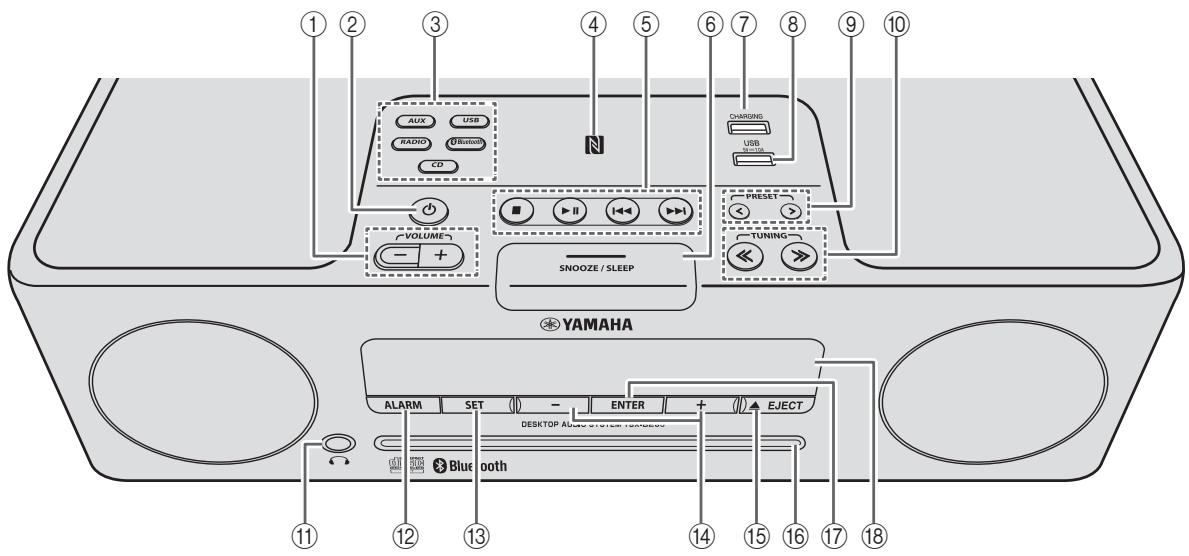
① VOLUME - /+
Adjust the volume.
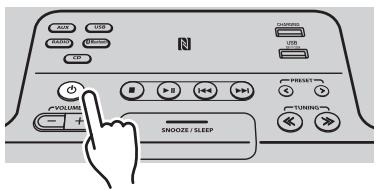
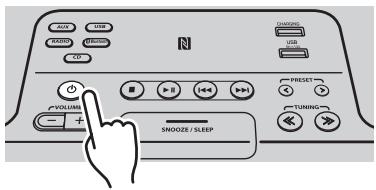
② (Power)
Press to turn the unit on/off (standby).
There are two types of the standby state (P. 5).
③ Source buttons
Switch the audio source to be played.
If you press one of these while the unit is in standby (except ECO standby), the unit will turn on and then switch the audio source.
(TSX-B235D only) When listening to the radio, press RADIO to switch between DAB/FM.
④ NFC mark
Allows easy pairing with NFC technology (P. 11).
⑤ Audio control buttons
Use these to operate the CD/USB device.
: Stop
▶II:Play/Pause
:Skip,Searchbackward/forward (press and hold down)
(6) SNOOZE/SLEEP
Set the sleep timer or switch the alarm to snooze mode (P. 20, 21).
⑦ CHARGING port
This port is for use to charge only.
Supplies 5V/1.0A to a portable device, such as a smartphone, when it is connected with a USB cable (P.6).
!
When the USB device is not in use, put the USB cap in place to protect the connector.
⑧ USB port
Connect and play your USB device here (P.8).

When the USB device is not in use, put the USB cap in place to protect the connector.
(9) PRESET /
Select a radio station that you stored (P. 16, 17).
⑩ TUNING /
Tune the radio (P. 15, 16).
(Headphone jack)
Connect headphones here.
⑫ALARM
Switch the alarm on/off (E 20.
⑬ SET
Set the alarm (P. 19).
(14)-I+
Select an item or value when setting the clock or the alarm.
15 ▲EJECT
Eject the CD.
16 Disc slot
Insert a CD here (P. 7).
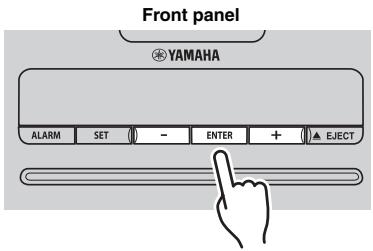
17 ENTER
Confirm a selected item or value.
18 Front panel display
The clock and other information is displayed here (P.3).
Front panel display
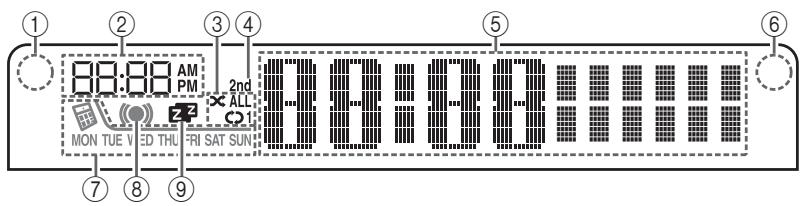
① Illumination sensor
Detect ambient lighting. Do not cover this sensor (P.6).
② Alarm time
Indicates the alarm time (P. 19).
③ Repeat/shuffle indicator
Displays the playback mode (P. 9).
④ Secondary indicator (TSX-B235D only)
Turns on if a secondary station is playing when you listen to a DAB station.
⑤ Multi-function indicator
Displays various information, including the clock time, information about the currently-playing track, and the frequency of the radio station.
Remote control signal receiver
Make sure that this sensor is not obstructed (P. 1).
⑦ Weekly alarm indicator
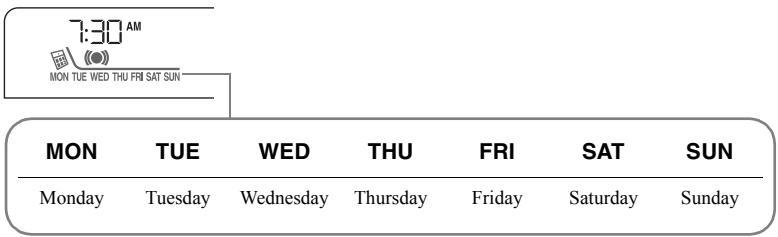
Shows alarm information specified using the free "DTA CONTROLLER" application for a smartphone and tablet computer (P. 21).
⑧ Alarm indicator
Turns on if the alarm has been set (P. 20).
⑨ Sleep indicator
Turns on if the sleep timer has been set (P. 21).
Rear panel

① CLOCK switch
Sets the clock and specifies whether the clock will be displayed (P. 5).
SET: Set the clock.
ON: Even when the unit is off, the clock will be displayed and the alarm function will be available.
OFF: When the unit is off, the clock will not be displayed and the alarm function will not be available.
② AUX
Use a commercially available 3.5mm mini-plug cable to connect your external device here (P.9).
③ DAB/FM antenna connector
Connect the DAB/FM antenna here.


Be sure to stretch out the antenna.

- If reception is poor, try changing the height or direction of the antenna, or move the unit to find a location that has better reception.
- If you use a commercially available outdoor antenna instead of the supplied antenna, reception may be better.
Remote control

① Remote control signal transmitter
② (Power)
Press to turn the unit on/off (standby).
There are two types of the standby state (P. 5).
(3) SNOOZE/SLEEP
Set the sleep timer or switch the alarm to snooze mode (P. 20, 21).
(4)ALARM
Switch the alarm on/off (P. 20).
⑤ Source buttons
Switch the audio source to be played. If you press one of these while the unit is in standby (except ECO standby), the unit will automatically turn on and then switch the audio source..
(TSX-B235D only) When listening to the radio, press RADIO to switch between DAB/FM.
⑥ Item selection buttons
FOLDER ▲/▼: Select items or switch the playback folder when playing music on data CDs or USB devices.
ENTER: Confirm a selected item.
⑦ Audio control buttons
Use these to operate the CD/USB device.
: Stop
▶II: Play/Pause
:Skip,Search backward/forward (press and hold down)
(Repeat)/ (Shuffle)
Play music on a CD or USB device in repeat/shuffle mode (P.9).
⑨ EQ: LOW/MID/HIGH
Adjust the bass, middle or treble sound quality (P. 6).
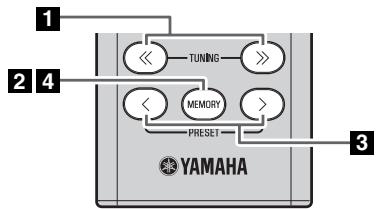
⑩ TUNING /
Tune the radio (P. 15, 16).
1) PRESET /
Select a radio station that you stored (P. 16, 17).
⑫ MEMORY
Store a radio station (P. 16).
⑬ DIMMER
Adjusts the brightness of the front panel display (P. 6).
14 DISPLAY
Switch the information shown in the front panel display (P. 7, 8, 15).
(15) VOLUME +/-
Adjust the volume.
16 MUTE
Mute or unmute the sound.
TURNING THE UNIT ON
Display (24-hour) when the unit is off (standby)
In ECO standby, the clock display will disappear.
Display (24-hour) when the unit is on
15:30 CD
15:30 26
Connect the power cable to an AC outlet, and press
The unit will turn on, and will be ready to play audio sources.
Press once again to turn the unit off (standby).
There are two types of the standby as below. The state can be set in the rear panel CLOCK switch (P. 3).
| Mode | Clock switch | Clock display | Bluetooth connection | Charging USB devices (USB port and CHARGING port) | Alarm setting |
| Standby | ON | Show | Enable | Enable | Enable |
| ECO standby (power saving mode) | OFF | No clock display | Disable | Enable | Disable |
ADJUSTING THE CLOCK

1
2

3
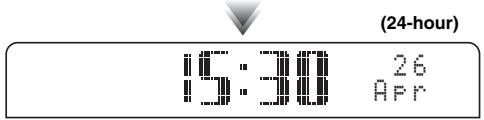
| Jan January | Feb February | Mar March | Apr April | May May | Jun June |
| Jul July | Aug August | Sep September | Oct October | Nov November | Dec December |
1 Set the rear panel CLOCK switch to the SET position.
The display will indicate "CLOCK YEAR," and the numerical value to be set will blink.
2 Set the date and time.
Press the front panel - / + buttons to edit the values, and then press ENTER to confirm the setting.
Set the items in the order of year month day hour minute.
When clock setting has finished, the display will indicate "Completed!"

On step 2, by pressing SNOOZE/SLEEP you can select the time format (12-hour / 24-hour).
3 Set the CLOCK switch to the ON position.
The moment you set the switch to the ON position, the clock will start from 0 second.

The time settings will be reset if the unit remains unpowered for more than one week.
ADJUSTING THE TONE (remote control only)

During playback, press the LOW, MID, or HIGH EQ button on the remote control. Select the tone to be adjusted (LOW, MID, HIGH).
Press / to adjust the tone.
3 Press ENTER on the remote control to complete the operation. You can also press the EQ button that you pressed in Step 1 to complete the settings. If you want to adjust another frequency band, return to step 1 and press the EQ button for the frequency band that you want to adjust.
ADJUSTING THE BRIGHTNESS OF THE FRONT PANEL DISPLAY (remote control only)
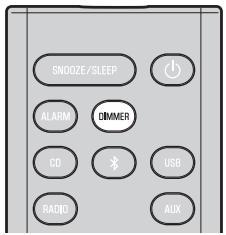
Press DIMMER repeatedly on the remote control.
The brightness of the front panel display will change in the order shown below.
AUTO 1 (bright) 2 (medium) 3 (dim)
back to AUTO

When AUTO is set, the brightness of the front panel display is adjusted automatically with the Illumination sensor (eP.3). Ensure that the sensor is not covered.
CHARGING WITH THE CHARGING PORT

Connecting a USB device such as a smartphone or tablet computer to the CHARGING port on this unit charges the connected device (power supply of up to 5V/1.0A is supported). Charging is possible even when the unit is off.
Prepare a USB cable that is compatible with the USB device.

- Charging may not be possible depending on the USB device.
- Yamaha will not be held responsible for any damage to the USB device or data loss occurred while using this unit.
The unit will operate as follows when playing back tracks/files on CD/USB devices.
- If the CD/USB device being played is stopped, the track that you listened will start playback from the beginning of the track the next time you play.
-
If you press ■ while playback is stopped, tracks will play as follows the next time playback begins:
-
Audio CD: Play from the first track of the CD.
- Data CD*/USB device: Play from the first track of the folder contains the track you listened to last time.
- This unit automatically turns off if no operation has been performed for 20 minutes after CD/USB device playback is stopped.
- "Data CD" is a CD that contains MP3/WMA files.

For details on playable discs and files, refer to "NOTES ON DISCS AND USB DEVICES" (P. 25).
Listening to a CD

1
1 Press the CD source button to switch the audio source to CD.
If a CD is already inserted, playback will start.
2 Insert a CD into the disc slot.
Playback starts automatically.
Playback can be controlled with either the remote control, or the front panel on this unit (P. 2, 4).

Insert the CD with the label side facing upward.

Folders and files on a data CD are played in alphabetical order.
Skipping folders (remote control only)
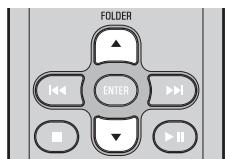
While a data CD is playing, you can use the remote control's FOLDER / buttons to select the folder.
Display information (remote control only)

The folder number (only for a data CD) or the song/file number is shown for several seconds when starting playback or skipping tracks.
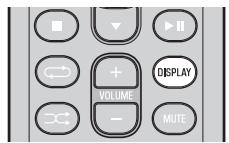
If you press DISPLAY on the remote control while a song is playing or paused, the information shown on the front panel display will be switched in the following order.
-
Elapsed song playback time
-
Remaining song playback time (only for an audio CD)
- Song name*
- Album name*
- Artist name*
- File name (only for a data CD)
-
Folder name (only for a data CD)
-
Shown only if this data is included in the song.
Listening to a USB device
For details on the supported USB device, refer to "NOTES ON DISCS AND USB DEVICES" (P. 25).

Press the USB source button to switch the audio source to USB. If a USB device is already connected, playback will start.
2 Connect a USB device to the USB port.
Playback starts automatically.
Playback can be controlled using either the remote control or the front panel on this unit (P. 2, 4).

- Folders and files will play in the order in which they were written.
- A USB device is automatically charged when it is connected to the USB port (5 V/1.0 A output).

- Stop playback before disconnecting the USB device.
- The iPod cannot be played back.
- Charging may not be possible depending on the USB device.
Skipping folders (remote control only)

While a USB device is playing, you can use the remote control's FOLDER / buttons to select the folder.
Display information (remote control only)
The folder/file number is shown for several seconds when starting playback or skipping tracks.
If you press DISPLAY on the remote control while a song is playing or paused, the information shown on the front panel display will be switched in the following order.
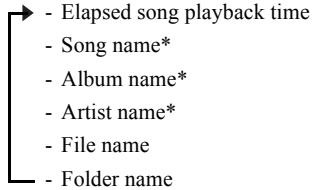
- Shown only if this data is included in the song.
Using repeat/shuffle playback (remote control only)
The playback status is shown by the repeat/shuffle indicator in the front panel display (P. 3).
Repeat playback

Press (repeat) repeatedly to select one of the following playback modes.
No display: Repeat mode off
1:1 track
: All tracks within the folder (data CD/USB device only)
ALL : All tracks
Shuffle playback

Press (shuffle) repeatedly to select one of the following playback modes.
No display: Shuffle mode off
: All tracks within the folder (data CD/USB device only)
ALL: All tracks
LISTENING TO EXTERNAL SOURCES
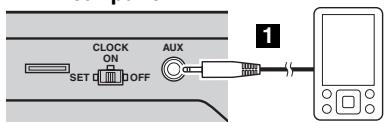
Rear panel
Using a commercially available 3.5 mm miniplug cable, connect your external device to the AUX jack on the rear panel of this unit.

- Turn the unit off before connecting the audio cable.
- Turn down the volume of the unit and your external audio device before connection.
Press to turn the unit on.
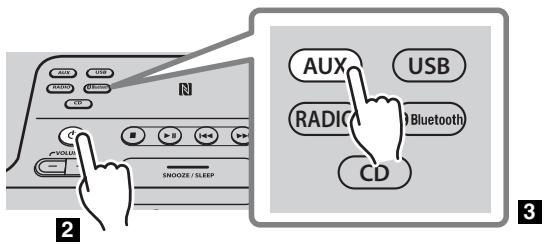
Press the AUX source button to switch the audio source to AUX.
4 Start playback on the connected external audio device.
LISTENING TO MUSIC FROM YOUR Bluetooth COMPONENT
This unit provides Bluetooth functionality. You can enjoy wireless music playback from your Bluetooth component (mobile phone, digital audio player, etc.). Please also refer to the owner's manual of your Bluetooth component.
Playing back from your Bluetooth component
You'll need to perform the pairing operation the first time you use your Bluetooth component with this unit, or if the pairing settings have been deleted. Pairing is an operation that registers the communicating component (subsequently called "the other component") with this unit. Once pairing has been completed, subsequent reconnection will be easy even after the Bluetooth connection is disconnected (P. 11). If pairing is not successful, refer to the item "Bluetooth" in "TROUBLESHOOTING" (P. 23).

Yamaha does not guarantee all connections between this unit and Bluetooth component.

- This unit can be paired with up to 8 other components. When pairing with the ninth component has succeeded, pairing data for the component with the oldest connection date will be deleted.
- If this unit is connected via Bluetooth to another component, hold down Bluetooth source button on this unit or × on the remote control to disconnect the Bluetooth connection before you perform the pairing operation.
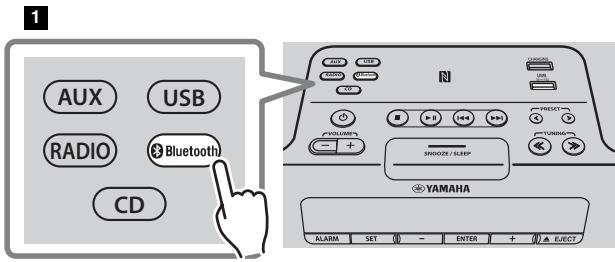

Press the Bluetooth source button to switch the audio source to Bluetooth.
2 Perform Bluetooth pairing on the other component.
For details refer to the owner's manual of the other component.
3 From the Bluetooth connection list of the other component, choose this unit (TSX-B235 Yamaha or TSX-B235D Yamaha).
When pairing has been completed, the front panel display of this unit will indicate "BT Pairing OK".

If you are asked to enter a password, enter the numerals "0000".
4 Connect this unit and your other component via Bluetooth.
5 Play back music from your Bluetooth component.

Take care that the volume setting of this unit is not too high. We recommend that you adjust the volume on the other component.

- If you connect via Bluetooth from your other component and playback music while this unit is in standby (except ECO standby), this unit will automatically turn on.
- If you disconnect the Bluetooth connection from your other component while the audio source is set to Bluetooth, this unit will automatically turn off.
- If Bluetooth is selected as the audio source, this unit will automatically turn off when 20 minutes have elapsed without any Bluetooth connection nor any operation performed.
Easy pairing
For the smartphone with NFC (Near Field Communication) function, you can easily perform the pairing operation just by holding the smartphone over the NFC mark (you need to turn the unit on and turn on the NFC function of the smartphone beforehand).

1 Hold the smartphone over the NFC mark.
2 Perform the pairing operation at the smartphone (for details, please read the owner's manual of the smartphone).
This unit is indicated as "TSX-B235 Yamaha" or "TSX-B235D Yamaha" on the smartphone.

- If you are prompted for a passkey, enter the numerals "0000".
- If the connection fails, move the smartphone slowly on the NFC mark.
- If the smartphone is equipped with a case, remove the case.
Connecting an already-paired component via Bluetooth
Once pairing has been completed, connecting a Bluetooth will be easy the next time.
Connecting from this unit

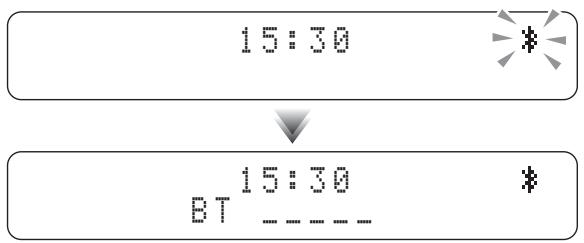
Press the Bluetooth source button to switch the audio source to Bluetooth.
The Bluetooth indicator will blink in the front panel display; this unit will search for the other component that was most recently connected via Bluetooth, and will then establish a connection (You must first turn on the Bluetooth setting of the other component).
When the Bluetooth connection has been established, the Bluetooth indicator will light, and the name of the other component will be displayed.
Connecting from the other component
In the Bluetooth settings of the other component, turn Bluetooth on.
2 From the Bluetooth connection list of the other component, choose this unit (TSX-B235 Yamaha or TSX-B235D Yamaha).
The Bluetooth connection will be established, and the front panel display of this unit will indicate the name of the other component.
!
- Bluetooth connections cannot be established from the other component when this unit is in ECO standby (eP. 5).
- When using an already-paired smartphone with the NFC function, holding it over the NFC mark establishes a Bluetooth connection.
Disconnecting a Bluetooth connection
If any of the following operations are performed while a Bluetooth connection is being used, the Bluetooth connection will be disconnected.
- Hold down Bluetooth source button on this unit or on the remote control.
- Turn the unit off.
- Turn off the Bluetooth setting of the other component.
- Hold the smartphone with the NFC function over the NFC mark during Bluetooth connection.
LISTENING TO DAB STATIONS (TSX-B235D only)
DAB (Digital Audio Broadcasting) and DAB^+ use digital signals for clearer sound and more stable reception compared to analog signals.
DAB^+ is based on the original DAB standard but uses a more efficient audio codec.
DAB and DAB^+ are broadcast in blocks of data called "ensembles" containing up to several radio stations that are simultaneously broadcast.
DAB and DAB^+ can also include an extensive amount of text information, enabling you to select a station by name.
Other information, such as the ensemble name or the status of the digital signal, can be displayed on the front panel display. "DAB" described in this manual may also refer to "DAB+".
Preparing for DAB reception
Before tuning into DAB stations, an initial scan must be performed. When you select the DAB for the first time, the initial scan is performed automatically.
To listen to a DAB station, connect the antenna (E8 P. 3).
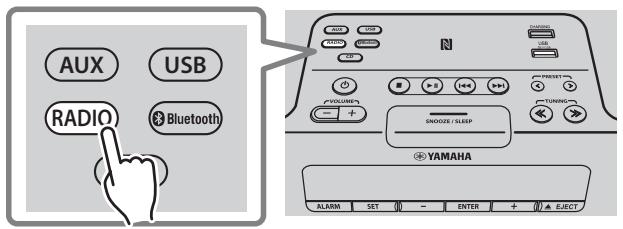
Press the RADIO source button to switch the audio source to DAB.
The initial scan starts. During the scan, the degree of progress is displayed on the front panel display. When scan is completed, the number of receivable DAB stations appear on the front panel display.

If the initial scan is performed, stored DAB station information and preset DAB stations are cleared.
Performing the initial scan again (remote control only)
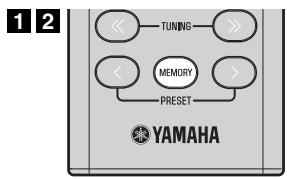
1 Press and hold down MEMORY on the remote control.
"DAB INIT SCAN" will appear and "Press MEMORY" will blink.
2 Press MEMORY.
The initial scan starts.
Selecting DAB stations

1
Press the RADIO source button to switch the audio source to DAB.
Press TUNING / to select the DAB station.
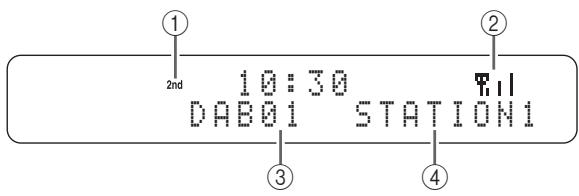
While receiving DAB, DAB station information is shown on the front panel display.
If the unit does not receive a DAB signal, "Off Air" is displayed instead of the DAB station name.
① Secondary indicator:
Some stations have sub (secondary) stations.
If a secondary station is playing, the secondary indicator is displayed.
② Signal strength indicator:
Shows current signal strength.
(3) Preset number
④ DAB station name
Display information (remote control only)

If you press DISPLAY on the remote control, the information shown on the front panel display will be switched in the following order.

- STATION LABEL, PRESET NUMBER
- DLS (Dynamic Label Segment)
- ENSEMBLE LABEL
- CHANNEL/FREQ (Channel label and frequency)
- SIGNAL QUALITY
- AUDIO FORMAT (Audio format, DRC)
DAB frequency information
This unit can receive Band III only.
| Frequency | Channel label |
| 174.928 | 5A |
| 176.640 | 5B |
| 178.352 | 5C |
| 180.064 | 5D |
| 181.936 | 6A |
| 183.648 | 6B |
| 185.360 | 6C |
| 187.072 | 6D |
| 188.928 | 7A |
| 190.640 | 7B |
| 192.352 | 7C |
| 194.064 | 7D |
| 195.936 | 8A |
| Frequency | Channel label |
| 197.648 | 8B |
| 199.360 | 8C |
| 201.072 | 8D |
| 202.928 | 9A |
| 204.640 | 9B |
| 206.352 | 9C |
| 208.064 | 9D |
| 209.936 | 10A |
| 211.648 | 10B |
| 213.360 | 10C |
| 215.072 | 10D |
| 216.928 | 11A |
| 218.640 | 11B |
| Frequency | Channel label |
| 220.352 | 11C |
| 222.064 | 11D |
| 223.936 | 12A |
| 225.648 | 12B |
| 227.360 | 12C |
| 229.072 | 12D |
| 230.784 | 13A |
| 232.496 | 13B |
| 234.208 | 13C |
| 235.776 | 13D |
| 237.488 | 13E |
| 239.200 | 13F |
Presetting DAB stations (remote control only)
Use the preset function to store your favorite 30 stations.
Deleting a stored preset

Selecting preset DAB stations
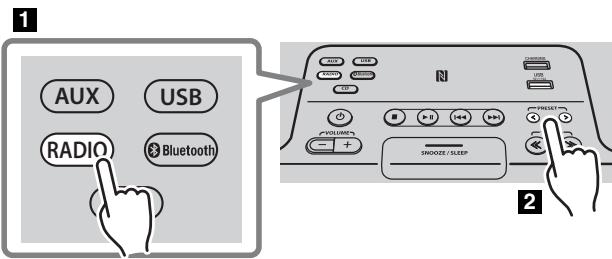
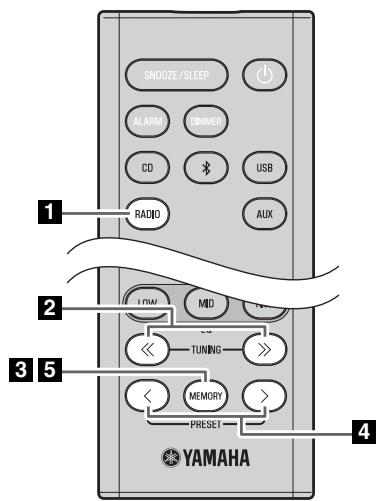
Press the RADIO source button to switch the audio source to DAB.
Press TUNING / to select a station that you want to preset.
3 Press MEMORY.
The display will indicate "PRESET MEMORY," and the preset number will blink.
4 Press PRESET / to select the preset number that you want to store.

- The lowest preset number that has not been stored will be selected first.
- If you want to cancel the presetting, press.
- If you select a preset number in which a station has already been stored, it will be overwritten by the new station.
5 Press MEMORY.
This stores the DAB station.
When presetting has finished, the display will indicate "Completed!".
Press the RADIO source button to switch the audio source to DAB.
2 Press MEMORY on the remote control.
The display will indicate "PRESET MEMORY," and the preset number will blink.
Press TUNING / to select the preset delete operation.
The display will indicate "PRESET DELETE".
4 Press PRESET < / > to select the preset number that you want to delete.

If you want to cancel the deleting, press
Press MEMORY to complete the operation.
The preset will be deleted, and the display will indicate "Deleted!".
Selecting an FM station
To listen to the FM station, connect the antenna (P. 3).
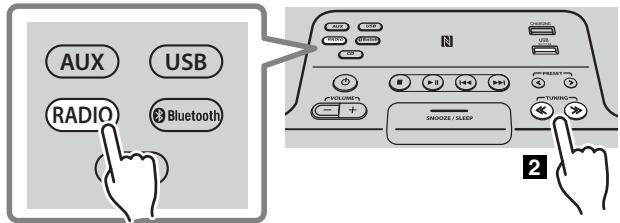
1
Press the RADIO source button to switch the audio source to FM.
2 Tune FM stations
Automatic tuning: Press and hold TUNING / Manual tuning: Press TUNING / repeatedly.
If you tune to a station manually while receiving FM, the sound will be monaural.
Display information (remote control only)
If you press DISPLAY on the remote control, the information shown on the front panel display will be switched in the following order.
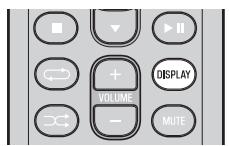
!
Preset number and frequency Reception status*
- Example of reception status indication.
TUNED/STEREO: A strong FM stereo broadcast is being received.
TUNED/MONO: A monaural FM broadcast is being received (even if the FM broadcast is stereo, reception will be monaural if the signal is weak).
Not TUNED: No broadcast is being received.
Displaying Radio Data System information
If you press DISPLAY on the remote control while Radio Data System information is being received, the information shown on the front panel display will be switched in the following order.

- PS (Program Service)
- PTY (Program Type)
- RT (Radio Text)
-CT (Clock Time) - Reception status
- Preset number and frequency

If the signal transmission of the Radio Data System station is too weak, this unit may not be able to receive Radio Data System information completely. In particular, RT (Radio Text) information uses a lot of bandwidth, so it may be less available compared to other types of information.
Presetting FM stations (remote control only)
Use the preset function to store your favorite 30 stations.
First, press the RADIO source button to switch the audio source to FM.
Auto preset
This method tunes automatically, and automatically presets only the stations that have good reception.

AUTO PRESET Press MEMORY
Manual preset
PRESET MEMORY F01 87.50MHz
Deleting a stored preset

Press and hold down MEMORY.
"AUTO PRESET" will appear and "Press MEMORY" will blink.
2 Press MEMORY.
Auto preset will begin.
When presetting has finished, the display will indicate "Completed!".

When you perform auto preset, all stored stations are cleared and the new stations are stored.

If you want to stop auto preset before it is completed, press
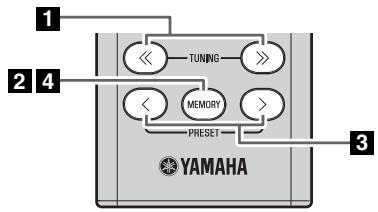
Press TUNING / to tune a station that you want to preset.
Press MEMORY.
The display will indicate "PRESET MEMORY," and the preset number will blink.
Press PRESET < / > to select the preset number that you want to store.

- The lowest preset number that has not been stored will be selected first.
- If you want to cancel the presetting, press.
- If you select a preset number in which a station has already been stored, it will be overwritten by the new station.
4 Press MEMORY.
When presetting has finished, the display will indicate "Completed!".
1 Press MEMORY on the remote control.
The display will indicate "PRESET MEMORY", and the preset number will blink.
Press TUNING / to select the preset delete operation.
The display will indicate "PRESET DELETE".
Press PRESET < / > to select the preset number that you want to delete.

If you want to cancel the deleting, press
4 Press MEMORY to complete the operation.
The preset will be deleted, and the display will indicate "Deleted!".
Selecting preset FM stations
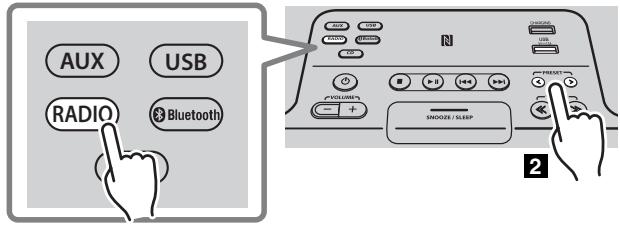
1
Press the RADIO source button to switch the audio source to FM.
Press PRESET / to select the FM station that you want to hear.

You can only select presets that have been stored.
USING THE ALARM FUNCTION (IntelliAlarm)
The unit includes an alarm function that plays back audio sources or a set of beep (internal alarm sound) at the set time using a variety of different methods. The alarm function has the following features.
3 types of alarms
Select from 3 alarm types, combining music and beep sounds.
| SOURCE+BEEP | The selected audio source and the beep sound are played at the set time. Source playback begins to fade in 3 minutes before the set time and the volume gradually increases to the set volume. Then, at the set time, the beep sound is activated. |
| SOURCE | The selected audio source is played at the set time. The volume fades in gradually and increases to the set volume. |
| BEEP | The beep sound is played at the set time. |
Various audio sources
You can choose from audio CD, data CD, USB device, or DAB*/FM. The following playback methods can also be selected depending on the audio source:
| Source | Playback method | Function |
| Audio CD | Selected track | The selected track is played repeatedly. |
| Resume | The track you listened to last time is played back. | |
| Data CD/USB device | Folder | The selected folder is played repeatedly. |
| Resume | The track you listened to last time is played back. | |
| DAB*/FM | Preset station | The selected preset station is played. |
| Resume | The DAB*/FM station you listened to last time is played back. |
- TSX-B235D only

You can not choose Bluetooth and AUX as the audio source.

The snooze function can be enabled to replay the alarm after 5 minutes (P. 20).
Setting the alarm
Setting the alarm time and alarm type

The alarm will not function when the unit is in ECO standby. To use the alarm function, set the rear panel CLOCK switch to the ON position (P. 3).


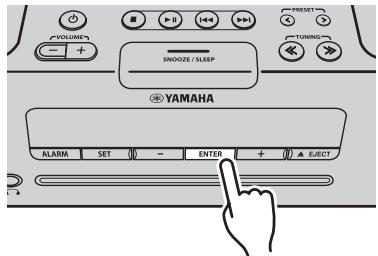


1 Press SET.
The alarm indicator (()) will blink.
2 Set the alarm.
Set items ①-⑤ described below.
Press - / + to select a numerical value, and press ENTER to confirm it.
| Items | Setting or range |
| ① ALARM SELECT | * This can be selected after you've used “DTA CONTROLLER” to set the alarm (P. 21). If you're not using “DTA CONTROLLER,” proceed to item ②. ONE DAY: An alarm that sounds only once at the specified time. WEEKLY: An alarm whose time can be specified for each day of the week (settable only using “DTA CONTROLLER”). If you've chosen WEEKLY, this completes the alarm setting. |
| ② ALARM TIME | Make settings in the order of hours → minutes. |
| ③ ALARM TYPE | Select from SOURCE+BEEP, SOURCE or BEEP. For details, refer to “3 types of alarms” (P. 18). If you selected BEEP, proceed to item ⑤. |
| ④ ALARM SOURCE (If you selected SOURCE+BEEP or SOURCE as the alarm type) | CD: Play back music from a CD. Specify the track number (data CD: folder number) (RESUME*1, 1-99). USB: Play back music from a USB device. Specify the folder number (RESUME, 1-999). DAB*2/FM: Play a DAB*2/FM station. Specify the preset number (RESUME, 1-30).If the selected source cannot be played back at the time set for the alarm, the beep sound is played back. |
| ⑤ ALARM VOLUME | Specifies the volume (5-60) of the alarm. |
1 If you choose RESUME when specifying the track/folder/preset number, the last-played track/folder/station will be played (resume playback)
2 TSX-B235D only
3 Complete the settings.
When you set the VOLUME for item ⑤, the display will indicate
"Completed!" and your settings will be confirmed.
The alarm will be turned on and the alarm indicator ( 1) will light.
!
- By pressing SET during this procedure, you can confirm the alarm settings with the currently-specified values and complete the procedure.
- If you decide to cancel alarm settings mid-way through the procedure, press .
Switching the alarm on/off
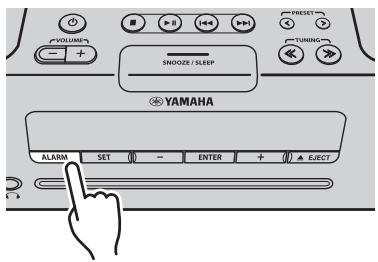
Press ALARM to turn the alarm on/off.
When the alarm is on, the alarm indicator (()) will light, and the alarm time will be shown.
If you press ALARM again, the alarm indicator ( 1) and the alarm will turn off.

When the unit is in ECO standby, the alarm will not function (P.5).
Operations while the alarm sound is playing
When the set time arrives, the selected alarm sound will play. During playback, the following operations are available.
To pause the alarm (Snoopze)
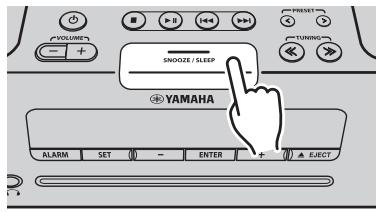
Press SNOOZE/SLEEP.
Snoopze will stop the alarm and play it again 5 minutes later.

If SOURCE + BEEP is set as the alarm type, you can press SNOOZE/SLEEP once to stop the beep sound, and twice to stop the audio source.
5 minutes after the audio source is stopped, it will start fading in again and the beep sound will resume.
To turn the alarm off
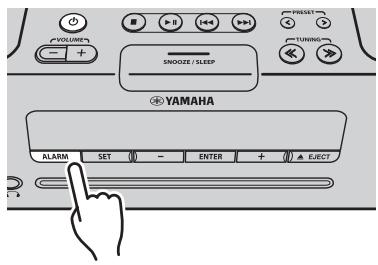
Press ALARM or 日

- You can also stop the alarm by holding down SNOOZE/SLEEP.
- If you don't stop the alarm, it will stop automatically after 60 minutes and the unit will turn off.
- The alarm setting will be saved even if the alarm is turned off. If the alarm is turned on again by pressing ALARM, the alarm will sound with the previous alarm settings.
USING THE "DTA CONTROLLER"
Installing DTA CONTROLLER application on a mobile device, such as a smartphone or tablet computer, allows you to use a variety of additional convenient features of this unit.
Features
- Turning on or off the unit
- Adjusting volume
- Setting of the alarm function (IntelliAlarm) (P. 19)
- Playing back songs stored in a mobile device

The mobile device needs to be connected with the unit via Bluetooth connection (P. 10).
For details, search for "DTA CONTROLLER" on the App Store or Google PlayTM.

The front panel display shows information for the Weekly Alarm you've set.
USING THE SLEEP TIMER
When the specified time has elapsed, the unit will turn off automatically.

Press SNOOZE/SLEEP repeatedly to specify the time after which the unit will turn off.
You can specify 30, 60, 90, 120 or OFF.
When you select a time, the sleep timer is turned on, and the sleep indicator (27) is shown in the front panel display.

If you press SNOOZE/SLEEP while the sleep timer is activated, the sleep timer setting will be canceled.
SETTING AUTO POWER STANDBY FUNCTION (main unit only)
By enabling the auto power standby function, the unit will automatically turn off (standby) under the following conditions.
- No operation for 8 hours.
- No operation has been performed for 20 minutes after CD/USB device playback is stopped.
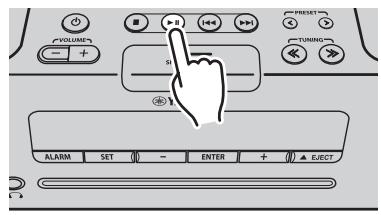
Press on the main unit for more than 3 seconds to enable/disable the auto power standby function.
When the auto power standby function has been enabled, the display will indicate "AUTO PWR STBY ON", when the auto power standby function has been disabled, the display will indicate "AUTO PWR STBY OFF".
- The default setting is enabled.
TROUBLESHOOTING
If there is a problem with the unit, check the following list first. If you cannot resolve the problem with the suggested solutions or if the problem is not listed below, turn off and unplug the unit, and consult the nearest authorized Yamaha dealer or service center.
General
| Problem | Cause | Solution |
| The speakers make no sound. | The volume might be set to the minimum level, or muted. | Adjust the volume level. |
| The source may be incorrect. | Select the correct source. | |
| Headphones are connected. | Remove the headphones. | |
| The volume of a connected external device is not loud enough. | Raise the volume of the external device. | |
| Sound suddenly turns off. | The sleep timer may be set (€ P. 21). | Turn the unit on and play the source again. |
| Sound is cracked/distorted or there is abnormal noise. | Input source volume is excessive, or volume of this unit is excessive (especially Bass). | Adjust volume with VOLUME, or adjust Bass with EQ (€ P. 6). If an external device is playing back, lower the volume of the external device. |
| The unit does not operate properly. | The unit may have received a strong electrical shock such as lightning or excessive static electricity, or power supply may have dropped. | Turn off, and disconnect the power cable. Wait about 30 seconds, reconnect the power cable, and turn on. |
| The unit turns on but immediately shuts off. | ||
| A digital or high-frequency equipment produces noises. | The unit may be placed too close to the digital or high-frequency equipment. | Place the unit farther away from the equipment. |
| The clock setting has been cleared. | The unit remained unpowered for about one week. | If the power supply is interrupted for about one week, the time setting may be reset. If this occurs, please reset the clock (€ P. 5). |
| Clock flashes and the unit cannot be operated. | The CLOCK switch is in the SET position, and the clock settings are in progress. | Set the CLOCK switch to the ON or OFF position (€ P. 3). |
| Alarm does not sound. | The CLOCK switch is in the OFF or SET position. | Set the CLOCK switch to the ON position (€ P. 3). |
| The front panel display indicates “ALARM not work” and can’t set the alarm. | ||
| The unit turns off unexpectedly. | The auto power standby function may have operated. | This unit will turn off when 20 minutes have elapsed without any operation being performed after stopping playback of the USB device or the CD, or if the unit has been on for 8 hours or more without any operation being performed (€ P. 21). |
| Front panel display becomes dim. | The front panel display’s brightness setting is set to AUTO. | Change the brightness setting to something other than AUTO (€ P. 6). Alternatively, ensure that the illumination sensor (€ P. 3) is not obscured. |
CD playback
| Problem | Cause | Solution |
| Disc cannot be inserted. | Another disc is already inserted. | Unload the disc with ▲EJECT. |
| You are attempting to insert a disc that cannot be used by this unit. | Use a disc supported by the unit (□P. 25). | |
| Some button operations do not work. | The disc loaded into the unit may not be compatible. | Use a disc supported by the unit (□P. 25). |
| Playback does not start immediately after pressing ▶(stops immediately). | The disc may be dirty. | Wipe the disc clean (□P. 25). |
| The disc loaded into the unit may not be compatible. | Use a disc supported by the unit (□P. 25). | |
| If the unit was moved from a cold to warm place, condensation may have formed on the disc reading lens. | Wait for an hour or two until the unit adjusts to the room temperature, and try again. | |
| The front panel display indicates “no operation”, and a disc cannot be inserted or unloaded. | The clock/alarm/tone settings are in progress. Alternatively, the alarm is playing. | Complete the clock/alarm/tone settings. Alternatively, stop the alarm. |
| When you insert a disc, the front panel display indicates “CD No Disc” or “CD Unknown.” | The disc loaded into the unit may not be compatible. | Use a disc supported by the unit (P. 25). |
| The disc may be dirty, or a foreign object may have adhered to it. | Wipe the disc clean. Alternatively, remove any foreign object that has adhered to the disc (P. 25). | |
| The disc does not contain playable files. | Use a disc contains playable files (P. 25). | |
| The disc was inserted upside down. | Insert the disc with the label facing upward. |
USB device playback
| Problem | Cause | Solution |
| MP3/WMA file in the USB device does not play. | The USB device is not recognized. | Make sure the USB device is connected to USB port instead of CHARGING port. Turn the unit off and reconnect the USB device to the unit. If the solutions above do not resolve the problem, the USB device is not playable on the unit (€ P. 25). |
| The USB device does not contain playable files. | Use a USB device contains playable files (€ P. 25). | |
| When you connect a USB device, the front panel display indicates “USB OverCurrent,” and then the front panel display goes blank. | An incompatible USB device was connected to the unit. Alternatively, the USB device is not connect firmly to the unit. | Turn the unit off and reconnect the USB device to the unit. If it does not resolve the problem, the USB device is not playable on the unit (€ P. 25). |
Bluetooth
| Problem | Cause | Solution |
| Cannot make this unit paired with the other component. | The other component does not support A2DP. | Perform pairing operations with a component which supports A2DP. |
| A Bluetooth adaptor, etc. that you want to pair with this unit has a password other than “0000”. | Use a Bluetooth adaptor, etc. whose password is “0000”. | |
| This unit and the other component are too far apart. | Move the other component closer to this unit. | |
| There is a device (microwave oven, wireless LAN, etc.) outputs signals in the 2.4 GHz frequency band nearby. | Move this unit away from the device that is emitting radio-frequency signals. | |
| Can’t establish a Bluetooth connection. | This unit is not registered on the other component’s Bluetooth connection list. | Perform pairing operations again (€ P. 10). |
| No sound is produced or the sound is interrupted during playback. | The Bluetooth connection of this unit with the other component is disconnected. | Perform Bluetooth connection operations again (€ P. 11). |
| This unit and the other component are too far apart. | Move the other component closer to this unit. | |
| There is a device (microwave oven, wireless LAN, etc.) outputs signals in the 2.4 GHz frequency band nearby. | Move this unit away from the device that is emitting radio-frequency signals. | |
| The other component’s Bluetooth function is off. | Turn on the Bluetooth function of the other component. | |
| The other component is not set to send Bluetooth audio signals to this unit. | Check that the Bluetooth function of the other component is set properly. | |
| The pairing setting of the other component is not set to this unit. | Set the pairing setting of the other component to this unit. | |
| The other component’s volume is set to the minimum. | Increase the volume level. |
DAB reception (TSX-B235D only)
| Problem | Cause | Solution |
| Cannot tune into any DAB stations. | The initial scan operations were not performed. | Perform the initial scan operations (P. 12). |
| The antenna may be connected improperly. | Make sure the antenna is connected properly (P. 3). | |
| There is no DAB coverage in your area. | Check with your dealer or WorldDMB Online at "http://www.worlddab.org" for a listing of the DAB coverage in your area. | |
| The DAB signals are too weak. | Change the height, direction, or placement of the antenna. | |
| The initial scan operations are not successful and "Not Found" appears on the front panel display. | The DAB signals are too weak. | |
| The antenna may be connected improperly. | Make sure the antenna is connected properly (P. 3). | |
| There is no DAB coverage in your area. | Check with your dealer or WorldDMB Online at "http://www.worlddab.org" for a listing of the DAB coverage in your area. | |
| The DAB station reception is weak. | The antenna may be connected improperly. | Make sure the antenna is connected properly (P. 3). |
| The DAB signals are too weak. | Change the height, direction, or placement of the antenna. | |
| There is noise interference (e.g. hiss, crackle, or jitter). | The antenna needs to be repositioned. | |
| The DAB signals are too weak. | ||
| The DAB station information does not appear or is inaccurate. | The DAB station may be temporarily out of service, or the DAB station information is not provided by the DAB broadcaster. | Contact the DAB broadcaster. |
FM reception
| Problem | Cause | Solution |
| Too much noise. | The antenna may be connected improperly. | Make sure the antenna is connected properly (€ P. 3) or use a commercially available outdoor antenna. |
| The antenna is too close to the unit or to an electronic device. | Position the antenna as far away as possible from the unit or the electronic device. | |
| Too much noise during stereo broadcast. | The radio station you selected may be far from your area, or the radio wave reception is weak in your area. | Try manual tuning to improve the signal quality (€ P. 15) or use a commercially available outdoor antenna. |
| Even with an outdoor antenna, radio wave reception is weak. (Sound is distorted.) | Multipath reflection or other radio interferences may have occurred. | Change the height, direction, or placement of the antenna (€ P. 3). |
Remote control
| Problem | Cause | Solution |
| The remote control does not work properly. | The remote control may be operated outside its operation range. | For information on the remote control operation range, refer to „How to use the remote control" (P. 1). |
| The remote control signal receiver on the unit (€ P. 3) may be exposed to direct sunlight or lighting (inverted fluorescent lamps). | Change the lighting or orientation of the unit. | |
| The battery may be worn out. | Replace the battery with a new one (€ P. 1). | |
| There are obstacles between the remote control signal receiver on the unit (€ P. 3) and the remote control. | Remove the obstacles. |
CD information
This unit is designed for use with audio CD, CD-R, and CD-RW with the logos followings.


- ISO 9660 format CD-R/RW

This unit can play back discs bearing any of the logo marks above. A disc logo mark is printed on the disc and the disc jacket.

- Do not load any other type of disc into this unit. Doing so may damage this unit.
- CD-R/RW cannot be played back unless finalized.
- Some discs cannot be played back depending on the disc characteristics or recording conditions.
- Do not use any non-standard shaped discs such as a heart-shaped disc.
- Do not use discs with many scratches on their surface.
- Do not load a cracked, warped, or glued disc.
- Do not use 8-cm discs.
Handling a disc
- Do not touch the surface of the disc. Hold a disc by its edge (and the center hole).
- Do not use a pencil or pointed marker to write on the disc.
- Do not put a tape, seal, glue, etc., on a disc.
- Do not use a protective cover to prevent scratches.
- Do not load more than one disc into this unit at one time. This can cause damage to both this unit and the discs.
- Do not insert any foreign objects into the disc slot.
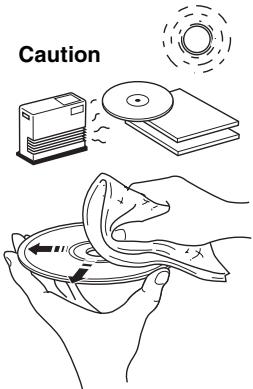
- Do not expose a disc to direct sunlight, high temperature, high humidity, or a lot of dust.

- If a disc becomes dirty, wipe it with a clean, dry cloth from the center out to the edge. Do not use record cleaner or paint thinner.
- To avoid malfunction, do not use a commercially available lens cleaner.
USB device information
This unit supports USB mass storage class devices (e.g., flash memories or portable audio players) using FAT16 or FAT32 format.

- Some devices may not work properly even if they meet the requirements.
- Do not connect devices other than USB mass storage class devices (such as USB chargers or USB hubs), PCs, card readers, an external HDD, etc.
- Yamaha will not be held responsible for any damage to or data loss on the USB device occurring while the device is connected to this unit.
- Playability of and power supply to all kind of USB devices are not guaranteed.
- USB devices with encryption cannot be used.
About MP3 or WMA files

The unit can play back:
| File | Bitrate (kbps) | Sampling frequency (kHz) |
| MP3 | 8-320** | 16-48 |
| WMA | 16-320** | 22.05-48 |
** Both constant and variable bitrates are supported.
- The maximum numbers of files/folders that can be played on the unit are as follows.
| Data CD | USB | |
| Maximum total number of file | 512 | 9999 |
| Maximum folder number | 255 | 999 |
| Maximum file number per folder | 511 | 255 |
Copyright-protected files cannot be played back.
SPECIFICATIONS
PLAYER SECTION
CD
Media CD,CD-R/RW
Audio format Audio CD, MP3, WMA
LASER
- Type. Semiconductor laser GaAS/GaAlAs
- Wave length. 790 nm
Output Power 7 mW
USB
Audio format MP3, WMA
AUX
- Input connector 3.5 mm (1/8") STEREO mini jack
Bluetooth SECTION
- Bluetooth version . . . . . . . . . . . . . . . . . . . . . . . . . . . . . . . . . . . . . . . . . . . . . . . . . . . . . . . . . . Ver. 2.1+EDR
- Supported profile . A2DP
Supported codecs SBC,AAC,aptX - Wireless output ..............................................Bluetooth Class 2
Maximum communication distance. 10m (without obstructions)
AMPLIFIER SECTION
Maximum output power. 15W + 15W (6 1kHz,10% THD)
- Headphones
3.5 mm (1/8 in) STEREO mini jack (Impedance 16 to 32
TUNER SECTION
Tuning range
- DAB/DAB ^+ (TSX-B235D only). 174 to 240 MHz (Band III)
FM 87.50 to 108.00 MHz
GENERAL
- Power supply. AC 230 V, 50 Hz
Power consumption 30 W - Standby consumption 3.8 W or less (standby)/0.5 W or less (ECO standby)
- Dimensions (W × H × D) - (TSX-B235) 370 (14.5 / 8^ ) × 110(4.3 / 8^ ) × 234(9.1 / 4^ ) mm
- (TSX-B235D) 370 (14.5 / 8^ ) × 110(4.3 / 8^ ) × 239(9.3 / 8^ ) mm
Weight. (TSX-B235) 3.92kg 8.64 lbs.) TSX-B235D) 3.92kg 8.64 lbs.)
- (TSX-B235D) 370 (14.5 / 8^ ) × 110(4.3 / 8^ ) × 239(9.3 / 8^ ) mm
Specifications are subject to change without notice.
iPod, iPhone, iPad
"Made for iPod", "Made for iPhone" and "Made for iPad" mean that an electronic accessory has been designed to connect specifically to iPod, iPhone or iPad, respectively, and has been certified by the developer to meet Apple performance standards.
Apple is not responsible for the operation of this device or its compliance with safety and regulatory standards. Please note that the use of this accessory with iPod, iPhone or iPad may affect wireless performance.
Made for:
iPhone 6 Plus, iPhone 6, iPhone 5s, iPhone 5c, iPhone 5, iPhone 4s, iPhone 4, iPhone 3GS
iPad (3rd and 4th generation), iPad 2
iPod touch (4th and 5th generation)
(As of May 2015)
iPhone, iPad, iPad Air, iPad mini and iPod touch are trademarks of Apple Inc., registered in the U.S. and other countries.

© 2013 CSR plc and its group companies.
The aptX® mark and the aptX logo are trade marks of CSR plc or one of its group companies and may be registered in one or more jurisdictions.

The N Mark is a trademark or registered trademark of NFC Forum, Inc. in the United States and in other countries.

Digital Audio Broadcasting

Digital Audio Broadcasting
This unit supports DAB/DAB+ tuning.
Bluetooth
- Bluetooth is a technology for wireless communication between devices within an area of about 10 meters (33 ft) employing the 2.4 GHz frequency band, a band which can be used without a license.
- Bluetooth is a registered trademark of the Bluetooth SIG and is used by Yamaha in accordance with a license agreement.
Handling Bluetooth communications
- The 2.4 GHz band used by Bluetooth compatible devices is a radio band shared by many types of equipment. While Bluetooth compatible devices use a technology minimizing the influence of other components using the same radio band, such influence may reduce the speed or distance of communications and in some cases interrupt communications.
- The speed of signal transfer and the distance at which communication is possible differs according to the distance between the communicating devices, the presence of obstacles, radio wave conditions and the type of equipment.
- Yamaha does not guarantee all wireless connections between this unit and devices compatible with Bluetooth function.
Information for Users on Collection and Disposal of Old Equipment and Used Batteries

These symbols on the products, packaging, and/or accompanying documents mean that used electrical and electronic products and batteries should not be mixed with general household waste.

For proper treatment, recovery and recycling of old products and used batteries, please take them to applicable collection points, in accordance with your national legislation and the Directives 2002/96/EC and 2006/66/EC.

By disposing of these products and batteries correctly, you will help to save valuable resources and prevent any potential negative effects on human health and the environment which could otherwise arise from inappropriate waste handling.

For more information about collection and recycling of old products and batteries, please contact your local municipality, your waste disposal service or the point of sale where you purchased the items.
[Information on Disposal in other Countries outside the European Union]
These symbols are only valid in the European Union. If you wish to discard these items, please contact your local authorities or dealer and ask for the correct method of disposal.
Note for the battery symbol (bottom two symbol examples):
This symbol might be used in combination with a chemical symbol. In this case it complies with the requirement set by the Directive for the chemical involved.
If there should be color blotching or noise when used near a TV, move this unit away from the TV when using it.
Do not use this unit within 22cm (9 inches) of persons with a heart pacemaker implant or defibrillator implant.
Radio waves may affect electro-medical devices. Do not use this unit near medical devices or inside medical facilities.
The user shall not reverse engineer, decompile, alter, translate or disassemble the software used in this unit, whether in part or in whole. For corporate users, employees of the corporation itself as well as its business partners shall observe the contractual bans stipulated within this clause. If the stipulations of this clause and this contract cannot be observed, the user shall immediately discontinue using the software.
We, Yamaha Music Europe GmbH hereby declare that this unit is in compliance with the essential requirements and other relevant provisions of Directive 1999/5/EC.
Yamaha Music Europe GmbH
Siemensstr. 22-34 25462 Rellingen, Germany
Tel: +49-4101-303-0

CAUTION
Use of controls or adjustments or performance of procedures other than those specified herein may result in hazardous radiation exposure.
LASER SAFETY
This unit employs a laser. Due to possible eye injury, only a qualified service person should remove the cover or attempt to service this device.
DANGER
This unit emits visible laser radiation when open. Avoid direct eye exposure to beam. When this unit is plugged into the wall outlet, do not place your eyes close to the opening of the disc slot and other openings to look into inside.
For U.K. customers
If the socket outlets in the home are not suitable for the plug supplied with this appliance, it should be cut off and an appropriate 3 pin plug fitted. For details, refer to the instructions described below.
#
The plug severed from the mains lead must be destroyed, as a plug with bared flexible cord is hazardous if engaged in a live socket outlet.

Special Instructions for U.K. Model
IMPORTANT
THE WIRES IN MAINS LEAD ARE COLOURED IN ACCORDANCE WITH THE FOLLOWING CODE:
Blue: NEUTRAL
Brown: LIVE
As the colours of the wires in the mains lead of this apparatus may not correspond with the coloured markings identifying the terminals in your plug, proceed as follows:
The wire which is coloured BLUE must be connected to the terminal which is marked with the letter N or coloured
BLACK. The wire which is coloured BROWN must be connected to the terminal which is marked with the letter L or coloured RED.
Make sure that neither core is connected to the earth terminal of the three pin plug.
ATTENTION: VEUILLEZ LIRE CE QUI SUIT AVANT D'UTILISER L'APPAREIL.
Diverses sources audio
Digital Audio Broadcasting

Digital Audio Broadcasting
Digital Audio Broadcasting

Digital Audio Broadcasting
DELARNAS NAMN OCH FUNKTIONER...2
Toppanel/frontpanel 2
Frontpanelens teckenfönster. 3
Bakpanel 3
Fjarrkontroll 4
STARTA ENHETEN 5
JUSTERA KLOCKAN 5
JUSTERA TONFREKVENSEN (endast fjarrkontroll) ...6
JUSTERA LJUSSTYRKAN FÜR FRONTPANELENS TECKENFÖNSTER (endast fjärrkontroll)............6
LADDNING MED CHARGING-PORTEN 6
LYSSNA PÄ CD OCH USB-ENHETER 7
Lyssna pa en CD. 7
Lyssna pa en USB-enhet. 8
Anvanda upprepa/blandaspár (endast fjarrkontroll)....9
LYSSNA PÅ EXTERNA KÄLLOR 9
LYSSNA PÅ DAB-STATIONER
(endast TSX-B235D) 12
DAB/FM-antenn (for TSX-B235D)
FM-antenn (for TSX-B235)
Batterier (x 2) (AAA, R03, UM-4)
USB-kapa (x 2)
1
Digital Audio Broadcasting

Digital Audio Broadcasting
Den har enheten stoder DAB/DAB+mottagning.
Bluetooth
ACCENSIONE DELL'UNITA 5
Antenna DAB/FM (per TSX-B235D)

Antenna FM (per TSX-B235)
Batterie (x 2) (AAA, R03, UM-4)
Coperchio USB (x 2)
1
ACCENSIONE DELL'UNITÀ
Digital Audio Broadcasting

Digital Audio Broadcasting
ESCUCHAR EMISORAS DAB (solo TSX-B235D)...12
Digital Audio Broadcasting

Digital Audio Broadcasting
| Jan | Feb | Mar | Apr | May | Jun |
| Januari | Februari | Maart | April | Mei | Juni |
| Jul | Aug | Sep | Oct | Nov | Dec |
| Juli | Augustus | September | Oktober | November | December |
Digital Audio Broadcasting

Digital Audio Broadcasting
Bluetooth-communications hanteren
3APRAKCA NOMOUIIO NOPTA CHARGING......6
IPOCJIUYUHBAHNE CD-IMCKOB I USB-YCTPOYCTB...7
Bocnpo3BeDeHne CD-1ncka. 7
Bocnpon3BeJeHne c USB-ycTropeCTBa. 8
IcnoJIb3OBAHnE NOBtOPHOBOCnpON3BeDeHnR/BOcnpON3BeDeHnR
B cnyaHOM nopAke (tOlbKo C npIbTa N) 9
ПОСЛУшВАНЕ BHESHHIX ICTOЧИКOB ...9
ПОСЛУSHINBAHNE MY3bIKN C YCTPOICTBA, IMEIOUSEO KOMNOHEHT Bluetooth 10
Bocnpon3BeDHeMe My3bIKn C yctpoiCtBa C fynKcIeN Bluetooth ... 10
Tobtphoe nodknueHne ycTroPcTBa no Bluetooth...11
Pa3pbIb IopKIIoueHnI NO Bluetooth. 12
IPOCJIyUINBAHNE DAB-CTAHNIC (ToJbKO TSX-B235D)...12
IoproToBka K npnemy DAB-cirhna1a 12
Bb6op DAB-CTaHcun 13
PepaBapTeIbHa NaCTpOka DAB-CTaHnI (ToIbKo C npIbTa IV)...14
Bb6op npedBaupTeIbHO 3aIaHbIX DAB-CTaIcIy.....14
ПОСЛУSHINBAHNE FM-PAДNOCTAHЦИ .....15
Bb6op FM-paiooctaHcui 15
PpeBaHteBna HacToaKa FM-paIOCTaHcN (TolbKo c npIbTa dy)...16
Bb6op npeDbapnteNbHO hactpoehhbx FM-paiooctaun…17
NCIOJIb3OBAHME ΦYHKUIM ByuINlbHnKA(IntelliAlarm) ... 18
UcTaHOBka CnHaIa 6yDInbHnka. 19
Onepaunn BO Bpemr Bocnpoun3BedeHn CnHaJa 6yDnblNka...20
IcnoJb3OBAHNE IPNJIOXEHNA "DTA CONTROLLER"....21
ИСПОЛьЗOBAHNE TаймЕРА ПЕTEXODAВ PEЖМ OЖИДАн.
21
YCTAHOBKAФУHKUIMN ABTOMATUHECKOTO NEPEXODA
B PEXM OXnDAHNA (ToIbko c yctpoiCTBa) 21
YCTPAHEHNE HENCINPABHOCTE 22
ПИМЕЧАНИОДИСКAXИUSB-УСТРОДСТВAX...25
TEXHNUECKNE XAPAKTEPNCNI 26
(B KOHue daHHoro pyKOBOdCTBa) DOnOHHTeIbHaI INΦOpMaun
Функции
Bocnpoh3BeJeHne My3bIKn C BHeIHHnx ycTpoiCTB, HAnpHmep, CD-ImckOB C My3bIKoN I daHHbIMN, USB-ycTPOICTB INH BHeIHHx ycTpoiCTB Yepe3 rHe3do AUX, INipocJyIHHBaHne paadinocTaHII.
(ToIbKO TSX-B235D)IpocJyHbBaHne DAB-cTaHn.
- BJaIaIapra TexHOJIOHn Bluteothb Bc mOKeTe HacJaKdAteBc qHCTbIM 3ByKOM 6e3 hCIOJIb3OBaHHa IIPOBOIOB. IOCTyIHNO IIOJKIIIOHeHne OINHM KacaHHeM C IIMOIOBJo TexHOJIOHn NFC.
- IcIIOJIb3OBAHHeJIIO6HMoMeJIOHN HIN 3BYKOBORO cHrHaJI B KaueCTBE 3BOHKa 6yIINbHnKa. B 3aJaHHoe BpeMc rHrHaJI bI6paHna MeIOJNBA BOCIIPOH3BOIDTcC yka3aHHoI rPOMKoCTbO, OeCneuHba Bam HIEaJIbHO HeaIIO JhA (fYHKIIH IntelliAlarm).
- IcIIIOJIb3y8 6ecIIaTHe OIprHIOJKeHne "DTA CONTROLLER" IIЯ smaprfoHa I IIJIaHIIeTHORO KOMIIbIOTepa, moKHO yIpaJIbIaTb 3tHM yCTpoIcTBOM H IOJIb3ObaTbcra pacHIpeHHbIMn 6yHKIIaMn 6yINJIbHNka (E5 cTp. 21).
- Ipnoctoe coxpanenHe n Bocnpon3BcdeHne IIO6HMbIX paIIOOCtAnuH: 10 30 FM- n 30 DAB-cTAnuH (fynKuHa DAB IOCTyHnA TOJIbKO TIN TSX-B235D).
- Hn3KHe, cpeHnE n BbICOKHe yactoTbI MoKHO HaCTpOHTB C COOTBeTCTBHN C INHINBHyaJIbHbIMN IIpeIIOHTeHHaMn.
O6 3Tom pykoBoDCTBe
CsbIJIKNHa iPodBdaHHompyKOBOCTBeTaKKeOTHOcTcKiIPhoneiPad.
- EcJIH OIIepaIIO MOKHO BbIIOJIHNb C IOMOIIbKO KHOIOK Ha cAMOM yctpoiCTBe HJN C IIy, B INHcTpkyIIN 6yJeT OINcBbATcbA BbIIOJIHeHHe OIIepaIIN C IOMOIIbIO yctpoiCTBa.
- yka3bIbAet Ha MEPbI IpeIOCTOPOJXHOCTn IIpi HcIOJIb3OBAHHy cTpoiCTBa H a OrpaHnueHH eTo yHKIIH.
yKa3bIbaeT Ha IOIOJIHHTeJIbHbIe HNCTpyKUHN IIO OITIMaJIbHOMY IcIOJIb3OBAHHIO.
Ppnilaraemble akceccyapbl
NytBdY
DAB-/FM-aHTeHHa (ДЛЯ TSX-B235D)
FM-aHTeHHa (dJIaTSX-B235)

BatapeiKn (x 2) (AAA, R03, UM-4)

Kpbiika nopTa USB (x 2)
XpaHnTe KpbHkU npTa USB B HeDcTynHOM IJIaTeJeM MeCte, YTO6bI OHN He MoTIN ClyaHIO IIPOJIoTHTbe.
IcnoJIb3OBAHne npJIbTa Dv
YctaHOBka 6aTapeek B npIbT y
HaJIInTe OTMeTKn “+” H“-” Ha6aTapeHkax H BCTaBbTe Hx COOTBeTCTByIOIHM O6pa3OM.
BepxHnHa nHeIb/pepeHnHa nHeIb
① VOLUME - /+
PeryIINPOBka rPOMKocTn.
(2) (nɪtəhne)
HaKMHTe 3Ty KHOIIky, YTO6bI BKJIIOHHTb HJIN BbIKJIIOUHTb (IpepeBecTH B peKHM OKNJaHHa) yCTPOIcTBO.
CyuieCTByeT IBa TnIIa COCTOAHNIA OKnIaHNN (E CTp. 5).
③ Khonkn Bbl6opa nCToHnKa
Bb6op aydnohctOHHka JIA BOCINpON3BeJeHn.
EcJH HaKaTb OJHy H3 3THX KHOIOK, KOJa yCTpoiCTBO hAXOHTcB peKHMe OJHaAHN (3a HCKJIIOueHHem peKHMa OJHaAHN ECO), yCTpoiCTBO BKJIOHTc#, IocJIe Yero IIpeKJIIOUHTcra ayDIOHOCTOHHK.
(ToJIbKO TSX-B235D)IIpi IIpocJyIHHBaHn paIIO HaKMHTe KHOIIKY RADIO IJIpeKJIIOueHn MeJxD DAB/FM.
④ 3HaK NFC
IIpocToe IIOIKIIOueHHe c IIOOMIoB IO TexHOJIOTHN NFC (cTp. 11).
⑤ KhoNk ynpaBJIeHn BocnpOn3BeDeHneM
HcIOJIb3yIte Hx IJIa yIpaBJIeHNr CD-ⅡHcKOM HJIH USB-yCTpoIcTBOM.
OCTaHOBKa
II:BOCINpOHN3BeIeHHe/IIay3a
1: IpoIyck, OobpaTHbI/IIpRAMOI IOHcK (HaKMHTe H ydepKHBaIte KHOIIKy)
⑥ SNOOZE/SLEEP
YcTaHOBKa TaIMepa IepexoJa B peKHM OJNJaHHa HJI INpeKJIIOUeHHe 6yIJINJBHKa B peKHM IOBTOpeHHa CnHaJa (Ctp.20,21).
⑦ Πορτ CHARGING
3TOTIPOPTIpeHa3HaueH NckJIOUHTeJIbHO JIA 3apAaKn.
C eIIOMOUbIO MOJHO IIOJaBaTb IINTaHHe 5 B/1,0 A HA IIOPTaTHBHO yCTpOiCTBO, HAIPIHMep cMaprTOH, IIOKJIIOUeHHoe C IIOMOUbIO Ka6eJIa USB (E CTp. 6).

EcJIN USB-ycTpoIcTBo He HcNIOJIb3yETcY, yCTaHOBHTe KpbIHKy IopTa USB ⅡAIIHTb pa3bema.
⑧ NopT USB
SET: HacTpoIka YacOB.
ON: JIaKe KOrTa yCTPoIcTBO BbIKJIOueHo, YacBb 6yDyT OTO6paKaTbc8n H cyHKIIH6yHNJIbHNka 6yTe TIOCTyIIHa.
OFF: KOrJa yCTpoiCTBO BbIKIOHcHo, HaCSbI He 6yIyT OTo6paKaTbC8, H dyHKIIHg 6vHJbHHKa He 6vIeT IOCTVHHa.
②AUX
HcIOJIb3yIte HMeIOUIINcB IIpoJaKe Ka6eJIb C MHNIIITeKePOM 3,5 MM IJIa IIOJIKIOHeHn BHEIIHero yCTpOHTBA KdAHHomy pa3bemy (E CTp.9).
③ Pa3bem ДЯ DAB-/FM-aHTehHbI
IpeHa3NaueH IJIa IIOKJIIOUeHHaDAB-/FM-aHTeHHbI.


He 3a6yIbTe BbIbHNHyTb aHTeHHy.

BcIyae cIa6oRcHraJaIOIpo6yIte H3MeHNb BcOTy,HaNPaBJIeHHe HJPi paIIOLOJKeHHe AHTeHHbI, YTO6bHaHTn MeTo, Ie IIpHem CrtHraJa JyUHe.
- IIpHem cHrHaJa yJUyUHTc, ecJIH BMEcTo IpiJIaRaEMo aHTeHHbI HcIOJIb3OBaTb HMeEOIuYOCB IIpoJaKe HApyKHyO aHTeHHy.
NynbTdY

II:BOCINPOH3BcEHeHHe/IIay3a
1: IIPOIyuc, OpbaTHbI/IIpRAMOI IIOHc (HaKMHTe H ydePKNBaIte KHOIIky)
⑧ (NOBTOPHOE BOCINPOUN3BedeHne)/
TO(BOcnpoN3BedeHne B cnyaHOM npraKe)
BocpoH3BeHeHne My3bIKn Ha CD-ⅡncKe HJIN USByctPoHCTBe BpeKHMe IIOBTOpHOrO BocpoH3BeHeHn/BOcipOnH3BeHeHnB CJIyuaHOM IOpAJaKe (E 3Ctp.9).
⑨ EQ: LOW/MID/HIGH
PeryuIINPOBka Hn3KHX, cpeIHHX HJIH BbICOKHX 3ByKObIX qactOT (E CTp.6).
⑩ TUNING /
HactpoIka paIIO (cTp. 15, 16).
1 PRESET
Bb6op coxpaenHHo paHocTaHnH (cTp. 16, 17).
⑫ MEMORY
CoxpaheHne paHocTaHcHn (ECTp.16).
⑬ DIMMER
PeryInpOBkA npKocTn nCnJIe IpeIeHn IaHEn (E 6.
14 DISPLAY
IpekeJIOHueHnΦOpMaUHn,OTo6paKaemHO Ha IINcIIeEpeJHeIHaJIeHN (cTp.7,8,15).
(15) VOLUME +/-
PeryJInpOBKa rIpomKocTN.
16 MUTE
BbIKIIOUeHHe IN BKIIIOUeHHe 3Byka.
BKJIIOUOYEHNE YCTPOICTBA

Budnucnne8 (24-achoboi pexim), KOrda yctpoicBo BKlioueHo
15:30 CD
IocJIe OKOHuaHnHaCTpOiKN YacOB Ha IHCIIIE IIOBHTc coo6JeHHe "Completed!".

B IIIare 2 c IIOMOIbI KHOIIKN SNOOZE/SLEEP MOJHO BbIbpaTb fOpMat BpeMeHn (12-Yacoboi/24-Yacoboi).
EcJIN DaHHOMy ycTpoiCTBy He ydaetcIIOJIyHTb CnHraJI DAB, BmecTo Ha3BaHmry DAB-cTaHmN 6yJeT OTo6paKaTbc coo6IeHHe "Off Air".
①ДононтеловиИнDNKATOP.
HeKOTOpbIe cTaHcHIN HcIOJIb3yIOT IIOCTaHcHIN (HJI IN IOIOJIHNTEJIbHbIe cTaHcHIN).
EcJIN BOCIINOH3BOJNTcC HnHaJI DIOJIOHNHTeJIbHOI CTaHUN, OTO6pKaetcDIOJIOHNHTeJIbHBI HHJNKaTOP.
② INДИКaTOp yPoBnA cnHana.
OnpeJeIaTeKyuIyIyOBeHcHrHaJa.
③HomepnpeBapntelbHnHaCTpoKn
④Ha3BaHne DAB-CTaHcHn
OTo6paXeHne HnΦopMaun (ToIbko C npJIbTa Iy)

IIpn HauKaTHN KHOIIKN DISPLAY Ha IIyIbTe IY HnHOpMaIIHa IINcIIepeIHeI NaHeJIH 6yIeT OTo6paKaTaBcB CJIeDyIOIIeM IopJKe.

- STATION LABEL, PRESET NUMBER
- DLS (Dynamic Label Segment)
- ENSEMBLE LABEL
- CHANNEL/FREQ (MeTka H uactota KaHaJa)
- SIGNAL QUALITY
- AUDIO FORMAT (aydnofoopmat, DRC)
Информацья оочтOTE DAB
BbI6op FM-paIocTaHcN
JaHHbM MeTOI IO3BOJIaET ABOMaTHUeCKH NaCTpaHBaT b ABOMaTHUeCKN IpeBaHPteLbHO 3aJabAaTB ToJIbKO paIIOCTaHIINC c XOpOIIHM KaYeCTBOM IIpHEMa.

AUTO PRESET Press MEMORY
Puchna npedBapnteNbHa NaCTpOka
PRESET MEMORY F01 87.50MHz
HaXmTe n ydepxnBaayte KhoNky MEMORY. IoYBHTc coo6iEHeNe "AUTO PREsT", n coo6iEHeNe "Press MEMORY" 6yIeT mIraTb.
HaKmTe KhONKy MEMORY.
Haunetc aBtOMaTHuecka IIpeBapHTeJIbHaa HacTpoKa. IocJe OKOHuaHnI IIpeBapHTeJIbHOH HacTpoKN Ha IINcIIJIe IIOBAHTc coo6IeHne "Completed!"

IIpnBbIIOJIHeHHN ABOTOMaTHueckO IIpeIbApTeJIbHOH NaCTPOJKN Bce coXpaHEHHbIe paIDocTaIHIN ydaIIAOTcH coXpaHIAOTc HOBIe paIDocTaIHIN.

Ecln Heo6xOJHMO OCTaHOBHTb ABTOMaTHueCKyIO IpEaBapTeJIbHyO HacTpoIky Do ee 3abepeHHa, HaxMHTe KHOIIky ■.
YdaJIeHne coXpaHeHHo IpeDbapnteIbHO HacTpoEHHO paIIOCTaHcNl

1HaxmTe KhoNky TUNING / ,YtObI HacTpoNTb paIOCTaHcUIO, KOtopyIO Heo6xOdMIO npEdbapnteJIbHO 3aJaTb.
2 HaKmTe KhONKy MEMORY.
Ha IIcIIIe IIOBHTc coo6IeHne “PRESET MEMORY”, a HOpE IIpeIbapHTeJIbHO 3aIaHHoJ paIIOCTaIHIN 6yIeT MmATb.
3HaKMTe KHONky PRESET<//,UTo6bI Bbl6paTb HOpE npEiBapuTeIbHO 3aDaHHoI paAnOCTaHcN, KOtOpYIO Heo6XoIMO COxpaHNTb.

- Camby MajaIeHbKn HOMep IpeIeBapHTeJIbHO 3aJAHNo paIaNocTahHH, KOToPbI eHe He bJI coXpAHen, 6yET BbIbpaN B IepByo OYepeIb.
Ecln BxOTHTe OTMeHHTb IIpeBapHTeJbHyIO HactpoiKy, HAKMITE KHOIIKy
EcJIb BbIb6HpaTe HOpem IIpeIbApaHTeJIbHO 3aIaHHo paIIOCTaIHIN, IIOI KOTOpBIM yKe 6bJIa COxpaHeHa paIIOCTaIHIN, OHA 6yIET 3aMeHeHa HA HOByIO paIIOCTaIHIO.
4 HaKmTe KhONKy MEMORY.
IocJIe OKOHuaHnI IpeBArHteJIbHOH HAcTpoKn Ha IIcIIJIe IIOyBHTc coO6IeHne "Completed!".
BbI6Op npeDvapntelbHO HacTpoeHHbIX FM-paDnocTaHcN

1
HaKmTe KHOJky nCTOuHnKa RADIo, yTo6bI Bbl6paTb FM-paIOocTaHcNIO B KaueCTBe ayDInONCTOuHnKa.
2 HaKmTe KHONKy PRESET</>,чTo6bI Bbl6paTb FM-paJnoCTaHcNIOДлЯ npocLyuBaHnY.

BbMOKeTe BbOpaTb TOJIbKO Te IpeIbApaHTeJIbHO HacTpoEHHbIe paIIOCTaHcIH, KOToPbIE 6blIN COxpaHeHbI.
ИСПОЛьЗOBAHNE ФУнкции БудINьнIKEA (IntelliAlarm)
UcTpoCTBO IMeET yHKIIO 6yINJIbHnKa, KOtOpA BOCIpOn3BOiHT MeIoIOHO c ayIOHNCTOCHKOB HII Na6Op 3ByKOBbIX CNrHaIOB (BCTPOeHHbI 3ByK 6yINJIbHnKa) B YcTaHOBJIeHHoe BpeM pa3JINuHbIMN CInOCo6aMn. CyHKIIg 6yINJIbHnKa HmeeT cJeYIOIe XapaKTepHCTNIK.
3 Tuna 6yDnIbHnKOB
YcTpoIcTBo HMeet 3 TnIIa 6yINJIbHNKOB, COUeTaIOUIne My3bIKy I 3ByKOBBie cHnaJIbI.
HaKmTe KhoNky SNOOZE/SLEEP.
Приг entOM BOCINpOH3BcIeHHe cHHaJIa IIpeKpaHTTCa H BO3O6HOBHtC ChOBa Yepe3 5 MmHyT.

EcINB KaueCTBe TnIIa CnHgAJIb BbIbpaHO 3HaueHHe SOURCE ^+ BEEP, HauKMHTe KHOIIky SNOOZE/SLEEP oINH pa3, YTO6bl BbIKIOUHTb 3ByKOBOI CNHgAI, IN DBA pa3a, YTO6bl OCTaHOBNb BOcINPON3BeJeHne ayINOHCTOUYHka.
Yepe3 5 MmHyT IocJIe OCTaHOBKN BOCIIpOHH2EHeHnayIHOHCTOCHNKA OH CHOBa HauHET IOCTeIIeHNO yCHJIHBaTbCn3ByKOBO CNHaJI BO3O6HOBHTcJ.
© 2013 CSR plc ngpyna KOMnnaHn.
3HaK aptX H IIOrOTHn aptX AIBJIAOTc TOBapHbIMN 3HaKaAMN KOMIIaHH CSR pIc IIN OJHOI N3 ee COBMecTbIX KOMIIaHH I MOYr 6bITb 3apeHCTpupOBaHbI B OJHOI IIN HeCKoJIbKHX IOPNCIIHIX.

3HaK N JABJIeTcTc TOBAPbHbIM 3HaKOM HJIN 3apeHCTpHPOBaHHbIM TOBAPbHbIM 3HaKOM NFC Forum, Inc. B CIIIA H JpyrHx cTpahax.

Digital Audio Broadcasting

Digital Audio Broadcasting
ДанhoeустpoiCTBOПОДержнБаETнacTpOИВФОмATEBeeиdHA DAB/DAB+.
Bluetooth
Bluetooth 3TO TEXHOLOTNII J6eCIIPOBOHOI C8B3N yCTPOHCTB, HAXOJIaIIXcHa paacTcOAHNN OKIOIO 10 MeTpOB Ipyr O T pyra H NcIOJIb3YIOUHX YAcTOTHbIyIaNa3OH 2,4 ΓΓI -IuaNa3OH, NcIOJIb3OBAHHe KOTOPOro He Tpe6yEr IInueE3nPOBaHH.
Bluetooth KBJIaETc3aERHCTPnPOBAHHbIM TOBapHBIM 3HaKOM Bluetooth SIG H NcIOJIb3yETc KOMIIaHHei Yamaha B COOTBTCTBHN C JINIEH3NHOHHbIM COJIAJIeHHEM.
Onucahne cBra3n no Bluetooth
Дианадон2,4TП,нсльзуемь устюctвамн,cobmectHMbIMn c Bluetooth,TOДианадонpaIHOuactOT,IprimeHЯевддя Многгх TIOOB 6OpyoobAHIN. HapayU cTeM,чTO yctpoiCTBA,cobmectHMbIe c Bluetooth,HcIOJIb3yOTexHOJIOTHIO,MHMHN3HpyOUIY BO3dEChTBHe NaIpyrHe yctpoICTBa,KOTOpBIE HCIOJIb3yOT TOJ KeДианадон,TaKoeBO3dEChTBNe MOnET IIpHBcTn K UMeHbIIeHINO CkopoCtH NIIpacCTOHHNЯ ПЕДaHbIXA,B a HeKOToPbIX cIyuaXn K O6pbIbY CB3N.
- Ckopocstb Ipepeaun cnHajla, a taKke paccToHne, Ha KOTOpoe ero MOxHO IpepeaTb, BapbHypeTcB 3aBCHMOCTN OT paccToHHM Mekdy KOMMYTHpyEmbIM yCtpoiCTBaMH, HAIHnIe IpeJIaTcBm, paDIOHOMex H TIIa OobopyIOBaHH.
- KomПангЯ Yamaha He rapaHTpyET BO3MOxHOCtB 6ecIIPOBOIHOH KOMMyTAIHH MEXJy DaHHbIM yCTpoICTBOM I BCEMH IpyTHMn yCTpoIcTBAMN, COBMecTHMbIMN C cyHKiHei Bluetooth.
HnΦopMaunIgNoJb3OBaTeNeI NO c6Opuy uTIN3aUN CTapOAnnapaTypbl NcNOJIb3OBaHHbIX 6bataeK

3n 3n KaHn Ha aIIIapatype, yIaKOBkax H B COIIOPOBIOJIeJIbHbIX DOKUMeHTAX YKa3IBaIOH Na TO, TTO IIOpEpaHHbIXe IJIeKTPNcEckN He IJIeKTPOHHbIe PInpObApI bIgatapeIKHne He IOJXhbl BbIbPaCbIbTaC BmecTe C O6bUHbIM DOMaIHHM MycOpOM.

06paTnTe BnHMaHHe Ha 3HaK JIa 6aTaapeek (DbA 3HaKa Ha 3aJHcN CTOpOHe):
3TOT 3HaK MOKeT HcIOJIb3OBAbTaC8 B KOMoHHaIHn CO 3HAKOM yKa3bIbAOIIHM O cOpJepKaHHx HmHKaJIHn. B 3TOM CJIyae 3TO yIOBJIeTBOpJe Tpe6OBaHHM yCTaHOBJEHHBMIN DHePeKTHBOI IO HcIOJIb3OBAHHO XMHKAJIHn.
Пин ВОЗнКНОВЕн ИБЕТьХ IЯТЕН HaДСПЛЕЕ ИЛИ ПОМEX BO ВРЕМ ИСПОЛБЗОВАнHAустBA6ЛH3N TeLEBEH3Opa IперемстHTe ayДнOCHCTemy ПДаЛБИЕ OT TeLEBEH3Opa.
He HcIOJIb3yIte DaHHOe ycTpoiCTBO 6JIHKe, Yem B 22 cm OT JIOJIe C HMIJIaHTpOBAHHbIM KapJIOcTHMyJIaTOpOM HJIN DeΦHbPnJIJIaTOpOM.
PaIHOBOJIHbMOrT Oka3aTb BIIHnHHe Ha ⅢeKtpoHHbIe yCTpOCTBa MeIINHCKORO Ha3HaueHn.
He nIOJIb3yIte daHnBI aIIIapAT B6JI3N taKHX yCTPOiCTB HJI IN MeDHIuHcKHX yUpeKdEHHX.
IIOJIb3OBaTeJIb yctpoHcTBa He JOJIkeH INpOBOJNTb HJKeHepHbI aHaJIIN3,JeKOMIIHInPOBaTb, H3MeHrTb HIN De3accem6JIInPOBaTb IporpamMHOe o6ecnneHHe, HcIOJIb3yeMOe B DAHHOM yCTpoCTBc, HN YacTHNuHO, HN B CEJOM. KopIOpaTHBHeI IOJIb3OBaTeJIH, COTpydHNKc CamoI KOpIopaAHH Nx IapThepbIO 6b3Hecy OJOJIhKn bCobIOaTaB DOROBOPbHbI 3aIPteB, OTOBOPBeHbI B DAHHO cTaBc. EcIJN ycIOBna DAHHO CTaTBn HJIN DAHHORO DOROBOPa HE MOrYT 6bITb CO6JIIOJeHbI, IOJIb3OBaTeJIb DOJIgKeH e3AmEJIHTeJIbHO IIpeKpATHTb HcIOJIb3OBaAHHe IporpamMHoro o6ecnneHHe.
Mby, KOMIIaHnYama Music Europe GmbH, HactoHHM 3aBJIeM, YTO daHHOe ycTPOIcTBO COOTBetCTByeT OCHOBHIM Tpe6oBAHnHM NpyTHM COOTBetCTByIOHMM IOJOKeHHM IIpeKTHBBi 1999/5/EC.
Yamaha Music Europe GmbH
Siemensstr. 22-34 25462 Rellingen, Germany
Tei: +49-4101-303-0

PPEIOCTEPEXEHNE
HcnoJIb3OBAHHe opraHOB ynpaBJIeHnHa IIIN IpnOH3BeJeHne HAcTpoEK HIN BbIIOJIHeHne IpoIeIyp, He yKa3aHHbIX B daHHOI HHCTpyKIIHN, MOKeT OTPa3HTbcS Ha BbIeJIeHnO npaCHOI paIinaIIHN.