OWR 220W - Radio OK - Free user manual and instructions
Find the device manual for free OWR 220W OK in PDF.


| Product Type | AM/FM Radio with AUX Input |
| Brand | OK |
| Model | OWR 220W |
| Power Supply | 220-240 V~, 50 Hz, 6 W |
| Protection Class | II |
| Main Functions | AM/FM radio, playback via AUX input, volume control, station selection, automatic standby after 10 minutes in AUX mode |
| Audio Input | 3.5 mm AUX IN jack |
| Antenna | Telescopic antenna for radio reception |
| Care and Cleaning | Clean external surfaces with a damp cloth; do not use solvents or metal objects; do not immerse in water |
| Safety | Do not expose to rain or moisture; unplug before cleaning; do not block ventilation slots; do not place flame sources on the device; have repairs done by a professional |
| Spare Parts and Repairability | No spare parts provided; any repair must be carried out by an authorized repairer |
| Recommended Use | Audio entertainment only, indoor household use |
| Temperature and Humidity | Moderate climate; avoid sudden temperature changes |
Frequently Asked Questions - OWR 220W OK
User questions about OWR 220W OK
0 question about this device. Answer the ones you know or ask your own.
Ask a new question about this device
Download the instructions for your Radio in PDF format for free! Find your manual OWR 220W - OK and take your electronic device back in hand. On this page are published all the documents necessary for the use of your device. OWR 220W by OK.
USER MANUAL OWR 220W OK
natural_image
Close-up of a black plug inserted into a white electrical outlet, with an arrow pointing to the plug (no text or symbols visible)1
natural_image
Close-up of a control panel with two rotary dials labeled 'OFF' and 'AUX', showing no readable text or symbols beyond the labels.5
natural_image
Close-up of a black plug inserted into a white wall socket, with an arrow pointing to the plug (no text or symbols visible)1
4
natural_image
Close-up of a control panel with two rotary dials labeled 'AUX' and 'OFF', showing no readable text or symbols beyond labels.5
IMPORTANT SAFETY INSTRUCTIONS. READ CAREFULLY AND KEEP FOR FUTURE REFERENCE.
• For household use only. Do not use outdoors.
- Danger! Excessive sound pressure from earphones and headphones can cause hearing loss. If you listen to loud music for a long time, your hearing may be impaired. Set to a moderate volume.
- Danger of suffocation! Keep all packaging material away from children.
• Only use under normal room temperature and humidity conditions.
- The product is only suitable for use at moderate degrees of latitude. Do not use in the tropics or in particularly humid climates.
- Do not move the product from cold into warm places and vice versa. Condensation can cause damage to the product and electrical parts.
- Do not use attachments or accessories other than recommended by the manufacturer or sold with this product. Install in accordance with this user manual.
- When installing the product, leave sufficient space for ventilation. Do not install in bookcases, built-in cabinets or the like.
- Do not impede ventilation by covering the ventilation openings with items, such as newspapers, table-cloths, curtains, etc. Do not insert any objects.
- Do not install near any heat sources such as radiators, heat registers, stoves or other products (including amplifiers) that produce heat.
- Do not shift or move the product when powered on.
- Do not touch, push or rub the surface of the product with any sharp or hard objects.
- Danger! To reduce the risk of fire or electric shock, do not expose this product to rain or moisture.
- The product shall not be exposed to dripping or splashing and no objects filled with liquids, such as vases, shall be placed on the product.
- Care should be taken so that no objects or liquids enter the enclosure through openings.
• No naked flame sources, such as lighted candles, should be placed on the product.
- Refer all servicing to authorised service agent. Do not attempt to repair the product yourself. Servicing is required when the product has been damaged in any way, such as the supply cord or plug are damaged, liquid has been spilled, objects have fallen into the product, the enclosure is damaged, the product has been exposed to rain or moisture, does not operate normally, or has been dropped.
- Before connecting the product to a socket outlet, make sure the voltage indicated on the product corresponds to your local mains.
- If the supply cord is damaged, it must be replaced by the manufacturer or its service agent or similarly qualified person in order to avoid hazard.
- Regularly check if the supply cord, product or extension cable is defective. If found defective, do not put the product into operation. Immediately pull the plug.
- Place the supply cord and, if necessary, an appropriate extension cable in such away that pulling or tripping over it is impossible. Do not allow the supply cord to hang down within easy reach.
- Do not jam, bend or pull the supply cord over sharp edges.
- The power plug is used as the disconnect device; the disconnect device shall remain readily operable. To completely disconnect the power input, disconnect the mains plug.
- The product may not function properly or not react to the operation of any control due to electrostatic discharge. Switch off and disconnect the product; reconnect after a few seconds.
- Protect the supply cord from being walked on or pinched particularly at the plug, convenience receptacles and the point where it exits from the product.
- Never pull the plug by the supply cord or with wet hands.
- Disconnect the power plug in case of faults during use, during lightening storms, before cleaning and when not using the product for a longer period of time.
- Danger! Before cleaning, switch the product off and disconnect the power plug from the socket.
- When the product has reached the end of its service life, make it defective by disconnecting the plug from the socket and cutting the cord in two.
CONGRATULATIONS
Thanks for your purchase of ok. product. Please read this manual carefully and keep it for future reference.
INTENDED USE
This product is intended for audio entertainment only. Any other use may result in damage to product or injuries.
COMPONENTS
The product may be available in different colors.
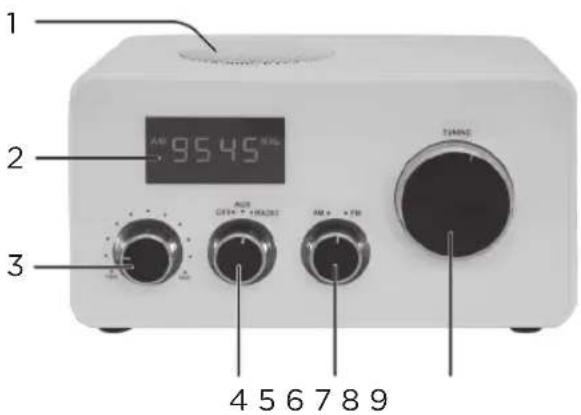
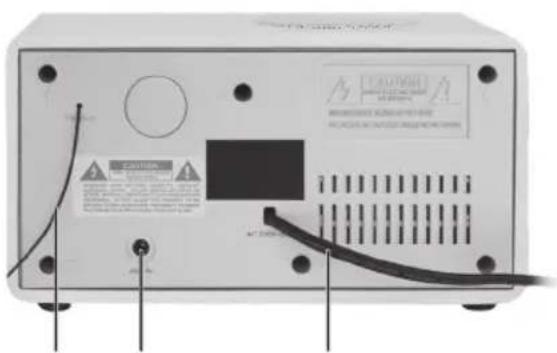
- Speaker
- Display
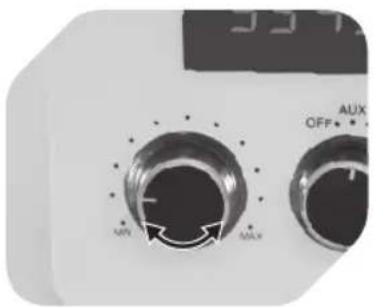
- Volume knob
- Power knob
-
AM/FM knob
-
TUNING knob
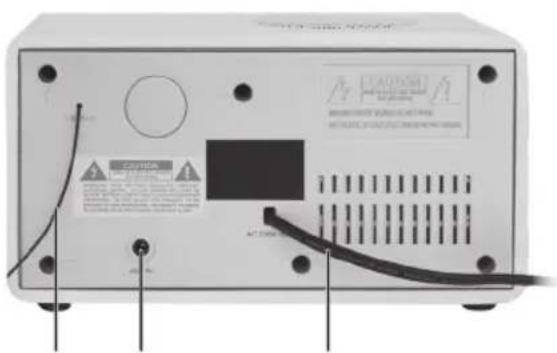
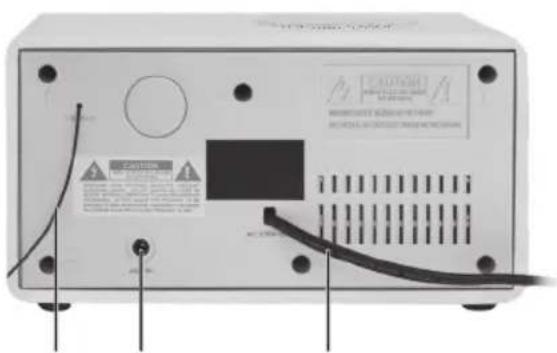
- Antenna
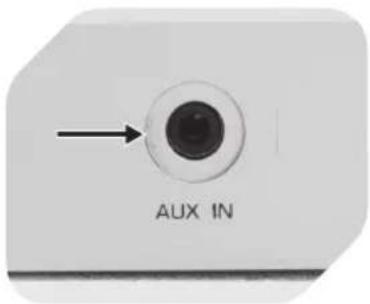
- AUX IN jack
- Power cord with plug
BEFORE FIRST TIME USE
Remove the product and accessories carefully from the original packaging. Inspect the delivery contents for completeness and damages. Should the delivery contents be incomplete or damaged, contact your sales outlet immediately.
USING THE RADIO
natural_image
Close-up of a white electrical outlet plug with a black cable inserted, showing an arrow pointing to the plug (no text or symbols visible)1
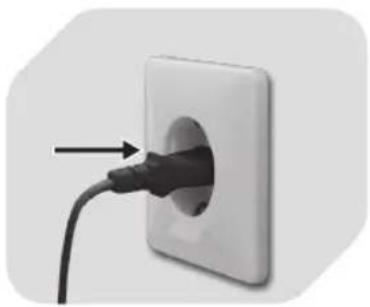
Connect the power plug to a suitable power outlet.
2
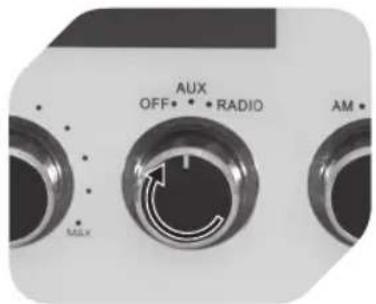
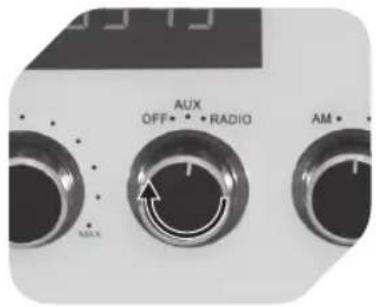
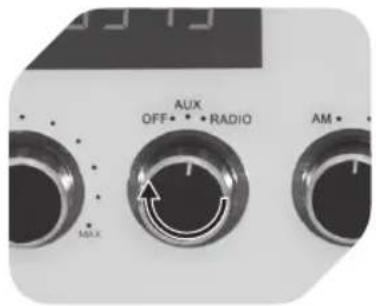
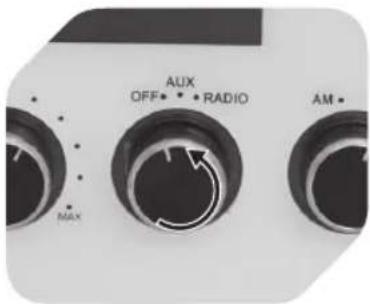
Turn the power knob to RADIO.
3
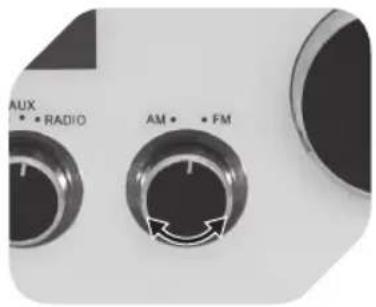
Select AM or FM.
4
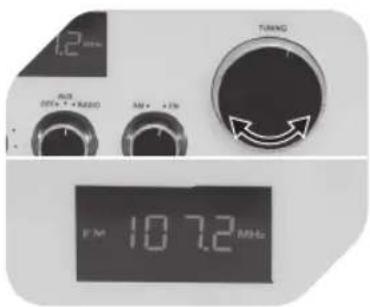
Turn the TUNING knob to select radio station. The frequency will be displayed.
natural_image
Close-up of a control panel with two rotary dials labeled MAX and OFF, no readable text or symbols beyond labels5
Turn the Volume knob to select the desired volume level.
NOTE
Extend the the antenna and adjust it for optimal reception.
LISTEN TO EXTERNAL AUDIO DEVICES
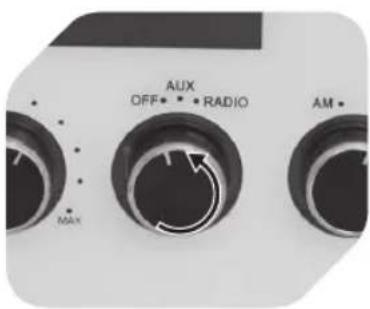
Turn off the product. Connect the external playback device to the AUX input with RCA cable (not included).
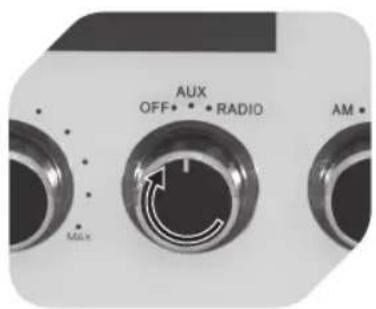
Turn the knob to AUX and start playback from the device.
AUTO STANDBY MODE
When the product is idle for about 10 minutes under AUX mode, then it will automatically go into standby mode to save power. After going into standby mode, the product can be turned on again by sliding the function selector to OFF and then to AUX/RADIO.
NOTE
Before connecting an external playback device, carefully read the respective user guide and safety instructions as well as instructions concerning usage with other devices.
CLEANING AND CARE
- Warning! Never immerse electrical parts of the product in water during cleaning or operation. Never hold the product under running water.
- Warning! When cleaning, never use solvents or abrasive materials, hard brushes, metallic or sharp objects. Solvents are harmful to human health and can attack plastic parts, while abrasive cleaning mechanisms and tools may scratch the surface(s).
- Clean the product's exterior surfaces with a slightly damp cloth and then dry them thoroughly.
• Make sure that no water enters the product interior (for example, through the switch). - Keep the product in a dry, cool location which is protected against moisture and direct sunlight. Keep this product out of the reach of children.
SPECIFICATION
Rated voltage: 220-240 V\~, 50 Hz / Rated power input: 6 W / Protection Class II
DISPOSAL
Do not dispose of this appliance as unsorted municipal waste. Return it to a designated collection point for the recycling of WEEE. By doing so, you will help to conserve resources and protect the environment. Contact your retailer or local authorities for more information.
natural_image
Close-up of a black plug inserted into a white wall socket, with an arrow pointing to the plug (no text or symbols visible)1
4
natural_image
Close-up of a control panel with rotary dials and indicator lights (no readable text or symbols)5
natural_image
Close-up of a black plug inserted into a white wall socket, with an arrow pointing to the plug (no text or symbols visible)1
4
natural_image
Close-up of a control panel with two rotary dials labeled 'OFF' and 'AUX', showing no readable text or symbols beyond labels.5
natural_image
Close-up of a black plug inserted into a white wall socket, with an arrow pointing to the plug (no text or symbols visible)1
4
natural_image
Close-up of a digital control panel with two rotary dials labeled MAX and OFF, no readable text or symbols beyond labels5
natural_image
Close-up of a white electrical outlet plug with a black cable inserted, showing an arrow pointing to the plug (no text or symbols visible)1
natural_image
Close-up of a dual rotary dial with 'OFF' and 'AUX' labels, no readable text or symbols beyond the dial indicators.5
natural_image
Close-up of a white electrical outlet plug with a black cable inserted, showing a plug inserted into the socket (no text or symbols visible)1
4
natural_image
Close-up of a digital audio mixer control dial with MAX and OFF buttons (no text or symbols beyond labels)5
natural_image
Close-up of a black plug inserted into a white wall socket, with an arrow pointing to the plug (no text or symbols visible)1
natural_image
Close-up of a dual rotary dial with MAX and MIN labels, no readable text or symbols beyond the dial indicators.5
natural_image
Close-up of a white electrical outlet plug with a black cable inserted, showing an arrow pointing to the plug (no text or symbols visible)1
natural_image
Close-up of a digital control panel with rotary dials and indicator lights (no readable text or symbols)5
natural_image
Close-up of a black plug inserted into a white wall socket, with an arrow pointing to the plug (no text or symbols visible)1
natural_image
Close-up of a control panel with two rotary dials labeled 'AUX' and 'OFF', showing no readable text or symbols beyond labels.5
natural_image
Close-up of a black plug inserted into a white wall socket, with an arrow pointing to the plug (no text or symbols visible)1
natural_image
Close-up of a control panel with two rotary dials labeled MAX and ON, showing no readable text or symbols beyond the dial indicators.5
natural_image
Close-up of a black plug inserted into a white wall socket, with an arrow pointing to the plug (no text or symbols visible)1
4
natural_image
Close-up of a dual rotary dial with MAX and MIN labels, no readable text or symbols beyond the dial indicators.5
natural_image
Close-up of a white electrical outlet with a black plug inserted into the socket, showing an arrow pointing to the plug (no text or symbols visible)1
将电源插头接入适当的电插座内。
natural_image
Close-up of a control panel with two rotary dials labeled 'AUX' and 'OFF', showing no readable text or symbols beyond the labels.5
转动音量按钮,选择所需的声音大小。
备注:
可以拉长及调节天线,以实现更好的接收。
接入外部音频设备
1 2 3
2