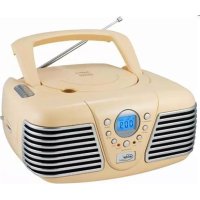
6699CW - Radio ELTA - Free user manual and instructions
Find the device manual for free 6699CW ELTA in PDF.



| Product type | Radio with CD/MP3 player |
| Brand | ELTA |
| Model | 6699CW |
| Dimensions (approx.) | 22 × 24 × 12 cm |
| Weight (without batteries) | 1.4 kg |
| Mains power supply | AC 230 V ~ 50 Hz |
| Battery power supply | DC 9 V (6 batteries LR14/UM-2/C) |
| Power consumption | 12 W |
| Radio bands | FM (87.5-108 MHz) and AM (525-1615 kHz) |
| FM antenna | Telescopic |
| AM antenna | Built-in ferrite |
| CD player | Audio CD and MP3 |
| Playback functions | Programming (99 tracks), repeat (track, album, all), random |
| Display | LCD and frequency dial |
| Indicators | Power on (LED), FM stereo (LED) |
| Maintenance and cleaning | Soft dry cloth, do not use chemical products |
| Safety | Class I laser product, protection against overload and humidity |
| Included accessories | Power cord, telescopic antenna |
| Repairability | Do not open or repair by yourself, consult a professional |
| Recycling | Do not dispose of with household waste, take to a recycling center |
Frequently Asked Questions - 6699CW ELTA
User questions about 6699CW ELTA
0 question about this device. Answer the ones you know or ask your own.
Ask a new question about this device
Download the instructions for your Radio in PDF format for free! Find your manual 6699CW - ELTA and take your electronic device back in hand. On this page are published all the documents necessary for the use of your device. 6699CW by ELTA.
USER MANUAL 6699CW ELTA
WARNING: TO REDUCE THE RISK OF FIRE OR ELECTRIC SHOCK, DO NOT EXPOSE THIS ANTENNA TO RAIN OR MOISTURE.

A triangle with a lightning symbol draws the user's attention to "dangerous voltage" without insulation in the cabinet which may be high enough to entail a risk of electric shock.
WARNING
RISK OF ELECTRIC SHOCK DO NOT OPEN
CAUTION: TO REDUCE THE RISK OF ELECTRIC SHOCK. DO NOT REMOVE COVER (OR BACK). THERE ARE NO USER SERVICEABLE PART INSIDE. REFER SERVICING TO QUALIFIED SERVICE PERSONNEL.

A triangle with an exclamation mark draws the user's attention to important instructions for use and maintenance in the accompanying manual, which should be studied.
FURTHER INFORMATION

Beware of small pieces and batteries, do not swallow them. It may be hazardous to your health and lead into suffocation. Please, Make sure to keep small devices and batteries out of the reach of children.
Important advice regarding hearing protection
Caution:
You care for your hearing, and so do we.
Therefore, use caution while using this appliance.
Our recommendation: Avoid high volumes.
Children should be supervised while using headphones; make sure that the appliance is not set to high volume.
Caution!
High volumes may cause irreparable damage to children's ears.

NEVER let allow anyone, especially children, to put objects into the holes, slots or openings on this devise. This may lead into death due to electric shock. The device must only be opened by a qualified assistant.

Only use the appliance for its intended purpose.
This device may only be used in housings and business premises.

Please keep this instruction manual for further reference.
Instructions on environment protection
Do not dispose of this product in the usual household garbage at the end of its life cycle; hand it over at a collection point for the recycling of electrical and electronic appliances. The symbol on the product, the instructions for use or the packing will inform about the methods for disposal.
The materials are recyclable as mentioned in its marking. By recycling, material recycling or other forms of reutilization of old appliances, you are making an important contribution to protect our environment.
Please inquire at the community administration for the authorized disposal location.

Do not obstruct the ventilation of the device. Make sure, that no curtains, newspapers, furniture or any other type of object are blocking the ventilation system of the apparatus.
The ventilation system must be clear of objects at all times! Overheating may lead into serious damage of the device and reduce its performance and lifespan.
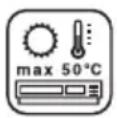
Heat and warmth
Do not expose the appliance to direct sunlight. Make sure that the appliance is not subject to direct heat sources such as heaters or open fire. Make sure that the ventilation slots of the appliance are not covered.
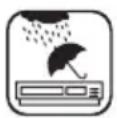
Moisture and cleaning
This appliance is not waterproof! Do not immerse the device in water. Do not allow player to come in contact with water. If water gets inside the device it may cause serious damage. Do not use cleaning agents that contain alcohol, ammoniac, benzene or abrasives as these could damage the device. For cleaning, use a soft, moistened cloth.
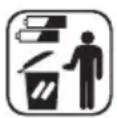
Professional recycling
Batteries and packaging should not be disposed of in the trash. Batteries must be handed over to a collection centre for used batteries. Separating disposable packaging materials is ecologically friendly.
IMPORTANT SAFETY INSTRUCTIONS
For best achievement please read carefully the operating instructions before the first start-up, in order that a problem-free operation are guaranteed for many years.
- READ INSTRUCTIONS - All the safety and operating instructions should be read before the unit is operated.
- RETAIN INSTRUCTIONS - The safety and operating instruction should be retained for future reference.
- HEED WARNINGS - All warnings on the unit and in the operating instructions should be adhered to.
- FOLLOW INSTRUCTIONS - All operating instructions should be followed.
- WATER AND MOISTURE - The appliance should not be used near water, for example, near a bathtub, washbowl, kitchen sink, laundry tub, swimming pool or in a wet basement.
- VENTILATION - Openings in the device serve its proper ventilation, are necessary for the operation and prevent overheating. The unit should be situated so that its location or position does not interfere with its proper ventilation. Do not place on bed, sofa, rug or similar surface that may block the ventilation openings, in a built-in installation, such as a bookcase or cabinet that may impede the flow of air through the ventilation openings.
- HEAT - The unit should be situated away from heat sources such as radiators, stoves, or other appliances (including amplifiers) that produce heat.
- POWER SOURCE - The unit should be connected to power supply only of the type described in the
operating instructions or as marked on the unit.
- POWER CORD PROTECTION - Power supply cords should be routed so that they are not likely to be walked on or pinched by items placed upon or against them.
- NON-USE - During longer periods of non-use please disconnect from mains power supply and antenna.
- OBJECT and LIQUID ENTRY - Care should be taken so that objects do not fall and liquids are not spilled into the enclosure through openings.
- DAMAGE REQUIRING SERVICE - The unit should be serviced by qualified service personnel when:
a. The power-supply cord or plug has been damaged.
b. Objects have fallen into, or liquid has been spilled into the unit enclosure.
c. The unit has been exposed to rain or moisture.
d. The appliance has been dropped, or the enclosure damaged. Only use controls and adjustments as specified in the manual.
e. The unit does not appear to operate normally.
f. The device displays serious changes in its performance
- SERVICING - The user should not attempt to service the unit beyond that described in the user operating instructions. All other servicing should be referred to qualified service personnel.
- CLEANING - Disconnect from mains power supply before cleaning. Do not use liquid or spray cleaners, only use a damp cloth. Follow the care and maintenance instructions in this manual.
- LIGHTNING - During lightning and longer periods of non-use please disconnect from mains power supply and antenna.
- SAFETY CHECK - After servicing the unit ask the customer service for a safety check.
- OVERLOAD - To avoid fire and electric shock do not overload wall outlets and convenience receptacles.
- ELECTROSTATIC DISCHARGE - Disconnect from mains power supply and remove batteries if unit malfunctions. Reconnect after a short time.

CAUTION:
THIS CD PLAYER IS A CLASS I LASER PRODUCT. HOWEVER, THIS CD PLAYER USES A VISIBLE/INVISIBLE LASER BEAM, WHICH COULD CAUSE HAZARDOUS RADIATION EXPOSURE IF DIRECTED. BE SURE TO OPERATE THE CD PLAYER CORRECTLY AS INSTRUCTED.
USE OF CONTROLS OR ADJUSTMENTS OR PERFORMANCE OF PROCEDURES OTHER THAN THOSE SPECIFIED HEREIN MAY RESULT IN HAZARDOUS RADIATION EXPOSURE. DO NOT OPEN COVERS AND DO NOT REPAIR THE DEVICE YOURSELF.
TO REDUCE THE RISK OF FIRE OR ELECTRIC SHOCK AND ANNOYING INTERFERENCE USE ONLY THE RECOMMENDED ACCESSORIES.
Setting a safe volume level
- If you continually listen to loud music, your hearing gradually adapts to it and gives you the impression that the volume is lower.
What seems normal to you can actually be damaging. - To protect yourself from this, set the volume to a low level.
- Increase the volume slowly, until you can hear clearly and without problems.
- Damage to your hearing can be extensive and cannot be reversed.
If you notice a hearing problem, please consult a doctor.
FURTHER INFORMATION
- If the device will be used for long periods of time, it will become warm. This is absolutely normal.
-
Always close the CD-door to keep the CD drive free from dust. When cleaning, wipe the CD drive compartment with a soft, dry cloth.
-
The mechanic parts of the unit contain self-lubricating bearings. Do not oil or lubricate!
- Operate the unit under moderate climate conditions only.
Condensation
Condensation may occur when moving the device from a cold to a warm environment. If there is moisture inside the player, it may not operate properly.
Please turn on the power supply and wait about one hour for the moisture to evaporate.
Protect the device from rain and moisture, sand, dust and extreme heat (e.g. in a parked vehicle in summer) and from direct sunlight.
Moving of the device
- Before moving remove the CD from the player.
- It is suggested to remove the CD and to turn off the player for periods of non use.
Setting up location of the device
- Avoid vibrations, impact or tilted surfaces as the internal parts may be seriously damaged.
- Do not place heavy objects on the player.
- Never place the player on amplifiers or other devices, which can become hot.
LOCATION OF CONTROLS
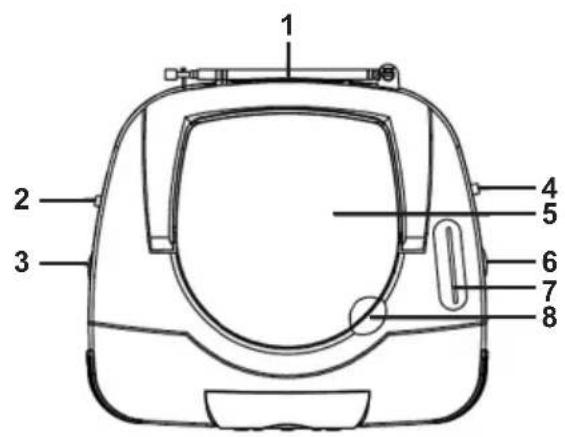
Top view
- FM Telescopic antenna
- FUNCTION selector: OFF, CD/MP3, RADIO
- VOLUME control: MIN - MAX
- BAND selector: FM ST. (FM stereo), FM, AM
- CD - door
- TUNING rotary knob
- Frequency dial
- Open grip of the CD drive
- Carry handle
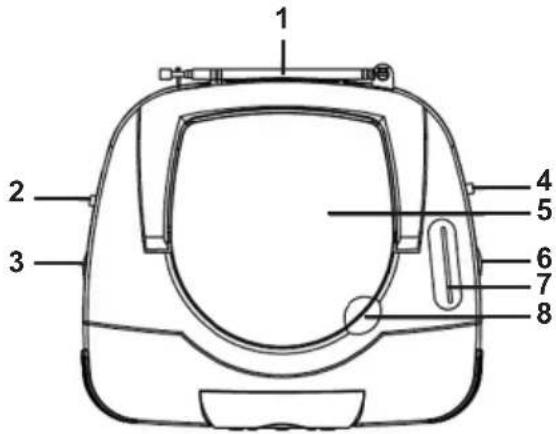
Front view
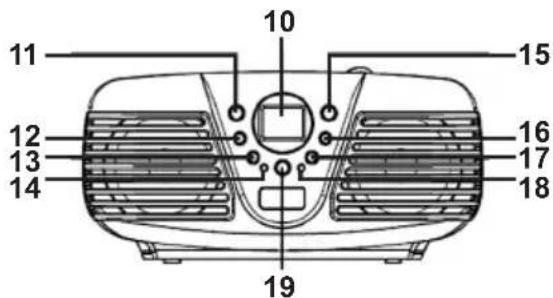
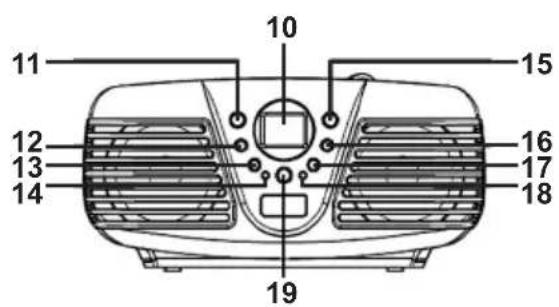
10 LCD display
11 PROGRAM button
12 ALBUM / Folder
13 STOP button
14 FM ST LED: FM stereo indicator
15 MODE button
16 SKIP+: Skip- and search forward
17 SKIP-:Skip-and search backward
18 POWER LED: Operation indicator
19 PLAY/PAUSE
CONNECTIONS AND INSTALLATION Power supply
MAINS OPERATION
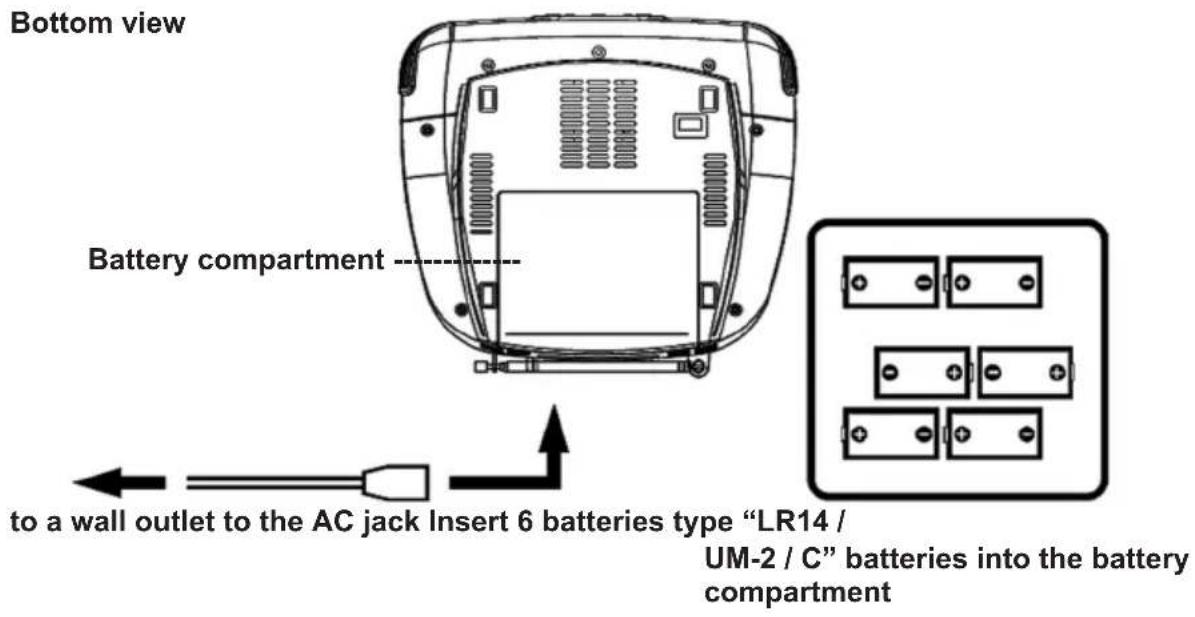
The unit is designed for mains power supply AC 230V 50Hz but may also be operated with 6 batteries type "LR14 / UM-2 / C".
Do not connect the unit to any other power supply to avoid damage that is not covered by your warranty. Connect the smaller plug to the jack at the rear of the unit (AC 230 V ~ 50 Hz) and the mains plug to a wall outlet.
Disconnect from mains power supply to completely turn off the unit.
BATTERY OPERATION
- Open the battery compartment on the bottom side of the player by gentle pressing down and push it to the rear.
- Insert 6 batteries type "LR14 / UM-2 / C" into the battery compartment. Please observe correct polarities which are marked with "+" and "-" in the battery compartment.
- Replace the cover by pushing onto the battery compartment until it snaps in.
Battery Safety Precautions
Follow the battery manufacturer's safety, usage and disposal instructions.
Only use batteries of the same type and size.
Insert the batteries observing the polarity (+/-) . Failure to properly align the battery polarity can cause personal injury and/or property damage.
Do not mix battery types (e.g. alkaline, zinc/carbon, rechargeable batteries) or exhausted and new batteries.
Remove exhausted batteries from the device. Remove the batteries when the device will not be used for extended periods of time to prevent damage due to rusted or corroded batteries.
To avoid fire and explosion do not recharge normal batteries. Keep batteries away from children and pets.
During battery operation of the device, disconnect the AC power cord.
GENERAL OPERATING INSTRUCTIONS
RADIO OPERATION
- Set the FUNCTION selector (2) to the RADIO position. The POWER LED (18) lights up.
-
Set the BAND selector (4) to the desired band: FM ST. (FM stereo), FM (FM mono), AM.
-
Select your station with the TUNING control (6), the adjusted frequency will be shown on the frequency dial (7).
-
Adjust the volume with the VOLUME control (3).
-
To turn off the radio set the FUNCTION selector (2) to the OFF position. The POWER LED (18) turns off.
FM stereo / mono
Stereo : Set the BAND selector (4) to FM ST. The FM ST. LED (14) lights up.
Mono : Set the BAND selector (4) to FM.
Recommendations for better reception
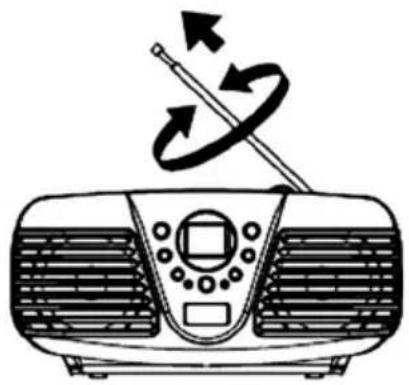
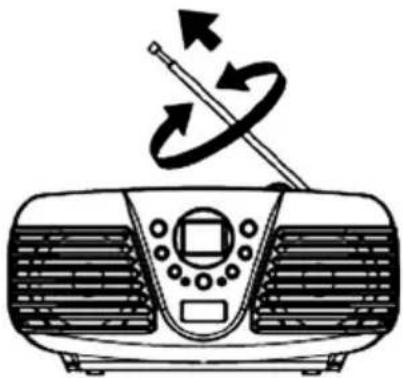
FM: Fully extend the telescopic antenna (1) and turn it for better reception.
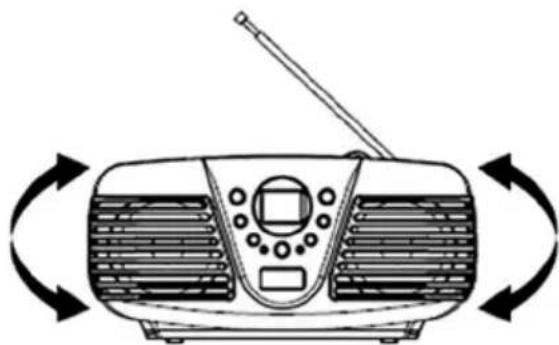
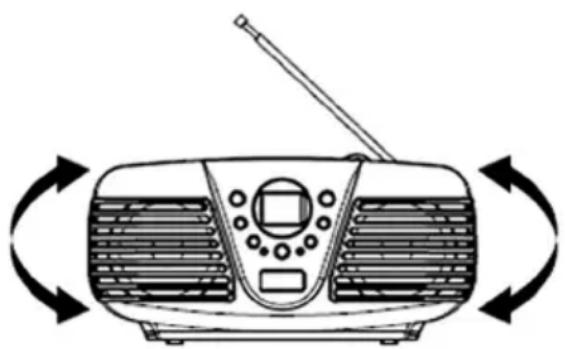
Medium Wave (AM): The device has a built-in AM - antenna; change the position of the device if reception is poor.
CD OPERATION
INSERTING OF A DISC
- Set the FUNCTION selector (2) to the CD / MP3 position. The POWER LED (18) lights up.
- Open the door of the CD drive (5) with the grip (8) at the right side of the lid. The display shows "OP"
- Insert a CD with the cover side faced up.
- Close the CD-door (5) manually.
Note: If a not supported CD (VCD, DVD) is inserted, the display shows "no".
TAKING OUT OF A DISC
- Make sure the device is in stop mode (STOP button (13)).
-
Open the door of the CD drive (5) with the grip (8) at the right side of the lid. The display shows "OP".
-
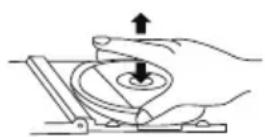
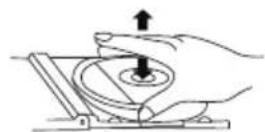
Remove carefully the CD upwards without touching the surface.
- Close the CD-door (5) manually.
- Store the removed CD in its cover.
CD / MP3 DISC PLAYBACK
- Insert a CD (see section "INSERTING OF A DISC").
- During the reading of a CD "---" flashes on the display and afterwards the total number of tracks will be shown.
Audio CD : total number of tracks.
MP3 CD : total number of tracks and "MP3" is shown.
- The playback of the first track starts automatically.
- Adjust the volume with the VOLUME control (3).
- Press PLAY / PAUSE (19) to pause the playback. The symbol „▶“ flashes on the display. To resume the playback from the same position press PLAY / PAUSE (19) again.
- Press STOP (13) to cancel the playback.
- Set the FUNCTION selector (2) to the OFF position to turn off the CD player. The POWER LED (18) turns off.
SELECTION OF A DIFFERENT TRACK (SKIP in the stop mode and during playback)
- Press SKIP + (16) or SKIP - (17) until the desired track number is displayed.
- Shortly press SKIP - (17) to return to the beginning of the current track.
- Press SKIP - (17) again to skip one track back at a time.
- Press SKIP + (16) to skip to the next track at a time.
Selection of A DIFFERENT ALBUM (only MP3, in the stop mode and during playback)
- Press ALBUM (12) once. On the display "ALBUM" and the current album number flashes.
- Repeatedly press ALBUM (12) until the display shows the desired album number.
- Press PLAY / PAUSE (19) to start the playback of the first track in the selected album.
SEARCH FOR A CERTAIN POSITION DURING PLAYBACK
Press and hold SKIP + (16) or SKIP - (17) to search for the desired position within the track. Normal playback continues when the button is released. In search mode the volume is reduced.
PROGRAM PLAYBACK
Up to 99 tracks can be programmed in a specified playback sequence.
- Before programming press STOP (13).
- Invoke the program mode by pressing PROGRAM (11). "P01" and "PROG" are flashing on the display.
- Select the desired track number with SKIP + (16) or SKIP - (17). (With the ALBUM button (12) the album / folder can be selected).
- Press PROGRAM (11) again to confirm.
- Repeat steps 3 and 4 to program further tracks.
- After all desired tracks are programmed, press PLAY / PAUSE (19) to start the programmed sequence. On the display "PROG" is shown.
- Press STOP (13) once to finish the program playback and add further tracks beginning from the next free program number (see 5.).
- Cancel the program playback and delete the program memory by pressing STOP (13) twice.
Notes: After entering more than 99 programmed tracks the display shows "FUL".
Turning off the player deletes the program memory.
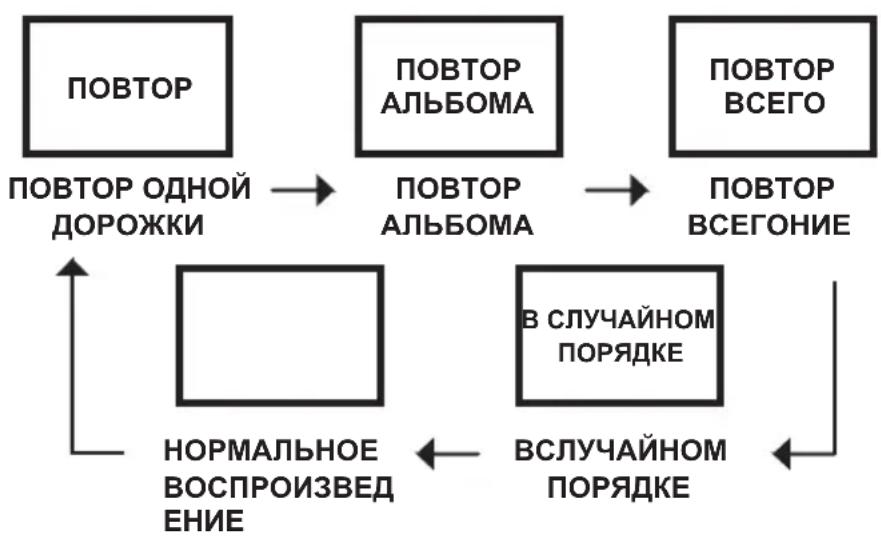
REPEAT
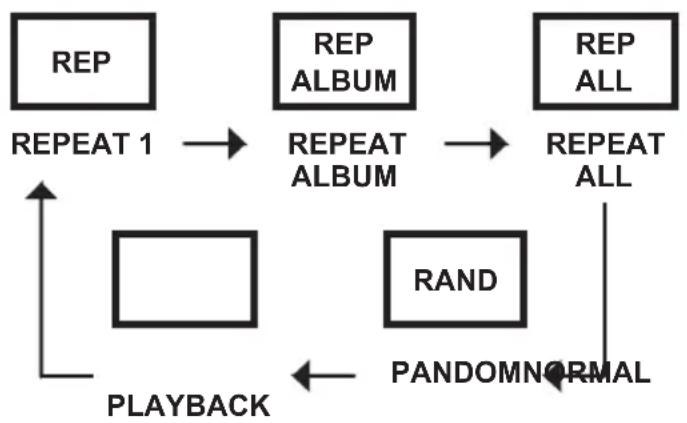
REPEAT ONE TRACK
- In the stop mode or playback mode press MODE (15) once.
- The display shows "REP". In the stop mode press now PLAY / PAUSE (19) for playback or SKIP + (16) or SKIP - (17) to select a track. Now the selected track will be repeated constantly. With SKIP + (16) or SKIP - (17) another track can be selected (see SELECTION OF A DIFFERENT TRACK)
- Press STOP (13) or MODE (15) to stop the repeat function and return to normal playback mode.
REPEAT ONE ALBUM / FOLDER (ONLY MP3)
- In the stop mode or playback mode press MODE (15) twice.
- The display shows "REP ALBUM". In the stop mode press now PLAY / PAUSE (19) for playback. Now the selected album will be repeated constantly. With SKIP + (16), SKIP - (17) or ALBUM (12) another album can be selected (see SELECTION OF A DIFFERENT ALBUM)
- Press STOP (13) or MODE (15) to stop the repeat function and return to normal playback mode.
REPEAT ALL TRACKS (COMPLETE CD)
- In the stop mode or playback mode press MODE (15) three times.
- The display shows "REP ALL". In the stop mode press now PLAY / PAUSE (19) for playback. Now the CD will be repeated constantly.
- Press STOP (13) or MODE (15) to stop the repeat function and return to normal playback mode.
RANDOM PLAYBACK
- In the stop mode or playback mode press MODE (15) four times.
- The display shows "RAND". In the stop mode press now PLAY / PAUSE (19) for the playback of all tracks on the CD in random order. With SKIP + (16) or SKIP - (17) another track can be selected random (see SELECTION OF A DIFFERENT TRACK).
Note: Pressing MODE (15) five times returns to the normal mode.
DISC CLEANING AND MAINTENANCE Handling of CDs
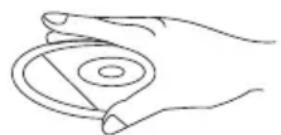
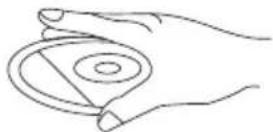
- Remove the CD from its cover.
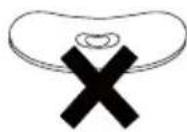
- Do not touch the surfaces.
- Do not attach stickers to CDs and do not write on them.
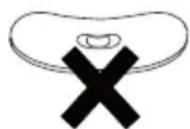
- Do not bend CDs.
Storage
- Always store CDs in their cover.
- Do not subject discs to direct sunlight, dirty, dusty and damp areas or car heaters.
Cleaning
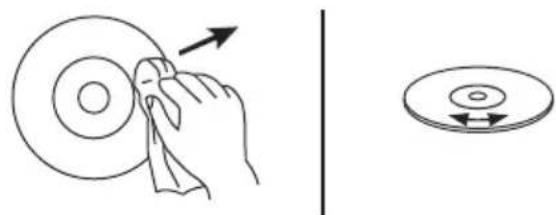
- Clean CDs with a soft cloth.
- Clean CDs from the center to the edge.
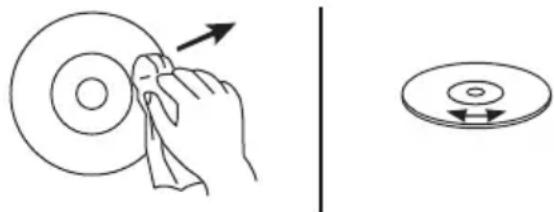
FROM THE CENTRE TO THE EDGE
CORRECT INCORRECT
- Do not use chemicals such as benzene, thinner, gramophone record cleaners or antistatic sprays.
- Close the door of the CD drive to prevent the infiltration of dust.
- Do not touch the pick-up lense.
TROUBLESHOOTING
To solve the common problems, read and follow the troubleshooting list. If you still cannot solve the problem, consult your nearest service dealer.
WARNING: Never open the device. Always refer service or maintenance to authorized customer service personnel.
| PROBLEM POSSIBLE CAUSE SOLUTION | ||
| GENERAL No sound Volume | is set too low. Batteries exhausted. Batteries inserted incorrectly. Mains cable not connected. | Adjust the volume. Change the batteries. Observe polarity. Connect mains cable correctly. |
| RADIO Poor reception | Weak signal. Interferences by other appliances (TV sets, VCRs, computers, etc.) | Adjust antenna: FM: telescopic antenna. AM: adjust unit. Keep distance to other electric appliances. |
| CD / MP3 CD skips The CD | / MP3 is dirty or damaged. Replace or clean the disc. | |
TECHNICAL SPECIFICATIONS
General
Power Supply AC 230V 50Hz
Battery operation DC 9V (6 x UM-2 / R14 Batteryen, 1.5V)
(Batteries not supplied)
Power Consumption 12 Watt
Dimensions approx. 22 × 24 × 12 cm
Weight approx. 1.4kg (without batteries)
Radio
Frequency range FM: 87.5 MHz - 108 MHz
AM: 525 kHz - 1615 kHz
Antenna FM: Telescopic antenna
AM: built-in ferrite antenna
CD-Player
Playback system Compact Disc Digital Audio System
SUBJECT TO CHANGE WITHOUT PRIOR NOTICE.
GUIDE D'UTILISATION
AVERTISSEMENT: AFIN DE RÉDUIRE LE RISQUE D'INCENDIE OU DE CHOC ÉLECTRIQUE, NE PAS EXPOSER CETTE ANTENNE À LA PLUIE OU À L'HUMIDITÉ.
RISQUE D' ELECTROCUTION NE PAS OUVRIR
ATENTION: AFIN DE REDUIRE LES RISQUES D'ELECTROCUTION, NE PAS RETIRER LE COFFRAGE (AVANT OU ARRIERE). NE CONTIENT AUCUNE PIECE REMPLACABLE. CONFIER Toute REPARATION A DU PERSONNEL QUALIFIE.

(Piles non fournies)
AM: 525 kHz-1615 kHz
Antena FM: Antena telescópica
AM: Antena incorpora da
Reproducor CD
Sistema de reproduccion Sistema Compact Disc Digital Audio
SUJETO A CAMBIOS SIN PREVIO AVISO.
MANUAL DO UTILIZADOR
ADVERTÉNCIA: PARA REDUZIR O RISCO DE FOGO OU CHOQUE ÉLECTRICO, NÃO EXPONHA ESTA ANTENA À CHUVA OU HUMIDADE.
AM: 525 kHz - 1,615 kHz
AM: 525 kHz-1615 kHz
Antenne
FM: telescoopantenne
INTRODUCEREA UNUI DISC
AM: 525 kHz-1615 kHz
Antena FM: Antenna telescopica
BaxkhbIe HnHCTpyKun no 6e3onacHOCTn
Дяdoctиженя Hannyuшпpe3yntaTOB, noxaynCTa, BHIMaTeIbHO npOHTte HNCTpyKUnno 3KcPnyataunnepei nepBbIM 3anyckOM yCtpoIcTBA, uTo6bl rapaHTnpOBaHNO nCNoIb30BaTb erO MHOrne roDbI 6e3 KaKnx-ri6o npo6Iem.
- BHIMATEJIbHO IPOUHTTE IHCTPYKUN - Bce yka3aHnno TeXnke 6e3OnacHocTn npkoBOcTBo NO 3KcnIyatauIN DoJNkHbI 6bITb IpOHTaHbI Do HauJa NcNoJb3OBaHnry YcTpoiCTBa.
- COXPAHNTE INHCTPYKUN - yka3aHnno No Texnke 6e3oNaChOCTN n pykoBocBO no 3KcJIpyatau nn DOJnxHbI 6bITb COxpaHehbln CnpabKn B 6yduem.
- OБрашаite BHMAMHNE HA ПЕДУПЕЖDEHNA -Bce npedynpejckdHnHa KOpnyce yctpoiCTBa nВ pykoBOIDCTBe NO 3KcNpyaTaUIN DoJXhbl 6bITb pInHrTb BO BHMAMHe.
- CLENYIte HNCTPYKUJM - BbINOJIHJTe BCE HAnICAHHBIE INHCTpyKUIN NO 3KcNJIyatauIN.
- BODA IN BINA - yCTpoiCTBO He DoJXHO IcNoIb3OBA Tbcra BO3Ne BOdbI, HApPIMep, BO3Ne BaHHbl, paKOBHbI yMbIBaJIbHnKa, KxOHHO paKOBHbI, EMKoCTN C BOIOI, IIaBaTeJIbHOrO 6accSeHa IINB cblpOM NOBaJe.
- BEHTUNLAUNA - OTBepCTNA B KOPnyce yctpoiCTBa CnykaT DnRA BeHTUNAUN; OHN HeoBXODIMbl IIN HOpMaJIbHO paOToI yCTPOIcTBa, TAK KAp NpeIoTbpaUaIOT erO nepeIpeB. YcTPOIcTBO DOJIKHO 6bITb paCNOIOXeHO TAKIM Oba3OM, UTObI erO MeCTOnIOXeHne He npenrTCTBOBaI0 erO HopMaJIbHO BeHTUNAUN. He pacNoIaraiTe yCTpoiCTBO Ha KpOBaTI, DInBaHe, KOBe nII IN dpynx
Noobhix NOBepxHocTax, INN B TaKnx MecTAX KAK KNHXHaj POJKA INN UkaΦ, Ie NOTOK BO3dyXa Chepe3 OTBepCTnBAHTINJIaUN 6yDet 3atpydHeH.
- BbICOKA TEMNEPATyPA - yCTpoIcTBo DOJXHO paCnONaRaTbcB DaJIH OT NCTOCHKOB TeNJa, TAKNX KAK paDnaTOpbl OToJIeHnI, KxOHHbIe PINTbI, INI dpyHX yCTPOIcTB (BKIOUaY ycINITeJI), KOtOpblpe npOn3BOJr 60JIbwoe KOJIuYeCTBO TeNJa.
- ICTOCHK 3JEKTPONITAHN - yCTpoiCTBO DOJXHO 6bITb NOKJIoueHO TOJIbKO K TaKOMy ICTOCHKy NITAHN, TIN KOtOpORO ONIcaH B pyKOBODCTBE NO 3KcIIpyatauN, IIn6o Yka3aH Ha Kopnyce yCTpoiCTBa.
- UHYP NITAHN - UHyp 3JIeKTPoNTAHN DOJXKeH npOJeRaTb TaKIM o6pa3OM, YTO6bl erO He 3aIeBaJIH HORAMN, IN He IpeKxMajIN ppeMetAmN, NOCTabJIeHHbIMn Ha Hero nIIp PdOM
- NEPEPbIBbI B PABOTE -ecnn yctpoiCTBO He nCnONb3yeTcra dNITeNbHoe BpeM, cneNyET OKJIIOUHTb eO OT NCTOCHNka pNTaHn I aHTEHbl.
- PPEDMETbI IN KNDKOCTN - cneNyet n03a6oNTbcra o TOM, yTO6bl Ha ycTPOJcTBO He naJaJIpa3JIuHbIe PpeDMetbI, a B erO OTBepCTnHe npOIINBaJIncb KNDKOCTN.
- PEMOHT IOBPEXKDEHIN - yCTPOINCTBO NOIDENKT peMOHTy, BbIIOJNHEMbIM KBaIIuΦnUPOBaHHbIM NepcoHaON, ecNI:
a. NOBpeKdHeBbI UHyp IIN BUNKa 3JNEKtpONNTAHnY.
b. BHyTpB Kopnyca yctpoicTba nonaII npedMeTbI INJIKKOCTb.
c. YCTPOINCTBO NOBEBPINOCB BO3DeICTBNU DOJN IIN BJIaRn.
d. YcTpoNCTBO 6bIIO ypoHEnO, IIN6o 6bl NOBpeKJde H erO KOpnyc. IcNoJIb3yIte TOnbKO Te NaCTPOKn n peYIpNOBKn, KOtOpBie 6bl IN yKa3aHbIB DaHHOM pyKOBOIDCTBe.
e. YcTpoiCTBO He cyHKUHOHpyET HopMaIbHO.
f. YcTpoIcTBo DEmOHCTpnpye3HaunTeNbHbIe N3MeHeHnB CBOe Ipon3BOJnteNbHOCTN.
- TEXO6CJYKINBAHNE - NOJIb3OBaTeJIb He DoJXeH NbITaTcR O6CJYKINBaTb DaHHoe yCTpOiCTBO CbIe TOrO, YTO yKa3aHO B HAcTOnIeM pyKOBoDcTBe No 3KcNpyaTuuN. Bce dpyrHe Bnbl O6CJyKINBaHNA DOJXHbI BbINOHNrTcR KBaJIInΦuNUPoBAHhbIM NepcoHaIOM.
- YNCTKA - nepei TeM, KaK YNCTnTb yCTpOJCTBO, OTCoeDINHTE erO OT NCTOCHka NITaHnI. He NCNoJIb3yIte IJIY YNCTKN JNIDKne IIN aApO3OJIbHbIe MOIOUne CpeIcTBA, INCNOJIb3yIte IJIY 3TOrTO TOJIbKO BIIaXHyBEToUb. CJIeDyIte COOTBeTCTByIOUm Yka3aHnI M, IN3JIOXeHHbIM B DaHHOM pyKOBODCTBe.
- P03A - BO Bpemra 03bl, a TaKke B nepnoDbI dInTeJbHoro nepepbBa B 3Kcnnyatauyn yctpoiCTBa, cneDyeT OTKJIouaTbe OTO NcToUHnKa 3NeKtpoNtAHnN n aHTeHHbl.
- NPOBEPKA 6E3ONACHOCTN UCTPOINCTBA - nocne peMOHTa/o6cnykuaHna yCTPOINCTBa, nonpocnte cnyk6y pa6oTbI c nokynataTeIamn npOBepntb 6e3onachOCTb yCTPOINCTBa.
- INPEPERPY3KA - BO n36exaHne onachocTn noXapa nnipopaxeHna 3JKeKTPoTOKOM, He neperpykaTe DoMaSHIOU cetb 3JIeKTPoNtAHNA.
- 3NEKTPOCTATNUECKN PA3Pd - ecn yctpoiCTBO He cyHKUOHpyeT HopMaJIbHo, OTCoeDHHte yctpoiCTBO OT nCToHnka nITaHnI N3BJIeKeNTe 6aTapeEKn. Ype3 He60JIbIoN IpOMExyTok BpeMeHn NOkHouHTe 3JNeKTPoNTaHne CHObA.

BHIMAHHE:
DAHHBICD-PIEEPYBJIETCJIA3EPHbIMIPOyKTOMKJACCAI.BDAHHOM PIIEEPENCIOJIb3YETCBAIDIMOE/HEBUNIMOEJA3EPHOEIN3JNUYEHNE, KOTOPOEMOXET Bbl3BATb ONACHOE PAADNOAKTUBHOEOBJUYEHNEIPNI HABEDEHN.Ob3ATEJIbHOIOJIb3yTECbCD-PIEEPOMPABNJbHO,B COOTBETCTBnC INHCTPYKlnei.
ИСПОЛБОВАНЕ ЗЛЕМЕТOB UYPABLEHЯ, PEGYЛПОВOK ИЛN БыПОЛHEнE ПОЛЕДУР, HE ONICAHьIX 3ДECb, MOЖET Bbl3BATb ONACHOE РадиоAKТИВhoe ИЗЛЧЕHЯ. HE CHIMAJTE KpbIшКИ И HE PEMOHTIPУITE ППБОР CAMOCTОТЕЛьно.
ДЛЯ CHИЖЕНИЙ PИСКА BO3нIKHOBEHЯ ПОЖAPA ИЛПОРAJEVEN TOKOM, A TAKKE BO I3БEXHAHNE ПOMEX INCПOLь3УITE TOЛБКО PEKOMEHДУEMbI E ПИНадпELEXHOCKTи.
YctahOBka 6e30nachoro ypOBHr rPOMKoCTN
- Ecnn Bbl nocToHHo cnlywaeTe rpoMkyu My3bky, BaW cnIyX nocTeeneHHO aanTnpyeTcK TaKOMy ypOBHIO 3Byka, n y Bac co3daeTcBneaatJHeHne, YTO yPOBeHb rPOMKOCTn Hn3Kn.
To, To Bam KaKetcH HopMaJIbHbIM, Ha cAmOM DeJe MoXeT 6bIT bPeIbIM dIyxa. - 丫T06bl3aunntnbCBOIcIyx,yCTaHOBnTe HN3KIN yPOBeHb rPOMKOCTN.
- NocTeHNo yBEnuBaIe rpoMkoCTb Do Tex nop, noka Bbl He 6yJeTe cIbIaTb OTYeTJInBO n 6e3 3aTpUdHeHn.
- Поврждени сныа может 6ыт b3haunTeьнblbIM n Heo6paTnmbim.
- Ecnn Bby 3ametnIn, uTo y Bac Bo3HnKn npo6nembl co cnlyxom, npokohcyIbTnpuYteCb y Bpaua.
DONOLHNTIELBHA INHΦOPMAUHA
- Ecnn yctpoiCTBO nCNOB3yeTcra dNITeINbHOe Bpemr, OHO cTaHOBnTcra TENbIM; 3TO a6COJIHTHO HOpMaJIbHOe RABHeHne.
Bcerda 3akpbBaIte KpbIuKy npnBOa KOMNaKT-DnCKOB, YTO6bIB Hero He nonaIaNJIb. YnCTky npnBOa KOMNaKT-DnCKOB CNeDyET BbIOJHrTb C NOMUbHO MmKo, cyxO BTouN. - MexaHueckne KOMNoHEHTbI yCTpOcTBA Cha6KeHbI cAMOCMa3bIBaIOUIMNcR NOdUnnHKaMn. Huyero He Cma3bBaIte!
- IcnoIb3yIte yctpoICTBO TOJIbKO B HOpMaJIbHbIX KINMaTnueeCKNX YCNOBnX.
KoHdeHcaua
Pn nepenoe npibopa nXoJOnHO NOKpykaOuSei CpeBb TEnny MoKeT pOn30N KOHcaua.
EcnBHytpnPiNeepa cKoNnJaCb Bnara, 3TO MoKeT npNBecT N He npBaNlbHo er o pa6oTe.
Poxanynta,OTcoeHnTe np6op OT nCTOuHka nTaHnI N NOOXnTe OKoNo Yaca, Noka Bnara He nCnapntc.
He noDBepraTe np6Op BO3eIcTBnIO DoJgN IN BnaXHOCTN, neCKa, nbIN, BbICOKNX TeMnepaTyp (Hanp. B npnapKOBaHHOM aBtOMo6nle JeTOM) IN npMbIX COJIHeuHbIX Jyuei.
PepemeeneyeyctpOcnTba
- Pered Tem, KaK pepeHocntb yCTpOINCTBO, n3BnEKeNTe KOMnAaKT-dnCK n3 nIeepa.
- Ecnn yctpoiCTBO He nCnONb3yeTcra, peKOMeHdyEeTc n3Bnueb KOMNaKT-dnck N BvIKNIOHTb nIeep.
Bb6op MeCTa dIy yCTpOInCTBa
- CtapaItecb n36eraTb yIapOB, Bn6paun I pe6pncTBIX NOBepxHocTei, TAK KAK BCE 3TO MOKeT NOBpeINtB BHyTpEHNHe KOMNOHeHTbl yCTpoiCTBa.
He knaIte Ha nIeep TjXeJIbI nepeMTebl. - Hikorda He cTaBbTe pIeep Ha ycInnteJI INn dpyrHe ycTpoiCTBa, NOBepXHOCTb KOTOpbIX MOKeT CTaTB ropayeJ.
KHONKUYPABLHeHNA
BnD cBepxy
- Teneckonnyeckay FM aHTenHa
2.ФункционаьньиpekeknouateJIb FUNCTION:OFF,CD/MP3,RADIO - PerynTop rpomkoctn VOLUME: MIN - MAX
4.ПepeKIIuOaTeJIb(Диana3oHOB)BAND:FMST. (FM cTepeo), FM, AM
5.KpbuKa npNbOda KOMNaKT-DnCKOB - Pучka Habстpoи TUNING
7.шкалу actOT - 3axBaT KpbIuKn npuBOda KOMNaKT-DnCKOB
- Puyka dIy nepeHoca
Bud cpeepn
10.KK-tnne
11. Khonka PROGRAM
12. ALBUM / Katanor
13. Khoika STOP
14. CBeToDIOI FM ST: INHdNkaTOp FM cTepeo
15. Khonka MODE
16. SKIP +: Khonka nepexoia n noncka «Вперд»
17. SKIP -: Khoja nepexoda n noncka «Ha3aD»
18. CBeToDIOPOWER: INHДИKAToP 3JIeKTpOPITaHnIa
19. Khonka PLAY / PAUSE
IIOKJIIOUeyHnE N YCTAHOBKA
3neKtponntaHne
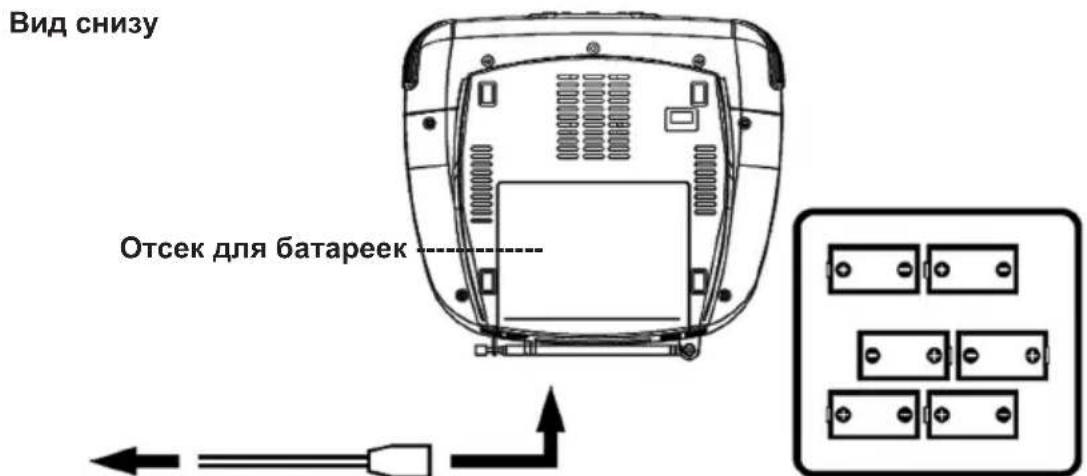
K HacTeHHoH po3eTke K rHe3dy 3JI. nHTaHnY. BcTaBbTe B oTceK 6 baTapeek Tuna «LR14 / UM-2 / C»
BKJIIOUeyHNE
YcTpoiCTBO npEHa3NaHeNo dIpa6oTbI OT cTeI nepemEHoro ToKa 230 B ~ 50 Tc, Ondako MoKeT pa6oTaTb IOT weCtN 6aTaapeek Tnna «LR14 / UM-2 / C».
He nodklouaHTe yCTpoNCTBO K dpyrMM nCTOuHkam nITAHn, YTO6bI n36exKaTb NOBpeKdEHN, KOtOpbie He noDnadaIoT noD rapaHTnIO.
IopcoeHNHTe MehBm WTeNCeB K rHe3ny Ha 3aHne naneHn yCtpoNCTBa (AC 230 V ~ 50 Hz), a
60nbwn wTeNCenb BCTaBbTe B HAcTeHHyIO po3eTKy.
YTo6bI NOHOCTBbBbIKIOUHTb yCTpOJCTBO,OTcoEINHHTe erO OTJNeKTPoCETN.
PABOTA OT BATAPEEK
- OtkpoTe oTceK IJIa 6aTaapeeK, cInerKa HauabNb Ha KpbIuKy, N BbITOnkHyB ee Ha3aI.
- BctabbTe B OTEcK 7eCTb 6aTapeek Tnna «LR14 / UM-2 / C». BctabJra 6aTapeKn, co6JIHOaIte NOJARPHOCb: «+» n «-» OTMeueHbHa KOpnyce OTEcKa.
- YcTaHOBnTe KpbIuKy OTCeKa IJy 6aTapeek o6paTHo, CJIerKa HauBaNB Ha Hee TaK, UTo6bI OHa 3aUeJIKNHynacb Ha CBOEM MecTe.
Mepbl npedoctoopoknoctn npna6oTe c 6aTapeKamn
CneDyTe HNCTpyKUm PpOn3BOuNTeI NO 6e3OanHOMy NCNoJIb3OBaHNIO U yTUN3aUIN 6aTaapeek. NcnoJIb3yIte 6aTaapeiKn ToJbKO OndHO TnIa n pa3Mepa.
BCTABJIte 6aTapeKn, co6JIIOJaI NOJrPHocTb (+/-). HecO6JIIOJeHne IONJrPHocTm MoKeT npJBecTN K TpaBMam I NOBpeKdEHNm IMyUeCTBa.
He cmeunBaTe Tnbl 6aTaapeek (Hanp. IeNoUHbIe, yroIbHO-UNHKOBbIe, nepe3apJkaembIe 6aTapeuKN) nn pa3prKeHHbIe n HOBbIe 6aTapeuKN.
BbHmMaTe pa3pJxHeHbIe 6aTapeKn n3 np6opa. BbHmMaTe 6aTapeKn, KOrda np6op He IcNoJIb3yETcB TeueHne DOnrOTo nepNoDa BpeMeHn, BO n36ExKaHne NOBpeKdEHN u3-3a pXaBbIX IIN KoppoDnPoBaHHbIX 6aTapeek.
Bo n36ekahne BO3HNKHOBeHn noXapa nn B3pbBa He nepe3apKaIe 0bIyHbIe 6aTapeKn. XpaHnte 6batapeknB MeCTax, HeIOCTynhIX IINr DeTeN IOMaWHx KINBOTbIX.
Korda yctpoicbo pa6oTaET ot 6atapeek, cneDyET OTCOeHNHTb HHyp 3JeKtpOnntAHn.
OBUHE YKA3AHNIO 3KCNJYATAUIN
PABOTA PAIIO
- YcTaHOBnTe ΦyHKUHOHaJIbHbI nepeKJIIOuTaTeNb FUNCTION (2)В noJoxeHne RADIO; 3aropntcra CBetOДиОD POWER (18).
- C nomoIbI nepeKJIouaTeIaIana3oHOB BAND (4) bIbePITe XeJIaEMbI dIana3OH paIIOBOIH: FM ST. (FM cTepeo), FM (FM moHO), AM.
- HactpoItecB Ha Jeaemyo cTaHcunO C nOMoubpo yuKn HactpoN TUNING (6), peryInpyemar Yactota 6ydt Noka3aHa Ha uKaJe YactOT (7).
- YcTaHOBnTe yPoBeHb rPOMKocTn C nOmoUbOp epyJrTopa rPOMKocTn VOLUME (3).
- UTo6bI BbIKIOuHTb paIIO, yCTaHOBInTe cyHKUHOHaJIbHbI nepeKIOuAteINb FUNCTION (2)В noJoxHeNc OFF. INdIkATOp nITaHnA POWER (18) noracHeT.
FM cTepeo / MOHO
CTepeo: yctaHOBnTe nepeKJIouaTeIb dHaana3oHOB BAND (4) B noJoxeHne FM ST.3arOpntcBcTeOAnoD FM ST. (14).
MoHO: yCTaHOBtTe nepeKlIOuATEJIb dIana3oHOB BAND (4) B noJIOKeHne FM.
PekomeHdaaun no ynyuweHIO npema cnHaJa
FM: nonHOCTbIO BBITAHHTe TeNECKONHueCKyO aHTEHHy (1) n NOKpyTnTe eO, YTO6bl HaHTn HauNyUwee noLOXHeHne.
CpeHne BoHbI (AM): yCTpoiCTBO Cha6KeHo BCTpoEHHOAM-aHTeHHo; N3MeHITe nOIOKeHne camoro yCTpoiCTBa, ecnn cnHn cna6bI.
BOCINPOUN3BEDEHNE KOMNAKT-ДИCKOB
BCTABKA KOMNAKT-UNCKA
- YcTaHOBInTe ΦyHKUHOHaNbHbI nepeKJIIOuYaTeNb FUNCTION (2) B noJIoXeHne CD / MP3; 3arOpntca INDnKaTOp NITaHnA POWER (18).
- OTKpoIe KpbIshky npINBOJa KOMNaKT-DnCKOB (5) c nOmoU 3axBaTa (8) Ha npaBoi cToPoHe KpbIshKn. Ha dncnnee BbICBETITcR «OP».
- BCTaBbTe KOMNaKT-ДИСК ЭТИКЕТКО ВБЕХ.
- 3akpoTe KpbIuKy npNBOa KOMnKaT-DnCka (5) BpyHyIO.
Приимechаиме: ecn BCTabJIeH KOMnakT-DnCK, ФормAT KOTOPOrO He noДepeKINBaETcR (VCD, DVD), Ha nCnJIee BbICBETITcR «NO».
N3BJIeUeHHe KOMIAKT-ДИСКА
- Y6eHNTecb, UTO YCTPOINCTBO HAXOHTC B PEXHMc OCTaHOBKN (KHONKa STOP (13)).
- OTKpoIe KpbIshky npnBODa KOMNaKT-DnCKOB (5) c nOmoIbIO 3axBaTa (8), paCnoIoxEHHoro Ha npaBOI CTopoHc KpbIshK,Ha dnCnPeE BbICBETTcR «OP»
- OCTOPOKHO n3BJIeKNTe KOMnAKT-DnCK, B3aBbUNCb 3a eO Kpa (He Kacacnb NOBepxHOCTN).
- 3akpoTe KpbIuKy npnBOda KOMnKaT-DnCKa (5) BpyHyIO.
- XpaHnTe DnCKN B COOTBETCTBYUOUX φ yTnIpax.
BOCINPOUN3BEDEHNE INCKOB CD / MP3
- BCTaBbTe KOMNaKT-DnCK (cM, da3dEe «BCTABKA KOMNAKT-ДИCKA»).
2.Bo BpemcHbHaHn HOpMaun C KOMNaKT-DnCKa,Ha DnCnJee 6ydt MrrTaB «- - - »,noCne Yero BBCBETTCr Ooee KOJIuYeCTBO DOPOXKeK.
Ayno KOMnakT Dnck (Audio CD) : o6uee konnyeCTBO DOPOXek.
3ANPOPTPAMMPOBAHHOE BOCNPOUN3BEDEHNE
I9 909 1000K MOrY T 6bITb 3aIporpaMMnOBAHHb IJRA BOCpOn3BeDeHnA.
1. Парад поррампюваимен нахмITE Конky STOP (13).
2. AKTINBIPyTe peKIM nporpaMMnpOBaHnA, HaxKaB KhoNky PROGAM (11). Ha dinCpIee NaHyT MInraTb 3HaUKN «P01» n «PROG».
3. Bb6epnte Homep Jeknaem Odoxkn C nOmoaBIO KhoNk SNIP + (16) nn SKIP - (17). (C nOmoaBIO KhoNk ALBUM (12) moXHO Bb6paTb aIb6om/kaTajor).
4. Eue pa3 haxmnte KhoNky PROGAM (11), TTo6bI noTBePdntb CBoi BbIbOp.
5. NOBTOPNE 3n4, yTo6bI 3aInporpaMMIOBaT bpyrne dOpokKn.
6. Послесно Кам Се Лаимьд Дорожки Зрогамповны, Нжмite Кноку PLAY / PAUSE (19), чоби начать Вocрпонзбдени Дорожки в Зрогамповань поледоватьhoe. И диспee 6удET BBICBEHeO сноBO «PROG».
7. Haxmnte KhoNky STOP (13) oIN pa3, YTo6bI 3aKoHnTb 3anporpaMMnpOBaHHoe BocnpOn3BeDeHne, I do6aBnTb dpyrHe dopoxKn, NaHnHaUOuNeecr Co CneyUoTeRo He3anporpaMMnpOBaHHoro Homepa dopoxKn (cM. nyHKT 5.).
8. 706bl OTMeHnTb 3anporpaMMnpoBaHHoe BocnpOn3BeDeHne, N OCHNTb NaMrtb, DbaXdbHaXmTe KhoNky STOP (13).
Причеся: ecn nonbItaBc BHeCTN B namr860Jee 99doPoXeK,Ha dncJIee BbcBeTITcCIOBO «FUL».BbIKIouHHe nIeepa OunuaeT 3anporpaMMIpOBaHHyIO namr8b.
NOBTOP
IOBOTOP OJHOI DOPOXKIN
- B pexnme octaHOBKn IIN BOCpOn3BeDeHn, HaxmTe OIN pa3 KhoNky MODE (15).
- Ha din cnee BbCBeTntcra REP).Teepb, BpeXime ocTaHOBKn, HaxMnte KhoNky PLAY / PAUSE (19), YTO6bl Naatb Bocnpo3BeDeHne, NnKhoNky SKIP + (16) nn SKIP - (17), YTO6bl BbIbpaTb KaKyIO-Ni60 dOpokkY. Teepb BbIbpaHHaJdoPoxka 6yJeT Bce Bpem NoBToprTbcr. C nOMOu bIO KhoNOK SKIP + (16) nn SKIP - (17) moxHo BbIbpaTb dpuyIO doPoxkY (cm. BbIBOP DpyTOI DOPOXKKI)
- Haxmte KhoNky STOP (13) nIIM MODE (15), yTo6bI OTKIOUHTb cyHKUIO NOBTOpa, I BepHyTbcB peXIM HopMaJIbHO BOCpOu3BeDeHnA.
IOBTOPOHOAJIbOMA/KATAIORA(TOJIbKO INCKN MP3)
- B pexime octaHOBKn nIIN BOCPon3BeDeHnR, DBAxDbl HaxMnte KhONky MODE (15).
- Ha dinçnPlee BbICBeTnTcR «REP ALBUM».TepeB, B peXime octaHOBKn, HaxMnte KhoNky PLAY / PAUSE (19), YTO6bI NaHaTb BocPon3BeDeHne, NocLe yero BbIbpaHHbI aJIb6om 6yJeT BCE BpeMa NOBToprTbcR. C NOMOu bIO KHONoK SKIP + (16) nJIn SKIP - (17) moXHo BbIbpaTb dpyroI aJIb6om (cm. BbIbOP DPyrOTo AJIb6OMA)
- Haxmte KhoKy STOP (13) nIe MODE (15), yTo6bI OTKIOuHTb cyHKUHO NOBTOpa, I BepHyTbcBpeXIM HopMaJIbHOro BocnpOu3BeDeHnA.
NOBTOP BCEX IOPOXKEK (BCERO KOMNAKT-ДИСКА)
- B pexime octaHOBKn nIN BOCPON3BeDeHnra, Haxmnte KhoNky MODE (15) Tpu pa3a.
- Ha dincnee BbICBeTntcra «REP ALL». Tenepb, B peXnme ocTaHOBKn, haxmnte KhoNky PLAY / PAUSE (19), uTo6bl Naatb BocnpOn3BeDeHne; nocne yero BocnpOn3BeDeHne dNcKa bUdTe BCE Bpemr nobToprTbcra.
- Haxmte KhoNky STOP (13) nIIM MODE (15), yTo6bI OTKIOUHTb cyHKUIO NOBTOpa, I BepHyTbcBpeXIM HopMaJIbHO BOCpOu3BeDeHnI.
BOCPON3BEDEHNE BCJUYAHOM NOPAOKE
- B pexime octaHOBKn nIN BOCPON3BeDeHnra, haxmnte KhoNky MODE (15) yeTbipe pa3a.
- Ha dinncnee BbCBeTntcra «RAND». Teinepb, b peXnme ocTaHOBKn, haxmnte KhoNky PLAY / PAUSE (19), yTo6bl Naatb Bocnpon3BeDeHne BceX dOpOKeK ha Dncke B cnyaHOM nopAke. C nomoIbIO KhoNOK SKIP + (16) nnn SKIP - (17) moxHo hayraD BbIbpaTb dpyryo dopoxkcy (cm. BbIBOP DpyrOJ IOPOXKN).
OuHCTKA INCKA N YXOD
06paueHne c kOMnakT-dnckamn
- ДостантыКOMпаКТ-ДИСК ИЗ КОрбКИ.
- He kacaɪtečb nobepxhocteɪ.
- He npikpenjne HaKneiHa KOMnakT-DnCKn H He JeNaTe Ha HnX HaDnCeN.
- He crɪbəyTe KOMnʌKT-ДиСКИ.
XpaHene
- Bcerda xpaHnte kOMnakT-ДиСКВ B IN Kopo6kax.
- He noDBepraTe DnCKN BO3DeIcTBnIO nprMOrO cOnHeuHoro CBeta, rpy3N, nbIN N BnAR INN ABTOMO6NJbHbIX 06orpeBaTeJeN.
OuInCTka
- OuHuaTe KOMNaKT-DnCKM MAnKo TKaHbO.
- Ouùaîte KOMnáKT-DɪnCKn OT ΚeHtpa K KpaM.
OT LIEHTPAK K PARM
BEPHO HEBEPHO
- He uoJIb3yIe XIMUeCKne BeIecTBA, TaKne KaK 6eH3nH, paCTBOpNTeIN, XuDKoCTn IJRA YIcTKn rpaMnactnHOK, nII aHTnCTaTUnckn cnp3i.
- 3akpbibaiTe KpbIshky npINBOda KOMnAKT-DInCKOB, YTO6bl TpydHe npOHkana nbJIb.
- He npnkaacaiTecb K JInH3e.
YCTPAHEHNE HENCPABHOCTEIN
Ipeheny Tnunhix npo6nem npoHTte n BocnoJb3yTeCb cnickom ycTpaHHeHcnpaBHOCTe.
EcnBbI, Tem He MeHee, He MoKeTe yCTpaHITb HEnOJaKy, 6paTntecb K 6nJxaiMeMy cepBnCHomy dInepy.
IPEyIPEXJEHNE: Hko2a He omKpbieaume npu6op. Bce2da obauaimec b K nepcoany aemopuzoeaHHo2o 6hpo 0cbnyxueaHn no noody peMOHa uU obcyxueaHua.



- WARNING
- FURTHER INFORMATION
- IMPORTANT ADVICE REGARDING HEARING PROTECTION
- CAUTION
- INSTRUCTIONS ON ENVIRONMENT PROTECTION
- HEAT AND WARMTH
- MOISTURE AND CLEANING
- PROFESSIONAL RECYCLING
- IMPORTANT SAFETY INSTRUCTIONS
- SETTING A SAFE VOLUME LEVEL
- CONDENSATION
- MOVING OF THE DEVICE
- SETTING UP LOCATION OF THE DEVICE
- LOCATION OF CONTROLS
- TOP VIEW
- FRONT VIEW
- CONNECTIONS AND INSTALLATION POWER SUPPLY
- MAINS OPERATION
- BATTERY OPERATION
- BATTERY SAFETY PRECAUTIONS
- GENERAL OPERATING INSTRUCTIONS
- RADIO OPERATION
- FM STEREO / MONO
- RECOMMENDATIONS FOR BETTER RECEPTION
- CD OPERATION
- INSERTING OF A DISC
- TAKING OUT OF A DISC
- CD / MP3 DISC PLAYBACK
- SELECTION OF A DIFFERENT TRACK (SKIP IN THE STOP MODE AND DURING PLAYBACK)
- SELECTION OF A DIFFERENT ALBUM (ONLY MP3, IN THE STOP MODE AND DURING PLAYBACK)
- SEARCH FOR A CERTAIN POSITION DURING PLAYBACK
- PROGRAM PLAYBACK
- REPEAT
- REPEAT ONE TRACK
- REPEAT ONE ALBUM / FOLDER (ONLY MP3)
- REPEAT ALL TRACKS (COMPLETE CD)
- RANDOM PLAYBACK
- DISC CLEANING AND MAINTENANCE HANDLING OF CDS
- STORAGE
- CLEANING
- TROUBLESHOOTING
- TECHNICAL SPECIFICATIONS
- GENERAL
- RADIO
- CD-PLAYER
- GUIDE D'UTILISATION
- REPRODUCOR CD
- MANUAL DO UTILIZADOR
- INTRODUCEREA UNUI DISC
- BAXKHBIE HNHCTPYKUN NO 6E3ONACHOCTN
- BHIMAHHE
- YCTAHOBKA 6E30NACHORO YPOBHR RPOMKOCTN
- DONOLHNTIELBHA INHΦOPMAUHA
- KOHDEHCAUA
- PEPEMEENEYEYCTPOCNTBA
- BB6OP MECTA DIY YCTPOINCTBA
- KHONKUYPABLHEHNA
- BND CBEPXY
- BUD CPEEPN
- IIOKJIIOUEYHNE N YCTAHOBKA
- 3NEKTPONNTAHNE
- BKJIIOUEYHNE
- PABOTA OT BATAPEEK
- MEPBL NPEDOCTOOPOKNOCTN NPNA6OTE C 6ATAPEKAMN
- OBUHE YKA3AHNIO 3KCNJYATAUIN
- PABOTA PAIIO
- FM CTEPEO / MOHO
- PEKOMEHDAAUN NO YNYUWEHIO NPEMA CNHAJA
- BOCINPOUN3BEDEHNE KOMNAKT-ДИCKOB
- BCTABKA KOMNAKT-UNCKA
- N3BJIEUEHHE KOMIAKT-ДИСКА
- BOCINPOUN3BEDEHNE INCKOB CD / MP3
- 3ANPOPTPAMMPOBAHHOE BOCNPOUN3BEDEHNE
- NOBTOP
- IOBOTOP OJHOI DOPOXKIN
- IOBTOPOHOAJIBOMA/KATAIORA(TOJIBKO INCKN MP3)
- NOBTOP BCEX IOPOXKEK (BCERO KOMNAKT-ДИСКА)
- BOCPON3BEDEHNE BCJUYAHOM NOPAOKE
- OUHCTKA INCKA N YXOD
- 06PAUEHNE C KOMNAKT-DNCKAMN
- XPAHENE
- OUINCTKA
- YCTPAHEHNE HENCPABHOCTEIN
Brand : ELTA
Model : 6699CW
Category : Radio