KB2950 - Keyboard TRUST - Free user manual and instructions
Find the device manual for free KB2950 TRUST in PDF.



| Product type | Wireless keyboard with trackball |
| Brand | Trust |
| Model | KB2950 |
| Connection technology | Wireless 2.4 GHz |
| Maximum wireless range | 8 meters |
| Power supply | 4 batteries (non-rechargeable) |
| Multimedia keys | Play/pause, volume, mute, next/previous track |
| Media Center keys | Live TV, DVD menu, TV guide, music menu, etc. |
| Internet keys | Browser, email, favorites |
| Built-in trackball | Yes (control ball) |
| Power button | Yes |
| Numeric keypad | Yes with Num Lock key |
| Fn key | Yes (for normal characters in NumLock mode) |
| AltGr key | Yes (for special characters) |
| System compatibility | Windows XP, Vista and later |
| Frequency | 2.4 GHz |
| Wireless class | 1 |
| Cleaning | With a dry cloth |
| Safety | Do not open, do not use in humid environment |
| Recycling | Do not dispose of with household waste |
| Warranty | 2 years |
| Certifications | CE, R&TTE Directive 1999/5/EC |
Frequently Asked Questions - KB2950 TRUST
User questions about KB2950 TRUST
0 question about this device. Answer the ones you know or ask your own.
Ask a new question about this device
Download the instructions for your Keyboard in PDF format for free! Find your manual KB2950 - TRUST and take your electronic device back in hand. On this page are published all the documents necessary for the use of your device. KB2950 by TRUST.
USER MANUAL KB2950 TRUST
UK
DE
FR
IT
ES
PL
NL
PT
GR
DK
SE
HU
CZ
SK
FI
NO
TR
RU
RO
BU
CN
LIFE IS MORE! TRUST US
TRUST.COM
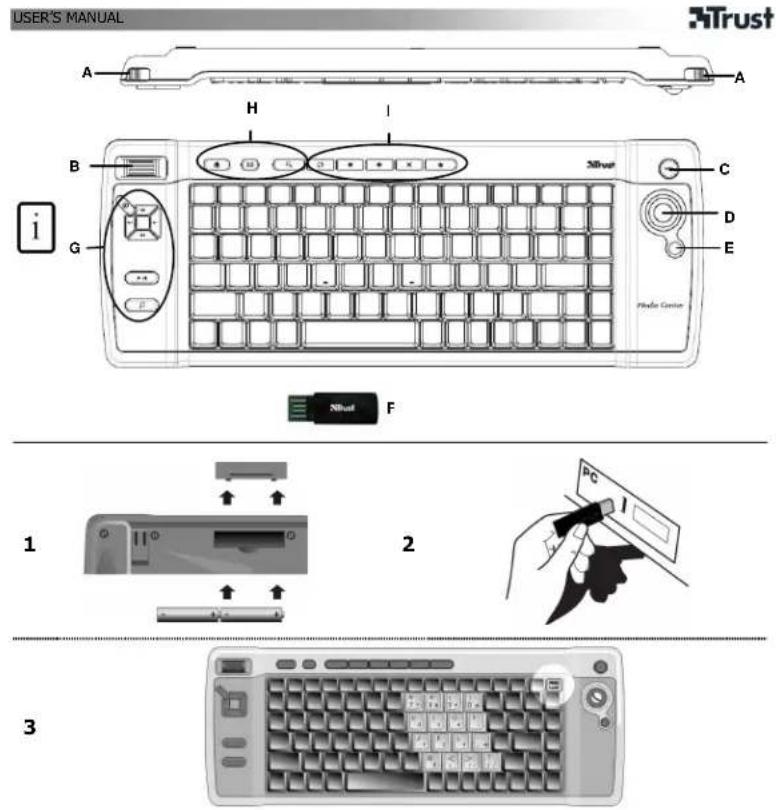
Product information
A: Left / right mouse button
B: Scroll
C: Media Center launch button
D: Trackball
E: Power button
F: USB receiver
G: Media Keys
| Launch Windows default Media player | |
| Mute | |
| Volume down | |
| Volume up | |
| Previous track | |
| Next track | |
| Play / Pause |
I: Media Center Keys
| Live TV | |
| DVD-menu | |
| TV-guide | |
| Music | |
| More | |
| ChUp | Channel Up |
| ChDn | Channel Down |
| OK | MCE OK |
| PrvScr | Previous Screen |
UK

H: Internet keys
| Start Internet Browser | |
| Start E-mail program | |
| Favourites |
Special Keys
| Num lock | Activate numeric functions. (Blue text) |
| AltGr | Insert special characters |
| Fn | Activate "normal" character when NumLock is on |
Installation
1 Open battery compartment on bottom side of keyboard and insert batteries.
2 Connect USB Transmitter to PC; wait until automatic installation has completed → Ready to use.
Note
⚠ Multimedia and Office keys
- The multimedia keys are designed for Media Center and Windows Media player. However, the keys may also work with other media player software.
- The launch keys will start the default internet browser, E-mail program and Media player installed on your PC.
Configure default programs:
XP: Start → Control Panel → Add/Remove Programs → Set Program Access and Defaults.
Vista: Start → Control Panel→Default Programs→Set programs access and computer defaults→Custom
⚠️ Special characters
- Press "NumLock" to activate numeric keypad (see picture 3). Press again to de-activate.
- When in NumLock mode: Press and hold Fn key to activate "normal" character instead of numeric.
- The keyboard country layout settings in Windows should correspond with the keyboard layout of your Trust keyboard. Layout of the Trust keyboard is specified by a sticker on the Box. To set the keyboard Layout in Windows: Go to: Start → Control Panel (classic view) → Regional and Language Options → Languages → Details (Vista: "Change Keyboards")
- The Alt Gr key gives access to special characters like the Euro sign. An overview of the special characters per country is available at www.trust.com/keyboardlayout.
Wireless performance
• Maximum Wireless working distance: 8 meter.
- Reduced wireless performance can be caused by:
- Metal objects close to or between transmitter and keyboard → Remove objects.
- Other wireless devices close by → Remove devices or reconnect dongle to get
different communication ID.
- Empty batteries → Replace batteries.
Energy
• After use, press the Power button (E) to turn the keyboard off and save power.
- Never recharge the batteries provided and never throw them onto a fire.
- Observe local regulations when disposing of batteries.
⚠ Safety instructions
- Do not open or repair this device.
- Do not use the device in a damp environment. Clean the device with a dry cloth.
See www.trust.com/14909 for up-to-date FAQs and Instruction manuals. For extensive service, register at www.trust.com/register.
CE
This device meets the essential requirements and other relevant conditions of the applicable European directives. The Declaration of Conformity (DoC) is available at www.trust.com/14909/ce.
UK

• If possible, dispose of the device at a recycling centre. Do not dispose of the device with the household waste.
Wireless
- This class 1 wireless device works at a frequency of 2.4 GHz. It meets the essential requirements and other relevant conditions of R&TTE Directive 1999/5/EC.
- Be careful when using wireless devices if you have a pacemaker or are dependent on other life-saving, sensitive electronic equipment, because this device transmits radio signals.
Warranty & copyright
- This device has a two-year product warranty which is valid from the date of purchase. See www.trust.com/warranty for more information.
- It is forbidden to reproduce any part of this instruction manual without the permission of Trust International B.V.
Produktinformationen
I: Tasti Media Center
programs access and computer defaults → Custom)
⚠️ Speciale tekens
Landinstellingen → Talen → Details (Start → Control Panel → Regional and Language Options →
Languages → Details) (Vista: "Toetsenbord wijzigen" – "Change Keyboards")
I: Media Center-nögler
| Direkte TV | |
| DVD-menu | |
| TV-guide | |
| Musikmenu | |
| Mere | |
| ChUp | Kanal op |
| ChDn | Kanal ned |
| OK | MCE OK |
| PrvScr | Forrige skærm |

H: Internettaster
| Start internetbrowser. | |
| Start e-mail-program. | |
| Foretrukne (Favourites) |
Specialtaster
| Start nettleser | |
| Start e-postprogram | |
| Favoritter |
Spesialtaster
I: Taste Media Center
DECLARATION OF CONFORMITY
We, the manufacturer / importer.
Trust International
Dclaro that the product
Kind of product Wireless 2.4 GHz Keyboard
type designation KB-2360 Wireless Media Center Keyboard
Item
14909 - 14910 - 15035 - 15100 - 15150
Is in compliance with the essential requirements and other relevant provisions of the following directives:
EMC Directive (89:335/EC)
Low-Voltage Directive (73'23'EC)
R&TTE Directive (1999/5/EC)
The product is compatible with the following norms / standards:
EN 60950 (2001)
EN 300528 (V1.6.1)
EN 300489-1 (V1.4.1)
EN 301489-17 (V1.2.1)
Intended use:
Restrictions for usage:
indoor
none
Manufacturer/Authorised representative

This class 1 wireless device meets the essential requirements and other relevant conditions of R&TTE Directive 1999/5/EC. Be careful when using wireless devices if you have a pacemaker or are dependent on other life-saving, sensitive electronic equipment, because this device transmits radio signals.
Warranty information : www.trust.com/warranty
Country specific information:
Brand : TRUST
Model : KB2950
Category : Keyboard