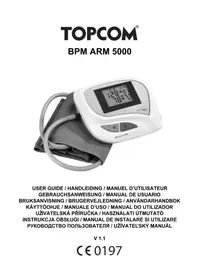
BD4620 - Blood pressure monitor TOPCOM - Free user manual and instructions
Find the device manual for free BD4620 TOPCOM in PDF.



User questions about BD4620 TOPCOM
0 question about this device. Answer the ones you know or ask your own.
Ask a new question about this device
Download the instructions for your Blood pressure monitor in PDF format for free! Find your manual BD4620 - TOPCOM and take your electronic device back in hand. On this page are published all the documents necessary for the use of your device. BD4620 by TOPCOM.
USER MANUAL BD4620 TOPCOM
Section C1-2 FuHai Industrial Zone
Fuhai Road Fuyong Town
Bao'an District
518103 Shenzhen City, Guangdong
PEOPLE'S REPUBLIC OF CHINA
European representative name:
ShangHai International Holding Corp. GmbH (Europe)
Address: Eiffestrasse 80, 20537 Hamburg Germany

Keep dry
This Blood Pressure Monitor complies with the EC Directives and bears the CE Mark "CE 0123".
This blood pressure monitor also complies with mainly following standards, (including but not limited).
Safety standards
EN 60601-1 - Medical electrical equipment part 1:General requirements for safety
EMC Standard
EN 60601-1-2 Medical electrical equipment part 1-2: General requirements for safety-Collateral standard: Electromagnetic compatibility - Requirements and tests
Performance standards:
EN 1060-1 Non-invasive sphygmomanometers - General requirements
EN 1060-3 Non-invasive sphygmomanometers - Supplementary requirements for electromechanical blood pressure measuring systems.
EN 1060-4 Non-invasive sphygmomanometers - Test procedures to determine the overall system accuracy of automated non-invasive sphygmomanometers.
The declaration of conformity can be found on: www.tristar.eu
Congratulations with your purchase of the Topcom . This fully automatic, wrist mounted blood pressure monitor is both easy to use and ideally suited for daily measurements.
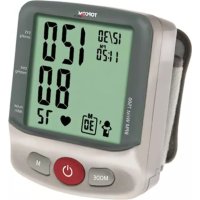
The large display includes systolic, diastolic and pulse, all clearly shown at the completion of each reading.
In addition, you can store up to 60 measurements per Memory Zone, ideal for users who want to monitor and track their blood pressure on a regular basis. The is compact and portable, making it ideal for home use and travel.
This device uses the oscillometric method to automatically measure systolic and diastolic blood pressure as well as heart rate.

Follow instructions for use.
2
| WARNING | Indicates a potentially hazardous situation which, if not avoided, could result in death or serious injury. |
| CAUTION | Indicates a potentially hazardous situation which, if not avoided, may result in minor or moderate injury to the user or patient or damage to the equipment or other property. |
| Type BF applied part | |
| Authorised representative in the European community | |
| Refer to instruction manual/booklet | |
| Manufacturer | |
| Serial number | |
| The marking of electrical and electronics devices According to Directive 2002/96/EC.The device, accessories and the packaging have to be disposed of waste correctly at the end of the usage. Please follow Local Ordinances or Regulations for disposal. |
3 Safety instructions
- This product is for household use only. It is not intended as a substitute for consultation with your doctor.
- For users diagnosed with common arrhythmia (atrial or ventricular premature beats or atrial fibrillation), diabetes, poor circulation of blood, kidney problems, or for users suffered from stroke, or for unconscious users, the device might not be suitable for use. Consult your doctor in case of any doubt.
- The unit should not be operated by children so to avoid hazardous situations.
- The unit contains high-precision assemblies. Therefore, avoid extreme temperatures, humidity, and direct sunlight. Avoid dropping or strongly shocking the main unit, and protect it from dust. Leaky batteries can damage the unit. Remove the batteries when the unit is not used for a long time.
- Do not press the start key when the cuff is not placed around the wrist.
-
Do not disassemble the main unit or cuff.
-
Do not store the device in extremely low (less than -13^ / -25^ ) and high (more than 158^ / 70^ ) temperature, nor in a place its humidity exceeds 93% R.H..
- Clean the blood pressure monitor body and the cuff carefully with a slightly damp, soft cloth. Do not press. Do not bend the pre-formed cuff inside out. Do not wash the cuff or use chemical cleaner on it. Never use thinner, alcohol or petrol (gasoline) as cleaner.
- If you have one of the circulatory problems as arteriosclerosis, diabetes, liver disease, kidney disease, severe hypertension, peripheral circulation..., please consult your healthcare professional before using the device.
- This product is not suitable for people with arrhythmias and pregnant women.
To avoid inaccurate results caused by electromagnetic interference between electrical and electronic equipments, do not use the device near a cell phone or microwave oven. At least keep a maximum output power of 2 W yields and a distance 3.3m away from this equipment.
4 T i p s
Here are a few helpful tips to help you obtain more accurate readings:
- Do not measure your blood pressure immediately after consuming a large meal. To obtain more accurate readings, please wait one hour before measuring.
- Do not smoke or drink alcohol before measuring your blood pressure.
- You should not be physically tired or exhausted while taking a measurement.
Rest at least 5~10 minutes before taking a measurement. - Do not take measurements if you are under stress or under tension.
- Take your blood pressure at normal body temperature. If you are feeling cold or hot, wait a while before taking a measurement.
- If the monitor is stored at very low temperature (near freezing), have it placed at a warm location for at least one hour before using it.
Relax at least 3~5 minutes in between measurements. - Wait 30 45 minutes before measurement if you've just consumed beverages containing caffeine or smoked cigarettes.
5 Disposal of the device
At the end of the product lifecycle, you should not throw this product into the normal household garbage but bring the product to a collection point for the recycling of electrical and electronic equipments. The symbol on the product, user guide and/or box indicate this.
Some of the product materials can be re-used if you bring them to a recycling
point. By re-using some parts or raw materials from used products you make an
important contribution to the protection of the environment. Please contact your local authorities in case you need more information on the collection points in your area.
6 Blood pressure
6.1 What is blood pressure?
Blood pressure is the pressure exerted on the artery tube while blood flows through the arteries. The pressure measured when the heart contracts and sends blood out of the heart is systolic (highest). The pressure measured when
the heart dilates with blood flowing back into the heart is called diastolic (lowest) blood pressure.
6.2 Why measure your blood pressure?
Among the various health problems afflicting modern people, problems associated with high blood pressure are by far the most common. High blood pressure's dangerously strong correlation with cardiovascular diseases
and high morbidity has made measuring blood pressures a necessity of identifying those at risk.
6.3 Blood pressure standard
The World Health Organization (WHO) has developed a Blood pressure standard, according to which areas of low and high-risk blood pressure are identified. This standard however, is a general guideline as individual's blood pressure varies among different people and different groups...etc.
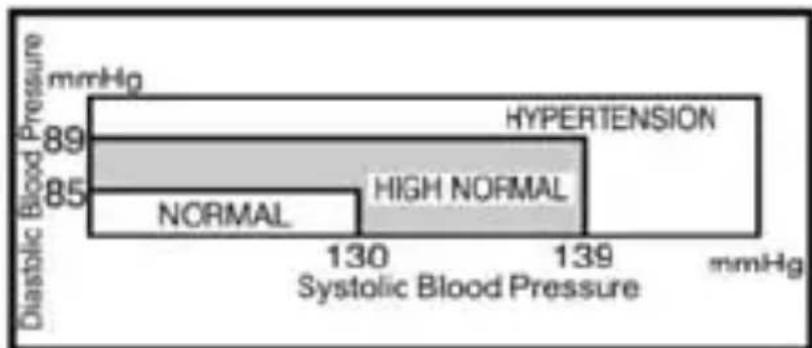
It is important that you consult with your physician regularly. Your physician will tell you your normal blood pressure range as well as the point at which you will be considered at risk.
6.4 Blood pressure fluctuation
Blood pressure fluctuates all the time!
You should not be worried if you encountered two or three measurements at high levels.
Blood pressure changes over the month and even throughout the day depending on circumstances (state of mind, temperature, ...)
7 Battery installation
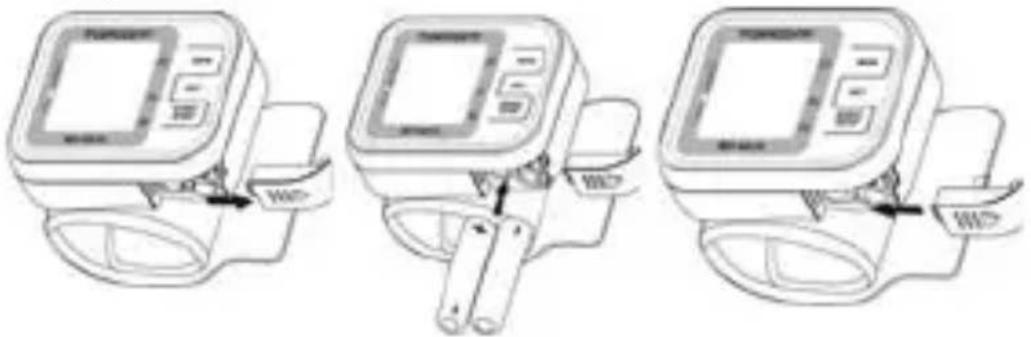
- Open the battery compartment by pulling the cover away
- Insert 2 AAA Alkaline batteries. Follow the polarity as illustrated.
- Re-install the battery cover.
Do not shortcircuit & dispose of in fire. Remove the battery if this device is not going to be used for a long period.
The batteries must be replaced when the battery low icon is displayed. All batteries used must be the same type. Do not mix alkaline, standard (carbon-zinc) or rechargeable (cadmium) batteries. Do not mix old and new batteries.
8 Buttons
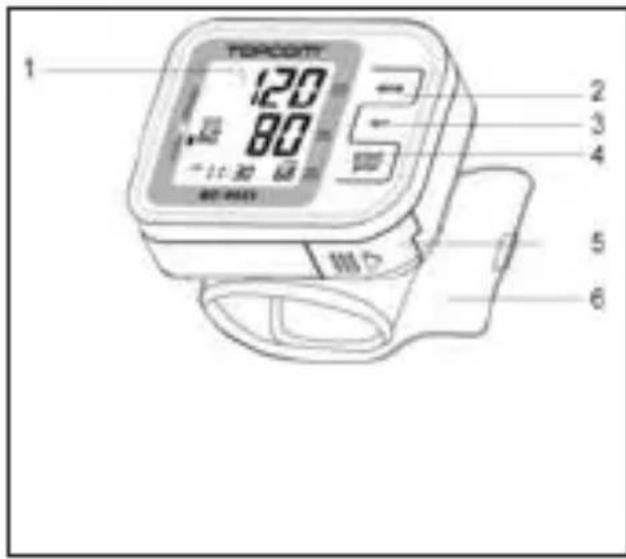
- LCD display
- Memory button
- Setting button
- Start / Stop button
- Battery compartment
- Wrist cuff
9 Display
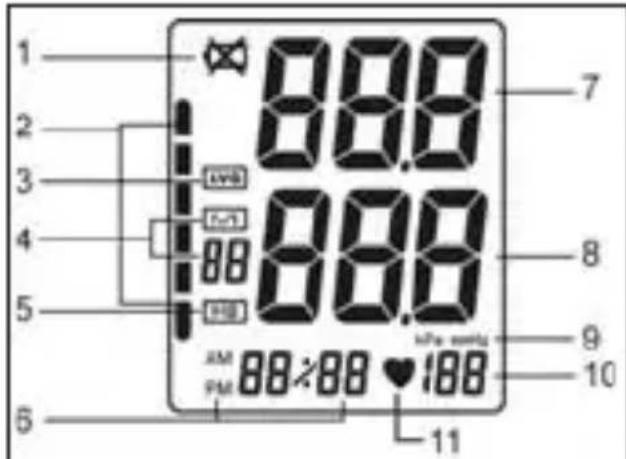
- Low battery symbol
- Inflation/deflation symbol or WHO indicator
- Average value symbol
- Memory and times
- Irregular heartbeat symbol
- Date / time
- Systolic blood pressure
- Diastolic blood pressure
- Unit indication
- Pulse
- Heartbeat symbol
10 Settings
10.1 Time, date and measuring unit adjustment
- When the batteries are installed for the first time, the year will flashes on the display automatically. When you already used the monitor before you have to press for 3-4 seconds the "SET" button in the off position, the year will flashes on the display.
- Press the "MEM" button for increasing the year, use the "SET" button to confirm the desired year.
- Change the months, days, hours and minutes as described above, using the "MEM" button to increase and use the "SET" button to confirm every setting.
After setting the minutes press "SET" and the current unit will appear. Use the Set button to choose between kPa or mmHg. - Press the "start/stop" button to save the current settings and turn off.
10.2 Applying the cuff
- Remove all watches, jewelry, etc. prior to attaching the wrist monitor. Clothing sleeves should be rolled up and the cuff should be wrapped on bare skin for correct measurements. Apply cuff to left wrist with palm facing up.
- Make sure the edge of the cuff is about 1 cm from the palm. In order to insure accurate measurements.
- Fasten the velcro strap securely around your wrist so there is no extra space between the cuff and the wrist. If the cuff is not wrapped tight enough, the measurement values will be false.
- If your physician has diagnosed you with poor circulation on your left arm, place the cuff around your right wrist.

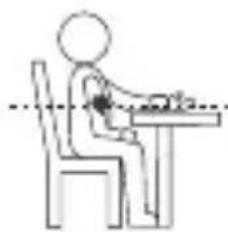
11 Measuring posture
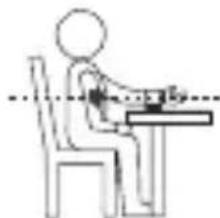
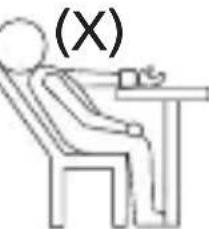
- Relax your entire body, especially the area between your elbow and fingers. Place your elbow on a table so that the cuff is at the same level as your heart.

Your heart is located slightly below your arm pit.
- If the cuff is not at the same level as your heart or if you can not keep your arm completely still throughout the reading, use a soft object such as folded towel to support your arm.
- Turn your palm upwards. Sit upright in a chair, and take 5-6 deep breaths. Avoid leaning back while the measurement is being taken.
12 Measurement
12.1 Important
- This monitor automatically switches off 2 minute after the last key operation.
- To interrupt the measurement, simply press any key. The cuff will deflate immediately after a key is pressed.
- During the measurement, do not talk or move your arm or hand muscles.
- The result will be stored automatically in the selected Memory Zone. Select the desires Memory Zone before measurement (see chapter §14)
13 Procedure
- Press the START/STOP button to activate the monitor, first all symbols will appear and then the cuff will automatically inflate to the level that is right for you.
- Measurement starts while inflating. The heartbeat symbol flashes once a pulse is detected.
- When the right level is reached, the cuff will deflate.
- When the measurement is completed, systolic, diastolic and pulse will be shown simultaneously on the LCD screen.
The measurement results will be stored automatically in the memory. - Press the "start/stop" button to turn off the unit, after 2 minutes the unit will turn on automatically.
- To stop the inflation or measurement, press the "start/stop" button in anytime. the unit will stop inflating and then release and turn off.
13.1 Irregular heartbeat (IHB)
The appearance of this symbol "IHB" signifies that a certain pulse irregularity was detected during measurement.
Talking, moving, shaking or an irregular pulse during the measurement can result in the appearance of this icon.
Usually this is not a cause for concern, however if the symbol appears often, we recommend you seek medical advice.
And please note that the device does not replace a cardiac examination, but serves to detect pulse irregularities at an early stage.

The irregular heart beat detected record wont be stored in memory. The pulse display is not suitable for checking the frequency of heart pacemarks. If a certain pulse irregularity is detected during measurement often, we recommend you seek medical advice.
However, as a safeguard, we recommend that if you have arrhythmias such as atrial or ventricular premature beats and atrial fibrillation or any other special conditions you should check with your physician before using your device.
The IHB function is not designed for use by people with arrhythmias nor for diagnosing or treating an arrhythmic problem. In order to filter the unstable status of user and avoid affecting the detection of heart rate from any movement, shaking or talking in the beginning of measurement, the method of averaging heart beat intervals for subject device is calculated with the three proper heart beat pulses detected in the beginning of measurement and that is different from a strict mathematical averaging of all recorded intervals.
At least 3 beats with at least 25% difference from the average heart beat interval will generate the IHB icon on the screen.
14 Memory
The unit stores the blood pressure and pulse rate in the memory after completing a measurement every time. It can automatically store 60 sets measurement values. The earliest record is deleted to save the latest measurement value when more than 60 sets. The unit also calculates an average reading based on the values of the latest 3 times measurement taken.
- Press the "MEM" button, the average value of the latest 3 times measurement values of the current user will display.
- Press the "MEM" button to display the set of measurement values with the measuring date and time from the oldest to the most recent.
TOPCOM BD-4620
- Long press the button and the value quickly changes.
- In the memory reading mode, press the "MEM" button for 4-6 seconds, the unit will
display "dEL no" - Press the "MEM" button again and LCD will display "dEL YES"
- If you are sure all the data of corresponding user can be deleted, press the "Start/stop" button, all the corresponding user's data will be deleted and the unit will turn off.
- if you do not press a button for 2 minutes, the unit will turn off automatically, but the corresponding user's blood pressure data will not be deleted. The delete operation must be confirmed by the user.
15 Technical specifications
| Model No. BD-4620 | ||
| Display LCD Digital Display | ||
| Measuring principle Oscillometric Method | ||
| Measurable circumference of wrist 13.5~21.5 cm. | (5.3"~8.5") | |
| Electric shock protection Internal power supply appli- ance type B | ||
| Measurement range Pressure 0 | to 299 mmHg (0~ | 39.9 kPa) |
| Pulse 40 to180 Pulses/min | ||
| Accuracy Pressure +/- 3 mmHg | (0.4kPa) | |
| Pulse +/- 5% of reading | ||
| LCD Indication Pressure 3 Digi- s | Display of mmHg or kPa | |
| Pulse 3 Digits Display | ||
| Symbol Memory/IHBA/Heartbeat/Low Battery,etc. | ||
| Inflation | Automatic by Internal Pump | |
| Rapid Air Re lease | Automatic by Air Valve | |
| Memory Function | Memory 60 Sets Measurement Values | |
| Power Source | 2 AAA Alkaline Batteries | |
| Automatic Turn Off | Within 2 Minutes | |
| Gross Weight | Approx. 110g (Batteries not included) | |
| Operating Environment | Temperature 10~40.. (50 ~ 104 F) | |
| Humidity 15 ~ 90%RH (Noncondensing) | ||
| Barometric Pres-sure | 80~105 kPa | |
| Storage Environment | Temperature -20~60.. (-4 ~ 140 F) | |
| Humidity 10 ~ 95%RH (Noncondensing) | ||
*Specifications are subject to change without notice.
The CE symbol indicates that the unit complies with the essential requirements of the directive 93/42/EEC.
16 Care and maintenance
- Keep the Unit in the storage case when not in use.
- Clean the unit with a soft dry cloth. do not use any abrasive or volatile cleaner. Do not clean the body and cuff with naphtha, thinner or gasoline etc.
- Do not wet the cuff or attempt to clean the cuff with water. Never immerse the unit or any components in water.
- Store the unit in a clean and dry location. Do not subject the unit to extreme hot or cold temperature, humidity and direct sunlight.
- Remove the batteries if the unit will not be used for 3 months or longer. Always replace both of the batteries with new ones at the same time.
Avoid subjecting the monitor to strong shocks or vibrations, such as dropping the unit on the floor.

17 Exceptional situations
17.1 Error Indicators
| Symbol Cause Correction | ||
| Err The course of | inflating appears error. | Wrap the cuff correctly and tightly. |
| Inflate over again after ensuring. | ||
| When measurement fails. | Do not move your arm and body, and keep quiet. | |
| Measure over again according to correct way. | ||
| Lo When the batteries power are too low. | Replace both of the worn batteries with two new ones. | |
17.2 Eliminate fault
| Problem Causes and Solutions | |
| No power. Replace both of the worn | batteries with two new ones. |
| No display appears on the display screen. | Check the battery installation for proper placement of the batteries polarities. |
| Measurement values appear too high or too low. | Blood pressure varies constantly. Many factors including stress, time of day, how you wrap the cuff, may affect your blood pressure. Review the sections "Proper Way of Measurement" and "Take a Measurement". |
18 Warranty
18.1 Warranty period
The Topcom units have a 24-month warranty period. The warranty period starts on the day the new unit is purchased. There is no warranty on Alkaline batteries (AA/AAA type). Consumables or defects causing a negligible effect on operation or value of the equipment are not covered.
The warranty has to be proven by presentation of the original or copy of the purchase receipt, on which the date of purchase and the unit-model are indicated.
18.2 Warranty exclusions
Damage or defects caused by incorrect treatment or operation and damage resulting from use of non-original parts or accessories are not covered by the warranty.
The warranty does not cover damage caused by outside factors, such as lightning, water and fire, nor any damage caused during transportation.
No warranty can be claimed if the serial number on the units has been changed, removed or rendered illegible.
Any warranty claims will be invalid if the unit has been repaired, altered or modified by the buyer.
To ensure precise measurement reading, re-calibration of the device is recommended after 2 years from the date of purchase. Shipping plus handling cost and recalibration service fee shall be charged accordingly. For more information, check www.tristar.eu
1 Inleiding
| Guidance and manufacturer's declaration - electromagnetic emissions | ||
| The device is intended for use in the electromagnetic environment specified below. The customer or the user of the device should assure that it is used in such an environment. | ||
| Emissions test | Compliance | Electromagnetic environment - guidance |
| RF emissionsCISPR 11 | Group 1 | The device uses RF energy only for its internal function. Therefore, its RF emissions are very low and are not likely to cause any interference in nearby electronic equipment. |
| RF emissionsCISPR 11 | Class B | The device is suitable for use in all establishments, including domestic establishments and those directly connected to the public low-voltage power supply network that supplies buildings used for domestic purposes. |
| Harmonic emissionsIEC 61000-3-2 | Not applicable | |
| Voltage fluctuations/flicker emissionsIEC 61000-3-3 | Not applicable | |
| Guidance and manufacturer's declaration - electromagnetic immunity | |||
| The device is intended for use in the electromagnetic environment specified below. The customer or the user of the device should assure that it is used in such an environment. | |||
| Immunity test | IEC 60001 test level | Compliance level | Electromagnetic environment - guidance |
| Electrostatic discharge (ESD) IEC 61000-4-2 | ±6 kV contact+8 kV air | ±6 kV contact+8 kV air | Floors should be wood, concrete or ceramic tile. If floors are covered with synthetic material, the relative humidity should be at least 30 %. |
| Power frequency (50/60 Hz) magnetic field IEC 61000-4-8 | 3 A/m | 3 A/m | Power frequency magnetic fields should be at levels characteristic of a typical location in a typical commercial or hospital environment. |
| Guidance and manufacturer's declaration - electromagnetic immunity | |||
| The device is intended for use in the electromagnetic environment specified below. The customer or the user of the device should assure that it is used in such an environment. | |||
| Immunity test IEC 60601 test level | Compliance level | Electromagnetic environment- guidance | |
| Conducted RF | 3 Vrms | Not Applicable | Portable and mobile RF communications equipment should be used no closer to any part of the device, including cables, than the recommended separation distance calculated from the equation applicable to the frequency of the transmitter.Recommended separation distance |
| IEC 61000-4-6 | 150 kHz to 80 MHz | ||
| Radiated RF | 3 V/m | 3 V/m | d=1,2 80 MHz to 800 MHz |
| IEC 61000-4-3 | 80 MHz to 2,5 GHz | d=1,2 800 MHz to 2,5 GHzwhere P is the maximum output power rating of the transmitter in watts (W) according to the transmitter manufacturer and d is the recommended separation distance in metres (m). | |
Field strengths from fixed RF transmitters, as determined by an electromagnetic site survey, should be less than the compliance level in each frequency range.
Interference may occur in the vicinity of equipment marked with the following symbol:

NOTE 1 At 80 MHz and 800 MHz, the higher frequency range applies.
NOTE 2 These guidelines may not apply in all situations. Electromagnetic propagation is affected by absorption and reflection from structures, objects and people.
Field strengths from fixed transmitters, such as base stations for radio (cellular/cordless) telephones and land mobile radios, amateur radio, AM and FM radio broadcast and TV broadcast cannot be predicted theoretically with accuracy. To assess the electromagnetic environment due to fixed RF transmitters, an electromagnetic site survey should be considered. If the measured field strength in the location in which the device is used exceeds the applicable RF compliance level above, the device should be observed to verify normal operation. If abnormal performance is observed, additional measures may be necessary, such as reorienting or relocating the device. Over the frequency range 150 kHz to 80 MHz, field strengths should be less than 3 V/m.
Recommended separation distances between portable and mobile RF communications equipment and the device
The device is intended for use in an electromagnetic environment in which radiated RF disturbances are controlled. The customer or the user of the device can help prevent electromagnetic interference by maintaining a minimum distance between portable and mobile RF communications equipment (transmitters) and the device as recommended below, according to the maximum output power of the communications equipment.
| Rated maximum output power of transmitter W | Separation distance according to frequency of transmitter m | ||
| 150 kHz to 80 MHz Not applicable | 80 MHz to 800 MHz d=1,2 | 800 MHz to 2,5 GHz d=2,3 | |
| 0,01 | Not applicable | 0,12 | 0,23 |
| 0,1 | Not applicable | 0,38 | 0,73 |
| 1 | Not applicable | 1,2 | 2,3 |
| 10 | Not applicable | 3,8 | 7,3 |
| 100 | Not applicable | 12 | 23 |
For transmitters rated at a maximum output power not listed above, the recommended separation distance d in metres (m) can be estimated using the equation applicable to the frequency of the transmitter, where P is the maximum output power rating of the transmitter in watts (W) according to the transmitter manufacturer. NOTE 1 At 80 MHz and 800 MHz, the separation distance for the higher frequency range applies. NOTE 2 These guidelines may not apply in all situations. Electromagnetic propagation is affected by absorption and reflection from structures, objects and people.
TOPCOM
visit our website www.tristar.eu