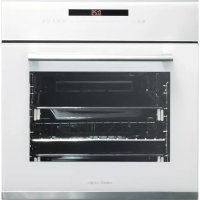
HGR 110 AS WH - Oven CATA - Free user manual and instructions
Find the device manual for free HGR 110 AS WH CATA in PDF.



| Product type | Built-in electric oven |
| Brand | CATA |
| Model | HGR 110 AS WH |
| Interior dimensions (H x W x D) | 340 x 440 x 390 mm |
| Usable volume | 59 liters |
| Power supply | 220-240 V ~ 50 Hz |
| Maximum power | 3,600 W (total heating elements) |
| Bottom heating element | 1,300 W |
| Top heating element | 900 W |
| Fan heating element | 2,300 W |
| Grill heating element | 1,350 W |
| Cooking functions | Defrosting, fan-assisted, grill, traditional cooking, etc. |
| Programming | Duration, end of cooking, alarm |
| Safety | Child lock, automatic shut-off |
| Cleaning | AquaSmart system, catalytic coatings (option) |
| Interior lighting | Bulb 15-25 W, type E-14 |
| Included accessories | Grill, drip tray, fixing screws |
| Removable door | Yes, 3 types of hinges |
| Energy efficiency class | Not specified (estimated A) |
| Repairability | Spare parts available via manufacturer's after-sales service |
Frequently Asked Questions - HGR 110 AS WH CATA
User questions about HGR 110 AS WH CATA
0 question about this device. Answer the ones you know or ask your own.
Ask a new question about this device
Download the instructions for your Oven in PDF format for free! Find your manual HGR 110 AS WH - CATA and take your electronic device back in hand. On this page are published all the documents necessary for the use of your device. HGR 110 AS WH by CATA.
USER MANUAL HGR 110 AS WH CATA
Operating and maintenance instructions for built-in ovens
IT
REEMPLACEMENT DE L'AMPOULE DU FOUR
Thank you for choosing one of our products. We hope this household appliance provides you with the best service. Therefore, we suggest you read the instructions and suggestions contained in this manual carefully in order to use our products correctly.
The specifications plate for this oven is available on this appliance. This plate, visible by opening the door, displays all the necessary identification information for this appliance for ordering replacement parts.
GENERAL INFORMATION
Please read this manual carefully before using the appliance. It is important that all the control functions are understood before beginning to cook with this appliance.
Heed the advice and warnings included under the title "IMPORTANT - Safety advice and instructions".
- This appliance has been designed for private domestic use and can be integrated into standard kitchen furnishings or similar.
- In order to use in caravan-type vehicles, the suitable indications included in the Installation Instructions should be borne in mind.
- Use of this appliance for any other purpose or in any other environment without the manufacturer's express agreement will invalidate any guarantee or liability.
- This new appliance is guaranteed against electrical or mechanical defects, subject to certain exclusions indicated in the Manufacturer's Terms and Conditions of the Guarantee.
The above does not affect your statutory rights.
Ensure that all protective packaging and covering has been removed before using this appliance.
To collaborate in protecting the environment, separate the packaging materials into the different types and dispose of them according to local waste disposal regulations.
The packaging is designed so as not to harm the environment; it can be recovered or recycled as it is an ecological product. By recycling the packaging, you will contribute to saving raw materials and reducing the volume of industrial and domestic waste.
Any additional information on waste disposal may be requested from your local environmental agency.
When used for the first time, a slight smell from the protective covering or damp may be noticeable, which will disappear after a short time.
Thesymbol on the product or its packaging indicates that this product cannot be treated as normal household waste. This product must be handed over to an electric and electronic equipment collection point for recycling. On ensuring that this product is disposed of correctly, you will help to avoid possible negative consequences for the environment and public health, which could occur if this product is not handled correctly. To receive more detailed information about recycling this product, contact your local
government, domestic waste disposal services or the outlet where the product was bought.
This appliance has been built and distributed in compliance with the essential requirements of the following EEC EUROPEAN LAWS AND DIRECTIVES:
EC Symbol - 93/68 Low voltage - 73/23 CEM-89/336
Safety Rules - EN 60 335-1, EN 60 335 - 2 - 6.
This appliance respects laws of the suppression of radio-interference.
As the Manufacturer has a policy of continuous product improvement, it reserves the right to adapt and carry out any modification considered necessary without prior warning.
IMPORTANT NOTICE
SAFETY INSTRUCTIONS AND WARNING
- This appliance complies with all current European safety legislation, however, the Manufacturer must emphasise that this compliance does not prevent the surfaces of the appliance from heating up during use and remaining hot during its operation.
- Therefore, the Manufacturer highly recommends that this appliance is kept out of the reach of babies and small children.
- If children cannot be kept out of the kitchen, they must be watched at all times.
- We also recommend that great care is taken during use and cleaning. Read the cleaning and maintenance sections for this appliance carefully.
- Do not place heavy objects on this oven or lean on the door when opening it, as this may damage the hinges.
- Do not leave hot oil or fats unattended as they may catch light.
- Do not place oven dishes or trays of the lower part of the oven or cover it in aluminium foil.
- Never store flammable objects inside the oven as they may catch light.
- Do not allow the accessories or electric cables to touch the hot parts of the appliance.
- Do not use the appliance for special heating or drying clothes.
- Do not install the appliance near curtains or upholstered furniture.
- Do not try to lift or move kitchen appliances by pulling any door or handle as this may cause damage.
- If the oven join is very dirty, the door will not close properly when the oven is working. The fronts of neighbouring furniture may be damaged. Keep the oven join clean.
- During operation the appliance will heat up. Care must be taken to avoid touching heating elements inside the oven.
- Open the oven carefully. Steam may escape and burn anyone nearby.
- Do not pour water inside a very hot oven. The enamel may be damaged.
- This appliance must be installed correctly by a suitably
qualified person, strictly following the manufacturer's instructions.
- The Manufacturer declines all liability for personal or material damage as a result of misuse or incorrect installation of this appliance.
- Heat, vapour and humidity are produced during use, avoid all kinds of personal damage and ensure that the room is suitably ventilated. If used for a prolonged period of time, additional ventilation may be necessary - consult a qualified installer if you have any doubts about the necessary volume.
INSTRUCTIONS
This User Manual must be kept for future reference and use by someone who is not familiar with the appliance.
Before using the oven, carefully clean the inside with a non-abrasive detergent and warm water. Introduce the grill and tray in their respective runners. Once the operation is complete, turn the oven on to the maximum temperature for approximately 20 minutes to remove any traces of manufacturing grease, oil or resins which may cause unpleasant odours when cooking.
WARNING: During this first heating some smoke or unpleasant odours may appear. Should this happen ventilate the room suitably until the first operation is finalised.
Once this simple operation has been carried out the oven is ready to use for cooking.
This appliance is exclusively for domestic use.
Use the oven to cook food only.
USEFUL ADVICE
- Before cooking, make sure all oven accessories that are not required are removed from the oven.
- Pre-heat the oven to the cooking temperature before using it.
- Place the cooking trays in the centre of the oven and leave space in between when using more than one, so that the air can circulate.
- Do not fill the tray to full when preparing a juicy, fruit cake. Any fruit juice that drips from the tray will produce stains that cannot be removed.
- Do not put oven trays on the base of the oven or cover it with aluminium foil. This will cause thermal accumulation. The cooking and roasting times will not coincide and the enamel may be damaged.
- Try to open the oven door as little as possible to see the food (the oven light remains on during cooking).
- Take care when opening the door to avoid contact with hot parts and steam.
COOKING INSTRUCTIONS
Read the information of the food packaging for the cooking temperatures and times. Once familiar with the performance of the appliance, the temperatures and times may be varied to adapt them to your personal tastes.
Check that frozen food is completely thawed before cooking, unless indicated otherwise.
| Type of food Temp. °C Runners Cooking time in minutes Suggested | |
| Cake mixture desserts in moulds | |
| Sponges or buns 175 2 55-65 | |
| Cake 175 3 60-70 | |
| Short pastry desserts in moulds | |
| Pie base | 200 3 08-10 |
| Cheesecake pie base | 200 3 25-35 |
| Fruit pie base | 200 3 25-35 |
| Raised dough desserts in moulds | |
| Pie base | 180 3 30-45 |
| Soft bread 1 kg of flour | 200 3 25-35 |
| Small pastries | |
| Short pastry | 200 3 10-15 |
| Doughnut dough | 200 2 35-45 |
| Biscuit dough | 200 3 15-20 |
| Lasagne | 225 2 40-50 |
| Meats (Cooking time per cm of thickness) | |
| Long roasts | 200 2 120-150 |
| Short roasts | 200 2 60-90 |
| Meatballs | 200 2 30-40 |
| Poultry | |
| Duck 1 1/2 Kg | 200 2 120-180 |
| Goose 3 Kg | 200 2 150-210 |
| Roast chicken | 200 2 60-90 |
| Turkey 5Kg | 175 2 240-260 |
| Game | |
| Hare | 200 2 60-90 |
| Leg of venison | 200 2 90-150 |
| Vegetables | |
| Oven-baked potatoes | 220 2 30-40 |
| Cooked vegetable flan | 200 2 40-50 |
| Fish | |
| Trout 200 2 | 40-50 |
| Sea Bream | 200 2 40-50 |
| Pizza | 240 3 10-20 |
| Grill | |
| Chops | 4 8-12 |
| Sausages | 4 10-12 |
| Grilled chicken | 2 25-35 |
| Spit-roasted veal 0,6Kg | 50-60 |
| * The runner number is counted from the bottom of the oven up (Excluding the base of the oven as trays cannot be placed on it) | |
| THE POSITION INFORMATION IS INDICATIVE BECAUSE THE COOKING TYPE AND TIMES CHANGE DEPENDING ON THE QUANTITY AND QUALITY OF THE FOOD. | |
HOW TO USE THE GRILL
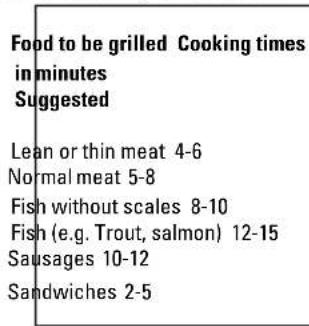
Place the food to be browned on the grid or in the shallow tray. The grid has to be placed on the highest runner, whilst the tray for collecting fat should be on the lower runner. Connect the grill using the following positions of fan-assisted oven selector knob, or in the position, of the multi-function oven selection knob.
Depending on the type of food (meat, fish, poultry, etc.) it will be necessary to turn it over to expose both sides to the infra-red rays of the grill. For guidance only, we indicate some cooking times below:
WARNING
- Check that the oven door is closed when using the GRILL.
- Do not use aluminium foil to cover the grill tray or heat.
- Do not wrap elements in aluminium foil or place them under the grill - the great reflective quality of aluminium may damage the grill element.
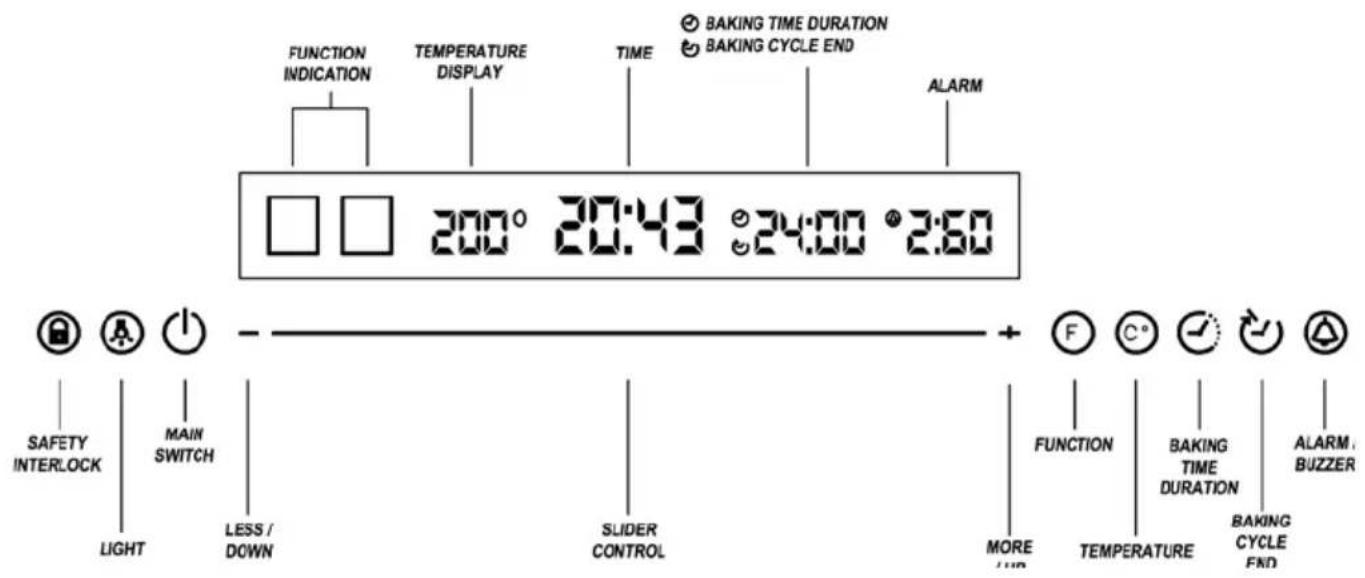
DESCRIPTION OF THE CONTROL PANEL AND VISUAL INDICATIONS:
CONTROL PANEL:
| Safety interlock | For blocking the operation of the oven. No key other than the On/Off switch can be activated. | |
| Light | For turning on and off the oven's interior light. | |
| Main switch | For turning the oven on and off. | |
| - | Less/Down | Depending on the oven's status at the time, it allows selecting the baking mode, lowering the temperature or reducing the operating time. |
| - | Slider control | It allows regulating the temperature and the operating time. |
| + | More/Up | Depending on the oven's status at the time, it allows selecting the baking mode, raising the temperature or increasing the operating time. |
| F | Function | For selecting the baking mode: |
| C | Temperature | For regulating the baking temperature. |
| Baking cycle duration | For programming the oven to stop after a period of time or when the baking cycle ends. | |
| Baking cycle end | For programming the oven to stop when a certain time is reached. | |
| Alarm/Buzzer | For programming an alarm that is complementary to the preceding functions. It does not affect the oven's operation. |
VISUAL INDICATIONS ON THE DISPLAY:
| 200° | Temperature display | For indicating the selected temperature. | |
| 20:43 | Time | It indicates the time. | |
| 24:00 | Duration of the baking cycle / End of the baking cycle | Depending on whether "Cycle duration" or "Cycle end" has been selected on the control panel, it indicates the duration of the baking cycle or the end time of the baking cycle. | |
| 2:60 | Alarm | When the indicated period ends, the audible alarm will activate. | |
DESCRIPTION OF OVEN OPERATION: TIME ADJUSTMENT:
When the oven is turned on the first time, the time digits will flash, indicating that the user can adjust the time. This status can also be accessed by pressing and holding the main switch for three seconds.
Once the time flashes, it can be adjusted using the "+" and "-" buttons and the slider control. Once the time has been adjusted, if no button is pressed for three seconds or if the main switch is pressed, the time will be configured and the digits will cease to flash.
SAFETY INTERLOCK:
By pressing the safety interlock, the symbol lights up in red, and the control panel is blocked so that it prevents the oven from being used accidentally by a child.
To un-block the oven, the interlock symbol has to be pressed again, at which time it lights up in white and the rest of the panel becomes active again.
BASIC OPERATION:
When the oven is turned on using the main switch, the entire control panel becomes active and is ready to be used. To start baking, just press the function symbol, and the thaw function appears on the display. By pressing the function symbol successively or by pressing the "+" and "-" buttons, you can move between the functions in the attached table:
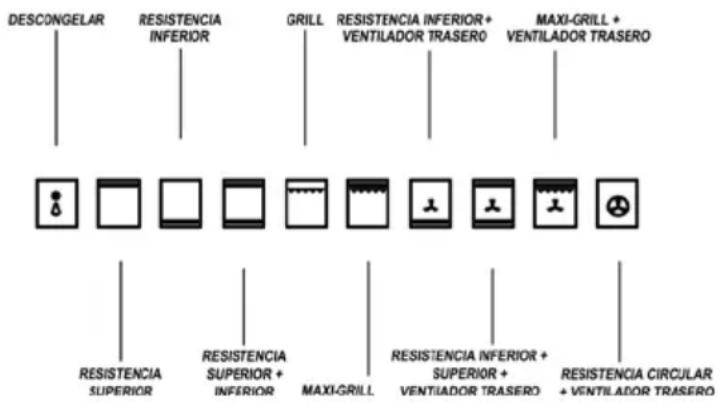
Three seconds after having selected a function or by touching the temperature symbol, the function will be selected, and then the temperature can be adjusted using the "+" and "-" buttons and the slider control.
After three seconds, the temperature remains selected, and the oven starts operating according to the selected function and temperature.
The light can be turned on and off at any time during baking.
The alarm function is a clock that counts down, with a buzzer at the end of the selected time. It can be turned on and off independently from oven operation.
When the symbol is pressed, it turns red and can be ad
justed using the "+" and "-" buttons and the slider control. Three seconds after the alarm has been adjusted, it remains selected and starts the countdown. When the set time ends, an audible alarm is activated for 2 minutes. To turn off the alarm, press the symbol. To delete the alarm from the visual indications area, press the symbol for two seconds.
PROGRAMMING:
While the oven is operating according to a certain function and temperature, you can activate three different programmes:
Baking cycle duration. When this symbol is pressed and by using the "+" and "-" buttons and the slider control, you can select the period of time after which the oven will stop automatically.
Baking cycle end. When this symbol is pressed and by using the "+" and "-" buttons and the slider control, you can select a certain time when the oven will stop automatically. Combination of baking cycle duration and baking cycle end. Select a function, a temperature and a duration, which we'll call "X", for a certain baking cycle. Then select the end of the cycle at a certain time "Y". The oven will start automatically at the Y-X time and will operate for X minutes until it reaches time Y.
Example: If you want to cook a pizza for 20 minutes so that it is ready when you get home from work at 19:00 h, select the desired function, the temperature (say 200^ ), a cycle duration of 20 minutes and the cycle end at 19:00 h. The oven will then start automatically at 18:40 h and will stop automatically at 19:00 h.
CLEANING THE APPLIANCE IMPORTANT
As a safety precaution, before beginning to clean the oven always unplug it from the power supply or remove the appliance power lead.
Cleaning an oven that does not self-cleaning panels must be done after use, when it is switched off but still warm, not hot, so that the film of grease produced by the cooking vapours on the walls is still easy to remove, as well as the drips and splashes of fat that are not yet hard and dry.
Remove the chrome-plated wire side supports; pull the front part upwards to unattach them from the wall and remove them from the rear orifices. Clean the oven with a soft cloth soaked in a diluted ammoniac solution; rinse and dry. If there are still stains and splashes, place a damp cloth soaked in ammoniac at the back, close the door and, after a few hours, wash the oven with warm water and liquid detergent, rinse and dry carefully. To clean the shiny metal outside doors, use a soft cloth with soap and water; do not use any powdered products that contain abrasive substances.
Also avoid the use of acid or alkaline substances (lemon juice, vinegar, salt, tomatoes, etc.). Avoid using products containing chlorine, acid or abrasive substances specially for cleaning the varnished walls. Do not use thick steel wool
or hard utensils, as they can damage the surface finishes. Do not use high pressure cleaners or steam appliances for cleaning the oven.
Normally, wiping with a damp soft cloth and warm detergent is enough, but for stubborn stains the following is recommended:
VTRIFIED ENAMELLED PARTS
Only use a recommended cleaner for this type of material - avoid chloride-based products such as bleach.
OVEN CLEANING SYSTEM EQUIPPED WITH THE AQUAS-MART SYSTEM
1 Take out the internal components: tray, screen, side screens.
2 Pour 200ml of soapy water on the bottom of the oven
3. Turn on and set the oven at 200^ for 15 minutes
4. Move the temperature control from 200^ to 0^ . Let the oven cool down for 20 minutes.
5. Move the AquaSmart function to 0. Wipe clean with a rag or soft cloth.
GLASSDOOR PANEL
Do not use abrasive products which could damage the glass. Remember that if the surface of the glass panel becomes scratched, it could cause a dangerous failure.
To simplify the cleaning, the inner glass panel can be taken out of the door. The method for removing the glass from the three types of door is shown below.
Door type A
After removing the screws fixing the glass, located on the inner face of the door, lift the glass out carefully. In versions with three glasses the intermediate glass can also be removed. The procedure is the same as above.
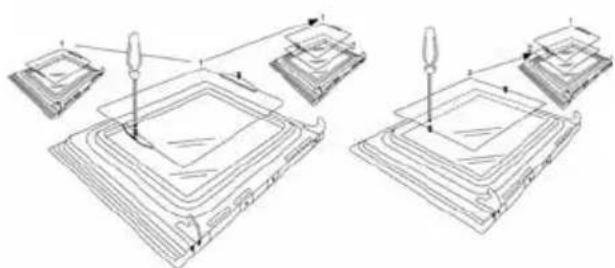
Door type B
After removing the screws fixing the upper support of the glass, remove the support in direction "A". Then the glass can be pulled out. In versions with three glasses the intermediate glass can also be removed.
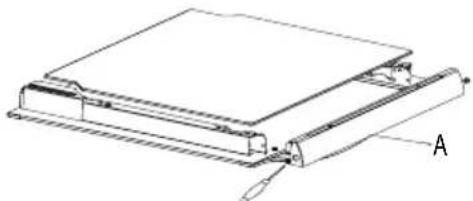
Door type C
Carefully lever up the glass with a flat screwdriver located in the groove shown in the figure.
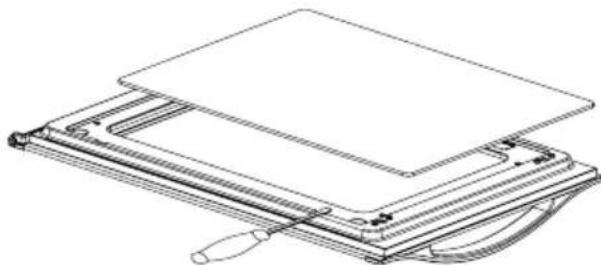
When refitting the glass, check that it is correctly fitted into the toothed joint of the door and all around.
REMOVING THE DOOR FROM THE OVEN
To simplify cleaning the interior of the oven, the door can be removed. The process of removing the door for the three types is shown below:
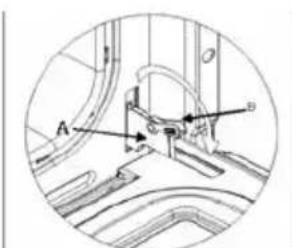
Door type A
The hinges "A" have two moving bolts "B".
When the bolt "B" is lifted, the hinge comes out of its housing.
Then close the door to the half-way position.
Next, lift the door upwards and remove it, sliding it outwards; hold the door by the sides close to the hinges when doing this.
To replace the door, first slide the hinges into their grooves and open the door completely.
Remember to turn the two moving bolts "B" used to engage the two hinges before closing the door (Fig. 3).
WARNING
- Take care not to remove the hinge locking system when taking off the door, as the hinge mechanism can spring back suddenly.
- Never submerge the door in water for any reason.
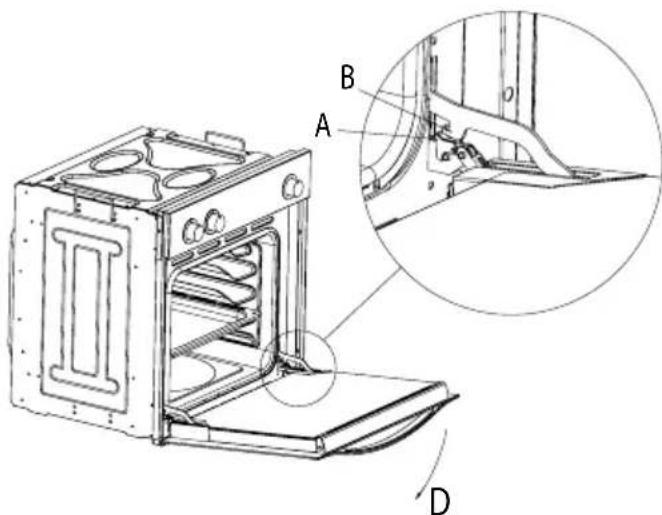
Door type B
Open the door fully to position "D"
Lift the two mobile links "A" of the hinges, until fixing at point "B".
Then close the door to the half-way position.
Next, lift the door upwards and remove it, sliding it outwards; hold the door by the sides close to the hinges when doing this.
To replace the door, first slide the hinges into their grooves and open the door completely.
Remember to turn the two moving links "B" used to engage the two hinges before closing the door (Fig. X).
WARNING
Take care not to remove the hinge locking system when taking off the door, as the hinge mechanism can spring back suddenly.
- Never submerge the door in water for any reason.
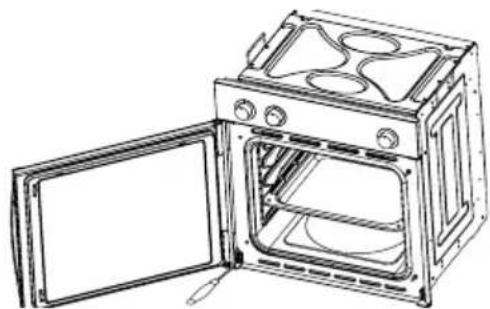
Door type C
Open the door and support it firmly.
Using a suitable screwdriver remove the lower hinge by the part fixed to the oven.
Then remove the upper hinge from its place and take off the door.
To replace the door, follow the same steps in reverse.
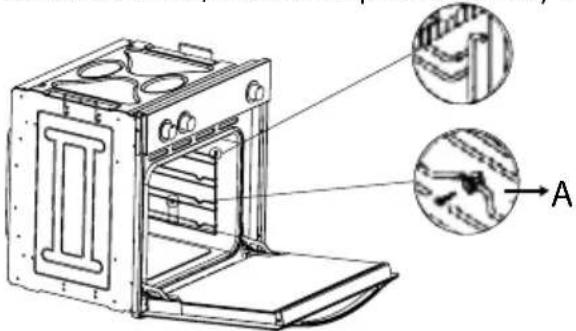
Oven accessories (Fig. 4)
The oven can be provided with lateral guides fitted to the oven wall. Insert the grid and oven sheet provided on the lateral guides. To remove the guides proceed as follows for
the two types:
Bars type 1
To remove the lateral guides press downwards at point A.
Bars type 2
To remove the lateral guides take out the screw using a suitable screwdriver, lift the bars upwards until they are free.
INSTRUCTIONS FOR INSTALLATION
This appliance must be installed by a competent person, in accordance with the current version of the UK Safety Rules and Regulations or their European equivalent:
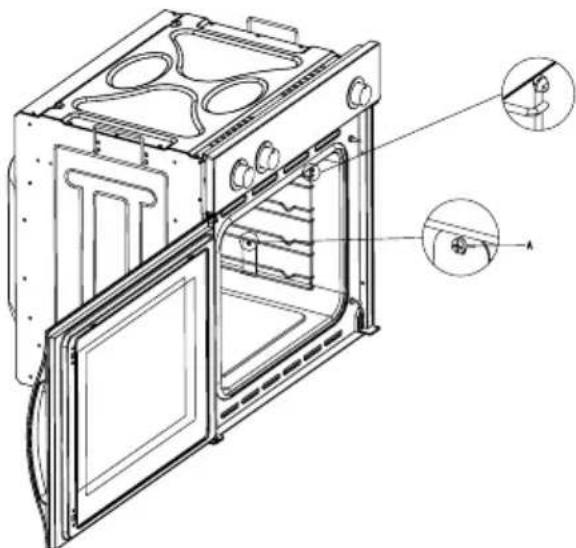
Urban development regulations (published by the Department of Environment).
Urban development laws (published by the Scottish Executive Development Department).
IEE wiring regulations.
Electricity in labour regulations.
PRIOR START-UP OF THE APPLIANCE
When it is unpacked, check that the following parts are with the oven:
- Instructions and Installation Manual
oven grid
-1 tray - Screws and stoppers for fitting the appliance in the housing
FITTING THE APPLIANCE (see Fig. 5)
These appliances are classified as Class I. The earth is obligatory as provided for by law. The manufacturer declines all liability in the event that the accident prevention rules have not been followed.
IMPORTANT
The adjacent piece or furniture or cupboard and all the materials used in the installation must resist a minimum temperature increase of 85^ above the ambient temperature during use of the appliance.
Certain types of vinyl or laminated kitchen furniture are particularly susceptible to damage due to decolouration at temperatures below those indicated.
If the appliance is installed without paying attention to this temperature limit or if it is placed less than 4mm from the adjacent cupboards, liability will belong to the owner.
INSTALLATION NOTES
- The oven has to be installed in a standard gap of 600mm as indicated in Fig. 5, whether under a hob or in a column.
- On inserting the oven in a column, it is essential in order to ensure there is enough ventilation, to remove the rear panel of the furniture and have an opening of at least 85-90mm as indicated in Fig. 5.
- Check that the oven has been fixed securely in the housing. Fixing the oven into the cupboard is done using 4 screws "A" Fig.5. One in each corner of the oven door frame.
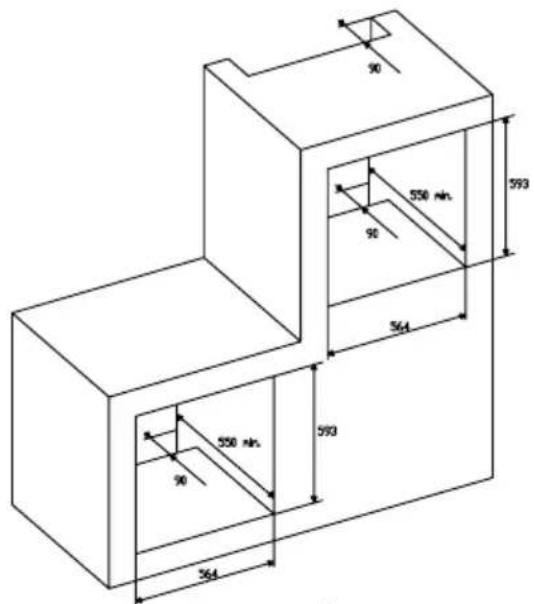
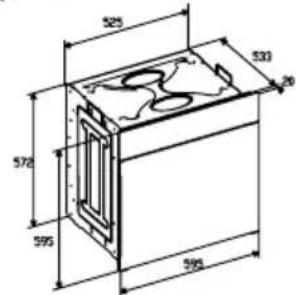
Fig. 5: Installation distanced for simple electric ovens of 60 cms wide (the shape of the upper casing may vary) and attachment to the cupboard.
A. The support runner must be removed
B. Spacing of 75 - 90mm between the wall and the rear part of the support shelf and the base of the cupboard
C. Base
D. False box front to be assembled
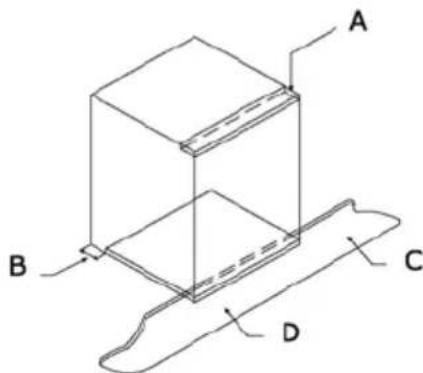
Fig. 7: Ventilation and gap requirements for the installation of e simple electric oven in a standard cooking unit.
Minimum ventilation requirements for upper, base and support shelves for the rear part of the unit.
A. Rear panel
B. Storage space
C. Remove the rear part of this section
D. Real panel
E. Storage space
F. Base
G. Minimum ventilation gap 80 cm2
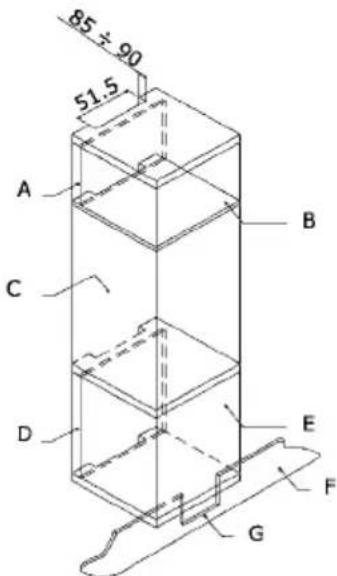
Fig. 8: Ventilation and gap requirements for the installation of a simple electric oven in an upper cupboard.
ELECTRICAL CONNECTION
Before connecting the appliance, check that the voltage marked on the specifications plate coincides with the voltage of the electricity network.
The NICEIC register is recommended for electrical installations.
WARNING - THIS APPLIANCE MUST BE EARTHED
This appliance must be wired to a 13 A bipolar automatic switch with protected socket, which has a 3mm separation between contacts and is placed in an easily accessible place next to the appliance.
IMPORTANT
The conductors of the network power supply lead are coded by colours are follows:
Green and yellow -Earth
Blue - Neutral
Brown - Live
- The green and yellow conductor must be connected to the terminal marked "E" or with the symbol of the earth or which is green and yellow.
- The blue conductor must be connected to the terminal marked "N".
- The brown conductor must be connected to the terminal marked "L".
- The lead must not reach a temperature higher than 50^ above the ambient temperature at any point.
- If the power lead is damaged, it must be replaced by a special lead or unit supplied by the manufacturer or it after-sales service.
REplacement of THE NETWORK POWER SUPPLY LEAD
If it is necessary to replace the network power supply lead, proceed as follows:
- Disconnect the appliance from the power supply, unscrews the fastening screws and remove the rear panel.
- Unscrew the fastening screws and those of the terminals to free the existing lead.
- Assemble the replacement lead which must comply with the information listed in the Specifications, ensuring the correct connection of the colour codes and that all the screws are correctly tightened.
MAINTENANCE
Before carrying out maintenance, disconnect the appliance from the power supply.
During the guarantee period, if necessary all services should be commissioned to the Manufacturer's Technical Assistance Service Department. Bear in mind that intervention or repair by unauthorised personnel will invalidate this guarantee.
REplacement of THE OVEN LIGHTBULB
Not covered by the appliance guarantee.)
The oven has a light with the following characteristics: 15 W or 25 W, 300^ and type E-14
WARNING: Disconnect the appliance from the electricity supply, remove the oven door (as described above), as well as the oven shelves.
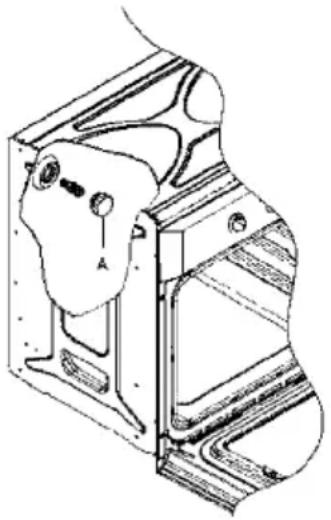
Remove the glass cover that protects the light bulb by turning it anti-clockwise. Fig. 9 (A)
Unscrew the old light bulb and dispose of it safely and ecologically, change it for one as specified in the Specifications and replace the cover.
NOTE - The glass cover may be tight and, therefore, may need a grip to release it.
CARE AND REPLACEMENT OF THE CATALYTIC COVERING
(When assembled, the covering is not covered by the appliance guarantee).
In order to keep the covering "always clean" efficiently, the oven must be heated to a minimum of 200^ whenever there are stubborn stains, so that they do not become permanent.
If the covering becomes black and shiny, they must be replaced. Remove all the internal accessories to facilitate the replacement of the covering.
The replacement covering may be bought directly from the Manufacturer's Replacement Part Department (see details included in the cover). Indicate the reference numbers of the product type described in the specifications plate and/or the series number of the appliance on ordering.
SPECIFICATIONS INTERIOR DIMENSIONS
Height: 340 mm
Width: 440 mm
Depth: 390 mm
Useful volume: 59 litres
ELECTRICAL INFORMATION
Nominal voltage:
220V-240V\~50Hz
Power connection: 13A (automatic bipolar switch with protected socket, with 3mm separation between contacts)
POWER ABSORPTION
Base Resistance: 1,30 kW
Roof Resistance: 0,90 kW
Fan Resistance: 2,30kW
Grill Resistance: 1,35 kW
Network power cable:
3x1.5mm2typeH07RN-F
Oven light bulb: 15W - 25W / 300^ screw type E-14
The Manufacturer declines all liability for damage caused to persons and objects due to incorrect or improper installation of the appliance.
The Manufacturer reserves the right to make any modification it believes necessary and useful to the products, without prior warning.
ISTRUZIONI PER L'UTENTE
Volume utile: 59 litri
DATI ELETTRICI
Tensione nominale:
220V-240V\~50Hz
WAARSCHUWING en VEILIGHEIDSVOORSCHRIFTEN
VISUELE INDICATIONS OP HET DISPLAY:
DIT APPARAAT MOET GEAARD WORDEN
Para as instalacoes electrolyicas, recomenda-se o registo NICEIC.
ADVERTÉNCIA
ESTE APARELHO DEVE SER LIGADO A TIERRA
Este aparecido deve ser ligado a um interruptor automatico bipolar de 13 A com tomada protegida, que tenha separação de contactos de 3 mm e situada num lugar fácilmente acessivel jusqu'à do aparecido.
IMPORTANT

- IT
- REEMPLACEMENT DE L'AMPOULE DU FOUR
- GENERAL INFORMATION
- IMPORTANT NOTICE
- SAFETY INSTRUCTIONS AND WARNING
- INSTRUCTIONS
- USEFUL ADVICE
- COOKING INSTRUCTIONS
- HOW TO USE THE GRILL
- WARNING
- CONTROL PANEL:
- VISUAL INDICATIONS ON THE DISPLAY:
- DESCRIPTION OF OVEN OPERATION: TIME ADJUSTMENT:
- SAFETY INTERLOCK:
- BASIC OPERATION:
- PROGRAMMING:
- CLEANING THE APPLIANCE IMPORTANT
- VTRIFIED ENAMELLED PARTS
- OVEN CLEANING SYSTEM EQUIPPED WITH THE AQUAS-MART SYSTEM
- GLASSDOOR PANEL
- Door type A
- Door type B
- Door type C
- REMOVING THE DOOR FROM THE OVEN
- Oven accessories (Fig. 4)
- Bars type 1
- Bars type 2
- INSTRUCTIONS FOR INSTALLATION
- PRIOR START-UP OF THE APPLIANCE
- FITTING THE APPLIANCE (see Fig. 5)
- IMPORTANT
- INSTALLATION NOTES
- ELECTRICAL CONNECTION
- WARNING - THIS APPLIANCE MUST BE EARTHED
- REplacement of THE NETWORK POWER SUPPLY LEAD
- MAINTENANCE
- REplacement of THE OVEN LIGHTBULB
- CARE AND REPLACEMENT OF THE CATALYTIC COVERING
- SPECIFICATIONS INTERIOR DIMENSIONS
- ELECTRICAL INFORMATION
- POWER ABSORPTION
- ISTRUZIONI PER L'UTENTE
- DATI ELETTRICI
- WAARSCHUWING en VEILIGHEIDSVOORSCHRIFTEN
- VISUELE INDICATIONS OP HET DISPLAY:
- DIT APPARAAT MOET GEAARD WORDEN
- ADVERTÉNCIA
- ESTE APARELHO DEVE SER LIGADO A TIERRA
Brand : CATA
Model : HGR 110 AS WH
Category : Oven