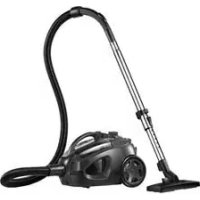
332936 - Vacuum Cleaner PRINCESS - Free user manual and instructions
Find the device manual for free 332936 PRINCESS in PDF.



| Product type | Canister vacuum cleaner |
| Use | Dry floors (parquet, tile, carpet, rug) |
| Filtration technology | HEPA filter (removes 99% of particles), motor filter, exhaust filter, round filter |
| Tank type | Bagless, transparent dust compartment |
| Included accessories | Hose, adjustable telescopic tube (16 positions), nozzle with surface selector, crevice tool |
| Settings | Speed selector (suction power), airflow control |
| Level indicator | Full tank indicator light |
| Cord rewinding | Automatic with button (hand or foot) |
| Carrying handle | Integrated |
| Storage | Temporary storage bracket for nozzle |
| Maintenance | Empty dust compartment, clean round filter, clean/replace HEPA filter, motor filter and exhaust filter |
| Safety | Do not vacuum liquids or flammable materials, use only with all filters in place |
| Prohibited applications | Liquids, wet substances, flammable materials, outdoors |
| Brand | Princess |
| Model | 332936 |
Frequently Asked Questions - 332936 PRINCESS
User questions about 332936 PRINCESS
0 question about this device. Answer the ones you know or ask your own.
Ask a new question about this device
Download the instructions for your Vacuum Cleaner in PDF format for free! Find your manual 332936 - PRINCESS and take your electronic device back in hand. On this page are published all the documents necessary for the use of your device. 332936 by PRINCESS.
USER MANUAL 332936 PRINCESS
332935 Princess Red Fox Cyclone Vacuum Cleaner
332936 Black Panther Cyclone Vacuum Cleaner
Gefeliciteerd!
You have purchased a Princess appliance.
Our aim is to provide quality products with a tasteful design and at an affordable price.
We hope that you will enjoy this appliance for many years.
Instructions for use
The instructions for use have been collected in the corresponding section. Be familiar with the safety instructions when you consult the instructions for use.
Safety instructions
Warning!
- When using mains-powered appliances, basic safety instructions must always be followed to reduce the risk of fire, electric shock and personal injury.
- Do not use the appliance near bathtubs, showers, basins or other vessels containing water.
Read the entire manual carefully before use. The intended use is described in this manual. The use of any accessory or the performance of any operation with this appliance other than recommended can cause a risk of personal injury. Keep this manual for future reference. Children should be supervised to ensure that they do not play with the appliance. The use of this appliance by children or persons with a physical, sensory, mental or motorial disability, or lack of experience and knowledge can give cause to hazards. Persons responsible for their safety should give explicit instructions or supervise the use of the appliance.
Use
Always be careful when using the appliance. Always protect the appliance from water or excessive humidity.
Carefully guide the mains cable to make - sure that it does not hang over the edge of a worktop and cannot be caught accidentally or tripped over.
Never pull the mains cable to disconnect the mains plug from the mains. Keep the mains cable away from heat, oil and sharp edges.
Do not remove any part or accessory when the mains plug is connected to the mains.
Always first disconnect the mains plug from the mains.
If the mains cable becomes damaged. during use, immediately disconnect the mains plug from the mains. Do not touch the mains cable before disconnecting the mains plug from the mains.
Disconnect the mains plug from the mains when the appliance is not in use, before assembly or disassembly and before cleaning and maintenance.
Safety of others
Do not allow children or any person unfamiliar with these instructions to use the appliance.
Do not allow children or animals to come near the work area. Do not allow children or animals to touch the appliance or mains cable. Close supervision is necessary when the appliance is used near children.
After use
Disconnect the mains plug from the mains and let the appliance cool down before leaving it unattended and before replacing, cleaning or inspecting any parts of the appliance.
- Store the appliance in a dry place when not in use. Make sure that children do not have access to stored appliances.
Inspection and repairs
Before use, check the appliance for damaged or defective parts. Inspect the appliance for breakage of parts, damage to switches and other conditions that can affect the operation.
- Do not use the appliance if any part is damaged or defective.
- Have any damaged or defective part repaired or replaced by an authorised repair agent.
Never attempt to remove or replace any parts As the colours of the wire in the mains lead of other than those specified in this manual. this appliance may not correspond with the
Before use, check the mains cable for wear or damage.
Do not use the appliance if the mains cable or mains plug is damaged or defective. If the mains cable or mains plug is damaged or defective, it must be replaced by the manufacturer or an authorised repair agent.
colour markings identifying the terminals on your plug, proceed as follows:
The wire which is coloured BLUE must be connected to the terminal which is marked with the letter N or coloured black.
The wire which is coloured BROWN must be connected to the terminal which is marked with the letter L or coloured red.
Safety instructions for vacuum cleaners
Before use, always check that the mains voltage is the same as the voltage on the rating plate of the appliance.
The appliance is not intended to be operated by means of an external timer or separate remote-control system.
Make sure that water cannot enter the contact plugs of the mains cable.
Always fully unwind the mains cable.
Only use the appropriate connector to. operate the appliance.
Do not use the appliance outdoors.
Do not use the appliance near water.
Do not immerse the appliance in water.
Do not use the appliance without the dust - compartment.
Do not use the appliance without the round - filter. Do not use the appliance without the HEPA filter. Do not use the appliance without the motor filter. Do not use the appliance without the outlet filter.
Do not use the appliance to vacuum liquids. Do not use the appliance to vacuum flammable materials.
Only hold the appliance by the handgrip. Keep the motor unit away from your eyes and face.
Always work from bottom up when using the appliance on stairs.
If a 13Amp (BS1363) plug is used, a 13Amp (BS1362) fuse must be fitted, or if any other type of plug is used, a 13Amp fuse must be fitted, either in the plug or adaptor, or on the distribution board.
This is a double-insulated appliance and does not need an earth connection.
Warning!
On no account should either the live or neutral wires be connected to the earth terminal.
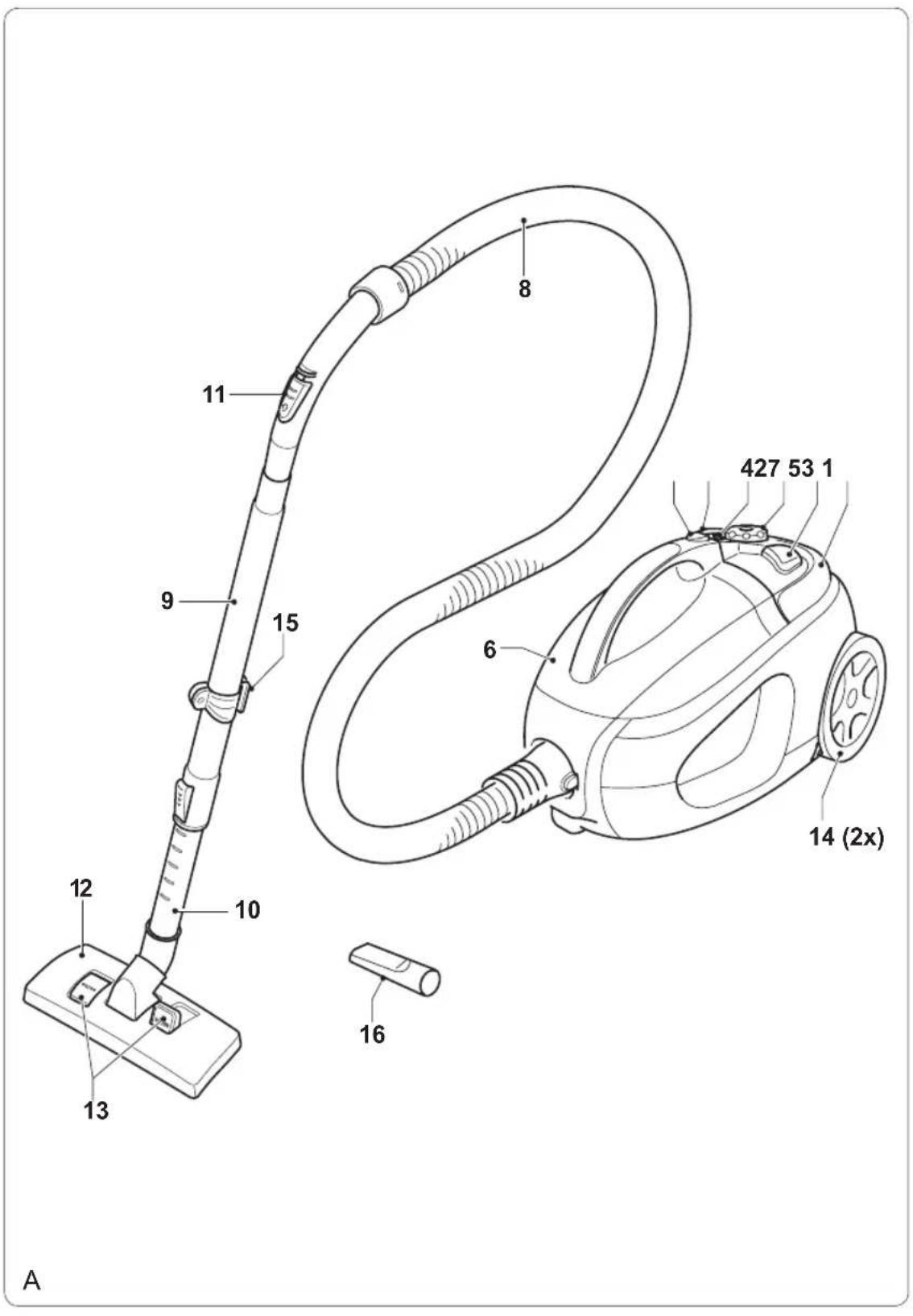
Description (fig. A)
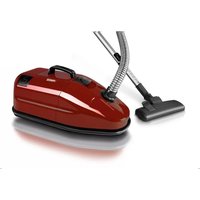
Your 332935/332936 Princess vacuum cleaner has been designed for vacuuming dry substances. The appliance is not suitable for vacuuming wet substances. The appliance is suitable for domestic use only.
- On/off button
- Mains cable rewind button
- Speed control switch
- Full indicator
- Handgrip
- Dust compartment
- Release button (dust compartment)
8.Hose - Tube
- Extension tube
- Airflow control switch
- Suction nozzle
- Floor surface selector
- Wheels
- Bracket for temporary parking
- Crevice nozzle
U.K. Wiring instructions
The wires in the mains lead are coloured in accordance with the following code:
BLUE NEUTRAL
BROWN LIVE
Assembly
Warning!
- Before assembly, always switch off the appliance and remove the mains plug from the wall socket.
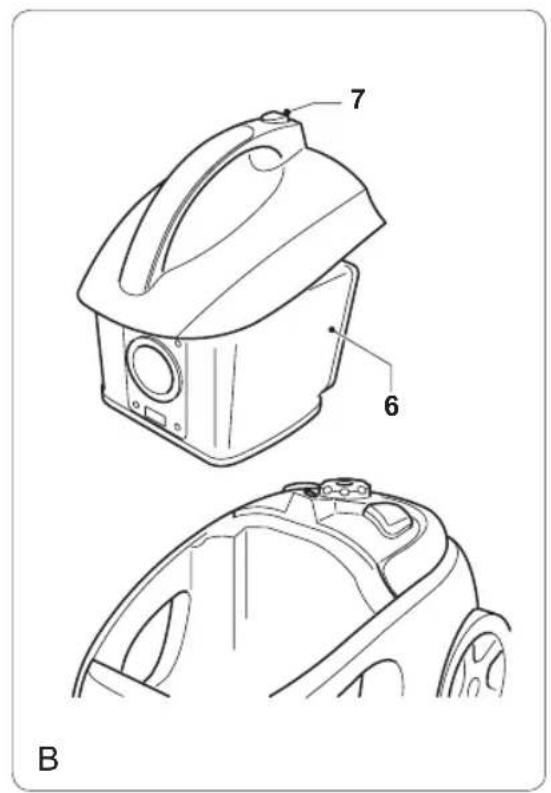
Mounting and removing the dust compartment (fig. B)
Caution!
- Do not use the appliance without the dust compartment.
To remove the dust compartment, keep the release button (7) pressed and pull the dust compartment (6) from the appliance. To mount the dust compartment, insert the dust compartment (6) into the appliance until the release button (7) clicks into place.
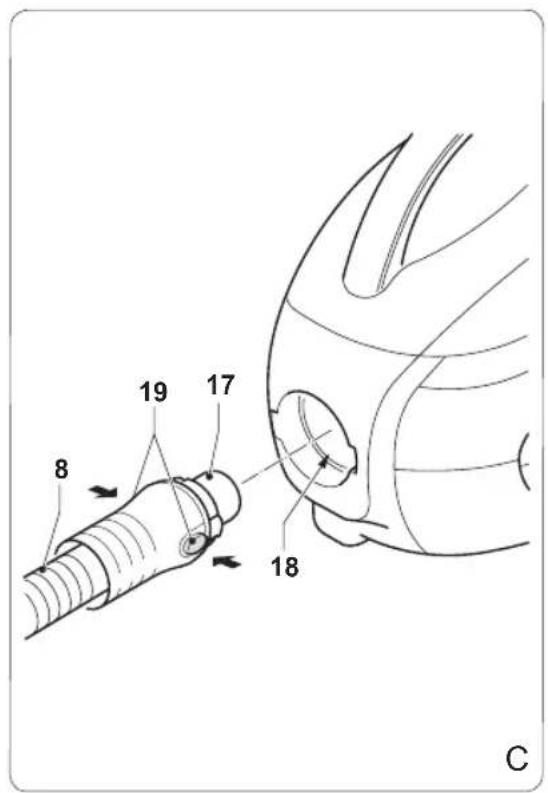
Mounting and removing the hose (fig. C)
Caution!
- Before mounting the hose, make sure that the dust compartment is inserted into the appliance.
To mount the hose (8), insert the hose outlet (17) into the hose connection (18) until the release buttons (19) click into place.
To remove the hose (8), keep the release buttons (19) pressed and pull the hose outlet (17) from the hose connection (18).
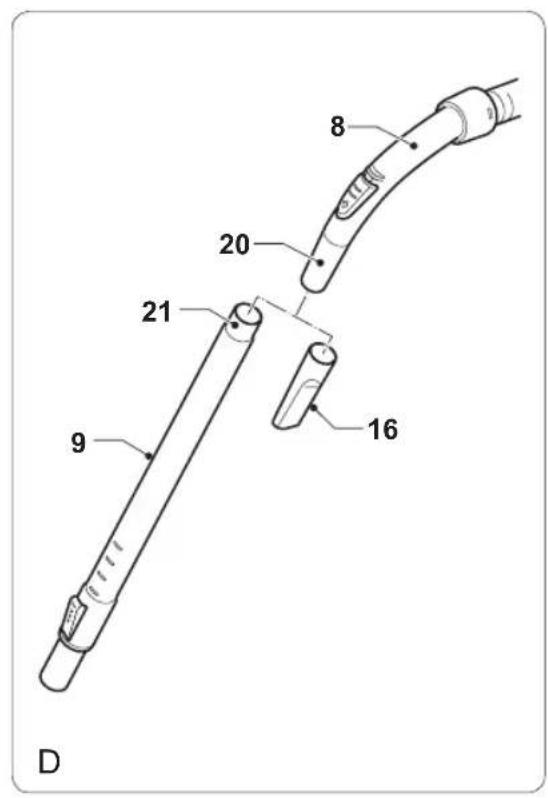
Mounting and removing the tube (fig. D)
To mount the tube (9), insert the hose inlet (20) into the tube outlet (21).
To remove the tube (9), pull the hose inlet (20) from the tube outlet (21).
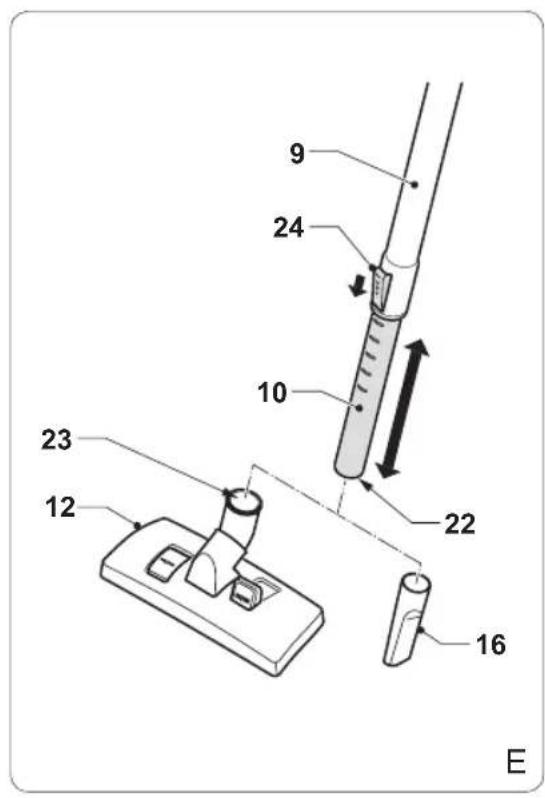
Mounting and removing the suction nozzle (fig. E)
The suction nozzle (12) can be mounted to the extension tube (10).
To mount the suction nozzle (12), insert the tube inlet (22) into the tube connection (23).
To remove the suction nozzle (12), pull the tube inlet (22) from the tube connection (23).
Mounting and removing the crevice nozzle (fig. D & E)
The crevice nozzle (16) can be mounted to the hose (8) or to the extension tube (10).
To mount the crevice nozzle to the hose (8), insert the hose inlet (20) into the crevice nozzle (16).
To mount the crevice nozzle to the extension tube (10), insert the tube inlet (22) into the crevice nozzle (16).
To remove the crevice nozzle, pull the crevice nozzle (16) from the hose inlet (20) or the tube inlet (22).
Use
Unwinding and rewinding the mains cable (fig. A)
The mains cable rewind button (2) can be operated by hand or foot.
Caution!
- Do not unwind or rewind the mains cable while the appliance is switched on.
- Always hold the mains plug to unwind the mains cable. Never pull the mains cable.
Before use, hold the mains plug and. unwind a sufficient length of the mains cable from the back of the appliance. After use, press the mains cable rewind button (2) to rewind the mains cable back into the appliance. Manually guide the mains cable to make sure that it does not swing back. Make sure that the mains plug is correctly located.
Adjusting the length of the tube (fig. E)
The extension tube (10) can be adjusted in 16 steps.
Keep the locking knob (24) pressed and slide the extension tube (10) to the required position.
Release the locking knob (24).
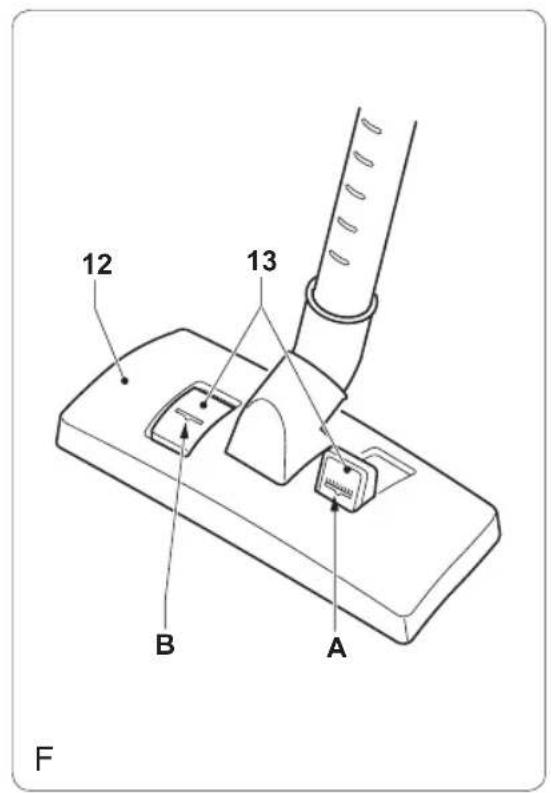
Adjusting the suction nozzle (fig. F)
The floor surface selector (13) can be set to adjust the suction nozzle (12) to the required floor surface. The floor surface selector (13) can be operated by hand or foot.
For vacuuming on laminates, tiles, etc., press the corresponding part (A) of the floor surface selector (13).
For vacuuming on carpets, press the corresponding part (B) of the floor surface selector (13).
Switching on and off (fig. A)
The on/off button (1) can be operated by hand or foot.
To switch on the appliance, press the on/off button (1).
To switch off the appliance, press the on/off button (1) again.
Adjusting the suction force (fig. A)
The speed control switch (3) can be used to adjust the suction force.
Set the speed control switch (3) to the required position:
- For vacuuming on hard surfaces (e.g. floors), set a high suction force.
- For vacuuming on soft surfaces (e.g. upholstery), set a low suction force.
Adjusting the airflow (fig. A)
The airflow can be adjusted using the airflow control switch (11).
To adjust the airflow, set the airflow control switch (11) to the required position.
Carrying the appliance (fig. A)
The appliance can be carried using the handgrip (5).
Raise the handgrip (5) into position.
Carry the appliance using the handgrip (5).
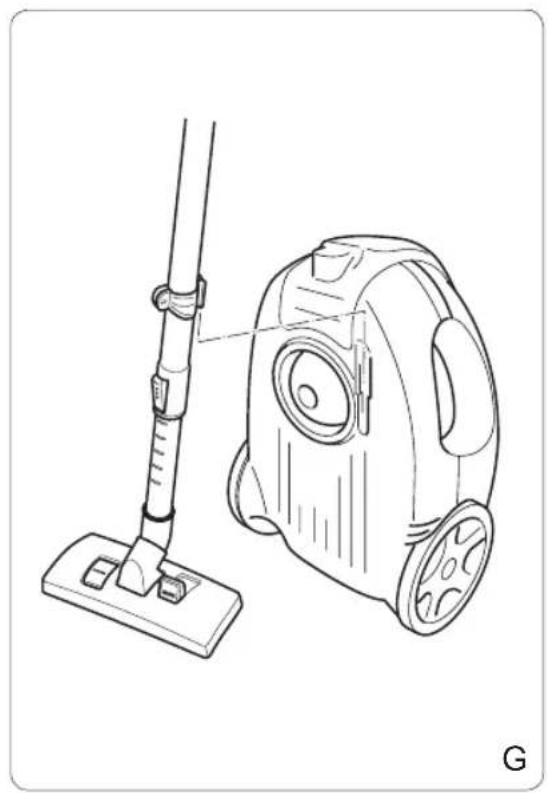
Temporarily parking the suction nozzle (fig. G)
To temporarily park the suction nozzle, use the park position as shown.
Cleaning and maintenance
Warning!
- Before cleaning or maintenance, remove the mains plug from the wall socket and wait until the appliance has cooled down.
- Do not immerse the appliance in water or any other liquids for cleaning.
Caution!
- Do not use aggressive or abrasive cleaning agents to clean the appliance.
- Do not use sharp objects to clean the appliance.
Regularly check the appliance for possible damage.
Regularly clean the ventilation slots using a soft brush.
Store the appliance in a dry place, out of the reach of children.
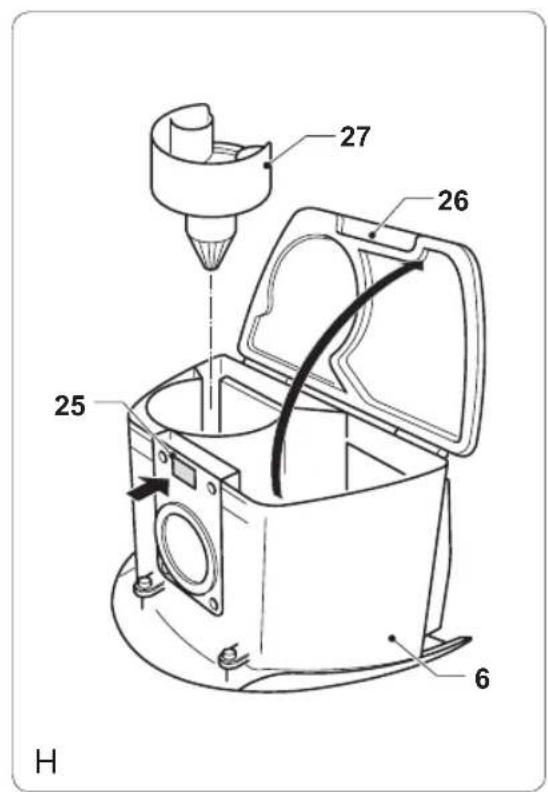
Emptying the dust compartment (fig. A, B & H)
The dust compartment (6) must be emptied when the full indicator (4) comes on.
Keep the release button (7) pressed and pull the dust compartment (6) from the appliance.
Press the release button (25) and open the cover (26).
Carefully tap the dust compartment (6) with your hand to remove the dust.
- Close the cover (26) until the release button (25) clicks into place.
- Insert the dust compartment (6) into the appliance until the release button (7) clicks into place.
Cleaning the round filter (fig. B & H)
Keep the release button (7) pressed and pull the dust compartment (6) from the appliance.
Press the release button (25) and open the cover (26).
If necessary, empty the dust compartment (6).
Turn the round filter (27) clockwise to remove the filter from the dust compartment (6).
- Remove the dust from the round filter (27) using a soft brush.
Turn the round filter (27) counterclockwise to insert the filter into the dust compartment (6).
Close the cover (26) until the release - button (25) clicks into place.
Insert the dust compartment (6) into the appliance until the release button (7) clicks into place.
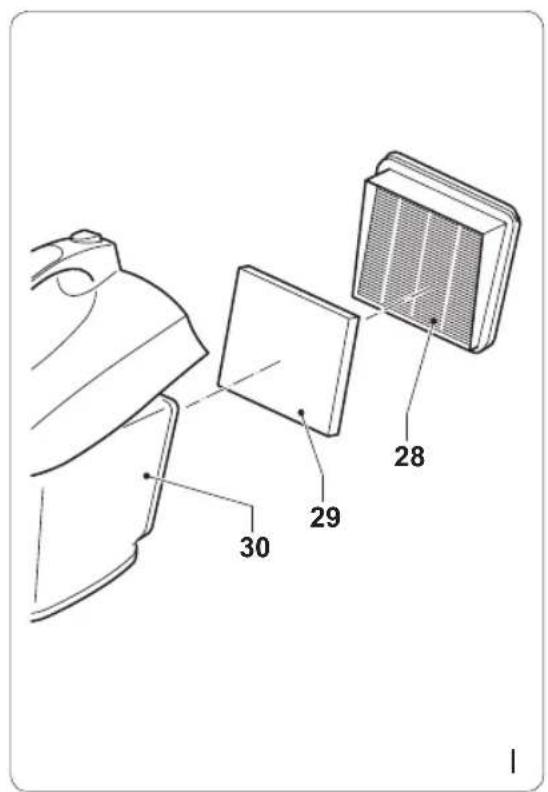
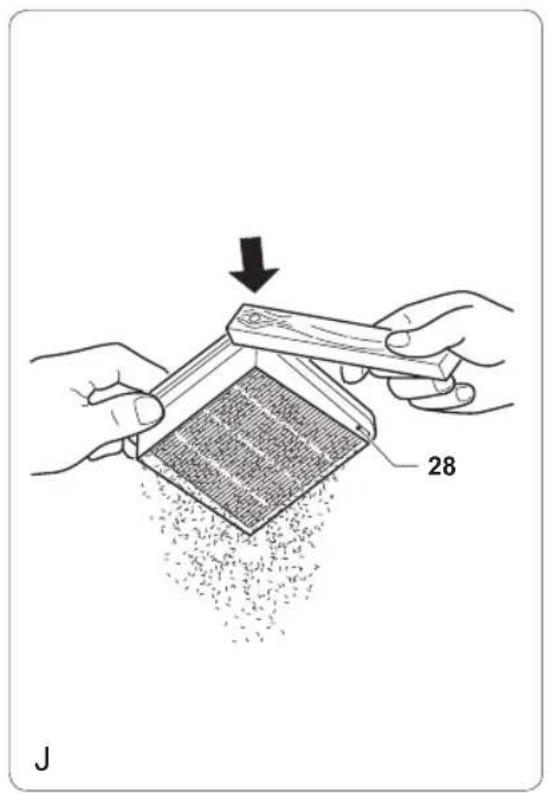
Cleaning and replacing the HEPA filter (fig. B, I & J)
The appliance is equipped with a HEPA filter. The HEPA filter is a special air filter which removes more than 99% of the dust particles that otherwise would recirculate back into the air. The HEPA filter must be cleaned regularly. The HEPA filter must be replaced after several months or whenever worn or damaged. Replacement HEPA filters are available from our service station.
Caution!
- Do not wash or rinse the HEPA filter.
- Do not tap the HEPA filter itself to avoid damage to the filter.
Keep the release button (7) pressed and pull the dust compartment (6) from the appliance.
Remove the HEPA filter (28) from the filter holder (30).
Carefully tap the plastic edge of the HEPA filter (28) to remove the dust particles.
If the filter is worn, use a new filter.
Insert the HEPA filter (28) into the filter holder (30).
Insert the dust compartment (6) into the appliance until the release button (7) clicks into place.
Cleaning and replacing the motor filter (fig. B & I)
The motor filter reduces the amount of dust entering the motor unit to a minimum. The motor filter must be cleaned regularly. The motor filter must be replaced whenever damaged. Replacement motor filters are available from our service station.
Caution!
- Do not wash or rinse the motor filter.
Keep the release button (7) pressed and pull the dust compartment (6) from the appliance.
Remove the HEPA filter (28) from the filter - holder (30).
Remove the motor filter (29) from the filter - holder (30).
Remove the dust from the motor filter (29) using a soft brush. If the filter is damaged, use a new filter.
Insert the motor filter (29) into the filter - holder (30).
Insert the HEPA filter (28) into the filter - holder (30).
Insert the dust compartment (6) into the appliance until the release button (7) clicks into place.
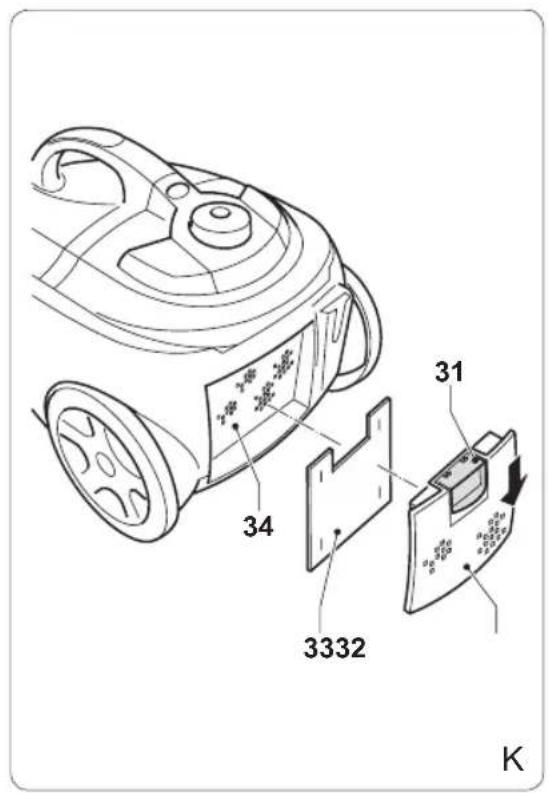
Cleaning and replacing the outlet filter (fig. K)
The outlet filter reduces the amount of dust entering the motor unit to a minimum. The outlet filter must be cleaned regularly. The outlet filter must be replaced after several months or whenever worn or damaged. Replacement outlet filters are available from our service station.
Caution!
- Do not wash or rinse the outlet filter.
Keep the release button (31) pressed and remove the cover (32).
Remove the outlet filter (33) from the filter holder (34).
Remove the dust from the outlet filter (33) using a soft brush. If the filter is worn, use a new filter.
Insert the outlet filter (33) into the filter - holder (34).
Mount the cover (32) until the release button (31) clicks into place.
Disclaimer
Subject to change; specifications can be changed without further notice.
Felicitations!
Tryck pa locket (26) tills frigoringsknappen (25) snapper fast.
Satt in dammbehallaren (6) i apparaten tills frigöringsknappen (7) snapper fast.
For at taende for apparatet, tryk pa tend/sluk-knappen (1).
Puroiogakpos owlva (Ek.E)
O oWnVac nPoektaonc (10) mTopei va puθμiTe i e 16 βnμata.
KpatnoTe To KouuTki KkEiDwatoC (24)
Tatnevo kai oupeTe to oAAnva TpoektaoC
(10) otv aattouuev n Theon.
ATeLeuepowTe To KouuTki KkEiDwatoC (24).
jlll (6) jlll jlll jlll jll l jlll jlll jlll jlll jlll jlll jlll jlll jlll jlll jlll jlll jlll jlll jlll jlll jlll jlll jlll jlll jlll jlll jlll jlll jlll jlll jlll jlll jlll jlll jlll jlll jlll jlll
(30)
(29) 100000000000000000000000000000000000000000000
J (29) J. (30)
Jolal (28) HEPA .(30)
(6)J (7)
Jus Jus Jus Jus Jus Jus Jus Jus Jus Jus Jus
-
-
-
-
-
-
-
-
-
-
-
-
-
-
-
-
-
-
-
-
-
-
-
-
-
-
-
-
-
-
-
- 1.
-
-
-
-
-
-
-
-
-
-
-
-
-
-
-
-
-
-
-
-
-
-
-
-
-
-
-
-
-
-
y
J 1
j = 1( 0,12,0,0)
jill 15 j jie biwai (p)
(2)
y 1
J 1
(E)
.16 (10) 11b11 b11
yj yj j 1500 (24) Jaa
al ball 10) (10)
.(24)
(F)
biul (13) bi j 1
12
(13)
.
buiol 1 buii j aiaai gila i bi
cbull 1200 (A) jll a jll
.(13)
(B)
(13)
all j q 1 all j all j all j
julil juaiaol jkaol y
jol 6)
jSall jdi jill jaiiaol jslal
g jj 6)
aLs (7) 11
(C)
14
jll jldj no sli pgs j
jglal jll Jannai
8)
- 18) (17)
AaS (19) 4 (20
(19) (8)
(17)
.(18)
(D)
9
(21) 20
(20) (9)
.(21)
(E)
(12)
.(10)
12)
.(23) 1 (22)
12
.(23) 1 (22)
(E.D)
(8) 16
.(10)
(8)g
.(16) (20)
(10)(2014)
(16) (22)
jglal jglal slwai 1g g g slic jc l y bslal o g jglal plisi wie jai Jai jao
(A)
332935/332936 aispaai piai dI jglll gall glal algill Prissess wlia jglll alll algal bilwulia jie .jiall pl
1
1
.2
3
4
5
Jjll Jaiiaall jkall .6
(1jll Jaiiaiall jkll) j 7
p 8
B 9
A 10
.11
biitai ji 12
.13
14
.15
gaaa .16
15 1
!
yI yI yI yI yI yI yI yI yI yI yI yI yI yI yI yI yI yI yI yI yI yI yI yI yI yI yI yI yI yI yI yI yI yI yI yI yI yI yI yI yI yI yI yI yI yI yI yI yI
411j! jll jaiil jaiil jll (B
14
2
aljie jie jie jie jie jie jie
a_i = 70%
. jglal jzaii wliai jgsall lao prui i 1 . glll cglg jglal prziuiy
Jai J. clall jao jjll jalil piaiuiy 1 .cll jla
J 1
- s jdlll
HEPA jJ 1 Jj
J 1
alall algll hai jkaill pisiui
Jiu:
1
J 10000000000000000000000000000000000000000000000000000000000000000000000000000000
Jy 100
. jy Jy
. y Jy
. y Jy
. y Jy
. y Jy
. y Jy
. y Jy
. y Jy
. y Jy
. y Jy
. y Jy
. y Jy
. y Jy
. y Jy
. y Jy
. y Jy
. y Jy
. y Jy
. y Jy
. y Jy
. y Jy
. . y Jy
. . y Jy
121 1
11 11 11 11 11 11 11 11 11 11 11 11 11 11 11 11 11 11 11 11 11 11 11 11 11 11 11 11 11 11 11 11 1
1
Princess jj 12
1 1
aolll lslj
1

- Gefeliciteerd!
- Instructions for use
- Safety instructions
- Warning!
- Use
- Safety of others
- After use
- Inspection and repairs
- Safety instructions for vacuum cleaners
- Description (fig. A)
- U.K. Wiring instructions
- Assembly
- Mounting and removing the dust compartment (fig. B)
- Caution!
- Mounting and removing the hose (fig. C)
- Mounting and removing the tube (fig. D)
- Mounting and removing the suction nozzle (fig. E)
- Mounting and removing the crevice nozzle (fig. D & E)
- Unwinding and rewinding the mains cable (fig. A)
- Adjusting the length of the tube (fig. E)
- Adjusting the suction nozzle (fig. F)
- Switching on and off (fig. A)
- Adjusting the suction force (fig. A)
- Adjusting the airflow (fig. A)
- Carrying the appliance (fig. A)
- Temporarily parking the suction nozzle (fig. G)
- Cleaning and maintenance
- Emptying the dust compartment (fig. A, B & H)
- Cleaning the round filter (fig. B & H)
- Cleaning and replacing the HEPA filter (fig. B, I & J)
- Cleaning and replacing the motor filter (fig. B & I)
- Cleaning and replacing the outlet filter (fig. K)
- Disclaimer
- Felicitations!
- Puroiogakpos owlva (Ek.E)
- (A)
- 2
- 1
- aolll lslj
Brand : PRINCESS
Model : 332936
Category : Vacuum Cleaner