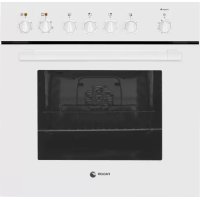
6H414AB - Electric oven FAGOR - Free user manual and instructions
Find the device manual for free 6H414AB FAGOR in PDF.



| Product type | Built-in electric oven |
| Brand | Fagor |
| Model | 6H414AB |
| Power supply | 220-240 V, 50 Hz, max power 2.5 kW |
| Capacity | 60 L (estimated) |
| Weight | 35 kg (approx.) |
| Dimensions (W x H x D) | Standard 60 cm – see rating plate |
| Cooking functions | Traditional cooking, fan-assisted cooking, turbo plus, strong grill, gentle grill, intensive bottom heat, fan-assisted bottom heat, defrost, rapid preheating (Celeris) |
| Cleaning | Self-cleaning catalytic walls, Aquaslading (steam cleaning) |
| Safety | Child lock, automatic safety shut-off |
| Included accessories | Multifunction grid, deep tray, flat tray, partial/full extraction guides |
| Interior lighting | Replaceable bulb |
| Repairability | Replaceable interior bulb, power cable replaceable by a professional |
| Installation type | Built-in, freestanding or with ceramic hob |
| Display | Digital or conventional depending on version |
Frequently Asked Questions - 6H414AB FAGOR
User questions about 6H414AB FAGOR
0 question about this device. Answer the ones you know or ask your own.
Ask a new question about this device
Download the instructions for your Electric oven in PDF format for free! Find your manual 6H414AB - FAGOR and take your electronic device back in hand. On this page are published all the documents necessary for the use of your device. 6H414AB by FAGOR.
USER MANUAL 6H414AB FAGOR
Important! Read the entire manual before using the oven. The documentation and accessories are inside the oven.
The texts in the manual correspond to the numbered diagrams.
Safety

Important
Keep this manual with the appliance. If you sell or give the appliance to another person, make sure you also pass on the user manual. Read these instructions carefully when using and installing the appliance. They are designed to protect your own and others' safety.
- The electrical installation that feeds the oven must have circuit breakers installed in accordance with current local installation regulations.
- The oven must be installed by an authorised installer in accordance with the manufacturer's instructions and diagrams.
- The electrical installation must be dimensioned for the maximum power indicated on the reference plate and the electrical socket must have a regulatory earth connection.
- If the power cord is damaged, it must be replaced by the after-sales technical service or by similarly qualified staff, to avoid hazard.
- Ensure the appliance is unplugged from the mains before replacing the oven lamp, to avoid electric shock.
- Do not use abrasive cleaning products or metal scouring pads to clean the oven door, as they could scratch the surface and cause the glass to shatter.
- During operation, some accessible parts may become hot.
Children under the age of 8 must not go near the appliance unless under permanent supervision.
- Do not touch the heating elements inside the oven.
- This appliance can be used by children aged from 8 years and above and persons with reduced physical, sensory or mental capabilities or lack of experience and knowledge if they have been given supervision or instruction concerning use of the appliance in a safe way and understand the hazards involved. Children shall not play with the appliance. Cleaning and user maintenance shall not be made by children without supervision.
- This appliance is designed for normal household use only. Do not use it for commercial or industrial purposes. Use exclusively for cooking food products.
- Do not try to modify the characteristics of the appliance. It could be dangerous.
- During cleaning by pyrolysis, surfaces become hotter than during normal use. Keep out of reach of children.
- Before cleaning with pyrolysis, remove all cooking items and signifi cant overflows.
- Do not put heavy weights on the oven door and make sure that children do not climb or sit on it.
- Always make sure that the oven is switched off before cleaning.
- After using the oven, make sure that all the controls are in the off position.
- Do not use the oven as a larder or to store accessories after use.
- Do not use steam or high pressure devices to clean the device (electrical device safety reasons)
- The oven door should always be kept closed when working, for all programmes, including the grill.

Identification

To find out which model your oven is ("a", "b", "c", "d", "e", "f") compare its control panel with the control panels shown in the illustrations.
1
Installation

1.1 Unpacking. Remove all the protective packaging elements.
1.2 Mains connection. Always take into account the data on the reference plate (1.2.1) and the measurements of the cabinet the oven will be housed in (1.2.2, 1.2.3).
Freestanding ovens: the appliance must be connected to the mains with a fixed single-phase connection with the neutral (blue) connection guaranteed (1.2.4). Fit the oven into the space, ensuring there is no excess cable in the upper part (1.2.5, 1.2.6). Screw it to the ftting using the two screws supplied (1.2.7). The fitted furniture or its surface must be heat-resistant. The time must be set in order to finish the installation (a, c, d, f). After a period of inactivity, the machine will turn to standby and its brightness will diminish or the screen will switch off, depending on the model.
Multi-purpose ovens for vitro-ceramic
hobs: to avoid hazard, the oven may only be installed with the vitro-ceramic hobs recommended by the manufacturer. Fit the cooking hob into the worktop and remove the switch box (1.2.8). Insert the hob in the worktop space according to the installation requirements (see the hob manual) (1.2.9). Insert the oven into the cabinet space, leaving enough room for handling (1.2.10). Screw the switch box onto the oven (1.2.11, 1.2.12). Connect the hob to the oven (1.2.13). Fully insert the oven and fix it in place with the two screws supplied (1.2.14, 1.2.15). Firmly push in the control accessories, according to the cooking ring type (1.2.16), and the controls (1.2.17).

Using the oven
Before using your new oven for the first time, heat it up while empty (with no food in it and with the control turned to , at for 30 minutes at 250^ ). It may produce some smoke or a bad smell (this is normal and is caused by the oven heating up grease residue etc.). When it has cooled down, pre-clean it by wiping the inside with a damp cloth.
2.1 Accessories. Depending on the model there is a Deep Tray (2.1.1), Flat Tray (2.1.2) and Multifunctional Grill (2.1.3) that work separately. If it also possible to combine either tray with the Multifunctional Grill (2.1.4) to make a set. All the accessories or sets can be used directly or mounted on the Partial Extraction Grill (2.1.5) or the Total Extraction Grill (2.1.6, 2.1.7), (2.1.8). If you have the partial extraction tray, it can be used separately or together with trays (3 types) (2.1.9). The Simple Grill is used separately (2.1.10). If you have telescopic rails, remove the tray before installing them in the oven (2.1.11). The telescopic rails extend automatically due to the weight of the tray when the oven is opened (2.1.12). Food must always be placed on a tray on the telescopic rails (2.1.13). Bear in mind the position of the grills when installing them. There are anti-tipping stops at the sides (2.1.14).
2.2 Accessory positions. The accessories can be fitted in 5 different positions,
2.3 Setting the time. Ordinary clock: Pull on the lower dial and turn it to the right (2.3.1). Set the time (2.3.2). Digital clock: press the button. (2.3.3). Set the time using the and buttons (2.3.4). After a few seconds will stop flashing (2.3.5).
Note: the time will need to be set again after an electricity cut or when the hour changes.
2.4 Cooking the food. Place the food in the oven. Consult the cooking table to choose the accessory or accessories to be used and their position. Close the oven door.
2.5 Selecting the cooking function.
Select the cooking function according to the model

Traditional fanned heat. For any kind of dish. Several dishes may be cooked at once without their flavours or smells mixing.

Turbo plus. The heat is produced by the central element.

Fanned high grill. This browns the food, distributing the heat evenly. Ideal for large-sized roasts.

High grill. For browning pasta, soufflés and bechamel sauce.
Low grill. For hamburgers, toast and food with a small surface area.
High base heat. The heat from the oven base is evenly distributed. Ideal for paellas or pizzas.
Fanned base heat. The fan distributes the base heat evenly. Suitable for paellas.
Traditional heat. For bread, cakes, cakes with filling and lean meat.
Defrost. Rapidly thaws any kind of food.
Celeris. For pre-heating the oven.
2.6 Selecting the temperature ^ C . Select the temperature by turning the selector dial. The pilot light will switch off when the selected temperature is reached.
TIME FUNCTIONS
2.7 Selecting the cooking time. Timer: select the minutes by turning the selector dial. (2.7.1). If you prefer the oven to function without a time limit, turn it to hand position
Ordinary clock: Turn the upper dial to the right and select the minutes (2.7.2). If you prefer the oven to function without a time limit, turn it to hand position and line up the red arrow with the time shown by the hands of the clock.
Digital clock: press the button. will start to flash (2.7.3). Adjust the duration using the + and - buttons (2.7.4). will stop flash after a few seconds.
2.8 Selecting the start time.
Ordinary clock: When you have selected the programme and the temperature, turn the upper dial to A. Then pull on the upper dial and turn it until the red arrow shows the start time (2.8.1). Select the duration by turning the upper dial to the right.
2.9 Selecting the end time.
Digital clock: after selecting the programme, temperature and cooking time, press the button. will start to flash (2.9.1). Set the desired end of cooking time by pressing the + and - buttons (2.9.2). will stop flashing after a few seconds.
2.10 Beeper function.
Ordinary clock: Select the position 0 on the programme dial (2.10.1). Turn the upper dial to the right and select the minutes (2.10.2). This only works if the oven is switched off.
Digital clock: press the button several times. will start to flash (2.10.3). Adjust the duration using the + and - buttons (2.10.4). will stop flashing after a few seconds. This works with the oven switched off and switched on.
2.11 Child lock. To prevent children from playing with the oven.
Ordinary clock: Turn the upper dial to select A.(2.11.1)
Digital clock: press the + and - buttons
at the same time and hold them down for 3 seconds. will appear on the display (2.11.2). To remove the child lock, repeat the process.
Warnings: when the cooking time has elapsed, turn the function and temperature dials to 0 and the time dial to hand position. Open the oven door, taking care as hot steam may come out.
3
Maintenance and cleaning

3.1 Cleaning the accessories. The accessories are dishwasher-safe. To wash them up by hand, use normal detergent. Leave them to soak for easier cleaning.
Cleaning the inside of the oven.
3.2 Smooth-walled models. ake out the side runners. Depending on the models, the side runners are fixed in two ways, either without a support (3.2.1, 3.2.2) or with a support (3.2.4, 3.2.5). Clean the oven while it is warm, wiping the walls with a cloth soaked in hot soapy water (3.2.3, 3.2.6). When you have cleaned the oven walls, replace the runners.
3.3 Self-cleaning rough-walled models. On these models, the rear plate and side panels are covered with a self-cleaning enamel that removes the grease while the oven is functioning. The side panels are reversible, doubling the lifetime of the coating.
To remove the self-cleaning panels, firstly remove the side rails.
If the panels are not performing the selfcleaning process sufficiently, they will need regenerating. To do this, remove all the accessories and utensils from the inside of the oven. Thoroughly clean the oven surfaces that are not self-cleaning. Select the function.
Set the temperature to 250^ and set the time between 30 and 60 minutes, depending on how dirty the oven is.
When the cleaning programme ends and the oven has cooled down, wipe the selfcleaning elements with a damp sponge. They will then be totally functional again. Note: Do not use specific oven cleaning products to clean the catalytic walls.
Do not scrape the surface with metal scouring pads or sharp or pointed instruments.
3.4 Cleaning the oven ceiling. If your oven has a fold-down grill, pull upwards and press to fold it down (3.4.1) and clean the top wall with a damp cloth (3.4.2).
3.5 Cleaning the outside of the oven. Use
neutral cleaning products and dry the oven well with a soft cloth.
3.6 The Aquasliding Function system makes it easier to clean the oven with steam. It takes 35 minutes and is done as follows:
-
Start with a lukewarm oven.
-
Remove all accessories and side guides from the model.
-
Spray 200ml of water onto the inside walls of the oven. Using too much water could cause overflow.
Depending on the model, a) Aquaslading wait until the oven indicates the end of the cleaning cycle.
b) Traditional t 150^ for 10 minutes. After this time has elapsed, reduce the temperature to minimum (35^ - 75^ according to the model) and maintain for 20 minutes. Failure to follow these instructions may cause condensation on the front.
-
Switch the oven off.
-
Carefully open the oven door, avoiding contact with the steam.
-
At the end of the cycle, remove the water from inside and wipe away any remaining dirt with a dishcloth. This cycle is used to assist cleaning but loses its effectiveness if the recommended times are not followed.
-
Depending on the model, it can assist the Warning function.
Warnings: 1. Make sure the oven is switched off.
2. Never use steam cleaning machines.
4
Troubleshooting

You can solve the following problems yourself:
4.1 The oven does not switch on. Check it is plugged in and that the time selector dial is not turned to 0.
4.2 Smoke comes out during cooking. Tum the temperature down and/or clean the oven (point 3.3).
4.3 The oven makes a noise after cooking. This is normal, as the fan keeps running until the temperature inside and outside the oven is reduced.
Digital display models have a diagnosis system which detects any problems and warns the user. You can see this on the display:
4.4 Oven not working. fl ashing. Turn the function selector dial to 0 and set the time (point 2.3).
4.5 Oven not working. Is fl ashing. The oven has been working for several hours and for safety reasons it has switched off
automatically. Turn the function selector dial to 0 and set the time (point 2.3).
4.6 Oven not working. is fl ashing. Turn the function selector dial to 0 and remove the child lock (point 2.11).
4.7 Oven not working. is flashing. Press any button.
Do not try to repair the oven yourself. Call the technical assistance service.
5
The Environment

This oven has been designed with environmental protection in mind.
Respect the environment. Only preheat the oven when necessary (see table). Use dark coloured cake tins whenever possible. For long cooking times, switch off the oven 5 or 10 minutes before the end of cooking time.
Management of waste electrical and electronic equipment.
The symbol indicates that the appliance must not be disposed of in traditional bins for domestic waste.
Take your oven to the a special collection centre. Recycling domestic appliances will prevent negative consequences for health and the environment and will allow savings on energy and resources.
For further information, contact the local authorities or the shop where you bought the oven.
Cooking Table
| meat and poultryvege | Food | Programme and temperature | Time | Position | Preheat | Accessories | |
| beef 1,5 Kg | 190°C | 210°C 50 - 60 min no | 1 | ||||
| pork 1,5 Kg | 150°C | 180°C | 85 - 95 min | 2 | no | ||
| lamb 1,2 Kg | 200°C | 220°C | 40 - 50 min | 2 | no | ||
| turkey 4 Kg | 170°C | 190°C | 115 - 125 min | 1 | no | ||
| chicken 1,25 Kg | 210°C | 230°C | 50 - 60 min | 1 | no | ||
| roasted red peppers 1,25 Kg | baked hake/baked cod 1,5 Kg | 190°C | 210°C | 30 - 40 min | 2 | no | |
| stuffed tomat-oes 4 servings | stuffed tomatoes 4 servings | 200°C | 220°C | 15 - 19 min | 2 | no | |
| baked hake/baked cod 1,5 Kg | baked hake/baked cod 1,5 Kg | 210°C | 230°C | 7 - 9 min | 2 | yes | |
| roasted lobster 1 Kg | lobster 1 Kg | 220°C | 240°C | 4 - 5 min | 4 | yes | |
| pizza | pizza | 200°C | 220°C | 18 - 22 min | 1 | yes | |
| defrosting, all types of food | defrosting, all types of food | 75°C | 2 | no | |||
| Fermenting dough for bread/cakes | fermenting dough for bread/cakes | 40°C | 40°C | 25 - 30 min | 0 | no | |
| 8.4.1 Butter cookies | 175°C | 22 min | 3 | yes | Deep Tray | ||
| 8.4.2 Fairy cakes | 185°C 23 min | 2 | yes | Deep Tray | |||
| *160°C 45 min | 3 | no | Deep Tray/standard | ||||
| 8.5.1 Fat-free sponge cake | 180°C 25 min | 1 | no | Mould on grill | |||
| *180°C | 40 min | 3 | no | 2 moulds on 1 grills and deep | |||
| 8.5.2 Apple tart | 185°C | 40-45 min | 2 | no | Grill | ||
| *180°C | 50-55 min | 3 | no | 2 moulds on 1 grills and deep | |||
| 9.1 Surface browning | *250°C | 2-3 min | 4 | Pre-heat for 5 min | Cook 2-3 min. on grill | ||
- Depending on the model.
Bedienungsanleitung
Tpainohnbltnnoaynenla. Xne6ooyhble 13eINNA, INPON, INPOXKN C HauHHKO INOCTHOE MRCO.

Pa3mopaxnBaHne. VcnoIb3yra 3TOT peXHM, Bbl CMOKETe B KpaTuaIuMe cPOK pa3MOpO3NTb IIO6bIe npOdyKTbl.

Celeris. 3ToT pexkIM npEHa3NaueH dI npEdbapntelbHOro pa3OprBa dyXOBKn.
2.6 BbI6Op TemnepaTpyb C YcTaHOBInTe TemnepaTpy, NOBOPaHIBa nepeKIOuHaTeNb.KoHTpOJIbHa JAMNOUka NorachET, KOrJa 6yJeT yCTaHOBNeHa HyXHaA TEMnepaTpa.
ФУHKUMB PБЕМИ
2.7 YctaHOBka BpeMeH npiroTOBHeHn. TaMep 念 :YCTaHOBtme MNHTb, NOBopAHBaN nepeKIOHATeNB (2.7.1).EcnB bXOTNE, YTObI dyXOBKa paOtaNa 6e3 BPemEHOrO OPAHHeHn, yCTaHOBt E e B No3UIMo pyHoro ynpabHeHn. O6bHbIe Yacbl: NObepHyTB BepxHIOpyKByPABoN yCTaHOBt MHNyTbI (2.7.2).EcnB bXOTNE, YTObI dXOBKa paOtaNa 6e3 BpeMeHHoro OPAHHeHn, YCTaHOBtE eNo3UIMo pyHoro ynpabHeHn. n CdeNaTe TaK, YTObI KpaCHaA CTpeKl KaCobnaJc CBpeHEm, KOToPOe NOKa3bIAoiT CTpeKN YacOB.
LdpoBbIe aacb:HaKMTe Ha KJIaBnUy L, HauHET MIRATb 3NaOH (2.7.3).YCTaHOBtE BpEM npriTOBHeHnPi NOMOIN KJIaBn+ -2.7.4). Upeez HeCKoJIbKO CeKHyN D 3NaOH [ ] nepeCTaHET MIRATb.
2.8 YctaHObKa BpeMeHn 3aNycka.
06bHbIyacbI: Nocne Bblbopa nporpaMMbI INBENHHbI TEMnepaTpybI NOBepHyTb BEPxHIOO pyKBy BNOLOXKeHHe. Nocne 3TOrO OTTHyTb BEPXHOO pyKBy INBpAaTb ee Do TEX nop, NOKa KpaCHa CTpeJIka He nokaxet Bpema Nycka (2.8.1).
2.9 YcTaHOBbKa BpeMeH 3aBepeHn HOpPoBbIe YacbI: Nocne yCTaHOBKn IpoTpaMMbl, TEMpePaTybpN BpeMeH INPIROTOBHeHn HaxMNTe
Ha KnaBnUy L, HauHET Mrratb 3HaQOK (2.9.1). YctaHOBITE BpEMr 3aBepueHn npri NMOuIN KNABNI +, (2.9.2).Yepe3 HeckonbKO cekyHd 3HaQK nepeCTaHET Mrratb.
2.10Функцmaсигнадизаци
ObHbIe yacIy:YCTaHOBtnepeKIOuATEIb nporpAMM Bno3nHIO 0 (2.10.1).IOBepHytB BepXHOO pyKy BIPABO N YCTaHOBt MBHytB (2.10.2).ToIbKO ecmIyXOBKa HaxoHTCBA Hepa6OtaIOUcEM COCTOHIM. LooPobBie yacIb:HaXMMTE HeCKoBko pa3 Ha KJIaBNIuN HAChET MIRAtb 3HaOOK (2.10.3).YCTaHOBtBe BPema PpiroTOBHeHr npi IOMOUs KJIaBNIu -2.10.4).Yepe3 HeckoBko CEyHd 3HaOOk nepeCTaHET MIRAtb. DxOBKa MOXeT HaxoHTbCA KaK B pa6OtaIOUcEM,TAK IN B Hepa6OtaIOUcEM COCTOHIM.
2.11ФyHKU6IbOKnOBKn:HTObI DeTn He MOrnn MaHInTyNPOBaTb C DxyOBKoN.
06bHbIe Yacb:BpaaTaB BepXIOO pyKy Do TcNop, noka He 6ydt yctaHOBeHO . (2.11.1)
Ucpobbueyacbl:HaKmMaTeBteHne3cekyHd OHOBPemEHNO KlaBUN-,NOTOBpaNTc3NaOK (2.11.2).Ipa36nokpOBKn NOBTOpe ONepaunIO.
IpeynpexeHne: Io OKOHaHbBpeMeH npriROBHeH yCTAHOBITE nepeKIOUaTeHn cyHKuN N TEMepaTpybl B nOtoXeHne 0,a nepeKIOUaTeHb BpeMeH B no3uio pyuHoro ynpabHeHn .OTKpbBaIte oCtopoXHO DBepy dXOBKn, TAK KAK OTTuDa MoKeT BbIPBaTc RopAHy nap.

YxOu n ynctKa

3.1 YnCTKa DOnONHmTeJbHbIX npCnOcO6neHm.
Bce npncnoc6bHeHn npnoDhbl nI MytBn B nocydomoeyho Maunhe. Pn uCTke BpyHyIO nCNOb3yTe 0bUHbE MOUe CpeCTBa. TTo6bI O6JIeHTb NcTky npncnoc6bHeHn, INMOxHO npdBaPteJIbHO 3amOHTb.
HcTka BHTpeHHHe NOBepxHOCTn KamepbI dYXOBKn.
3.2 MoJIcN C rJaKnMn CTeHkAMn. HeoXoIMo CHATb 6OKOBbie HaprabIIOUme. B 3aBcIMOCTn OT MOJIe NdyOBOrO WkaFpa 6OKOBbie HaprabIIOUme MOrTy KpeINTBcA ODNIM IN3 DByx cNoCobB: 6e3 ONOpBI (3.2.1, 3.2.2) INn C onOpoi (3.2.4, 3.2.5). DxyOBky cJeNyET MbITb CnErKa HApTeOn, INpOMbIBa TAnKy RopHNei BOdON MOIOUm CpeCDTBM INn MBInOM (3.2.3, 3.2.6). Iocne 3aBepSeHn PpoCeDpybO uOChTKn CTeHok HAprabIIOUme CneDeyET yCTaHOBNtB Ha MeTO.
3.3 MoJIcpeJIbeΦHbIMnCTeHkAMn (camoouuaouneca).BdyxOBkax TaKHX MOJIeN 3aDHRAI60KOBbie naHEJIIOKpbITbI camoouauouece3MaJIbIO,6laOdaPryMyXIp ydaJIHTcCO CTeHOK BO BPEMpaBOtI pnp6opa. BoKOBbie naHEJI MoxHO IpeBopauHBaTb Ha dpyrHy cToPOHy, YTO IpOJaNEBaET cPOK ClyXbI ObluOBOHOrO cNoR B Dba pa3a.
Korda nane nepectaHT obecneHbTaB doCTaTOHyIO
OuCTy 3a CHT CBOUX CBOICTB, HEOXOIMO
npou3BcTn ux perehepaunio. Iyra 3TOrO u3 uka pa Hyxho N3BvneB BCE npHaJNeXHOCTN EMKoCTn.
Tocne 3TOrO TuaTeBHO OuHCTnTb NOBepxHOCTn
IyXOBKn, He HBJIOUneCn CaMOOuHuaIOUmmncn. 3aTeM 3aJnte peKm
YctaHOBtTe TEMnepaTpy Ha ypOBHe 250 ^ N BpEMr
B Dnna3OHe 30-60 MNHyT B 3aBNCUMOCTN OT CTENEHN 3aqrpaHHocTN np6opa.
TTOKAPorpmaOHTK3aBepnT
paBoTy n DuxOBKa OCTbIHET, CaMOOuIuaIOUJIeCN 3IeMeHTbI Heo6XoDMIO IpOTepTe BnaxHOI r6Koi.
IIO 3aBepeHm 3ToI npOeUpybI OHI NOJIHOCTbIO BOCCTaHaBJIbAHO T CBOIO pNFOJHOCTb K 3KcNlYaT
3.4 Ynctka notonka.Ecn nyxOBKa NmeeT CbeMbH
rPnIb,TO HJXHO pnpnoHHTb ero,HaKaTb Ha Hero N BbHyTb BHN3 (3.4.1),IOUHCTNTe BepxHIO CTeHKy BlaxKHO TpAknOi (3.4.2).
3.5 Unctka HapykhbIX NOBepxHOcteI dYXOBKn.
IcnoIb3yIte HeITpAlbHbIe MOIOUme CpeIcTBA, XopoOo BbITpIte DxyOBky KyCKOM MArKoT KaHn.
3.6 PexkM Aquasiding. 3TO peXIM, o6JIeUaIOUI
HcTky DuxOBoro 1ka4a3a Cuet NcNoIb3OBaHnI
BOJHOrO npa.ДIINTeJIbHOCTb pa60Tb I npIbOpa B 3TOM pexKIMe COCTaBnAET 35 MInHy, IN OH NcToNb3yEtCra CneDyUoUMM o6pa30M:
- Ynctky DuxOBoro 1kaqha Heo6xOJIMo HaHHaTb, KOrda OH TeJIbI.
- N3BneB BCE npHnAdJeXHoCTN 60KOBbIe HAnpaBJIIOUe (B 3aBNCIMOCTN OT MoDJI).
Pa36pb13raTb nyIbBepn3aTopom 200 Ml BObl Ha BHTpeHnne CTeHNKuKaopa. Ipn H36blTOHOM KOJIueCTBe BObl OHA MOKeT BblNBaTcbr.
B3aBcHMOCTOnOTMOneJI,
a) Aquaslading. IdoJxnte, noka dYXOBoi shkaΦ He coo6uNT O 3aBepueHn cukna OCHCTKn.
b) 6bIHyBn npT TemnepaType 150°C Ha 10 MNHT. IIO nCTeueHn yKa3aHHOro BpemeHn YcTaHOBnTb TEMpeaTyPHa MHNImaJIbHOM 3NaueHn (OT 35 Do 75°C B 3aBNCIMOCTn OT MOJeHn) n DaTb npu6opy npa60TaTb 20 MNHT. Pn HECo6NIODeHn 3TNx yKa3aHn Ha nepeDHei CTeHKe MoKet Opa3OBBiBaTbcn KOHdEHCAT.
- BbiklouHTb dyxOBOu kαφ.
- OcToPoxKHO OTKpbITb DBepeu WkaPca, CneIa 3a TEM, YTO6bI He o6KeueBcra napOM.
-ПоЗавершеницклаячстknубразьизшkaфа BODYИБITepeTbOCTaTKN3aPRA3HeHIN TPRANKO. 3TOT BCNOMORAteNBHyI ZKlДЯ ONUCTKN yTpauHBAETФфсEkTNBHOCTb,ecnI YUcTKa BbINOJIHReTc6e3co6JIIODeHInyka3aHHbIX 3HaueHINВрemeHn.
*B3aBNCIMOCNOTMODEIN BKAueCTBE BCIOMOrAteJIbHOH MOKET NCIIOJIb3OBaTbCnpyHKUH INpeDyIpyEeHnA.
PepdynpekdeHn:1.YIOCTOBeBpTecb TOM,HTO DxyOBKa HaxoNTcB Hepa6oTaIoEeM CoCToHn.2.HNKOrda He IcNoJIb3yIte NapOBBe ONUCTtEnI.

Ppo6IeMbI

HeKOTOpBie npOJIeMbI BbIMoKeTe peuINb CaM.
4.1 DyXOBKa He pa6oTaet. YIOCTOBepeBbTEcB B TOM, YTO DyXOBKa NOKJIIOHeHa K CETn N/NIIN YTO NepeKJIIOUaTeJIb BpemeHn He HaxoDNTCB NIOJOKeHmN 0.
4.2 Bo Bpem npiroTOBnHn NOABJnEeTc dbIM.
YMeHbIeTe TempeaTpy n/nn noHcTne DyXOBky (nyHKT 3.3).
4.3 DuyOBka npOn3BODnT wym, KOrda npriroTOBHeHne yKe 3aBepseHo. 3To HopMaJIbHOe ABNeHne, BeHTnIATOp npOJONXaET pa6oTaTb, YTO6bl NOHN3NTb TEMpePaTyP BHyTpN IN ChApyKn DuyOBKn.
Moenn CnPobBIM DnCnneem ChabxHb CnCTeMoI
DnaHnOCTNk, N03BONHOueo6hApyKuBaT IIObIe HenoJaKn
IN CnHaJIIN3nPoBaTb O Hx. 3To OTo6paXaETcHa DnCnnee.
4.4 DyXOBKa He pa6oTaE.Mrae3HaQOK .YcTaHOBnTe nepeKJIIOuAteJIb cyHKmB nIOnJKeHne O n yCTaHOBnTe TeKyUee Bpemr (nyHKT 2.3).
4.5 DyXOBka He pa6oTaet. Mraet 3NaOcK .DyXOBka pa6oTana B TeueHne HeCKoJIbKINx YacOB n ABToMaTHueCKn OTKnIOuHNacB dIa ObecNeueHn 6e3OnaCHOCTN. YctAHOBtte NepeKlIOUATEnb FyHKmB NonoKeHne O n yctAHOBtte TekUee Bpemr (nyHKT 2.3).
4.6 DyXOBKa He pa6oTaE. Mrae3HaQok [ ] . YCTaHOBnTe nepeKIOHcAteJIb cyHKmB nONoxKeHne 0 n CHIMnTE 6NoKIpOBky (nyHKT 2.11).
4.7 DyXOBKa He pa6oTaet. Mraet 3HaQok .HaxMnte HIO6yIO KlaBnUy.

- He npou3BOUnte C dyxOBKoHnKaKuX MaHnPyIaIcN, CBXkUTecb COTDeJOM TexO6CJyKuBaHaIa.

OkpyxuaouaCpea

KoHCTpykunnydxyOBKn OCHOBaHa Ha npHHunax 3aunbl Okpykaoue Cpebl.
Co6JIOdaIte npHcunIbI 3aunIbI OkpyKaiouei
Cpebl. PpOIN3BOIDTe npeBapNTeNbHoe HArpeBaHne DxyOBKn, ToIbKO eCNI 3TO Heo6XoDIMO (CM. TaBnUy).
PnDnTbHpaBote DyXOBKn BblKIOaHTe e3a 5-10 MNHT Do yCTAHOBENHO BPemHN.
Ipo6Jema Otpa6oTaHHbIX 3NeKtpnuecknx n 3NeKtpoHHbIX annapatob.
O6o3haeHne yKa3bIBAeT Ha TO, YTO DaHHbI np60b HJIb3r Bbl6paCbIBaTb B 06bUHbIe KOHTeHepbl IIN 6blTOBbIX OTXODOB. NpeDaIte BaWy DuxOBKv B CNEuAIIbHbI YeHTp npEIMKn. YTuNl3aUNaY 6blTOBbIX 3JeKTPoPnp6OBn O3BONReT n36ExKaTb HeratunBbIX NocNECTBn DInI 3DopOBBa, OKpyKaIOSei CpeDbI INOMORAET 3KOHOOMtB 3JeKTPo3HePRnIO n pecypcbI. DnI POJUYHnI DOnOIHNITbHON INHOpMaUNm O6paTNTecB K MEcTHbIM BlaCTAM INN B OprAHN3aUNIO, rDe Bbl npNo6peNl BAwY DuxOBKy.
Ta6nca npiroTOBJeHna
Forns polivalents per a plaques
- Safety
- Important
- Multi-purpose ovens for vitro-ceramic
- TIME FUNCTIONS
- 3
- Maintenance and cleaning
- Troubleshooting
- The Environment
- This oven has been designed with environmental protection in mind.
- Management of waste electrical and electronic equipment.
- Cooking Table
- Bedienungsanleitung
- ФУHKUMB PБЕМИ
- YctaHObKa BpeMeHn 3aNycka.
- 2.10Функцmaсигнадизаци
- YxOu n ynctKa
- YnCTKa DOnONHmTeJbHbIX npCnOcO6neHm.
- HcTka BHTpeHHHe NOBepxHOCTn KamepbI dYXOBKn.
- Ppo6IeMbI
- OkpyxuaouaCpea
- Forns polivalents per a plaques
Brand : FAGOR
Model : 6H414AB
Category : Electric oven