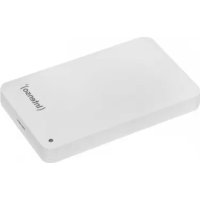
Memory Case - External hard drive INTENSO - Free user manual and instructions
Find the device manual for free Memory Case INTENSO in PDF.



| Product type | External hard drive |
| Brand | Intenso |
| Model | Memory Case |
| Format | 2.5 inches (6.35 cm) |
| Interface | USB 3.0 (backward compatible with USB 2.0) |
| Maximum transfer speed | 5 Gbit/s (USB 3.0) |
| Dimensions (case) | 15 x 78 x 127 mm (approximate) |
| Weight | Approximately 150 g |
| Power supply | Via USB port (5 V) |
| Compatible operating systems | Windows 7/8/8.1/10, Mac OS 10.x |
| Main functions | Data storage and transfer |
| Status LED | On during operation, flashes during access |
| Included accessories | Hard drive, USB 3.0 cable, user manual |
| Care and cleaning | Clean with a dry, soft cloth. Do not use liquids. |
| Safety | Avoid shocks, humidity, dust, and strong magnetic fields. |
| Spare parts and repairability | Not user-serviceable. Contact customer service in case of defect. |
| Warranty | 2 years (in addition to statutory warranty) |
| Capacity | Varies by model |
Frequently Asked Questions - Memory Case INTENSO
User questions about Memory Case INTENSO
0 question about this device. Answer the ones you know or ask your own.
Ask a new question about this device
Download the instructions for your External hard drive in PDF format for free! Find your manual Memory Case - INTENSO and take your electronic device back in hand. On this page are published all the documents necessary for the use of your device. Memory Case by INTENSO.
USER MANUAL Memory Case INTENSO
Declaration of conformity 2
General 2
Use
System requirements 3
Connecting the hard drive 3
Removing the hard drive 3
Safety instructions 4
Assistance with problems 4
Technical data 5
Disposal 5
Exclusion of liability 5
Guarantee Conditions and complaints procedure 6
2
OVERVIEW
Delivery scope
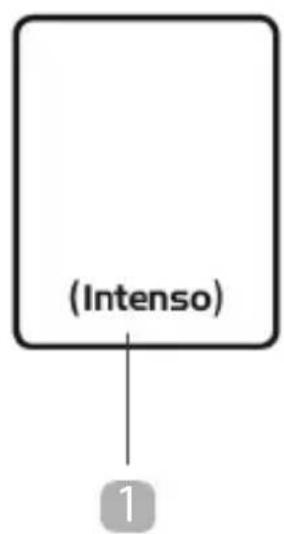
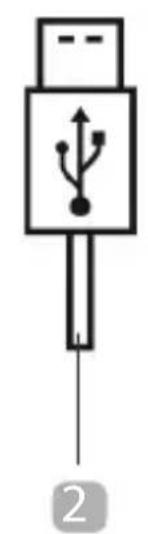
Intenso Super Speed USB 3.0 hard drive (downwards compatible)
USB 3.0 cable
5 Operating instructions
Declaration of conformity
The CE marking says that this product meets the requirements of all EU Directi ves applicable for this product.
GENERAL
About these instructions
Read these instructions carefully and please observe and heed all references made in these instructions to guarantee a long life and reliable use of the device. Please keep these instructions ready to hand and pass them on to other users of the device.
Intended use
The primary purpose of this external hard drive is the storage of data from PCs, Notebooks, Ultrabooks or MAC computers. This product is not intended for commercial use or for medical and special applicati ons, where the failure of the product can cause injuries, mortaliti es or considerable material damages. In the case of use which does not correspond to the intended use, the liability expires. TThe opening, as well as conversion of the device and the use of additi onal devices and accessories, which are not approved by us, must be refrained from. Do not use the device under extreme ambient condi ons and observe the safety instructi ons. Non-observation of the information on and safety instructi ons in these Instructi ons is deemed as non-observation of the intended use and leads to expiry of the liability and can lead to personal or material damage.
USE
System requirements
This hard drive is compatible with the operating systems MS Windows 7 / 8 / 8.1 / 10 and Mac OS 10.x*. A free USB interface is required to operate it.
*Trademarks: Windows 7/8/8.1/10 are registered trademarks of the Microsoft Corporation. Macintosh and MAC are registered trademarks of Apple Computer. All brands and third party names are the property of the respective user.
Notes:
A USB 3.0 interface card is necessary for the USB 3.0 operation The hard drive is downward compatible to previous USB standards. The hardware configuration of your PC and the used operating system can influence the compatibility of the hard drive.
Power supply under USB 2.0: In the case that your USB 3.0 hard drive is not recognised on a computer with a USB 2.0 port, the power supply could be a possible cause. Please connect a USB hub with external power supply in this case.
Connecting the hard drive
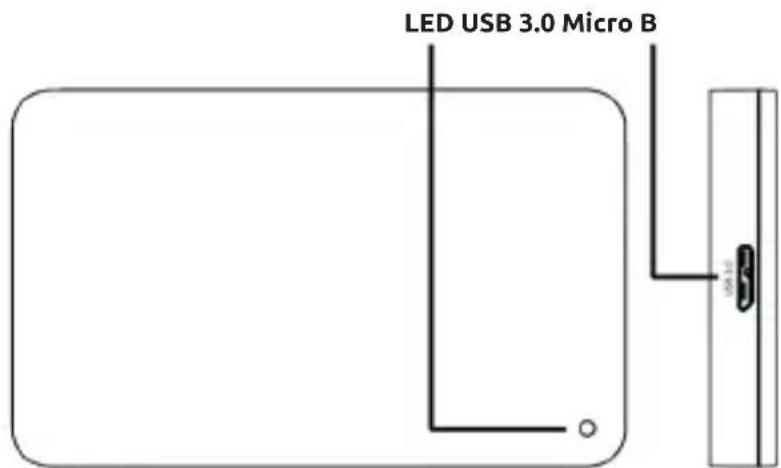
To connect the external hard drive to your computer, please use only the supplied USB cable. Connect the USB 3.0 plug with the Intenso hard drive and the plug of the USB cable end with your computer.
The computer recognizes the "new hardware" and installs the driver automatically. Wait until the driver installation is completed. In the "workspace" there is now another drive with the designation "Intenso" available.
As soon as the external drive is connected with the computer, the LED lights up The LED flashes when a write or read operation is carried out.
Removing the hard drive
Depending on the used operating system, the hard drive must be logged off before the connection to the computer is interrupted. For further details please refer to the Help Section of your operating system provider. The device may not be removed when it is still being accessed (flashing LED). This can lead to damages and/or data loss. Please close all the files located on the hard drive (photos, documents, etc.) before removing the hard drive.
SAFETY INSTRUCTIONS
Dangers for children and persons with restricted physical, sensory or mental abilities:
Children often underestimate dangers or do not recognise them at all. This device is not intended to be used by persons (including children) with restricted sensory, physical or mental abilities or lack of experience and/or knowledge, unless they are supervised by a person responsible for their safety or received instructions from the person on how to use the device and they have understood the resultant dangers. Unsupervised children should not have access to the device. Make sure that children do not play with the device.
General
The device may not be exposed to spray or dripping water.
Vessels filled with liquid (vases, glasses or similar) may not be placed on the device. There is danger that the vessel tips over and the liquid impairs the electrical safety.
Do not operate this device with wet hands.
Do not insert any items, which are not intended for its use, into the openings of the device. This could lead to an electrical short-circuit and a resultant fire.
Do not block or cover the openings of the product.
Under no circumstances use the device in the case of visible damages on it or the USB cable.
When positioning the device, pay attention that no one can tread on the cable or trip over it. Do not place any objects onto the cable.
Do not drop the device or subject it to vibrations or impacts, this applies in particular to the transport. Do not move the device when it is in operation. Hard drives are extremely vulnerable and the data located on them can be destroyed irretrievably through this. Such damages are not contained in the guarantees.
Carry out data backups frequently to avoid a possible data loss.
Data recovery is not part of the guarantees and cannot be conducted by our Service Centre!
Keep the device away from any type of moisture and avoid dust, heat and direct sunlight.
Do not open the housing of the device and do not disassemble it into its component parts. Do not try to repair it yourself. The guarantee expires in this case.
Avoid using the device in strongly magnetized areas such as, for example, in the direct proximity of TV sets, loudspeakers, etc. to avoid data loss or other malfunctions.
During operation pay attention to a vibration-free base to avoid damages.
ASSISTANCE WITH PROBLEMS
Status LED is not illuminated
Check the external hard drive and the USB cable for visible damages. Should there be damage please contact our Support to exchange it. Under no circumstances use the defective device or cable. Check that the cable connection is plugged correctly.
Hard Drive is not recognized
Check the points under "Status LED is not illuminated" first.
Please check all further USB ports of your device (in particular on the rear side of PCs), it is possible that the hard drive does not get enough power at the used USB port. Please use only the supplied cable and, in particular, no extension.
If you use a USB hub between hard drive and computer, this should have an own power supply.
If the hard drive is not recognized at any USB port of your device, please try if it works on another device to exclude a possible defect.
Check the Disk Management, it is possible that only a drive letter has to be assigned (please see the Help file of your Windows version).
If you have used the hard drive previously, for example on a TV set, it could be that you have to format the hard drive first so that you can use it on a computer again (please refer to the operating instructions of the previously used device and/or the Help file of your operating system provider for details).
TECHNICAL DATA
| EXTERNAL USB 3.0 HARD DRIVE 2.5" (6.35CM) | |
| Dimensions (2.5" housing): 11 / 13 / 17 / 20 x 78 x 127 mm | |
| Transfer rate: max. 5 GBit/sec (USB 3.0) | |
| Capacity calculation: 1 MB = 1,000,000 bytes/1 GB = 1,000,000,000 bytes |
DISPOSAL
| Disposal of old electronic equipment: The devices marked with this symbol are subject to the European Directive 2012/19/EC. All electrical appliances and old electrical appliances must be disposed of separate from the municipal waste stream via designated collection facilities appointed by the government or the local authorities. You avoid environmental damage with the proper disposal of old electrical equipment. | |
| Packaging: Packaging is raw material. The packaging material of this product is suitable for recycling and can be re-used. Please pay attention to the local recycling provisions when disposing of any materials. |
EXCLUSION OF LIABILITY
The firmware and/or hardware may be changed at any time without prior notice. For this reason it is possible that parts of these instructions, technical data and images in this documentation differ slightly from the product in your possession. All points described in these instructions only serve the purpose of clarification and must not inevitably correspond to a certain situation. Legal claims cannot be made on the basis of these instructions.
GUARANTEE CONDITIONS AND COMPLAINTS PROCEDURE
Guarantee conditions:
Intenso International GmbH grants a two-year guarantee for this product in addition to the statutory warranty. The guarantee applies only to material and production errors. Intenso International GmbH is not liable for the loss of data. The free-of-charge guarantee relates to the repair or exchange of faulty parts. You are responsible for the safe elimination of your data which is not carried out by us. The sales receipt must be retained for the determination of the guarantee period. Please understand that we cannot provide a guarantee service in the case of, e.g.:
Non-observance of the Operating Instructions
- Abusive or improper treatment, installation or use
- Damages, scratches or wear
- Arbitrary modifications, opening the housing, interventions or repairs
- Damage through other devices, force majeur or transport
Complaints procedure:
In the case of a complaint, please proceed as follows:
- Only returns with sales receipt and full accessories will be accepted.
- Furthermore, an RMA number is absolute precondition for returns. You can request this RMA number via the homepage, by email or via the service hotline. It must be attached clearly visible on the parcel.
- Please pack the product including the sales receipt and complete accessories in a transport-proof manner. The parcel must have sufficient postage.
Please send the parcel to the following address:
INTENSO INTERNATIONAL GMBH
Service Center (your RMA-No.)
(0,39 € / min. from the German fixed network mobile phone prices may vary.)
MODE D'EMPLOI
Table des matieres
Vue d'ensemble
Matériel fourni
Email (assistance technique): support@intenso-international.de
Email (supporto technician): support@intenso-international.de
Email (numero RMA): rma@intenso-international.de
Sito Web: www.intenso-international.de
Hotline: +49 (0) 900 -1 50 40 30
Service Center (Va's RMA-br.)
Service Center (Vasec. RMA)
He donyckaTb nona,danHnHa ycTpoiCTBO 6pbiznKaneIb BObl.
Ha yctpoicTBo HeIb3a CTaBnTb COCyIb, 3aIOJIHeHHbIe JNIOKcTbIO (Ba3bl, cTaKaHbI IIN T. n). CyueCTByeT ONaCHOCTb ONpOKnDbIBaHnIg COcyDa N ONaCHORO Bo3dEiCTBnJ XNIOKcTn Ha 3JIeKTpUueckne Lcenn.
He noIb3yIteCb 3TtM yCTpoIcTBOM, ecn y Bac MOKpbIe pyKn.
He BCTaBnIe T B OTBepcTna ycTpoiCtBa He npEynCMOTpeHHbIe IJIg 3TOrO npeMeTbI. 3TO MoKeTbI.
PpNBecTn K KOpOTKOMy 3JIeKtpuYeCKOMy 3AmbIkaHIO N Bbl3BaHHOMy IM BO3RopaHIO.
He 3aropaxnBaIte n He hakpbIbAIte OTBepCTna yCTpoCTBa.
HnB Koem clyuae He nCnoIb3yIte ycTpoIcTBO, ecn Ha hem camom nIiHa USB-ka6eJe HmEOTc BUnMbIe NobpeJdeHn.
BbIbepnte IyI yctpoiCTBa TaKoe MeTo, UTO6bl HnKTo He MoT Ha cTynItb Ha Ka6elb nn CnoTKHyTBcO Hero. He cTabtbe Ha Ka6elb KaKe-Imbo npedMeTbI.
He pohnyTe yctpoiCTBO n He noDBeprAte erO cotpcHnM n YdapaM (B uactHOCTn, npu TpaHcnpTnpOBke). He DnBaIte yctpoiCTBO B TOm MOMeHT, KOrda OHO pa6oTaET. JKeCTKne dNCKn IpeDCTaBIAJOT c60b Upe3BvUaMyHO UyBCTBnteJIbHbIe yCTpoiCTBa n HEnpaBnIbHoe o6paueHne MOxET npNBecTN K 6e3BO3BpAthOMy pa3pySeHnIO haxOJaIuxCn Ha Hnx DaHHbIX. Ha TaKne IOBpeKdEHNr rapaHTnHbIe O6raTeJIbCTBa He pacnpocTpaHnOTc.
Bo n36eXaHHe BO3MOxHoi noTeepn DaHHbIX YaIe co3daBaIte IN xe3epBHbIe KOnnn.
BocstaHOBJIeHne daHHbIX He BXoIIT B obBeM rapaHTnHbIX o6a3aTeJIbCTB H He BBINOJIHReTcHaIIM cepBnCHbIM ueHTpOM!
3aunuayte yctpoocTBO OT BlaHn, nbln, BbICOKo TeMpepaTypbI npraMbIX cOJIHehblx lyuei.
He BCKpbBaIte KOpnyc yCTpoiCtBA n He pa36bpaIte yCTpoiCtBO Ha qacTn. He nbITaeB erO camocToTeJIbHO peMOHTnpOBaTb. B 3TuX clyuayr rapaHTn yTpauNbaET cnly.
Bo n36eKahne noTeprn daHHbIX nHbIX yHKcnoHaIbHbIX HeNoJaOK n36eraTne
ncNoJIb3OBaHnY cTpoiCTBa B cnJIbHbIX MaHHTbIX nOJx (HaNPmEp, B HENOCpeIcTBeHHoN
6n3OCTn OT TeJeBn3OpOB, ayDnOKoLOHOK n T. n.).
Bo n36eXaHHe NOBpeXdEHHy UcTpoiCtBa He IcNoJIb3yIte erO B MeCTax, POnBepXeHHbIX Bn6paUmaM.
UCTPAHEHNE HENOJAOK
CBeToaNoIcOCToAHnHe rOpHT
IpoBepbTe, HET NIN BnDnMbIX NOBpeXeHn Ha XecTKn DnCK n USB-ka6eJe. Ecn TakoBbie IMeOTcR, O6paTnTEcb B Hauy cepBnCHyO CnyK6y dJra 3aMeHbl. Hn B Koem clyuae He IcNoJIb3yTe HeNCnPabHoe yCTpOJCTBO IIn Ka6eJIb.
PpOBepeTe, npaBnIbHO nn nOdcoeHHeN Ka6eJIb.
KecTKn DnCK He pacno3HaeTc
Chayana npoBepbTe nyHkTbI n3 pa3dela „CBeToiNoD coCTOHHa He rOpNT".
Nonpo6yIte nCnoB3OBAb Bce npOue rHe3da USB, mMeIoUneC8 B BaWe m yCTpoiCTBe (B clyuae KOMnbIOTepa - npExde Bcero C ero 3aDHeN CTOpOnbI). Bo3MOxHO, JecTKn DnCK POnyauH HeIOCTaTOuHb TOK OT nCnoB3OBAWIEOra rHe3da USB. NcNoB3yIte TObKO pInJaRaemb Ka6JIb. B YacTHocTn, He nCnoB3yIte HnKaKne yDlnHnteJI.
EcnMmKdy JecTKIM DnCKOM N KOMNbIOTepOM Bbl npImeHReTe USB-KoHcHTpaTOp, To OHdoJIkeH mMeTb co6CTBeHHoe 3neKtpoNTaHHe.
EcnJKeCTKn DnCK He pacno3HaETcHn Ha OndHom n3 rHe3D USB BaIero yCTpoiCTBa, To npOBepbTe, pa6oTaET nn OH Na dpyrom ycTpoiCTBe.
IpoBepbTe ynpaBHeHne DnCKOBoJaMn B OnerpaunHOHcNCTeMe. Bo3MOxHo, Tpe6yeTcA Nusb IpnCBOuTB DnCKOBOy 6yKBeHHoe 6o3HaueHne (6oJe nOpDp6Hy IOHΦOpMaqHIO MoKHO HauTN B CnpaBOUHO NOMOuBaWe BepCnn Windows).
EcnnepeJ 3TmJnck nCnoB0aIc Jn DpyrOy cTPOCTBa (HaPnmep, dTeJeBn3opa), To IJnncNoB3OBaHnC KOMNbIOTepom MoKeT NOHaDObHTCBc 3aHOBO cOpMaTnpoBaTb NsCK (6oJee POnpO6HyU INΦOpMauIIO MOxHO HaNTB pyKOBODCTBe IO 3KcNlyaTaunn PpeBldUySeRo yCTpoIcTBa N/INn B CnpaBOOHn NOMOuONepaauHHo CnCTembl).
TEXHnueCKNE DAHHbIE
NCKJIIOUcHHe OTBETCTBEHHOCTn
ИЗТОВИЕЛБ Впаве В ЛЮБОМOMЕNT 6e3 yBEДOMЛECHNBA HECTI ИЗМЕHENЯ B aППаРТНОпрогамнhoe obecneчehne n/NIIa ППAPATHучсь. ПОТOMУ HeKOTOpbie DeTaJIи 3TOrO pYKOBOdCTBa,TEXHnueckne daHbIe N3OБражehня B 3ToI DOkUMeHTaцIN MOry T HeMHORO OTlNUaTbCЯ OT IMeIOUeROc Y Bac npOdyKTa. BCEpyKOBODCTBa I3LOJKeHbI TOlbKO C ZeIbIpoZbIeHHeNЯ N He O6raTeBHo DoJIKHbI COBnAdaTb C onpeJeIeHNo CnTuaIcNe. 3TO pYKOBOdCTBO He MoJcET cLJxNtB ochOBaHm DЯnpaBOpntA3aHn.
TAPAHNTHbIE YCJIOBnI INPOUeDyPA PEKJIAMAuN
TapaHTnHbIe ycIOBna
Hapayc rapaHTne, npedycmTopeHHo 3aKoHOaTeJIbCTBOM, Intenso International GmbH npedeocTabIeT Ha 3OT pOdyKT DByXLeTHIO rapaHTnIO. rapaHTnHbIe o6aTeJIbCTBa pacnpoctpaHOTc TolbKO Ha deΦeKtBu MaTePnAla n IpoN3BOdCTBa. Intenso International GmbH He Hecet OTBeTCTBeHHOCt 3a NOpTeIO DaHHbIX. Be3BO3Me3dHbIe rapaHTnHbIe o6aTeJIbCTBa ORpaHUnBAOTc peMOHTom nn 3aMeHOJ deΦeKTHbIX DeTaJe. O6ecneueHne noNHO ydaJIeHn BAaNX DaHHbIX BXODIT B BaUy OTBeTCTBeHHOCt, Mbl He OcyuIeCTBIAm EyaJIeHne DaHHbIX. JIra ONpeDeJIeHn rapaHTnHOrO cPoKa CNeDuYeT XpaHNTb KaccOBbl Yek. HaeemcHa BaWe NOHMaHHe, YTO MbI He MoXeM HeCTn rapaHTnHyIO OTBeTCTBeHHOCt, HApPIMep, B CLeDyUOxN ClyuAx:
- Heco6IIOJeHne pyKOBOIDCTBa IIO NOJIb3OBAHIO
- IcnoIb3ObaHne He nO Ha3HaueHnIO nIi HnPaBnIbHoe o6paueHne, yCTaHOBka nnI npImeHeHne
IOBpeKdEHHaapanHbI nnN3HOC - camOBolbHoe BHeceHne n3MeHeHn, BCKpbIBaHne KopnyCa, BMeLaTeIbCTBa nn peMOHTbl
- NOBpeJxIeHne IpyrHMn ycTpoNCTBaMn, HEnpeoOJIIMoN cnIoN nn npn TpaHCnpTnpOBke
PpOeDpya peKlaMaucn
B clyuae peklaamaunn DeiCtByuTe cIeDyUOuM o6pa3oM:
- OtnpaBHeHHbO6paTHo npOdyKT npHnHaetcToIbKO npHnHaJIyHn KaccOBOrO ueKa INoJIHOrO KOMnEKeTa npHaJdLeXHocTei.
- Kpome Toro, 683aTeIbHbIM ycIOBnEM dIg o6paTHo OTnpABKn YBJIeTc HOMep RMA. HOpE RMA Bbl MoKeTe 3anPoCtNb Ha caIte, IIO 3JIeKTPoHHO NOUTe NIN IIO rOpey TeIefoHHo JInHn CepBnCHo ClyX6bl. OH DOnJKeH 6blb OTYeTIINO HaHeceH Ha NaKeT.
3.УпakуITE npodyKT BmecTe C KaccOBbIM YeKOM N NOHbIM KOMJIeKToM PrnHaIeJxHocTe TAK, YTO6bl OH He MoR 6bITb NOBpeJdE H BO BpEma TpaHCnOpTnpOBKn. NoTuBaI nepeCbIlna DoJnxHa 6bITb DOCTaTOUHO ONlaueHa.
BbIuInTe Nocblky no cneDyUoMeMy cepBnCHomy aIpecy:
INTENSO INTERNATIONAL GMBH
Service Center (Baw Homep RMA)


- OVERVIEW
- DELIVERY SCOPE
- DECLARATION OF CONFORMITY
- GENERAL
- ABOUT THESE INSTRUCTIONS
- INTENDED USE
- USE
- SYSTEM REQUIREMENTS
- NOTES
- CONNECTING THE HARD DRIVE
- REMOVING THE HARD DRIVE
- SAFETY INSTRUCTIONS
- DANGERS FOR CHILDREN AND PERSONS WITH RESTRICTED PHYSICAL, SENSORY OR MENTAL ABILITIES
- ASSISTANCE WITH PROBLEMS
- STATUS LED IS NOT ILLUMINATED
- HARD DRIVE IS NOT RECOGNIZED
- TECHNICAL DATA
- DISPOSAL
- EXCLUSION OF LIABILITY
- GUARANTEE CONDITIONS AND COMPLAINTS PROCEDURE
- GUARANTEE CONDITIONS
- COMPLAINTS PROCEDURE
- MODE D'EMPLOI
- TABLE DES MATIERES
- UCTPAHEHNE HENOJAOK
- CBETOANOICOCTOAHNHE ROPHT
- KECTKN DNCK HE PACNO3HAETC
- TEXHNUECKNE DAHHBIE
- NCKJIIOUCHHE OTBETCTBEHHOCTN
- TAPAHNTHBIE YCJIOBNI INPOUEDYPA PEKJIAMAUN
- TAPAHTNHBIE YCIOBNA
- PPOEDPYA PEKLAMAUCN
Brand : INTENSO
Model : Memory Case
Category : External hard drive