
6028660 - External hard drive INTENSO - Free user manual and instructions
Find the device manual for free 6028660 INTENSO in PDF.


| Product type | External hard drive |
| Brand | Intenso |
| Model | 6028660 |
| Dimensions (L x W x H) | Approximately 12 x 8 x 1.5 cm |
| Weight | Approximately 150 g |
| Power supply | Powered via USB port (5V, 500 mA) |
| Main functions | External data storage, backup, file transfer |
| Connectivity | USB 3.0 (compatible with USB 2.0) |
| Compatible operating systems | Windows, macOS, Linux |
| Supported formats | FAT32, NTFS, exFAT (depending on OS) |
| Maintenance and cleaning | Clean with a soft, dry cloth. Avoid contact with liquids. |
| Safety | Do not expose to water, shocks, or magnets. Disconnect properly before moving. |
| Spare parts and repairability | Replaceable USB cable. Hard drive not user-serviceable. |
| Operating temperature | 5°C to 40°C |
| Storage temperature | -10°C to 60°C |
| Package contents | Hard drive, USB cable, user manual |
Frequently Asked Questions - 6028660 INTENSO
User questions about 6028660 INTENSO
0 question about this device. Answer the ones you know or ask your own.
Ask a new question about this device
Download the instructions for your External hard drive in PDF format for free! Find your manual 6028660 - INTENSO and take your electronic device back in hand. On this page are published all the documents necessary for the use of your device. 6028660 by INTENSO.
USER MANUAL 6028660 INTENSO
Stoß, Fall:
Operating Instructions
2,5"
MEMORYBOARD
Scope of Delivery
- Intenso High-Speed USB 3.0 hard drive (downwardly compatible)
- USB 3.0 cable
- Operating instructions
Technical Data
External USB 3.0 hard disk 2,5" (6,35cm)
Dimensions: 15 x 75 x 115 mm
Maximal transfer 5 GBit /sec (USB 3.0)
Capacity: 1MB = 1,000,000 bytes / 1GB = 1,000,000,000 bytes
Instructions for use


Operational between:
5° C to 35° C
Crush, fall:
Protect the device in every operation condition from crush and fall. Do not move the device during operation.
Electrostatic discharge:
It is an electrostatic discharge sensitive device. Protect the device from every kind of electrostatic discharge.
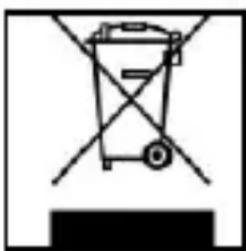
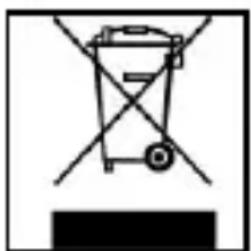
Disposal of WEEE (Waste Electrical and Electronic Equipment)
Devices marked with the WEEE logo are subject to the European Community Directive 2012/19/EC.
Waste Electrical and Electronic Equipment must be separated from household rubbish and disposed at sites that collect WEEE.
By orderly disposing WEEE you will avoid damage caused to the environment.
Installation Instructions
System Requirements:
This hard drive is compatible with the operating systems MS Windows XP / Vista / Windows 7 / 8 / 8.1 / 10 and Mac OS 10.x.
Please note:
For the USB 3.0 operation an USB 3.0 interface card is needed. The hard disk is downwardly compatible with the previous USB standards.
Your PC's hardware configuration as well as the operating system employed can influence the compatibility of the hard drive.
Power supply under USB 2.0: If your USB 3.0 hard disc is not recognized on your PC with a USB 2.0 connection, this could probably be caused by the power supply. In this case, please connect an USB hub with an external power supply.
Hard Drive Connection:

To connect an external hard drive to your computer, please use the USB cable provided. Connect the USB 3.0 plug with the Intenso hard drive and the plug of the USB cable ending with your computer.
The computer automatically detects the “New Device” and installs the driver. Please wait until driver installation is completed. Your computer now shows an additional drive named “Intenso”.
As soon as the hard drive is connected to your computer, the LED flashes. The LED flashes, when writing or reading procedure is carried out.
Trademark: Windows XP / Vista / Windows 7 / 8 / 8.1 / 10 are registered trademarks of the Microsoft Corporation. Macintosh and MAC are registered trademarks of Apple Computer. All trademarks and names of third parties are property of the respective user.
Limited guarantee conditions
The guarantee only covers the use of this Intenso product. The guarantee does not cover normal wear resulting from faulty, improper use, negligence, accidents, incompatibility or poor functionality of certain computer hardware or computer software.
Claim under guarantee does not exist in the case of noncompliance with the Intenso user manual as well as in case of improper assembly, use or defects of other devices.
Claim under guarantee does not exist in the case that the device is exposed to shock, electrostatic discharge, heat or humidity beyond the product specifications.
Intenso is not liable for data loss or any other occurring indirect damages or secondary damages, for the violation of the guarantee conditions or any other damages, no matter what the reason is.
Important information:
Please note that any claim under guarantee expires, if the capacity label (= guarantee sealing) on the rear side is damaged and if the housing of the hard disk is opened.
This product is not intended for commercial use, for medical or special applications, where a failure of the product can cause injuries, fatalities or substantial property damage.
(Intenso) ® WARRANTY CONDITIONS

Dear Intenso customer,
Thank you for opting for a high-quality Intenso product. All Intenso products are subject to constant quality inspections and the legal warranty period applies, of course, from the date of purchase. Please be sure therefore to save the sales receipt as proof of purchase.
Warranty conditions
The warranty only covers material and production defects. Intenso GmbH is not liable for the loss of data in units sent to us. The free of charge warranty service covers the repair or replacement of defective parts. Please understand that we cannot render any warranty services, e.g. in case of:
- Misuse or improper handling, installation or use
■ Damages, scratches or wear - Modifications, manipulation or repairs by third parties
■ Damages through force majeure or transport
Your Intenso GmbH
CLAIM PROCEDURE
In case of a claim, please proceed as follows:
- Only returns accompanied with all accessories and sales receipt are accepted.
- In addition, a RMA number is absolutely required for return shipments. You can request this RMA number via e-mail or through the service hotline.
- Please package the product including all accessories and the sales receipt safe for transport. Please stamp the package.
- Please affix the RMA number clearly visible on the outside of the package.
Please send to the following service address:
INTENSO GMBH
Service Center (your RMA-No.)
(0.39 €/min. from the landline in Germany.
Usual costs apply.)
Email: support@intenso.de
Urto, caduta
Capacité: 1MB = 1,000,000 bytes / 1GB = 1,000,000,000 bytes
Ecrasement, chute
Operable entre:
5 °C hasta 35 °C

Golpe, caída
Descarga electroestática
Capacidade: 1MB = 1,000,000 bytes / 1GB = 1,000,000,000 bytes
Indicações de uso:


Operacional entre:
5 °C até 35 °C
Colisões, quedas
Service Center (Seu N° ADM)







- STOSS, FALL
- OPERATING INSTRUCTIONS
- MEMORYBOARD
- SCOPE OF DELIVERY
- TECHNICAL DATA
- INSTRUCTIONS FOR USE
- OPERATIONAL BETWEEN
- CRUSH, FALL
- ELECTROSTATIC DISCHARGE
- DISPOSAL OF WEEE (WASTE ELECTRICAL AND ELECTRONIC EQUIPMENT)
- INSTALLATION INSTRUCTIONS
- SYSTEM REQUIREMENTS
- LIMITED GUARANTEE CONDITIONS
- (INTENSO) ® WARRANTY CONDITIONS
- WARRANTY CONDITIONS
- YOUR INTENSO GMBH
- CLAIM PROCEDURE
- ECRASEMENT, CHUTE
- OPERABLE ENTRE
- GOLPE, CAÍDA
- DESCARGA ELECTROESTÁTICA
- INDICAÇÕES DE USO
- OPERACIONAL ENTRE
- COLISÕES, QUEDAS
Brand : INTENSO
Model : 6028660
Category : External hard drive